Release Hyundai Grand i10 2015 User Guide
[x] Cancel search | Manufacturer: HYUNDAI, Model Year: 2015, Model line: Grand i10, Model: Hyundai Grand i10 2015Pages: 343, PDF Size: 29.47 MB
Page 26 of 343
315
Safety system of your vehicle
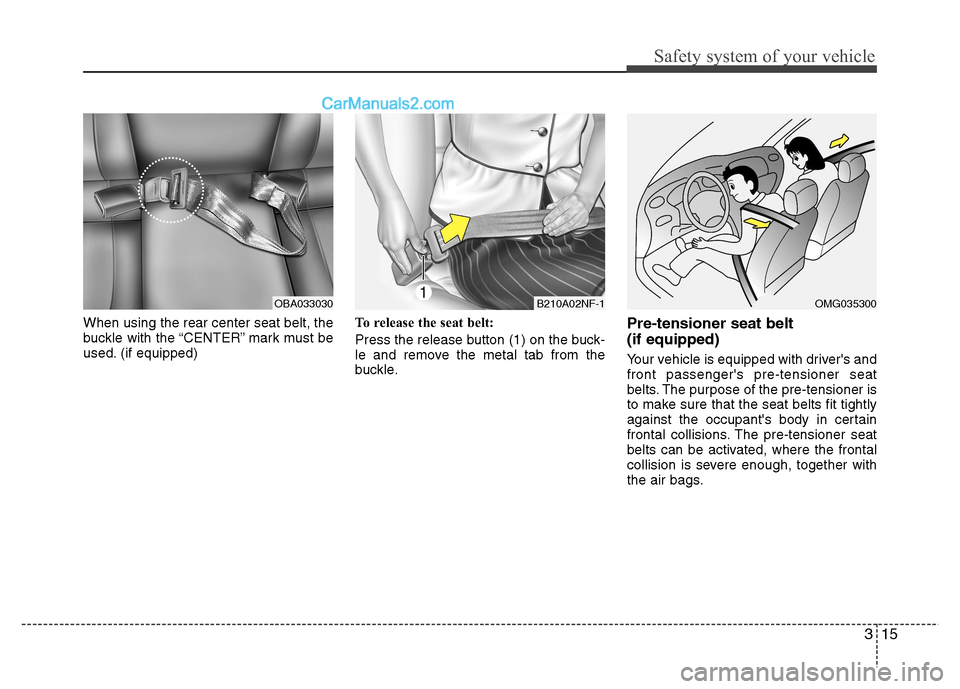
When using the rear center seat belt, the
buckle with the “CENTER” mark must be
used. (if equipped)To release the seat belt:
Press the release button (1) on the buck-
le and remove the metal tab from the
buckle.Pre-tensioner seat belt (if equipped)
Your vehicle is equipped with driver's and front passenger's pre-tensioner seat
belts. The purpose of the pre-tensioner is
to make sure that the seat belts fit tightly
against the occupant's body in certain
frontal collisions. The pre-tensioner seat
belts can be activated, where the frontal
collision is severe enough, together with
the air bags.
B210A02NF-1OBA033030OMG035300
Page 27 of 343
Safety system of your vehicle
16
3
When the vehicle stops suddenly, or if
the occupant tries to lean forward too
quickly, the seat belt retractor will lock
into position. In certain frontal collisions,
the pre-tensioner will activate and pullthe seat belt into tighter contact against
the occupant's body.
If the system senses excessive seat belt
tension on the driver or passenger's seat
belt when the pre-tensioner activates, theload limiter inside the pre-tensioner willrelease some of the pressure on the
affected seat belt. (if equipped)(Continued)
Improper handling of the pre-ten-
sioner seat belt assemblies, and failure to heed the warnings not
to strike, modify, inspect, replace,
service or repair the pre-tension-
er seat belt assemblies may lead
to improper operation or inadver-
tent activation and serious injury.
If the vehicle or pre-tensioner seat belt must be discarded, we
recommend that you contact an
authorized HYUNDAI dealer.WARNING
Pre-tensioners are designed to operate only one time. After acti-
vation, pre-tensioner seat belts
must be replaced. All seat belts,
of any type, should always be
replaced after they have been
worn during a collision.
The pre-tensioner seat belt assembly mechanisms become
hot during activation. Do not
touch the pre-tensioner seat belt
assemblies for several minutes
after they have been activated.
Do not hit the pre-tensioner seat belt assemblies.
Do not attempt to inspect or replace the pre-tensioner seat
belts yourself. We recommend
that the system be serviced by an
authorized HYUNDAI dealer.
Do not attempt to service or repair the pre-tensioner seat belt
system in any manner.
(Continued)
WARNING
To obtain maximum benefit from a pre-tensioner seat belt:
1. The seatbelt must be worn cor- rectly and adjusted to the proper
position. Please read and follow
all of the important information
and precautions about your vehi-
cle’s occupant safety features –
including seat belts and air bags
– that are provided in this manu-al.
2. Be sure you and your passen- gers always wear seat belts prop-
erly.
Page 36 of 343
325
Safety system of your vehicle
Securing a child restraint systemwith a lap belt or lap/shoulder belt
All child restraint system must be secured
to a vehicle rear seat with the lap belt or
the lap part of a lap/shoulder belt.
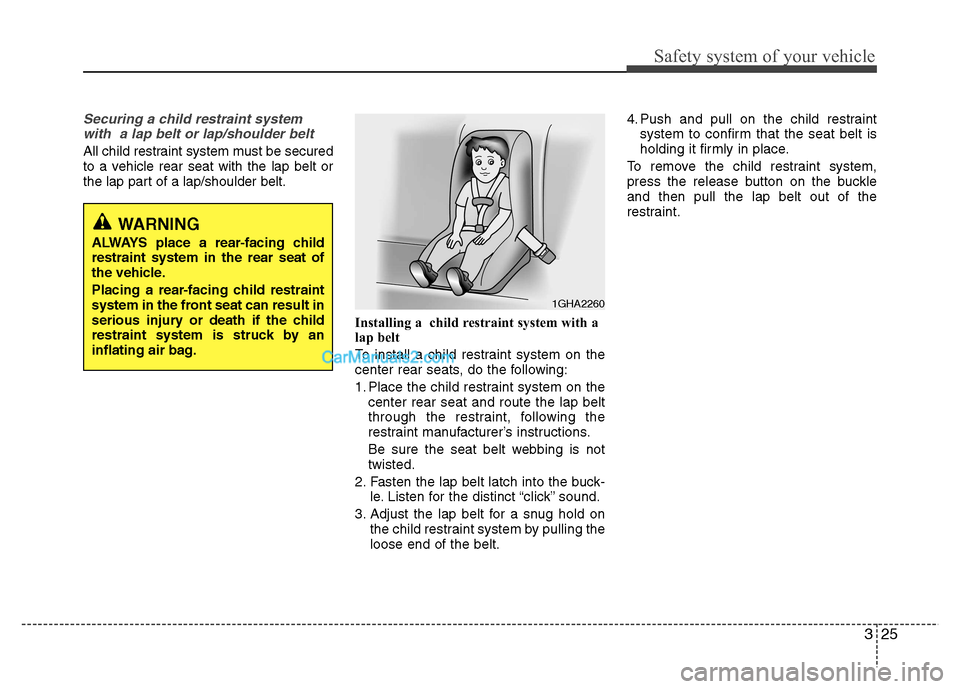
Installing a child restraint system with a
lap belt
To install a child restraint system on the
center rear seats, do the following:
1. Place the child restraint system on thecenter rear seat and route the lap belt
through the restraint, following the
restraint manufacturer’s instructions.
Be sure the seat belt webbing is not twisted.
2. Fasten the lap belt latch into the buck- le. Listen for the distinct “click” sound.
3. Adjust the lap belt for a snug hold on the child restraint system by pulling theloose end of the belt. 4. Push and pull on the child restraint
system to confirm that the seat belt is
holding it firmly in place.
To remove the child restraint system,
press the release button on the buckleand then pull the lap belt out of the
restraint.
WARNING
ALWAYS place a rear-facing child restraint system in the rear seat of
the vehicle.
Placing a rear-facing child restraint
system in the front seat can result in
serious injury or death if the child
restraint system is struck by an
inflating air bag.
1GHA2260
Page 37 of 343

Safety system of your vehicle
26
3
Installing a child restraint system with a
lap/shoulder belt
To install a child restraint system on the
rear seats, do the following:
1. Place the child restraint system on a
rear seat and route the lap/shoulder
belt around or through the restraint, fol-
lowing the restraint manufacturer’s
instructions.
Be sure the seat belt webbing is not twisted. 2. Fasten the lap/shoulder belt latch into
the buckle. Listen for the distinct “click”sound.
✽✽ NOTICE
Position the release button so that it is
easy to access in case of an emergency.
3. Remove as much slack from the belt as possible by pushing down on the
child restraint system while feeding the
shoulder belt back into the retractor.
4. Push and pull on the child restraint system to confirm that the seat belt is
holding it firmly in place.
To remove the child restraint system,
press the release button on the buckleand then pull the lap/shoulder belt out of
the restraint and allow the seat belt to
retract fully.
OEN036104E2MS103005OEN036101
Page 46 of 343
335
Safety system of your vehicle
What to expect after an air bag inflates After a frontal or side impact air bag
inflates, it will deflate very quickly. Air bag
inflation will not prevent the driver from see-
ing out of the windshield or being able to
steer. Curtain air bags may remain partially
inflated for some time after they deploy.Noise and smoke from inflating airbag
When the air bags inflate, they make a
loud noise and they leave smoke and
powder in the air inside of the vehicle.
This is normal and is a result of the igni-
tion of the air bag inflator. After the air
bag inflates, you may feel substantial dis-
comfort in breathing because of the con-
tact of your chest with both the seat belt
and the air bag, as well as from breathing
the smoke and powder. The powder may
aggravate asthma for some people. If you
experience breathing problems after an
air bag deployment, seek medical atten-
tion immediately.
Though the smoke and powder are non-
toxic, they may cause irritation to the
skin, eyes, nose, throat, etc. If this is the
case, wash and rinse with cold waterimmediately and seek medical attentionif the symptoms persist.
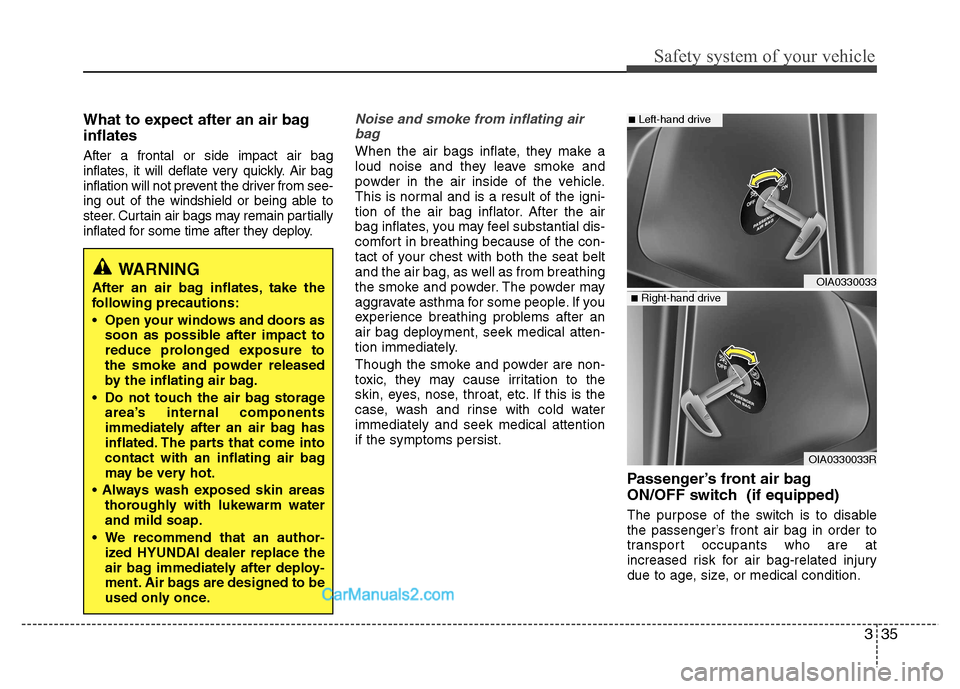
Passenger’s front air bag
ON/OFF switch (if equipped)
The purpose of the switch is to disable
the passenger’s front air bag in order to
transport occupants who are at
increased risk for air bag-related injury
due to age, size, or medical condition.
WARNING
After an air bag inflates, take the
following precautions:
Open your windows and doors as soon as possible after impact to
reduce prolonged exposure to
the smoke and powder released
by the inflating air bag.
Do not touch the air bag storage area’s internal components
immediately after an air bag has
inflated. The parts that come into
contact with an inflating air bag
may be very hot.
thoroughly with lukewarm waterand mild soap.
We recommend that an author- ized HYUNDAI dealer replace the
air bag immediately after deploy-
ment. Air bags are designed to be
used only once.
OIA0330033R
OIA0330033
■Left-hand drive
■Right-hand drive
Page 63 of 343
47
Features of your vehicle
Remote keyless entry system operations
Remote key
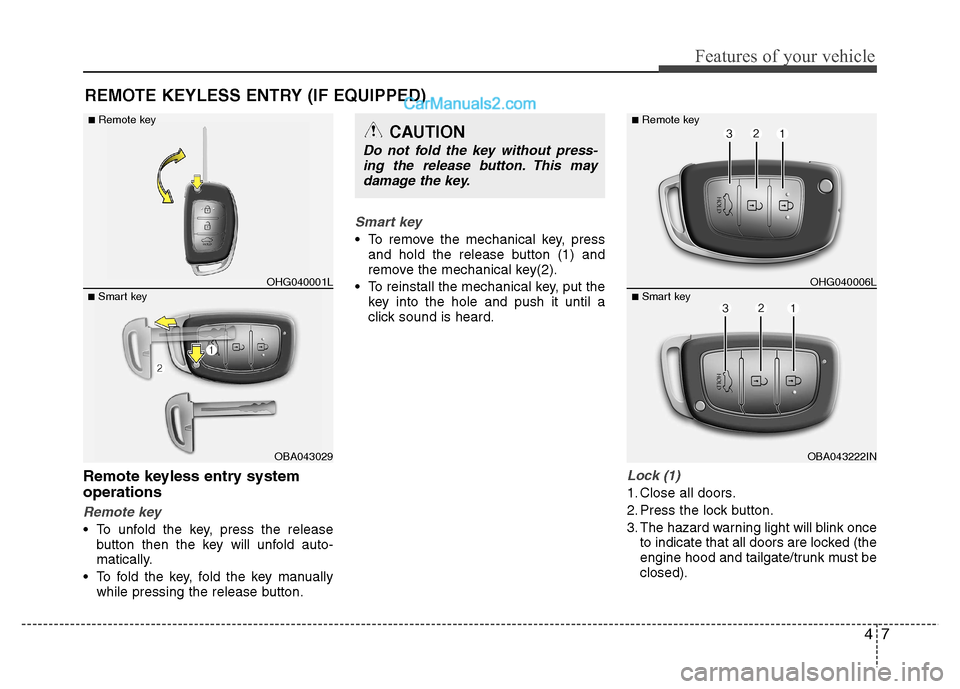
To unfold the key, press the releasebutton then the key will unfold auto-
matically.
To fold the key, fold the key manually while pressing the release button.
Smart key
To remove the mechanical key, pressand hold the release button (1) and
remove the mechanical key(2).
To reinstall the mechanical key, put the key into the hole and push it until a
click sound is heard.
Lock (1)
1. Close all doors.
2. Press the lock button.
3. The hazard warning light will blink onceto indicate that all doors are locked (the
engine hood and tailgate/trunk must beclosed).
REMOTE KEYLESS ENTRY (IF EQUIPPED)
OBA043029
■
Smart key OHG040001L
■
Remote key
CAUTION
Do not fold the key without press-
ing the release button. This may
damage the key.
OBA043222IN
■
Smart key OHG040006L
■
Remote key
Page 69 of 343
413
Features of your vehicle
(Continued)
If the smart key is in close proximityto your cell phone or smart phone, the
signal from the smart key could be
blocked by normal operation of your
cell phone or smart phone. This is
especially important when the phone
is active such as making call, receiving
calls, text messaging, and/or send-
ing/receiving emails. Avoid placing the
smart key and your cell phone or
smart phone in the same pants or
jacket pocket and maintain adequate
distance between the two devices.
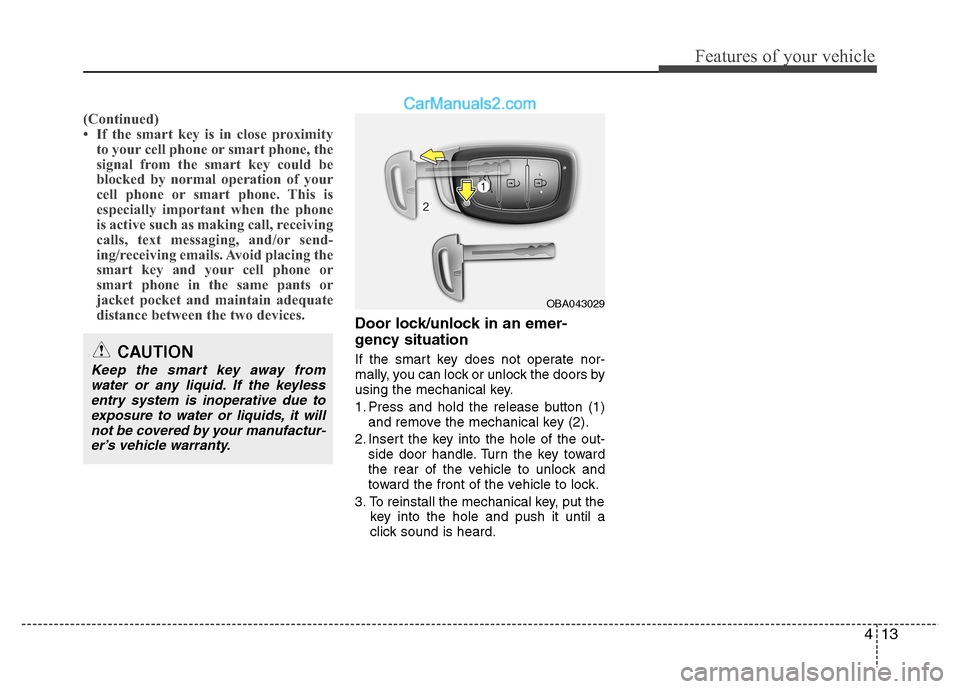
Door lock/unlock in an emer-
gency situation
If the smart key does not operate nor-
mally, you can lock or unlock the doors by
using the mechanical key.
1. Press and hold the release button (1)and remove the mechanical key (2).
2. Insert the key into the hole of the out- side door handle. Turn the key toward
the rear of the vehicle to unlock and
toward the front of the vehicle to lock.
3. To reinstall the mechanical key, put the key into the hole and push it until a
click sound is heard.
CAUTION
Keep the smart key away from
water or any liquid. If the keylessentry system is inoperative due to exposure to water or liquids, it will
not be covered by your manufactur-er’s vehicle warranty.
OBA043029
Page 77 of 343
421
Features of your vehicle
TRUNK
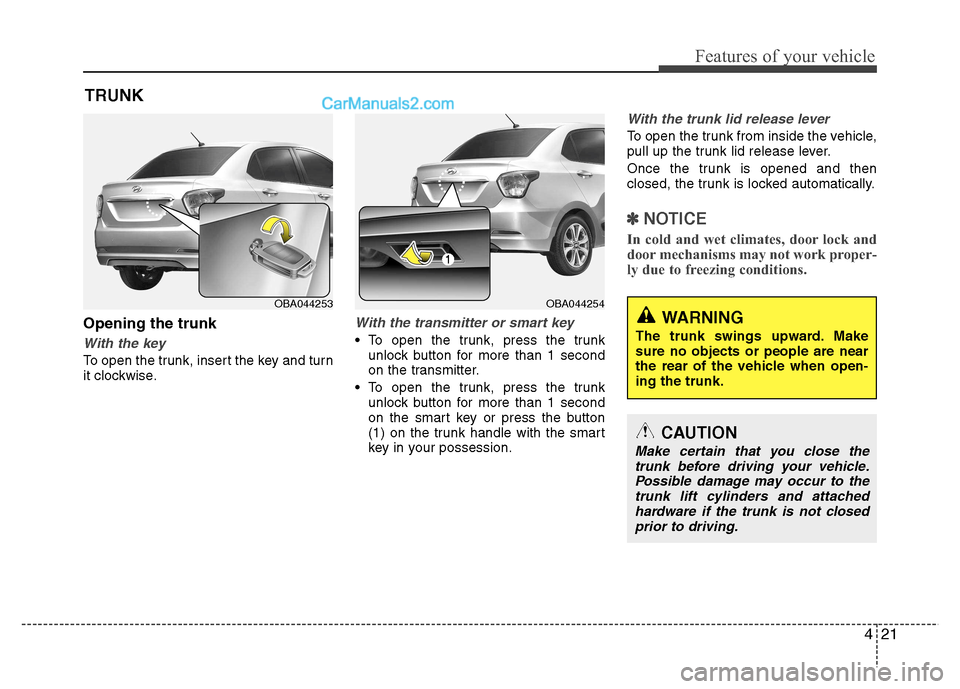
Opening the trunk
With the key
To open the trunk, insert the key and turn
it clockwise.
With the transmitter or smart key
To open the trunk, press the trunk unlock button for more than 1 second
on the transmitter.
To open the trunk, press the trunk unlock button for more than 1 second
on the smart key or press the button
(1) on the trunk handle with the smart
key in your possession.
With the trunk lid release lever
To open the trunk from inside the vehicle,
pull up the trunk lid release lever.
Once the trunk is opened and then
closed, the trunk is locked automatically.
✽✽ NOTICE
In cold and wet climates, door lock and
door mechanisms may not work proper-
ly due to freezing conditions.
CAUTION
Make certain that you close the trunk before driving your vehicle. Possible damage may occur to thetrunk lift cylinders and attached
hardware if the trunk is not closedprior to driving.
WARNING
The trunk swings upward. Make sure no objects or people are near
the rear of the vehicle when open-ing the trunk.
OBA044254OBA044253
Page 82 of 343
Features of your vehicle
26
4
Power windows
The ignition switch must be in the ON posi-
tion for power windows to operate. Each
door has a power window switch that con-
trols the door’s window. The driver has a
power window lock button which can block
the operation of rear passenger windows.
The power windows can be operated for
approximately 30 seconds after the igni-
tion key is removed or turned to the ACC
or LOCK position. However, if the front
doors are opened, the power windows
cannot be operated even within the 30
seconds period.
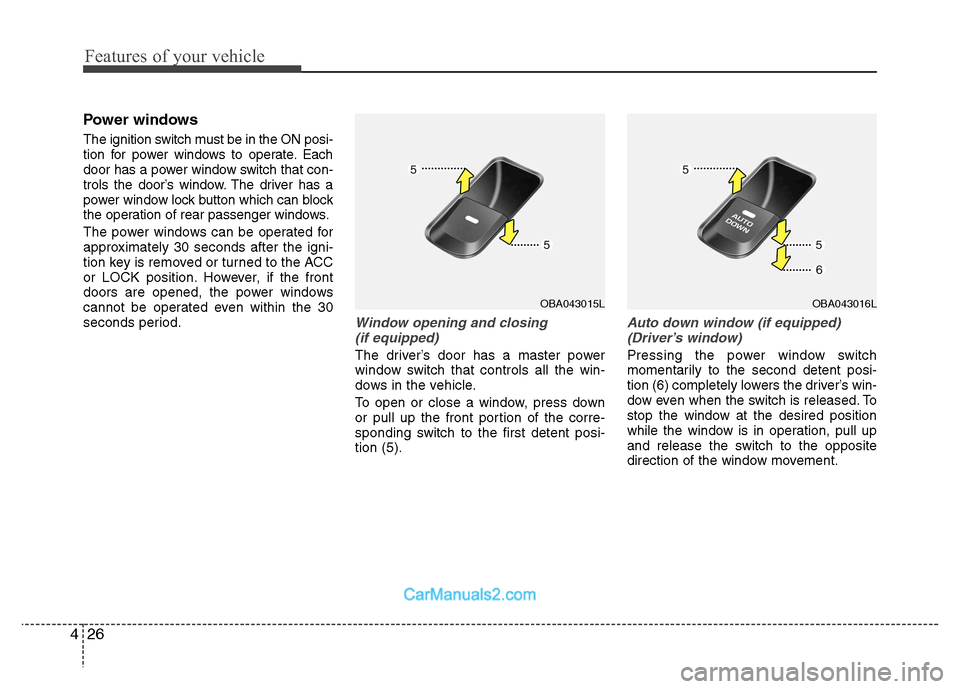
Window opening and closing
(if equipped)
The driver’s door has a master power
window switch that controls all the win-
dows in the vehicle.
To open or close a window, press down
or pull up the front portion of the corre-
sponding switch to the first detent posi-tion (5).
Auto down window (if equipped)(Driver’s window)
Pressing the power window switch
momentarily to the second detent posi-
tion (6) completely lowers the driver’s win-
dow even when the switch is released. To
stop the window at the desired position
while the window is in operation, pull up
and release the switch to the opposite
direction of the window movement.
OBA043016LOBA043015L
Page 83 of 343
427
Features of your vehicle
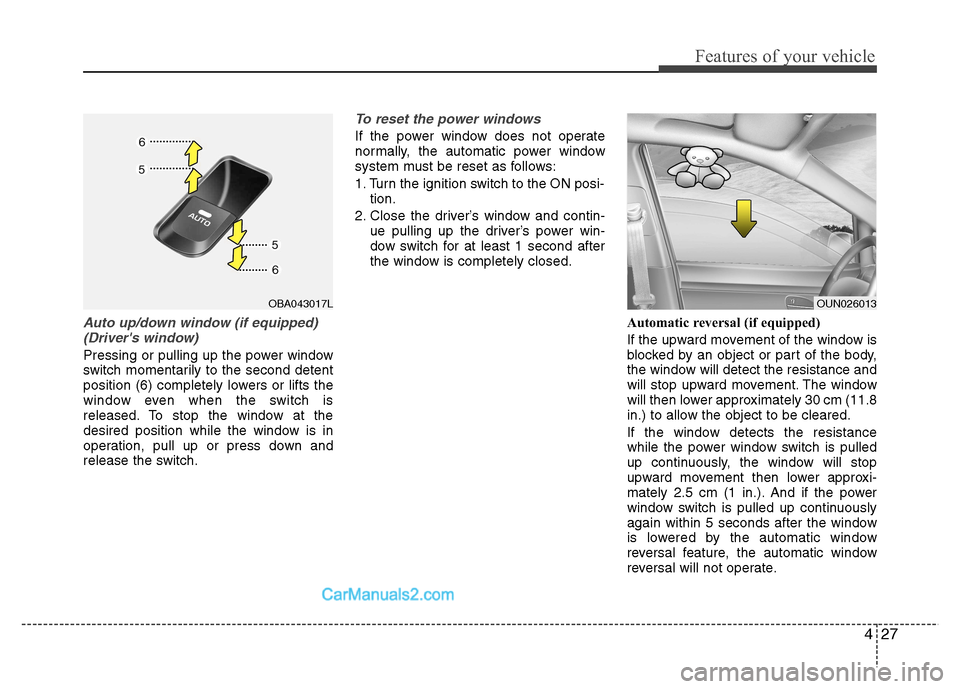
Auto up/down window (if equipped)(Driver's window)
Pressing or pulling up the power window
switch momentarily to the second detent
position (6) completely lowers or lifts the
window even when the switch is
released. To stop the window at the
desired position while the window is in
operation, pull up or press down and
release the switch.
To reset the power windows
If the power window does not operate
normally, the automatic power window
system must be reset as follows:
1. Turn the ignition switch to the ON posi- tion.
2. Close the driver’s window and contin- ue pulling up the driver’s power win-
dow switch for at least 1 second after
the window is completely closed.
Automatic reversal (if equipped)
If the upward movement of the window is
blocked by an object or part of the body,
the window will detect the resistance and
will stop upward movement. The window
will then lower approximately 30 cm (11.8
in.) to allow the object to be cleared.
If the window detects the resistance
while the power window switch is pulled
up continuously, the window will stop
upward movement then lower approxi-
mately 2.5 cm (1 in.). And if the power
window switch is pulled up continuously
again within 5 seconds after the window
is lowered by the automatic window
reversal feature, the automatic window
reversal will not operate.
OUN026013OBA043017L