engine Hyundai Grand Santa Fe 2013 User Guide
[x] Cancel search | Manufacturer: HYUNDAI, Model Year: 2013, Model line: Grand Santa Fe, Model: Hyundai Grand Santa Fe 2013Pages: 718, PDF Size: 13.5 MB
Page 29 of 718
Safety features of your vehicle
10 3
Storing positions into memory
using the buttons on the door
Storing driver’s seat positions
1. Shift the shift lever into P or N (for
Automatic transaxle) while the
engine start/stop button is ON or
ignition switch ON.
2. Adjust the driver’s seat and out-
side rearview mirror comfortable
for the driver.
3. Press SET button on the control
panel. The system will beep once.
4. Press one of the memory buttons
(1 or 2) within 5 seconds after
pressing the SET button. The sys-
tem will beep twice when memory
has been successfully stored.Recalling positions from memory
1. Shift the shift lever into P or N (for
Automatic transaxle) while the
engine start/stop button is ON or
ignition switch ON.
2. To recall the position in the memo-
ry, press the desired memory but-
ton (1 or 2). The system will beep
once, then the driver’s seat will
automatically adjust to the stored
position.
Adjusting the control switch for the
driver’s seat while the system is
recalling the stored position will
cause the movement to stop and
move in the direction that the control
switch is moved.
WARNING
Use caution when recalling the
adjustment memory while sit-
ting in the vehicle. Push the
seat position control switch to
the desired position immediate-
ly if the seat moves too far in
any direction.
WARNING
Never attempt to operate the
driver position memory system
while the vehicle is moving.
This could result in loss of con-
trol, and an accident causing
death, serious injury, or property
damage.
Page 30 of 718
311
Safety features of your vehicle
Easy access function
(if equipped)
The system will move the driver's
seat automatically as follows:
• Without smart key system
- It will move the driver’s seat rear-
ward when the ignition key is
removed and front driver’s door is
opened.
- It will move the driver’s seat for-
ward when the ignition key is
inserted.
• With smart key system
- It will move the driver’s seat rear-
ward when the engine start/stop
button is changed to the OFF
position and front driver’s door is
opened.
- It will move the driver’s seat for-
ward when the engine start/stop
button is changed to the ACC or
START position.
You can activate or deactivate this
feature. Refer to "User settings" in
section 4.
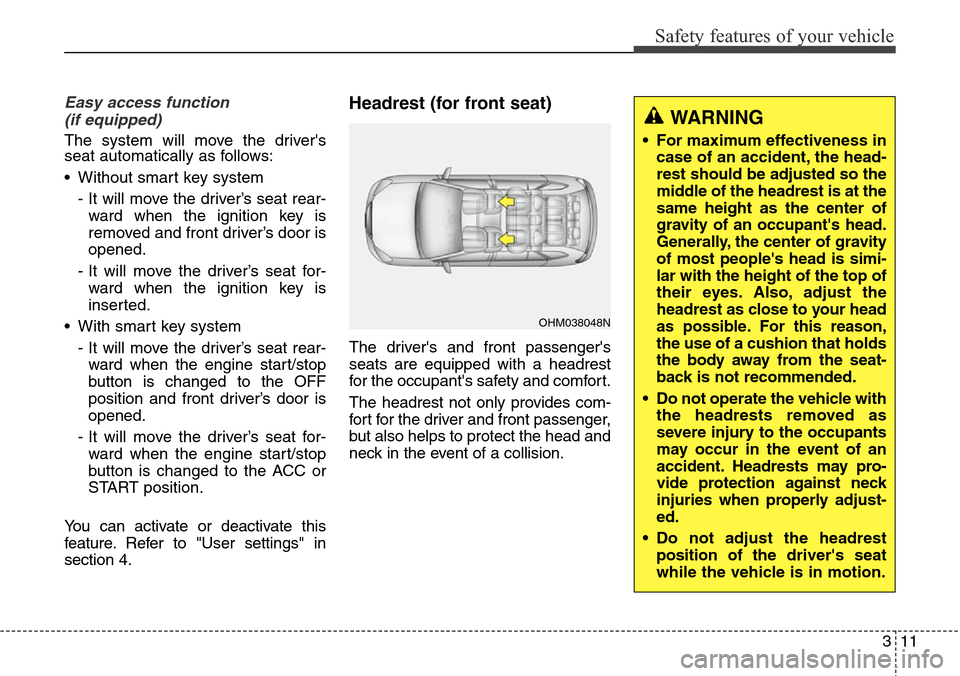
Headrest (for front seat)
The driver's and front passenger's
seats are equipped with a headrest
for the occupant's safety and comfort.
The headrest not only provides com-
fort for the driver and front passenger,
but also helps to protect the head and
neck in the event of a collision.
OHM038048N
WARNING
• For maximum effectiveness in
case of an accident, the head-
rest should be adjusted so the
middle of the headrest is at the
same height as the center of
gravity of an occupant's head.
Generally, the center of gravity
of most people's head is simi-
lar with the height of the top of
their eyes. Also, adjust the
headrest as close to your head
as possible. For this reason,
the use of a cushion that holds
the body away from the seat-
back is not recommended.
• Do not operate the vehicle with
the headrests removed as
severe injury to the occupants
may occur in the event of an
accident. Headrests may pro-
vide protection against neck
injuries when properly adjust-
ed.
• Do not adjust the headrest
position of the driver's seat
while the vehicle is in motion.
Page 42 of 718
323
Safety features of your vehicle
WARNING- Cargo
Cargo should always be
secured to prevent it from being
thrown about the vehicle in a
collision and causing injury to
the vehicle occupants. Do not
place objects in the rear (2nd
and/or 3rd row) seats, since they
cannot be properly secured and
may hit the front seat occupants
in a collision.
WARNING - Cargo loading
Make sure the engine is off, the
automatic transaxle is in P (Park),
and the parking brake is securely
applied whenever loading or
unloading cargo. Failure to take
these steps may allow the vehicle
to move if the shift lever is inad-
vertently moved to another posi-
tion.
CAUTION- Rear seat belts
When returning the rear (2nd
and/or 3rd row) seatbacks to the
upright position, remember to
return the rear shoulder belts to
their proper position. Routing the
seat belt webbing through the
rear seat belt guides will help
keep the belts from being trapped
behind or under the seats.
CAUTION - Damaging
rear seat belt buckles
When you fold the rear (2nd
and/or 3rd row) seatback, insert
the buckle in the pocket between
the rear seatback and cushion.
Doing so can prevent the buckle
from being damaged by the rear
seatback.
WARNING - Uprighting
seat
When you return the seatback
to its upright position, hold the
seatback and return it slowly. If
the seatback is returned with-
out holding it, the back of the
seat could spring forward
resulting in injury caused by
being struck by the seatback.
Page 81 of 718
Safety features of your vehicle
62 3
Driver's and passenger's front
air bag (if equipped)
Your vehicle is equipped with a
Supplemental Restraint (Air Bag)
System and lap/shoulder belts at
both the driver and passenger seat-
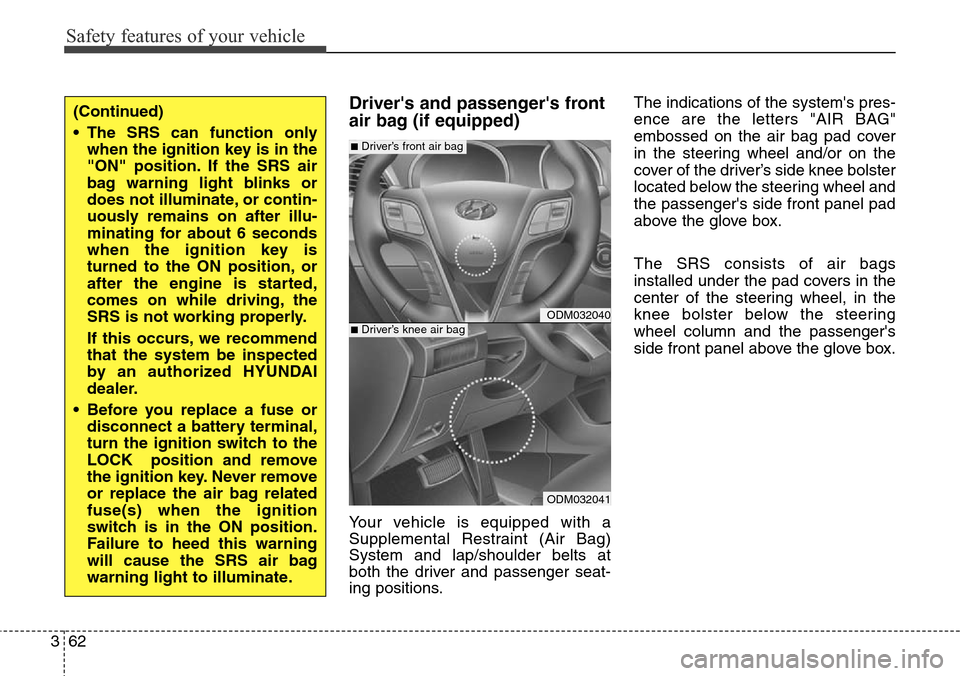
ing positions.The indications of the system's pres-
ence are the letters "AIR BAG"
embossed on the air bag pad cover
in the steering wheel and/or on the
cover of the driver’s side knee bolster
located below the steering wheel and
the passenger's side front panel pad
above the glove box.
The SRS consists of air bags
installed under the pad covers in the
center of the steering wheel, in the
knee bolster below the steering
wheel column and the passenger's
side front panel above the glove box.
(Continued)
• The SRS can function only
when the ignition key is in the
"ON" position. If the SRS air
bag warning light blinks or
does not illuminate, or contin-
uously remains on after illu-
minating for about 6 seconds
when the ignition key is
turned to the ON position, or
after the engine is started,
comes on while driving, the
SRS is not working properly.
If this occurs, we recommend
that the system be inspected
by an authorized HYUNDAI
dealer.
• Before you replace a fuse or
disconnect a battery terminal,
turn the ignition switch to the
LOCK position and remove
the ignition key. Never remove
or replace the air bag related
fuse(s) when the ignition
switch is in the ON position.
Failure to heed this warning
will cause the SRS air bag
warning light to illuminate.
ODM032040
ODM032041
■Driver’s front air bag
■Driver’s knee air bag
Page 96 of 718
377
Safety features of your vehicle
Additional safety precautions
•Never let passengers ride in the
cargo area or on top of a folded-
down back seat.All occupants
should sit upright, fully back in their
seats with their seat belts on and
their feet on the floor.
•Passengers should not move
out of or change seats while the
vehicle is moving.A passenger
who is not wearing a seat belt dur-
ing a crash or emergency stop can
be thrown against the inside of the
vehicle, against other occupants,
or out of the vehicle.
•Each seat belt is designed to
restrain one occupant.If more
than one person uses the same
seat belt, they could be seriously
injured or killed in a collision.
•Do not use any accessories on
seat belts.Devices claiming to
improve occupant comfort or repo-
sition the seat belt can reduce the
protection provided by the seat belt
and increase the chance of serious
injury in a crash.•Passengers should not place
hard or sharp objects between
themselves and the air bags.
Carrying hard or sharp objects on
your lap or in your mouth can result
in injuries if an air bag inflates.
•Keep occupants away from the
air bag covers.All occupants
should sit upright, fully back in their
seats with their seat belts on and
their feet on the floor. If occupants
are too close to the air bag covers,
they could be injured if the air bags
inflate.
•Do not attach or place objects
on or near the air bag covers.
Any object attached to or placed
on the front or side impact air bag
covers could interfere with the
proper operation of the air bags.
•Do not modify the front seats.
Modification of the front seats
could interfere with the operation of
the supplemental restraint system
sensing components or side air
bags.(Continued)
• If components of the air bag
system must be discarded, or if
the vehicle must be scrapped,
certain safety precautions must
be observed. An authorized
HYUNDAI dealer knows these
precautions and can give you
the necessary information.
Failure to follow these precau-
tions and procedures could
increase the risk of personal
injury.
• If your car was flooded and has
soaked carpeting or water on
flooring, you shouldn't try to
start the engine; we recom-
mend that you contact an
authorized HYUNDAI dealer.
Page 102 of 718
45
Features of your vehicle
Record your key number
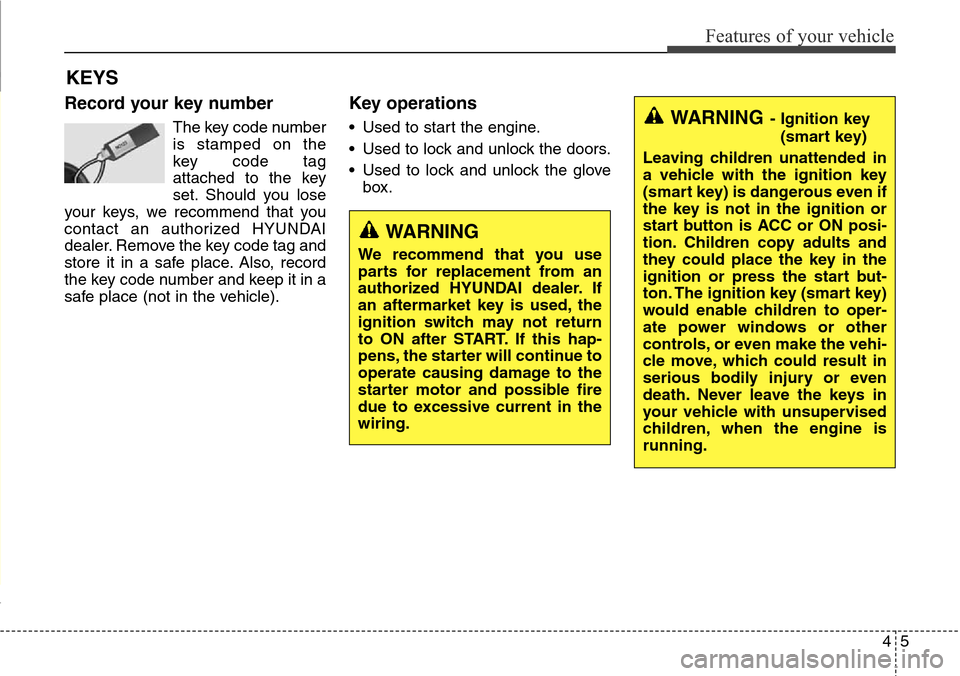
The key code number
is stamped on the
key code tag
attached to the key
set. Should you lose
your keys, we recommend that you
contact an authorized HYUNDAI
dealer. Remove the key code tag and
store it in a safe place. Also, record
the key code number and keep it in a
safe place (not in the vehicle).
Key operations
• Used to start the engine.
• Used to lock and unlock the doors.
• Used to lock and unlock the glove
box.
KEYS
WARNING
We recommend that you use
parts for replacement from an
authorized HYUNDAI dealer. If
an aftermarket key is used, the
ignition switch may not return
to ON after START. If this hap-
pens, the starter will continue to
operate causing damage to the
starter motor and possible fire
due to excessive current in the
wiring.
WARNING- Ignition key
(smart key)
Leaving children unattended in
a vehicle with the ignition key
(smart key) is dangerous even if
the key is not in the ignition or
start button is ACC or ON posi-
tion. Children copy adults and
they could place the key in the
ignition or press the start but-
ton. The ignition key (smart key)
would enable children to oper-
ate power windows or other
controls, or even make the vehi-
cle move, which could result in
serious bodily injury or even
death. Never leave the keys in
your vehicle with unsupervised
children, when the engine is
running.
Page 103 of 718
Features of your vehicle
6 4
Immobilizer system
(if equipped)
Your vehicle may be equipped with
an electronic engine immobilizer sys-
tem to reduce the risk of unautho-
rized vehicle use.
Your immobilizer system is com-
prised of a small transponder in the
key and electronic devices inside the
vehicle.
Vehicles without smart key sys-
tem
With the immobilizer system, when-
ever you insert your ignition key into
the ignition switch and turn it to ON,
it checks and determines and verifies
if the ignition key is valid or not.
If the key is valid, the engine will start.
If the key is invalid, the engine will
not start.
To deactivate the immobilizer system:
Insert the ignition key into the key
cylinder and turn it to the ON position.
To activate the immobilizer system:
Turn the ignition key to the OFF posi-
tion. The immobilizer system acti-
vates automatically. Without a valid
ignition key for your vehicle, the
engine will not start.
Vehicles with smart key system
Whenever the engine start/stop but-
ton is changed to the ON position,
the immobilizer system checks and
verifies if the key is valid or not.
If the key is valid, the engine will start.
If the key is invalid, the engine will
not start.
To deactivate the immobilizer system
Change the engine start/stop button
to the ON position.
To activate the immobilizer system
Change the engine start/stop button
to the OFF position. The immobilizer
system activates automatically.
Without a valid smart key for your
vehicle, the engine will not start.
Page 104 of 718
47
Features of your vehicle
✽NOTICE
When starting the engine, do not use
the key with other immobilizer keys
around. Otherwise the engine may
not start or may stop soon after it
starts. Keep each key separate in
order to avoid a starting malfuntioin.
✽NOTICE
If you need additional keys or lose
your keys, we recommend that you
consult with an authorized
HYUNDAI dealer.
CAUTION
The transponder in your ignition
key is an important part of the
immobilizer system. It is
designed to give years of trou-
ble-free service, however you
should avoid exposure to mois-
ture, static electricity and rough
handling. Immobilizer system
malfunction could occur.
CAUTION
Do not change, alter or adjust
the immobilizer system because
it could cause the immobilizer
system to malfunction and we
recommend that the system be
serviced by an authorized
HYUNDAI dealer.
Malfunctions caused by improp-
er alterations, adjustments or
modifications to the immobilizer
system are not covered by your
vehicle manufacturer warranty.
WARNING
In order to prevent theft of your
vehicle, do not leave spare keys
anywhere in your vehicle. Your
immobilizer password is a cus-
tomer unique password and
should be kept confidential. Do
not leave this number anywhere
in your vehicle.
CAUTION
Do not put metal accessories
near the ignition switch.
The engine may not start for the
metal accessories may interrupt
the transponder signal from
normally transmitting.
Page 105 of 718
Features of your vehicle
8 4
Remote keyless entry system
operations
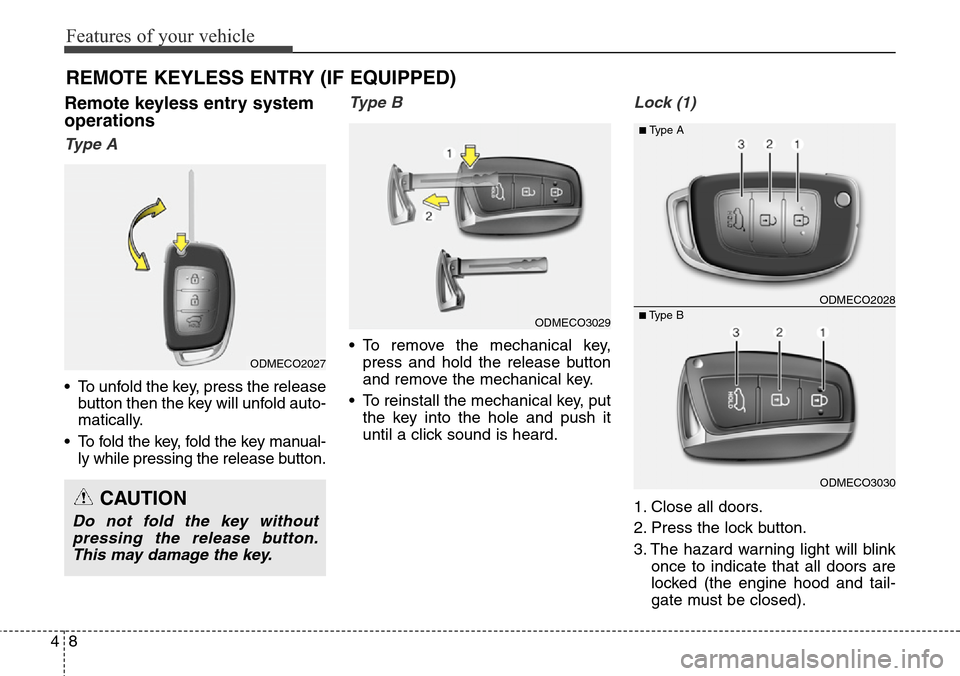
Ty p e A
• To unfold the key, press the release
button then the key will unfold auto-
matically.
• To fold the key, fold the key manual-
ly while pressing the release button.
Type B
• To remove the mechanical key,
press and hold the release button
and remove the mechanical key.
• To reinstall the mechanical key, put
the key into the hole and push it
until a click sound is heard.
Lock (1)
1. Close all doors.
2. Press the lock button.
3. The hazard warning light will blink
once to indicate that all doors are
locked (the engine hood and tail-
gate must be closed).
REMOTE KEYLESS ENTRY (IF EQUIPPED)
CAUTION
Do not fold the key without
pressing the release button.
This may damage the key.
ODMECO3030
■Type BODMECO2028
■Type A
ODMECO2027
ODMECO3029
Page 109 of 718
Features of your vehicle
12 4
Smart key function
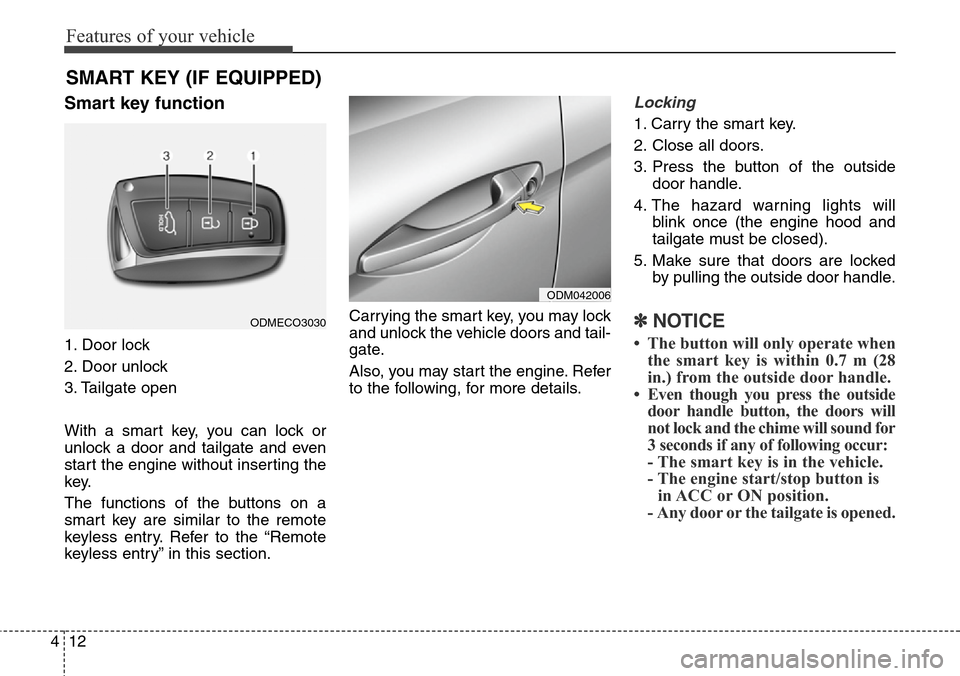
1. Door lock
2. Door unlock
3. Tailgate open
With a smart key, you can lock or
unlock a door and tailgate and even
start the engine without inserting the
key.
The functions of the buttons on a
smart key are similar to the remote
keyless entry. Refer to the “Remote
keyless entry” in this section.Carrying the smart key, you may lock
and unlock the vehicle doors and tail-
gate.
Also, you may start the engine. Refer
to the following, for more details.
Locking
1. Carry the smart key.
2. Close all doors.
3. Press the button of the outside
door handle.
4. The hazard warning lights will
blink once (the engine hood and
tailgate must be closed).
5. Make sure that doors are locked
by pulling the outside door handle.
✽NOTICE
• The button will only operate when
the smart key is within 0.7 m (28
in.) from the outside door handle.
• Even though you press the outside
door handle button, the doors will
not lock and the chime will sound for
3 seconds if any of following occur:
- The smart key is in the vehicle.
- The engine start/stop button is
in ACC or ON position.
- Any door or the tailgate is opened.
SMART KEY (IF EQUIPPED)
ODM042006
ODMECO3030