instrument panel Hyundai Grand Santa Fe 2013 User Guide
[x] Cancel search | Manufacturer: HYUNDAI, Model Year: 2013, Model line: Grand Santa Fe, Model: Hyundai Grand Santa Fe 2013Pages: 718, PDF Size: 13.5 MB
Page 144 of 718
447
Features of your vehicle
Tilt steering
A tilt steering wheel allows you to
adjust the steering wheel before you
drive. You can also raise it to give
your legs more room when you exit
and enter the vehicle.
The steering wheel should be posi-
tioned so that it is comfortable for
you to drive, while permitting you to
see the instrument panel warning
lights and gauges.
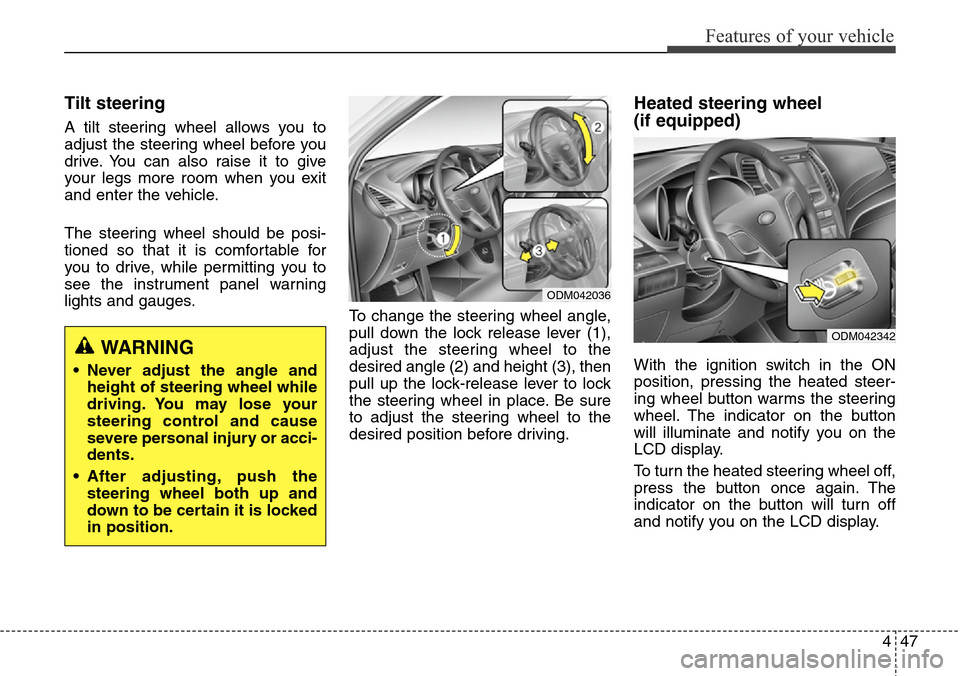
To change the steering wheel angle,
pull down the lock release lever (1),
adjust the steering wheel to the
desired angle (2) and height (3), then
pull up the lock-release lever to lock
the steering wheel in place. Be sure
to adjust the steering wheel to the
desired position before driving.
Heated steering wheel
(if equipped)
With the ignition switch in the ON
position, pressing the heated steer-
ing wheel button warms the steering
wheel. The indicator on the button
will illuminate and notify you on the
LCD display.
To turn the heated steering wheel off,
press the button once again. The
indicator on the button will turn off
and notify you on the LCD display.WARNING
• Never adjust the angle and
height of steering wheel while
driving. You may lose your
steering control and cause
severe personal injury or acci-
dents.
• After adjusting, push the
steering wheel both up and
down to be certain it is locked
in position.
ODM042036
ODM042342
Page 159 of 718
Features of your vehicle
62 4
Instrument Cluster Control
Adjusting Instrument Cluster
Illumination (if equipped)
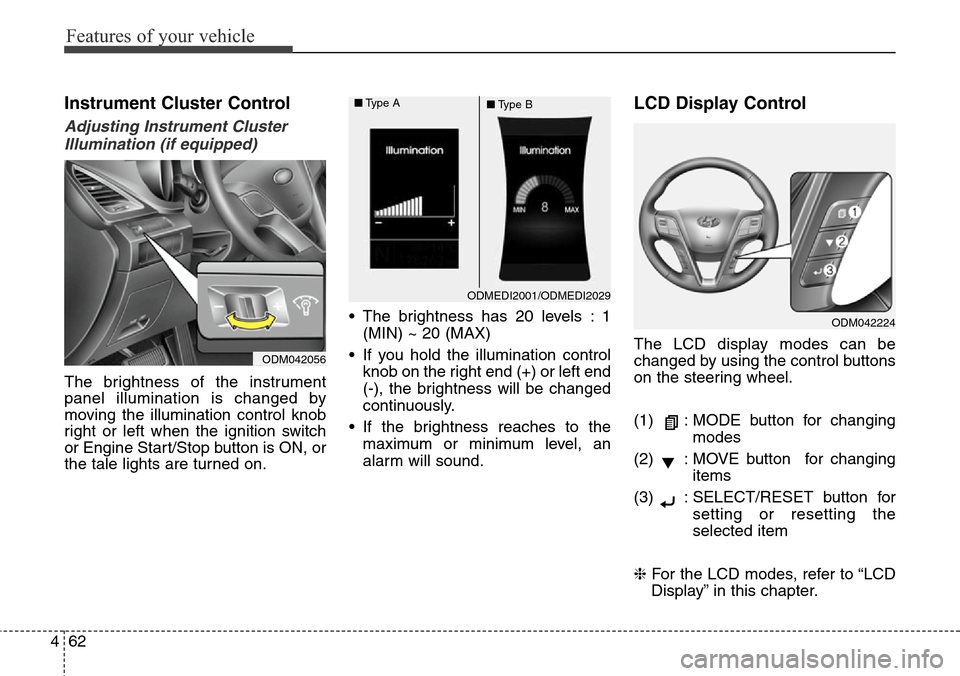
The brightness of the instrument
panel illumination is changed by
moving the illumination control knob
right or left when the ignition switch
or Engine Start/Stop button is ON, or
the tale lights are turned on.• The brightness has 20 levels : 1
(MIN) ~ 20 (MAX)
• If you hold the illumination control
knob on the right end (+) or left end
(-), the brightness will be changed
continuously.
• If the brightness reaches to the
maximum or minimum level, an
alarm will sound.
LCD Display Control
The LCD display modes can be
changed by using the control buttons
on the steering wheel.
(1) : MODE button for changing
modes
(2) : MOVE button for changing
items
(3) : SELECT/RESET button for
setting or resetting the
selected item
❈For the LCD modes, refer to “LCD
Display” in this chapter.
ODMEDI2001/ODMEDI2029 ■Type A
■Type B
ODM042056
ODM042224
Page 221 of 718
Features of your vehicle
124 4
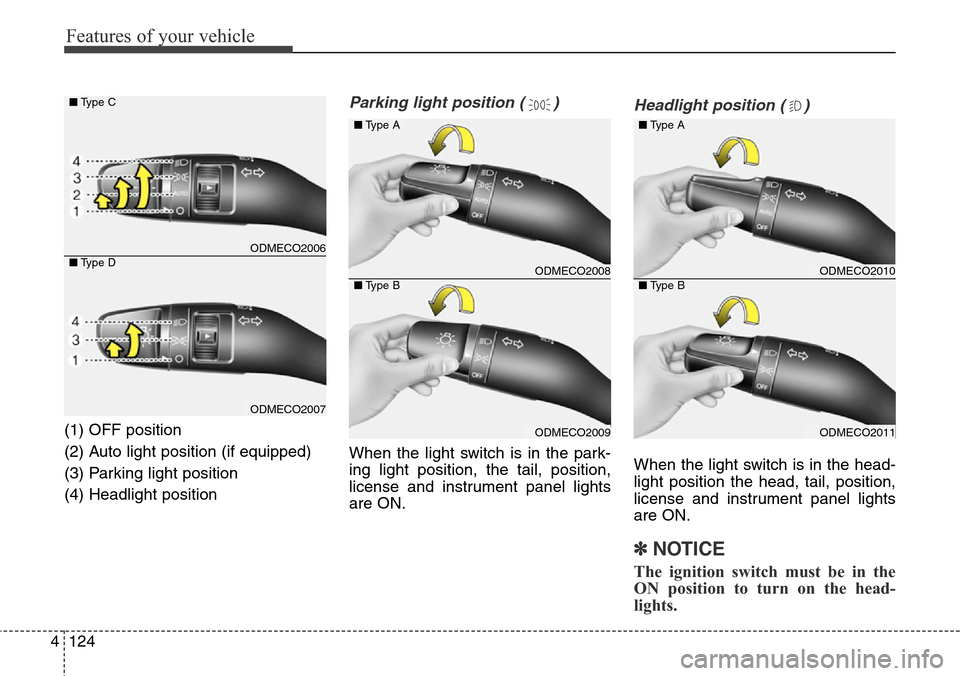
(1) OFF position
(2) Auto light position (if equipped)
(3) Parking light position
(4) Headlight position
Parking light position ( )
When the light switch is in the park-
ing light position, the tail, position,
license and instrument panel lights
are ON.
Headlight position ( )
When the light switch is in the head-
light position the head, tail, position,
license and instrument panel lights
are ON.
✽NOTICE
The ignition switch must be in the
ON position to turn on the head-
lights.
ODMECO2006
ODMECO2007
■Type C
■Type DODMECO2008
ODMECO2009
■Type A
■Type BODMECO2010
ODMECO2011
■Type A
■Type B
Page 222 of 718
4125
Features of your vehicle
Auto light/AFLS position
(if equipped)
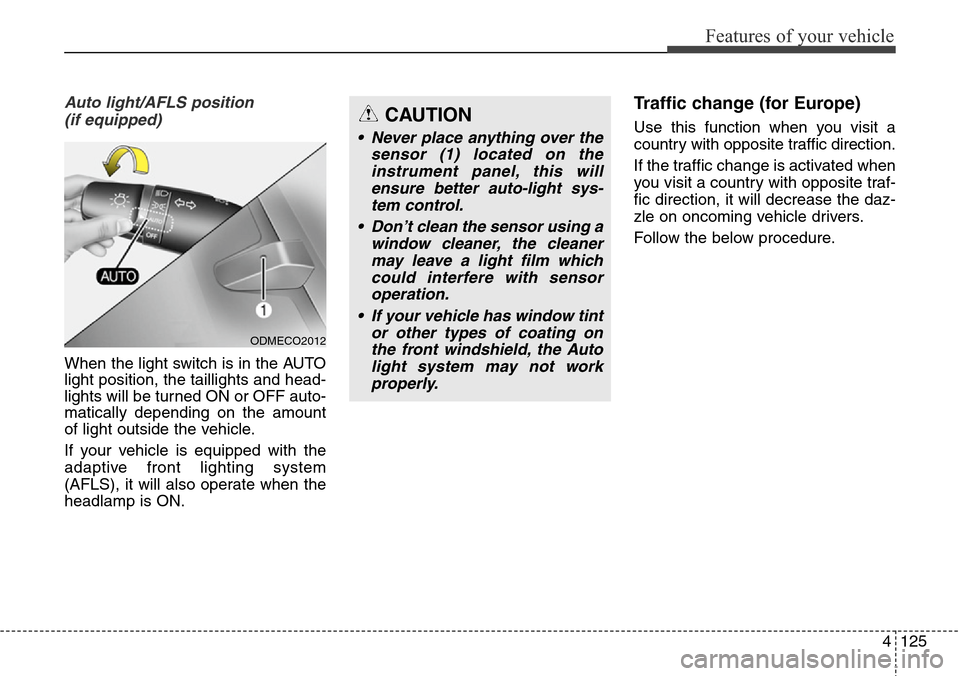
When the light switch is in the AUTO
light position, the taillights and head-
lights will be turned ON or OFF auto-
matically depending on the amount
of light outside the vehicle.
If your vehicle is equipped with the
adaptive front lighting system
(AFLS), it will also operate when the
headlamp is ON.
Traffic change (for Europe)
Use this function when you visit a
country with opposite traffic direction.
If the traffic change is activated when
you visit a country with opposite traf-
fic direction, it will decrease the daz-
zle on oncoming vehicle drivers.
Follow the below procedure.
ODMECO2012
CAUTION
• Never place anything over the
sensor (1) located on the
instrument panel, this will
ensure better auto-light sys-
tem control.
• Don’t clean the sensor using a
window cleaner, the cleaner
may leave a light film which
could interfere with sensor
operation.
• If your vehicle has window tint
or other types of coating on
the front windshield, the Auto
light system may not work
properly.
Page 225 of 718
Features of your vehicle
128 4
Turn signals and lane change
signals
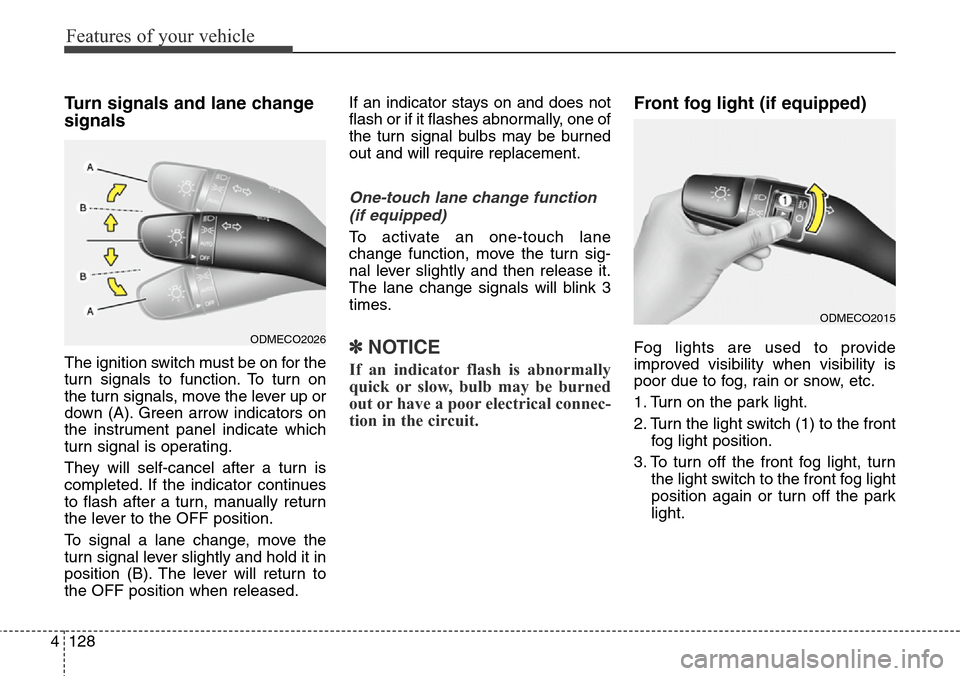
The ignition switch must be on for the
turn signals to function. To turn on
the turn signals, move the lever up or
down (A). Green arrow indicators on
the instrument panel indicate which
turn signal is operating.
They will self-cancel after a turn is
completed. If the indicator continues
to flash after a turn, manually return
the lever to the OFF position.
To signal a lane change, move the
turn signal lever slightly and hold it in
position (B). The lever will return to
the OFF position when released.If an indicator stays on and does not
flash or if it flashes abnormally, one of
the turn signal bulbs may be burned
out and will require replacement.
One-touch lane change function
(if equipped)
To activate an one-touch lane
change function, move the turn sig-
nal lever slightly and then release it.
The lane change signals will blink 3
times.
✽NOTICE
If an indicator flash is abnormally
quick or slow, bulb may be burned
out or have a poor electrical connec-
tion in the circuit.
Front fog light (if equipped)
Fog lights are used to provide
improved visibility when visibility is
poor due to fog, rain or snow, etc.
1. Turn on the park light.
2. Turn the light switch (1) to the front
fog light position.
3. To turn off the front fog light, turn
the light switch to the front fog light
position again or turn off the park
light.ODMECO2026
ODMECO2015
Page 239 of 718
Features of your vehicle
142 4
DEFROSTER
✽NOTICE
If you want to defrost and defog the
front windshield, refer to
“Windshield Defrosting and
Defogging” in this section.
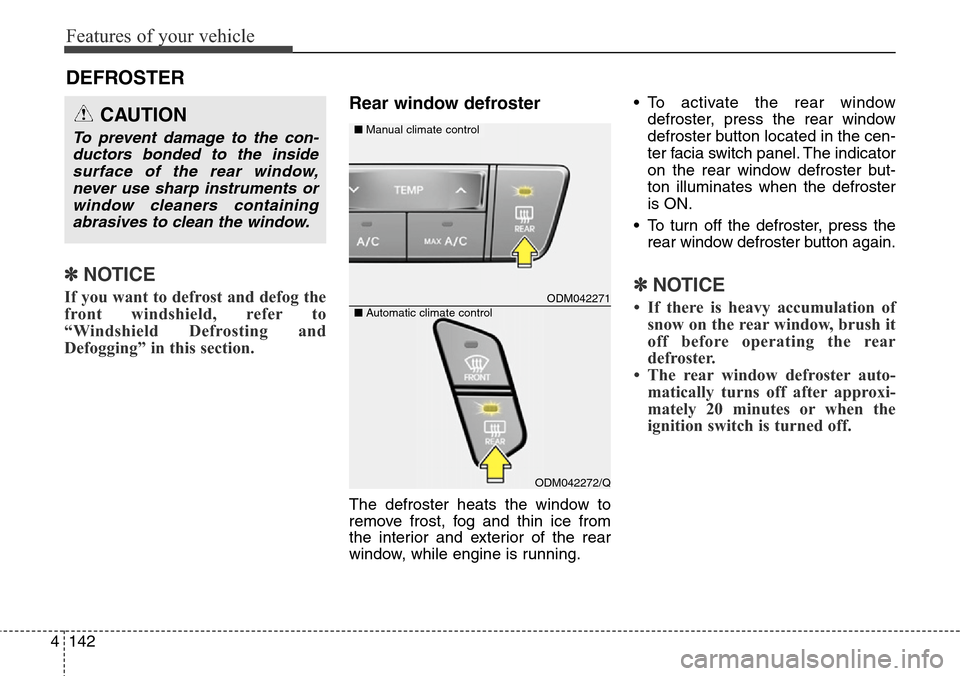
Rear window defroster
The defroster heats the window to
remove frost, fog and thin ice from
the interior and exterior of the rear
window, while engine is running.• To activate the rear window
defroster, press the rear window
defroster button located in the cen-
ter facia switch panel. The indicator
on the rear window defroster but-
ton illuminates when the defroster
is ON.
• To turn off the defroster, press the
rear window defroster button again.
✽NOTICE
• If there is heavy accumulation of
snow on the rear window, brush it
off before operating the rear
defroster.
• The rear window defroster auto-
matically turns off after approxi-
mately 20 minutes or when the
ignition switch is turned off.
CAUTION
To prevent damage to the con-
ductors bonded to the inside
surface of the rear window,
never use sharp instruments or
window cleaners containing
abrasives to clean the window.
ODM042271
■Manual climate control
ODM042272/Q ■Automatic climate control
Page 242 of 718
4145
Features of your vehicle
Heating and air conditioning
1.Start the engine.
2.Set the mode to the desired posi-
tion.
For improving the effectiveness of
heating and cooling;
- Heating:
- Cooling:
3.Set the temperature control to the
desired position.
4.Set the air intake control to the out-
side (fresh) air position.
5.Set the fan speed control to the
desired speed.
6.If air conditioning is desired, turn
the air conditioning system (if
equipped) on.
ONCNCL2003
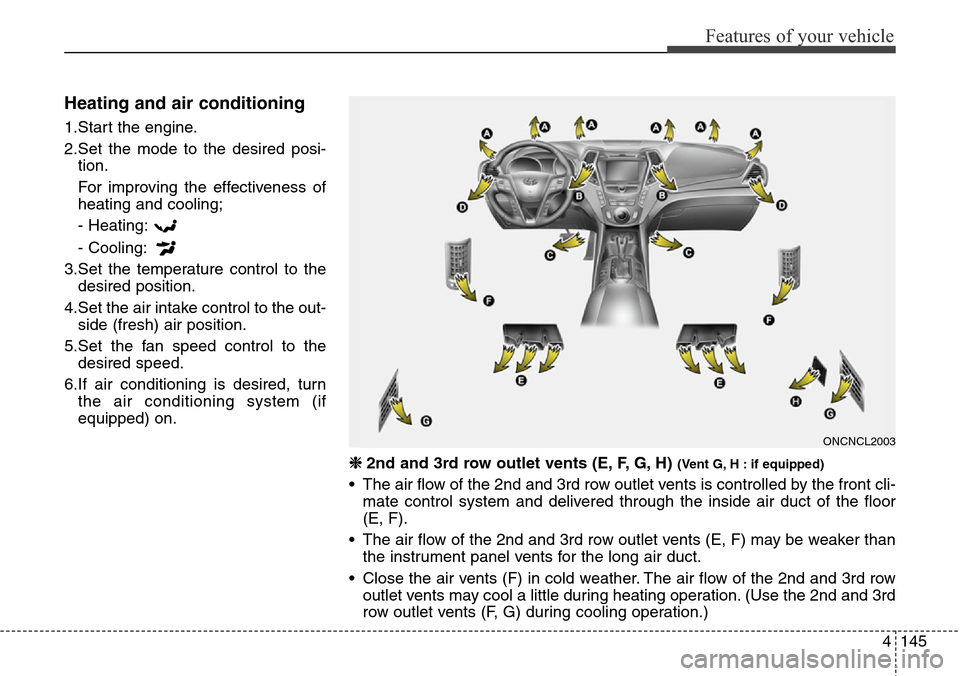
❈ 2nd and 3rd row outlet vents (E, F, G, H) (Vent G, H : if equipped)
• The air flow of the 2nd and 3rd row outlet vents is controlled by the front cli-
mate control system and delivered through the inside air duct of the floor
(E, F).
• The air flow of the 2nd and 3rd row outlet vents (E, F) may be weaker than
the instrument panel vents for the long air duct.
• Close the air vents (F) in cold weather. The air flow of the 2nd and 3rd row
outlet vents may cool a little during heating operation. (Use the 2nd and 3rd
row outlet vents (F, G) during cooling operation.)
Page 244 of 718
4147
Features of your vehicle
MAX A/C-Level (if equipped)
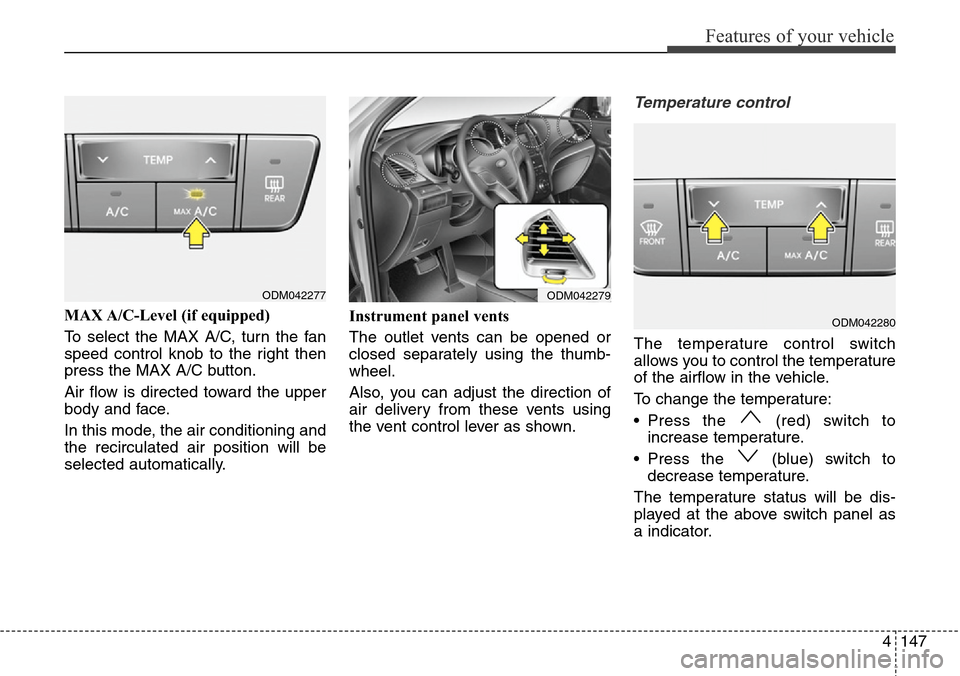
To select the MAX A/C, turn the fan
speed control knob to the right then
press the MAX A/C button.
Air flow is directed toward the upper
body and face.
In this mode, the air conditioning and
the recirculated air position will be
selected automatically.Instrument panel vents
The outlet vents can be opened or
closed separately using the thumb-
wheel.
Also, you can adjust the direction of
air delivery from these vents using
the vent control lever as shown.
Temperature control
The temperature control switch
allows you to control the temperature
of the airflow in the vehicle.
To change the temperature:
• Press the (red) switch to
increase temperature.
• Press the (blue) switch to
decrease temperature.
The temperature status will be dis-
played at the above switch panel as
a indicator.
ODM042277ODM042279
ODM042280
Page 255 of 718
Features of your vehicle
158 4
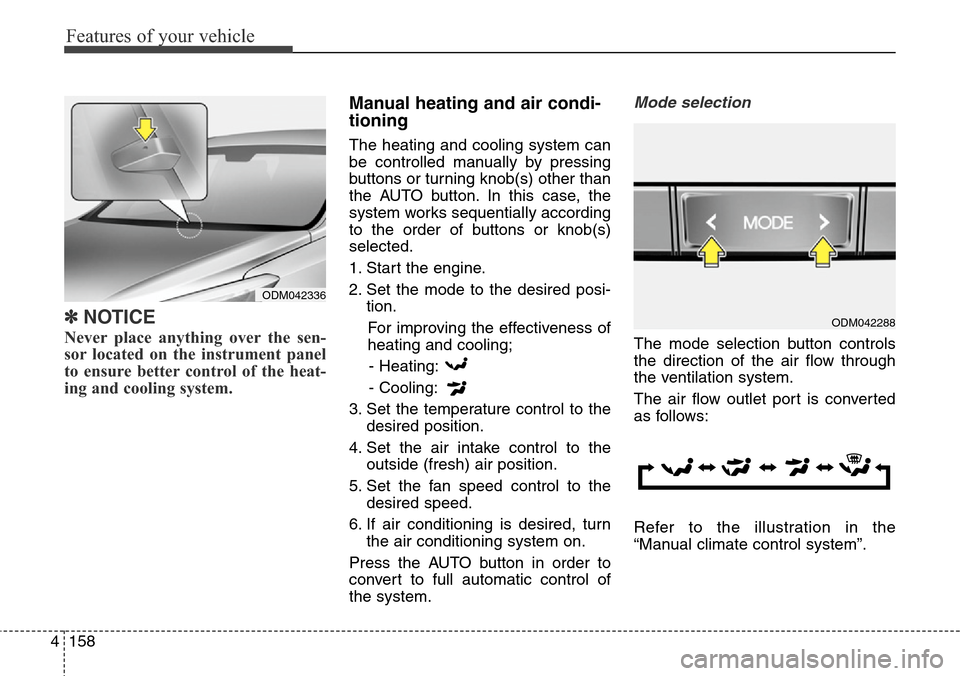
✽NOTICE
Never place anything over the sen-
sor located on the instrument panel
to ensure better control of the heat-
ing and cooling system.
Manual heating and air condi-
tioning
The heating and cooling system can
be controlled manually by pressing
buttons or turning knob(s) other than
the AUTO button. In this case, the
system works sequentially according
to the order of buttons or knob(s)
selected.
1. Start the engine.
2. Set the mode to the desired posi-
tion.
For improving the effectiveness of
heating and cooling;
- Heating:
- Cooling:
3. Set the temperature control to the
desired position.
4. Set the air intake control to the
outside (fresh) air position.
5. Set the fan speed control to the
desired speed.
6. If air conditioning is desired, turn
the air conditioning system on.
Press the AUTO button in order to
convert to full automatic control of
the system.
Mode selection
The mode selection button controls
the direction of the air flow through
the ventilation system.
The air flow outlet port is converted
as follows:
Refer to the illustration in the
“Manual climate control system”.
ODM042336
ODM042288
Page 257 of 718
Features of your vehicle
160 4
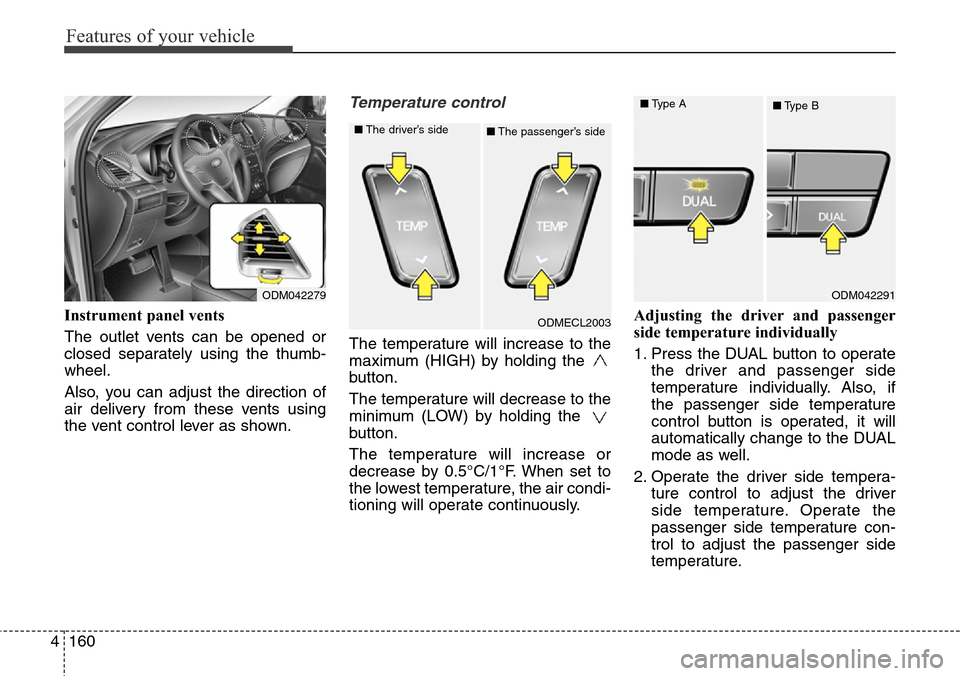
Instrument panel vents
The outlet vents can be opened or
closed separately using the thumb-
wheel.
Also, you can adjust the direction of
air delivery from these vents using
the vent control lever as shown.
Temperature control
The temperature will increase to the
maximum (HIGH) by holding the
button.
The temperature will decrease to the
minimum (LOW) by holding the
button.
The temperature will increase or
decrease by 0.5°C/1°F. When set to
the lowest temperature, the air condi-
tioning will operate continuously.Adjusting the driver and passenger
side temperature individually
1. Press the DUAL button to operate
the driver and passenger side
temperature individually. Also, if
the passenger side temperature
control button is operated, it will
automatically change to the DUAL
mode as well.
2. Operate the driver side tempera-
ture control to adjust the driver
side temperature. Operate the
passenger side temperature con-
trol to adjust the passenger side
temperature.
ODM042279
ODMECL2003 ■The driver’s side
■The passenger’s side
ODM042291 ■Type A
■Type B