steering wheel Hyundai Grand Santa Fe 2013 Owner's Guide
[x] Cancel search | Manufacturer: HYUNDAI, Model Year: 2013, Model line: Grand Santa Fe, Model: Hyundai Grand Santa Fe 2013Pages: 718, PDF Size: 13.5 MB
Page 180 of 718
483
Features of your vehicle
✽NOTICE
• The average vehicle speed is not
displayed if the driving distance is
less than 50 meters (0.03 miles) or
the driving time is less than 10 sec-
onds since the ignition switch or
Engine Start/Stop button is turned
to ON.
• Even if the vehicle is not in motion,
the average vehicle speed keeps
going while the engine is running.
Elapsed Time (3)
• The elapsed time is the total driv-
ing time since the last elapsed time
reset.
- Time range (hh:mm): 00:00 ~ 99:59
• To reset the elapsed time, press
the SELECT/RESET button on
the steering wheel for more than 1
second when the elapsed time is
displayed.
✽NOTICE
Even if the vehicle is not in motion,
the elapsed time keeps going while
the engine is running.
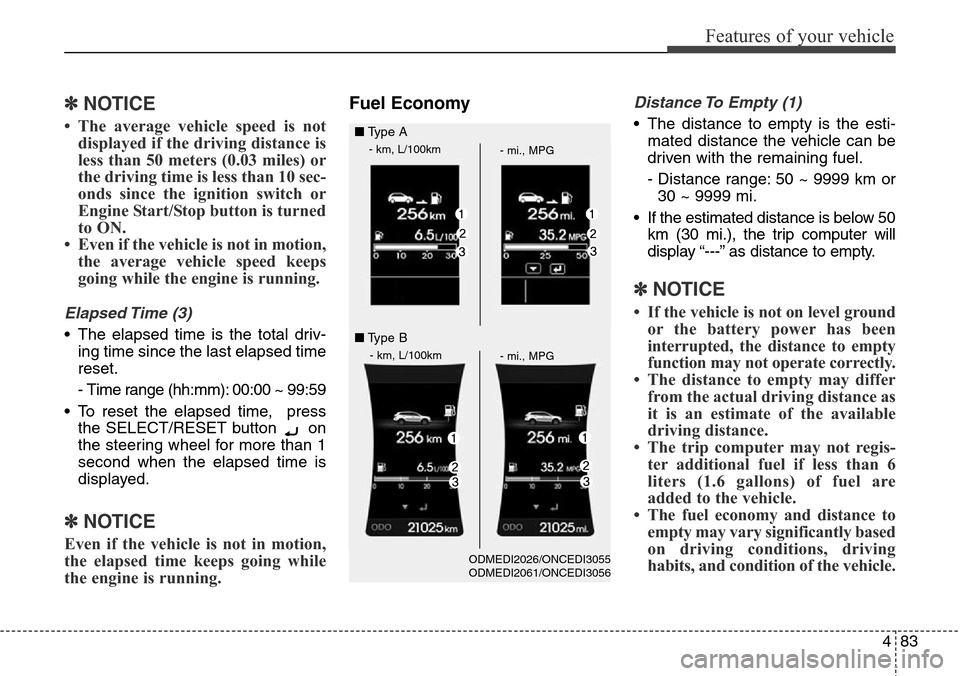
Fuel EconomyDistance To Empty (1)
• The distance to empty is the esti-
mated distance the vehicle can be
driven with the remaining fuel.
- Distance range: 50 ~ 9999 km or
30 ~ 9999 mi.
• If the estimated distance is below 50
km (30 mi.), the trip computer will
display “---” as distance to empty.
✽NOTICE
• If the vehicle is not on level ground
or the battery power has been
interrupted, the distance to empty
function may not operate correctly.
• The distance to empty may differ
from the actual driving distance as
it is an estimate of the available
driving distance.
• The trip computer may not regis-
ter additional fuel if less than 6
liters (1.6 gallons) of fuel are
added to the vehicle.
• The fuel economy and distance to
empty may vary significantly based
on driving conditions, driving
habits, and condition of the vehicle.
■Type A
- km, L/100km
- mi., MPG
- km, L/100km
- mi., MPG
■Type B
ODMEDI2026/ONCEDI3055
ODMEDI2061/ONCEDI3056
Page 181 of 718
Features of your vehicle
84 4
Average Fuel Economy (2)
• The average fuel economy is calcu-
lated by the total driving distance
and fuel consumption since the last
average fuel economy reset.
- Fuel economy range: 0.0 ~ 99.9
L/ 100km or MPG
• The average fuel economy can be
reset both manually and automati-
cally.
Manual reset
To clear the average fuel economy
manually, press the SELECT/RESET
button on the steering wheel for
more than 1 second when the aver-
age fuel economy is displayed.Automatic reset
To make the average fuel economy
be reset automatically whenever refu-
eling, select the “Auto Reset” mode in
User Setting menu of the LCD display
(Refer to “LCD Display”).
Under “Auto Reset” mode, the aver-
age fuel economy will be cleared to
zero (---) when the vehicle speed
exceeds 1 km/h after refueling more
than 6 liters (1.6 gallons).
✽NOTICE
The average fuel economy is not dis-
played for more accurate calculation
if the vehicle does not drive more
than 10 seconds or 50 meters (0.03
miles) since the ignition switch or
Engine Start/Stop button is turned
to ON.
Instant Fuel Economy (3)
• This mode displays the instant fuel
economy during the last few sec-
onds when the vehicle speed is
more than 10 km/h (6.2 MPH).
- Fuel economy range: 0 ~ 30
L/100km or 0 ~ 50 MPG
Page 206 of 718
4109
Features of your vehicle
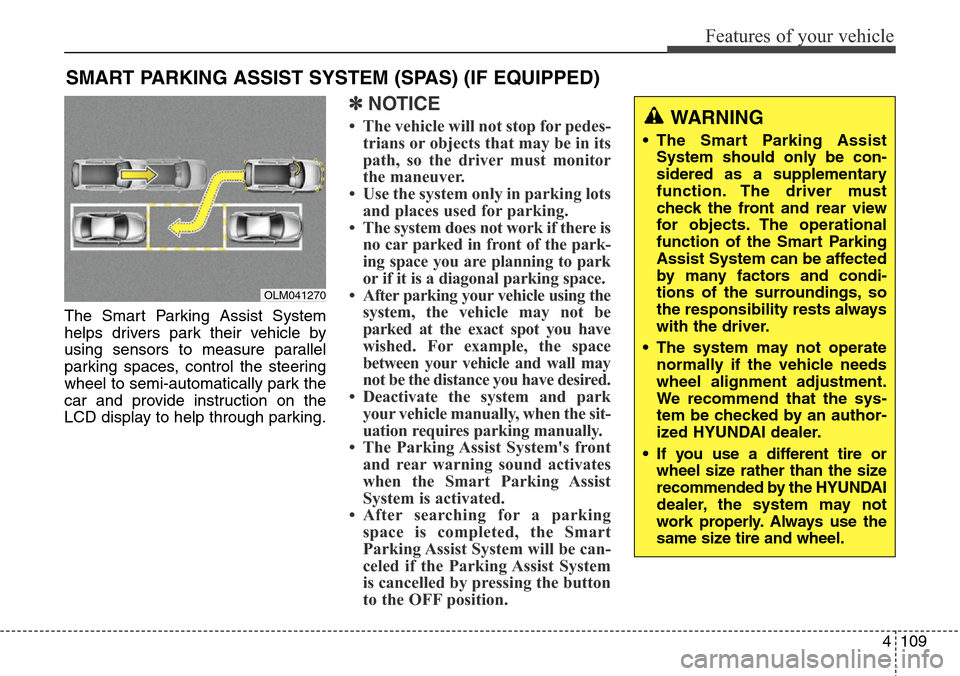
The Smart Parking Assist System
helps drivers park their vehicle by
using sensors to measure parallel
parking spaces, control the steering
wheel to semi-automatically park the
car and provide instruction on the
LCD display to help through parking.
✽NOTICE
• The vehicle will not stop for pedes-
trians or objects that may be in its
path, so the driver must monitor
the maneuver.
• Use the system only in parking lots
and places used for parking.
• The system does not work if there is
no car parked in front of the park-
ing space you are planning to park
or if it is a diagonal parking space.
• After parking your vehicle using the
system, the vehicle may not be
parked at the exact spot you have
wished. For example, the space
between your vehicle and wall may
not be the distance you have desired.
• Deactivate the system and park
your vehicle manually, when the sit-
uation requires parking manually.
• The Parking Assist System's front
and rear warning sound activates
when the Smart Parking Assist
System is activated.
• After searching for a parking
space is completed, the Smart
Parking Assist System will be can-
celed if the Parking Assist System
is cancelled by pressing the button
to the OFF position.
SMART PARKING ASSIST SYSTEM (SPAS) (IF EQUIPPED)
OLM041270
WARNING
• The Smart Parking Assist
System should only be con-
sidered as a supplementary
function. The driver must
check the front and rear view
for objects. The operational
function of the Smart Parking
Assist System can be affected
by many factors and condi-
tions of the surroundings, so
the responsibility rests always
with the driver.
• The system may not operate
normally if the vehicle needs
wheel alignment adjustment.
We recommend that the sys-
tem be checked by an author-
ized HYUNDAI dealer.
• If you use a different tire or
wheel size rather than the size
recommended by the HYUNDAI
dealer, the system may not
work properly. Always use the
same size tire and wheel.
Page 210 of 718
4113
Features of your vehicle
How the system works
1. Activate the Smart Parking Assist
System
2. Select parking assist mode
3. Search for parking space (slowly
move forward.)
4. Search complete (automatic
search by sensor.)
5. Steering wheel control
(1) Shift according to the instruc-
tion on the LCD display.
(2) Drive slowly with the brake
pedal applied.
6. Smart Parking Assist System
complete
7. If necessary, manually adjust posi-
tion of vehicle.
✽NOTICE
• Before activating the system check
if the conditions are possible to use
the system.
• For your safety, always apply the
brake pedal except for when driving.
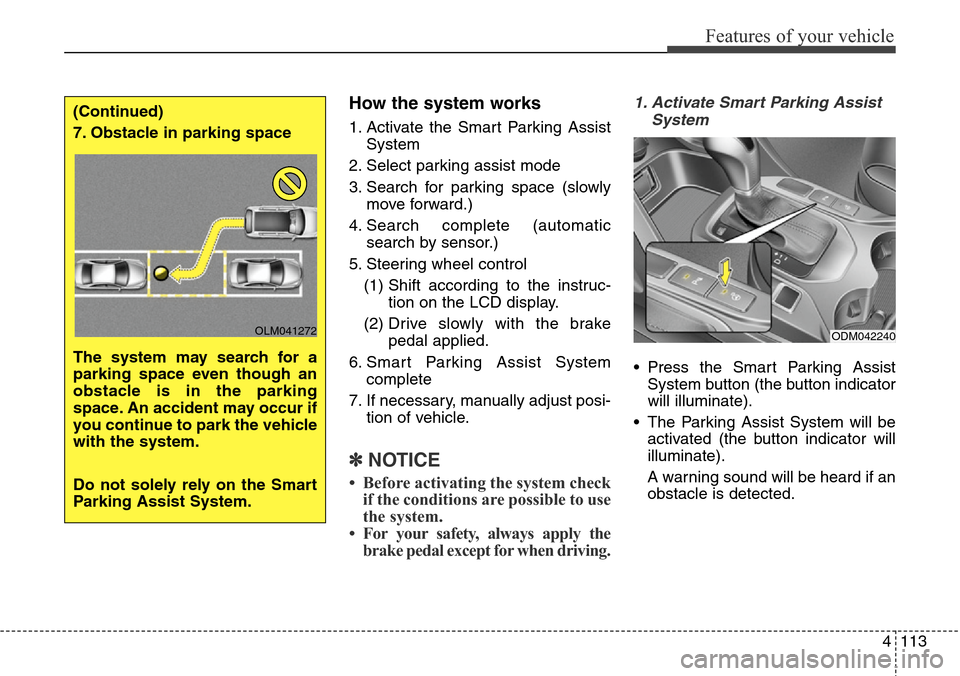
1. Activate Smart Parking Assist
System
• Press the Smart Parking Assist
System button (the button indicator
will illuminate).
• The Parking Assist System will be
activated (the button indicator will
illuminate).
A warning sound will be heard if an
obstacle is detected.
(Continued)
7. Obstacle in parking space
The system may search for a
parking space even though an
obstacle is in the parking
space. An accident may occur if
you continue to park the vehicle
with the system.
Do not solely rely on the Smart
Parking Assist System.
OLM041272ODM042240
Page 214 of 718
4117
Features of your vehicle
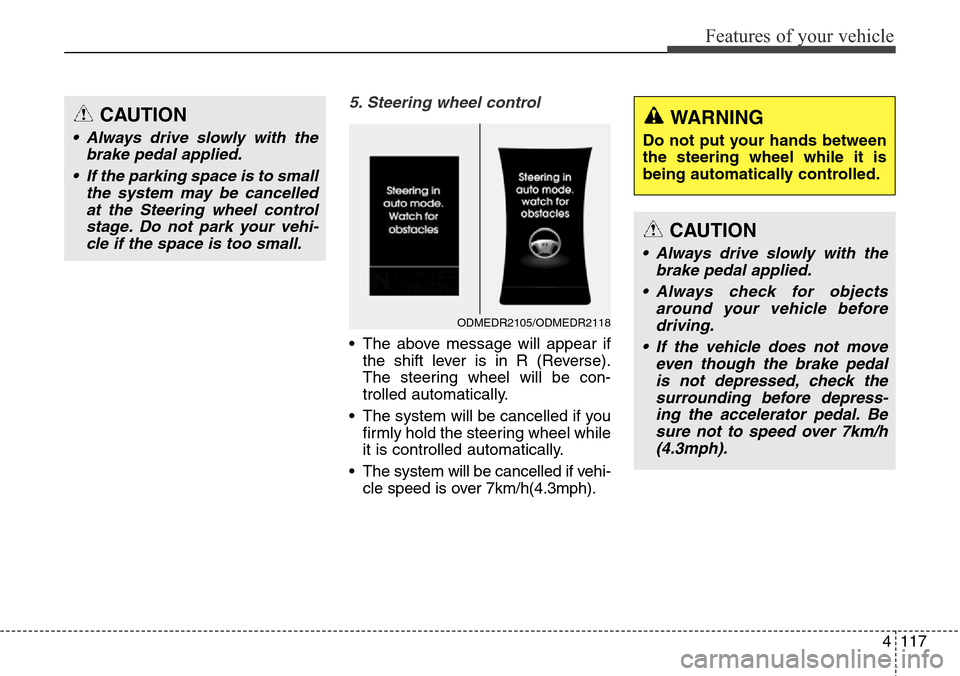
5. Steering wheel control
• The above message will appear if
the shift lever is in R (Reverse).
The steering wheel will be con-
trolled automatically.
• The system will be cancelled if you
firmly hold the steering wheel while
it is controlled automatically.
• The system will be cancelled if vehi-
cle speed is over 7km/h(4.3mph).
CAUTION
• Always drive slowly with the
brake pedal applied.
• If the parking space is to small
the system may be cancelled
at the Steering wheel control
stage. Do not park your vehi-
cle if the space is too small.
ODMEDR2105/ODMEDR2118
CAUTION
• Always drive slowly with the
brake pedal applied.
• Always check for objects
around your vehicle before
driving.
• If the vehicle does not move
even though the brake pedal
is not depressed, check the
surrounding before depress-
ing the accelerator pedal. Be
sure not to speed over 7km/h
(4.3mph).
WARNING
Do not put your hands between
the steering wheel while it is
being automatically controlled.
Page 215 of 718
Features of your vehicle
118 4
✽NOTICE
• If you do not follow the instruc-
tions provided, you may fail to
park your vehicle.
However, if the Parking Assist
System warning sound (distance
from object is within 30cm: con-
tinuous beep) occurs, slowly drive
the vehicle to the reverse direction
of the detected object after check-
ing the surrounding.
• Always check the surrounding
before driving your vehicle if the
Parking Assist System warning
sound (distance from object is
within 30cm: continuous beep) is
heard for the object is close to
your vehicle.
To cancel the system while parking
Press the Smart Parking Assist
System button or turn the steering
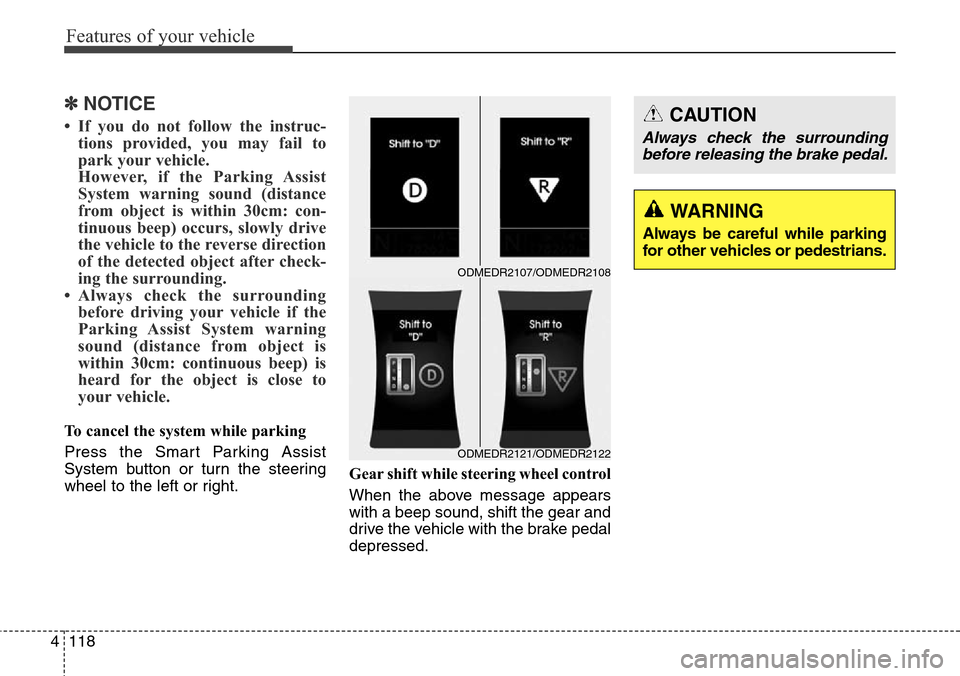
wheel to the left or right.Gear shift while steering wheel control
When the above message appears
with a beep sound, shift the gear and
drive the vehicle with the brake pedal
depressed.
ODMEDR2121/ODMEDR2122
ODMEDR2107/ODMEDR2108
WARNING
Always be careful while parking
for other vehicles or pedestrians.
CAUTION
Always check the surrounding
before releasing the brake pedal.
Page 216 of 718
4119
Features of your vehicle
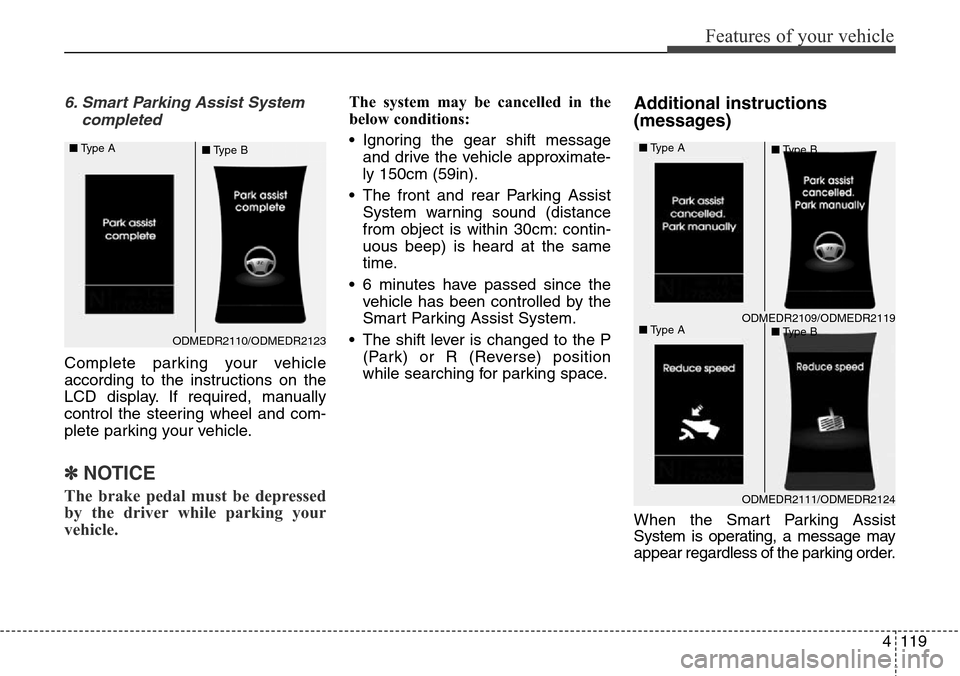
6. Smart Parking Assist System
completed
Complete parking your vehicle
according to the instructions on the
LCD display. If required, manually
control the steering wheel and com-
plete parking your vehicle.
✽NOTICE
The brake pedal must be depressed
by the driver while parking your
vehicle.
The system may be cancelled in the
below conditions:
• Ignoring the gear shift message
and drive the vehicle approximate-
ly 150cm (59in).
• The front and rear Parking Assist
System warning sound (distance
from object is within 30cm: contin-
uous beep) is heard at the same
time.
• 6 minutes have passed since the
vehicle has been controlled by the
Smart Parking Assist System.
• The shift lever is changed to the P
(Park) or R (Reverse) position
while searching for parking space.Additional instructions
(messages)
When the Smart Parking Assist
System is operating, a message may
appear regardless of the parking order.
ODMEDR2110/ODMEDR2123 ■Type A
■Type B
ODMEDR2111/ODMEDR2124
ODMEDR2109/ODMEDR2119 ■Type A
■Type A■Type B
■Type B
Page 217 of 718
Features of your vehicle
120 4
The messages will appear according
to the circumstances. Follow the
instructions provided while parking
your vehicle with the Smart Parking
Assist System.✽NOTICE
In the below conditions the system
will be cancelled. Park your vehicle
manually.
1. Search for parking space
- When the ABS/ESC is activated
- When the vehicle speed is over
40km/h (24.8mph)
- When you press the Smart
Parking Assist System button
(the front and rear Parking
Assist System operates)
- When you shift the shift lever to
R (Reverse)
2. Steering wheel control
- When the ABS/ESC is activated
- When the vehicle speed is over
7km/h (4.3 mph)
- When you press the Smart
Parking Assist System button
(the front and rear Parking
Assist System operates)
- When you shift the shift lever to
D (Drive) before entering the
parking space
- When you hold the steering
wheel firmly
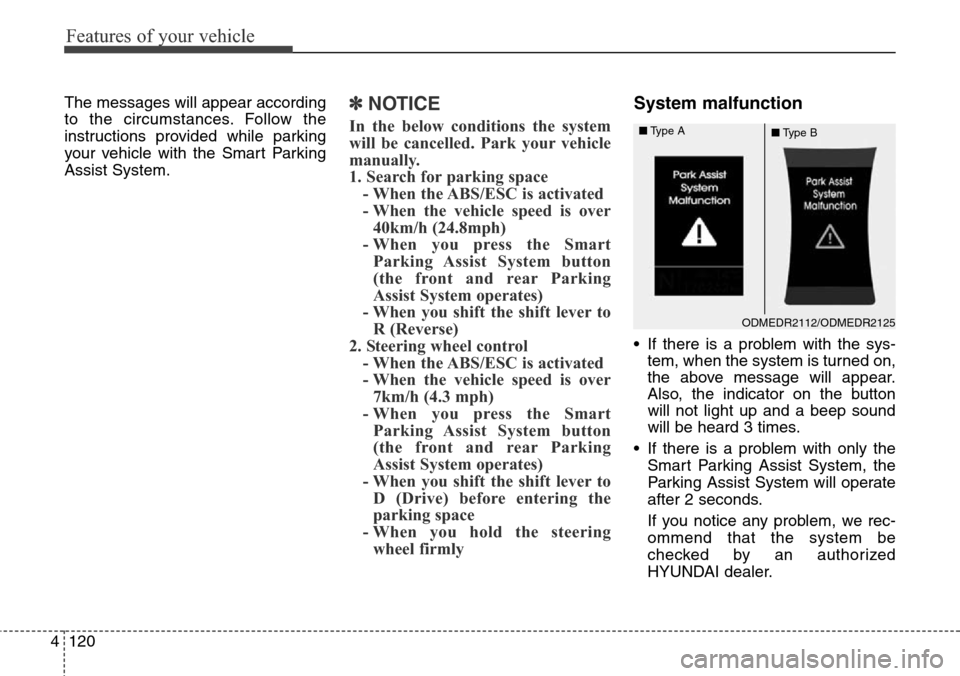
System malfunction
• If there is a problem with the sys-
tem, when the system is turned on,
the above message will appear.
Also, the indicator on the button
will not light up and a beep sound
will be heard 3 times.
• If there is a problem with only the
Smart Parking Assist System, the
Parking Assist System will operate
after 2 seconds.
If you notice any problem, we rec-
ommend that the system be
checked by an authorized
HYUNDAI dealer.
ODMEDR2112/ODMEDR2125
■Type A
■Type B
Page 223 of 718
Features of your vehicle
126 4
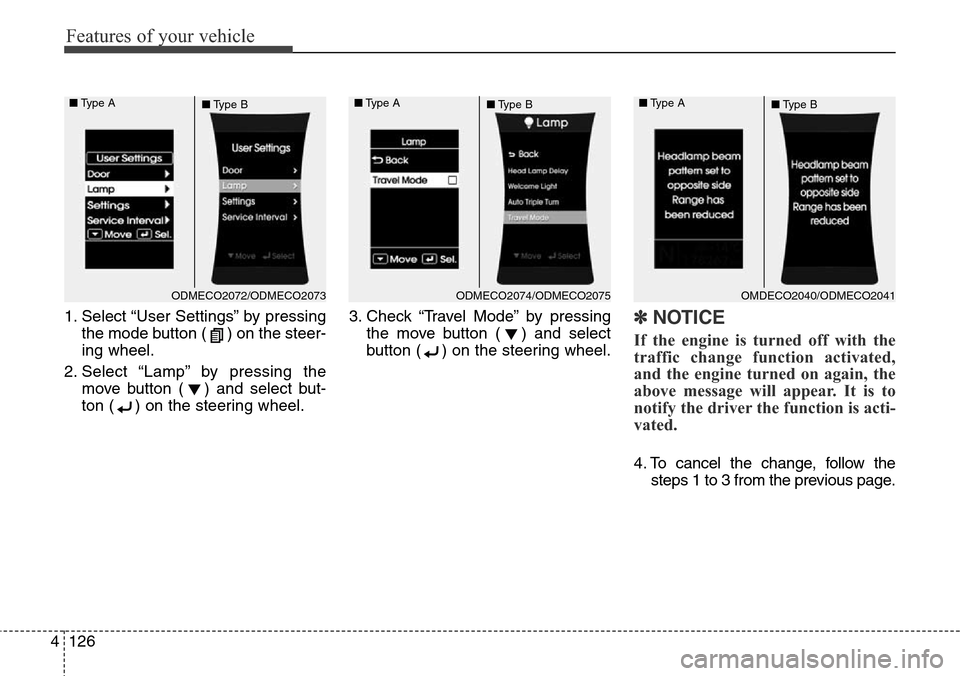
1. Select “User Settings” by pressing
the mode button ( ) on the steer-
ing wheel.
2. Select “Lamp” by pressing the
move button ( ) and select but-
ton ( ) on the steering wheel.3. Check “Travel Mode” by pressing
the move button ( ) and select
button ( ) on the steering wheel.✽NOTICE
If the engine is turned off with the
traffic change function activated,
and the engine turned on again, the
above message will appear. It is to
notify the driver the function is acti-
vated.
4. To cancel the change, follow the
steps 1 to 3 from the previous page.
ODMECO2072/ODMECO2073 ■Type A
■Type BODMECO2074/ODMECO2075 ■Type A
■Type BOMDECO2040/ODMECO2041 ■Type A
■Type B
Page 288 of 718
4191
Features of your vehicle
Audio remote control
(if equipped)
❈ The actual feature in the vehicle may differ
from the illustration.
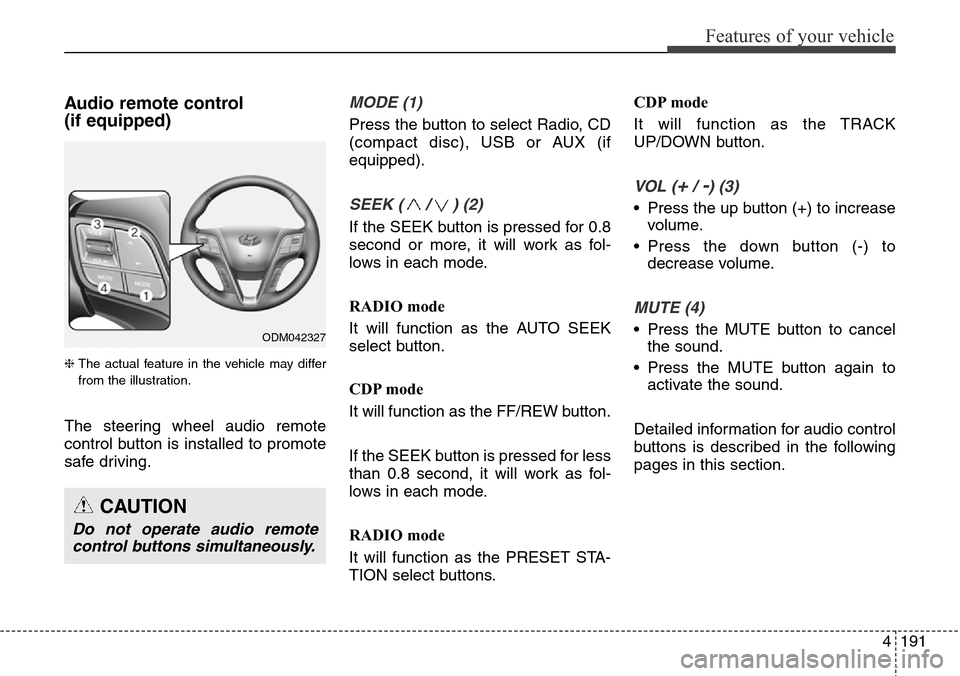
The steering wheel audio remote
control button is installed to promote
safe driving.
MODE (1)
Press the button to select Radio, CD
(compact disc), USB or AUX (if
equipped).
SEEK ( / ) (2)
If the SEEK button is pressed for 0.8
second or more, it will work as fol-
lows in each mode.
RADIO mode
It will function as the AUTO SEEK
select button.
CDP mode
It will function as the FF/REW button.
If the SEEK button is pressed for less
than 0.8 second, it will work as fol-
lows in each mode.
RADIO mode
It will function as the PRESET STA-
TION select buttons.CDP mode
It will function as the TRACK
UP/DOWN button.
VOL (+/ -) (3)
• Press the up button (+) to increase
volume.
• Press the down button (-) to
decrease volume.
MUTE (4)
• Press the MUTE button to cancel
the sound.
• Press the MUTE button again to
activate the sound.
Detailed information for audio control
buttons is described in the following
pages in this section.
CAUTION
Do not operate audio remote
control buttons simultaneously.
ODM042327