light Hyundai Grand Santa Fe 2013 Manual PDF
[x] Cancel search | Manufacturer: HYUNDAI, Model Year: 2013, Model line: Grand Santa Fe, Model: Hyundai Grand Santa Fe 2013Pages: 718, PDF Size: 13.5 MB
Page 225 of 718
Features of your vehicle
128 4
Turn signals and lane change
signals
The ignition switch must be on for the
turn signals to function. To turn on
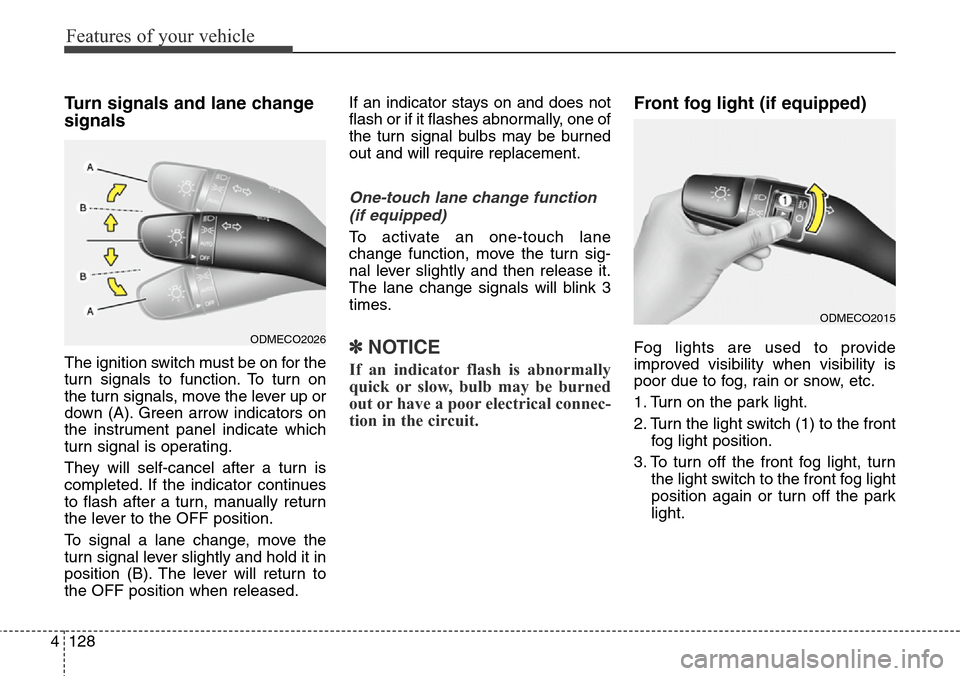
the turn signals, move the lever up or
down (A). Green arrow indicators on
the instrument panel indicate which
turn signal is operating.
They will self-cancel after a turn is
completed. If the indicator continues
to flash after a turn, manually return
the lever to the OFF position.
To signal a lane change, move the
turn signal lever slightly and hold it in
position (B). The lever will return to
the OFF position when released.If an indicator stays on and does not
flash or if it flashes abnormally, one of
the turn signal bulbs may be burned
out and will require replacement.
One-touch lane change function
(if equipped)
To activate an one-touch lane
change function, move the turn sig-
nal lever slightly and then release it.
The lane change signals will blink 3
times.
✽NOTICE
If an indicator flash is abnormally
quick or slow, bulb may be burned
out or have a poor electrical connec-
tion in the circuit.
Front fog light (if equipped)
Fog lights are used to provide
improved visibility when visibility is
poor due to fog, rain or snow, etc.
1. Turn on the park light.
2. Turn the light switch (1) to the front
fog light position.
3. To turn off the front fog light, turn
the light switch to the front fog light
position again or turn off the park
light.ODMECO2026
ODMECO2015
Page 226 of 718
4129
Features of your vehicle
Rear fog light (if equipped)
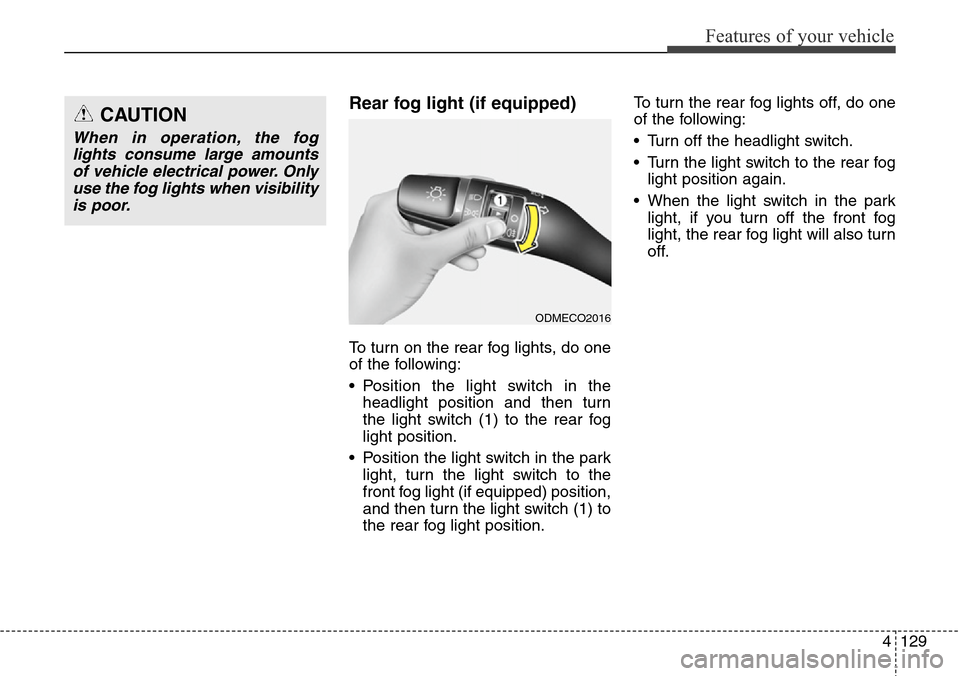
To turn on the rear fog lights, do one
of the following:
• Position the light switch in the
headlight position and then turn
the light switch (1) to the rear fog
light position.
• Position the light switch in the park
light, turn the light switch to the
front fog light (if equipped) position,
and then turn the light switch (1) to
the rear fog light position.To turn the rear fog lights off, do one
of the following:
• Turn off the headlight switch.
• Turn the light switch to the rear fog
light position again.
• When the light switch in the park
light, if you turn off the front fog
light, the rear fog light will also turn
off.
CAUTION
When in operation, the fog
lights consume large amounts
of vehicle electrical power. Only
use the fog lights when visibility
is poor.
ODMECO2016
Page 227 of 718
Features of your vehicle
130 4
Daytime running light
(if equipped)
Daytime Running Lights (DRL) can
make it easier for others to see the
front of your vehicle during the day.
DRL can be helpful in many different
driving conditions, and it is especial-
ly helpful after dawn and before sun-
set.
The DRL system will turn off the ded-
icated lamp when:
1. The front fog light or headlight (low
beam) switch is ON.
2. The engine is OFF.
Headlight leveling device
(if equipped)
Manual type
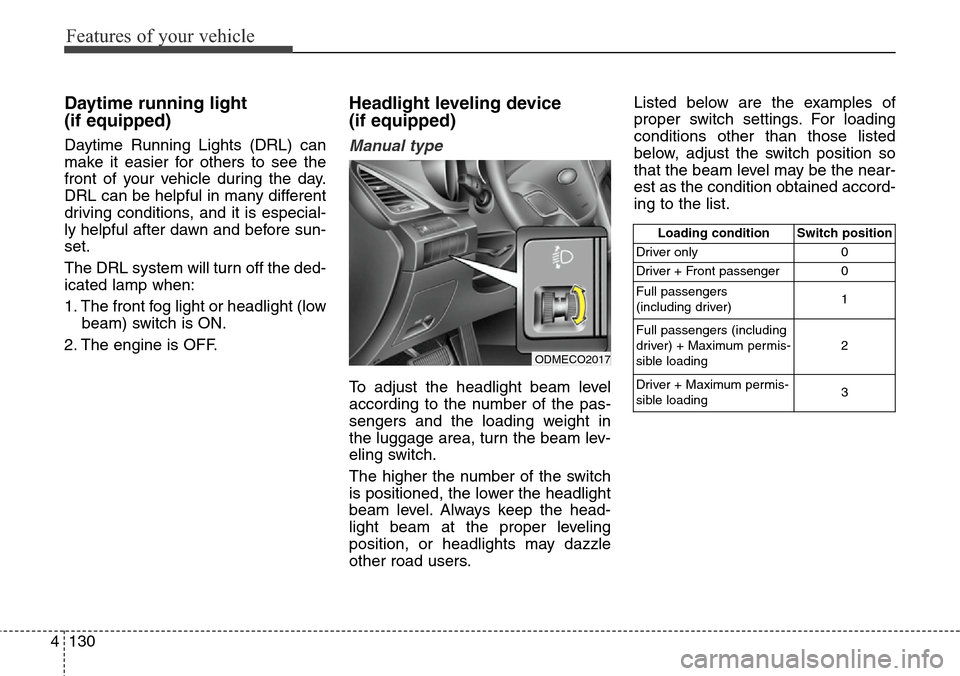
To adjust the headlight beam level
according to the number of the pas-
sengers and the loading weight in
the luggage area, turn the beam lev-
eling switch.
The higher the number of the switch
is positioned, the lower the headlight
beam level. Always keep the head-
light beam at the proper leveling
position, or headlights may dazzle
other road users.Listed below are the examples of
proper switch settings. For loading
conditions other than those listed
below, adjust the switch position so
that the beam level may be the near-
est as the condition obtained accord-
ing to the list.
Loading condition Switch position
Driver only 0
Driver + Front passenger 0
Full passengers
(including driver)1
Full passengers (including
driver) + Maximum permis-
sible loading2
Driver + Maximum permis-
sible loading 3
ODMECO2017
Page 228 of 718
4131
Features of your vehicle
Automatic type
It automatically adjusts the headlight
beam level according to the number
of passengers and loading weight in
the luggage area.
And it offers proper headlight beam
under various conditions.
Adaptive front lighting system
(AFLS) (if equipped)
Adaptive front lighting system uses
the steering angle and vehicle
speed, to keep your field of vision
wide by swiveling and leveling the
headlamp.
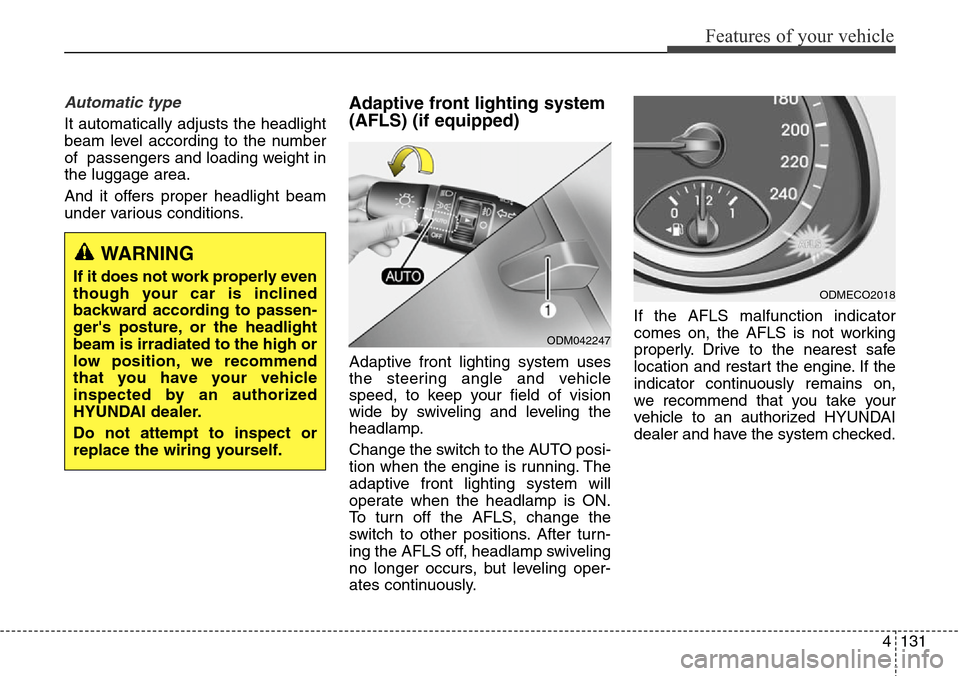
Change the switch to the AUTO posi-
tion when the engine is running. The
adaptive front lighting system will
operate when the headlamp is ON.
To turn off the AFLS, change the
switch to other positions. After turn-
ing the AFLS off, headlamp swiveling
no longer occurs, but leveling oper-
ates continuously.If the AFLS malfunction indicator
comes on, the AFLS is not working
properly. Drive to the nearest safe
location and restart the engine. If the
indicator continuously remains on,
we recommend that you take your
vehicle to an authorized HYUNDAI
dealer and have the system checked.
ODM042247
ODMECO2018
WARNING
If it does not work properly even
though your car is inclined
backward according to passen-
ger's posture, or the headlight
beam is irradiated to the high or
low position, we recommend
that you have your vehicle
inspected by an authorized
HYUNDAI dealer.
Do not attempt to inspect or
replace the wiring yourself.
Page 230 of 718
4133
Features of your vehicle
Windshield wipers
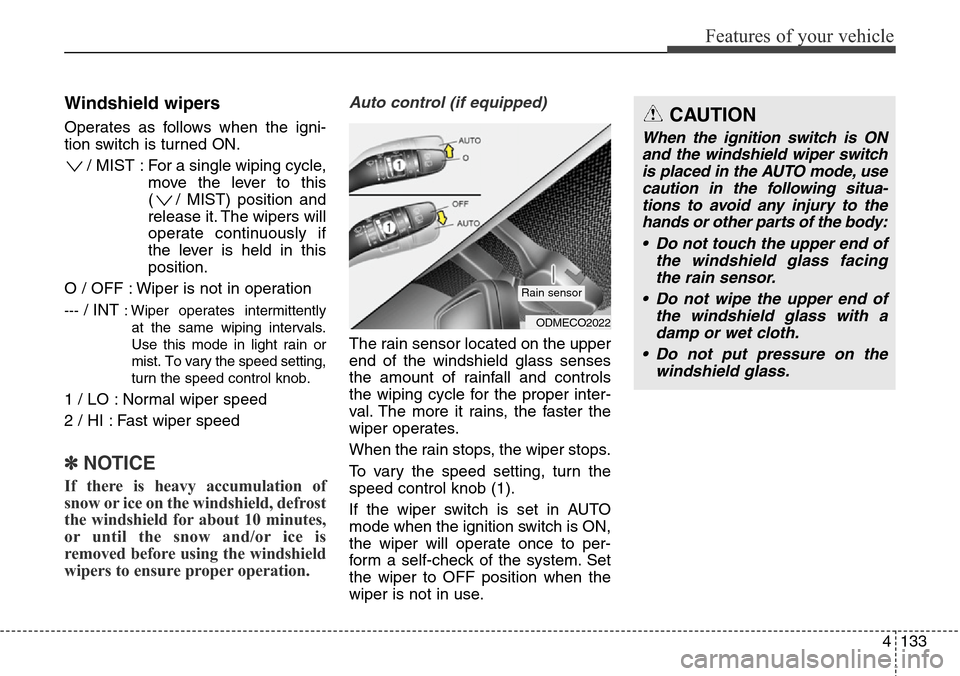
Operates as follows when the igni-
tion switch is turned ON.
/ MIST : For a single wiping cycle,
move the lever to this
( / MIST) position and
release it. The wipers will
operate continuously if
the lever is held in this
position.
O / OFF : Wiper is not in operation
---/ INT : Wiper operates intermittently
at the same wiping intervals.
Use this mode in light rain or
mist. To vary the speed setting,
turn the speed control knob.
1 / LO : Normal wiper speed
2 / HI : Fast wiper speed
✽NOTICE
If there is heavy accumulation of
snow or ice on the windshield, defrost
the windshield for about 10 minutes,
or until the snow and/or ice is
removed before using the windshield
wipers to ensure proper operation.
Auto control (if equipped)
The rain sensor located on the upper
end of the windshield glass senses
the amount of rainfall and controls
the wiping cycle for the proper inter-
val. The more it rains, the faster the
wiper operates.
When the rain stops, the wiper stops.
To vary the speed setting, turn the
speed control knob (1).
If the wiper switch is set in AUTO
mode when the ignition switch is ON,
the wiper will operate once to per-
form a self-check of the system. Set
the wiper to OFF position when the
wiper is not in use.
ODMECO2022
Rain sensor
CAUTION
When the ignition switch is ON
and the windshield wiper switch
is placed in the AUTO mode, use
caution in the following situa-
tions to avoid any injury to the
hands or other parts of the body:
• Do not touch the upper end of
the windshield glass facing
the rain sensor.
• Do not wipe the upper end of
the windshield glass with a
damp or wet cloth.
• Do not put pressure on the
windshield glass.
Page 232 of 718
4135
Features of your vehicle
Headlight washer (if equipped)
If your vehicle is equipped with the
headlight washer it will operate at the
same time when you operate the
windshield washer. It will operate
when the headlight low beam is
turned on and the ignition switch or
engine start/stop button is in the ON
position.
The washer fluid will be sprayed on
to the headlights.
✽NOTICE
• Check the headlight washers peri-
odically to confirm that the wash-
er fluid is being sprayed properly
onto the headlight lenses.
• The headlight washer can be oper-
ated 15 minutes after being oper-
ated last time.
CAUTION
• To prevent possible damage
to the wipers or windshield,
do not operate the wipers
when the windshield is dry.
• To prevent damage to the wiper
blades, do not use gasoline,
kerosene, paint thinner, or
other solvents on or near them.
• To prevent damage to the
wiper arms and other compo-
nents, do not attempt to move
the wipers manually.
CAUTION
To prevent possible damage to
the washer pump, do not oper-
ate the washer when the fluid
reservoir is empty.
WARNING
Do not use the washer in freez-
ing temperatures without first
warming the windshield with
the defrosters; the washer solu-
tion could freeze on the wind-
shield and obscure your vision.
Page 234 of 718
4137
Features of your vehicle
Interior lamp AUTO cut
• When all entrances are closed, if
you lock the vehicle by using the
transmitter or the smart key, all
interior lamp will be off within 5
seconds.
• If you do not operate anything in
the vehicle after turning off the
engine, the lights will turn off after
20 minutes.
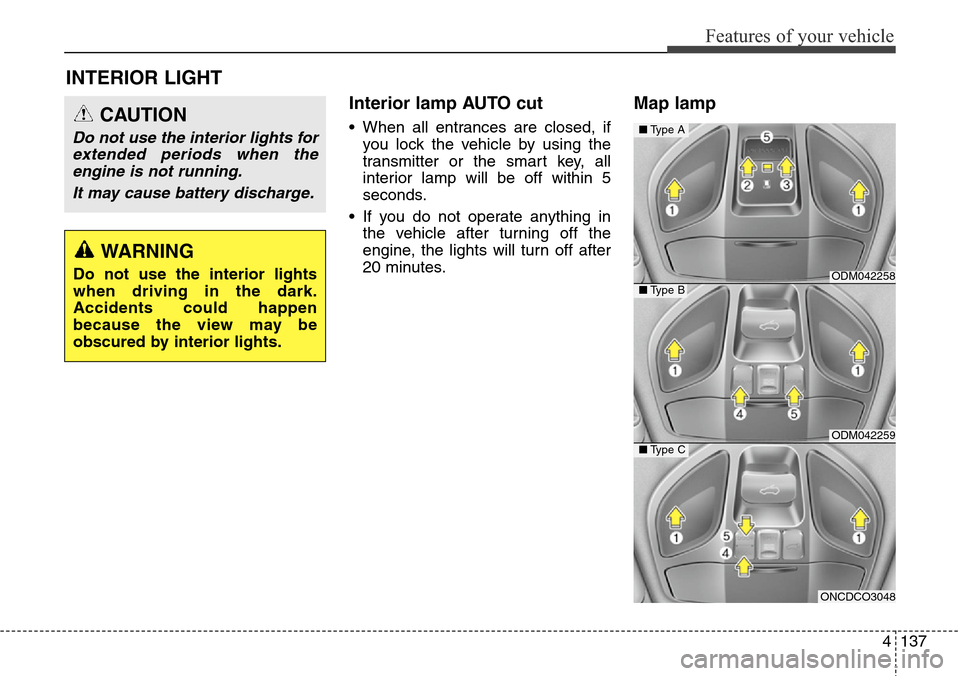
Map lamp
INTERIOR LIGHT
CAUTION
Do not use the interior lights for
extended periods when the
engine is not running.
It may cause battery discharge.
WARNING
Do not use the interior lights
when driving in the dark.
Accidents could happen
because the view may be
obscured by interior lights.ODM042258
ODM042259
■Type A
■Type B
ONCDCO3048
■Type C
Page 236 of 718
4139
Features of your vehicle
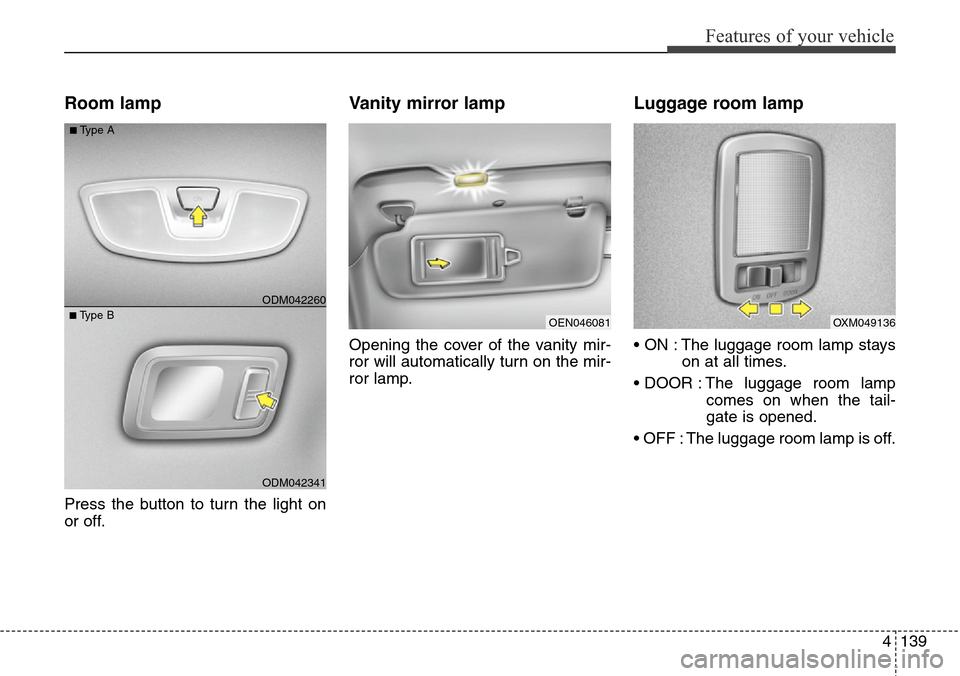
Room lamp
Press the button to turn the light on
or off.
Vanity mirror lamp
Opening the cover of the vanity mir-
ror will automatically turn on the mir-
ror lamp.
Luggage room lamp
• ON : The luggage room lamp stays
on at all times.
• DOOR : The luggage room lamp
comes on when the tail-
gate is opened.
• OFF : The luggage room lamp is off.
OEN046081
ODM042341
■Type BODM042260
■Type A
OXM049136
Page 237 of 718
Features of your vehicle
140 4
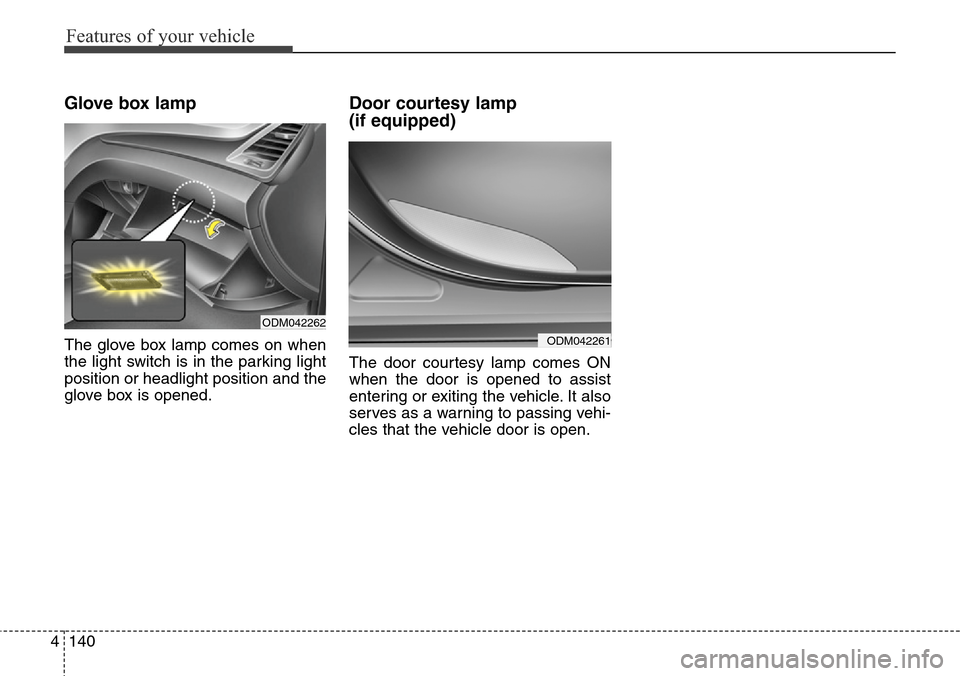
Glove box lamp
The glove box lamp comes on when
the light switch is in the parking light
position or headlight position and the
glove box is opened.
Door courtesy lamp
(if equipped)
The door courtesy lamp comes ON
when the door is opened to assist
entering or exiting the vehicle. It also
serves as a warning to passing vehi-
cles that the vehicle door is open.
ODM042262
ODM042261
Page 238 of 718
4141
Features of your vehicle
Headlamp welcome
When the headlight(light switch in
the headlight or AUTO position) is on
and all doors (and tailgate) are
locked and closed, the headlight,
position light and tail light will come
on for 15 seconds if any of the below
is performed.
• Without smart key system
- When the door unlock button is
pressed on the transmitter.
• With the smart key system
- When the door unlock button is
pressed on the smart key.
At this time, if you press the door lock
button (on the transmitter or smart
key), the lights will turn off immedi-
ately.
Interior light
When the interior light switch is in the
DOOR position and all doors (and
tailgate) are locked and closed, the
room lamp will come on for 30 sec-
onds if any of the below is performed.
• Without smart key system
- When the door unlock button is
pressed on the transmitter.
• With the smart key system
- When the door unlock button is
pressed on the smart key.
- When the button of the outside
door handle is pressed.
At this time, if you press the door lock
button, the lamps will turn off imme-
diately.
Puddle lamp and pocket lamp
(if equipped)
When all doors are locked and
closed, the puddle lamp and pocket
lamp will come on for 15 seconds if
any of the below is performed.
• Without smart key system
- When the door unlock button is
pressed on the transmitter.
• With the smart key system
- When the door unlock button is
pressed on the smart key.
- When the button of the outside
door handle is pressed.
- When the vehicle is approached
with the smart key in possession.
At this time, if you press the door lock
button, the lamps will turn off imme-
diately.
✽NOTICE
The puddle lamp and pocket lamp
do not operate when the outside
rearview mirror folding switch is in
the fold position.
WELCOME SYSTEM (IF EQUIPPED)