phone Hyundai Grand Santa Fe 2014 User Guide
[x] Cancel search | Manufacturer: HYUNDAI, Model Year: 2014, Model line: Grand Santa Fe, Model: Hyundai Grand Santa Fe 2014Pages: 718, PDF Size: 13.5 MB
Page 296 of 718
4199
Features of your vehicle
(Continued)
• If you use devices such as a USB
hub purchased separately, the
vehicle’s audio system may not
recognize the USB device. In that
case, connect the USB device
directly to the multimedia termi-
nal of the vehicle.
• If the USB device is divided by log-
ical drives, only the music files on
the highest-priority drive are rec-
ognized by car audio.
• Devices such as MP3 Player/
Cellular phone/Digital camera can
be unrecognizable by standard
USB I/F can be unrecognizable.
• Charging through the USB may
not be supported in some mobile
devices.
• USB HDD or USB types liable to
connection failures due to vehicle
vibrations are not supported. (i-
stick type)
• Some non-standard USB devices
(METAL COVER TYPE USB)
can be unrecognizable.
(Continued)(Continued)
• Some USB flash memory readers
(such as CF, SD, micro SD, etc.) or
external-HDD type devices can be
unrecognizable.
• Music files protected by DRM
(DIGITAL RIGHTS MANAGE-
MENT) are not recognizable.
• The data in the USB memory may
be lost while using this audio.
Always back up important data on
a personal storage device.
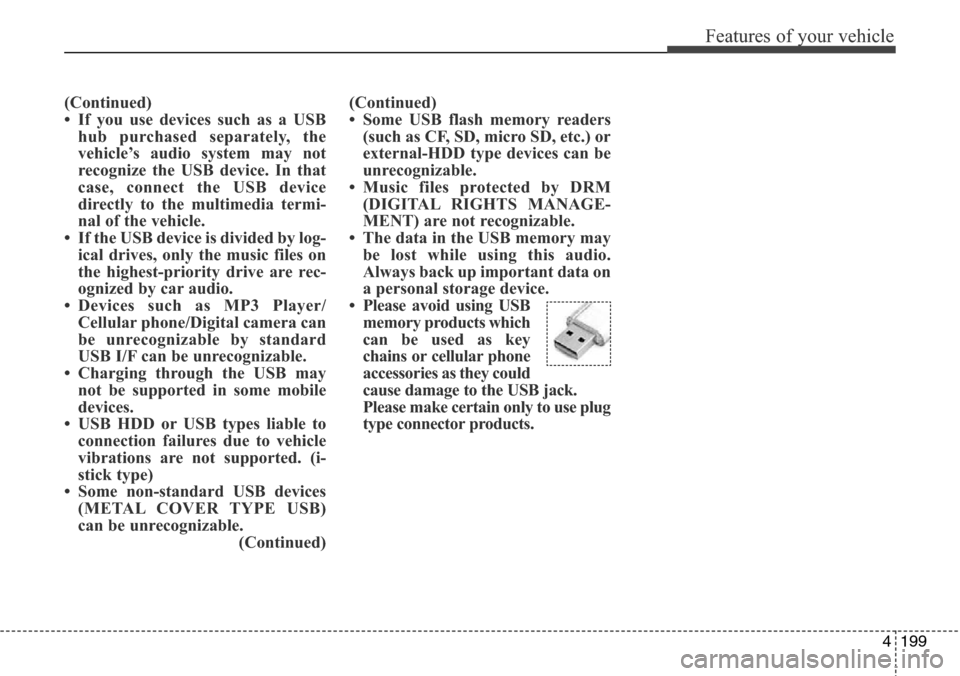
• Please avoid using USB
memory products which
can be used as key
chains or cellular phone
accessories as they could
cause damage to the USB jack.
Please make certain only to use plug
type connector products.
Page 297 of 718
Features of your vehicle
200 4
✽NOTICE - USING THE iPod®
DEVICE
• Some iPod®models may not sup-
port communication protocol and
files may not properly play.
Supported iPod
®models:
- iPod®Mini
- iPod®4th (Photo) ~ 6th (Classic)
generation
- iPod
®Nano 1st~4th generation
- iPod®Touch 1st~2nd generation
• The order of search or playback of
songs in the iPod
®can be different
from the order searched in the
audio system.
• If the iPod
®disabled due to its
own malfunction, reset the iPod®.
(Reset: Refer to iPod®manual)
• An iPod®may not operate nor-
mally on low battery.
(Continued)(Continued)
• Some iPod
®devices, such as the
iPhone®, can be connected through
the Bluetooth®Wireless Technology
interface. The device must have
audio Bluetooth
®Wireless
Technology capability (such as for
stereo headphone Bluetooth
®
Wireless Technology ). The device
can play, but it will not be con-
trolled by the audio system.
• To use iPod
®features within the
audio, use the cable provided upon
purchasing an iPod
®d device.
• Skipping or improper operation may
occur depending on the characteris-
tics of your iPod
®/iPhone®device.
• If your iPhone®is connected to both
the Bluetooth®Wireless Technology
and USB, the sound may not be prop-
erly played. In your iPhone
®, select
the Dock connector orBluetooth®
Wireless Technology to change the
sound output (source).
(Continued)
(Continued)
• When connecting iPod®with the
iPod®Power Cable, insert the con-
nector to the multimedia socket
completely. If not inserted com-
pletely, communications between
iPod
®and audio may be interrupt-
ed.
• When adjusting the sound effects
of the iPod
®and the audio system,
the sound effects of both devices
will overlap and might reduce or
distort the quality of the sound.
• Deactivate (turn off) the equalizer
function of an iPod
®when adjust-
ing the audio system’s volume, and
turn off the equalizer of the audio
system when using the equalizer of
an iPod
®.
• When not using iPod®with car
audio, detach the iPod®cable from
iPod®. Otherwise, iPod®may
remain in accessory mode, and
may not work properly.
Page 300 of 718
4203
Features of your vehicle
SYSTEM CONTROLLERS
AND FUNCTIONS
❈Display and settings may differ
depending on the selected audio.
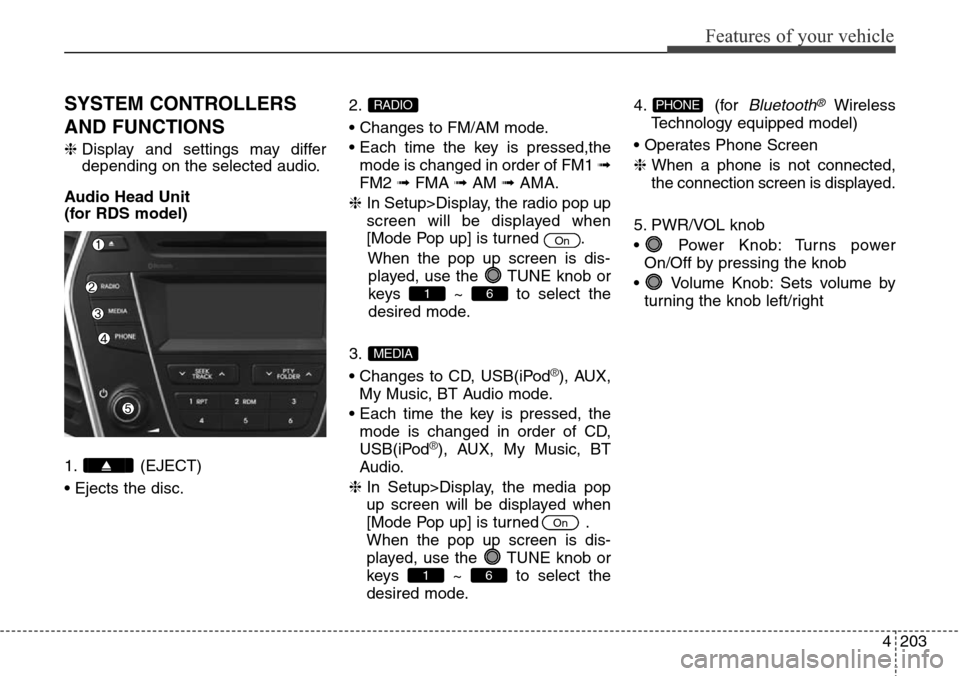
Audio Head Unit
(for RDS model)
1. (EJECT)
• Ejects the disc.2.
• Changes to FM/AM mode.
• Each time the key is pressed,the
mode is changed in order of FM1 ➟
FM2 ➟FMA ➟AM ➟AMA.
❈ In Setup>Display, the radio pop up
screen will be displayed when
[Mode Pop up] is turned .
When the pop up screen is dis-
played, use the TUNE knob or
keys ~ to select the
desired mode.
3.
• Changes to CD, USB(iPod
®), AUX,
My Music, BT Audio mode.
• Each time the key is pressed, the
mode is changed in order of CD,
USB(iPod
®), AUX, My Music, BT
Audio.
❈ In Setup>Display, the media pop
up screen will be displayed when
[Mode Pop up] is turned .
When the pop up screen is dis-
played, use the TUNE knob or
keys ~ to select the
desired mode.4. (for
Bluetooth®Wireless
Technology equipped model)
• Operates Phone Screen
❈ When a phone is not connected,
the connection screen is displayed.
5. PWR/VOL knob
• Power Knob: Turns power
On/Off by pressing the knob
• Volume Knob: Sets volume by
turning the knob left/rightPHONE
61
On
MEDIA
61
On
RADIO
Page 301 of 718
Features of your vehicle
204 4
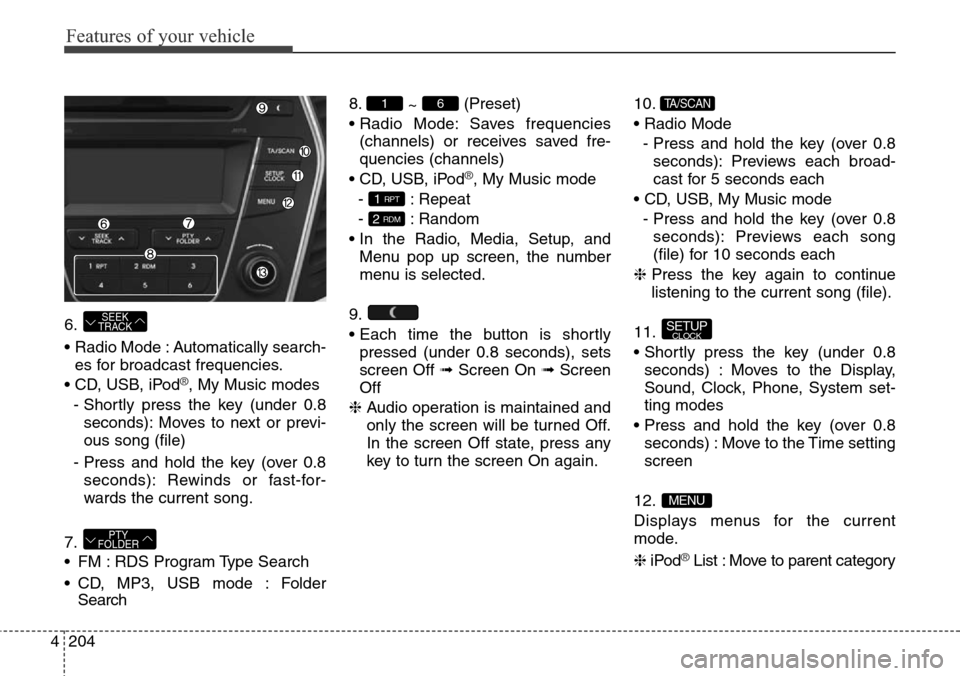
6.
• Radio Mode : Automatically search-
es for broadcast frequencies.
• CD, USB, iPod
®, My Music modes
- Shortly press the key (under 0.8
seconds): Moves to next or previ-
ous song (file)
- Press and hold the key (over 0.8
seconds): Rewinds or fast-for-
wards the current song.
7.
• FM : RDS Program Type Search
• CD, MP3, USB mode : Folder
Search8.
~ (Preset)
• Radio Mode: Saves frequencies
(channels) or receives saved fre-
quencies (channels)
• CD, USB, iPod
®, My Music mode
- : Repeat
- : Random
• In the Radio, Media, Setup, and
Menu pop up screen, the number
menu is selected.
9.
• Each time the button is shortly
pressed (under 0.8 seconds), sets
screen Off ➟Screen On ➟Screen
Off
❈ Audio operation is maintained and
only the screen will be turned Off.
In the screen Off state, press any
key to turn the screen On again.10.
• Radio Mode
- Press and hold the key (over 0.8
seconds): Previews each broad-
cast for 5 seconds each
• CD, USB, My Music mode
- Press and hold the key (over 0.8
seconds): Previews each song
(file) for 10 seconds each
❈ Press the key again to continue
listening to the current song (file).
11.
• Shortly press the key (under 0.8
seconds) : Moves to the Display,
Sound, Clock, Phone, System set-
ting modes
• Press and hold the key (over 0.8
seconds) : Move to the Time setting
screen
12.
Displays menus for the current
mode.
❈iPod
®List : Move to parent category
MENU
SETUPCLOCK
TA/SCAN
2 RDM
1 RPT
61
PTY
FOLDER
SEEK
TRACK
Page 303 of 718
Features of your vehicle
206 4
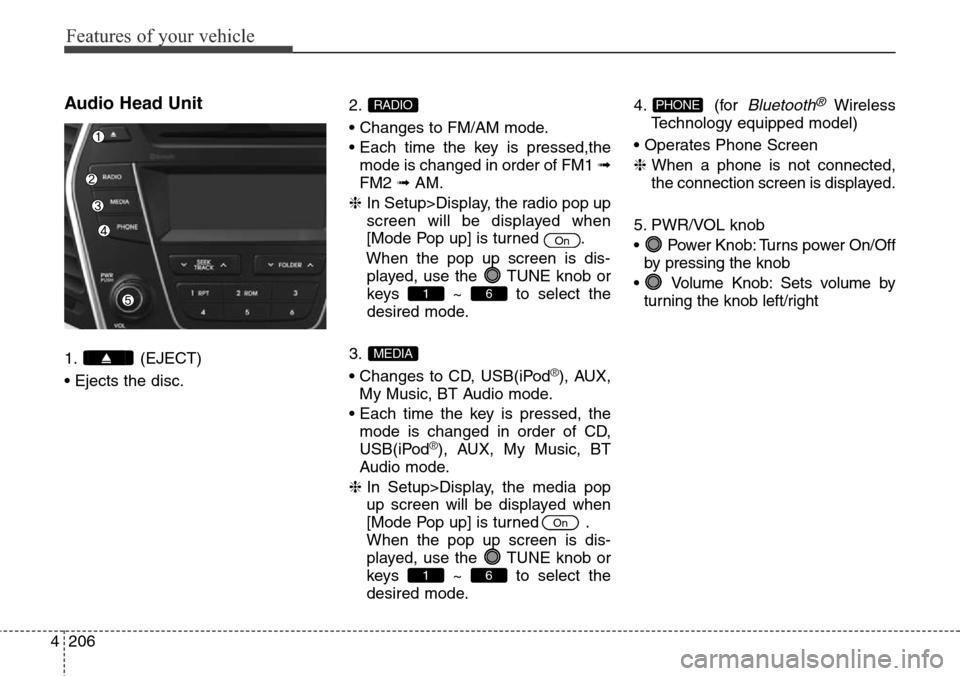
Audio Head Unit
1. (EJECT)
• Ejects the disc.2.
• Changes to FM/AM mode.
• Each time the key is pressed,the
mode is changed in order of FM1 ➟
FM2 ➟AM.
❈ In Setup>Display, the radio pop up
screen will be displayed when
[Mode Pop up] is turned .
When the pop up screen is dis-
played, use the TUNE knob or
keys ~ to select the
desired mode.
3.
• Changes to CD, USB(iPod®), AUX,
My Music, BT Audio mode.
• Each time the key is pressed, the
mode is changed in order of CD,
USB(iPod
®), AUX, My Music, BT
Audio mode.
❈ In Setup>Display, the media pop
up screen will be displayed when
[Mode Pop up] is turned .
When the pop up screen is dis-
played, use the TUNE knob or
keys ~ to select the
desired mode.4. (for
Bluetooth®Wireless
Technology equipped model)
• Operates Phone Screen
❈ When a phone is not connected,
the connection screen is displayed.
5. PWR/VOL knob
• Power Knob: Turns power On/Off
by pressing the knob
• Volume Knob: Sets volume by
turning the knob left/rightPHONE
61
On
MEDIA
61
On
RADIO
Page 304 of 718
4207
Features of your vehicle
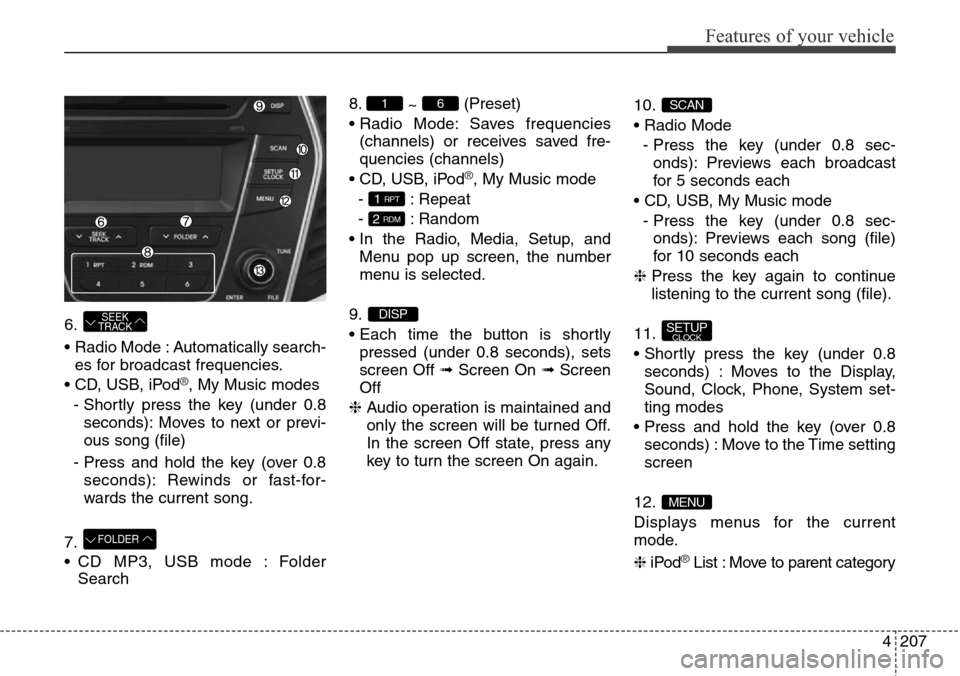
6.
• Radio Mode : Automatically search-
es for broadcast frequencies.
• CD, USB, iPod
®, My Music modes
- Shortly press the key (under 0.8
seconds): Moves to next or previ-
ous song (file)
- Press and hold the key (over 0.8
seconds): Rewinds or fast-for-
wards the current song.
7.
• CD MP3, USB mode : Folder
Search8.
~ (Preset)
• Radio Mode: Saves frequencies
(channels) or receives saved fre-
quencies (channels)
• CD, USB, iPod
®, My Music mode
- : Repeat
- : Random
• In the Radio, Media, Setup, and
Menu pop up screen, the number
menu is selected.
9.
• Each time the button is shortly
pressed (under 0.8 seconds), sets
screen Off ➟Screen On ➟Screen
Off
❈ Audio operation is maintained and
only the screen will be turned Off.
In the screen Off state, press any
key to turn the screen On again.10.
• Radio Mode
- Press the key (under 0.8 sec-
onds): Previews each broadcast
for 5 seconds each
• CD, USB, My Music mode
- Press the key (under 0.8 sec-
onds): Previews each song (file)
for 10 seconds each
❈ Press the key again to continue
listening to the current song (file).
11.
• Shortly press the key (under 0.8
seconds) : Moves to the Display,
Sound, Clock, Phone, System set-
ting modes
• Press and hold the key (over 0.8
seconds) : Move to the Time setting
screen
12.
Displays menus for the current
mode.
❈iPod
®List : Move to parent category
MENU
SETUPCLOCK
SCAN
DISP
2 RDM
1 RPT
61
FOLDER
SEEK
TRACK
Page 310 of 718
![Hyundai Grand Santa Fe 2014 User Guide 4213
Features of your vehicle
Phone Setup
(for RDS
,Bluetooth®Wireless
Technology equipped model)
Press the key Select [Phone] Pair Phone
Select [Pair Phone] Set through
TUNE knob
➀ Search for dev](/img/35/14775/w960_14775-309.png "Hyundai Grand Santa Fe 2014 User Guide 4213
Features of your vehicle
Phone Setup
(for RDS
,Bluetooth®Wireless
Technology equipped model)
Press the key Select [Phone] Pair Phone
Select [Pair Phone] Set through
TUNE knob
➀ Search for dev")
4213
Features of your vehicle
Phone Setup
(for RDS
,Bluetooth®Wireless
Technology equipped model)
Press the key Select [Phone] Pair Phone
Select [Pair Phone] Set through
TUNE knob
➀ Search for device names as dis-
played on your mobile phone and
connect.
➁ Input the passkey displayed on the
screen. (Passkey : 0000)
❈ The device name and passkey will
be displayed on the screen for up
to 3 minutes. If pairing is not com-
pleted within the 3 minutes, the
mobile phone pairing process will
automatically be canceled.➂ Pairing completion is displayed.
❈In some mobile phones, pairing
will automatically be followed by
connection.
❈ It is possible to pair up to five
Bluetooth®Wireless Technology
enabled mobile phones.SETUP
CAUTION
To pair a Bluetooth®Wireless
Technology enabled mobile
phone, authentication and con-
nection processes are first
required. As a result, you can-
not pair your mobile phone
while driving the vehicle. First
park your vehicle before use.
Page 311 of 718
![Hyundai Grand Santa Fe 2014 User Guide Features of your vehicle
214 4
Phone List
The names of up to 5 paired phones
will be displayed.
A [ ] is displayed in front of the cur-
rently connected phone.
Select the desired name to setup the
sel](/img/35/14775/w960_14775-310.png "Hyundai Grand Santa Fe 2014 User Guide Features of your vehicle
214 4
Phone List
The names of up to 5 paired phones
will be displayed.
A [ ] is displayed in front of the cur-
rently connected phone.
Select the desired name to setup the
sel")
Features of your vehicle
214 4
Phone List
The names of up to 5 paired phones
will be displayed.
A [ ] is displayed in front of the cur-
rently connected phone.
Select the desired name to setup the
selected phone.• Connecting a phone
Select [Phone List] Select mobile
phone through TUNE knob
Select [Connect Phone]
➀ Select a mobile phone that is not
currently connected.
➁ Connect the selected mobile
phone.
➂ Connection completion is dis-
played.
❈ If a phone is already connected, dis-
connect the currently connected
phone and select a new phone to con-
nect.•
Disconnecting a connected phone
Select [Phone List] Select mobile
phone through TUNE knob
Select [Disconnect Phone]
➀ Select the currently connected
mobile phone.
➁ Disconnect the selected mobile
phone.
➂ Disconnection completion is dis-
played.
Page 312 of 718
![Hyundai Grand Santa Fe 2014 User Guide 4215
Features of your vehicle
• Changing connection sequence
(Priority)
This is used to change the order (pri-
ority) of automatic connection for the
paired mobile phones.
Select [Phone List] Select](/img/35/14775/w960_14775-311.png "Hyundai Grand Santa Fe 2014 User Guide 4215
Features of your vehicle
• Changing connection sequence
(Priority)
This is used to change the order (pri-
ority) of automatic connection for the
paired mobile phones.
Select [Phone List] Select")
4215
Features of your vehicle
• Changing connection sequence
(Priority)
This is used to change the order (pri-
ority) of automatic connection for the
paired mobile phones.
Select [Phone List] Select [Priority]
through TUNE knob Select No. 1
Priority mobile phone
➀ Select [Priority].
➁ From the paired phones, select
the phone desired for No.1 priority.
➂ The changed priority sequence is
displayed.
❈ Once the connection sequence
(priority) is changed, the new no. 1
priority mobile phone will be con-
nected.
- when the no. 1 priority cannot be
connected: Automatically attempts
to connect the most recently con-
nected phone.
- Cases when the most recently
connected phone cannot be con-
nected: Attempts to connect in the
order in which paired phones are
listed.- The connected phone will auto-
matically be changed to No. 1 pri-
ority.
• Delete
Select [Phone List] Select mobile
phone through TUNE knob
Select [Delete]
➀ Select the desired mobile phone.
➁ Delete the selected mobile phone.
➂ Deletion completion is displayed.
❈ When attempting to delete a cur-
rently connected phone, the phone
is first disconnected.Phone book Download
This feature is used to download
phone book and call histories into
the audio system.
Select [Phone book Download]
Select through TUNE knob
CAUTION
• The download feature may not
be supported in some mobile
phones.
• If a different operation is per-
formed while phone book is
being downloaded, download-
ing will be discontinued.
Phone book already down-
loaded will be saved.
• When downloading new phone
book, delete all previously
saved phone book before start-
ing download.
CAUTION
• When you delete a mobile
phone, the mobile phone
phone book will also be erased.
• For stable Bluetooth
®Wireless
Technology communication,
delete the mobile phone from
the audio and also delete the
audio from your mobile phone.
Page 313 of 718
![Hyundai Grand Santa Fe 2014 User Guide Features of your vehicle
216 4
Auto Download
When connecting a mobile phone, it
is possible to automatically download
new phone book and Call Histories.
Select [Auto Download] Set /
through TUNE knob](/img/35/14775/w960_14775-312.png "Hyundai Grand Santa Fe 2014 User Guide Features of your vehicle
216 4
Auto Download
When connecting a mobile phone, it
is possible to automatically download
new phone book and Call Histories.
Select [Auto Download] Set /
through TUNE knob")
Features of your vehicle
216 4
Auto Download
When connecting a mobile phone, it
is possible to automatically download
new phone book and Call Histories.
Select [Auto Download] Set /
through TUNE knob
Audio Streaming
Songs (files) saved in your
Bluetooth®Wireless Technology
enabled mobile phone can be played
through the audio system.
Select [Audio Streaming] Set /
through TUNE knobOutgoing Volume
This is used to set the volume of your
voice as heard by the other party
while on a
Bluetooth®Wireless
Technology enabled handsfree call.
Select [Outgoing Volume] Set vol-
ume through TUNE knob
❈ While on a call, the volume can be
changed by using the
key.
Bluetooth®Wireless Technology
System Off
This feature is used when you do not
wish to use the
Bluetooth®Wireless
Technology system.
Select [Bluetooth System Off] Set
through TUNE knob
❈ If a phone is already connected,
disconnect the currently connect-
ed phone and turn the
Bluetooth®
Wireless Technology system off.
SEEK
TRACK
Off
On
Off
On
CAUTION
The Bluetooth®Wireless
Technology audio streaming
feature may not be supported in
some mobile phones.