4WD Hyundai H-1 (Grand Starex) 2007 Owner's Manual
[x] Cancel search | Manufacturer: HYUNDAI, Model Year: 2007, Model line: H-1 (Grand Starex), Model: Hyundai H-1 (Grand Starex) 2007Pages: 284, PDF Size: 11.33 MB
Page 9 of 284
F9
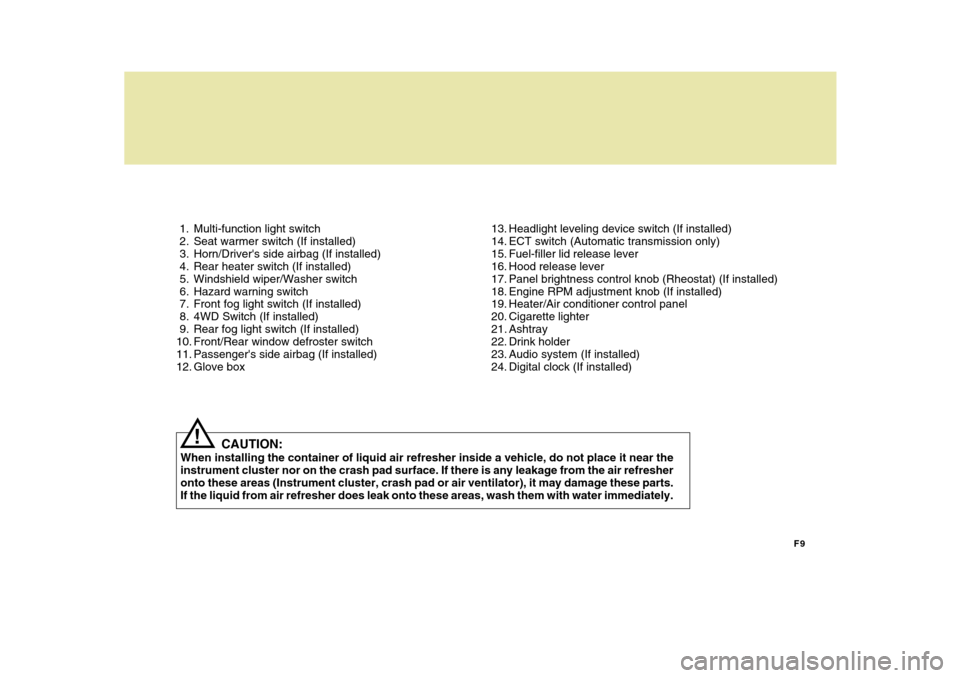
1. Multi-function light switch
2. Seat warmer switch (If installed)
3. Horn/Driver's side airbag (If installed)
4. Rear heater switch (If installed)
5. Windshield wiper/Washer switch
6. Hazard warning switch
7. Front fog light switch (If installed)
8. 4WD Switch (If installed)
9. Rear fog light switch (If installed)
10. Front/Rear window defroster switch
11. Passenger's side airbag (If installed)
12. Glove box
13. Headlight leveling device switch (If installed)
14. ECT switch (Automatic transmission only)
15. Fuel-filler lid release lever
16. Hood release lever
17. Panel brightness control knob (Rheostat) (If installed)
18. Engine RPM adjustment knob (If installed)
19. Heater/Air conditioner control panel
20. Cigarette lighter
21. Ashtray
22. Drink holder
23. Audio system (If installed)
24. Digital clock (If installed)
CAUTION:
When installing the container of liquid air refresher inside a vehicle, do not place it near theinstrument cluster nor on the crash pad surface. If there is any leakage from the air refresher onto these areas (Instrument cluster, crash pad or air ventilator), it may damage these parts. If the liquid from air refresher does leak onto these areas, wash them with water immediately.
!
Page 12 of 284

YOUR VEHICLE AT A GLANCE
F12
B255A01P-GAT INDICATOR SYMBOLS ON THE INSTRUMENT CLUSTER * More detailed explanations of these items will be found beginning on page 2-8.
O/D OFF Indicator Light (Automatic Transmission Only)
Fuel Filter Warning Light (Diesel only)
Diesel Pre-heat Indicator Light (Diesel only)
Immobilizer Warning Light (If installed)
SRS (Airbag) Service Reminder Indicator Light (SRI) (If installed)
ABS Service Reminder Indicator Light(If installed)
Turn Signal Indicator Lights High Beam Indicator LightLow Oil Pressure Warning Light Parking Brake/Low Brake Fluid Level Warning Light Charging System Warning Light Seat Belt Warning Light (If installed) Door Ajar Warning Light Low Fuel Level Warning Light
POWER/HOLD Indicator Light (If installed) Malfunction Indicator Light (If installed)
4WD HIGH/LOW Indicator Light (If installed)
Page 70 of 284
2
INSTRUMENTS AND CONTROLS
3
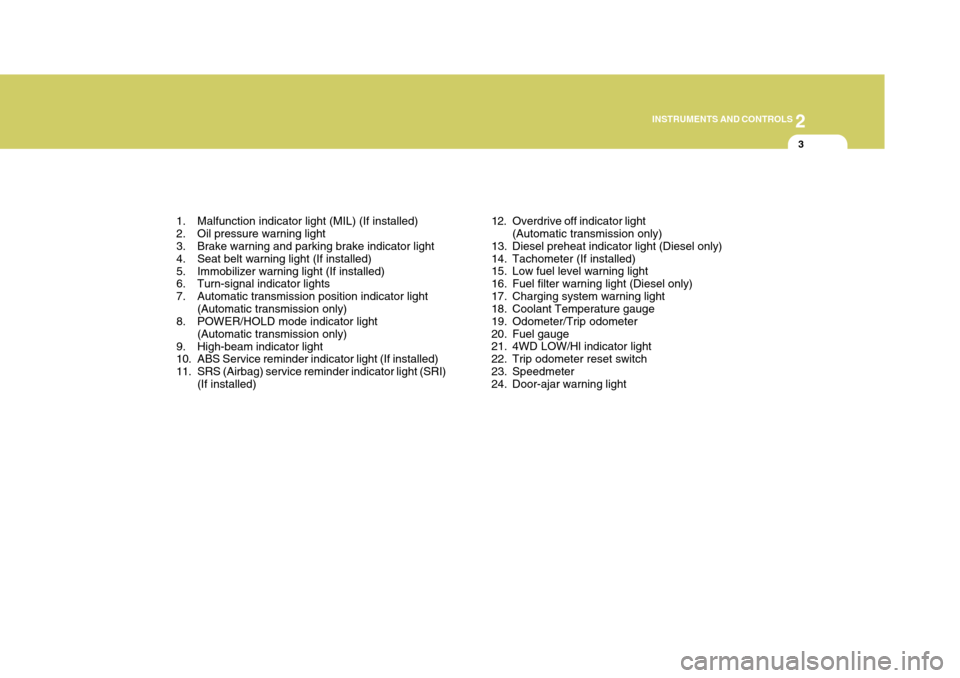
1. Malfunction indicator light (MIL) (If installed)
2. Oil pressure warning light
3. Brake warning and parking brake indicator light
4. Seat belt warning light (If installed)
5. Immobilizer warning light (If installed)
6. Turn-signal indicator lights
7. Automatic transmission position indicator light (Automatic transmission only)
8. POWER/HOLD mode indicator light
(Automatic transmission only)
9. High-beam indicator light
10. ABS Service reminder indicator light (If installed)
11. SRS (Airbag) service reminder indicator light (SRI) (If installed) 12. Overdrive off indicator light
(Automatic transmission only)
13. Diesel preheat indicator light (Diesel only)
14. Tachometer (If installed)
15. Low fuel level warning light
16. Fuel filter warning light (Diesel only)
17. Charging system warning light
18. Coolant Temperature gauge
19. Odometer/Trip odometer
20. Fuel gauge
21. 4WD LOW/Hl indicator light
22. Trip odometer reset switch
23. Speedmeter
24. Door-ajar warning light
Page 72 of 284
2
INSTRUMENTS AND CONTROLS
5
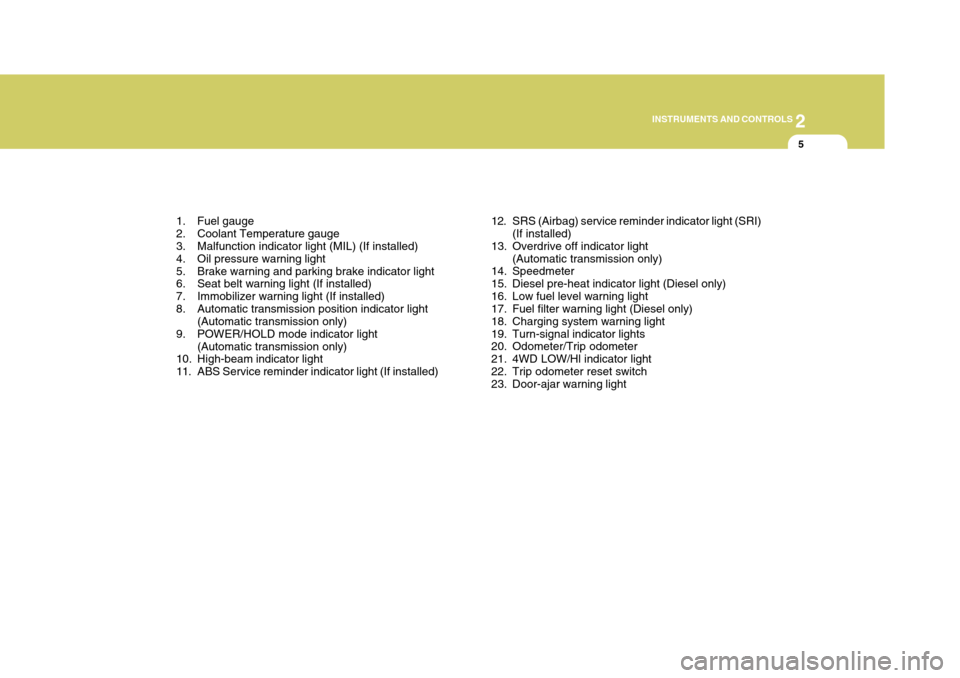
1. Fuel gauge
2. Coolant Temperature gauge
3. Malfunction indicator light (MIL) (If installed)
4. Oil pressure warning light
5. Brake warning and parking brake indicator light
6. Seat belt warning light (If installed)
7. Immobilizer warning light (If installed)
8. Automatic transmission position indicator light (Automatic transmission only)
9. POWER/HOLD mode indicator light
(Automatic transmission only)
10. High-beam indicator light
11. ABS Service reminder indicator light (If installed) 12. SRS (Airbag) service reminder indicator light (SRI)
(If installed)
13. Overdrive off indicator light (Automatic transmission only)
14. Speedmeter
15. Diesel pre-heat indicator light (Diesel only)
16. Low fuel level warning light
17. Fuel filter warning light (Diesel only)
18. Charging system warning light
19. Turn-signal indicator lights
20. Odometer/Trip odometer
21. 4WD LOW/Hl indicator light
22. Trip odometer reset switch
23. Door-ajar warning light
Page 78 of 284
2
INSTRUMENTS AND CONTROLS
11
C130R01P-GAT 4WD LOW/HI Indicator Light (If installed)
See page 3-17.
B260U01TB-GAT Immobilizer IndicatorLight (If installed)
This indicator light comes on for some seconds after the ignition key is turnedto the "ON" position. At this time, you can start the engine. The light goes out after the engine is running. In case thislight goes out before you start the engine, you must turn to the "LOCK" position and restart the engine. In casethis light blinks for five seconds when the ignition key is turned to "ON" posi- tion, this indicates that the immobilizersystem is out of order. At this time, refer to the explanation of the Limp home procedure(See page 1-9) or con-sult to the Hyundai dealer. Illuminating time
(sec)15 10
3 2 1
C130L01P-GAT
Diesel Preheat Indication Light
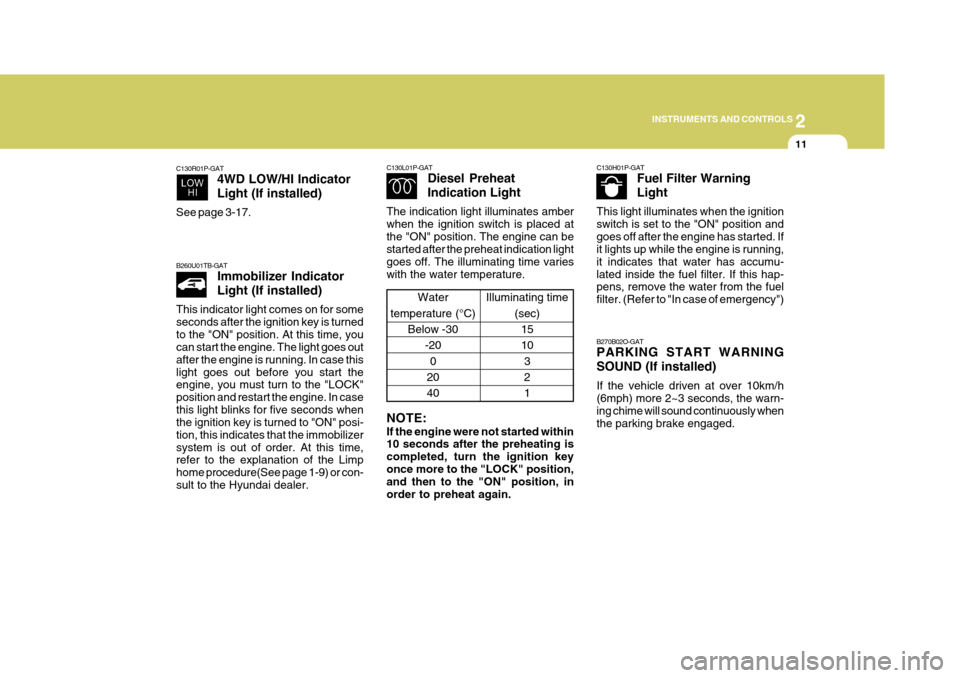
The indication light illuminates amber when the ignition switch is placed atthe "ON" position. The engine can be started after the preheat indication light goes off. The illuminating time varieswith the water temperature. NOTE: If the engine were not started within 10 seconds after the preheating is completed, turn the ignition keyonce more to the "LOCK" position, and then to the "ON" position, in order to preheat again.
Water
temperature (°C) Below -30
-200
20 40 C130H01P-GAT
Fuel Filter Warning Light
This light illuminates when the ignition switch is set to the "ON" position andgoes off after the engine has started. If it lights up while the engine is running, it indicates that water has accumu-lated inside the fuel filter. If this hap- pens, remove the water from the fuel filter. (Refer to "In case of emergency")
B270B02O-GAT PARKING START WARNING SOUND (If installed) If the vehicle driven at over 10km/h (6mph) more 2~3 seconds, the warn- ing chime will sound continuously whenthe parking brake engaged.
Page 91 of 284
2 INSTRUMENTS AND CONTROLS
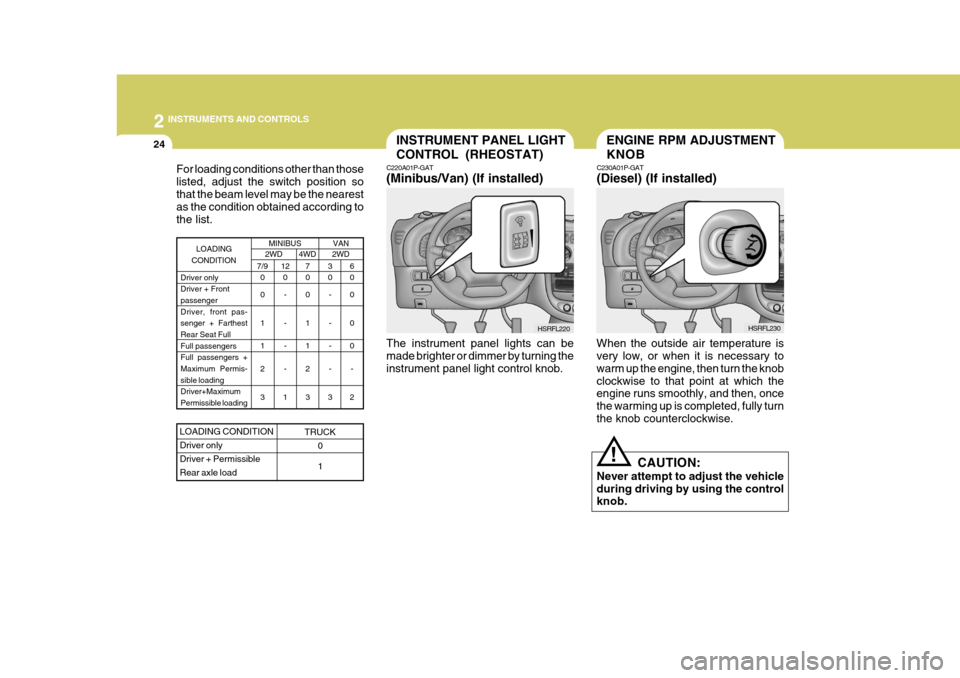
24INSTRUMENT PANEL LIGHT CONTROL (RHEOSTAT)
C220A01P-GAT (Minibus/Van) (If installed)
HSRFL220
The instrument panel lights can be made brighter or dimmer by turning the instrument panel light control knob.
For loading conditions other than thoselisted, adjust the switch position sothat the beam level may be the nearest as the condition obtained according to the list.
MINIBUS2WD4WD 2WD
7/9
0 0 1 1 2 3 3 0
- - - -
3 6 0 0 0 0
-
2
7 0 0 1 1 2 3
LOADING
CONDITION
Driver only Driver + Frontpassenger Driver, front pas- senger + FarthestRear Seat Full Full passengers Full passengers +Maximum Permis- sible loading Driver+MaximumPermissible loading12 0
- - - -
1
LOADING CONDITION Driver onlyDriver + PermissibleRear axle load
TRUCK 0 1
VAN
ENGINE RPM ADJUSTMENT KNOB
C230A01P-GAT (Diesel) (If installed)
When the outside air temperature is very low, or when it is necessary to warm up the engine, then turn the knobclockwise to that point at which the engine runs smoothly, and then, once the warming up is completed, fully turnthe knob counterclockwise. CAUTION:
Never attempt to adjust the vehicleduring driving by using the control knob.
! HSRFL230
Page 143 of 284
3
Engine Exhaust Can Be Dangerous! ........................... 3-2
Before Starting the Engine ........................................... 3-3Precaution for Exhaust Fumes While
Starting and Driving .................................................... 3-3
To Start the Engine ...................................................... 3-4
Key Positions ............................................................... 3-4Starting ........................................................................ 3-5
Manual Transmission ................................................... 3-8Automatic Transmission ............................................. 3-10
Driving with Electronic Dual-Range Automatic
Transmission ............................................................. 3-14
Four-Wheel Drive (4WD) ............................................ 3-16
Brake System ............................................................. 3-20
Anti-Lock Brake System (ABS) .................................. 3-24
Rear Parking Assist System ...................................... 3-25
Driving for Economy ................................................... 3-26
Smooth Cornering ....................................................... 3-29
Winter Driving ............................................................. 3-29
Additional Equipment .................................................. 3-32
Locking Differential ..................................................... 3-32
STARTING AND OPERATING
3
Page 158 of 284
3 STARTING AND OPERATING
16
o Always use the parking brake. Do
not depend on placing the transmis- sion in "P" to keep the vehicle from moving.
o Exercise extreme caution when driv-
ing on a slippery surface. Be espe-cially careful when braking, acceler- ating or shifting gears.On a slippery surface, an abrupt change in engine speed can cause the drive wheels to lose traction andthe vehicle to go out of control.
o Do not hold the vehicle on the up-
grade with the accelerator pedal.This can cause the transmission to overheat. Always use the brake pedal or parking brake.
o Optimum vehicle performance and economy is obtained by smoothlydepressing and releasing the accel-erator pedal.
WARNING:
o Avoid high cornering speeds.
o Do not make quick steering wheel movements, such as sharp lane changes or fast, sharp turns.
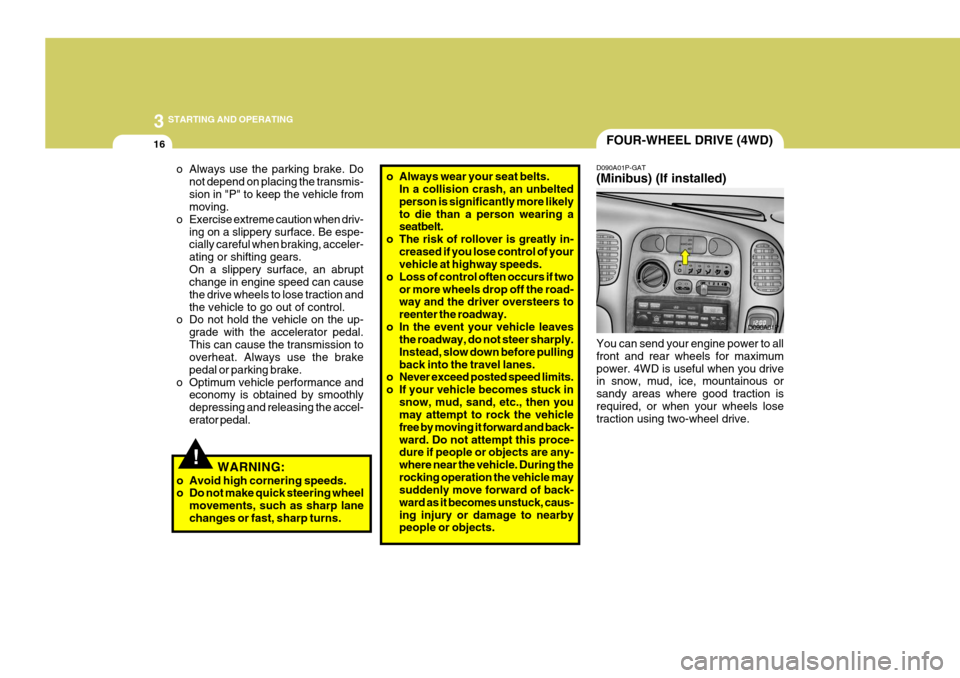
FOUR-WHEEL DRIVE (4WD)
D090A01P-GAT (Minibus) (If installed) You can send your engine power to all front and rear wheels for maximumpower. 4WD is useful when you drive in snow, mud, ice, mountainous or sandy areas where good traction isrequired, or when your wheels lose traction using two-wheel drive. D090A01P
!
o Always wear your seat belts.
In a collision crash, an unbelted person is significantly more likelyto die than a person wearing a seatbelt.
o The risk of rollover is greatly in-
creased if you lose control of yourvehicle at highway speeds.
o Loss of control often occurs if two or more wheels drop off the road-way and the driver oversteers to reenter the roadway.
o In the event your vehicle leaves the roadway, do not steer sharply.Instead, slow down before pullingback into the travel lanes.
o Never exceed posted speed limits.
o If your vehicle becomes stuck in
snow, mud, sand, etc., then you may attempt to rock the vehicle free by moving it forward and back-ward. Do not attempt this proce- dure if people or objects are any- where near the vehicle. During therocking operation the vehicle may suddenly move forward of back- ward as it becomes unstuck, caus-ing injury or damage to nearby people or objects.
Page 159 of 284
3
STARTING AND OPERATING
17
Switch position
o 2H(Rear-wheel drive) When driving on normal roads and highway.
o 4H(High range 4-wheel drive) When driving deep snow, sand or rough roads with normal speed. The 4WD indication light "HI" will be turned on to remind you that you are in the 4Hmode.
o 4L(Low range 4-wheel drive) When driving up or descending steep slopes or rough roads such as muddyroad. Especially when increased drive power is required. The indication light "LO" will be turnedon to remind you that you are in the 4L mode. CAUTION:
Do not select 4WD mode on dry paved roads. Especially on dry high way, never select the 4WD(4H or 4L).Four-wheel driving on dry paved roads for a long period will increase the fuel consumption with possiblenoise generation and early tire wear. In addition, differential oil tempera- ture increases with possible driv-ing system part wear.
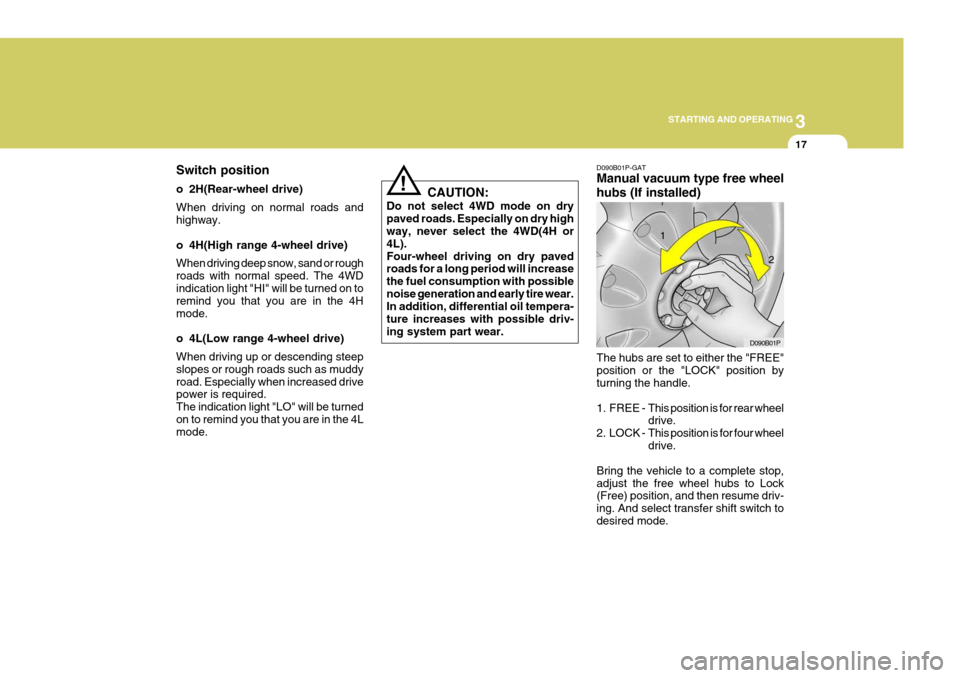
! D090B01P-GAT Manual vacuum type free wheel hubs (If installed) The hubs are set to either the "FREE" position or the "LOCK" position by turning the handle.
1. FREE -
This position is for rear wheel drive.
2. LOCK - This position is for four wheel drive.
Bring the vehicle to a complete stop, adjust the free wheel hubs to Lock (Free) position, and then resume driv- ing. And select transfer shift switch todesired mode. D090B01P
1
2
Page 160 of 284
3 STARTING AND OPERATING
18
D090D02P-GAT Transfer shift switch operation By selecting the transfer shift switch(4H, 4L), the both axles of thevehicle are rigidly connected with each other. This improves the traction char- acteristics.
2H 4H
Select the 4H mode switch at speed below 60~70 km/h. It is not necessary to depress the clutch pedal (manualtransmission) or put the shift lever into "N" position (automatic transmission). Perform this operation when drivingstraight. 4H 2H
Select the 2H mode switch. This canbe done at any speed, and it is notnecessary to depress the clutch pedal (manual transmission) or put the shift lever into "N" position (automatic trans-mission). Perform this operation when driving straight.
CAUTION:
If four wheel drive is to be used, both the left and right free wheel hubs must be set to the "LOCK" position. Do not attempt to drivethe vehicle with the transfer shift switch is selected to either the "4H" or "4L" position if the free wheelhubs are in the "FREE" position. If the setting of the free wheel hubs is to be changed after extended use ofthe brake (such as for descending a long slope), allow them to cool first. The free wheel hubs can be becomeextremely hot and could cause se- vere burns.! D090C01P-GAT Auto vacuum type free wheel hubs (If installed) The auto vacuum type free wheel hub is designed to allow for automatic 4WDengagement when the transfer shift switch is selected to the 4H or 4L position.When engaging and disengaging, the auto vacuum type free wheel hubs will make a clicking noise. This is normal.