clock Hyundai H-1 (Grand Starex) 2007 Owner's Manual
[x] Cancel search | Manufacturer: HYUNDAI, Model Year: 2007, Model line: H-1 (Grand Starex), Model: Hyundai H-1 (Grand Starex) 2007Pages: 284, PDF Size: 11.33 MB
Page 9 of 284
F9
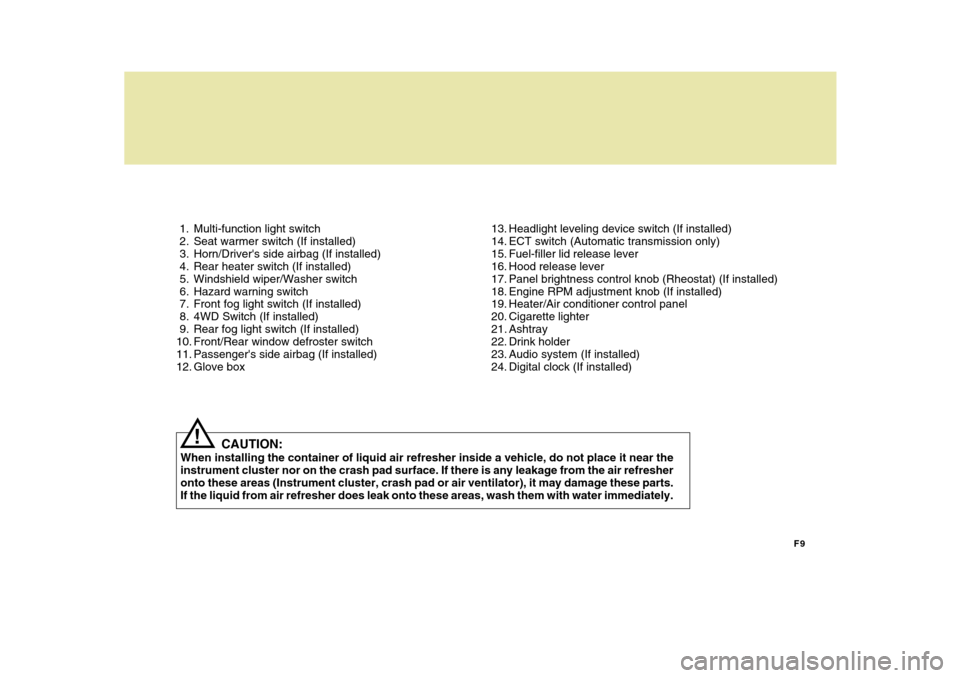
1. Multi-function light switch
2. Seat warmer switch (If installed)
3. Horn/Driver's side airbag (If installed)
4. Rear heater switch (If installed)
5. Windshield wiper/Washer switch
6. Hazard warning switch
7. Front fog light switch (If installed)
8. 4WD Switch (If installed)
9. Rear fog light switch (If installed)
10. Front/Rear window defroster switch
11. Passenger's side airbag (If installed)
12. Glove box
13. Headlight leveling device switch (If installed)
14. ECT switch (Automatic transmission only)
15. Fuel-filler lid release lever
16. Hood release lever
17. Panel brightness control knob (Rheostat) (If installed)
18. Engine RPM adjustment knob (If installed)
19. Heater/Air conditioner control panel
20. Cigarette lighter
21. Ashtray
22. Drink holder
23. Audio system (If installed)
24. Digital clock (If installed)
CAUTION:
When installing the container of liquid air refresher inside a vehicle, do not place it near theinstrument cluster nor on the crash pad surface. If there is any leakage from the air refresher onto these areas (Instrument cluster, crash pad or air ventilator), it may damage these parts. If the liquid from air refresher does leak onto these areas, wash them with water immediately.
!
Page 11 of 284
F11
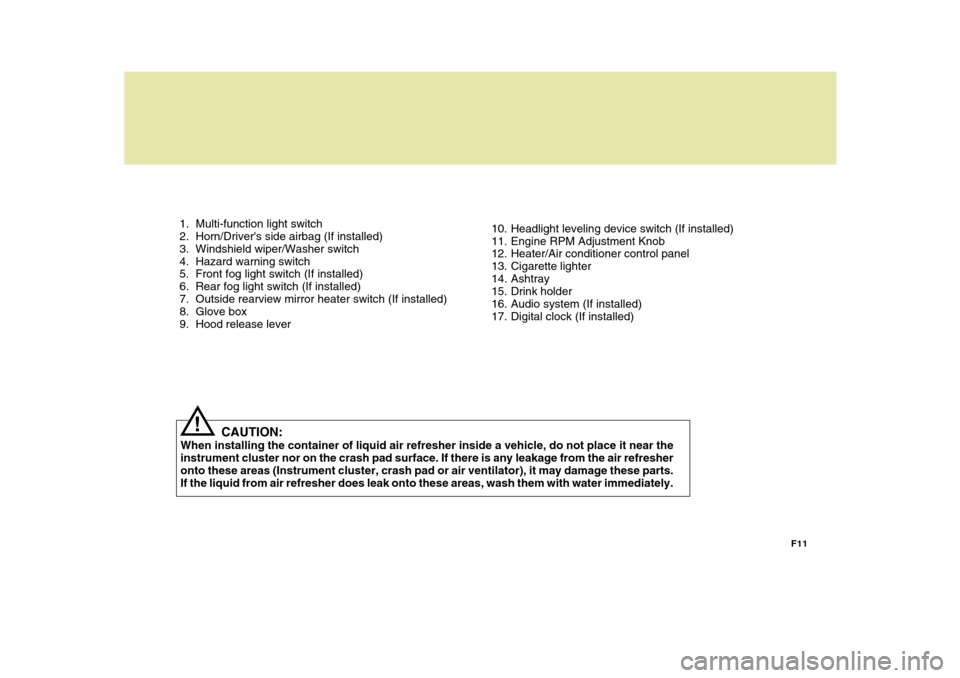
1. Multi-function light switch
2. Horn/Driver's side airbag (If installed)
3. Windshield wiper/Washer switch
4. Hazard warning switch
5. Front fog light switch (If installed)
6. Rear fog light switch (If installed)
7. Outside rearview mirror heater switch (If installed)
8. Glove box
9. Hood release lever
10. Headlight leveling device switch (If installed)
11. Engine RPM Adjustment Knob
12. Heater/Air conditioner control panel
13. Cigarette lighter
14. Ashtray
15. Drink holder
16. Audio system (If installed)
17. Digital clock (If installed)
CAUTION:
When installing the container of liquid air refresher inside a vehicle, do not place it near theinstrument cluster nor on the crash pad surface. If there is any leakage from the air refresheronto these areas (Instrument cluster, crash pad or air ventilator), it may damage these parts. If the liquid from air refresher does leak onto these areas, wash them with water immediately.
!
Page 46 of 284
1BEFORE DRIVING YOUR VEHICLE
34
5
!
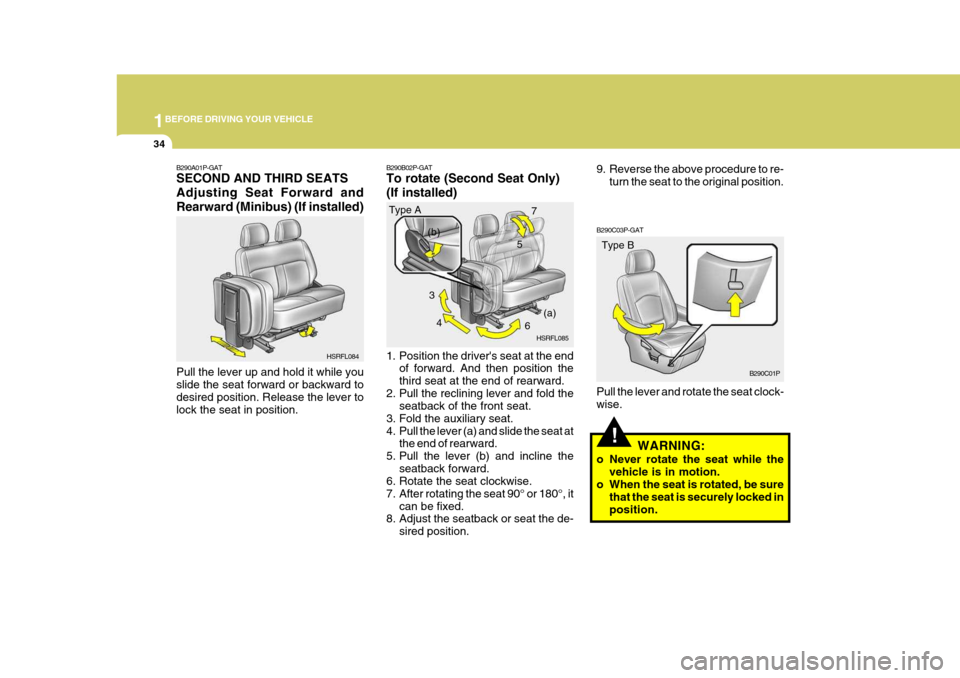
B290C03P-GAT Pull the lever and rotate the seat clock- wise.
WARNING:
o Never rotate the seat while the vehicle is in motion.
o When the seat is rotated, be sure
that the seat is securely locked inposition.
B290A01P-GAT SECOND AND THIRD SEATS Adjusting Seat Forward andRearward (Minibus) (If installed) Pull the lever up and hold it while you slide the seat forward or backward to desired position. Release the lever tolock the seat in position.
B290B02P-GAT To rotate (Second Seat Only) (If installed)
1. Position the driver's seat at the end
of forward. And then position the third seat at the end of rearward.
2. Pull the reclining lever and fold the seatback of the front seat.
3. Fold the auxiliary seat.
4. Pull the lever (a) and slide the seat at the end of rearward.
5. Pull the lever (b) and incline the seatback forward.
6. Rotate the seat clockwise.
7. After rotating the seat 90° or 180°, it
can be fixed.
8. Adjust the seatback or seat the de-
sired position.
HSRFL084
Type A
HSRFL085Type B
B290C01P
3
4 67
(a)
(b)
9. Reverse the above procedure to re-
turn the seat to the original position.
Page 68 of 284
2
Instrument Cluster And Indicator Lights ....................... 2-2
Warning And Indicator Lights ........................................ 2-8
Instrument Cluster....................................................... 2-12
Odometer/Trip odmeter ................................................ 2-14
Multimeter .................................................................... 2-16
Muti-funition Light Switch ............................................. 2-19
Windshield Wiper And Washer Switch ........................2-21
Headlamp Leveling Device System .............................2-23
Instrument Panel Light Control (Rheostat) ..................2-24
Engine Rpm Adjustment Knob ..................................... 2-24
Fog Lamp Switch ......................................................... 2-25
Front/Rear Window Defroster Switch ..........................2-26
Interior Light ....................... .......................................... 2-28
Sunroof ........................................................................ 2-30
Mirror ........................................................................... 2-34
Drink H older ................................................................ 2-35
Ashtray ........................................................................ 2-36
Digital Clock ................................................................ 2-37
Horn ............................................................................. 2-37
Heating And Cooling Control .......................................2-38
Rear Heater And Air Conditioner ................................. 2-45
Overhead Air C onditioning ........................................... 2-47
Climate Control Air Filter .............................................. 2-47
Stereo Sound System ................................................. 2-49
Audio System .............................................................. 2-51
Antenna ....................................................................... 2-73
INSTRUMENTS AND CONTROLS
2
Page 91 of 284
2 INSTRUMENTS AND CONTROLS
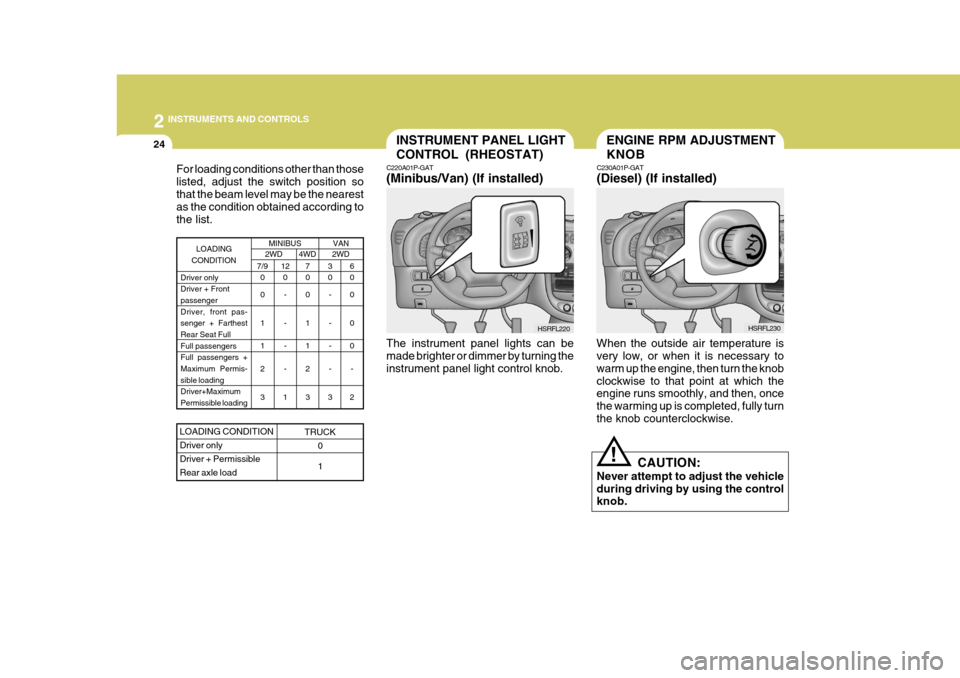
24INSTRUMENT PANEL LIGHT CONTROL (RHEOSTAT)
C220A01P-GAT (Minibus/Van) (If installed)
HSRFL220
The instrument panel lights can be made brighter or dimmer by turning the instrument panel light control knob.
For loading conditions other than thoselisted, adjust the switch position sothat the beam level may be the nearest as the condition obtained according to the list.
MINIBUS2WD4WD 2WD
7/9
0 0 1 1 2 3 3 0
- - - -
3 6 0 0 0 0
-
2
7 0 0 1 1 2 3
LOADING
CONDITION
Driver only Driver + Frontpassenger Driver, front pas- senger + FarthestRear Seat Full Full passengers Full passengers +Maximum Permis- sible loading Driver+MaximumPermissible loading12 0
- - - -
1
LOADING CONDITION Driver onlyDriver + PermissibleRear axle load
TRUCK 0 1
VAN
ENGINE RPM ADJUSTMENT KNOB
C230A01P-GAT (Diesel) (If installed)
When the outside air temperature is very low, or when it is necessary to warm up the engine, then turn the knobclockwise to that point at which the engine runs smoothly, and then, once the warming up is completed, fully turnthe knob counterclockwise. CAUTION:
Never attempt to adjust the vehicleduring driving by using the control knob.
! HSRFL230
Page 99 of 284
2 INSTRUMENTS AND CONTROLS
32
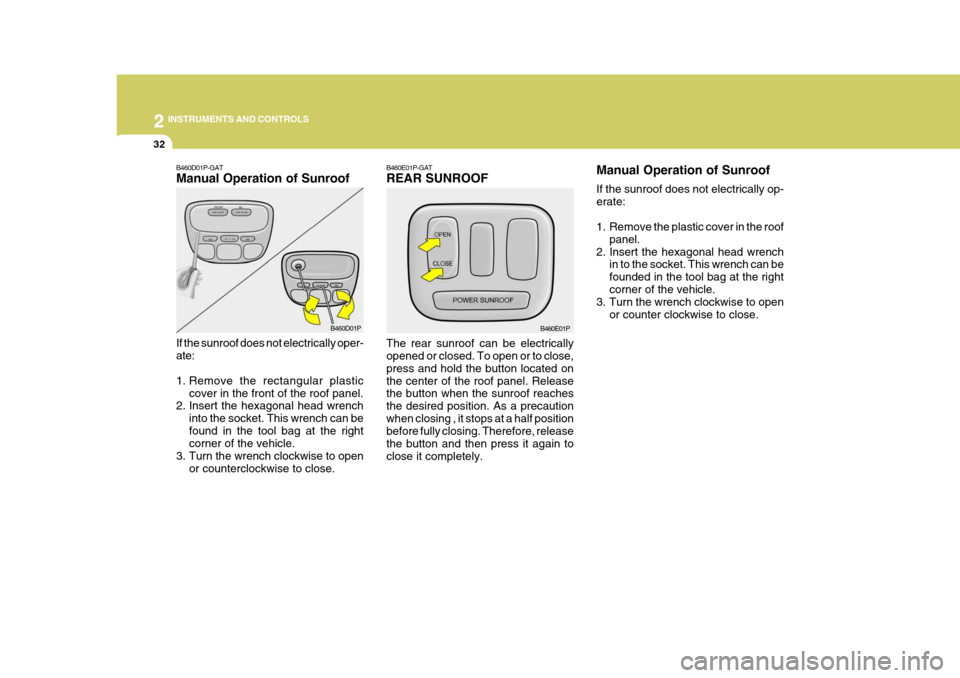
B460E01P-GAT REAR SUNROOF The rear sunroof can be electrically opened or closed. To open or to close, press and hold the button located onthe center of the roof panel. Release the button when the sunroof reaches the desired position. As a precautionwhen closing , it stops at a half position before fully closing. Therefore, release the button and then press it again toclose it completely. B460E01PManual Operation of Sunroof If the sunroof does not electrically op- erate:
1. Remove the plastic cover in the roof
panel.
2. Insert the hexagonal head wrench in to the socket. This wrench can be founded in the tool bag at the rightcorner of the vehicle.
3. Turn the wrench clockwise to open
or counter clockwise to close.B460D01P-GAT Manual Operation of Sunroof If the sunroof does not electrically oper- ate:
1. Remove the rectangular plasticcover in the front of the roof panel.
2. Insert the hexagonal head wrench
into the socket. This wrench can be found in the tool bag at the right corner of the vehicle.
3. Turn the wrench clockwise to open
or counterclockwise to close. B460D01P
Page 104 of 284
2
INSTRUMENTS AND CONTROLS
37
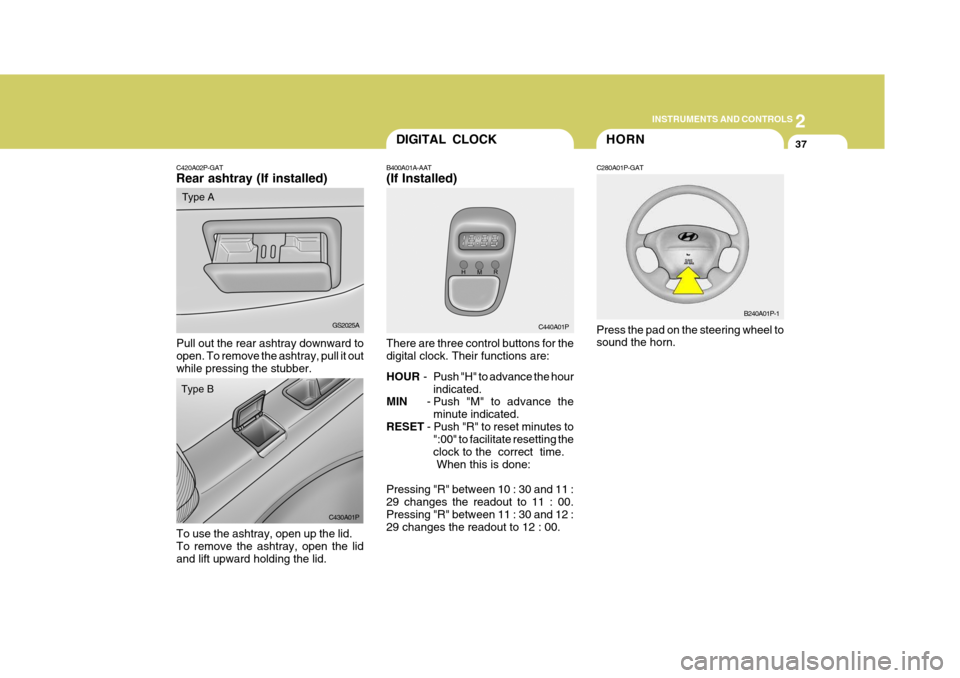
C420A02P-GAT Rear ashtray (If installed)
Pull out the rear ashtray downward to open. To remove the ashtray, pull it out while pressing the stubber. GS2025A
Type A
DIGITAL CLOCK
B400A01A-AAT (If Installed) There are three control buttons for the digital clock. Their functions are: HOUR - Push "H" to advance the hour
indicated.
MIN - Push "M" to advance the
minute indicated.
RESET - Push "R" to reset minutes to
":00" to facilitate resetting the clock to the correct time. When this is done:
Pressing "R" between 10 : 30 and 11 :29 changes the readout to 11 : 00. Pressing "R" between 11 : 30 and 12 : 29 changes the readout to 12 : 00. C440A01PHORN
C280A01P-GAT Press the pad on the steering wheel to sound the horn. B240A01P-1
C430A01P
Type B
To use the ashtray, open up the lid. To remove the ashtray, open the lidand lift upward holding the lid.
Page 119 of 284
2 INSTRUMENTS AND CONTROLS
52
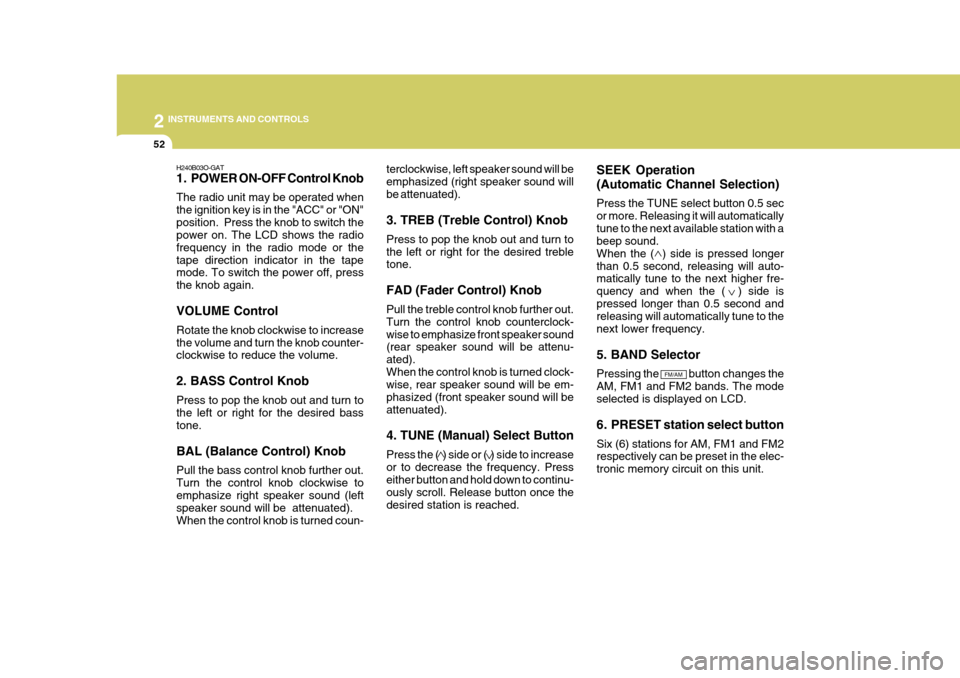
H240B03O-GAT
1. POWER ON-OFF Control Knob The radio unit may be operated when the ignition key is in the "ACC" or "ON"position. Press the knob to switch the power on. The LCD shows the radio frequency in the radio mode or thetape direction indicator in the tape mode. To switch the power off, press the knob again. VOLUME Control Rotate the knob clockwise to increase the volume and turn the knob counter- clockwise to reduce the volume. 2. BASS Control Knob Press to pop the knob out and turn to the left or right for the desired bass tone. BAL (Balance Control) Knob Pull the bass control knob further out. Turn the control knob clockwise to emphasize right speaker sound (left speaker sound will be attenuated).When the control knob is turned coun- terclockwise, left speaker sound will beemphasized (right speaker sound willbe attenuated). 3. TREB (Treble Control) Knob Press to pop the knob out and turn to the left or right for the desired treble tone. FAD (Fader Control) Knob Pull the treble control knob further out. Turn the control knob counterclock-wise to emphasize front speaker sound (rear speaker sound will be attenu- ated).When the control knob is turned clock- wise, rear speaker sound will be em- phasized (front speaker sound will beattenuated). 4. TUNE (Manual) Select Button Press the ( ) side or ( ) side to increase or to decrease the frequency. Press either button and hold down to continu- ously scroll. Release button once thedesired station is reached.
SEEK Operation (Automatic Channel Selection) Press the TUNE select button 0.5 sec or more. Releasing it will automaticallytune to the next available station with a beep sound. When the ( ) side is pressed longerthan 0.5 second, releasing will auto- matically tune to the next higher fre- quency and when the ( ) side ispressed longer than 0.5 second and releasing will automatically tune to the next lower frequency. 5. BAND Selector Pressing the button changes the AM, FM1 and FM2 bands. The modeselected is displayed on LCD.
6. PRESET station select button Six (6) stations for AM, FM1 and FM2 respectively can be preset in the elec- tronic memory circuit on this unit.
FM/AM
Page 124 of 284
2
INSTRUMENTS AND CONTROLS
57
H260B03E-AAT
1. POWER ON-OFF Control Knob
The radio unit may be operated when the ignition key is in the "ACC" or "ON"position. Press the knob to switch the power on. The LCD shows the radio frequency in the radio mode or the CDtrack indicator in either the CD mode. To switch the power off, press the knob again. VOLUME Control Rotate the knob clockwise to increase the volume and turn the knob counter-clockwise to reduce the volume. BALANCE Control Pull and turn the control knob clock- wise to emphasize right speaker sound (left speaker sound will be attenuated).When the control knob is turned coun- terclockwise, left speaker sound will be emphasized (right speaker soundwill be attenuated). 2. FAD (Fader Control) Knob Turn the control knob counterclock- wise to emphasize front speaker sound(rear speaker sound will be attenu- ated). When the control knob is turned clockwise, rear speaker sound will beemphasized (front speaker sound will be attenuated).
3. BASS Control Knob Press to pop the knob out and turn to the left or right for the desired basstone. TREB (Treble Control) Knob Pull the bass control knob further out. Turn to the left or right for the desired treble tone.
4. SCAN Button When the scan button is pressed, the frequency will increase and the receiv-able stations will be tuned in one after another, receiving each station for 5 seconds. To stop scanning, press thescan button again.5. TUNE (Manual) Select Button Press the ( ) side or ( ) side to increase or to decrease the frequency.Press either button and hold down to continuously scroll. Release button once the desired station is reached. SEEK Operation (Automatic Channel Selection) Press the TUNE select button for 0.5 sec or more. Releasing it will automati-cally tune to the next available station with a beep sound. When the ( ) side is pressed longerthan 0.5 second, releasing will auto- matically tune to the next higher fre- quency and when the ( ) side ispressed longer than 0.5 second, re- leasing will automatically tune the next lower frequency. 6. BAND Selector Pressing the button changes the AM, FM1 and FM2 bands. The mode selected is displayed on LCD.
FM/AM
Page 130 of 284
2
INSTRUMENTS AND CONTROLS
63
BALANCE Control knob Pull the Bass control knob out further. Rotate the knob clockwise to empha-size right speaker sound (left speaker sound will be attenuated). When the control knob is turned counterclock-wise, left speaker sound will be em- phasized (right speaker sound will be attenuated).
3. TREBLE/FAD Control Knob TREBLE Control Knob
Press to pop the knob out and turn to the left or right for the desired trebletone. FAD (Fader Control) Knob Pull the Treble control knob out fur- ther. Turn the control knob counter- clockwise to emphasize front speakersound (rear speaker sound will be at- tenuated). When the control knob is turned clockwise, rear speaker soundwill be emphasized (front speaker sound will be attenuated).
H290B03E-GAT
1. POWER ON-OFF Control
Knob
The radio unit may be operated when the ignition key is in the "ACC" or "ON"position. Press the button to switch the power on. The display shows the radio frequency in the radio mode, the tapedirection indicator in the tape mode or CD track in either the CD mode. To switch the power off, press the buttonagain. VOLUME Control Rotate the knob clockwise to increase the volume and turn the knob counter- clockwise to reduce the volume.
2. BASS/BALANCE Control Knob
BASS Control Knob Press to pop the knob out. To increase the bass, rotate the knob clockwise,while to decrease the bass, rotate the knob counterclockwise. 4. TUNE (Manual) Select Button Press the ( ) side or ( ) side to increase or to decrease the frequency.Press either button and hold down to continuously scroll. Release button once the desired station is reached. SEEK Operation (Automatic Channel Selection) Press the TUNE select button for 0.5 sec or more. Releasing it will automati-cally tune to the next available station with a beep sound. When the ( ) side is pressed longerthan 0.5 second and releasing will automatically tune to the next higher frequency and when the ( ) side ispressed longer than 0.5 second, re- leasing will automatically tune to the next lower frequency.
5. PRESET Station Select But-
tons
Six (6) stations for AM, FM1 and FM2 respectively can be preset in the elec-tronic memory circuit.