steering Hyundai H350 2015 User Guide
[x] Cancel search | Manufacturer: HYUNDAI, Model Year: 2015, Model line: H350, Model: Hyundai H350 2015Pages: 473, PDF Size: 26.4 MB
Page 59 of 473
2-39
Safety system of your vehicle
2
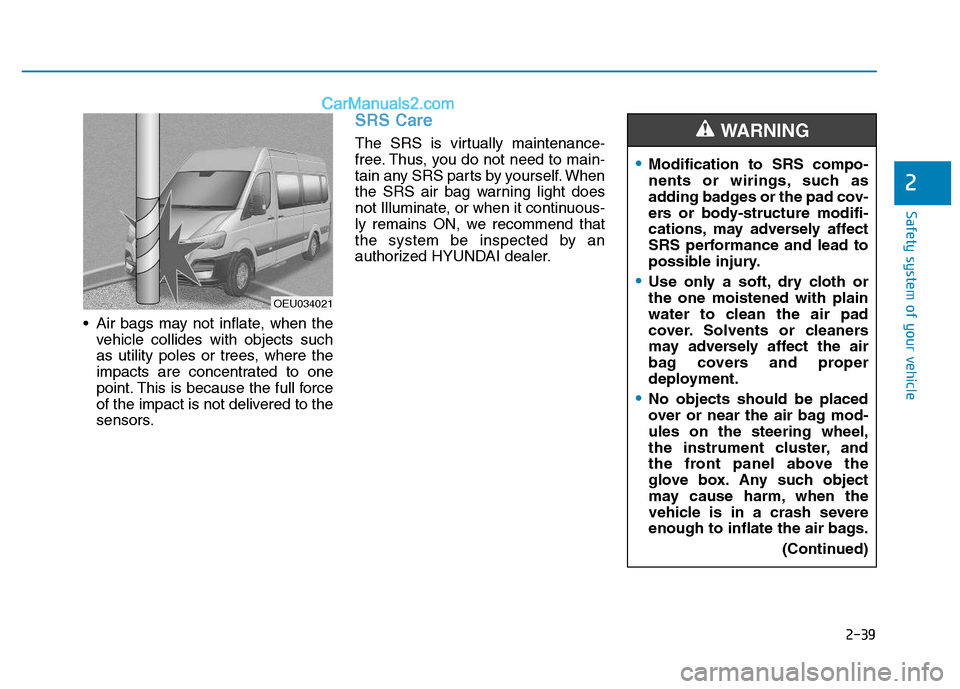
Air bags may not inflate, when thevehicle collides with objects such
as utility poles or trees, where the
impacts are concentrated to one
point. This is because the full force
of the impact is not delivered to the
sensors.
SRS Care
The SRS is virtually maintenance-
free. Thus, you do not need to main-
tain any SRS parts by yourself. When
the SRS air bag warning light does
not Illuminate, or when it continuous-
ly remains ON, we recommend that
the system be inspected by an
authorized HYUNDAI dealer.
OEU034021
Modification to SRS compo-
nents or wirings, such as
adding badges or the pad cov-
ers or body-structure modifi-
cations, may adversely affect
SRS performance and lead to
possible injury.
Use only a soft, dry cloth or the one moistened with plain
water to clean the air pad
cover. Solvents or cleaners
may adversely affect the air
bag covers and proper
deployment.
No objects should be placed
over or near the air bag mod-ules on the steering wheel,
the instrument cluster, and
the front panel above the
glove box. Any such object
may cause harm, when the
vehicle is in a crash severe
enough to inflate the air bags.
(Continued)
WARNING
Page 63 of 473
Convenient features of your vehicle
Keys .........................................................................3-4Record your key number ................................................3-4
Key operations ...................................................................3-4
Immobilizer system............................................................3-5
Remote keyless entry ...........................................3-6 Remote keyless entry system operations...................3-6
Transmitter precautions...................................................3-7
Battery replacement .........................................................3-8
Theft-alarm system...............................................3-9 Armed stage .....................................................................3-10
Theft-alarm stage...........................................................3-10
Disarmed stage ................................................................3-11
Door locks .............................................................3-11 Operating door locks from outside the vehicle ......3-11
Operating door locks from inside the vehicle .........3-12
Deadlocks ..........................................................................3-14
Speed sensing door lock system ................................3-14
Mid sliding door ...................................................3-15 Opening/closing from the outside..............................3-15
Opening/closing from the inside.................................3-16
Child-protector mid sliding door lock ........................3-16
Electrical step .......................................................3-17 Operation and obstacle detection ..............................3-19
Electrical step warning alarm ......................................3-19
Regular cleaning ..............................................................3-21 Rear door ..............................................................3-22
Opening/closing from the outside..............................3-23
Opening/closing from the inside.................................3-23
Opening the left-hand rear door ...............................3-24
Opening the rear doors to an angle of
180° or 270° ......................................................................3-24 Closing the rear doors from the outside ..................3-25
Child-protector rear door lock ....................................3-25
Windows ................................................................3-26 Power windows ................................................................3-27
Rear seat windows .........................................................3-29
Hood.......................................................................3-30 Opening the hood ...........................................................3-30
Closing the hood .............................................................3-31
Fuel filler lid .........................................................3-32 Closing the fuel filler lid ................................................3-32
Urea solution filler lid .........................................3-34
Steering wheel......................................................3-37 Power steering.................................................................3-37
Tilt & telescopic steering ..............................................3-37
Horn ....................................................................................3-38
Mirrors ...................................................................3-39 Inside rearview mirror....................................................3-39
Outside rearview mirror ................................................3-41
3
Page 99 of 473
3-37
Convenient features of your vehicle
3
Power steering
Power steering uses energy from the
engine to assist you in steering the
vehicle. If the engine is off or if the
power steering system becomes
inoperative, the vehicle may still be
steered, but it will require increased
steering effort.
Should you notice any change in the
effort required to steer during normal
vehicle operation, have the power
steering checked by an authorized
HYUNDAI dealer.If the power steering drive belt
breaks or if the power steering
pump malfunctions, the steering
effort will greatly increase.
If the vehicle is parked for extend- ed periods outside in cold weath-
er (below -10°C/14°F), the power
steering may require increased
effort when the engine is first
started. This is caused byincreased fluid viscosity due tothe cold weather and does notindicate a malfunction.
When this happens, increase the
engine RPM by depressing accel-
erator until the RPM reaches 1,500rpm then release or let the engine
idle for two or three minutes towarm up the fluid.
Tilt & telescopic steering
A tilt steering column allows you to
adjust the steering wheel before you
drive. You can also raise it to give
your legs more room when you exit
and enter the vehicle (if equipped).
The steering wheel should be posi-
tioned so that it is comfortable for
you to drive, while permitting you to
see the instrument panel warning
lights and gauges.
NOTICE
NOTICE
SS
TT EEEERR IINN GG WW HHEEEELL
Never hold the steering wheel
against a stop (extreme right or
left turn) for more than 5 sec-onds with the engine running.
Holding the steering wheel formore than 5 seconds in either
position may cause damage to
the power steering pump.
CAUTION
Never adjust the angle and height of steering wheel while
driving. You may lose your
steering control and cause
severe personal injury or acci-dents.
After adjusting, push the steering wheel both up and
down to be certain it is lockedin position.
WARNING
Page 100 of 473
3-38
Convenient features of your vehicle
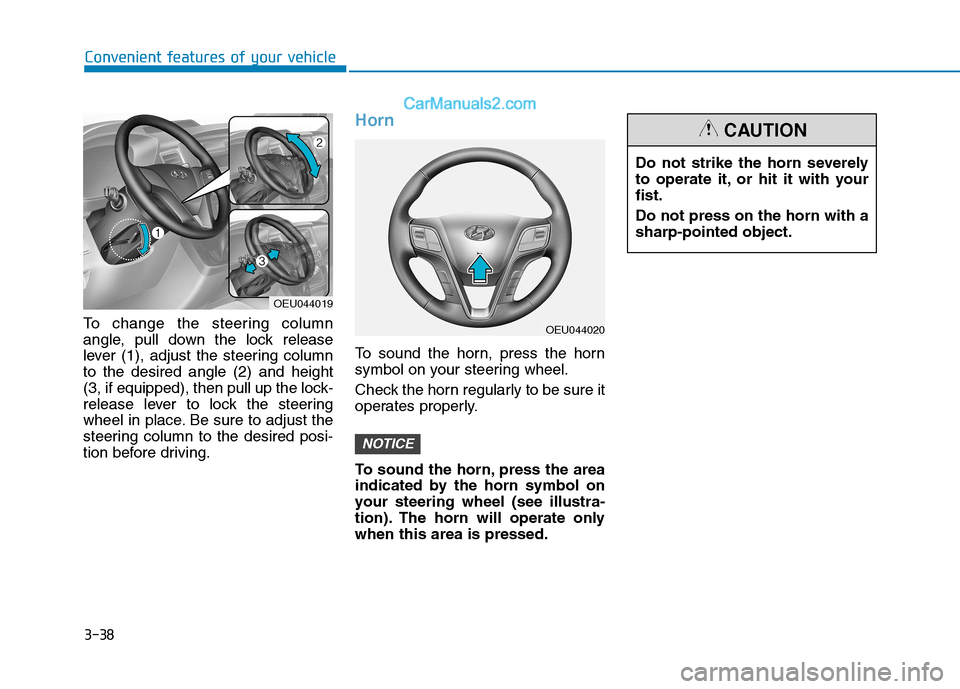
To change the steering column
angle, pull down the lock release
lever (1), adjust the steering columnto the desired angle (2) and height
(3, if equipped), then pull up the lock-
release lever to lock the steering
wheel in place. Be sure to adjust the
steering column to the desired posi-
tion before driving.
Horn
To sound the horn, press the horn
symbol on your steering wheel.
Check the horn regularly to be sure it
operates properly.
To sound the horn, press the area
indicated by the horn symbol on
your steering wheel (see illustra-
tion). The horn will operate onlywhen this area is pressed.
NOTICE
Do not strike the horn severely
to operate it, or hit it with yourfist. Do not press on the horn with a sharp-pointed object.
CAUTION
OEU044020
OEU044019
Page 157 of 473
3-95
Convenient features of your vehicle
3
This system is a supplemental sys-
tem that shows behind the vehicle
through the rearview display mirror
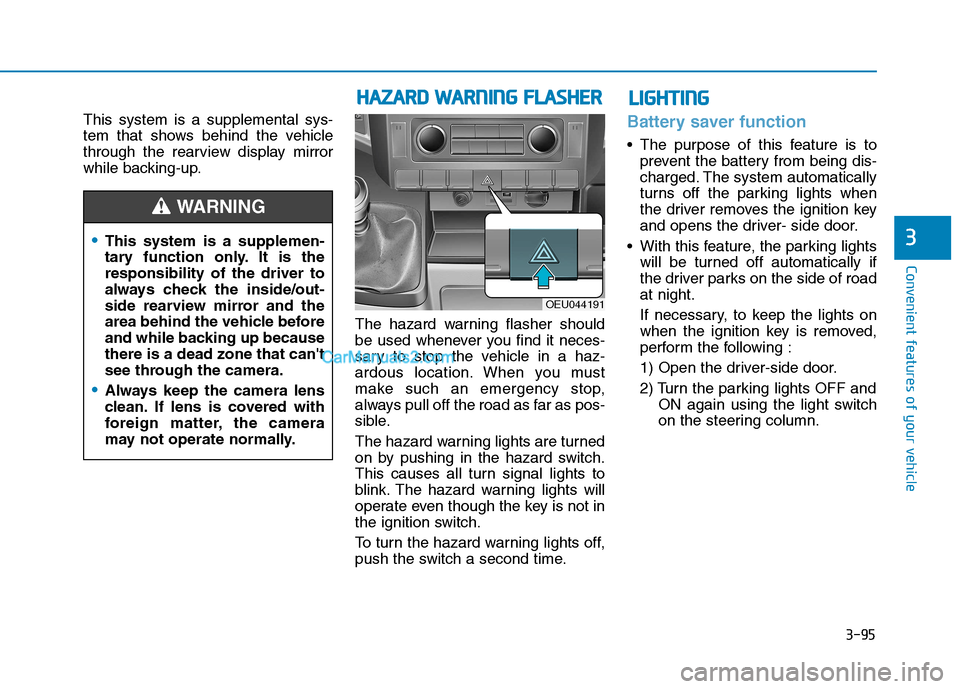
while backing-up.The hazard warning flasher should
be used whenever you find it neces-
sary to stop the vehicle in a haz-
ardous location. When you must
make such an emergency stop,
always pull off the road as far as pos-
sible.
The hazard warning lights are turned
on by pushing in the hazard switch.
This causes all turn signal lights to
blink. The hazard warning lights will
operate even though the key is not in
the ignition switch.
To turn the hazard warning lights off,
push the switch a second time.Battery saver function
The purpose of this feature is toprevent the battery from being dis-
charged. The system automatically
turns off the parking lights when
the driver removes the ignition key
and opens the driver- side door.
With this feature, the parking lights will be turned off automatically if
the driver parks on the side of roadat night.
If necessary, to keep the lights on
when the ignition key is removed,
perform the following :
1) Open the driver-side door.
2) Turn the parking lights OFF and ON again using the light switch
on the steering column.
This system is a supplemen-
tary function only. It is theresponsibility of the driver to
always check the inside/out-
side rearview mirror and the
area behind the vehicle before
and while backing up becausethere is a dead zone that can't
see through the camera.
Always keep the camera lens
clean. If lens is covered with
foreign matter, the camera
may not operate normally.
WARNING
HHAAZZAA RRDD WW AARRNN IINN GG FF LLAA SSHH EERR
OEU044191
LLIIGG HH TTIINN GG
Page 195 of 473
4-3
Multimedia System
4
Before entering a place with alow height clearance or a vehicle
wash, remove the antenna by
rotating it counterclockwise. If
not, the antenna may be dam-
aged.
When reinstalling your antenna, it is important that it is fullytightened and adjusted to the
upright position to ensure prop-
er reception. But it could be fold-
ed or removed when parking the
vehicle or when loading cargo
on the roof rack.
When cargo is loaded on the roof rack, do not place the cargonear the antenna pole to ensure
proper reception.
Audio remote control (if equipped)
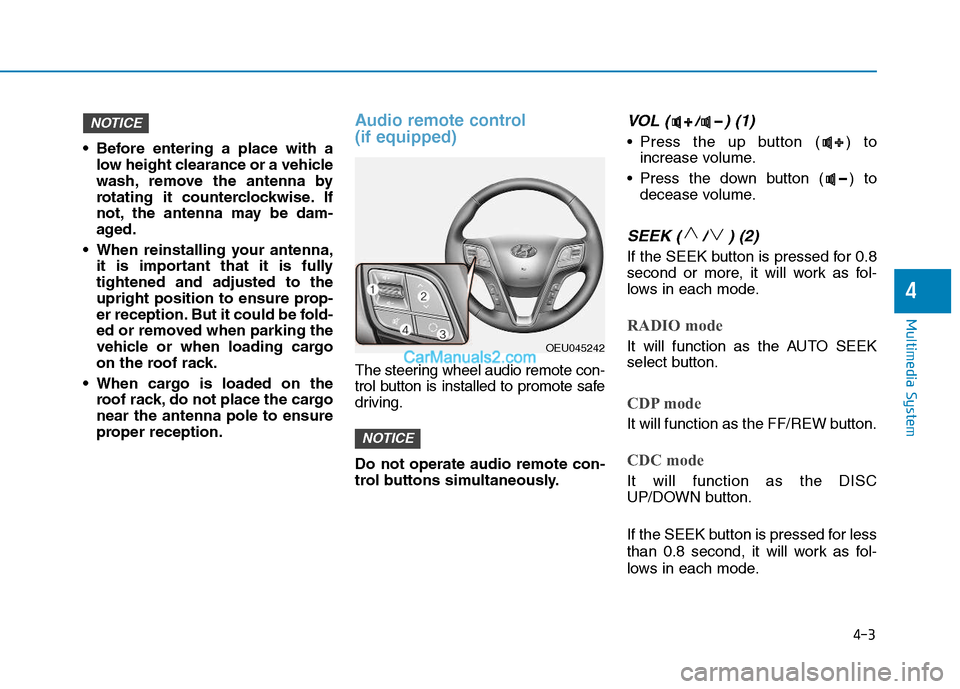
The steering wheel audio remote con-
trol button is installed to promote safe
driving. Do not operate audio remote con-
trol buttons simultaneously.
VOL ( / ) (1)
• Press the up button ( ) toincrease volume.
Press the down button ( ) to decease volume.
SEEK ( / ) (2)
If the SEEK button is pressed for 0.8
second or more, it will work as fol-
lows in each mode.
RADIO mode
It will function as the AUTO SEEK
select button.
CDP mode
It will function as the FF/REW button.
CDC mode
It will function as the DISC
UP/DOWN button.
If the SEEK button is pressed for less
than 0.8 second, it will work as fol-
lows in each mode.
NOTICE
NOTICE
OEU045242
Page 234 of 473
4-42
Multimedia System
Using the Bluetooth®Wireless
Technology audio features
Press the TUNE knob to play and pause the current song. ❈ The title / artist info may not be
supported in some mobile phone.
When it is not supported, no title /
no artist will be displayed.
Press of to play previous or
next song. ❈ The previous song / next song /
play / pause functions may not be
supported in some mobile
phones.
PP HH OO NNEE ((iiff ee qq uu iipp pp eedd ))
Before using the Bluetooth®Wireless
Technology
phone features
Bluetooth®Wireless
Technology
phone, you must first
pair and connect the
Bluetooth®
Wireless Technologymobile phone.
connected, it is not possible to
enter Phone mode. Once a phoneis paired or connected, the guid-
ance screen will be displayed.
tion (IGN/ACC ON), the
Bluetooth®
Wireless Technologyphone will be
automatically connected. Even if
you are outside, the
Bluetooth®
Wireless Technologyphone will be
automatically connected once you
are in the vicinity of the vehicle. If you
do not want automatic
Bluetooth®
Wireless Technologyphone connec-
tion, set the
Bluetooth®Wireless
Technology
power to OFF.
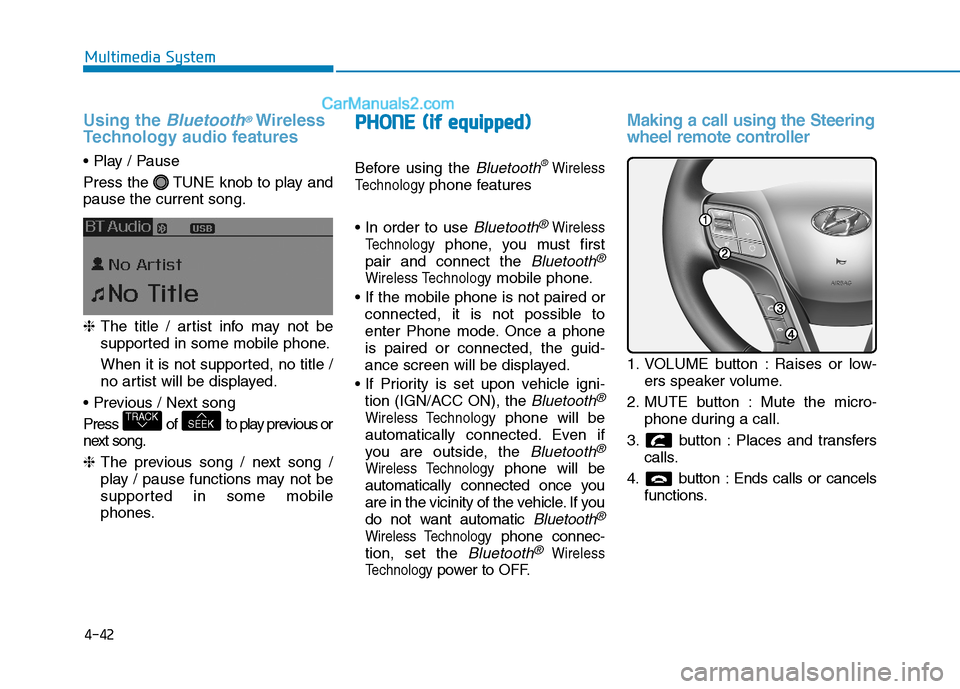
Making a call using the Steering
wheel remote controller
1. VOLUME button : Raises or low- ers speaker volume.
2. MUTE button : Mute the micro- phone during a call.
3. button : Places and transfers calls.
4. button : Ends calls or cancels functions.
SEEKTRACK
Page 235 of 473
4-43
Multimedia System
4
➀Shortly press (under 0.8 seconds)
the key on the steering
remote controller.
➁ The call history list will be dis-
played on the screen.
➂ Press the key again to con-
nect a call to the selected number.
number
➀ Press and hold (over 0.8 seconds)
the key on the steering
remote controller.
➁ The most recently called numberis redialed.Phone MENU (for RDS model)
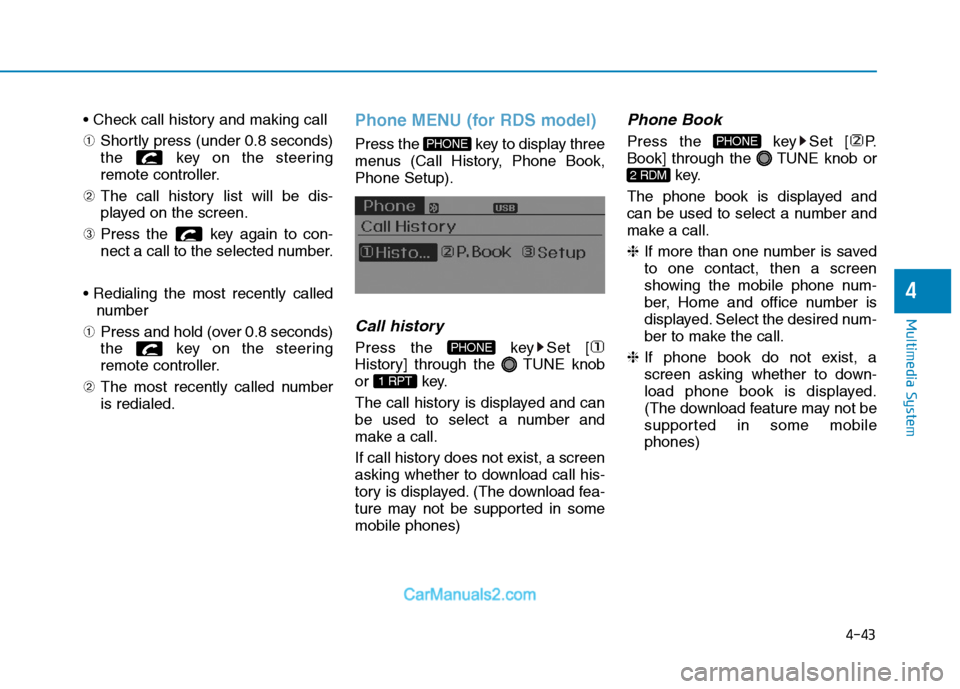
Press the key to display three
menus (Call History, Phone Book,Phone Setup).
Call history
Press the key Set [
History] through the TUNE knob
or key.
The call history is displayed and can
be used to select a number and
make a call.
If call history does not exist, a screen
asking whether to download call his-
tory is displayed. (The download fea-
ture may not be supported in somemobile phones)
Phone Book
Press the key Set [ P.
Book] through the TUNE knob or
key.
The phone book is displayed and
can be used to select a number and
make a call. ❈ If more than one number is saved
to one contact, then a screen
showing the mobile phone num-
ber, Home and office number is
displayed. Select the desired num-
ber to make the call.
❈ If phone book do not exist, a
screen asking whether to down-
load phone book is displayed.
(The download feature may not be
supported in some mobilephones)
2 RDM
PHONE
1 RPT
PHONE
PHONE
Page 268 of 473

4-76
Multimedia System
Using the Bluetooth®Wireless
Technology audio features
Press the TUNE knob to play and pause the current song. ❈ The title / artist info may not be
supported in some mobile phone.
When it is not supported, no title /
no artist will be displayed.
Press of to play previous or
next song. ❈ The previous song / next song /
play / pause functions may not be
supported in some mobile
phones.
PP HH OO NNEE ((iiff ee qq uu iipp pp eedd ))
Before using the Bluetooth®Wireless
Technology
phone features
Bluetooth®Wireless
Technology
phone, you must first
pair and connect the
Bluetooth®
Wireless Technologymobile phone.
connected, it is not possible to
enter Phone mode. Once a phoneis paired or connected, the guid-
ance screen will be displayed.
tion (IGN/ACC ON), the
Bluetooth®
Wireless Technologyphone will be
automatically connected. Even if
you are outside, the
Bluetooth®
Wireless Technologyphone will be
automatically connected once you
are in the vicinity of the vehicle. If you
do not want automatic
Bluetooth®
Wireless Technologyphone connec-
tion, set the
Bluetooth®Wireless
Technology
power to OFF.
Making a call using the Steering
wheel remote controller
1. VOLUME button : Raises or low- ers speaker volume.
2. MUTE button : Mute the micro- phone during a call.
3. button : Places and transfers calls.
4. button : Ends calls or cancels functions.
SEEKTRACK
Page 269 of 473
4-77
Multimedia System
4
➀Shortly press (under 0.8 seconds)
the key on the steering
remote controller.
➁ The call history list will be dis-
played on the screen.
➂ Press the key again to con-
nect a call to the selected number.
number
➀ Press and hold (over 0.8 seconds)
the key on the steering
remote controller.
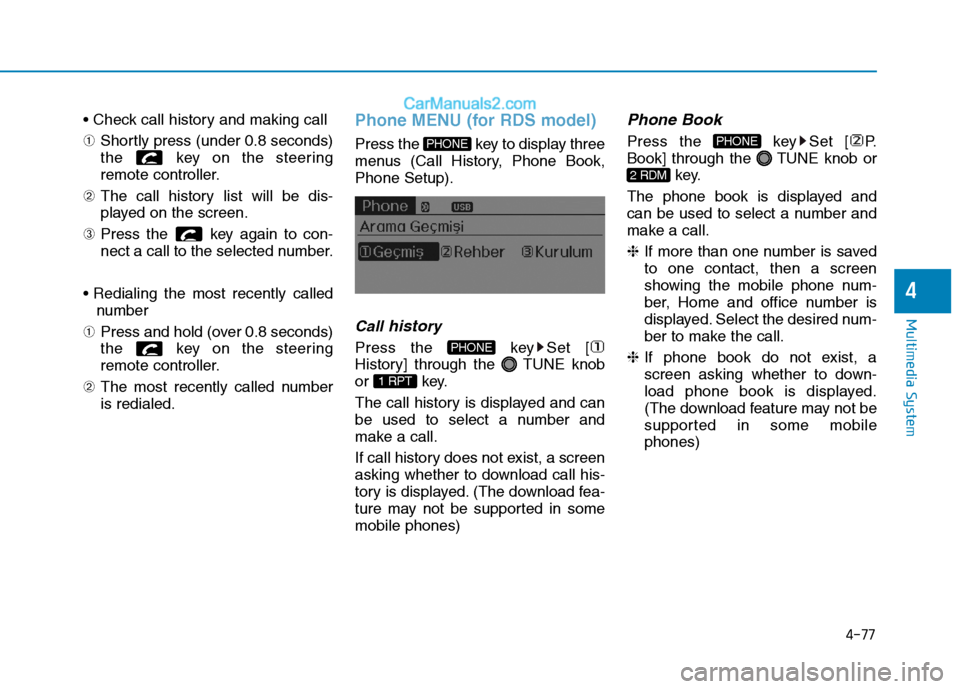
➁ The most recently called numberis redialed.Phone MENU (for RDS model)
Press the key to display three
menus (Call History, Phone Book,Phone Setup).
Callhistory
Press the key Set [
History] through the TUNE knob
or key.
The call history is displayed and can
be used to select a number and
make a call.
If call history does not exist, a screen
asking whether to download call his-
tory is displayed. (The download fea-
ture may not be supported in somemobile phones)
Phone Book
Press the key Set [ P.
Book] through the TUNE knob or
key.
The phone book is displayed and
can be used to select a number and
make a call. ❈ If more than one number is saved
to one contact, then a screen
showing the mobile phone num-
ber, Home and office number is
displayed. Select the desired num-
ber to make the call.
❈ If phone book do not exist, a
screen asking whether to down-
load phone book is displayed.
(The download feature may not be
supported in some mobilephones)
2 RDM
PHONE
1 RPT
PHONE
PHONE