audio Hyundai H350 2015 Owner's Guide
[x] Cancel search | Manufacturer: HYUNDAI, Model Year: 2015, Model line: H350, Model: Hyundai H350 2015Pages: 473, PDF Size: 26.4 MB
Page 243 of 473
4-51
Multimedia System
4
(Continued)
When connecting an external USBdevice, the device may not be proper-
ly recognize the USB when the USB
is in some states.
When formatting the external USB device, the device may not be proper-
ly recognize a Byte/Sector selection
other than 512Byte or 2048Byte.
The device will only recognize USB devices formatted in FAT 12/16/32.
Some USB devices may not operate properly because of compatibility
issues. Verify that the external device
is supported by the device before
starting use.
Avoid contact between the USB con- nector with bodily parts and foreign
substances.
Repeatedly connecting/disconnecting the USB in a short period of time
may cause damage to the device.
When disconnecting the USB, an abnormal sound may occur occasion-
ally.
(Continued)(Continued)
Abruptly disconnecting the external
USB device while the USB is operat-
ing may cause the device to become
damaged or function abnormally. -
Make sure to disconnect the USB
device only after the audio power is
turned off or when the audio is oper-
ating in a different mode.
The amount of time required to rec- ognize the external USB device may
differ depending on the type, size, or
file formats stored on the USB. Such
differences in the required time are
not indications of malfunction.
The song name (ID3Tag) or com- mand icons (RPT/RDM) may take
time to be displayed on the LCD
DISPLAY depending the complexity
of the USB memory/folder structure.
Please wait the period of time required to recognize the device. The
device supports only USB devices
used to play music files.
(Continued)(Continued)
Do not use the USB I/F to charge bat-
teries or USB accessories which gen-
erate heat. Such acts may lead to
deteriorated performance or damage
to the device.
The device may not recognize the USB device if separately purchased
USB hubs and extension cables are
being used. Connect the USB direct-
ly to the multimedia terminal of the
vehicle.
In the case of high capacity USB devices, there are instances where the
logical drives are partitioned for user
convenience. - In this case, only the
USB music in the top-level logical
drive will be possible to play.
When using partitioned drives, save
the songs desired to play on the
device only in the top-level logical
drive. In addition, certain UBS
devices are configured with a sepa-
rate drive used to install application
programs and songs from such
drives may not be possible to play for
the reasons as described above.
(Continued)
Page 244 of 473
4-52
Multimedia System
(Continued)
The device may not support normaloperation if MP3 Players, cellular
phones, digital cameras, or other
electronic devices (USB devices not
recognized as portable disk drives)
are connected to the device.
This product does guarantees proper operation of only standard (METAL
COVER TYPE) USB MEMORY.
The device may not support normal operation when using formats such
as HDD Type, CF, or SD Memory.
The device will not support files locked by DRM (Digital Rights
Management).
This product does not recognize SD Type USB MEMORY STICK, CF
Type USB MEMORY STICK and
other USB MEMORY STICKS con-
nected to a different Adaptor.
(Continued)(Continued)
This product does not guarantee
proper operation of USB HDD or
USB MEMORY with defective con-
nection caused by vehicle vibrations.
UBS memory products used as key
chains and mobile phone accessories
(i-stick type) may cause damage to
the USB Jack. Refrain from using
such products.
USB CONNECTOR PIN wear and tear can lead to inferior USB signal
delivery with the SET.UUSSIINN GG UU SSBB //AA UU XX
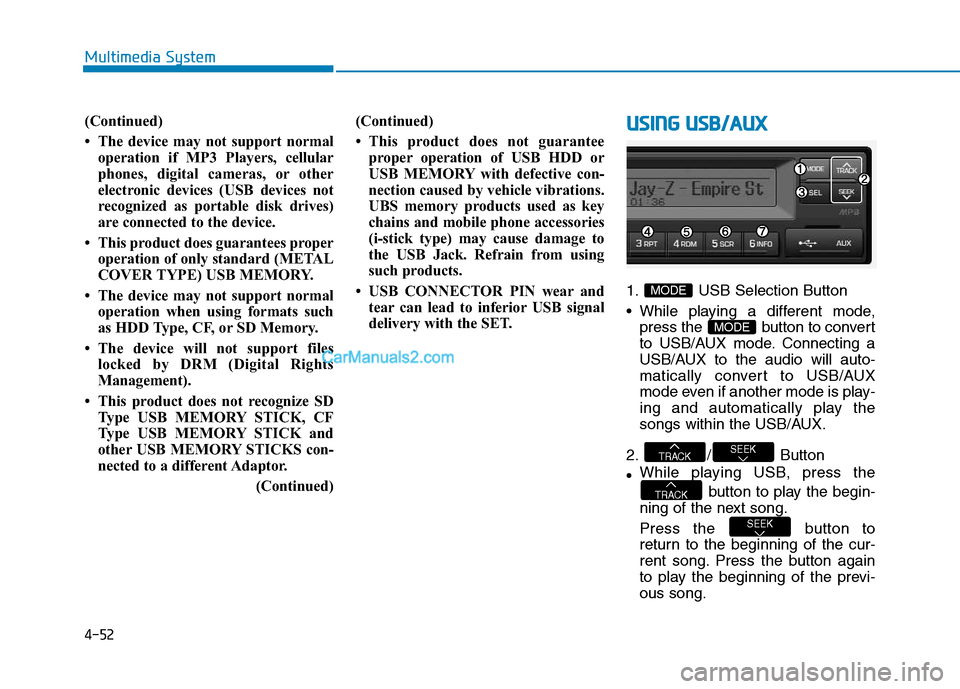
1. USB Selection Button
While playing a different mode,
press the button to convert
to USB/AUX mode. Connecting a
USB/AUX to the audio will auto-
matically convert to USB/AUX
mode even if another mode is play-
ing and automatically play the
songs within the USB/AUX.
2. / Button While playing USB, press the
button to play the begin-
ning of the next song.
Press the button to
return to the beginning of the cur-
rent song. Press the button again
to play the beginning of the previ-ous song.
SEEK
TRACK
SEEKTRACK
MODE
MODE
Page 246 of 473
4-54
Multimedia System
9./
If there are more than 2 folders in
the USB, pressing the /
button will move to the
previous or next folder.
If there are no folders in the USB,
then pressing the button will move
up/down within the folder in 10 file
increments.
10. / FF/REW Button
While a USB is operating, press and hold the button to fast-for-
ward the song. When fast-forward is
complete, the next song will proper-
ly play from the beginning even if
you continue holding the button.
Press and hold the button to
rewind the song. When rewind is
complete, the current song will
properly play from the beginning
even if you continue holding the
button. Shortly pressing the buttons
will not operate the / . Information
- Using the iPod
®
device
The iPod ®
device will charge by
connecting an iPod ®
connector
cable to the iPod ®
in ACC ON state.
When connecting with an iPod ®
cable, insert the JACK all the way
in the terminal to prevent communi-
cation interference.
The song name (ID3Tag) or com- mand icons (RPT/RDM) may take
time to be displayed depending on
the iPod ®
model and model software
version. This is not a sign of mal-
function. Please wait.
iPod ®
Shuffle device does not work.UU SSIINN GG iiPP oodd®®
1. iPod®Selection Button
press the button to convert
to iPod
®mode. Connecting an
iPod®to the audio will automatical-
ly convert to iPod®mode even if
another mode is playing and auto-
matically play the songs within the
iPod
®.
2. / Button
button to play the begin-
ning of the next song.
TRACK
SEEKTRACK
MODE
MODE
i
2 FF1 REW
1 REW
2 FF
2 FF1 REW
FLDRFLDR
FLDRFLDR
Page 247 of 473
4-55
Multimedia System
4
Press the button to
return to the beginning of the cur-
rent song. Press the button again
to play the beginning of the previ-ous song.
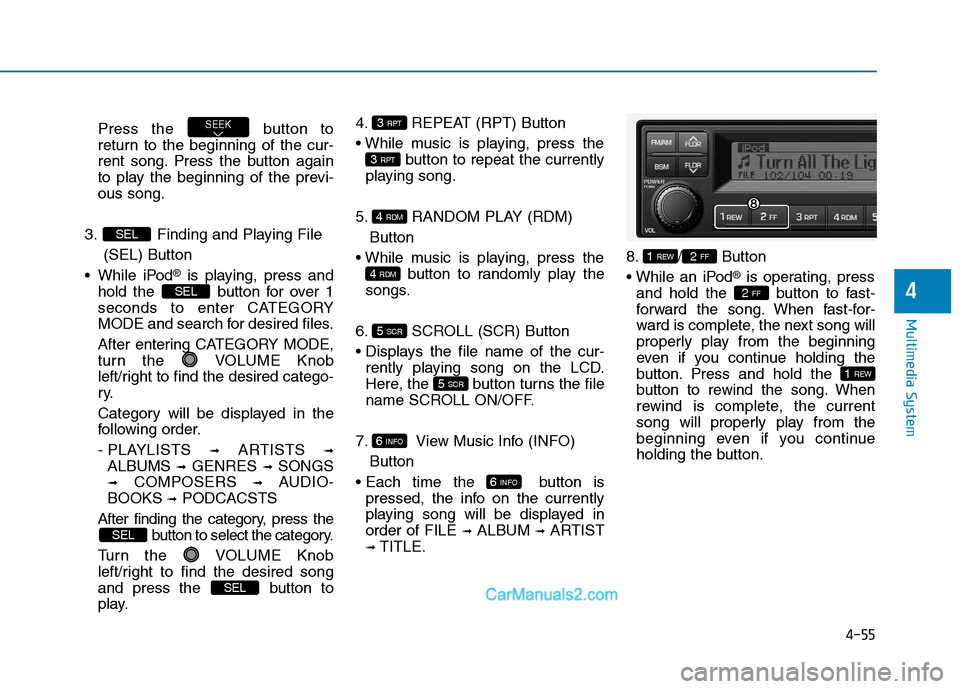
3. Finding and Playing File (SEL) Button
While iPod
®is playing, press and
hold the button for over 1
seconds to enter CATEGORY
MODE and search for desired files.
After entering CATEGORY MODE,
turn the VOLUME Knob
left/right to find the desired catego-
ry.
Category will be displayed in the
following order.
- PLAYLISTS ➟
ARTISTS ➟
ALBUMS ➟GENRES ➟SONGS
➟ COMPOSERS ➟AUDIO-
BOOKS ➟PODCACSTS
After finding the category, press the button to select the category.
Turn the VOLUME Knob
left/right to find the desired song
and press the button to
play. 4. REPEAT (RPT) Button
button to repeat the currently
playing song.
5. RANDOM PLAY (RDM) Button
button to randomly play the
songs.
6. SCROLL (SCR) Button
rently playing song on the LCD.
Here, the button turns the file
name SCROLL ON/OFF.
7. View Music Info (INFO) Button
button is pressed, the info on the currently
playing song will be displayed inorder of FILE ➟
ALBUM ➟ARTIST
➟ TITLE. 8. / Button
®is operating, press
and hold the button to fast-
forward the song. When fast-for-
ward is complete, the next song will
properly play from the beginning
even if you continue holding the
button. Press and hold the
button to rewind the song. When
rewind is complete, the current
song will properly play from the
beginning even if you continue
holding the button.
1 REW
2 FF
2 FF1 REW
6 INFO
6 INFO
5 SCR
5 SCR
4 RDM
4 RDM
3 RPT
3 RPT
SEL
SEL
SEL
SEL
SEEK
Page 249 of 473
4-57
Multimedia System
4
SSYY SSTT EEMM CC OO NNTTRR OO LLLL EE RR SS AA NN DD
F
F UU NNCCTT IIOO NNSS
❈ Display and settings may differ
depending on the selected audio.
Audio Head Unit
(for RDS model)
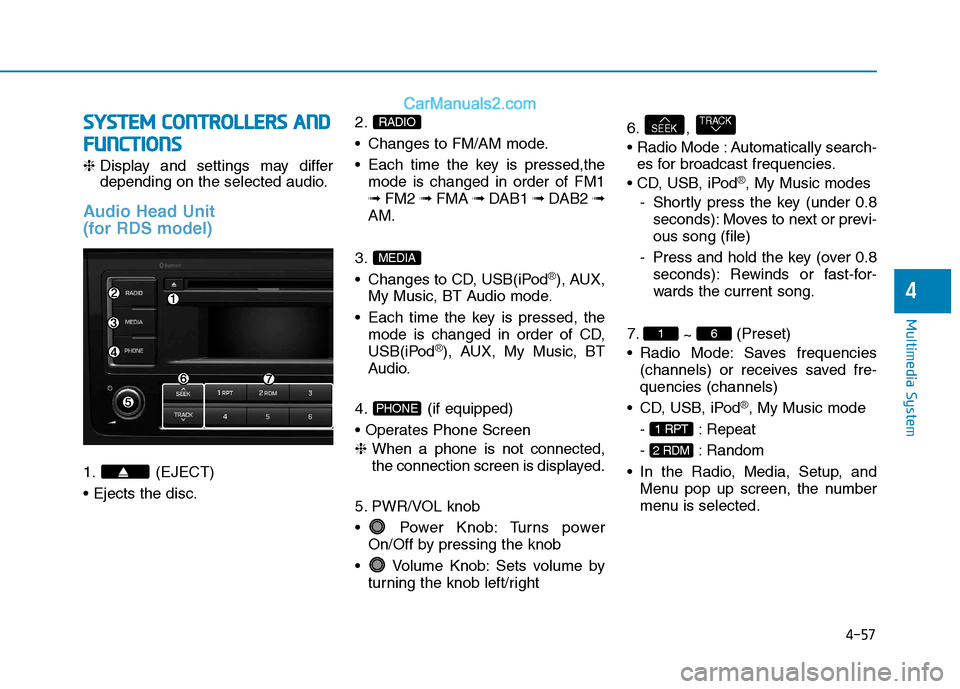
1. (EJECT) 2.
Changes to FM/AM mode.
Each time the key is pressed,the
mode is changed in order of FM1 ➟ FM2 ➟ FMA ➟ DAB1 ➟ DAB2 ➟
AM.
3.
Changes to CD, USB(iPod
®), AUX,
My Music, BT Audio mode.
Each time the key is pressed, the mode is changed in order of CD,
USB(iPod
®), AUX, My Music, BT
Audio.
4. (if equipped)
❈ When a phone is not connected,
the connection screen is displayed.
5. PWR/VOL knob
Power Knob: Turns power On/Off by pressing the knob
Volume Knob: Sets volume by turning the knob left/right 6. ,
Automatically search-
es for broadcast frequencies.
®, My Music modes
- Shortly press the key (under 0.8 seconds): Moves to next or previ- ous song (file)
- Press and hold the key (over 0.8 seconds): Rewinds or fast-for-
wards the current song.
7. ~ (Preset)
Radio Mode: Saves frequencies (channels) or receives saved fre-quencies (channels)
®, My Music mode
- : Repeat
- : Random
Menu pop up screen, the number
menu is selected.
2 RDM
1 RPT
61
TRACKSEEK
PHONE
MEDIA
RADIO
Page 250 of 473
4-58
Multimedia System
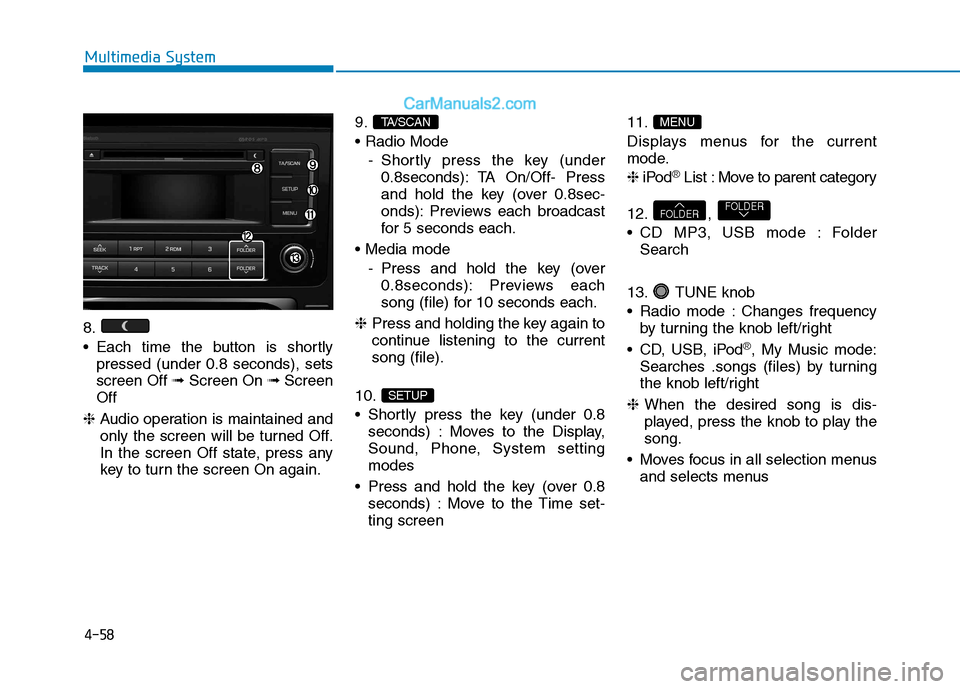
8.
Each time the button is shortlypressed (under 0.8 seconds), sets screen Off ➟Screen On ➟Screen
Off
❈ Audio operation is maintained and
only the screen will be turned Off.
In the screen Off state, press any
key to turn the screen On again. 9.
- Shortly press the key (under0.8seconds): TA On/Off- Press
and hold the key (over 0.8sec-
onds): Previews each broadcast
for 5 seconds each.
- Press and hold the key (over0.8seconds): Previews each
song (file) for 10 seconds each.
❈ Press and holding the key again to
continue listening to the currentsong (file).
10.
Shortly press the key (under 0.8 seconds) : Moves to the Display,
Sound, Phone, System settingmodes
Press and hold the key (over 0.8 seconds) : Move to the Time set-ting screen 11.
Displays menus for the current
mode. ❈
iPod
®List : Move to parent category
12. ,
CD MP3, USB mode : Folder Search
13. TUNE knob
Radio mode : Changes frequency by turning the knob left/right
CD, USB, iPod
®, My Music mode:
Searches .songs (files) by turning
the knob left/right
❈ When the desired song is dis-
played, press the knob to play thesong.
Moves focus in all selection menus and selects menus
FOLDERFOLDER
MENU
SETUP
TA/SCAN
Page 252 of 473
![Hyundai H350 2015 Owners Guide 4-60
Multimedia System
Sound Settings
Press the key Select
[Sound] through TUNE knob orkey Select menu through
TUNE knob
Audio Settings
This menu allows you to set the
‘Bass, Middle](/img/35/14886/w960_14886-251.png "Hyundai H350 2015 Owners Guide 4-60
Multimedia System
Sound Settings
Press the key Select
[Sound] through TUNE knob orkey Select menu through
TUNE knob
Audio Settings
This menu allows you to set the
‘Bass, Middle")
4-60
Multimedia System
Sound Settings
Press the key Select
[Sound] through TUNE knob orkey Select menu through
TUNE knob
Audio Settings
This menu allows you to set the
‘Bass, Middle, Treble’ and the Sound
Fader and Balance.
Select [Audio Settings] Select
menu through TUNE knob Turn TUNE knob left/right to set
Bass, Middle, Treble : Selects the sound tone.
Fader, Balance : Moves the sound fader and balance.
Default : Restores default settings. ❈ Return : While adjusting values,
re-pressing the TUNE knob will
restore the parent menu.
Speed Dependent Volume Control
This feature is used to automatically
control the volume level according to
the speed of the vehicle.
Select [Speed Dependent Vol.] Set in [On/Off] of
TUNEknob
2 RDM
SETUP
Page 256 of 473
![Hyundai H350 2015 Owners Guide 4-64
Multimedia System
Changing connection sequence(Priority)
This is used to change the order (pri-
ority) of automatic connection for the
paired mobile phones.
Select [Phone List] Select [Priorit](/img/35/14886/w960_14886-255.png "Hyundai H350 2015 Owners Guide 4-64
Multimedia System
Changing connection sequence(Priority)
This is used to change the order (pri-
ority) of automatic connection for the
paired mobile phones.
Select [Phone List] Select [Priorit")
4-64
Multimedia System
Changing connection sequence(Priority)
This is used to change the order (pri-
ority) of automatic connection for the
paired mobile phones.
Select [Phone List] Select [Priority]
through TUNE knob Select No. 1
Priority mobile phone ➀ Select [Priority].
➁ From the paired phones, select
the phone desired for No.1 priority.
➂ The changed priority sequence is
displayed.
❈ Once the connection sequence
(priority) is changed, the new no. 1
priority mobile phone will be con-nected.
-when the no. 1 priority cannot be connected: Automatically attemptsto connect the most recently con-
nected phone.
-Cases when the most recently connected phone cannot be con-
nected: Attempts to connect in theorder in which paired phones arelisted. -The connected phone will auto-
matically be changed to No. 1 pri-
ority.
Select [Phone List] Select mobile
phone through TUNE knobSelect [Delete] ➀ Select the desired mobile phone.
➁ Delete the selected mobile phone.
➂ Deletion completion is displayed.
❈ When attempting to delete a cur-
rently connected phone, thephone is first disconnected.
Information
When you delete a mobile phone, the mobile phone contacts will also
be erased.
For stable Bluetooth®
Wireless
Technology communication, delete
the mobile phone from the audio
and also delete the audio from your
mobile phone.Phone book Download
(for RDS model)
This feature is used to download
phone book and call histories intothe audio system.
Select [Phone book Download]
Select through TUNE knob.
Information
The download feature may not be supported in some mobile phones.
If a different operation is performed while phone book is being down-
loaded, downloading will be discon-
tinued. Phone book already down-
loaded will be saved.
When downloading new phone book, delete all previously saved
phone book before starting down-
load.
Auto Download
When connecting a mobile phone, it
is possible to automatically download
new Contacts and Call Histories.
Select [Auto Download] Set /
through TUNE knob
Off
On
i
i
Page 257 of 473
![Hyundai H350 2015 Owners Guide 4-65
Multimedia System
4
Audio Streaming
Songs (files) saved in your
Bluetooth®Wireless Technology
enabled mobile phone can be played through the audio system.
Select [Audio Streaming] Set / throug](/img/35/14886/w960_14886-256.png "Hyundai H350 2015 Owners Guide 4-65
Multimedia System
4
Audio Streaming
Songs (files) saved in your
Bluetooth®Wireless Technology
enabled mobile phone can be played through the audio system.
Select [Audio Streaming] Set / throug")
4-65
Multimedia System
4
Audio Streaming
Songs (files) saved in your
Bluetooth®Wireless Technology
enabled mobile phone can be played through the audio system.
Select [Audio Streaming] Set / through TUNE knob
Information
The Bluetooth ®
Wireless Technology
audio streaming feature may not be
supported in some mobile phones.
Outgoing Volume
This is used to set the volume of your
voice as heard by the other partywhile on a
Bluetooth ®Wireless
Technology enabled handsfree call.
Select [Outgoing Volume] Set vol-
ume through TUNE knob ❈ While on a call, the volume can be
changed by using the key.
Bluetooth®Wireless
Technology System Off
This feature is used when you do not wish to use the
Bluetooth ®Wireless
Technology system.
Select [Bluetooth System Off] Set
through TUNE knob ❈ If a phone is already connected, disconnect the currently connect-
ed phone and turn the
Bluetooth ®
Wireless Technology system off.
Using the Bluetooth®Wireless
Technology System
To use Bluetooth ®Wireless
Technology when the system is cur-
rently off, follow these next steps.
Turning On
Bluetooth ®Wireless
Technology through the
Key
Press the key ScreenGuidance ❈ Moves to the screen where
Bluetooth ®Wireless Technology
functions can be used and dis-
plays guidance. Turning On
Bluetooth
®Wireless
Technology through the
Key
Press the key Select[Phone] ➀ A screen asking whether to turn on
Bluetooth ®Wireless Technology will
be displayed.
➁ On the screen, select to turn on
Bluetooth ®Wireless Technology
and display guidance.
❈ If the
Bluetooth ®Wireless
Technology system is turned on,
the system will automatically try toconnect the most recently con-nected
Bluetooth ®Wireless
Technology mobile phone. YES
SETUP
CLOCK
SETUP
CLOCK
PHONE
PHONE
SEEK
TRACK
i
Off
On
Page 258 of 473
4-66
Multimedia System
Information
Bluetooth ®
Wireless Technology con-
nection may become intermittently
disconnected in some mobile phones.
Follow these next steps to try again.
1)Turn the Bluetooth®
Wireless
Technology function within the
mobile phone ON/OFF and try to
connect again.
2)Turn the mobile phone power ON/OFF and try to connect again.
3)Completely remove the mobile phone battery, reboot, and then try
to connect again.
4)Reboot the audio system and try to connect again
5)Delete all paired devices in your mobile phone and the audio system
and pair again for use.RRAA DDIIOO (( ff oo rr RR DD SS mm ooddeell))
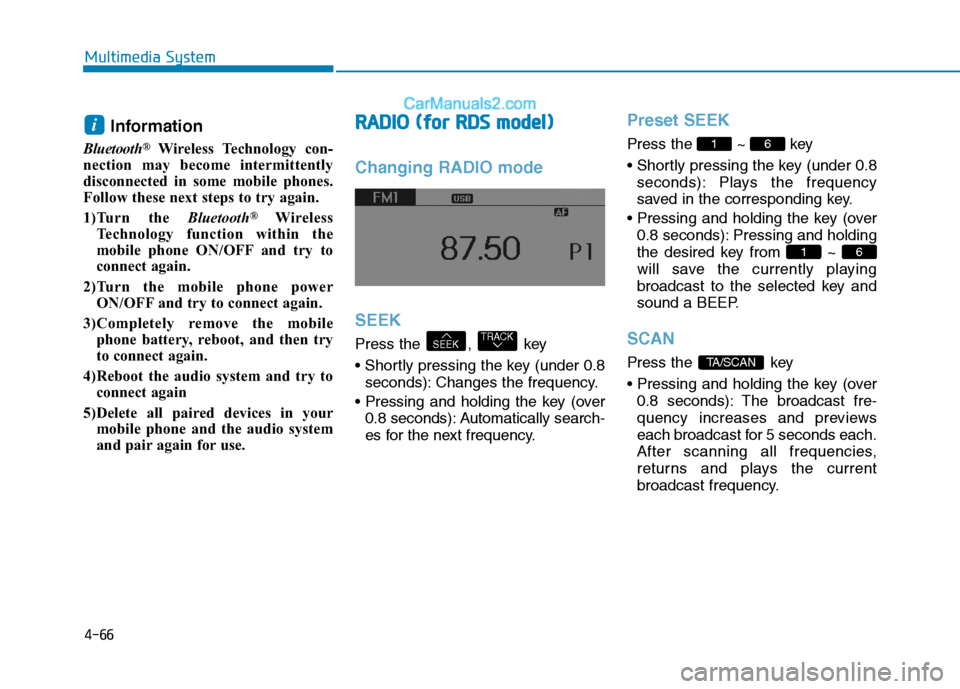
Changing RADIO mode SEEK
Press the , key
seconds): Changes the frequency.
0.8 seconds): Automatically search-
es for the next frequency.
Preset SEEK
Press the ~ key
seconds): Plays the frequency
saved in the corresponding key.
0.8 seconds): Pressing and holding
the desired key from ~
will save the currently playing
broadcast to the selected key and
sound a BEEP.
SCAN
Press the key
0.8 seconds): The broadcast fre-
quency increases and previews
each broadcast for 5 seconds each.
After scanning all frequencies,
returns and plays the current
broadcast frequency.TA/SCAN
61
61
TRACKSEEK
i