clock HYUNDAI I10 2009 User Guide
[x] Cancel search | Manufacturer: HYUNDAI, Model Year: 2009, Model line: I10, Model: HYUNDAI I10 2009Pages: 354, PDF Size: 37.04 MB
Page 172 of 354
493
Features of your vehicle
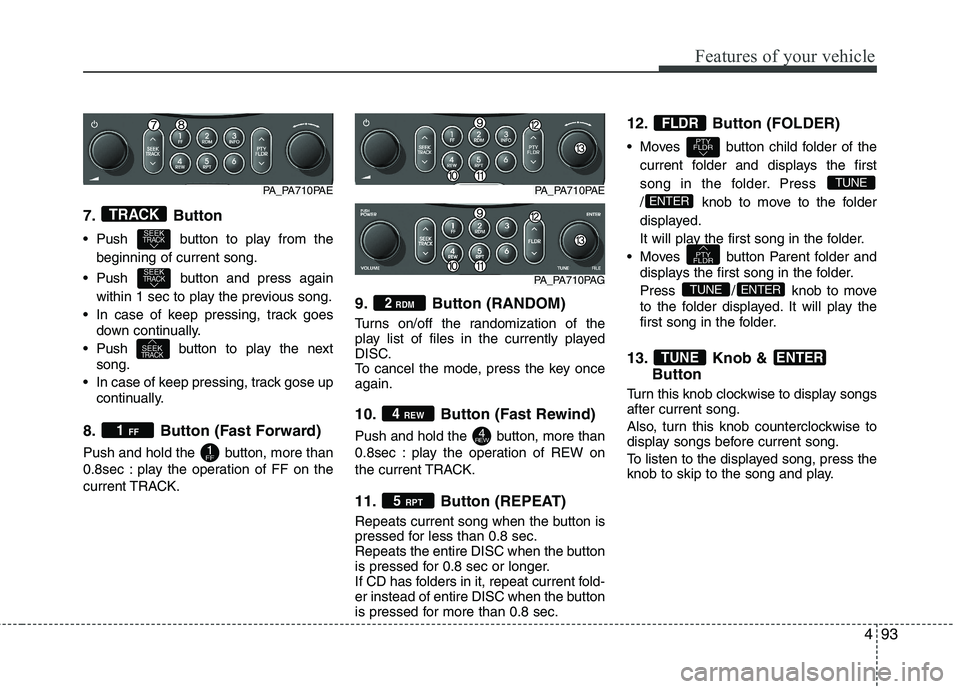
7. Button
Push button to play from thebeginning of current song.
Push button and press again within 1 sec to play the previous song.
In case of keep pressing, track goes down continually.
Push button to play the next song.
In case of keep pressing, track gose up continually.
8. Button (Fast Forward)
Push and hold the button, more than
0.8sec : play the operation of FF on the
current TRACK. 9. Button (RANDOM)
Turns on/off the randomization of the
play list of files in the currently played
DISC.
To cancel the mode, press the key onceagain.
10. Button (Fast Rewind)
Push and hold the button, more than
0.8sec : play the operation of REW on
the current TRACK.
11. Button (REPEAT)
Repeats current song when the button is
pressed for less than 0.8 sec.
Repeats the entire DISC when the button
is pressed for 0.8 sec or longer.
If CD has folders in it, repeat current fold-
er instead of entire DISC when the button
is pressed for more than 0.8 sec.12. Button (FOLDER)
Moves button child folder of the
current folder and displays the first
song in the folder. Press
/ knob to move to the folder
displayed.
It will play the first song in the folder.
Moves button Parent folder and displays the first song in the folder.
Press / knob to move
to the folder displayed. It will play the
first song in the folder.
13. Knob & Button
Turn this knob clockwise to display songs after current song.
Also, turn this knob counterclockwise to
display songs before current song.
To listen to the displayed song, press the
knob to skip to the song and play.
ENTERTUNE
ENTERTUNE
PTY
FLDR
ENTER
TUNE
PTY
FLDR
FLDR
5 RPT
4REW
4 REW
2
RDM
1FF
1 FF
SEEKTRACK
SEEKTRACK
SEEKTRACK
TRACK
PA_PA710PAE
PA_PA710PAG
PA_PA710PAE
Page 177 of 354
Features of your vehicle
98
4
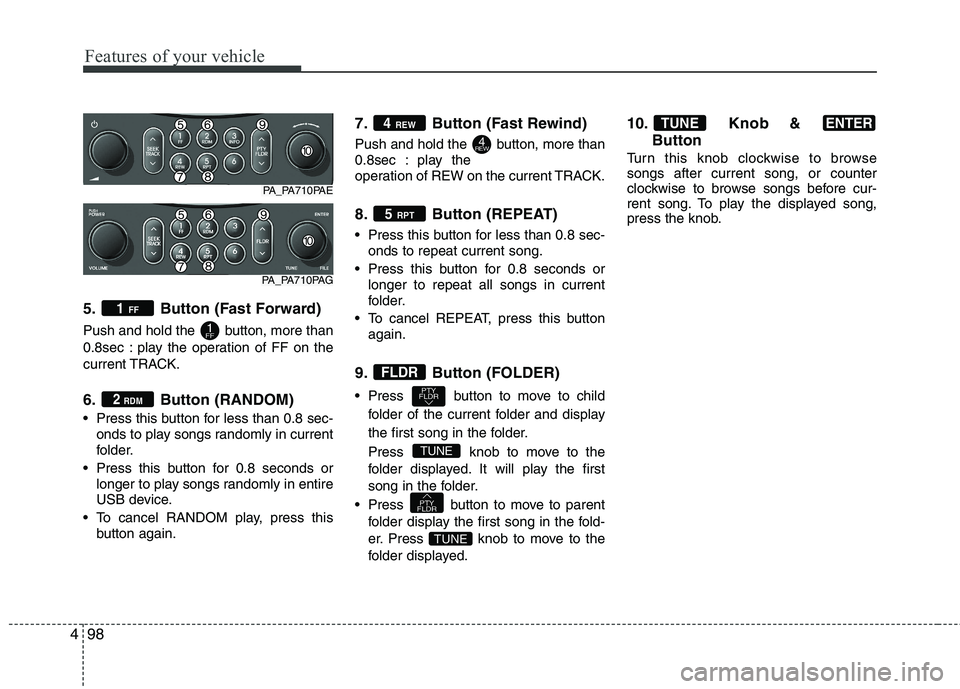
5. Button (Fast Forward)
Push and hold the button, more than
0.8sec : play the operation of FF on the
current TRACK.
6. Button (RANDOM)
Press this button for less than 0.8 sec-
onds to play songs randomly in current
folder.
Press this button for 0.8 seconds or longer to play songs randomly in entire
USB device.
To cancel RANDOM play, press this button again. 7. Button (Fast Rewind)
Push and hold the button, more than
0.8sec : play the
operation of REW on the current TRACK.
8. Button (REPEAT)
Press this button for less than 0.8 sec-
onds to repeat current song.
Press this button for 0.8 seconds or longer to repeat all songs in current
folder.
To cancel REPEAT, press this button again.
9. Button (FOLDER)
Press button to move to child folder of the current folder and display
the first song in the folder.
Press knobto move to the
folder displayed. It will play the first
song in the folder.
Press button to move to parent folder display the first song in the fold-
er.
Press knobto move to the
folder displayed. 10. Knob &
Button
Turn this knob clockwise to browse songs after current song, or counter
clockwise to browse songs before cur-
rent song. To play the displayed song,
press the knob.
ENTERTUNE
TUNE
PTY
FLDR
TUNE
PTY
FLDR
FLDR
5 RPT
4REW
4 REW
2
RDM
1FF
1 FF
PA_PA710PAE
PA_PA710PAG
Page 180 of 354
4101
Features of your vehicle
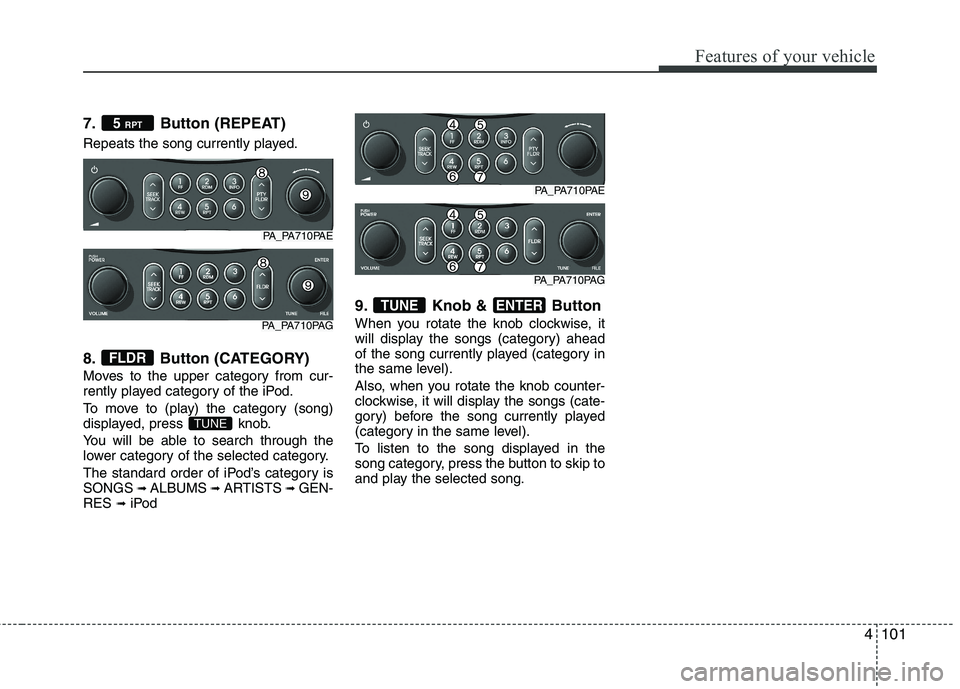
7. Button (REPEAT)
Repeats the song currently played.
8. Button (CATEGORY)
Moves to the upper category from cur-
rently played category of the iPod.
To move to (play) the category (song)
displayed, press knob.
You will be able to search through the
lower category of the selected category.
The standard order of iPod’s category is SONGS ➟
ALBUMS ➟ARTISTS ➟GEN-
RES ➟iPod 9. Knob & Button
When you rotate the knob clockwise, it
will display the songs (category) ahead
of the song currently played (category in
the same level).
Also, when you rotate the knob counter-
clockwise, it will display the songs (cate-
gory) before the song currently played
(category in the same level).
To listen to the song displayed in the
song category, press the button to skip to
and play the selected song.
ENTERTUNE
TUNE
FLDR
5
RPT
PA_PA710PAE
PA_PA710PAG
PA_PA710PAE
PA_PA710PAG
Page 247 of 354
69
What to do in an emergency
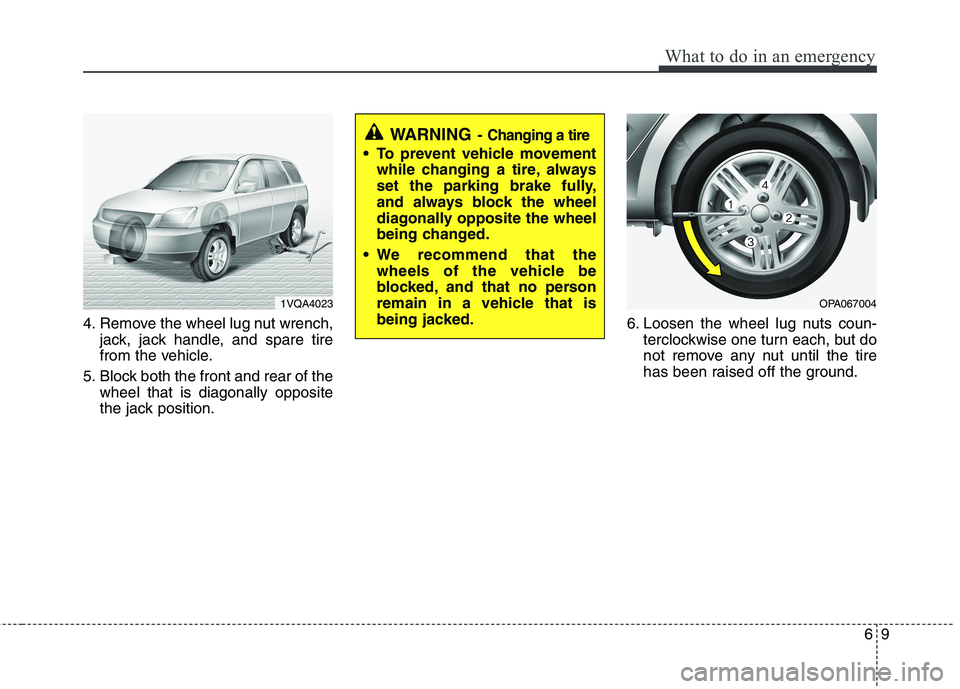
4. Remove the wheel lug nut wrench,jack, jack handle, and spare tire
from the vehicle.
5. Block both the front and rear of the wheel that is diagonally opposite
the jack position. 6. Loosen the wheel lug nuts coun-
terclockwise one turn each, but do
not remove any nut until the tire
has been raised off the ground.
1VQA4023OPA067004
WARNING - Changing a tire
To prevent vehicle movement
while changing a tire, always
set the parking brake fully,
and always block the wheel
diagonally opposite the wheel
being changed.
We recommend that the wheels of the vehicle be
blocked, and that no person
remain in a vehicle that is
being jacked.
Page 248 of 354
What to do in an emergency
10
6
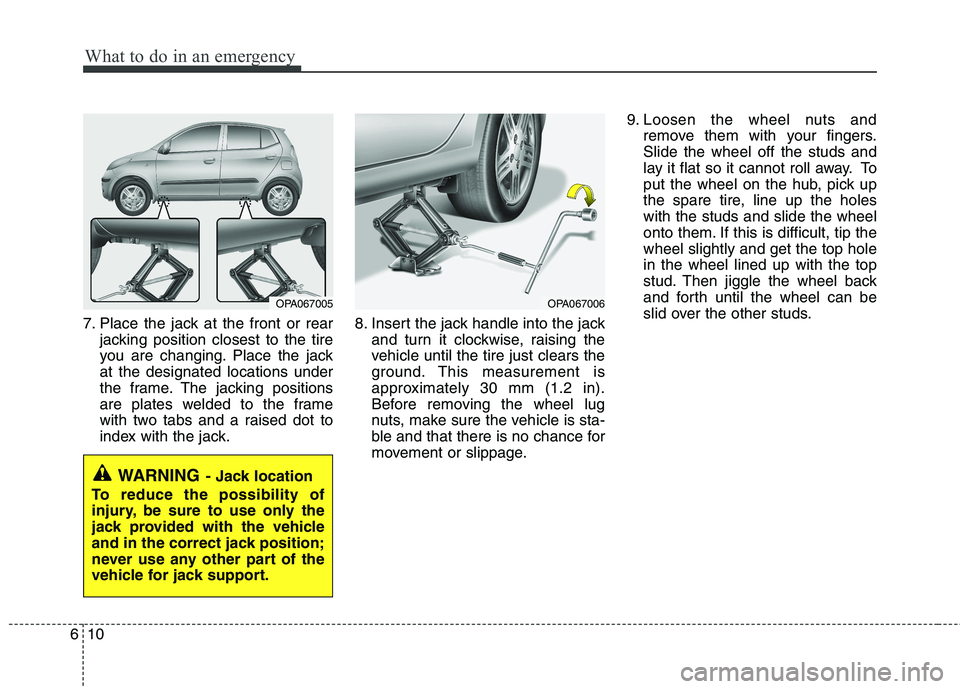
7. Place the jack at the front or rear
jacking position closest to the tire
you are changing. Place the jackat the designated locations under
the frame. The jacking positions
are plates welded to the frame
with two tabs and a raised dot to
index with the jack. 8. Insert the jack handle into the jack
and turn it clockwise, raising the
vehicle until the tire just clears the
ground. This measurement is
approximately 30 mm (1.2 in).
Before removing the wheel lug
nuts, make sure the vehicle is sta-
ble and that there is no chance for
movement or slippage. 9. Loosen the wheel nuts and
remove them with your fingers.Slide the wheel off the studs and
lay it flat so it cannot roll away. To
put the wheel on the hub, pick up
the spare tire, line up the holeswith the studs and slide the wheel
onto them. If this is difficult, tip thewheel slightly and get the top holein the wheel lined up with the top
stud. Then jiggle the wheel back
and forth until the wheel can be
slid over the other studs.
WARNING - Jack location
To reduce the possibility of
injury, be sure to use only the
jack provided with the vehicle
and in the correct jack position;
never use any other part of the
vehicle for jack support.
OPA067005OPA067006
Page 249 of 354
611
What to do in an emergency
10. To reinstall the wheel, hold it onthe studs, put the wheel nuts on the studs and tighten them finger
tight. The nuts should be installedwith their tapered small diameter
ends directed inward. Jiggle thetire to be sure it is completely
seated, then tighten the nuts as
much as possible with your fin-gers again.
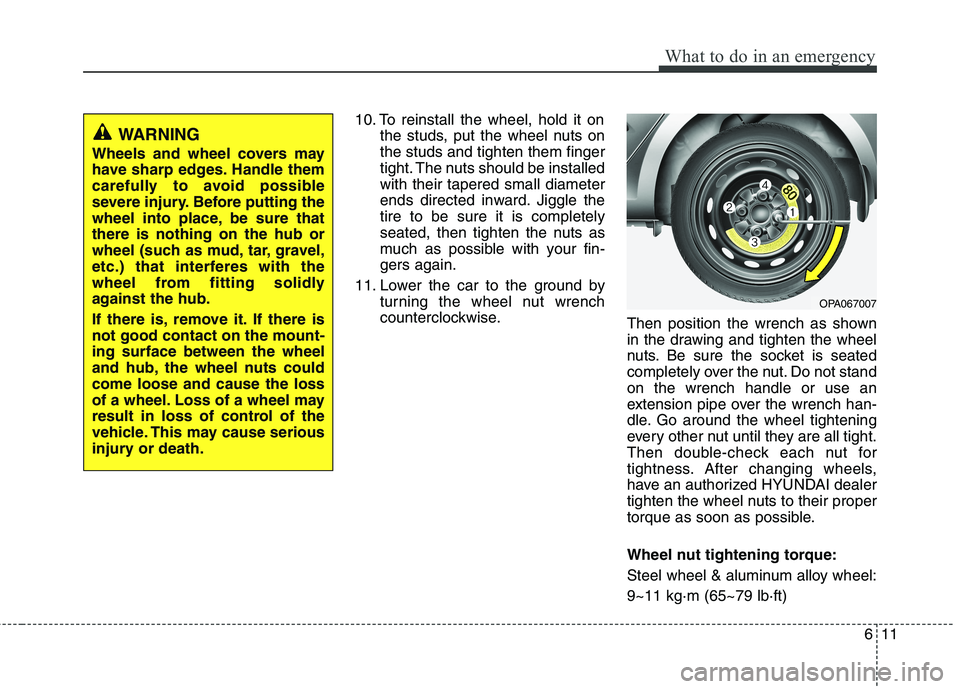
11. Lower the car to the ground by turning the wheel nut wrench
counterclockwise. Then position the wrench as shown
in the drawing and tighten the wheel
nuts. Be sure the socket is seated
completely over the nut. Do not standon the wrench handle or use an
extension pipe over the wrench han-
dle. Go around the wheel tightening
every other nut until they are all tight.
Then double-check each nut for
tightness. After changing wheels,
have an authorized HYUNDAI dealer
tighten the wheel nuts to their proper
torque as soon as possible.
Wheel nut tightening torque:
Steel wheel & aluminum alloy wheel:9~11 kg·m (65~79 lb·ft)
WARNING
Wheels and wheel covers may
have sharp edges. Handle them
carefully to avoid possible
severe injury. Before putting the
wheel into place, be sure thatthere is nothing on the hub or
wheel (such as mud, tar, gravel,
etc.) that interferes with the
wheel from fitting solidly
against the hub.
If there is, remove it. If there is not good contact on the mount-ing surface between the wheel
and hub, the wheel nuts couldcome loose and cause the loss
of a wheel. Loss of a wheel may
result in loss of control of the
vehicle. This may cause serious
injury or death.
OPA067007
Page 259 of 354
621
What to do in an emergency
When towing your vehicle in an emer- gency without wheel dollies :
1. Set the ignition switch in the ACC posi-tion.
2. Place the transaxle shift lever in N (Neutral).
3. Release the parking brake.
F080200APA
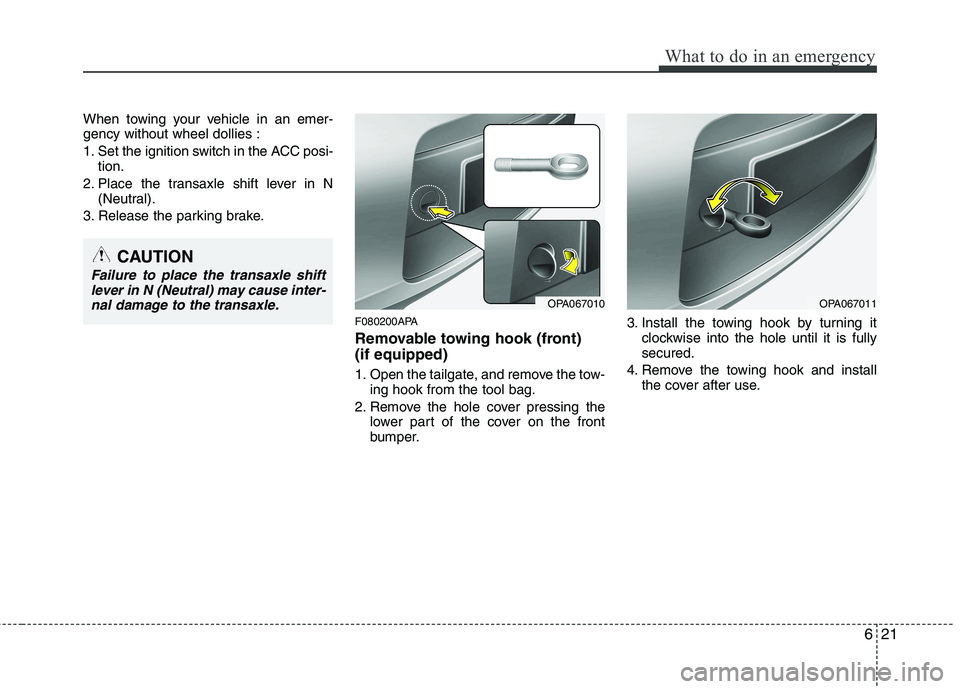
Removable towing hook (front) (if equipped)
1. Open the tailgate, and remove the tow-ing hook from the tool bag.
2. Remove the hole cover pressing the lower part of the cover on the front
bumper. 3. Install the towing hook by turning it
clockwise into the hole until it is fullysecured.
4. Remove the towing hook and install the cover after use.
CAUTION
Failure to place the transaxle shift
lever in N (Neutral) may cause inter-nal damage to the transaxle.
OPA067010OPA067011
Page 289 of 354
727
Maintenance
ENGINE COOLANT
G070000AUN The high-pressure cooling system has a
reservoir filled with year-round antifreeze
coolant. The reservoir is filled at the fac-
tory.
Check the antifreeze protection and
coolant level at least once a year, at thebeginning of the winter season, and
before traveling to a colder climate.G070100AEN
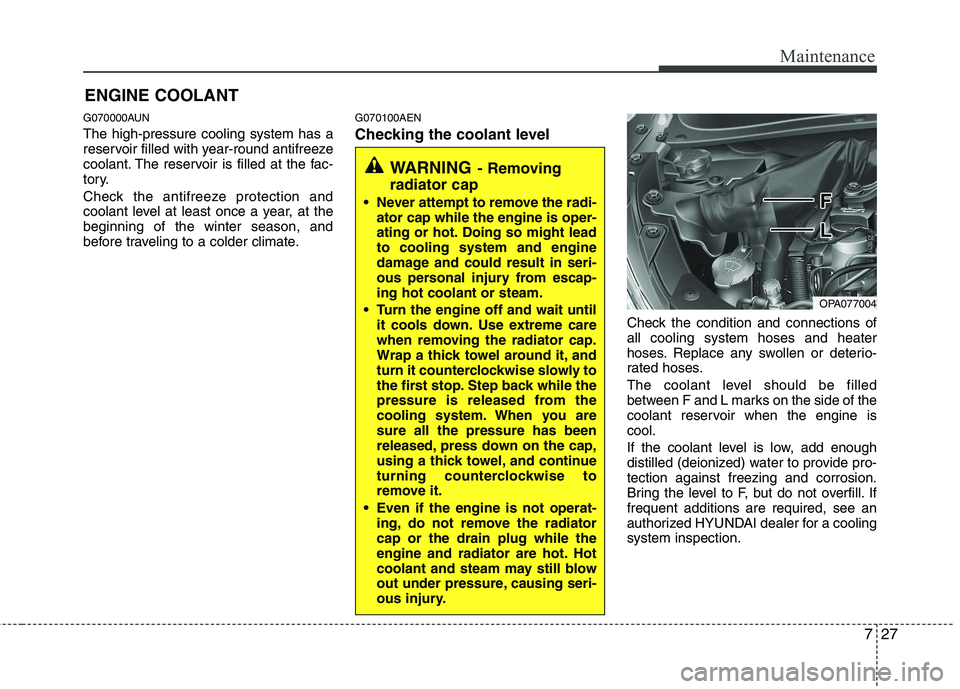
Checking the coolant level
Check the condition and connections of all cooling system hoses and heater
hoses. Replace any swollen or deterio-
rated hoses.
The coolant level should be filled
between F and L marks on the side of the
coolant reservoir when the engine iscool.
If the coolant level is low, add enough
distilled (deionized) water to provide pro-tection against freezing and corrosion.
Bring the level to F, but do not overfill. Iffrequent additions are required, see an
authorized HYUNDAI dealer for a coolingsystem inspection.
WARNING- Removing
radiator cap
Never attempt to remove the radi- ator cap while the engine is oper-
ating or hot. Doing so might leadto cooling system and engine
damage and could result in seri-
ous personal injury from escap-ing hot coolant or steam.
Turn the engine off and wait until it cools down. Use extreme care
when removing the radiator cap.
Wrap a thick towel around it, and
turn it counterclockwise slowly to
the first stop. Step back while the
pressure is released from the
cooling system. When you aresure all the pressure has been
released, press down on the cap,
using a thick towel, and continue
turning counterclockwise to
remove it.
Even if the engine is not operat- ing, do not remove the radiatorcap or the drain plug while the
engine and radiator are hot. Hot
coolant and steam may still blow
out under pressure, causing seri-
ous injury.
OPA077004
Page 302 of 354
Maintenance
40
7
G190200AUN
Battery recharging
Your vehicle has a maintenance-free,
calcium-based battery.
If the battery becomes discharged in a
short time (because, for example, the
headlights or interior lights were left on
while the vehicle was not in use),
recharge it by slow charging (trickle)
for 10 hours.
If the battery gradually discharges because of high electric load while the
vehicle is being used, recharge it at 20-
30A for two hours. G190300APA Reset items
Items should be reset after the battery
has been discharged or the battery hasbeen disconnected.
Sunroof (See section 4)
Digital clock (See section 4)
Audio (See section 4)
(Continued)
The electrical ignition system
works with high voltage. Never
touch these components with theengine running or the ignition
switched on.
Failure to follow the above warn-
ings can result in serious bodily
injury or death.(Continued)
Before performing maintenance or recharging the battery, turn off all accessories and stop the
engine.
The negative battery cable must be removed first and installed
last when the battery is discon-nected.WARNING - Recharging
battery
When recharging the battery,
observe the following precautions:
The battery must be removed from the vehicle and placed in an area with good ventilation.
Do not allow cigarettes, sparks, or flame near the battery.
Watch the battery during charg- ing, and stop or reduce the charg-
ing rate if the battery cells begin
gassing (boiling) violently or if
the temperature of the electrolyte
of any cell exceeds 49°C (120°F).
Wear eye protection when check- ing the battery during charging.
Disconnect the battery charger in the following order.
1. Turn off the battery charger main switch.
2. Unhook the negative clamp from the negative battery terminal.
3. Unhook the positive clamp from the positive battery terminal.
(Continued)
Page 315 of 354
753
Maintenance
G210101AUN
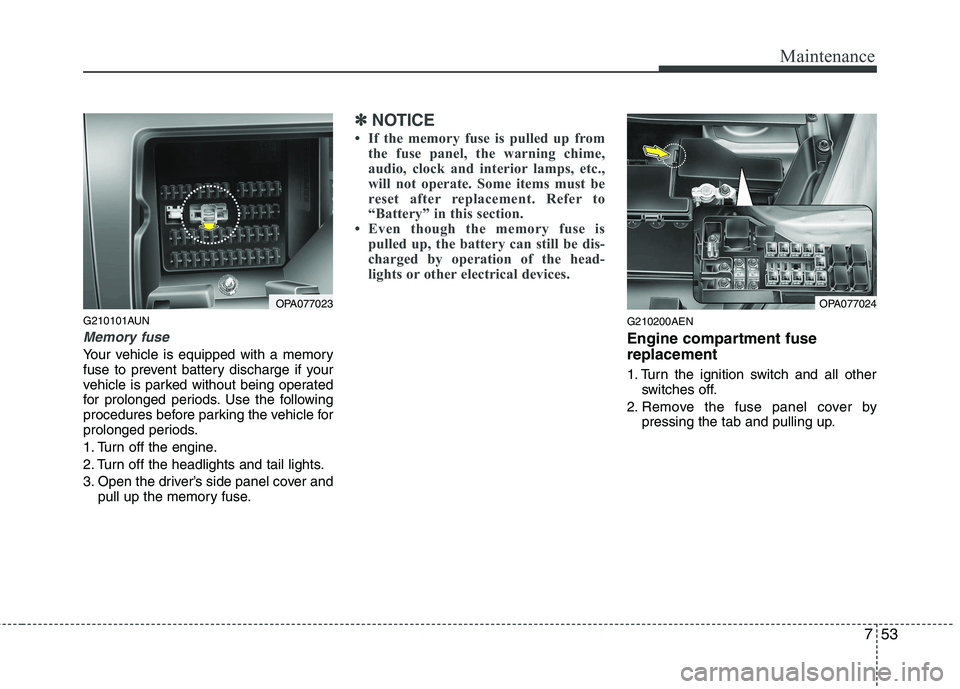
Memory fuse
Your vehicle is equipped with a memory
fuse to prevent battery discharge if your
vehicle is parked without being operated
for prolonged periods. Use the following
procedures before parking the vehicle for
prolonged periods.
1. Turn off the engine.
2. Turn off the headlights and tail lights.
3. Open the driver’s side panel cover andpull up the memory fuse.
✽✽ NOTICE
If the memory fuse is pulled up from the fuse panel, the warning chime,
audio, clock and interior lamps, etc.,
will not operate. Some items must be
reset after replacement. Refer to
“Battery” in this section.
Even though the memory fuse is
pulled up, the battery can still be dis-
charged by operation of the head-
lights or other electrical devices.
G210200AEN
Engine compartment fuse replacement
1. Turn the ignition switch and all other switches off.
2. Remove the fuse panel cover by pressing the tab and pulling up.
OPA077023OPA077024