lock HYUNDAI I10 2012 Workshop Manual
[x] Cancel search | Manufacturer: HYUNDAI, Model Year: 2012, Model line: I10, Model: HYUNDAI I10 2012Pages: 354, PDF Size: 37.04 MB
Page 169 of 354
Features of your vehicle
90
4
- REGION (REGION MENU indication is
possible with RDS MENU)
Selects whether REGION code is used
(ON) or not (OFF) once the radio deter-
mines the AF jump condition. If AUTO isselected, AF jump condition is deter-mined automatically via PI reception sta-
tus.
- TA VOL (TA VOL MENU indication is possible with RDS MENU)
Adjusts the TA (Traffic Announcement)
volume level according to normal audio
volume level. - Time
Select this item to enter “Automatic Time
setting” mode (Auto, manual). ❋ Auto is Automatic RDS Time.
Select this item to enter Clock setup
mode. (12/24Hr., Auto, Time)
- 12/24 Hr.
Select “12/24 Hr.” button to enter Time
Format menu. - Time
Select “Time” button to enter Time set- ting. Adjust the hour and press the
button to set. Adjust the minute and
press the button to complete
and exit from clock adjustment mode.
Pressing the button while in
power off, screen will allow the user to
make immediately adjustments to the
clock.
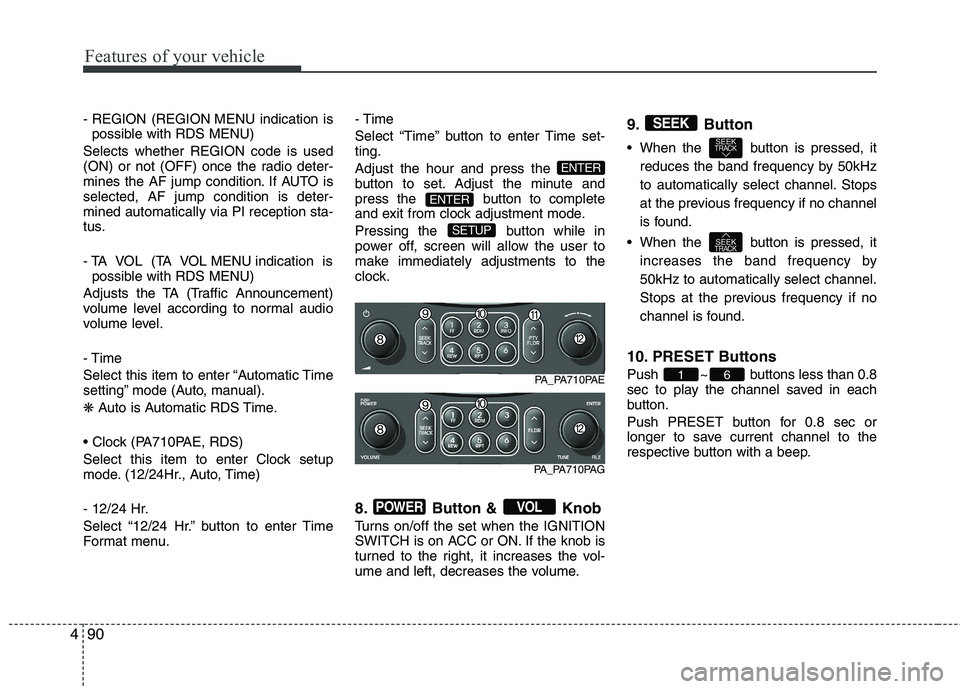
8. Button & Knob
Turns on/off the set when the IGNITION
SWITCH is on ACC or ON. If the knob is
turned to the right, it increases the vol-
ume and left, decreases the volume.9. Button
When the button is pressed, it
reduces the band frequency by 50kHz
to automatically select channel. Stops
at the previous frequency if no channel
is found.
When the button is pressed, it increases the band frequency by50kHz to automatically select channel.
Stops at the previous frequency if no
channel is found.
10. PRESET Buttons
Push ~ buttons less than 0.8
sec to play the channel saved in each
button.
Push PRESET button for 0.8 sec or
longer to save current channel to the
respective button with a beep.
61
SEEKTRACK
SEEKTRACK
SEEK
VOLPOWER
SETUP
ENTER
ENTER
PA_PA710PAE
PA_PA710PAG
Page 170 of 354
491
Features of your vehicle
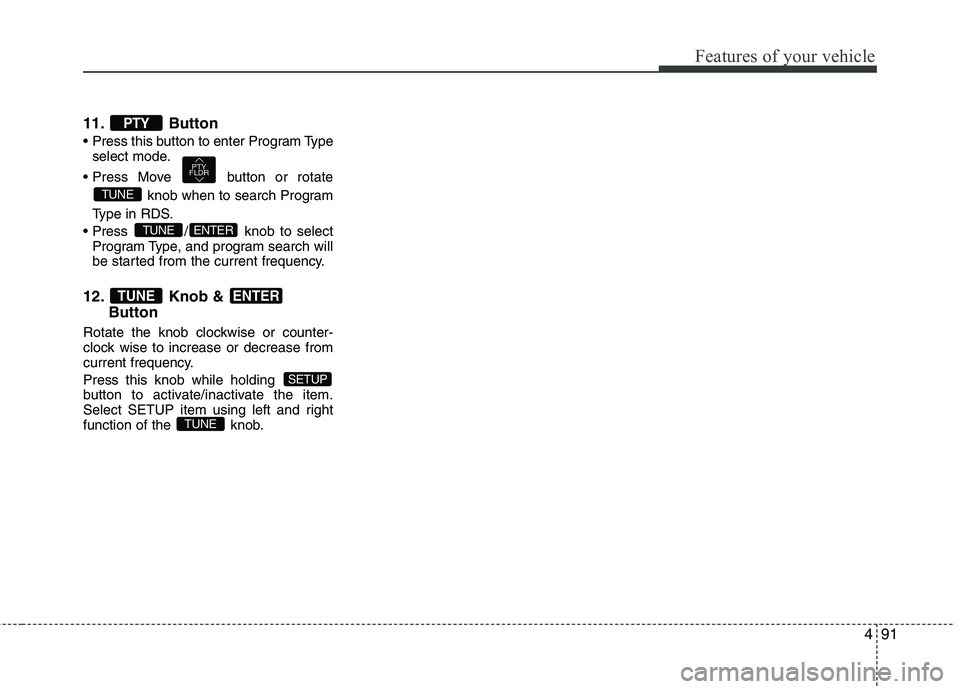
11. Button
select mode.
button or rotate knob when to search Program
Type in RDS.
/ knob to select Program Type, and program search will
be started from the current frequency.
12. Knob & Button
Rotate the knob clockwise or counter-
clock wise to increase or decrease from
current frequency.
Press this knob while holding
button to activate/inactivate the item.
Select SETUP item using left and right
function of the knob.
TUNE
SETUP
ENTERTUNE
ENTERTUNE
TUNE
PTY
FLDR
PTY
Page 172 of 354
493
Features of your vehicle
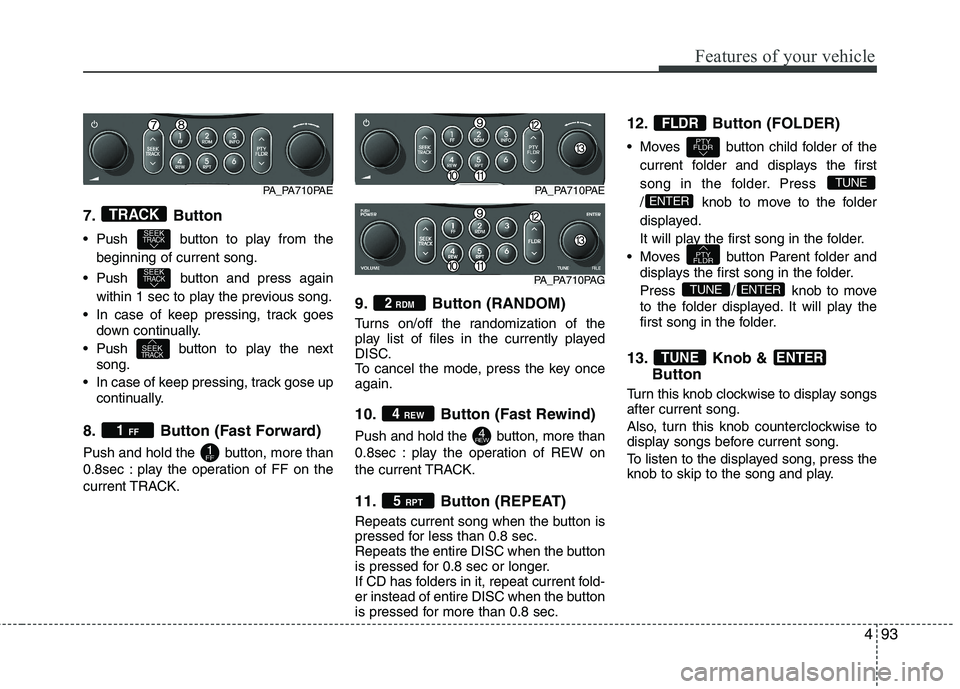
7. Button
Push button to play from thebeginning of current song.
Push button and press again within 1 sec to play the previous song.
In case of keep pressing, track goes down continually.
Push button to play the next song.
In case of keep pressing, track gose up continually.
8. Button (Fast Forward)
Push and hold the button, more than
0.8sec : play the operation of FF on the
current TRACK. 9. Button (RANDOM)
Turns on/off the randomization of the
play list of files in the currently played
DISC.
To cancel the mode, press the key onceagain.
10. Button (Fast Rewind)
Push and hold the button, more than
0.8sec : play the operation of REW on
the current TRACK.
11. Button (REPEAT)
Repeats current song when the button is
pressed for less than 0.8 sec.
Repeats the entire DISC when the button
is pressed for 0.8 sec or longer.
If CD has folders in it, repeat current fold-
er instead of entire DISC when the button
is pressed for more than 0.8 sec.12. Button (FOLDER)
Moves button child folder of the
current folder and displays the first
song in the folder. Press
/ knob to move to the folder
displayed.
It will play the first song in the folder.
Moves button Parent folder and displays the first song in the folder.
Press / knob to move
to the folder displayed. It will play the
first song in the folder.
13. Knob & Button
Turn this knob clockwise to display songs after current song.
Also, turn this knob counterclockwise to
display songs before current song.
To listen to the displayed song, press the
knob to skip to the song and play.
ENTERTUNE
ENTERTUNE
PTY
FLDR
ENTER
TUNE
PTY
FLDR
FLDR
5 RPT
4REW
4 REW
2
RDM
1FF
1 FF
SEEKTRACK
SEEKTRACK
SEEKTRACK
TRACK
PA_PA710PAE
PA_PA710PAG
PA_PA710PAE
Page 177 of 354
Features of your vehicle
98
4
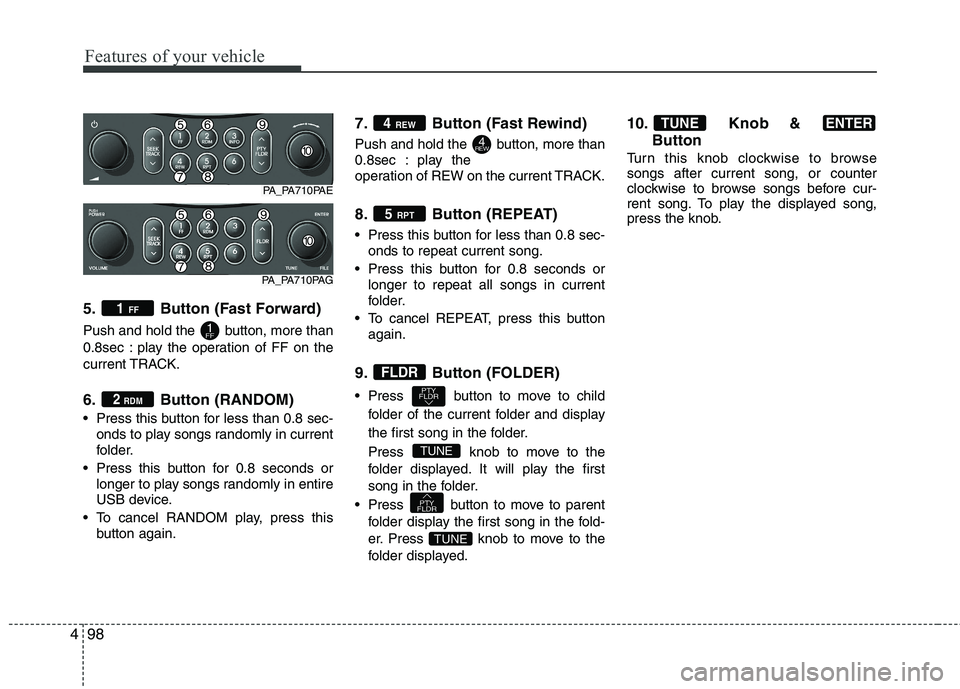
5. Button (Fast Forward)
Push and hold the button, more than
0.8sec : play the operation of FF on the
current TRACK.
6. Button (RANDOM)
Press this button for less than 0.8 sec-
onds to play songs randomly in current
folder.
Press this button for 0.8 seconds or longer to play songs randomly in entire
USB device.
To cancel RANDOM play, press this button again. 7. Button (Fast Rewind)
Push and hold the button, more than
0.8sec : play the
operation of REW on the current TRACK.
8. Button (REPEAT)
Press this button for less than 0.8 sec-
onds to repeat current song.
Press this button for 0.8 seconds or longer to repeat all songs in current
folder.
To cancel REPEAT, press this button again.
9. Button (FOLDER)
Press button to move to child folder of the current folder and display
the first song in the folder.
Press knobto move to the
folder displayed. It will play the first
song in the folder.
Press button to move to parent folder display the first song in the fold-
er.
Press knobto move to the
folder displayed. 10. Knob &
Button
Turn this knob clockwise to browse songs after current song, or counter
clockwise to browse songs before cur-
rent song. To play the displayed song,
press the knob.
ENTERTUNE
TUNE
PTY
FLDR
TUNE
PTY
FLDR
FLDR
5 RPT
4REW
4 REW
2
RDM
1FF
1 FF
PA_PA710PAE
PA_PA710PAG
Page 180 of 354
4101
Features of your vehicle
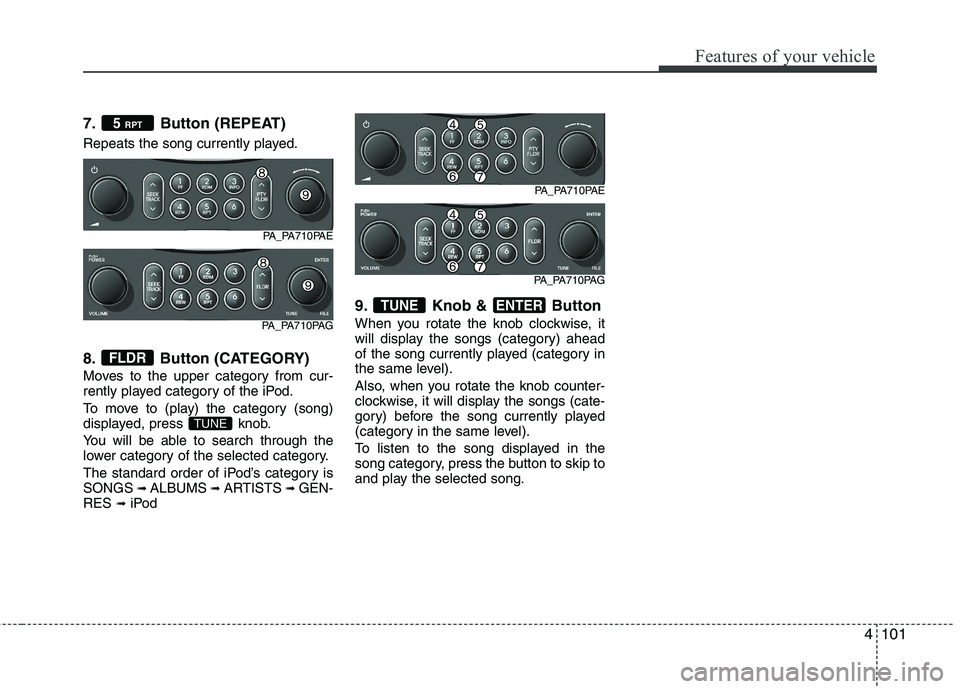
7. Button (REPEAT)
Repeats the song currently played.
8. Button (CATEGORY)
Moves to the upper category from cur-
rently played category of the iPod.
To move to (play) the category (song)
displayed, press knob.
You will be able to search through the
lower category of the selected category.
The standard order of iPod’s category is SONGS ➟
ALBUMS ➟ARTISTS ➟GEN-
RES ➟iPod 9. Knob & Button
When you rotate the knob clockwise, it
will display the songs (category) ahead
of the song currently played (category in
the same level).
Also, when you rotate the knob counter-
clockwise, it will display the songs (cate-
gory) before the song currently played
(category in the same level).
To listen to the song displayed in the
song category, press the button to skip to
and play the selected song.
ENTERTUNE
TUNE
FLDR
5
RPT
PA_PA710PAE
PA_PA710PAG
PA_PA710PAE
PA_PA710PAG
Page 195 of 354
53
Driving your vehicle
E020100AUN
Before entering vehicle
• Be sure that all windows, outside mir-ror(s), and outside lights are clean.
Check the condition of the tires.
Check under the vehicle for any sign of leaks.
Be sure there are no obstacles behind you if you intend to back up.
E020200AUN
Necessary inspections
Fluid levels, such as engine oil, engine
coolant, brake fluid, and washer fluid
should be checked on a regular basis,
with the exact interval depending on the
fluid. Further details are provided in sec-
tion 7, “Maintenance”. E020300BUN
Before starting
Close and lock all doors.
Position the seat so that all controls are
easily reached.
Adjust the inside and outside rearview mirrors.
Be sure that all lights work.
Check all gauges.
Check the operation of warning lights when the ignition switch is turned to the ON position.
Release the parking brake and make sure the brake warning light goes out.
For safe operation, be sure you are famil-
iar with your vehicle and its equipment.
BEFORE DRIVING
WARNING
All passengers must be properly
belted whenever the vehicle is mov-
ing. Refer to “Seat belts” in section
3 for more information on their
proper use.
WARNING
Always check the surrounding
areas near your vehicle for people,
especially children, before putting a
car into D (Drive) or R (Reverse).
WARNING - Driving under
the influence of alcohol or drugs
Drinking and driving is dangerous.
Drunk driving is the number one
contributor to the highway death
toll each year. Even a small amount
of alcohol will affect your reflexes,
perceptions and judgment. Drivingwhile under the influence of drugs
is as dangerous or more dangerousthan driving drunk.
You are much more likely to have a
serious accident if you drink or
take drugs and drive.
If you are drinking or taking drugs,
don’t drive. Do not ride with a driv-er who has been drinking or taking
drugs. Choose a designated driveror call a cab.
WARNING
When you intend to park or stop the
vehicle with the engine on, be care-ful not to depress the accelerator
pedal for a long period of time. It
may overheat the engine or exhaust
system and cause fire.
Page 196 of 354
Driving your vehicle
4
5
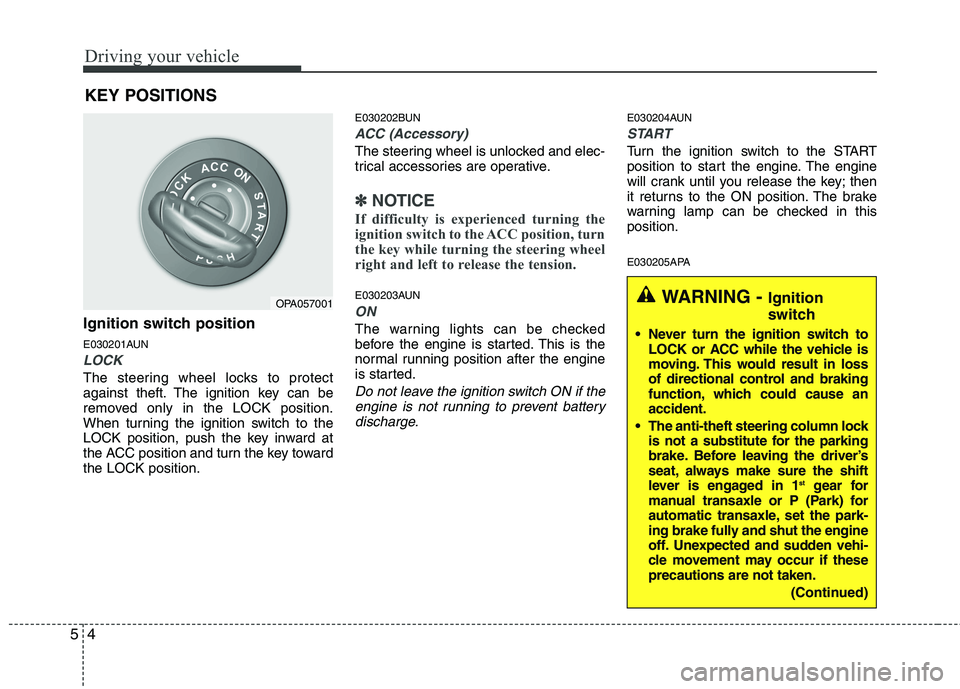
Ignition switch position
E030201AUN
LOCK
The steering wheel locks to protect
against theft. The ignition key can be
removed only in the LOCK position.
When turning the ignition switch to the
LOCK position, push the key inward at
the ACC position and turn the key towardthe LOCK position. E030202BUN
ACC (Accessory)
The steering wheel is unlocked and elec-
trical accessories are operative.
✽✽
NOTICE
If difficulty is experienced turning the
ignition switch to the ACC position, turn
the key while turning the steering wheel
right and left to release the tension.
E030203AUN
ON
The warning lights can be checked
before the engine is started. This is the
normal running position after the engine
is started.
Do not leave the ignition switch ON if the engine is not running to prevent battery
discharge.
E030204AUN
START
Turn the ignition switch to the START
position to start the engine. The engine
will crank until you release the key; then
it returns to the ON position. The brake
warning lamp can be checked in thisposition.
E030205APA
KEY POSITIONS
OPA057001WARNING -
Ignition
switch
Never turn the ignition switch to LOCK or ACC while the vehicle is
moving. This would result in loss
of directional control and braking
function, which could cause anaccident.
The anti-theft steering column lock is not a substitute for the parking
brake. Before leaving the driver’s
seat, always make sure the shift
lever is engaged in 1 st
gear for
manual transaxle or P (Park) for
automatic transaxle, set the park-
ing brake fully and shut the engine
off. Unexpected and sudden vehi-
cle movement may occur if theseprecautions are not taken.
(Continued)
Page 200 of 354

Driving your vehicle
8
5
✽✽
NOTICE
When the ISG related sensors or sys- tem error occurs, the ISG OFF button
light will illuminate. If the button light
is not turned off by pressing the ISG
OFF button again or if the ISG system
continuously does not work correctly,
please contact an authorized
HYUNDAI dealer as soon as possible.
Also, if the battery charging status is
low, the ISG OFF button light will
illuminate. When the button light
comes on, it may stop illuminating
after driving your vehicle at approxi-
mately 80 km/h for a maximum of two
hours and setting the fan speed con-
trol knob below the 2nd position. If
the button light continues to be illumi-
nated in spite of the procedure, please
contact an authorized HYUNDAI
dealer as soon as possible.WARNING
When the engine is in Idle Stop
mode, it's possible to restart theengine without the driver taking
any action.
Before leaving the car or doing any-
thing in the engine room area, stop
the engine by turning the ignition
key to the LOCK position or remov-ing it.
Page 202 of 354
Driving your vehicle
10
5
During cold weather, shifting may be
difficult until the transaxle lubricant has
warmed up. This is normal and not
harmful to the transaxle.
If you've come to a complete stop and it's hard to shift into 1st or R(Reverse),
put the shift lever in N(Neutral) position
and release the clutch. Press the
clutch pedal back down, and then shift
into 1st or R(Reverse) gear position. E050101AUNUsing the clutch
The clutch should be pressed all the way
to the floor before shifting, then released
slowly. The clutch pedal should always be
fully released while driving. Do not rest
your foot on the clutch pedal while driv-
ing. This can cause unnecessary wear.
Do not partially engage the clutch to hold
the car on an incline. This causes unnec-
essary wear. Use the foot brake or park-
ing brake to hold the car on an incline. Do
not operate the clutch pedal rapidly and
repeatedly.
CAUTION
To avoid premature clutch wear
and damage, do not drive with
your foot resting on the clutchpedal. Also, don’t use the clutchto hold the vehicle stopped on an uphill grade, while waiting for atraffic light, etc.
Do not use the shift lever as a handrest during driving, as thiscan result in premature wear ofthe transaxle shift forks.
WARNING
Before leaving the driver’s seat, always set the parking brake fully
and shut the engine off. Thenmake sure the transaxle is shifted
into 1st gear when the vehicle is
parked on a level or uphill grade,
and shifted into R (Reverse) on a
downhill grade. Unexpected and
sudden vehicle movement canoccur if these precautions are not
followed in the order identified.
If your vehicle has a manual transaxle not equipped with a
ignition lock switch, it may moveand cause a serious accident
when starting the engine without
depressing the clutch pedal whilethe parking brake is released and
the shift lever not in the N(Neutral) position.
Page 204 of 354
Driving your vehicle
12
5
E060000APA E060100APA
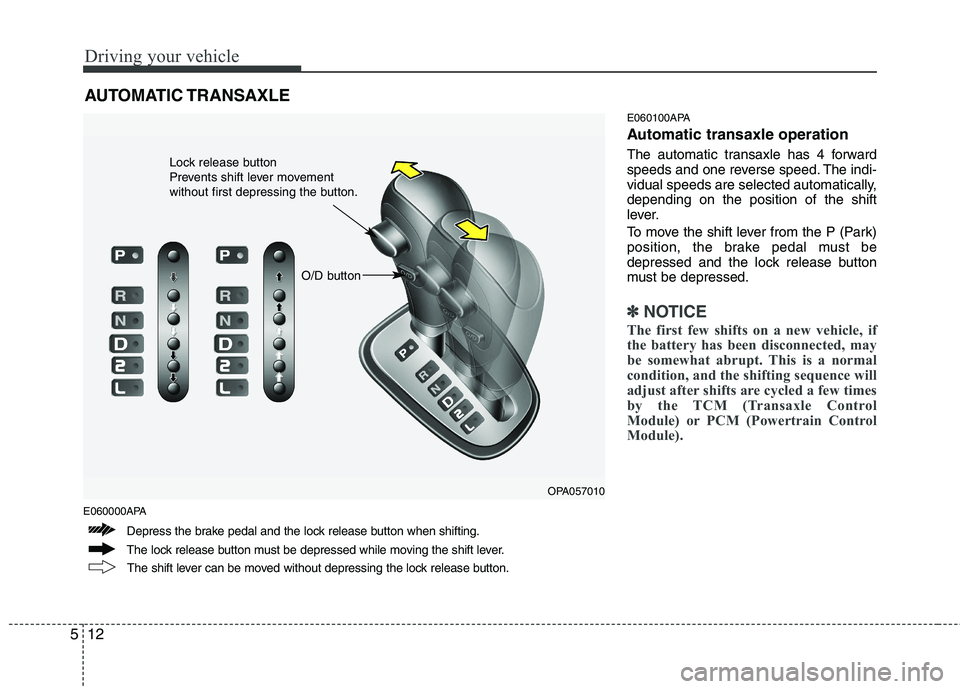
Automatic transaxle operation
The automatic transaxle has 4 forward
speeds and one reverse speed. The indi-
vidual speeds are selected automatically,depending on the position of the shift
lever.
To move the shift lever from the P (Park)
position, the brake pedal must be
depressed and the lock release button
must be depressed.
✽✽
NOTICE
The first few shifts on a new vehicle, if
the battery has been disconnected, may
be somewhat abrupt. This is a normal
condition, and the shifting sequence will
adjust after shifts are cycled a few times
by the TCM (Transaxle Control
Module) or PCM (Powertrain Control
Module).
AUTOMATIC TRANSAXLE
OPA057010
The lock release button must be depressed while moving the shift lever. The shift lever can be moved without depressing the lock release button.
Depress the brake pedal and the lock release button when shifting. Lock release button
Prevents shift lever movement
without first depressing the button.
O/D button