Key HYUNDAI I10 2015 Owner's Guide
[x] Cancel search | Manufacturer: HYUNDAI, Model Year: 2015, Model line: I10, Model: HYUNDAI I10 2015Pages: 343, PDF Size: 9.14 MB
Page 159 of 343
Features of your vehicle
98 4
(Continued)
• If you use devices such as a USB hub
purchased separately, the vehicle’s
audio system may not recognize the
USB device. In that case, connect the
USB device directly to the multimedia
terminal of the vehicle.
• If the USB device is divided by logical
drives, only the music files on the
highest-priority drive are recognized
by car audio.
• Devices such as MP3 Player/ Cellular
phone/Digital camera can be unrecog-
nizable by standard USB I/F can be
unrecognizable.
• Charging through the USB may not
be supported in some mobile devices.
• USB HDD or USB types liable to con-
nection failures due to vehicle vibra-
tions are not supported. (i-stick type)
• Some non-standard USB devices
(METAL COVER TYPE USB) can be
unrecognizable.
(Continued)(Continued)
• Some USB flash memory readers
(such as CF, SD, micro SD, etc.) or
external-HDD type devices can be
unrecognizable.
• Music files protected by DRM (DIGI-
TAL RIGHTS MANAGEMENT) are
not recognizable.
• The data in the USB memory may be
lost while using this audio. Always
back up important data on a personal
storage device.
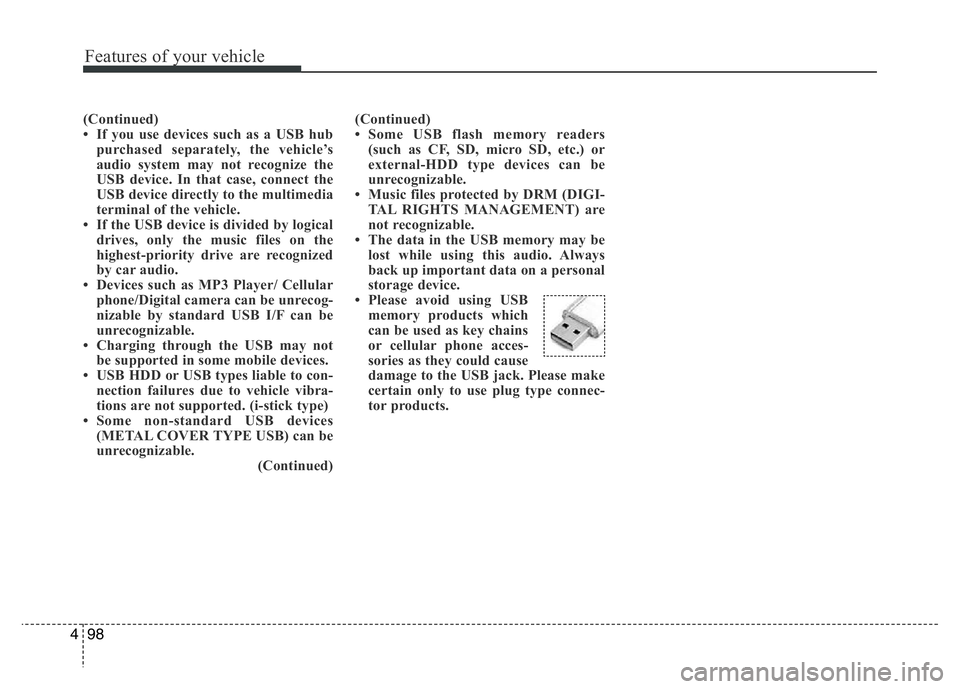
• Please avoid using USB
memory products which
can be used as key chains
or cellular phone acces-
sories as they could cause
damage to the USB jack. Please make
certain only to use plug type connec-
tor products.
Page 163 of 343
Features of your vehicle
102 4
SYSTEM CONTROLLERS AND
FUNCTIONS
❈Display and settings may differ
depending on the selected audio.
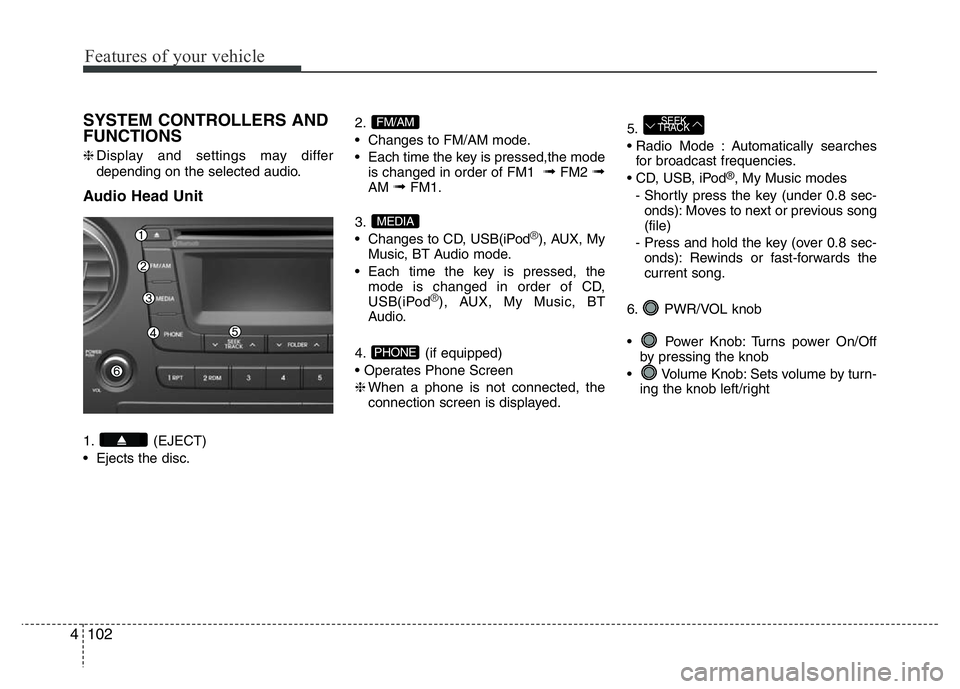
Audio Head Unit
1. (EJECT)
• Ejects the disc.2.
• Changes to FM/AM mode.
• Each time the key is pressed,the mode
is changed in order of FM1
➟FM2 ➟AM ➟FM1.
3.
• Changes to CD, USB(iPod
®), AUX, My
Music, BT Audio mode.
• Each time the key is pressed, the
mode is changed in order of CD,
USB(iPod
®), AUX, My Music, BT
Audio.
4. (if equipped)
• Operates Phone Screen
❈When a phone is not connected, the
connection screen is displayed.5.
• Radio Mode : Automatically searches
for broadcast frequencies.
• CD, USB, iPod
®, My Music modes
- Shortly press the key (under 0.8 sec-
onds): Moves to next or previous song
(file)
- Press and hold the key (over 0.8 sec-
onds): Rewinds or fast-forwards the
current song.
6. PWR/VOL knob
• Power Knob: Turns power On/Off
by pressing the knob
• Volume Knob: Sets volume by turn-
ing the knob left/right
SEEK
TRACK
PHONE
MEDIA
FM/AM
Page 164 of 343
4103
Features of your vehicle
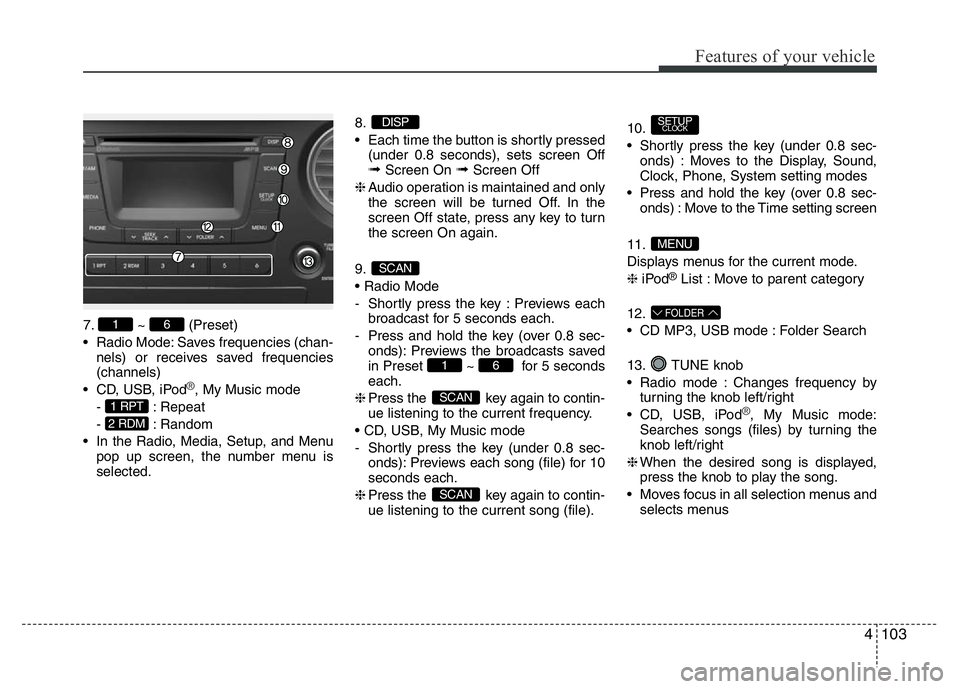
7. ~ (Preset)
• Radio Mode: Saves frequencies (chan-
nels) or receives saved frequencies
(channels)
• CD, USB, iPod
®, My Music mode
- : Repeat
- : Random
• In the Radio, Media, Setup, and Menu
pop up screen, the number menu is
selected.8.
• Each time the button is shortly pressed
(under 0.8 seconds), sets screen Off
➟Screen On ➟Screen Off
❈Audio operation is maintained and only
the screen will be turned Off. In the
screen Off state, press any key to turn
the screen On again.
9.
• Radio Mode
- Shortly press the key : Previews each
broadcast for 5 seconds each.
- Press and hold the key (over 0.8 sec-
onds): Previews the broadcasts saved
in Preset ~ for 5 seconds
each.
❈Press the key again to contin-
ue listening to the current frequency.
• CD, USB, My Music mode
- Shortly press the key (under 0.8 sec-
onds): Previews each song (file) for 10
seconds each.
❈Press the key again to contin-
ue listening to the current song (file).10.
• Shortly press the key (under 0.8 sec-
onds) : Moves to the Display, Sound,
Clock, Phone, System setting modes
• Press and hold the key (over 0.8 sec-
onds) : Move to the Time setting screen
11.
Displays menus for the current mode.
❈iPod
®List : Move to parent category
12.
• CD MP3, USB mode : Folder Search
13. TUNE knob
• Radio mode : Changes frequency by
turning the knob left/right
• CD, USB, iPod
®, My Music mode:
Searches songs (files) by turning the
knob left/right
❈When the desired song is displayed,
press the knob to play the song.
• Moves focus in all selection menus and
selects menus
FOLDER
MENU
SETUPCLOCK
SCAN
SCAN
61
SCAN
DISP
2 RDM
1 RPT
61
Page 165 of 343
Features of your vehicle
104 4
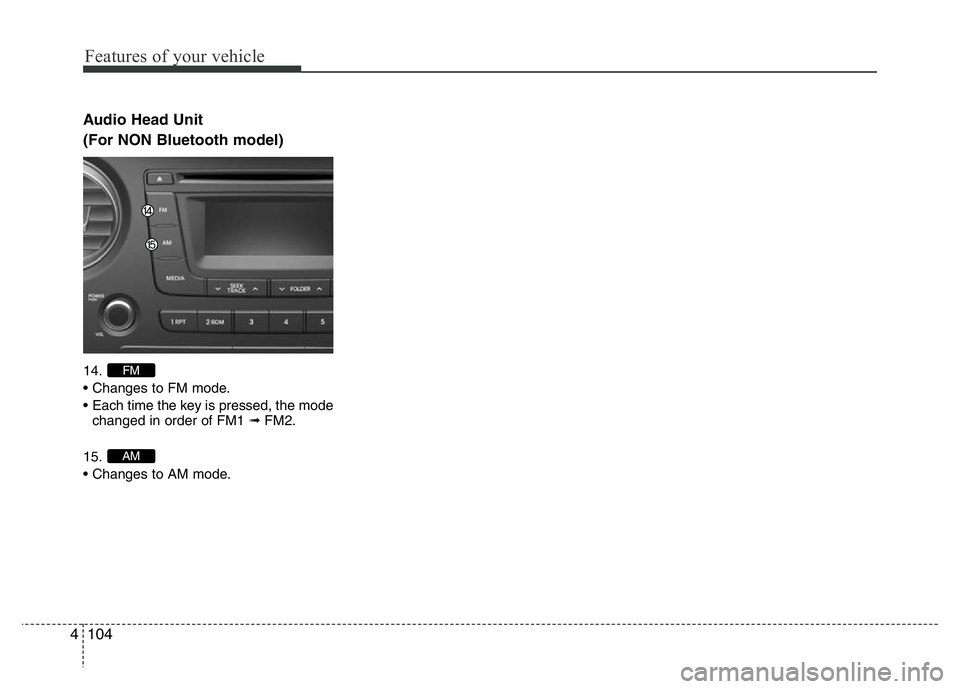
Audio Head Unit
(For NON Bluetooth model)
14.
• Changes to FM mode.
• Each time the key is pressed, the mode
changed in order of FM1 ➟FM2.
15.
• Changes to AM mode.
AM
FM
Page 167 of 343
Features of your vehicle
106 4
SYSTEM CONTROLLERS AND
FUNCTIONS
❈Display and settings may differ
depending on the selected audio.
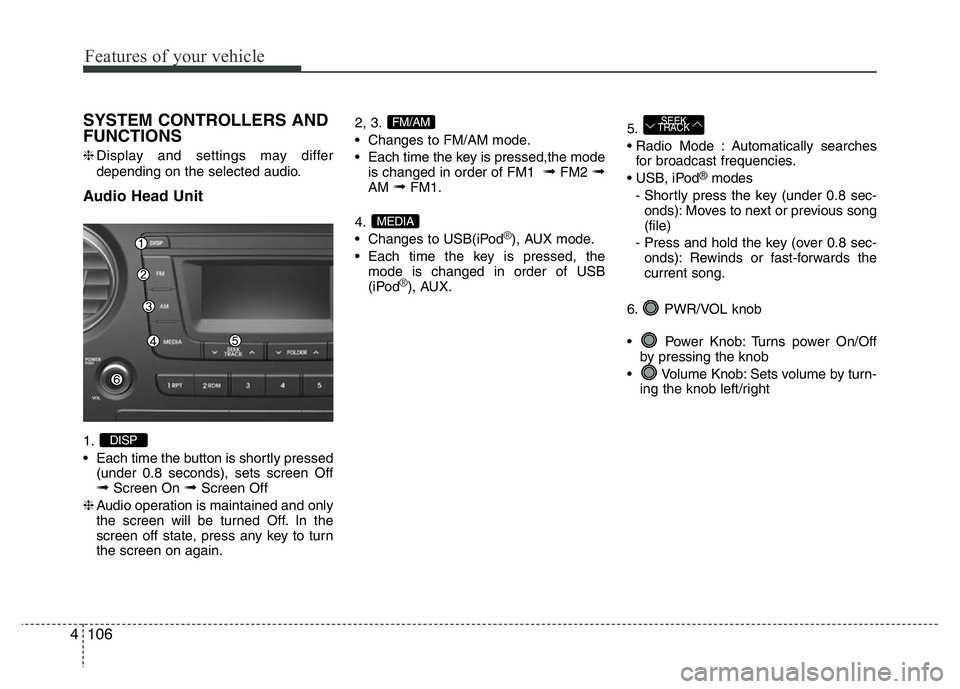
Audio Head Unit
1.
• Each time the button is shortly pressed
(under 0.8 seconds), sets screen Off
➟Screen On ➟Screen Off
❈Audio operation is maintained and only
the screen will be turned Off. In the
screen off state, press any key to turn
the screen on again.2, 3.
• Changes to FM/AM mode.
• Each time the key is pressed,the mode
is changed in order of FM1
➟FM2 ➟AM ➟FM1.
4.
• Changes to USB(iPod
®), AUX mode.
• Each time the key is pressed, the
mode is changed in order of USB
(iPod
®), AUX.5.
• Radio Mode : Automatically searches
for broadcast frequencies.
• USB, iPod
®modes
- Shortly press the key (under 0.8 sec-
onds): Moves to next or previous song
(file)
- Press and hold the key (over 0.8 sec-
onds): Rewinds or fast-forwards the
current song.
6. PWR/VOL knob
• Power Knob: Turns power On/Off
by pressing the knob
• Volume Knob: Sets volume by turn-
ing the knob left/right
SEEK
TRACK
MEDIA
FM/AM
DISP
Page 168 of 343
4107
Features of your vehicle
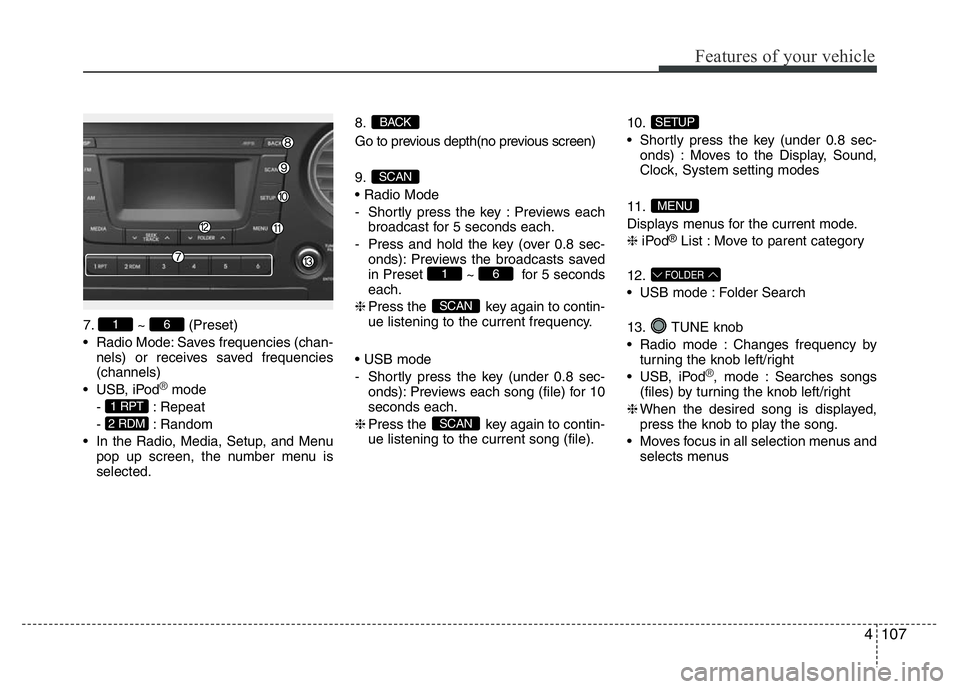
7. ~ (Preset)
• Radio Mode: Saves frequencies (chan-
nels) or receives saved frequencies
(channels)
• USB, iPod
®mode
- : Repeat
- : Random
• In the Radio, Media, Setup, and Menu
pop up screen, the number menu is
selected.8.
Go to previous depth(no previous screen)
9.
• Radio Mode
- Shortly press the key : Previews each
broadcast for 5 seconds each.
- Press and hold the key (over 0.8 sec-
onds): Previews the broadcasts saved
in Preset ~ for 5 seconds
each.
❈Press the key again to contin-
ue listening to the current frequency.
• USB mode
- Shortly press the key (under 0.8 sec-
onds): Previews each song (file) for 10
seconds each.
❈Press the key again to contin-
ue listening to the current song (file).10.
• Shortly press the key (under 0.8 sec-
onds) : Moves to the Display, Sound,
Clock, System setting modes
11.
Displays menus for the current mode.
❈iPod
®List : Move to parent category
12.
• USB mode : Folder Search
13. TUNE knob
• Radio mode : Changes frequency by
turning the knob left/right
• USB, iPod
®, mode : Searches songs
(files) by turning the knob left/right
❈When the desired song is displayed,
press the knob to play the song.
• Moves focus in all selection menus and
selects menus
FOLDER
MENU
SETUP
SCAN
SCAN
61
SCAN
BACK
2 RDM
1 RPT
61
Page 169 of 343
![HYUNDAI I10 2015 Owners Guide SETUP
Display Settings
Press the , key Select
[Display] through TUNE knob or
key Select menu through TUNE knob
Mode Pop up
[Mode Pop up] Changes . selec-
tion mode
• During On state, press th](/img/35/56232/w960_56232-168.png "HYUNDAI I10 2015 Owners Guide SETUP
Display Settings
Press the , key Select
[Display] through TUNE knob or
key Select menu through TUNE knob
Mode Pop up
[Mode Pop up] Changes . selec-
tion mode
• During On state, press th")
SETUP
Display Settings
Press the , key Select
[Display] through TUNE knob or
key Select menu through TUNE knob
Mode Pop up
[Mode Pop up] Changes . selec-
tion mode
• During On state, press the or
key to display the mode
change pop up screen.
• When the pop up screen is displayed,
use the TUNE knob or keys
~ to select the desired mode.
Text Scroll
[Text Scroll] Set /
• : Maintains scroll
• : Scrolls only one (1) time.
Media Display
When playing an MP3 file, select the
desired display info from ‘Folder/File’ or
‘Album/Artist/Song’.
Sound Settings
Press the , key Select
[Sound] through TUNE knob or
key Select menu through TUNE knob
2 RDM
SETUPSETUP
CLOCK
Off
On
OffOn
6
1
MEDIARADIO
On
1 RPT
SETUPSETUP
CLOCK
Features of your vehicle
108 4
Page 171 of 343
![HYUNDAI I10 2015 Owners Guide Features of your vehicle
110 4
Clock Settings
Press the key Select [Clock]
through TUNE knob or key
Select menu through TUNE knob
Clock Settings
This menu is used to set the time.
Select [Clock Set](/img/35/56232/w960_56232-170.png "HYUNDAI I10 2015 Owners Guide Features of your vehicle
110 4
Clock Settings
Press the key Select [Clock]
through TUNE knob or key
Select menu through TUNE knob
Clock Settings
This menu is used to set the time.
Select [Clock Set")
Features of your vehicle
110 4
Clock Settings
Press the key Select [Clock]
through TUNE knob or key
Select menu through TUNE knob
Clock Settings
This menu is used to set the time.
Select [Clock Settings] Set through
TUNE knob Press TUNE knob
❈Adjust the number currently in focus to
set the [hour] and press the tune knob
to set the [minute].
Callendar Settings
This menu is used to set the date.
Select [Callendar Settings ] Set through
TUNE knob Press TUNE knob
❈Adjust the number currently in focus to
make the settings and press the tune
knob to move to the next setting. (Set
in order of Year/Month/Day)
Time Format
This function is used to set the 12/24
hour time format of the audio system.
Select [Time Format] Set 12Hr / 24Hr
through TUNE knob
Clock Display when Power is OFF
Select [Clock Disp.(Pwr Off) Set /
through TUNE knob
• : Displays time/date on screen
• : Turn off.
Off
On
Off
On
3
SETUP
CLOCK
Page 172 of 343
![HYUNDAI I10 2015 Owners Guide 4111
Features of your vehicle
Phone Setup (if equipped)
Press the key Select [Phone]
Pair Phone
Select [Pair Phone] Set through
TUNE knob
➀Search for device names as displayed
on your mobile phone](/img/35/56232/w960_56232-171.png "HYUNDAI I10 2015 Owners Guide 4111
Features of your vehicle
Phone Setup (if equipped)
Press the key Select [Phone]
Pair Phone
Select [Pair Phone] Set through
TUNE knob
➀Search for device names as displayed
on your mobile phone")
4111
Features of your vehicle
Phone Setup (if equipped)
Press the key Select [Phone]
Pair Phone
Select [Pair Phone] Set through
TUNE knob
➀Search for device names as displayed
on your mobile phone and connect.
➁Input the passkey displayed on the
screen. (Passkey : 0000)
❈The device name and passkey will be
displayed on the screen for up to 3
minutes. If pairing is not completed
within the 3 minutes, the mobile phone
pairing process will automatically be
canceled.➂Pairing completion is displayed.
❈In some mobile phones, pairing will
automatically be followed by connec-
tion.
❈It is possible to pair up to five
Bluetooth®Wireless Technology
enabled mobile phones.
SETUP
CLOCKCAUTION
To pair a Bluetooth®Wireless
Technology enabled mobile phone,
authentication and connection
processes are first required. As a
result, you cannot pair your mobile
phone while driving the vehicle.
First park your vehicle before use.
Page 175 of 343
![HYUNDAI I10 2015 Owners Guide Features of your vehicle
114 4
Auto Download
When connecting a mobile phone, it is
possible to automatically download new
Contacts and Call Histories.
Select [Auto Download] Set /
through TUNE knob
A](/img/35/56232/w960_56232-174.png "HYUNDAI I10 2015 Owners Guide Features of your vehicle
114 4
Auto Download
When connecting a mobile phone, it is
possible to automatically download new
Contacts and Call Histories.
Select [Auto Download] Set /
through TUNE knob
A")
Features of your vehicle
114 4
Auto Download
When connecting a mobile phone, it is
possible to automatically download new
Contacts and Call Histories.
Select [Auto Download] Set /
through TUNE knob
Audio Streaming
Songs (files) saved in your Bluetooth®
Wireless Technology enabled mobile
phone can be played through the audio
system.
Select [Audio Streaming] Set /
through TUNE knob
Outgoing Volume
This is used to set the volume of your
voice as heard by the other party while
on a
Bluetooth®Wireless Technology
enabled handsfree call.
Select [Outgoing Volume] Set volume
through TUNE knob
❈While on a call, the volume can be
changed by using the key.
Bluetooth®Wireless Technology
System Off
This feature is used when you do not
wish to use the Bluetooth®Wireless
Technology system.
Select [Bluetooth System Off] Set
through TUNE knob
❈If a phone is already connected, dis-
connect the currently connected phone
and turn the
Bluetooth®Wireless
Technology system off.
Using the Bluetooth®Wireless
Technology System
To use Bluetooth®Wireless Technology
when the system is currently off, follow
these next steps.
• Turning On
Bluetooth®Wireless
Technology through the Key.
Press the key Screen Guidance
❈Moves to the screen where
Bluetooth®
Wireless Technology functions can be
used and displays guidance.
• Turning On
Bluetooth®Wireless
Technology through the Key.
Press the key Select [Phone]
➀A screen asking whether to turn on
Bluetooth®Wireless Technology will be
displayed.
➁On the screen, select to turn on
Bluetooth®Wireless Technology and
display guidance.
❈If the
Bluetooth®Wireless Technology
system is turned on, the system will
automatically try to connect the most
recently connected
Bluetooth®Wireless
Technology mobile phone.
YES
SETUP
CLOCK
SETUP
CLOCK
PHONE
PHONE
SEEK
TRACK
OffOn
OffOn
CAUTION
The Bluetooth®Wireless Technology
audio streaming feature may not be
supported in some mobile phones.