warning light HYUNDAI I10 2016 User Guide
[x] Cancel search | Manufacturer: HYUNDAI, Model Year: 2016, Model line: I10, Model: HYUNDAI I10 2016Pages: 343, PDF Size: 9.14 MB
Page 60 of 343
Safety system of your vehicle
44 3
SRS care
The SRS is virtually maintenance-free
and there are no parts you can safely
service by yourself. If the SRS air bag
warning light does not illuminate when
the ignition switch is in the ON position,
or continuously remains on, we recom-
mend that the system be immediately
inspected by an authorized HYUNDAI
dealer.
We recommend any work on the SRS
system, such as removing, installing,
repairing, or any work on the steering
wheel, the front passenger's panel, front
seats and roof rails be performed by an
authorized HYUNDAI dealer. Improper
handling of the SRS system may result in
serious personal injury.WARNING
To reduce the risk of serious injury
or death, take the following precau-
tions:
• Do not attempt to modify or dis-
connect the SRS components or
wiring, including the addition of
any kind of badges to the pad
covers or modifications to the
body structure.
• Do not place objects over or near
the air bag modules on the steer-
ing wheel, instrument panel, or
the front passenger's panel
above the glove box.
• Clean the air bag pad covers with
a soft cloth moistened with plain
water. Solvents or cleaners could
adversely affect the air bag cov-
ers and proper deployment of the
system.
• We recommend that inflated air
bags be replaced by an author-
ized HYUNDAI dealer.
(Continued)
(Continued)
• If components of the air bag sys-
tem must be discarded, or if the
vehicle must be scrapped, certain
safety precautions must be
observed. Consult an authorized
HYUNDAI dealer for the neces-
sary information. Failure to follow
these precautions could increase
the risk of personal injury.
Page 68 of 343
47
Features of your vehicle
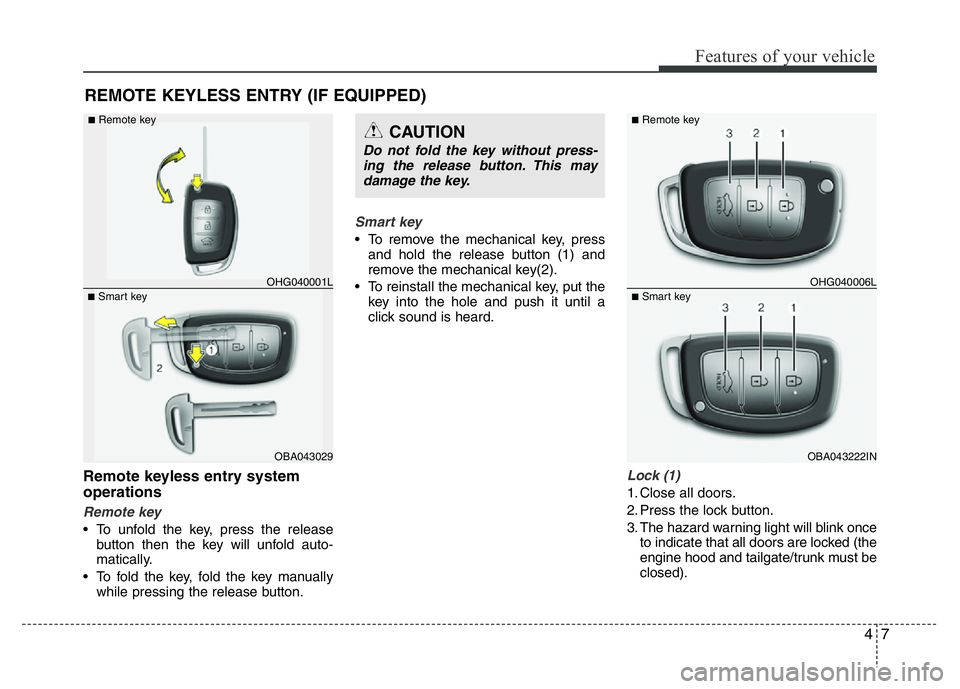
Remote keyless entry system
operations
Remote key
• To unfold the key, press the release
button then the key will unfold auto-
matically.
• To fold the key, fold the key manually
while pressing the release button.
Smart key
• To remove the mechanical key, press
and hold the release button (1) and
remove the mechanical key(2).
• To reinstall the mechanical key, put the
key into the hole and push it until a
click sound is heard.
Lock (1)
1. Close all doors.
2. Press the lock button.
3. The hazard warning light will blink once
to indicate that all doors are locked (the
engine hood and tailgate/trunk must be
closed).
REMOTE KEYLESS ENTRY (IF EQUIPPED)
OBA043029
■Smart keyOHG040001L
■Remote keyCAUTION
Do not fold the key without press-
ing the release button. This may
damage the key.
OBA043222IN
■Smart keyOHG040006L
■Remote key
Page 69 of 343
Features of your vehicle
8 4
✽NOTICE
The doors will not lock if a door is
opened.
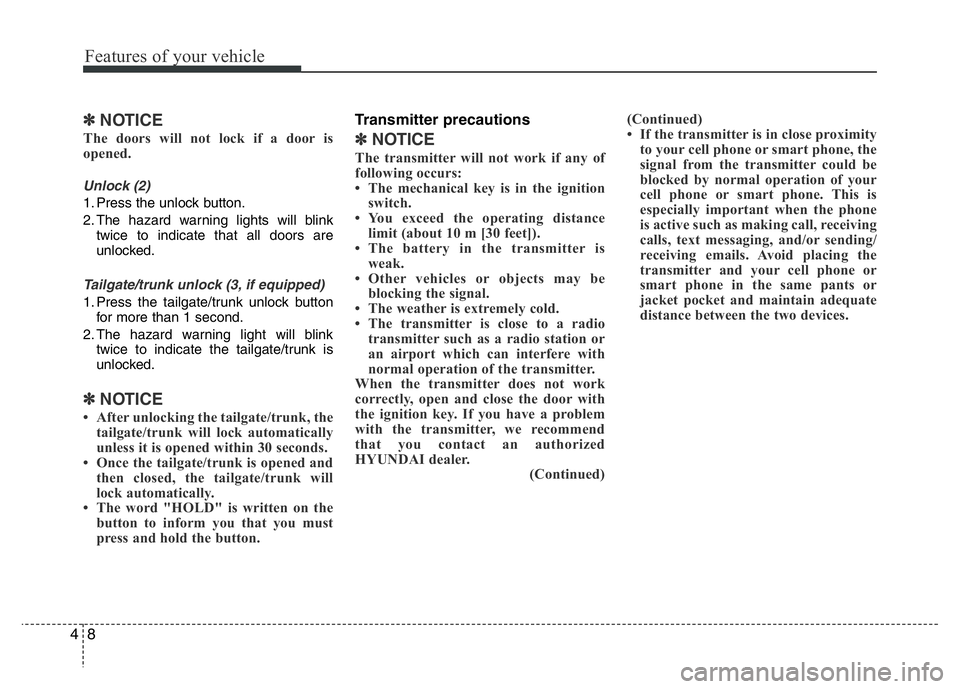
Unlock (2)
1. Press the unlock button.
2. The hazard warning lights will blink
twice to indicate that all doors are
unlocked.
Tailgate/trunk unlock (3, if equipped)
1. Press the tailgate/trunk unlock button
for more than 1 second.
2. The hazard warning light will blink
twice to indicate the tailgate/trunk is
unlocked.
✽NOTICE
• After unlocking the tailgate/trunk, the
tailgate/trunk will lock automatically
unless it is opened within 30 seconds.
• Once the tailgate/trunk is opened and
then closed, the tailgate/trunk will
lock automatically.
• The word "HOLD" is written on the
button to inform you that you must
press and hold the button.
Transmitter precautions
✽NOTICE
The transmitter will not work if any of
following occurs:
• The mechanical key is in the ignition
switch.
• You exceed the operating distance
limit (about 10 m [30 feet]).
• The battery in the transmitter is
weak.
• Other vehicles or objects may be
blocking the signal.
• The weather is extremely cold.
• The transmitter is close to a radio
transmitter such as a radio station or
an airport which can interfere with
normal operation of the transmitter.
When the transmitter does not work
correctly, open and close the door with
the ignition key. If you have a problem
with the transmitter, we recommend
that you contact an authorized
HYUNDAI dealer.
(Continued)(Continued)
• If the transmitter is in close proximity
to your cell phone or smart phone, the
signal from the transmitter could be
blocked by normal operation of your
cell phone or smart phone. This is
especially important when the phone
is active such as making call, receiving
calls, text messaging, and/or sending/
receiving emails. Avoid placing the
transmitter and your cell phone or
smart phone in the same pants or
jacket pocket and maintain adequate
distance between the two devices.
Page 72 of 343
411
Features of your vehicle
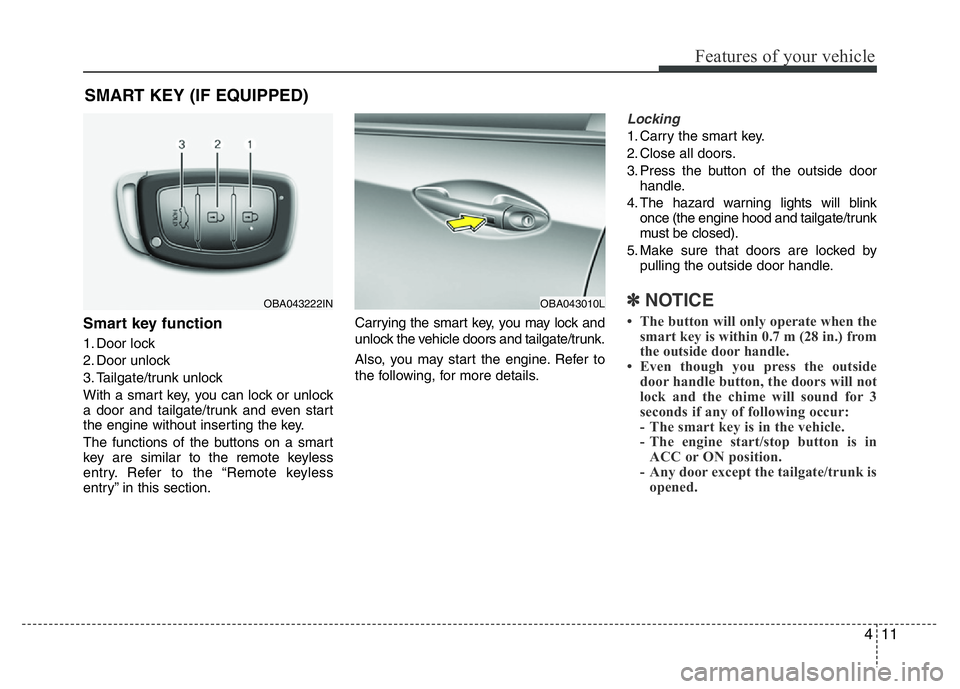
Smart key function
1. Door lock
2. Door unlock
3. Tailgate/trunk unlock
With a smart key, you can lock or unlock
a door and tailgate/trunk and even start
the engine without inserting the key.
The functions of the buttons on a smart
key are similar to the remote keyless
entry. Refer to the “Remote keyless
entry” in this section.Carrying the smart key, you may lock and
unlock the vehicle doors and tailgate/trunk.
Also, you may start the engine. Refer to
the following, for more details.
Locking
1. Carry the smart key.
2. Close all doors.
3. Press the button of the outside door
handle.
4. The hazard warning lights will blink
once (the engine hood and tailgate/trunk
must be closed).
5. Make sure that doors are locked by
pulling the outside door handle.
✽NOTICE
• The button will only operate when the
smart key is within 0.7 m (28 in.) from
the outside door handle.
• Even though you press the outside
door handle button, the doors will not
lock and the chime will sound for 3
seconds if any of following occur:
- The smart key is in the vehicle.
- The engine start/stop button is in
ACC or ON position.
- Any door except the tailgate/trunk is
opened.
SMART KEY (IF EQUIPPED)
OBA043222INOBA043010L
Page 73 of 343
Features of your vehicle
12 4
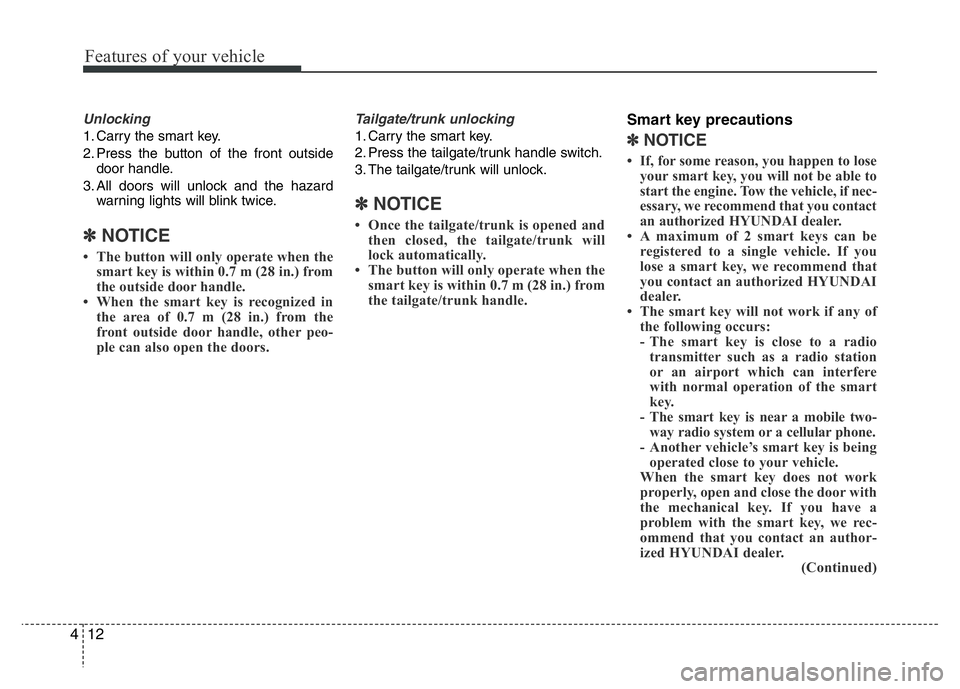
Unlocking
1. Carry the smart key.
2. Press the button of the front outside
door handle.
3. All doors will unlock and the hazard
warning lights will blink twice.
✽NOTICE
• The button will only operate when the
smart key is within 0.7 m (28 in.) from
the outside door handle.
• When the smart key is recognized in
the area of 0.7 m (28 in.) from the
front outside door handle, other peo-
ple can also open the doors.
Tailgate/trunk unlocking
1. Carry the smart key.
2. Press the tailgate/trunk handle switch.
3. The tailgate/trunk will unlock.
✽NOTICE
• Once the tailgate/trunk is opened and
then closed, the tailgate/trunk will
lock automatically.
• The button will only operate when the
smart key is within 0.7 m (28 in.) from
the tailgate/trunk handle.
Smart key precautions
✽NOTICE
• If, for some reason, you happen to lose
your smart key, you will not be able to
start the engine. Tow the vehicle, if nec-
essary, we recommend that you contact
an authorized HYUNDAI dealer.
• A maximum of 2 smart keys can be
registered to a single vehicle. If you
lose a smart key, we recommend that
you contact an authorized HYUNDAI
dealer.
• The smart key will not work if any of
the following occurs:
- The smart key is close to a radio
transmitter such as a radio station
or an airport which can interfere
with normal operation of the smart
key.
- The smart key is near a mobile two-
way radio system or a cellular phone.
- Another vehicle’s smart key is being
operated close to your vehicle.
When the smart key does not work
properly, open and close the door with
the mechanical key. If you have a
problem with the smart key, we rec-
ommend that you contact an author-
ized HYUNDAI dealer.
(Continued)
Page 75 of 343
Features of your vehicle
14 4
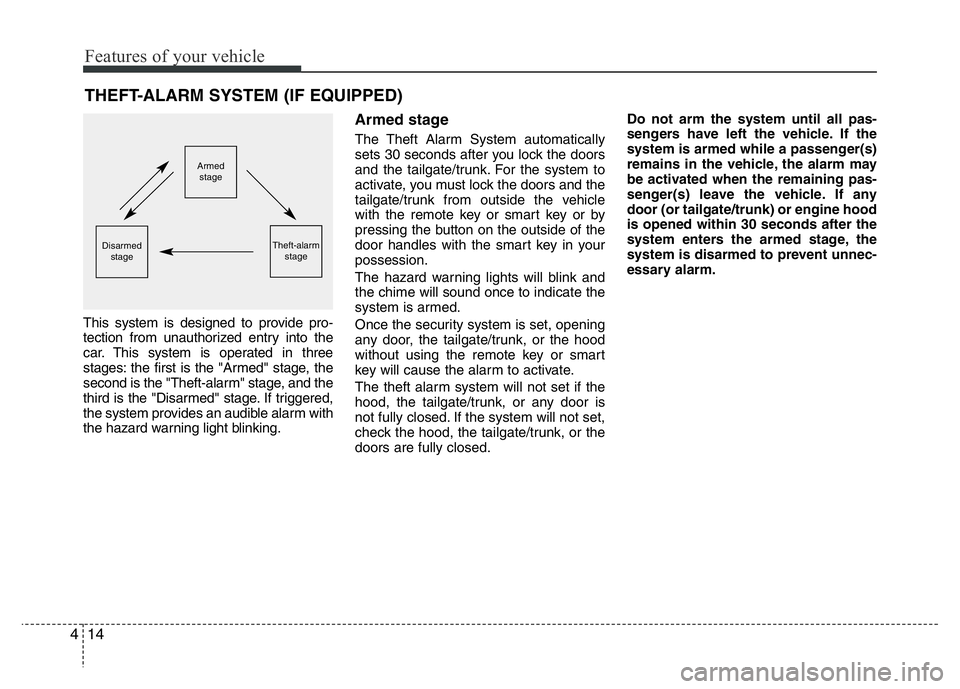
This system is designed to provide pro-
tection from unauthorized entry into the
car. This system is operated in three
stages: the first is the "Armed" stage, the
second is the "Theft-alarm" stage, and the
third is the "Disarmed" stage. If triggered,
the system provides an audible alarm with
the hazard warning light blinking.
Armed stage
The Theft Alarm System automatically
sets 30 seconds after you lock the doors
and the tailgate/trunk. For the system to
activate, you must lock the doors and the
tailgate/trunk from outside the vehicle
with the remote key or smart key or by
pressing the button on the outside of the
door handles with the smart key in your
possession.
The hazard warning lights will blink and
the chime will sound once to indicate the
system is armed.
Once the security system is set, opening
any door, the tailgate/trunk, or the hood
without using the remote key or smart
key will cause the alarm to activate.
The theft alarm system will not set if the
hood, the tailgate/trunk, or any door is
not fully closed. If the system will not set,
check the hood, the tailgate/trunk, or the
doors are fully closed.Do not arm the system until all pas-
sengers have left the vehicle. If the
system is armed while a passenger(s)
remains in the vehicle, the alarm may
be activated when the remaining pas-
senger(s) leave the vehicle. If any
door (or tailgate/trunk) or engine hood
is opened within 30 seconds after the
system enters the armed stage, the
system is disarmed to prevent unnec-
essary alarm.
THEFT-ALARM SYSTEM (IF EQUIPPED)
Armed
stage
Theft-alarm
stageDisarmed
stage
Page 76 of 343
415
Features of your vehicle
Theft-alarm stage
The alarm will be activated if any of the
following occurs while the system is
armed.
• A door is opened without using the
remote key or smart key.
• The tailgate/trunk is opened without
using the remote key or smart key.
• The engine hood is opened.
The horn will sound and the hazard
warning lights will blink continuously for
approximately 27 seconds, unless the
system is disarmed. To turn off the sys-
tem, unlock the doors with the remote
key or smart key.
Disarmed stage
The system will be disarmed when:
Remote key
- The door unlock button is pressed.
Smart key
- The door unlock button is pressed.
- The button of the front outside door is
pressed while carrying the smart key.
After the doors are unlocked, the hazard
warning lights will blink twice to indicate
that the system is disarmed.
After pressing the unlock button, if any
door (or tailgate/trunk) is not opened
within 30 seconds, the system will be
rearmed.
✽NOTICE- Non-Smart key
• If the system is not disarmed with the
remote key, open the door with the
key and insert the key into the ignition
switch, turn the ignition switch to the
ON position and wait for 30 seconds.
Then the system will be disarmed.
• If you lose your keys, we recommend
that you contact an authorized
HYUNDAI dealer.
✽NOTICE- Smart key
• If the system is not disarmed with the
smart key, open the door with the
mechanical key and start the engine.
Then the system will be disarmed.
• If you lose your keys, we recommend
that you contact an authorized
HYUNDAI dealer.
CAUTION
Do not change, alter or adjust the
immobilizer system because it
could cause the immobilizer sys-
tem to malfunction and we recom-
mend that the system be serviced
by an authorized HYUNDAI dealer.
Malfunctions caused by improper
alterations, adjustments or modifi-
cations to the immobilizer system
are not covered by your vehicle
manufacturer warranty.
Page 91 of 343
Features of your vehicle
30 4
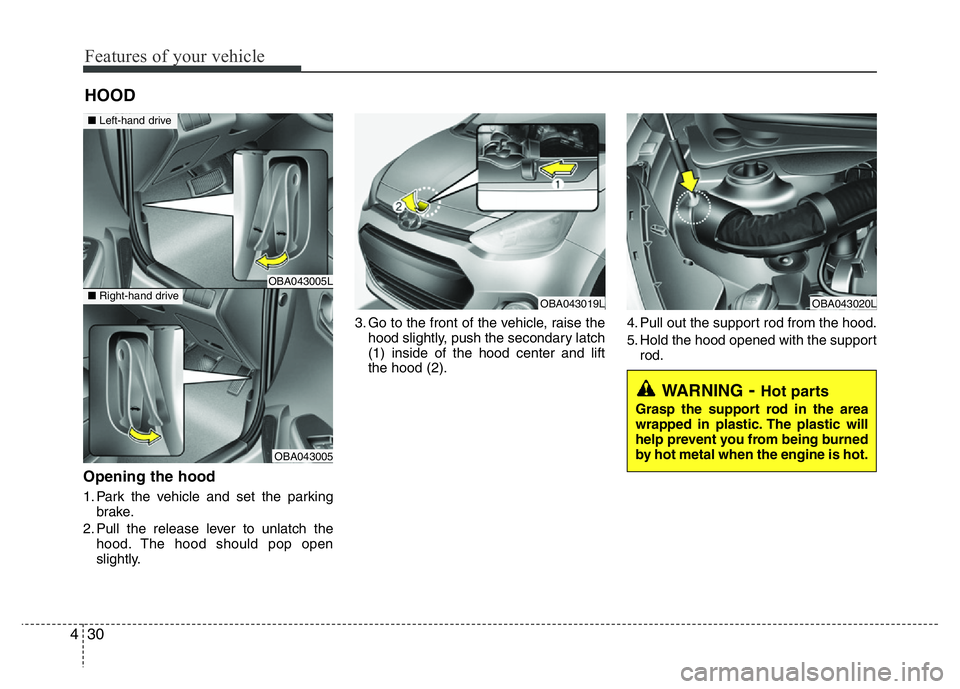
Opening the hood
1. Park the vehicle and set the parking
brake.
2. Pull the release lever to unlatch the
hood. The hood should pop open
slightly.3. Go to the front of the vehicle, raise the
hood slightly, push the secondary latch
(1) inside of the hood center and lift
the hood (2).4. Pull out the support rod from the hood.
5. Hold the hood opened with the support
rod.
HOOD
OBA043019LOBA043020L
WARNING- Hot parts
Grasp the support rod in the area
wrapped in plastic. The plastic will
help prevent you from being burned
by hot metal when the engine is hot.
OBA043005L
OBA043005
■Left-hand drive
■Right-hand drive
Page 94 of 343
433
Features of your vehicle
Closing the fuel filler lid
1. To install the cap, turn it clockwise until
it “clicks”. This indicates that the cap is
securely tightened.
2. Close the fuel filler lid and push it light-
ly and make sure that it is securely
closed.WARNING - Refueling
dangers
Automotive fuels are flammable
materials. When refueling, please
note the following guidelines care-
fully. Failure to follow these guide-
lines may result in severe personal
injury, severe burns or death by fire
or explosion.
• Read and follow all warning at the
gas station facility.
• Before refueling note the location
of the Emergency Gasoline Shut-
Off, if available, at the gas station
facility.
• Before touching the fuel nozzle,
you should eliminate potentially
dangerous static electricity dis-
charge by touching another metal
part of the vehicle, a safe dis-
tance away from the fuel filler
neck, nozzle, or other gas source.
(Continued)
WARNING - Refueling
• If pressurized fuel sprays out, it
can cover your clothes or skin
and subject you to the risk of fire
and burns. Always remove the
fuel cap carefully and slowly. If
the cap is venting fuel or if you
hear a hissing sound, wait until
the condition stops before com-
pletely removing the cap.
• Do not "top off" after the nozzle
automatically shuts off when
refueling.
• Always check that the fuel cap is
installed securely to prevent fuel
spillage in the event of an acci-
dent.
(Continued)
• Do not get back into a vehicle once
you have begun refueling since
you can generate static electricity
by touching, rubbing or sliding
against any item or fabric (poly-
ester, satin, nylon, etc.) capable of
producing static electricity. Static
electricity discharge can ignite
fuel vapors resulting in rapid burn-
ing. If you must re-enter the vehi-
cle, you should once again elimi-
nate potentially dangerous static
electricity discharge by touching a
metal part of the vehicle, away
from the fuel filler neck, nozzle or
other gasoline source.
• When using an approved
portable fuel container be sure to
place the container on the
ground prior to refueling. Static
electricity discharge from the
container can ignite fuel vapors
causing a fire. Once refueling
has begun, contact with the vehi-
cle should be maintained until
the filling is complete.
(Continued)
Page 96 of 343
435
Features of your vehicle
Electric power steering (EPS)
(if equipped)
Power steering uses the motor to assist
you in steering the vehicle. If the engine
is off or if the power steering system
becomes inoperative, the vehicle may
still be steered, but it will require
increased steering effort.
Should you notice any change in the
effort required to steer during normal
vehicle operation, we recommend that
the system be checked by an authorized
HYUNDAI dealer.
✽NOTICE
The following symptoms may occur dur-
ing normal vehicle operation:
• The EPS warning light does not illu-
minate.
• The steering effort is high immediate-
ly after turning the ignition switch on.
This happens as the system performs
the EPS system diagnostics. When the
diagnostics is completed, the steering
wheel will return to its normal condi-
tion.
• A click noise may be heard from the
EPS relay after the ignition switch is
turned to the ON or LOCK/OFF posi-
tion.
• Motor noise may be heard when the
vehicle is at a stop or at a low driving
speed.
• The steering effort can suddenly
increase, if the operation of the EPS
system is stopped to prevent serious
accidents when it detects malfunction
of the EPS system by self-diagnosis.
• The steering effort increases if the
steering wheel is rotated continuously
when the vehicle is not in motion.
However, after a few minutes, it will
return to its normal conditions.
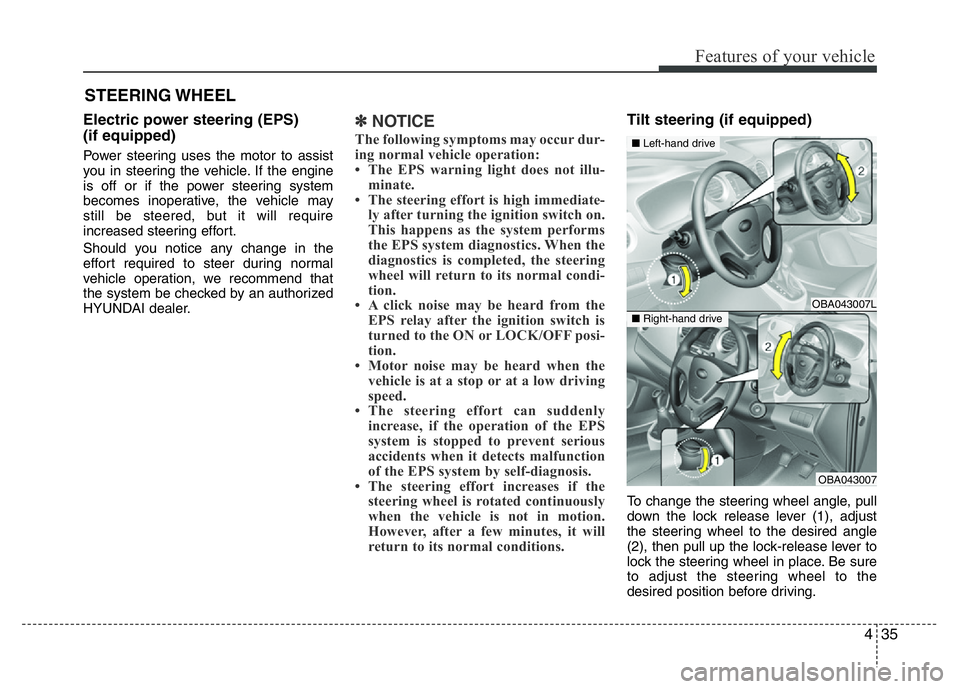
Tilt steering (if equipped)
To change the steering wheel angle, pull
down the lock release lever (1), adjust
the steering wheel to the desired angle
(2), then pull up the lock-release lever to
lock the steering wheel in place. Be sure
to adjust the steering wheel to the
desired position before driving.
STEERING WHEEL
OBA043007L
OBA043007
■Left-hand drive
■Right-hand drive