phone HYUNDAI I10 2016 Owner's Manual
[x] Cancel search | Manufacturer: HYUNDAI, Model Year: 2016, Model line: I10, Model: HYUNDAI I10 2016Pages: 343, PDF Size: 9.14 MB
Page 192 of 343
✽NOTICE - USING THE
Bluetooth®Wireless Technology
CELLULAR PHONE
• Do not use a cellular phone or perform
Bluetooth®Wireless Technology set-
tings (e.g. pairing a phone) while driv-
ing.
• Some Bluetooth
®Wireless Technology -
enabled phones may not be recognized
by the system or fully compatible with
the system.
• Before using Bluetooth
®Wireless
Technology related features of the
audio system, refer your phone’s User’s
Manual for phone-side Bluetooth
®
Wireless Technology operations.
• The phone must be paired to the audio
system to use Bluetooth
®Wireless
Technology related features.
• You will not be able to use the hands-
free feature when your phone (in the
car) is outside of the cellular service
area (e.g. in a tunnel, in a underground,
in a mountainous area, etc.).
(Continued)(Continued)
• If the cellular phone signal is poor or
the vehicles interior noise is too loud, it
may be difficult to hear the other per-
son’s voice during a call.
• Do not place the phone near or inside
metallic objects, otherwise communica-
tions with Bluetooth
®Wireless
Technology system or cellular service
stations can be disturbed.
• While a phone is connected through
Bluetooth
®Wireless Technology your
phone may discharge quicker than
usual for additional Bluetooth
®
Wireless Technology-related opera-
tions.
• Some cellular phones or other devices
may cause interference noise or mal-
function to audio system. In this case,
store the device in a different location
may resolve the condition.
• Phone contact names should be saved
in English or they may not be displayed
correctly.
(Continued)(Continued)
• If Priority is set upon vehicle
ignition(IGN/ACC ON), the Bluetooth
®
Wireless Technology phone will be
automatically connected.
Even if you are outside, the Bluetooth
®
Wireless Technology phone will be
automatically connected once you are
in the vicinity of the vehicle.
If you do not want automatic
Bluetooth
®Wireless Technology con-
nection, turn the Bluetooth®Wireless
Technology feature off.
• The hands-free call volume and quality
may differ depending on the mobile
phone type.
•Bluetooth
®Wireless Technology fea-
tures can be used only when the mobile
phone has been paired and connected
with the device. For more information
on pairing and connecting Bluetooth
®
Wireless Technology enabled mobile
phones, refer to the “Phone Setup” sec-
tion.
(Continued)
Features of your vehicle
131 4
Page 193 of 343
(Continued)
• When a Bluetooth®Wireless
Technology mobile phone is connected,
a ( ) icon will appear at the top of the
screen. If a ( ) icon is not displayed,
this indicates that a Bluetooth
®
Wireless Technology enabled device has
not been connected. You must connect
the device before use. For more infor-
mation on Bluetooth
®Wireless
Technology mobile phones, refer to the
“Phone Setup” section.
• Pairing and connecting a Bluetooth
®
Wireless Technology enabled mobile
phone will work only when the
Bluetooth
®Wireless Technology option
within your mobile phone has been
turned on. (Methods of turning on the
Bluetooth
®Wireless Technology
enabled feature may differ depending
on the mobile phone.)
(Continued)(Continued)
• In some mobile phones, starting the
ignition while talking through
Bluetooth
®Wireless Technology
enabled handsfree call will result in the
call becoming disconnected. (Switch the
call back to your mobile phone when
starting the ignition.)
• Some features may not be supported in
some Bluetooth
®Wireless Technology
mobile phone and devices.
•Bluetooth
®Wireless Technology
enabled operation may be unstable
depending on the communication state.
• Placing the audio system within an elec-
tromagnetic environment may result in
noise interference.
4132
Features of your vehicle
Page 226 of 343
533
Driving your vehicle
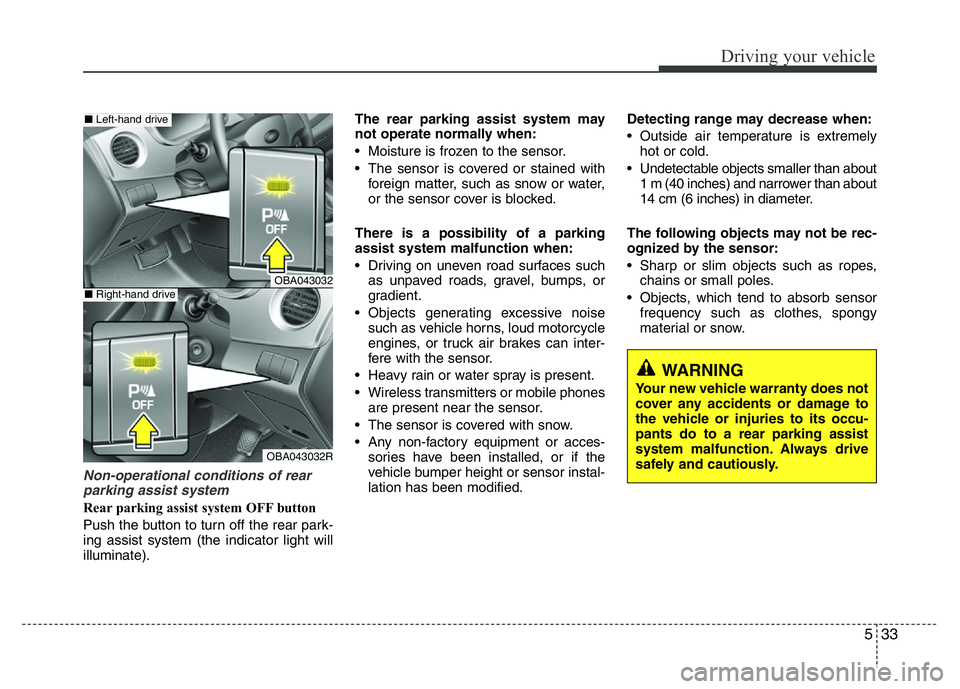
Non-operational conditions of rear
parking assist system
Rear parking assist system OFF button
Push the button to turn off the rear park-
ing assist system (the indicator light will
illuminate).The rear parking assist system may
not operate normally when:
• Moisture is frozen to the sensor.
• The sensor is covered or stained with
foreign matter, such as snow or water,
or the sensor cover is blocked.
There is a possibility of a parking
assist system malfunction when:
• Driving on uneven road surfaces such
as unpaved roads, gravel, bumps, or
gradient.
• Objects generating excessive noise
such as vehicle horns, loud motorcycle
engines, or truck air brakes can inter-
fere with the sensor.
• Heavy rain or water spray is present.
• Wireless transmitters or mobile phones
are present near the sensor.
• The sensor is covered with snow.
• Any non-factory equipment or acces-
sories have been installed, or if the
vehicle bumper height or sensor instal-
lation has been modified.Detecting range may decrease when:
• Outside air temperature is extremely
hot or cold.
• Undetectable objects smaller than about
1 m (40 inches) and narrower than about
14 cm (6 inches) in diameter.
The following objects may not be rec-
ognized by the sensor:
• Sharp or slim objects such as ropes,
chains or small poles.
• Objects, which tend to absorb sensor
frequency such as clothes, spongy
material or snow.
WARNING
Your new vehicle warranty does not
cover any accidents or damage to
the vehicle or injuries to its occu-
pants do to a rear parking assist
system malfunction. Always drive
safely and cautiously.
OBA043032
OBA043032R
■Left-hand drive
■Right-hand drive