change time HYUNDAI I10 2017 User Guide
[x] Cancel search | Manufacturer: HYUNDAI, Model Year: 2017, Model line: I10, Model: HYUNDAI I10 2017Pages: 343, PDF Size: 9.14 MB
Page 167 of 343
Features of your vehicle
106 4
SYSTEM CONTROLLERS AND
FUNCTIONS
❈Display and settings may differ
depending on the selected audio.
Audio Head Unit
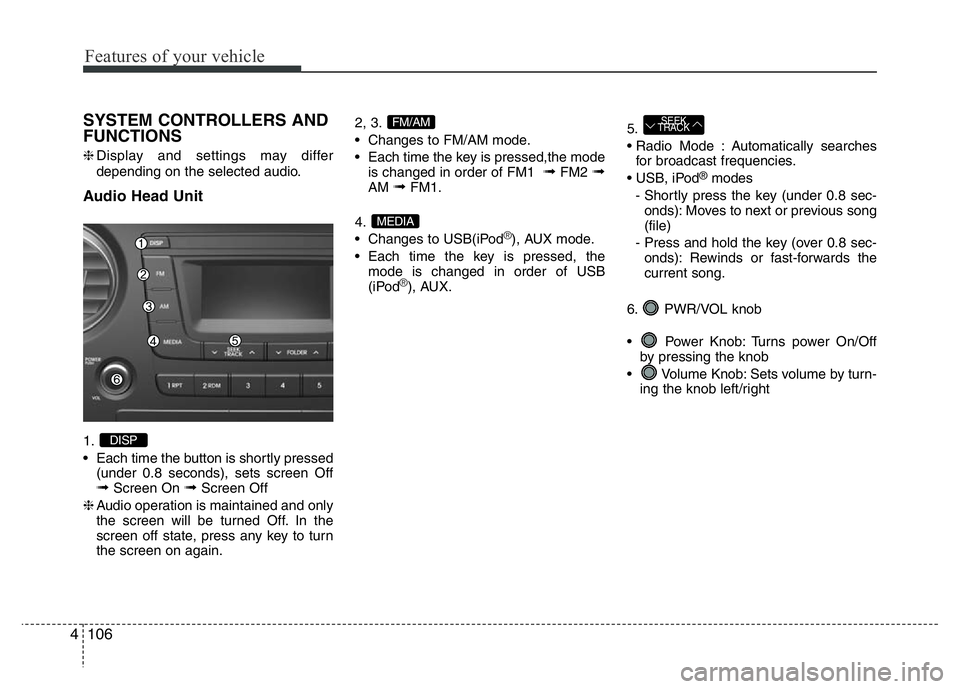
1.
• Each time the button is shortly pressed
(under 0.8 seconds), sets screen Off
➟Screen On ➟Screen Off
❈Audio operation is maintained and only
the screen will be turned Off. In the
screen off state, press any key to turn
the screen on again.2, 3.
• Changes to FM/AM mode.
• Each time the key is pressed,the mode
is changed in order of FM1
➟FM2 ➟AM ➟FM1.
4.
• Changes to USB(iPod
®), AUX mode.
• Each time the key is pressed, the
mode is changed in order of USB
(iPod
®), AUX.5.
• Radio Mode : Automatically searches
for broadcast frequencies.
• USB, iPod
®modes
- Shortly press the key (under 0.8 sec-
onds): Moves to next or previous song
(file)
- Press and hold the key (over 0.8 sec-
onds): Rewinds or fast-forwards the
current song.
6. PWR/VOL knob
• Power Knob: Turns power On/Off
by pressing the knob
• Volume Knob: Sets volume by turn-
ing the knob left/right
SEEK
TRACK
MEDIA
FM/AM
DISP
Page 169 of 343
![HYUNDAI I10 2017 User Guide SETUP
Display Settings
Press the , key Select
[Display] through TUNE knob or
key Select menu through TUNE knob
Mode Pop up
[Mode Pop up] Changes . selec-
tion mode
• During On state, press th](/img/35/56220/w960_56220-168.png "HYUNDAI I10 2017 User Guide SETUP
Display Settings
Press the , key Select
[Display] through TUNE knob or
key Select menu through TUNE knob
Mode Pop up
[Mode Pop up] Changes . selec-
tion mode
• During On state, press th")
SETUP
Display Settings
Press the , key Select
[Display] through TUNE knob or
key Select menu through TUNE knob
Mode Pop up
[Mode Pop up] Changes . selec-
tion mode
• During On state, press the or
key to display the mode
change pop up screen.
• When the pop up screen is displayed,
use the TUNE knob or keys
~ to select the desired mode.
Text Scroll
[Text Scroll] Set /
• : Maintains scroll
• : Scrolls only one (1) time.
Media Display
When playing an MP3 file, select the
desired display info from ‘Folder/File’ or
‘Album/Artist/Song’.
Sound Settings
Press the , key Select
[Sound] through TUNE knob or
key Select menu through TUNE knob
2 RDM
SETUPSETUP
CLOCK
Off
On
OffOn
6
1
MEDIARADIO
On
1 RPT
SETUPSETUP
CLOCK
Features of your vehicle
108 4
Page 195 of 343
Driving your vehicle
2 5
WARNING
Carbon monoxide (CO) gas is toxic. Breathing CO can cause unconsciousness and death.
Engine exhaust contains carbon monoxide which cannot be seen or smelled.
Do not inhale engine exhaust.
If at any time you smell engine exhaust inside the vehicle, open the windows immediately. Exposure to CO can cause uncon-
sciousness and death by asphyxiation.
Be sure the exhaust system does not leak.
The exhaust system should be checked whenever the vehicle is raised to change the oil or for any other purpose. If you hear a
change in the sound of the exhaust or if you drive over something that strikes the underneath side of the vehicle, we recom-
mend that the exhaust system be checked as soon as possible by an authorized HYUNDAI dealer.
Do not run the engine in an enclosed area.
Letting the engine idle in your garage, even with the garage door open, is a hazardous practice. Run the engine only long enough
to start the engine and to move the vehicle out of the garage.
Avoid idling the engine for prolonged periods with people inside the vehicle.
If it is necessary to idle the engine for a prolonged period with people inside the vehicle, be sure to do so only in an unenclosed
area with the air intake set at "Fresh" and fan control to high so fresh air is drawn into the interior.
Keep the air intakes clear.
To assure proper operation of the ventilation system, keep the ventilation air intakes located in front of the windshield clear of
snow, ice, leaves, or other obstructions.
If you must drive with the tailgate lid open:
Close all windows.
Open instrument panel air vents.
Set the air intake control at "Fresh", the air flow control at "Floor" or "Face", and the fan control to high.
Page 205 of 343
Driving your vehicle
12 5
Downshifting
Downshift when you must slow down in
heavy traffic or drive up a steep hill to
prevent engine load.
Also, downshifting reduces the chance of
stalling and can accelerate when you
need to increase your speed again.
When the vehicle is going downhill,
downshifting helps maintain safe speed
by providing brake power from the engine
and enables less wear on the brakes.
Good driving practices
• Never take the vehicle out of gear and
coast down a hill. This is extremely
dangerous.
• Don't "ride" the brakes. This can cause
the brakes and related parts to over-
heat and malfunction.
When you are driving down a long hill,
slow down and shift to a lower gear.
Engine braking will help slow down the
vehicle.
• Slow down before shifting to a lower
gear. This will help avoid over-revving
the engine, which can cause damage.
• Slow down when you encounter cross
winds. This gives you much better con-
trol of your vehicle.
• Be sure the vehicle is completely
stopped before you shift into R
(Reverse) to prevent damage to the
transaxle.
• Exercise extreme caution when driving
on a slippery surface. Be especially
careful when braking, accelerating or
shifting gears. On a slippery surface,
an abrupt change in vehicle speed can
cause the drive wheels to lose traction
and may cause loss of vehicle control
resulting in an accidentCAUTION
To prevent damage to the engine:
• When downshifting from 5th gear
to 4th gear, be careful not to inad-
vertently push the shift lever
sideways engaging the 2nd gear.
A drastic downshift may cause
the engine speed to increase to
the point the tachometer will
enter the red-zone.
• Do not downshift more than one
gear at a time or downshift the
gear when the engine is running
at high speed (5,000 RPM or high-
er).
Page 211 of 343
Driving your vehicle
18 5
Parking
Always come to a complete stop and
continue to depress the brake pedal.
Move the shift lever into the P (Park)
position, apply the parking brake, and
place the ignition switch in the
LOCK/OFF position. Take the Key with
you when exiting the vehicle.
Good driving practices
• Never move the shift lever from P
(Park) or N (Neutral) to any other posi-
tion with the accelerator pedal
depressed.
• Never move the shift lever into P (Park)
when the vehicle is in motion.
• Be sure the vehicle is completely
stopped before you attempt to shift into
R (Reverse) or D (Drive).
• Do not move the shift lever to N
(Neutral) when driving. Doing so may
result in an accident because of a loss
of engine braking and the transaxle
could be damaged.
• Do not drive with your foot resting on
the brake pedal. Even light, but consis-
tent pedal pressure can result in the
brakes overheating, brake wear and
possibly even brake failure.
• When driving in sports mode, slow
down before shifting to a lower gear.
Otherwise, the lower gear may not be
engaged if the engine rpms are out-
side of the allowable range.
• Always apply the parking brake when
leaving the vehicle. Do not depend on
placing the transmission in P (Park) to
keep the vehicle from moving.• Exercise extreme caution when driving
on a slippery surface. Be especially
careful when braking, accelerating or
shifting gears. On a slippery surface,
an abrupt change in vehicle speed can
cause the drive wheels to lose traction
and may cause loss of vehicle control
resulting in an accident
• Optimum vehicle performance and
economy is obtained by smoothly
depressing and releasing the accelera-
tor.
WARNING
When you stay in the vehicle with
the engine running, be careful not
to depress the accelerator pedal for
a long period of time. The engine or
exhaust system may overheat and
start a fire.
The exhaust gas and the exhaust
system are very hot. Keep away
from the exhaust system compo-
nents.
Do not stop or park over flammable
materials, such as dry grass, paper
or leaves. They may ignite and
cause a fire.
Page 214 of 343
521
Driving your vehicle
Disc brakes wear indicator
When your brake pads are worn and new
pads are required, you will hear a high
pitched warning sound from your front or
rear brakes. You may hear this sound
come and go or it may occur whenever
you depress the brake pedal.
Please remember some driving condi-
tions or climates may cause a brake
squeal when you first apply (or lightly
apply) the brakes. This is normal and
does not indicate a problem with your
brakes.
✽ NOTICE
Always replace brake pads as complete
front or rear axle sets.
Rear drum brakes (if equipped)
Your rear drum brakes do not have wear
indicators. Therefore, have the rear brake
linings inspected if you hear a rear brake
rubbing noise. Also have your rear
brakes inspected each time you change
or rotate your tires and when you have
the front brakes replaced.
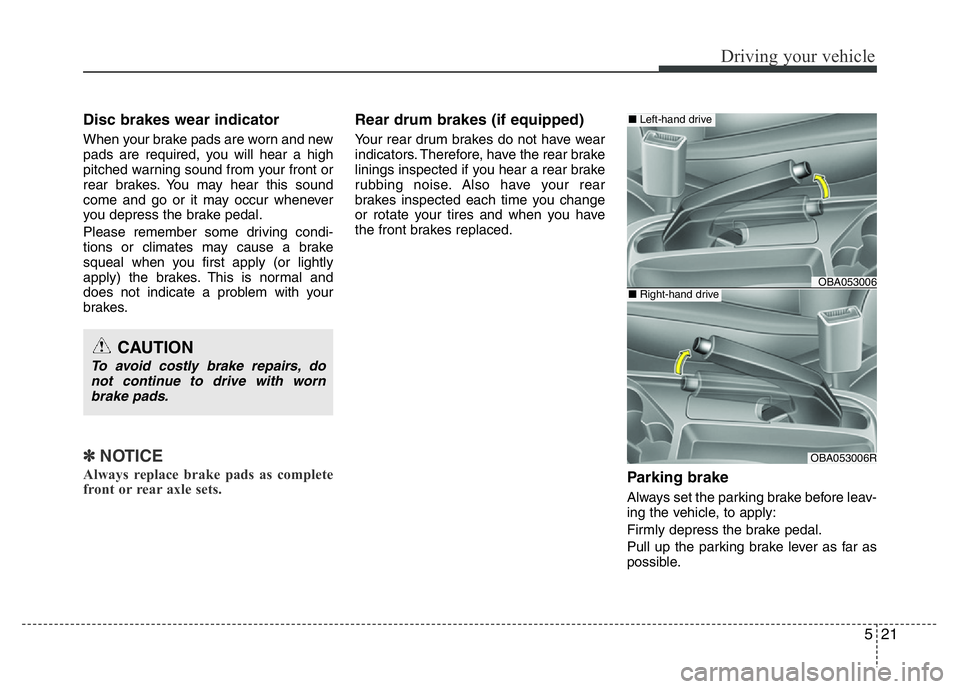
Parking brake
Always set the parking brake before leav-
ing the vehicle, to apply:
Firmly depress the brake pedal.
Pull up the parking brake lever as far as
possible.
CAUTION
To avoid costly brake repairs, do
not continue to drive with worn
brake pads.
OBA053006
OBA053006R
■Left-hand drive
■Right-hand drive
Page 217 of 343
Driving your vehicle
24 5
Anti-lock Brake System (ABS)
(if equipped)
ABS is an electronic braking system that
helps prevent a braking skid. ABS allows
the driver to steer and brake at the same
time.
Using ABS
To obtain the maximum benefit from your
ABS in an emergency situation, do not
attempt to modulate your brake pressure
and do not try to pump your brakes.
Depress your brake pedal as hard as
possible.
When you apply your brakes under con-
ditions which may lock the wheels, you
may hear sounds from the brakes, or feel
a corresponding sensation in the brake
pedal. This is normal and it means your
ABS is active.
ABS does not reduce the time or dis-
tance it takes to stop the vehicle.
Always maintain a safe distance from the
vehicle in front of you.
ABS will not prevent a skid that results
from sudden changes in direction, such
as trying to take a corner too fast or mak-
ing a sudden lane change. Always drive
at a safe speed for the road and weather
conditions.
ABS cannot prevent a loss of stability.
Always steer moderately when braking
hard. Severe or sharp steering wheel
movement can still cause your vehicle to
veer into oncoming traffic or off the road.(Continued)
The safety features of an ABS or
ESC equipped vehicle should not
be tested by high speed driving or
cornering. This could endanger the
safety of yourself or others.
WARNING
An Anti-Lock Braking System
(ABS) or an Electronic Stability
Control (ESC) system will not pre-
vent accidents due to improper or
dangerous driving maneuvers.
Even though vehicle control is
improved during emergency brak-
ing, always maintain a safe dis-
tance between you and objects
ahead of you. Vehicle speeds
should always be reduced during
extreme road conditions. The brak-
ing distance for cars equipped with
ABS or ESC may be longer than for
those without these systems in the
following road conditions.
Drive your vehicle at reduced
speeds during the following condi-
tions:
• Rough, gravel or snow-covered
roads.
• On roads where the road surface
is pitted or has different surface
height.
• Tire chains are installed on your
vehicle.
(Continued)
Page 227 of 343
Driving your vehicle
34 5
Hazardous driving conditions
When hazardous driving conditions are
encountered such as water, snow, ice,
mud or sand:
Drive cautiously and allow extra distance
for braking.
Avoid sudden movements in braking or
steering.
If stuck in snow, mud, or sand, use sec-
ond gear. Accelerate slowly to avoid spin-
ning the drive wheels.
Use sand, rock salt, or other non-slip
material under the drive wheels to pro-
vide traction when stalled in ice, snow, or
mud.
Rocking the vehicle
If it is necessary to rock the vehicle to
free it from snow, sand, or mud, first turn
the steering wheel right and left to clear
the area around your front wheels. Then,
shift back and forth between 1st and R
(Reverse, for manual transaxle vehicle)
or R (Reverse) and a forward gear (for
automatic transaxle vehicle). Try to avoid
spinning the wheels, and do not race the
engine.
To prevent transaxle wear, wait until the
wheels stop spinning before shifting
gears. Release the accelerator pedal
while shifting, and press lightly on the
accelerator pedal while the transaxle is in
gear. Slowly spinning the wheels in for-
ward and reverse directions causes a
rocking motion that may free the vehicle.
SPECIAL DRIVING CONDITIONS
WARNING
Downshifting with an automatic
transaxle, while driving on slippery
surfaces can cause an accident.
The sudden change in tire speed
could cause the tires to skid. Be
careful when downshifting on slip-
pery surfaces.
WARNING
If the tires spin at high speed the
tires can explode, and you or oth-
ers may be injured. Do not attempt
this procedure if people or objects
are anywhere near the vehicle.
The vehicle can overheat causing
an engine compartment fire or
other damage. Spin the wheels as
little as possible and avoid spin-
ning the wheels at speeds over 56
km/h (35 mph) as indicated on the
speedometer.
CAUTION
If you are still stuck after rocking
the vehicle a few times, have the
vehicle pulled out by a tow vehicle
to avoid engine overheating, possi-
ble damage to the transaxle, and
tire damage. See “Towing” in chap-
ter 6.
To prevent damage to the transaxle,
turn OFF the ESC (if equipped) prior
to rocking the vehicle.
Page 264 of 343
Maintenance
12 7
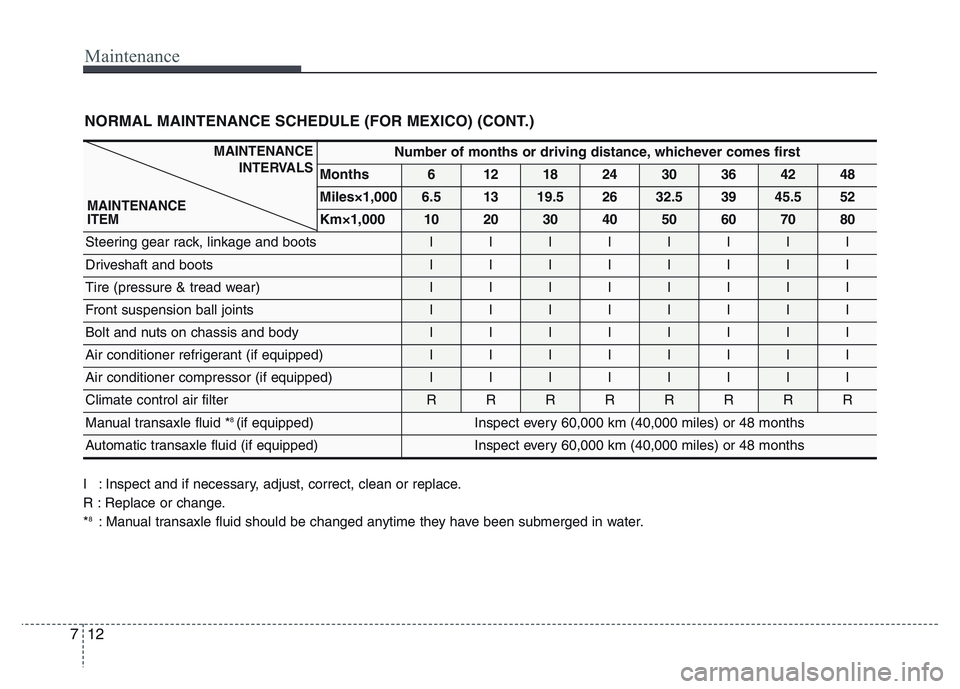
NORMAL MAINTENANCE SCHEDULE (FOR MEXICO) (CONT.)
Number of months or driving distance, whichever comes first
Months612182430364248
Miles×1,0006.51319.52632.53945.552
Km×1,0001020304050607080
Steering gear rack, linkage and bootsIIIIIIII
Driveshaft and bootsIIIIIIII
Tire (pressure & tread wear) IIIIIIII
Front suspension ball jointsIIIIIIII
Bolt and nuts on chassis and bodyIIIIIIII
Air conditioner refrigerant (if equipped)IIIIIIII
Air conditioner compressor (if equipped)IIIIIIII
Climate control air filter RRRRRRRR
Manual transaxle fluid *8 (if equipped)Inspect every 60,000 km (40,000 miles) or 48 months
Automatic transaxle fluid (if equipped) Inspect every 60,000 km (40,000 miles) or 48 months
I : Inspect and if necessary, adjust, correct, clean or replace.
R : Replace or change.
*
8: Manual transaxle fluid should be changed anytime they have been submerged in water.
MAINTENANCE
INTERVALS
MAINTENANCE
ITEM
Page 268 of 343
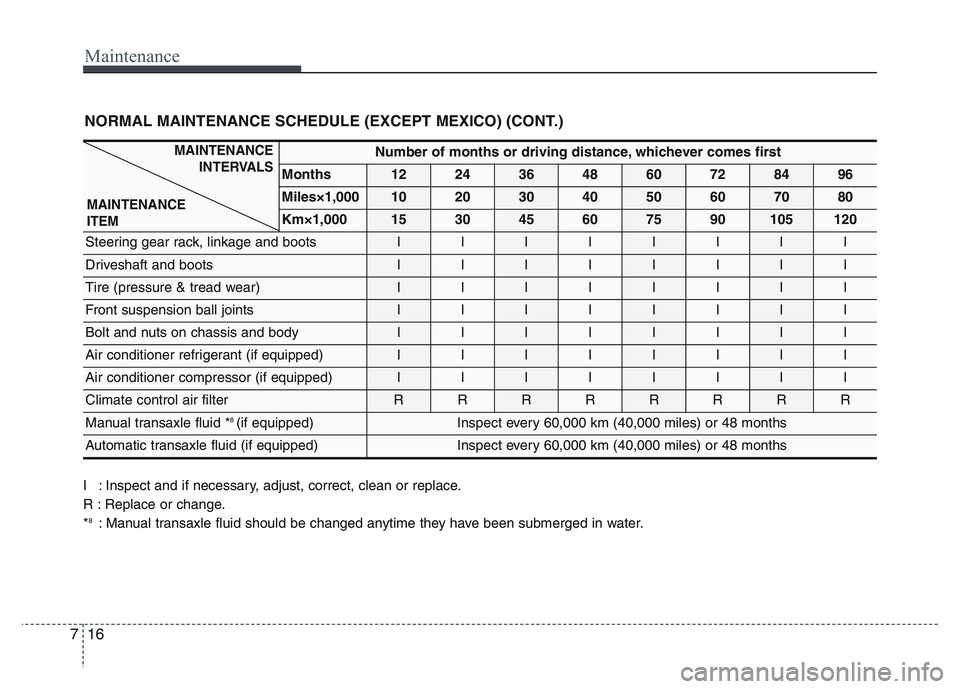
Maintenance
16 7
NORMAL MAINTENANCE SCHEDULE (EXCEPT MEXICO) (CONT.)
Number of months or driving distance, whichever comes first
Months1224364860728496
Miles×1,0001020304050607080
Km×1,000153045607590105120
Steering gear rack, linkage and bootsIIIIIIII
Driveshaft and bootsIIIIIIII
Tire (pressure & tread wear) IIIIIIII
Front suspension ball jointsIIIIIIII
Bolt and nuts on chassis and bodyIIIIIIII
Air conditioner refrigerant (if equipped)IIIIIIII
Air conditioner compressor (if equipped)IIIIIIII
Climate control air filter RRRRRRRR
Manual transaxle fluid *8 (if equipped)Inspect every 60,000 km (40,000 miles) or 48 months
Automatic transaxle fluid (if equipped) Inspect every 60,000 km (40,000 miles) or 48 months
MAINTENANCE
INTERVALS
MAINTENANCE
ITEM
I : Inspect and if necessary, adjust, correct, clean or replace.
R : Replace or change.
*
8: Manual transaxle fluid should be changed anytime they have been submerged in water.