lights HYUNDAI I10 2017 User Guide
[x] Cancel search | Manufacturer: HYUNDAI, Model Year: 2017, Model line: I10, Model: HYUNDAI I10 2017Pages: 343, PDF Size: 9.14 MB
Page 111 of 343
Features of your vehicle
50 4
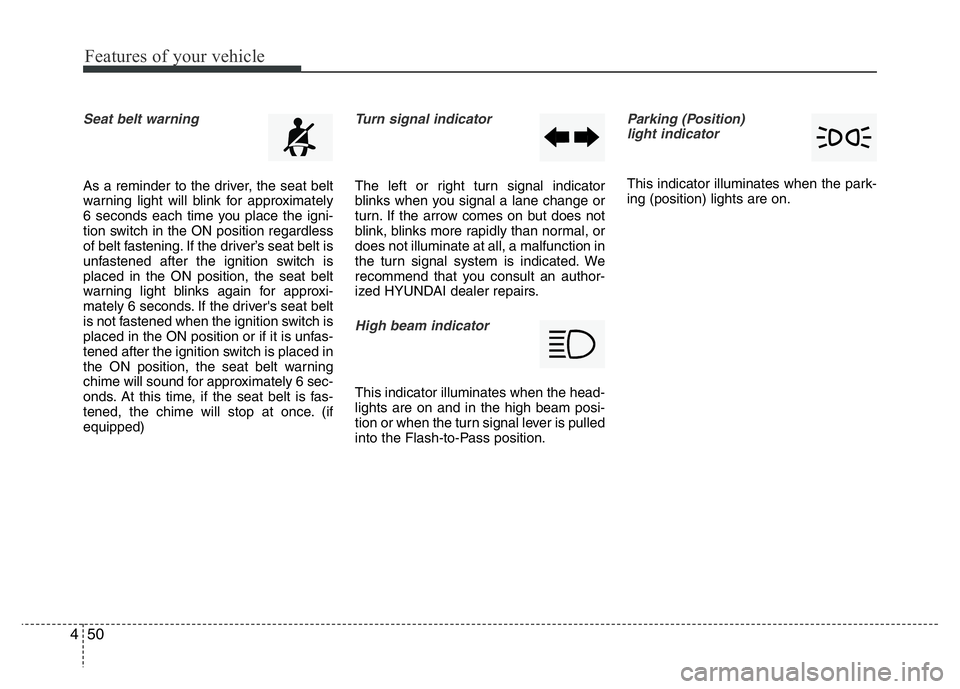
Seat belt warning
As a reminder to the driver, the seat belt
warning light will blink for approximately
6 seconds each time you place the igni-
tion switch in the ON position regardless
of belt fastening. If the driver’s seat belt is
unfastened after the ignition switch is
placed in the ON position, the seat belt
warning light blinks again for approxi-
mately 6 seconds. If the driver's seat belt
is not fastened when the ignition switch is
placed in the ON position or if it is unfas-
tened after the ignition switch is placed in
the ON position, the seat belt warning
chime will sound for approximately 6 sec-
onds. At this time, if the seat belt is fas-
tened, the chime will stop at once. (if
equipped)
Turn signal indicator
The left or right turn signal indicator
blinks when you signal a lane change or
turn. If the arrow comes on but does not
blink, blinks more rapidly than normal, or
does not illuminate at all, a malfunction in
the turn signal system is indicated. We
recommend that you consult an author-
ized HYUNDAI dealer repairs.
High beam indicator
This indicator illuminates when the head-
lights are on and in the high beam posi-
tion or when the turn signal lever is pulled
into the Flash-to-Pass position.
Parking (Position)
light indicator
This indicator illuminates when the park-
ing (position) lights are on.
Page 113 of 343
Features of your vehicle
52 4
Your vehicle is equipped with dual-diago-
nal braking systems. This means you still
have braking on two wheels even if one of
the dual systems should fail. With only one
of the dual systems working, more than
normal pedal travel and greater pedal
pressure are required to stop the vehicle.
Also, the vehicle will not stop in as short a
distance with only a portion of the brake
system working. If the brakes fail while you
are driving, shift to a lower gear for addi-
tional engine braking and stop the vehicle
as soon as it is safe to do so.
To check bulb operation, check whether
the parking brake and brake fluid warning
light illuminates when the ignition switch
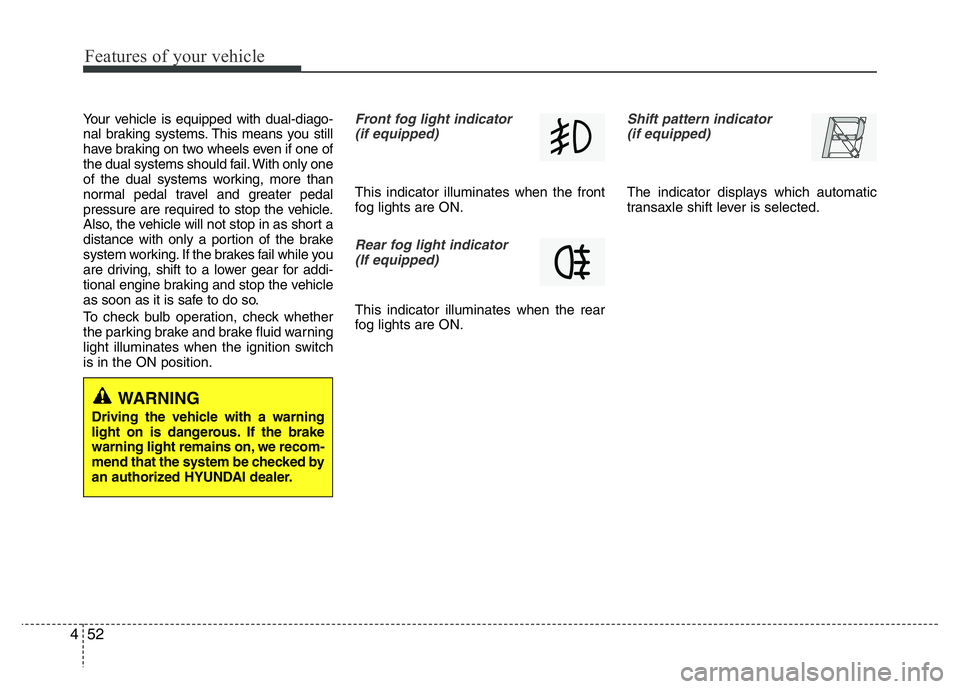
is in the ON position.Front fog light indicator
(if equipped)
This indicator illuminates when the front
fog lights are ON.
Rear fog light indicator
(If equipped)
This indicator illuminates when the rear
fog lights are ON.
Shift pattern indicator
(if equipped)
The indicator displays which automatic
transaxle shift lever is selected.
WARNING
Driving the vehicle with a warning
light on is dangerous. If the brake
warning light remains on, we recom-
mend that the system be checked by
an authorized HYUNDAI dealer.
Page 119 of 343
Features of your vehicle
58 4
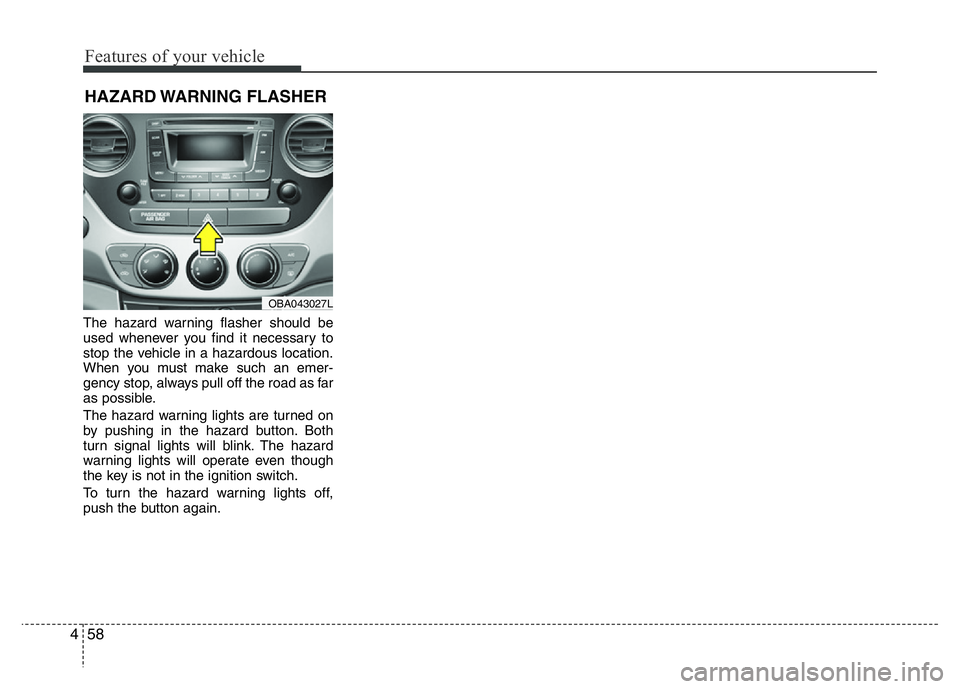
The hazard warning flasher should be
used whenever you find it necessary to
stop the vehicle in a hazardous location.
When you must make such an emer-
gency stop, always pull off the road as far
as possible.
The hazard warning lights are turned on
by pushing in the hazard button. Both
turn signal lights will blink. The hazard
warning lights will operate even though
the key is not in the ignition switch.
To turn the hazard warning lights off,
push the button again.
HAZARD WARNING FLASHER
OBA043027L
Page 120 of 343
459
Features of your vehicle
Battery saver function (if equipped)
• The purpose of this feature is to pre-
vent the battery from being dis-
charged. The system automatically
turns off the exterior lights when the
driver removes the ignition key and
opens the driver-side door.
• With this feature, the parking lights will
turn off automatically if the driver parks
on the side of road at night.
If necessary, to keep the lights on
when the ignition key is removed, per-
form the following :
1) Open the driver-side door.
2) Turn the parking lights OFF and ON
again using the light switch on the
steering column.
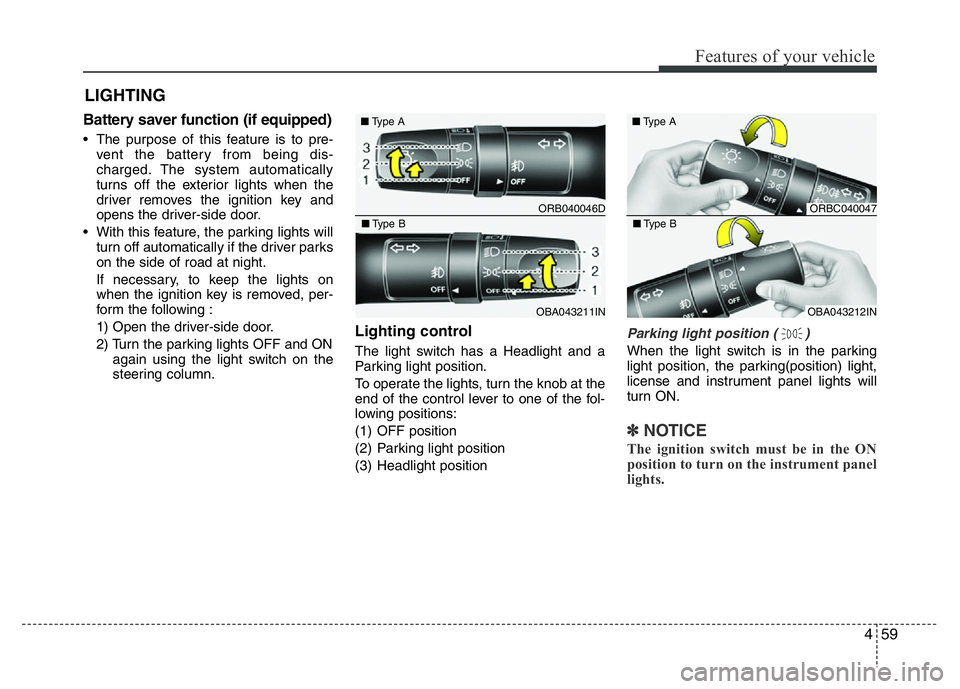
Lighting control
The light switch has a Headlight and a
Parking light position.
To operate the lights, turn the knob at the
end of the control lever to one of the fol-
lowing positions:
(1) OFF position
(2) Parking light position
(3) Headlight position
Parking light position ( )
When the light switch is in the parking
light position, the parking(position) light,
license and instrument panel lights will
turn ON.
✽NOTICE
The ignition switch must be in the ON
position to turn on the instrument panel
lights.
LIGHTING
ORB040046D ■Type A
OBA043211IN ■Type B
ORBC040047 ■Type A
OBA043212IN ■Type B
Page 121 of 343
Features of your vehicle
60 4
WARNING
Do not use high beam when there
are other vehicles. Using high beam
could obstruct the other driver's
vision.
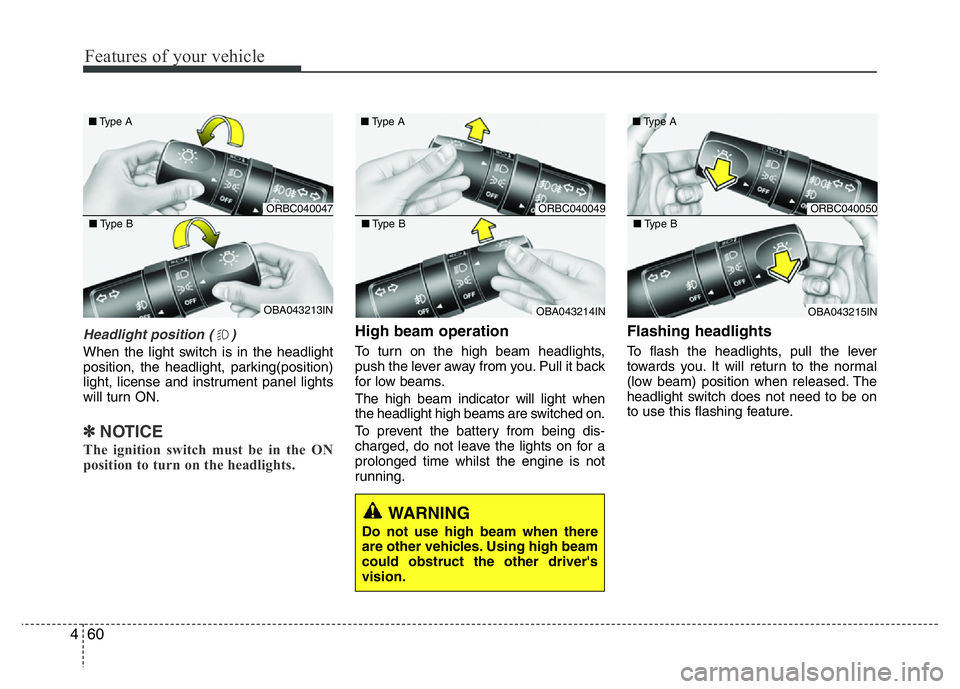
Headlight position ( )
When the light switch is in the headlight
position, the headlight, parking(position)
light, license and instrument panel lights
will turn ON.
✽NOTICE
The ignition switch must be in the ON
position to turn on the headlights.
High beam operation
To turn on the high beam headlights,
push the lever away from you. Pull it back
for low beams.
The high beam indicator will light when
the headlight high beams are switched on.
To prevent the battery from being dis-
charged, do not leave the lights on for a
prolonged time whilst the engine is not
running.
Flashing headlights
To flash the headlights, pull the lever
towards you. It will return to the normal
(low beam) position when released. The
headlight switch does not need to be on
to use this flashing feature.
ORBC040047 ■Type A
OBA043213IN ■Type B
ORBC040049 ■Type A
OBA043214IN ■Type B
ORBC040050 ■Type A
OBA043215IN ■Type B
Page 123 of 343
Features of your vehicle
62 4
✽NOTICE
The ignition switch must be in the ON
position to turn on the front fog light.
CAUTION
When in operation, the fog lights
consume large amounts of vehicle
electrical power. Only use the fog
lights when visibility is poor or
unnecessary battery and generator
drain could occur.
■Type B
■Type A
■Type D
■Type C
ORBC040052/ORB040052D/OTA040219R/ORBI041052
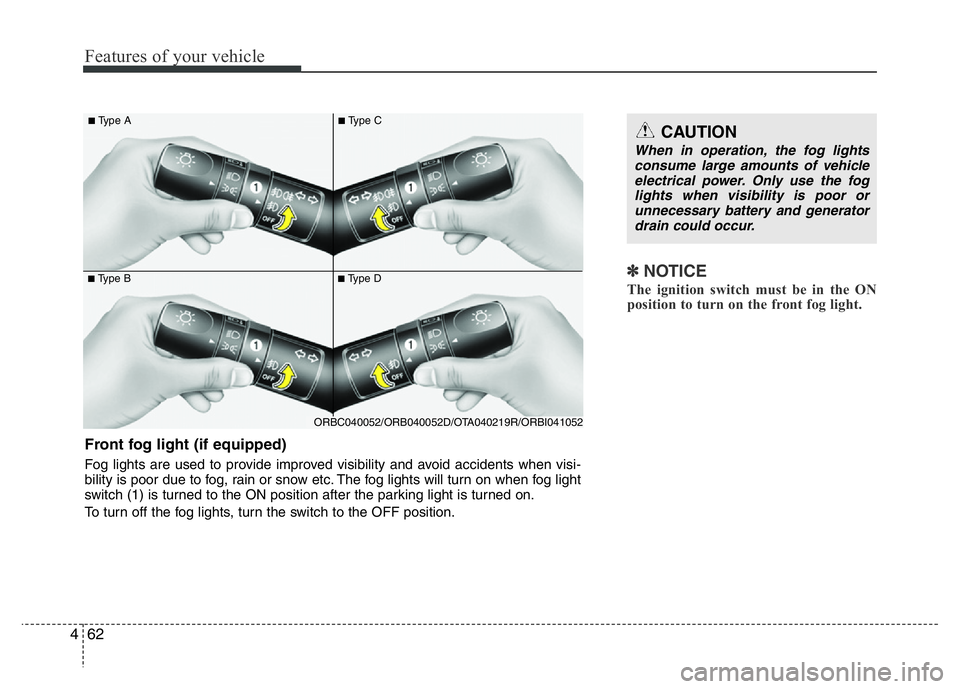
Front fog light (if equipped)
Fog lights are used to provide improved visibility and avoid accidents when visi-
bility is poor due to fog, rain or snow etc. The fog lights will turn on when fog light
switch (1) is turned to the ON position after the parking light is turned on.
To turn off the fog lights, turn the switch to the OFF position.
Page 124 of 343
463
Features of your vehicle
✽NOTICE
To turn on the rear fog light switch, the
ignition switch must be in the ON position.
■Type B
■Type A
■Type D
■Type C
ORBC040053/ORBC040052E/OTA040217R/OTA040218R
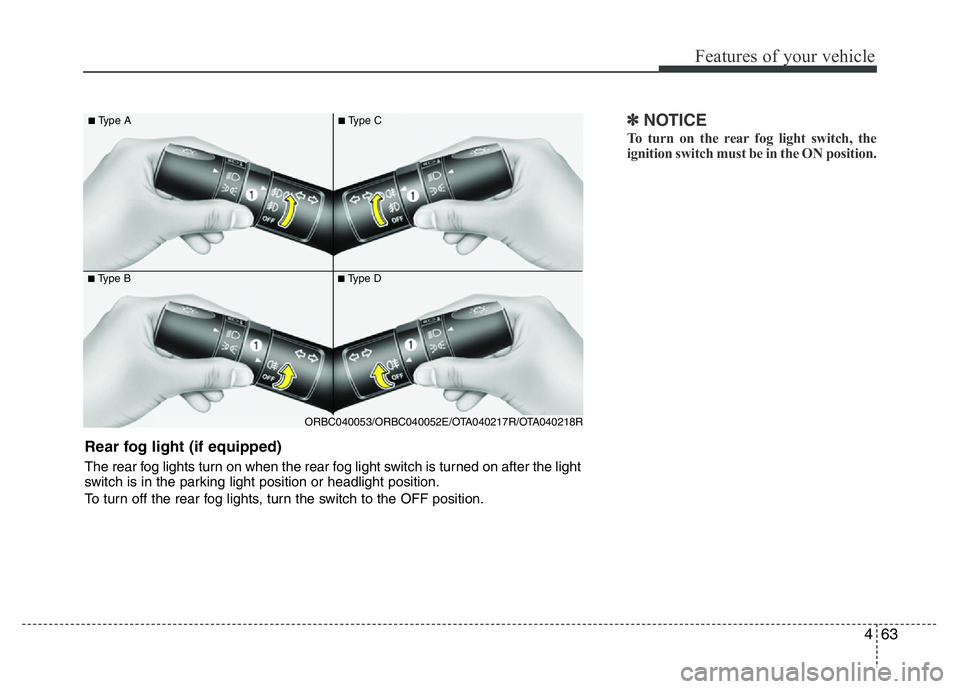
Rear fog light (if equipped)
The rear fog lights turn on when the rear fog light switch is turned on after the light
switch is in the parking light position or headlight position.
To turn off the rear fog lights, turn the switch to the OFF position.
Page 125 of 343
Features of your vehicle
64 4
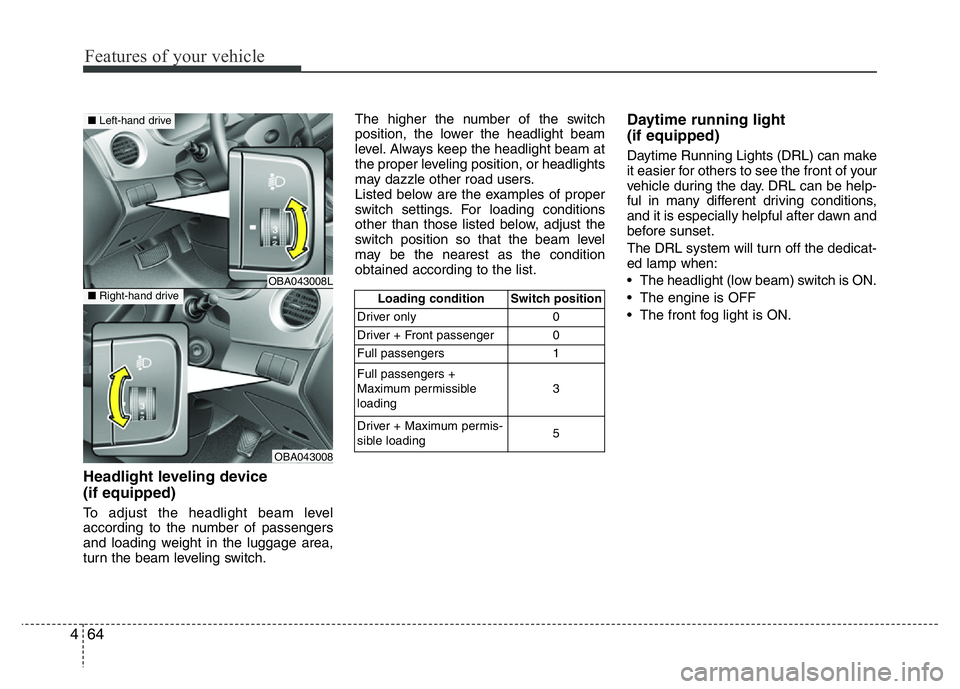
Headlight leveling device
(if equipped)
To adjust the headlight beam level
according to the number of passengers
and loading weight in the luggage area,
turn the beam leveling switch.The higher the number of the switch
position, the lower the headlight beam
level. Always keep the headlight beam at
the proper leveling position, or headlights
may dazzle other road users.
Listed below are the examples of proper
switch settings. For loading conditions
other than those listed below, adjust the
switch position so that the beam level
may be the nearest as the condition
obtained according to the list.
Daytime running light
(if equipped)
Daytime Running Lights (DRL) can make
it easier for others to see the front of your
vehicle during the day. DRL can be help-
ful in many different driving conditions,
and it is especially helpful after dawn and
before sunset.
The DRL system will turn off the dedicat-
ed lamp when:
• The headlight (low beam) switch is ON.
• The engine is OFF
• The front fog light is ON.
Loading condition Switch position
Driver only 0
Driver + Front passenger 0
Full passengers 1
Full passengers +
Maximum permissible
loading3
Driver + Maximum permis-
sible loading 5
OBA043008L
OBA043008
■Left-hand drive
■Right-hand drive
Page 129 of 343
Features of your vehicle
68 4
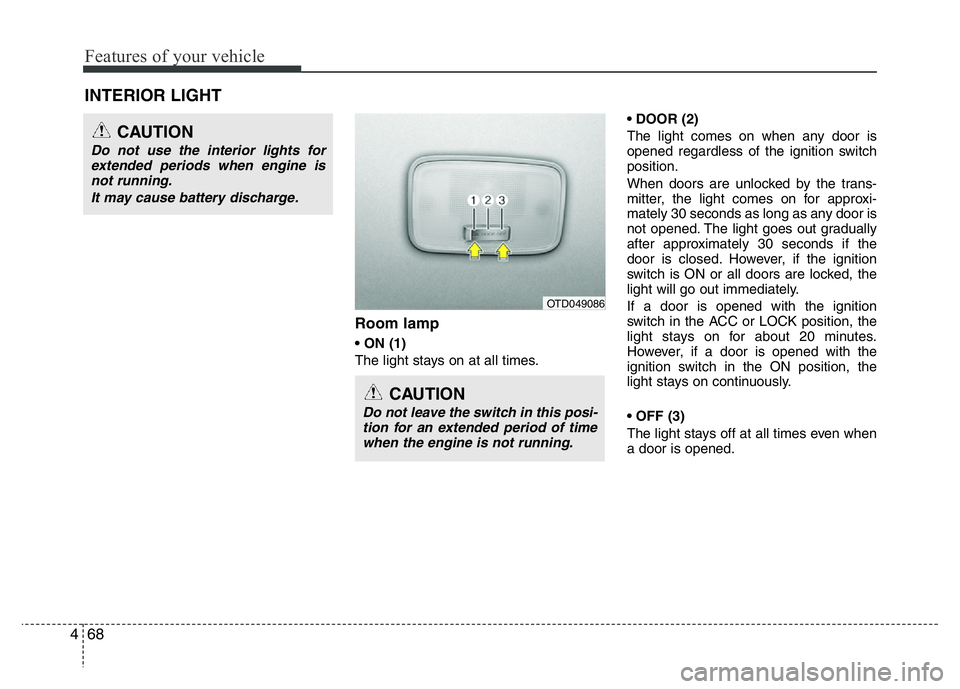
Room lamp
• ON (1)
The light stays on at all times.• DOOR (2)
The light comes on when any door is
opened regardless of the ignition switch
position.
When doors are unlocked by the trans-
mitter, the light comes on for approxi-
mately 30 seconds as long as any door is
not opened. The light goes out gradually
after approximately 30 seconds if the
door is closed. However, if the ignition
switch is ON or all doors are locked, the
light will go out immediately.
If a door is opened with the ignition
switch in the ACC or LOCK position, the
light stays on for about 20 minutes.
However, if a door is opened with the
ignition switch in the ON position, the
light stays on continuously.
• OFF (3)
The light stays off at all times even when
a door is opened.
INTERIOR LIGHT
CAUTION
Do not use the interior lights for
extended periods when engine is
not running.
It may cause battery discharge.
CAUTION
Do not leave the switch in this posi-
tion for an extended period of time
when the engine is not running.
OTD049086
Page 130 of 343
469
Features of your vehicle
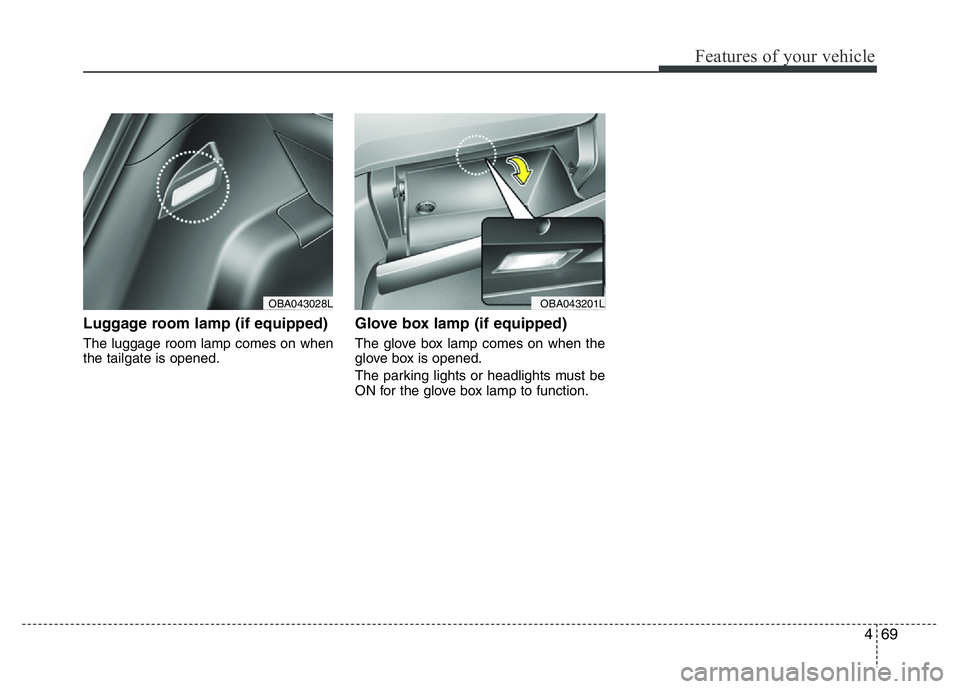
Luggage room lamp (if equipped)
The luggage room lamp comes on when
the tailgate is opened.
Glove box lamp (if equipped)
The glove box lamp comes on when the
glove box is opened.
The parking lights or headlights must be
ON for the glove box lamp to function.
OBA043201LOBA043028L