radio HYUNDAI I10 2017 User Guide
[x] Cancel search | Manufacturer: HYUNDAI, Model Year: 2017, Model line: I10, Model: HYUNDAI I10 2017Pages: 343, PDF Size: 9.14 MB
Page 167 of 343
Features of your vehicle
106 4
SYSTEM CONTROLLERS AND
FUNCTIONS
❈Display and settings may differ
depending on the selected audio.
Audio Head Unit
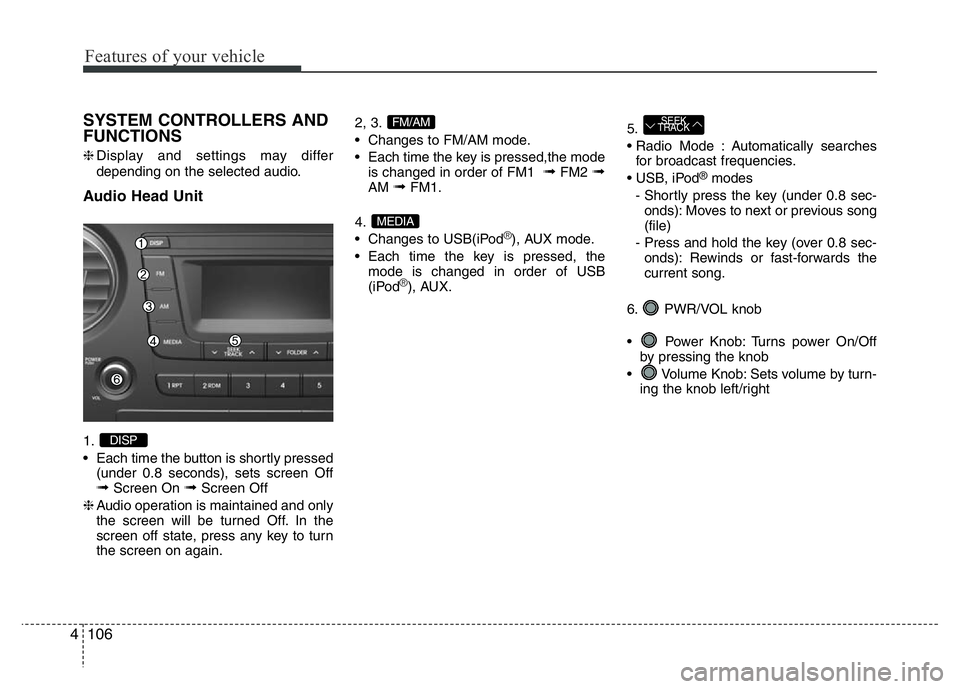
1.
• Each time the button is shortly pressed
(under 0.8 seconds), sets screen Off
➟Screen On ➟Screen Off
❈Audio operation is maintained and only
the screen will be turned Off. In the
screen off state, press any key to turn
the screen on again.2, 3.
• Changes to FM/AM mode.
• Each time the key is pressed,the mode
is changed in order of FM1
➟FM2 ➟AM ➟FM1.
4.
• Changes to USB(iPod
®), AUX mode.
• Each time the key is pressed, the
mode is changed in order of USB
(iPod
®), AUX.5.
• Radio Mode : Automatically searches
for broadcast frequencies.
• USB, iPod
®modes
- Shortly press the key (under 0.8 sec-
onds): Moves to next or previous song
(file)
- Press and hold the key (over 0.8 sec-
onds): Rewinds or fast-forwards the
current song.
6. PWR/VOL knob
• Power Knob: Turns power On/Off
by pressing the knob
• Volume Knob: Sets volume by turn-
ing the knob left/right
SEEK
TRACK
MEDIA
FM/AM
DISP
Page 168 of 343
4107
Features of your vehicle
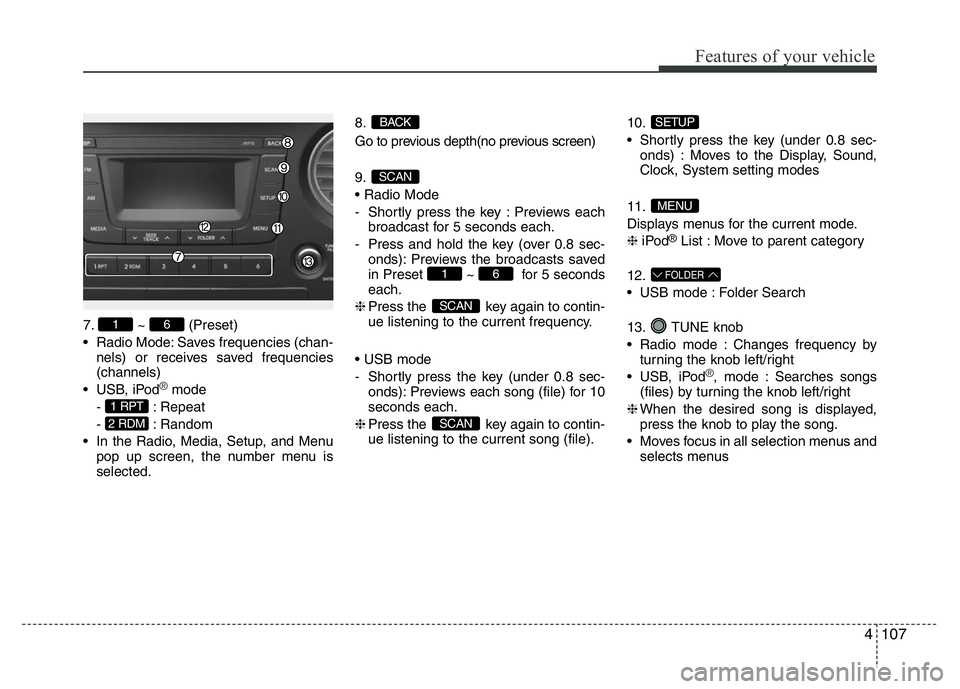
7. ~ (Preset)
• Radio Mode: Saves frequencies (chan-
nels) or receives saved frequencies
(channels)
• USB, iPod
®mode
- : Repeat
- : Random
• In the Radio, Media, Setup, and Menu
pop up screen, the number menu is
selected.8.
Go to previous depth(no previous screen)
9.
• Radio Mode
- Shortly press the key : Previews each
broadcast for 5 seconds each.
- Press and hold the key (over 0.8 sec-
onds): Previews the broadcasts saved
in Preset ~ for 5 seconds
each.
❈Press the key again to contin-
ue listening to the current frequency.
• USB mode
- Shortly press the key (under 0.8 sec-
onds): Previews each song (file) for 10
seconds each.
❈Press the key again to contin-
ue listening to the current song (file).10.
• Shortly press the key (under 0.8 sec-
onds) : Moves to the Display, Sound,
Clock, System setting modes
11.
Displays menus for the current mode.
❈iPod
®List : Move to parent category
12.
• USB mode : Folder Search
13. TUNE knob
• Radio mode : Changes frequency by
turning the knob left/right
• USB, iPod
®, mode : Searches songs
(files) by turning the knob left/right
❈When the desired song is displayed,
press the knob to play the song.
• Moves focus in all selection menus and
selects menus
FOLDER
MENU
SETUP
SCAN
SCAN
61
SCAN
BACK
2 RDM
1 RPT
61
Page 169 of 343
![HYUNDAI I10 2017 User Guide SETUP
Display Settings
Press the , key Select
[Display] through TUNE knob or
key Select menu through TUNE knob
Mode Pop up
[Mode Pop up] Changes . selec-
tion mode
• During On state, press th](/img/35/56220/w960_56220-168.png "HYUNDAI I10 2017 User Guide SETUP
Display Settings
Press the , key Select
[Display] through TUNE knob or
key Select menu through TUNE knob
Mode Pop up
[Mode Pop up] Changes . selec-
tion mode
• During On state, press th")
SETUP
Display Settings
Press the , key Select
[Display] through TUNE knob or
key Select menu through TUNE knob
Mode Pop up
[Mode Pop up] Changes . selec-
tion mode
• During On state, press the or
key to display the mode
change pop up screen.
• When the pop up screen is displayed,
use the TUNE knob or keys
~ to select the desired mode.
Text Scroll
[Text Scroll] Set /
• : Maintains scroll
• : Scrolls only one (1) time.
Media Display
When playing an MP3 file, select the
desired display info from ‘Folder/File’ or
‘Album/Artist/Song’.
Sound Settings
Press the , key Select
[Sound] through TUNE knob or
key Select menu through TUNE knob
2 RDM
SETUPSETUP
CLOCK
Off
On
OffOn
6
1
MEDIARADIO
On
1 RPT
SETUPSETUP
CLOCK
Features of your vehicle
108 4
Page 177 of 343
Features of your vehicle
116 4
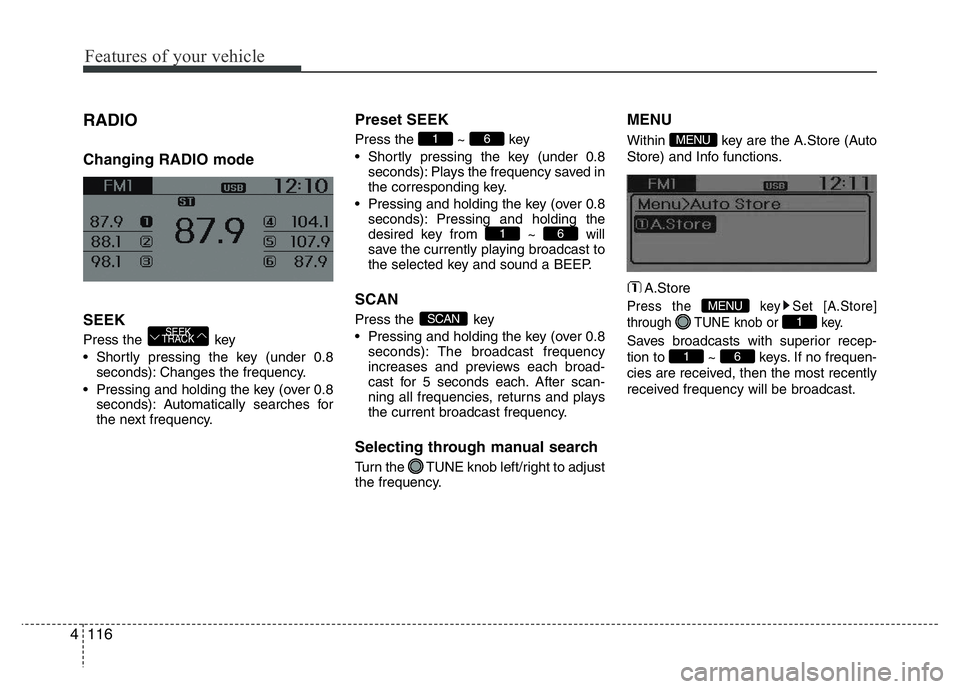
RADIO
Changing RADIO mode
SEEK
Press the key
• Shortly pressing the key (under 0.8
seconds): Changes the frequency.
• Pressing and holding the key (over 0.8
seconds): Automatically searches for
the next frequency.
Preset SEEK
Press the ~ key
• Shortly pressing the key (under 0.8
seconds): Plays the frequency saved in
the corresponding key.
• Pressing and holding the key (over 0.8
seconds): Pressing and holding the
desired key from ~ will
save the currently playing broadcast to
the selected key and sound a BEEP.
SCAN
Press the key
• Pressing and holding the key (over 0.8
seconds): The broadcast frequency
increases and previews each broad-
cast for 5 seconds each. After scan-
ning all frequencies, returns and plays
the current broadcast frequency.
Selecting through manual search
Turn the TUNE knob left/right to adjust
the frequency.
MENU
Within key are the A.Store (Auto
Store) and Info functions.
A.Store
Press the key Set [A.Store]
through TUNE knob or key.
Saves broadcasts with superior recep-
tion to ~ keys. If no frequen-
cies are received, then the most recently
received frequency will be broadcast.61
1
MENU
MENU
SCAN
61
61
SEEK
TRACK
Page 238 of 343
65
What to do in an emergency
✽ NOTICE
An inappropriately disposed
battery can be harmful to the
environment and human health.
Dispose the battery according
to your local law(s) or regula-
tion.
Jump starting procedure
1. Position the vehicles close enough that
the jumper cables will reach, but do not
allow the vehicles to touch.
2. Avoid fans or any moving parts in the
engine compartment at all times, even
when the vehicles are turned off.
3. Turn off all electrical devices such as
radios, lights, air conditioning, etc. Put
the vehicles in P (Park, for automatic
transaxle vehicle) or neutral (for manu-
al transaxle vehicle), and set the park-
ing brakes. Turn both vehicles OFF.
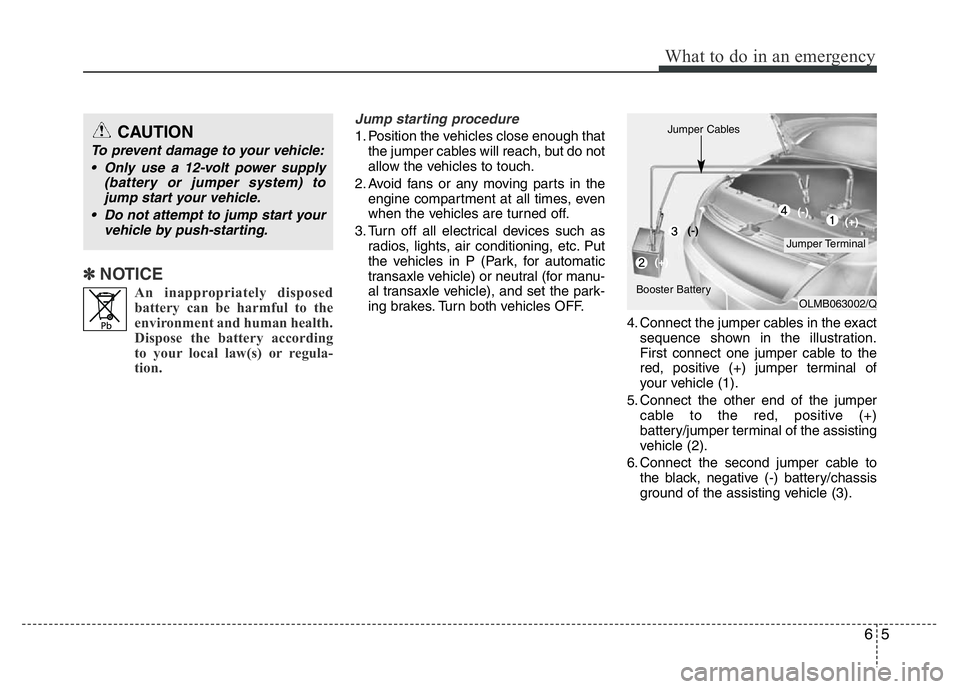
4. Connect the jumper cables in the exact
sequence shown in the illustration.
First connect one jumper cable to the
red, positive (+) jumper terminal of
your vehicle (1).
5. Connect the other end of the jumper
cable to the red, positive (+)
battery/jumper terminal of the assisting
vehicle (2).
6. Connect the second jumper cable to
the black, negative (-) battery/chassis
ground of the assisting vehicle (3).CAUTION
To prevent damage to your vehicle:
• Only use a 12-volt power supply
(battery or jumper system) to
jump start your vehicle.
• Do not attempt to jump start your
vehicle by push-starting.
OLMB063002/Q
Jumper Terminal Jumper Cables
Booster Battery(-)
(+)(+) (-)