pressure HYUNDAI I10 2018 Owners Manual
[x] Cancel search | Manufacturer: HYUNDAI, Model Year: 2018, Model line: I10, Model: HYUNDAI I10 2018Pages: 343, PDF Size: 9.14 MB
Page 32 of 343
Safety system of your vehicle
16 3
When the vehicle stops suddenly, or if
the occupant tries to lean forward too
quickly, the seat belt retractor will lock
into position. In certain frontal collisions,
the pre-tensioner will activate and pull
the seat belt into tighter contact against
the occupant's body.
If the system senses excessive seat belt
tension on the driver or passenger's seat
belt when the pre-tensioner activates, the
load limiter inside the pre-tensioner will
release some of the pressure on the
affected seat belt. (if equipped)(Continued)
• Improper handling of the pre-ten-
sioner seat belt assemblies, and
failure to heed the warnings not
to strike, modify, inspect, replace,
service or repair the pre-tension-
er seat belt assemblies may lead
to improper operation or inadver-
tent activation and serious injury.
• If the vehicle or pre-tensioner
seat belt must be discarded, we
recommend that you contact an
authorized HYUNDAI dealer.WARNING
• Pre-tensioners are designed to
operate only one time. After acti-
vation, pre-tensioner seat belts
must be replaced. All seat belts,
of any type, should always be
replaced after they have been
worn during a collision.
• The pre-tensioner seat belt
assembly mechanisms become
hot during activation. Do not
touch the pre-tensioner seat belt
assemblies for several minutes
after they have been activated.
• Do not hit the pre-tensioner seat
belt assemblies.
• Do not attempt to inspect or
replace the pre-tensioner seat
belts yourself. We recommend
that the system be serviced by an
authorized HYUNDAI dealer.
• Do not attempt to service or
repair the pre-tensioner seat belt
system in any manner.
(Continued)
WARNING
To obtain maximum benefit from a
pre-tensioner seat belt:
1. The seatbelt must be worn cor-
rectly and adjusted to the proper
position. Please read and follow
all of the important information
and precautions about your vehi-
cle’s occupant safety features –
including seat belts and air bags
– that are provided in this manu-
al.
2. Be sure you and your passen-
gers always wear seat belts prop-
erly.
Page 50 of 343
Safety system of your vehicle
34 3
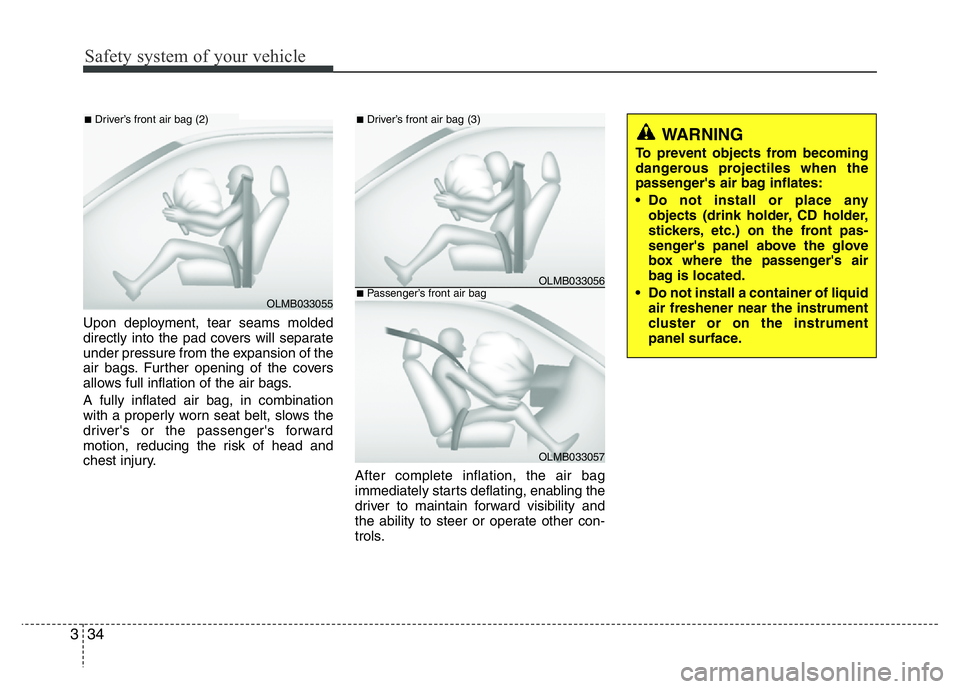
Upon deployment, tear seams molded
directly into the pad covers will separate
under pressure from the expansion of the
air bags. Further opening of the covers
allows full inflation of the air bags.
A fully inflated air bag, in combination
with a properly worn seat belt, slows the
driver's or the passenger's forward
motion, reducing the risk of head and
chest injury.
After complete inflation, the air bag
immediately starts deflating, enabling the
driver to maintain forward visibility and
the ability to steer or operate other con-
trols.
OLMB033055
■Driver’s front air bag (2)
OLMB033056
■Driver’s front air bag (3)
OLMB033057
■Passenger’s front air bag
WARNING
To prevent objects from becoming
dangerous projectiles when the
passenger's air bag inflates:
• Do not install or place any
objects (drink holder, CD holder,
stickers, etc.) on the front pas-
senger's panel above the glove
box where the passenger's air
bag is located.
• Do not install a container of liquid
air freshener near the instrument
cluster or on the instrument
panel surface.
Page 104 of 343
443
Features of your vehicle
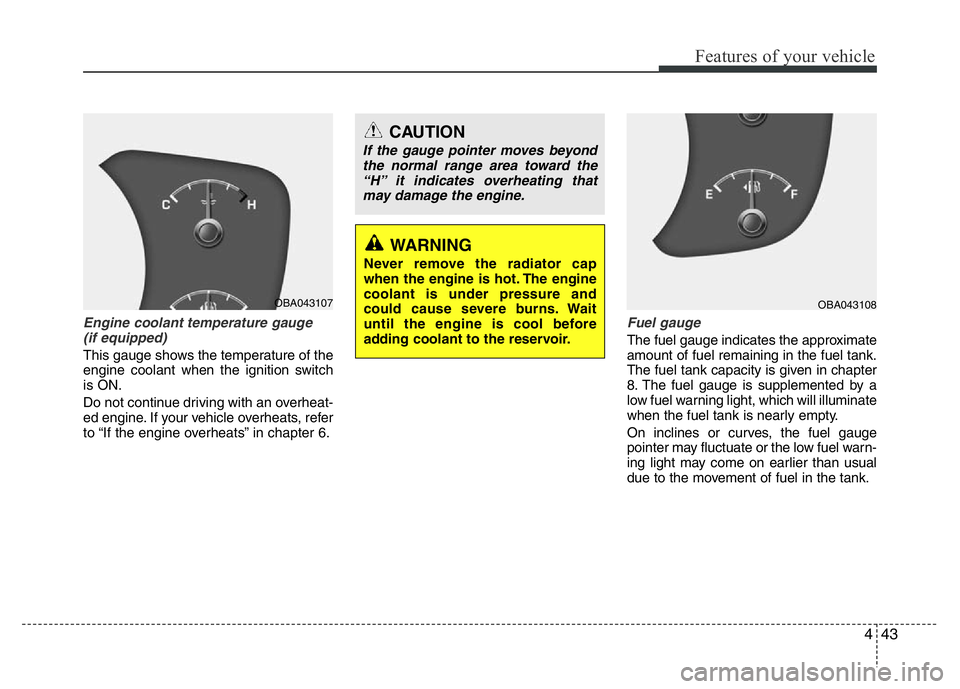
Engine coolant temperature gauge
(if equipped)
This gauge shows the temperature of the
engine coolant when the ignition switch
is ON.
Do not continue driving with an overheat-
ed engine. If your vehicle overheats, refer
to “If the engine overheats” in chapter 6.
Fuel gauge
The fuel gauge indicates the approximate
amount of fuel remaining in the fuel tank.
The fuel tank capacity is given in chapter
8. The fuel gauge is supplemented by a
low fuel warning light, which will illuminate
when the fuel tank is nearly empty.
On inclines or curves, the fuel gauge
pointer may fluctuate or the low fuel warn-
ing light may come on earlier than usual
due to the movement of fuel in the tank.
OBA043107
CAUTION
If the gauge pointer moves beyond
the normal range area toward the
“H” it indicates overheating that
may damage the engine.
WARNING
Never remove the radiator cap
when the engine is hot. The engine
coolant is under pressure and
could cause severe burns. Wait
until the engine is cool before
adding coolant to the reservoir.
OBA043108
Page 112 of 343
451
Features of your vehicle
Engine oil pressure warn-
ing light
This warning light indicates the engine oil
pressure is low.
If the warning light illuminates while driv-
ing:
1. Drive safely to the side of the road and
stop.
2. With the engine off, check the engine
oil level. If the level is low, add oil as
required.
If the warning light remains on after
adding oil or if oil is not available, we rec-
ommend that you call an authorized
HYUNDAI dealer.
Parking brake & brake
fluid warning
This light illuminates if the ignition switch is
turned ON and goes off in approximately 3
seconds if the parking brake is not applied.
Parking brake warning
This warning light is illuminated when the
parking brake is applied with the ignition
switch in the START or ON position. The
warning light should go off when the
parking brake is released.
Low brake fluid level warning
If the warning light remains on, it may
indicate that the brake fluid level in the
reservoir is low.
If the warning light remains on:
1. Drive carefully to the nearest safe loca-
tion and stop your vehicle.
2. With the engine stopped, check the
brake fluid level immediately and add
fluid as required. Then check all brake
components for fluid leaks.
3. Do not drive the vehicle if leaks are
found, the warning light remains on or
the brakes do not operate properly. We
recommend that you contact an
authorized HYUNDAI dealer.
CAUTION
If the engine is not stopped imme-
diately after the engine oil pressure
warning light is illuminated, severe
damage could result.
CAUTION
If the oil pressure warning light
stays on while the engine is run-
ning, serious engine damage may
result. The oil pressure warning
light comes on whenever there is
insufficient oil pressure. In normal
operation, it should come on when
the ignition switch is turned on, then
goes off when the engine starts. If
the oil pressure warning light stays
on while the engine is running, there
is a serious malfunction.
If this happens, stop the vehicle as
soon as it is safe to do so, turn off
the engine and check the oil level. If
the oil level is low, fill the engine oil
to the proper level and start the
engine again. If the light stays on
with the engine running, turn the
engine off immediately. In any
instance where the oil light stays on
when the engine is running, we rec-
ommend that the system be
checked by an authorized HYUNDAI
dealer.
Page 113 of 343
Features of your vehicle
52 4
Your vehicle is equipped with dual-diago-
nal braking systems. This means you still
have braking on two wheels even if one of
the dual systems should fail. With only one
of the dual systems working, more than
normal pedal travel and greater pedal
pressure are required to stop the vehicle.
Also, the vehicle will not stop in as short a
distance with only a portion of the brake
system working. If the brakes fail while you
are driving, shift to a lower gear for addi-
tional engine braking and stop the vehicle
as soon as it is safe to do so.
To check bulb operation, check whether
the parking brake and brake fluid warning
light illuminates when the ignition switch
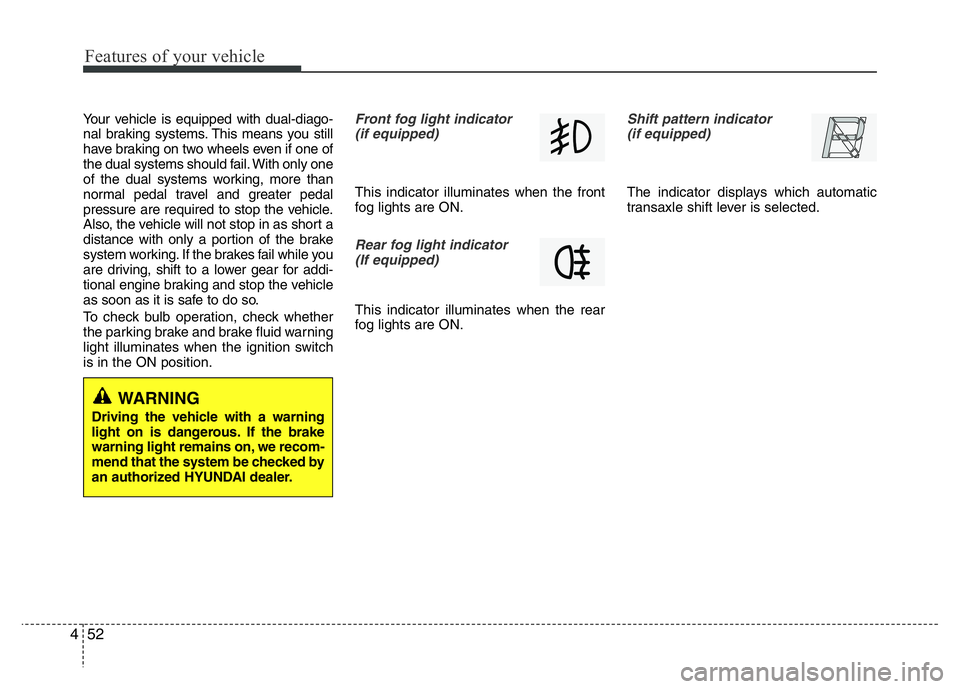
is in the ON position.Front fog light indicator
(if equipped)
This indicator illuminates when the front
fog lights are ON.
Rear fog light indicator
(If equipped)
This indicator illuminates when the rear
fog lights are ON.
Shift pattern indicator
(if equipped)
The indicator displays which automatic
transaxle shift lever is selected.
WARNING
Driving the vehicle with a warning
light on is dangerous. If the brake
warning light remains on, we recom-
mend that the system be checked by
an authorized HYUNDAI dealer.
Page 157 of 343
Features of your vehicle
96 4
(Continued)
• Turn on the car ignition before
using this device. Do not operate
the audio system for long periods
of time with the ignition turned off
as such operations may lead to
battery discharge.
• Do not subject the device to
severe shock or impact. Direct
pressure onto the front side of
the monitor may cause damage to
the LCD or touch screen.
• When cleaning the device, make
sure to turn off the device and
use a dry and smooth cloth.
Never use tough materials, chem-
ical cloths, or solvents (alcohol,
benzene, thinners, etc.) as such
materials may damage the device
panel or cause color/quality dete-
rioration
(Continued)(Continued)
• Do not place beverages close to
the audio system. Spilling bever-
ages may lead to system mal-
function.
• In case of product malfunction,
please contact your place of pur-
chase or After Service center.
• Placing the audio system within
an electromagnetic environment
may result in noise interference.
• Prevent caustic solutions such as
perfume and cosmetic oil from
contacting the dashboard
because they may cause damage
or discoloration.CAUTION
• Operating the device while driv-
ing could lead to accidents due to
a lack of attention to external sur-
roundings. First park the vehicle
before operating the device.
• Adjust the volume to levels that
allow the driver to hear sounds
from outside of the vehicle.
Driving in a state where external
sounds cannot be heard may lead
to accidents.
• Pay attention to the volume set-
ting when turning the device on.
A sudden output of extreme vol-
ume upon turning the device on
could lead to hearing impairment.
(Adjust the volume to a suitable
levels before turning off the
device.)
(Continued)
Page 211 of 343
Driving your vehicle
18 5
Parking
Always come to a complete stop and
continue to depress the brake pedal.
Move the shift lever into the P (Park)
position, apply the parking brake, and
place the ignition switch in the
LOCK/OFF position. Take the Key with
you when exiting the vehicle.
Good driving practices
• Never move the shift lever from P
(Park) or N (Neutral) to any other posi-
tion with the accelerator pedal
depressed.
• Never move the shift lever into P (Park)
when the vehicle is in motion.
• Be sure the vehicle is completely
stopped before you attempt to shift into
R (Reverse) or D (Drive).
• Do not move the shift lever to N
(Neutral) when driving. Doing so may
result in an accident because of a loss
of engine braking and the transaxle
could be damaged.
• Do not drive with your foot resting on
the brake pedal. Even light, but consis-
tent pedal pressure can result in the
brakes overheating, brake wear and
possibly even brake failure.
• When driving in sports mode, slow
down before shifting to a lower gear.
Otherwise, the lower gear may not be
engaged if the engine rpms are out-
side of the allowable range.
• Always apply the parking brake when
leaving the vehicle. Do not depend on
placing the transmission in P (Park) to
keep the vehicle from moving.• Exercise extreme caution when driving
on a slippery surface. Be especially
careful when braking, accelerating or
shifting gears. On a slippery surface,
an abrupt change in vehicle speed can
cause the drive wheels to lose traction
and may cause loss of vehicle control
resulting in an accident
• Optimum vehicle performance and
economy is obtained by smoothly
depressing and releasing the accelera-
tor.
WARNING
When you stay in the vehicle with
the engine running, be careful not
to depress the accelerator pedal for
a long period of time. The engine or
exhaust system may overheat and
start a fire.
The exhaust gas and the exhaust
system are very hot. Keep away
from the exhaust system compo-
nents.
Do not stop or park over flammable
materials, such as dry grass, paper
or leaves. They may ignite and
cause a fire.
Page 217 of 343
Driving your vehicle
24 5
Anti-lock Brake System (ABS)
(if equipped)
ABS is an electronic braking system that
helps prevent a braking skid. ABS allows
the driver to steer and brake at the same
time.
Using ABS
To obtain the maximum benefit from your
ABS in an emergency situation, do not
attempt to modulate your brake pressure
and do not try to pump your brakes.
Depress your brake pedal as hard as
possible.
When you apply your brakes under con-
ditions which may lock the wheels, you
may hear sounds from the brakes, or feel
a corresponding sensation in the brake
pedal. This is normal and it means your
ABS is active.
ABS does not reduce the time or dis-
tance it takes to stop the vehicle.
Always maintain a safe distance from the
vehicle in front of you.
ABS will not prevent a skid that results
from sudden changes in direction, such
as trying to take a corner too fast or mak-
ing a sudden lane change. Always drive
at a safe speed for the road and weather
conditions.
ABS cannot prevent a loss of stability.
Always steer moderately when braking
hard. Severe or sharp steering wheel
movement can still cause your vehicle to
veer into oncoming traffic or off the road.(Continued)
The safety features of an ABS or
ESC equipped vehicle should not
be tested by high speed driving or
cornering. This could endanger the
safety of yourself or others.
WARNING
An Anti-Lock Braking System
(ABS) or an Electronic Stability
Control (ESC) system will not pre-
vent accidents due to improper or
dangerous driving maneuvers.
Even though vehicle control is
improved during emergency brak-
ing, always maintain a safe dis-
tance between you and objects
ahead of you. Vehicle speeds
should always be reduced during
extreme road conditions. The brak-
ing distance for cars equipped with
ABS or ESC may be longer than for
those without these systems in the
following road conditions.
Drive your vehicle at reduced
speeds during the following condi-
tions:
• Rough, gravel or snow-covered
roads.
• On roads where the road surface
is pitted or has different surface
height.
• Tire chains are installed on your
vehicle.
(Continued)
Page 219 of 343
Driving your vehicle
26 5
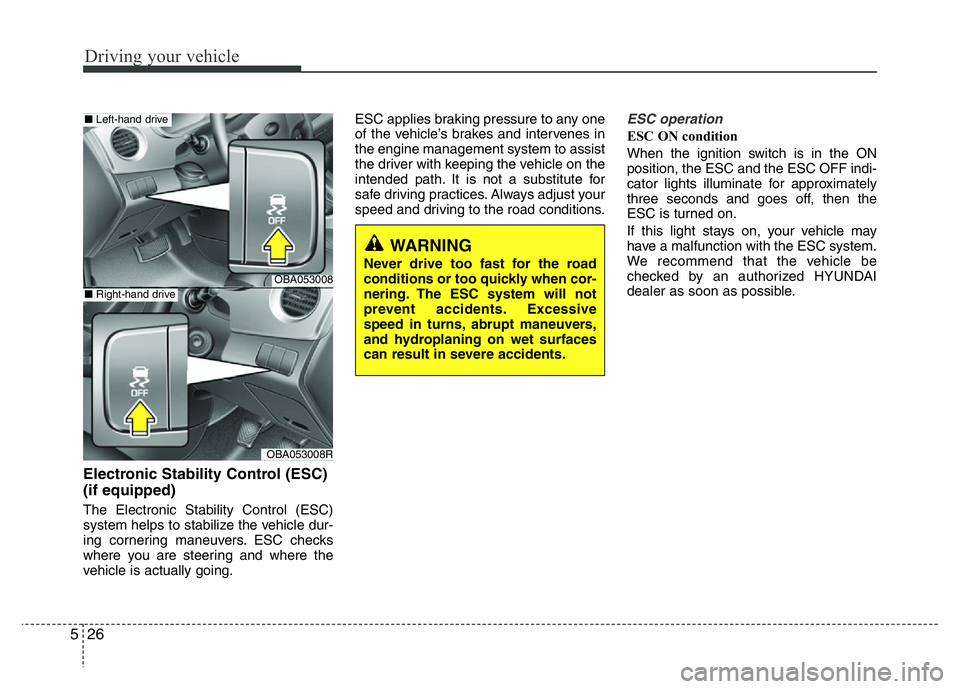
Electronic Stability Control (ESC)
(if equipped)
The Electronic Stability Control (ESC)
system helps to stabilize the vehicle dur-
ing cornering maneuvers. ESC checks
where you are steering and where the
vehicle is actually going.ESC applies braking pressure to any one
of the vehicle’s brakes and intervenes in
the engine management system to assist
the driver with keeping the vehicle on the
intended path. It is not a substitute for
safe driving practices. Always adjust your
speed and driving to the road conditions.
ESC operation
ESC ON condition
When the ignition switch is in the ON
position, the ESC and the ESC OFF indi-
cator lights illuminate for approximately
three seconds and goes off, then the
ESC is turned on.
If this light stays on, your vehicle may
have a malfunction with the ESC system.
We recommend that the vehicle be
checked by an authorized HYUNDAI
dealer as soon as possible.
WARNING
Never drive too fast for the road
conditions or too quickly when cor-
nering. The ESC system will not
prevent accidents. Excessive
speed in turns, abrupt maneuvers,
and hydroplaning on wet surfaces
can result in severe accidents.OBA053008
OBA053008R
■Left-hand drive
■Right-hand drive
Page 224 of 343
531
Driving your vehicle
Emergency Stop Signal (ESS)
(if equipped)
The Emergency Stop Signal system
alerts the driver behind by blinking the
stop light when the vehicle brakes rapid-
ly and severely.
The system is activated when:
• The vehicle suddenly stops (vehicle
speed is over 55km/h (34mph) and the
vehicle deceleration is greater than
7m/s2).
• The ABS is activating.
When vehicle speed is under 40 km/h
(25mph) and the ABS deactivates or
the sudden stop situation is over, the
stop light will stop blinking. Instead, the
hazard warning flasher will turn on
automatically. The hazard warning
flasher will turn off when vehicle speed
is over 10km/h (6mph) after the vehicle
has stopped. Also, it will turn off when
the vehicle is driven at low speed for
some time. You can turn it off manually
by pressing the hazard warning flasher
switch.
Good braking practices Wet brakes can be dangerous! The
brakes may get wet if the vehicle is driv-
en through standing water or if it is
washed. Your vehicle will not stop as
quickly if the brakes are wet. Wet brakes
may cause the vehicle to pull to one side.
To dry the brakes, apply the brakes light-
ly until the braking action returns to nor-
mal, taking care to keep the vehicle
under control at all times. If the braking
action does not return to normal, stop as
soon as it is safe to do so and we rec-
ommend that you call an authorized
HYUNDAI dealer for assistance.
DO NOT drive with your foot resting on
the brake pedal. Even light, but constant
pedal pressure can result in the brakes
overheating, brake wear, and possibly
even brake failure.
If a tire goes flat while you are driving,
apply the brakes gently and keep the
vehicle pointed straight ahead while you
slow down. When you are moving slowly
enough for it to be safe to do so, pull off
the road and stop in a safe location.
Keep your foot firmly on the brake pedal
when the vehicle is stopped to prevent
the vehicle from rolling forward.
WARNING
Whenever leaving the vehicle or
parking, always come to a complete
stop and continue to depress the
brake pedal. Move the shift lever
into the 1st gear (for manual
transaxle vehicle) or P (Park, for
automatic transaxle vehicle) posi-
tion, then apply the parking brake,
and place the ignition switch in the
LOCK/OFF position.
Vehicles with the parking brake not
fully engaged are at risk for moving
inadvertently and causing injury to
yourself or others.