engine mount HYUNDAI I20 2013 Owners Manual
[x] Cancel search | Manufacturer: HYUNDAI, Model Year: 2013, Model line: I20, Model: HYUNDAI I20 2013Pages: 207, PDF Size: 2.46 MB
Page 109 of 207
437
Features of your vehicle
D150203APB
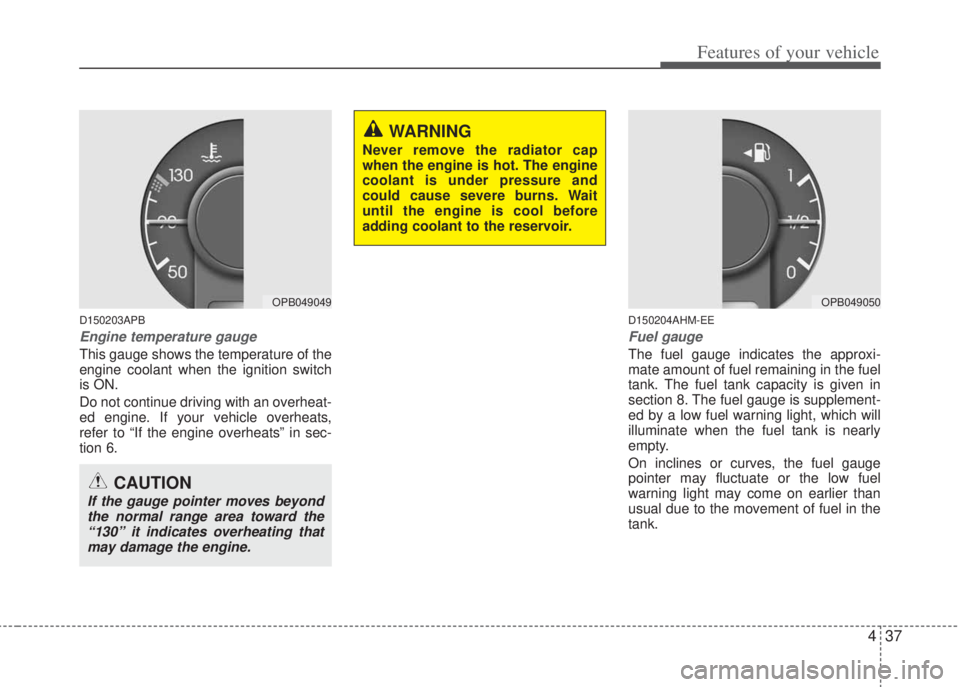
Engine temperature gauge
This gauge shows the temperature of the
engine coolant when the ignition switch
is ON.
Do not continue driving with an overheat-
ed engine. If your vehicle overheats,
refer to “If the engine overheats” in sec-
tion 6.
D150204AHM-EE
Fuel gauge
The fuel gauge indicates the approxi-
mate amount of fuel remaining in the fuel
tank. The fuel tank capacity is given in
section 8. The fuel gauge is supplement-
ed by a low fuel warning light, which will
illuminate when the fuel tank is nearly
empty.
On inclines or curves, the fuel gauge
pointer may fluctuate or the low fuel
warning light may come on earlier than
usual due to the movement of fuel in the
tank.
OPB049049
CAUTION
If the gauge pointer moves beyond
the normal range area toward the
“130” it indicates overheating that
may damage the engine.
WARNING
Never remove the radiator cap
when the engine is hot. The engine
coolant is under pressure and
could cause severe burns. Wait
until the engine is cool before
adding coolant to the reservoir.
OPB049050
Page 121 of 207
449
Features of your vehicle
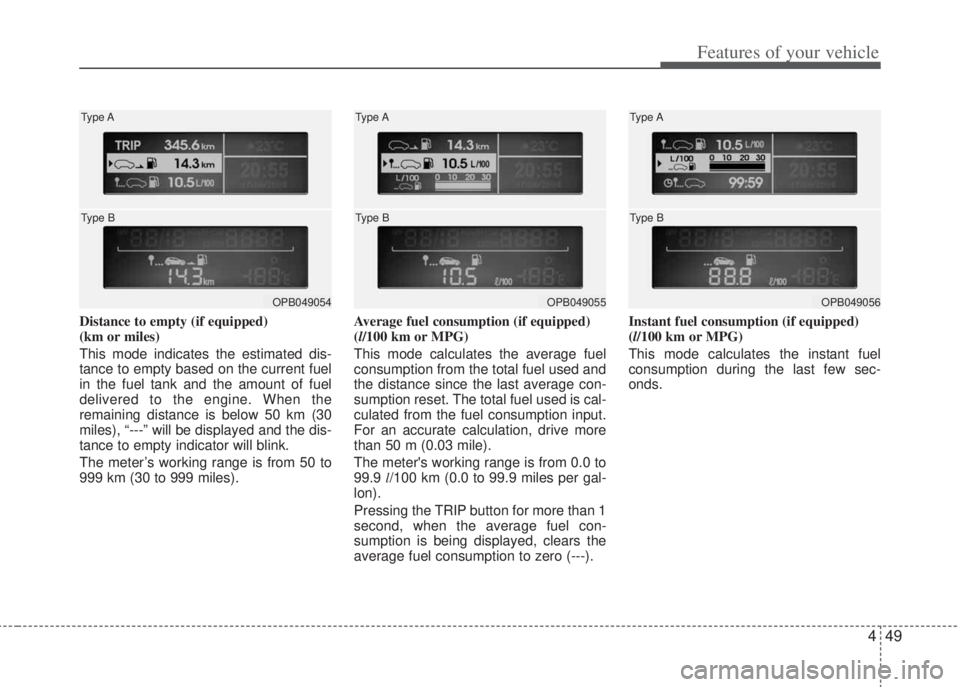
Distance to empty (if equipped)
(km or miles)
This mode indicates the estimated dis-
tance to empty based on the current fuel
in the fuel tank and the amount of fuel
delivered to the engine. When the
remaining distance is below 50 km (30
miles), “---” will be displayed and the dis-
tance to empty indicator will blink.
The meter’s working range is from 50 to
999 km (30 to 999 miles).Average fuel consumption (if equipped)
(l/100 km or MPG)
This mode calculates the average fuel
consumption from the total fuel used and
the distance since the last average con-
sumption reset. The total fuel used is cal-
culated from the fuel consumption input.
For an accurate calculation, drive more
than 50 m (0.03 mile).
The meter's working range is from 0.0 to
99.9 l/100 km (0.0 to 99.9 miles per gal-
lon).
Pressing the TRIP button for more than 1
second, when the average fuel con-
sumption is being displayed, clears the
average fuel consumption to zero (---).Instant fuel consumption (if equipped)
(l/100 km or MPG)
This mode calculates the instant fuel
consumption during the last few sec-
onds.
OPB049054 Type A
Type BOPB049055 Type A
Type BOPB049056 Type A
Type B
Page 127 of 207
455
Features of your vehicle
To turn off the fog lights, turn the switch
to the off position.
D190800APB
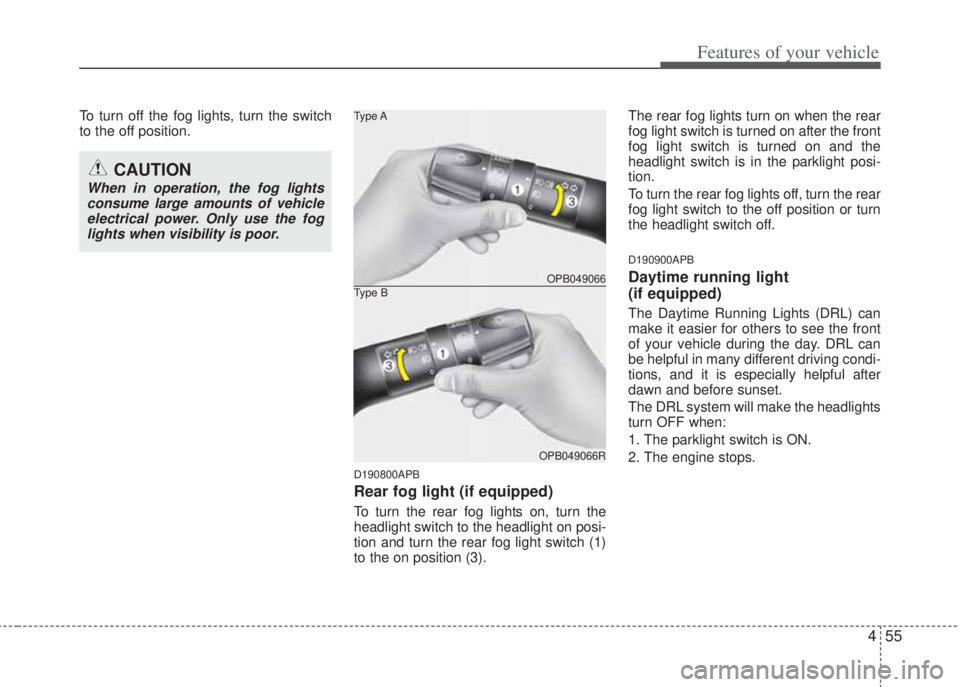
Rear fog light (if equipped)
To turn the rear fog lights on, turn the
headlight switch to the headlight on posi-
tion and turn the rear fog light switch (1)
to the on position (3). The rear fog lights turn on when the rear
fog light switch is turned on after the front
fog light switch is turned on and the
headlight switch is in the parklight posi-
tion.
To turn the rear fog lights off, turn the rear
fog light switch to the off position or turn
the headlight switch off.
D190900APB
Daytime running light
(if equipped)
The Daytime Running Lights (DRL) can
make it easier for others to see the front
of your vehicle during the day. DRL can
be helpful in many different driving condi-
tions, and it is especially helpful after
dawn and before sunset.
The DRL system will make the headlights
turn OFF when:
1. The parklight switch is ON.
2. The engine stops.
CAUTION
When in operation, the fog lights
consume large amounts of vehicle
electrical power. Only use the fog
lights when visibility is poor.
OPB049066 Type A
OPB049066R
Type B
Page 164 of 207
Features of your vehicle
92 4
D300800AFD-EA
How car audio works
AM and FM radio signals are broadcast
from transmitter towers located around your
city. They are intercepted by the radio
antenna on your car. This signal is then
received by the radio and sent to your car
speakers.
When a strong radio signal has reached
your vehicle, the precise engineering of
your audio system ensures the best pos-
sible quality reproduction. However, in
some cases the signal coming to your
vehicle may not be strong and clear. This
can be due to factors such as the dis-
tance from the radio station, closeness of
other strong radio stations or the pres-
ence of buildings, bridges or other large
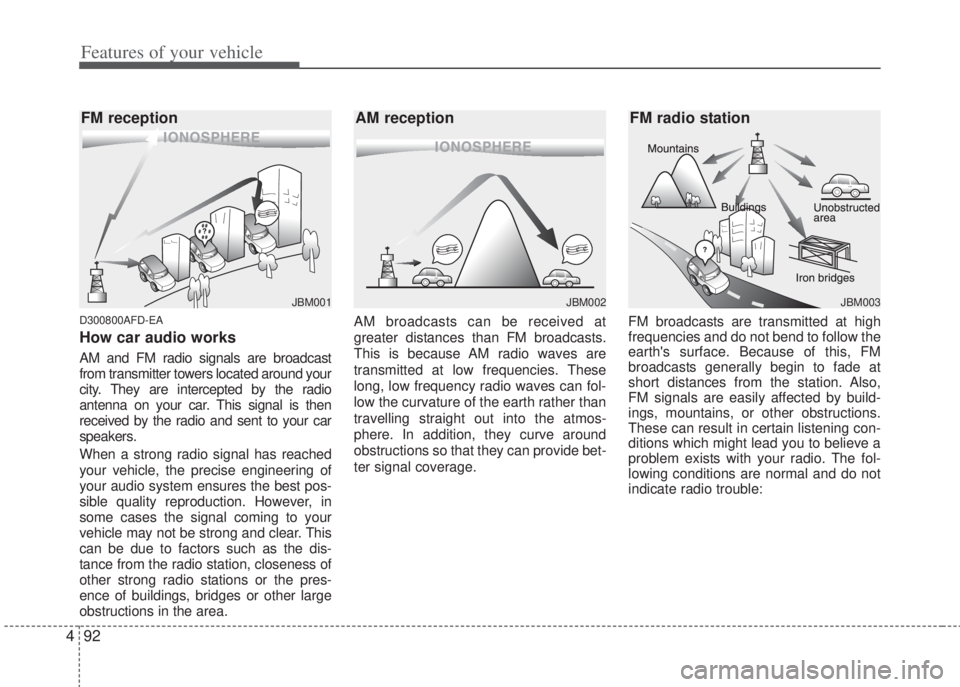
obstructions in the area.AM broadcasts can be received at
greater distances than FM broadcasts.
This is because AM radio waves are
transmitted at low frequencies. These
long, low frequency radio waves can fol-
low the curvature of the earth rather than
travelling straight out into the atmos-
phere. In addition, they curve around
obstructions so that they can provide bet-
ter signal coverage.FM broadcasts are transmitted at high
frequencies and do not bend to follow the
earth's surface. Because of this, FM
broadcasts generally begin to fade at
short distances from the station. Also,
FM signals are easily affected by build-
ings, mountains, or other obstructions.
These can result in certain listening con-
ditions which might lead you to believe a
problem exists with your radio. The fol-
lowing conditions are normal and do not
indicate radio trouble:
¢¢¢
JBM001
¢¢¢¢¢¢
JBM002JBM003
FM reception AM reception FM radio station
Page 175 of 207
4103
Features of your vehicle
CAUTION - Using USB
device
• To use the external USB device,
make sure the device is not con-
nected when starting the vehicle.
Connect the device after starting.
• If you start the vehicle when the
USB device is mounted, it may
damage the USB device. (USB is
not ESA)
• If the vehicle is started or turned
off while the external USB device
is connected, the external USB
device may not work.
• It may not play inauthentic MP3 or
WMA files.
1) It can only play MP3 files with
the compression rate between
8Kbps~320Kbps.
2) It can only play WMA music
files with the compression rate
between 8Kbps~320Kbps.
• Take cautions for static electricity
when connect or disconnect the
external USB device.
• Encoded MP3 PLAYER is not rec-
ognizable.
(Continued)
(Continued)
• Depending on the condition of
the external USB device, the con-
nected external USB device can
be unrecognizable.
• When the VHAPTTL byte/sector
setting of External USB devices is
not either 512byte or 2048byte,
then the device will not be recog-
nized.
• Use only a device formatted to
FAT 12/16/32.
• USB device without USB I/F
(IMPLEMENTERS FORUM)
authentication may not be recog-
nizable.
• Make sure the USB connection
terminal does not come in con-
tact with human body or any
object.
• If you repeat connecting or dis-
connecting USB device in a short
period of time, it may break the
device.
• You might hear a strange noise
when connecting or disconnect-
ing USB device.
(Continued)(Continued)
• If you disconnect the external
USB device during playback in
USB mode, the external USB
device can be damaged or mal-
function. Therefore, connect the
external USB device when the
engine is turned off or in another
mode.
• Depending on the type and
capacity of the external USB
device or the type of files stored
in the device, there is a difference
in the time taken for recognition
of the device, so you may have to
wait.
• Do not use the USB device for
other purposes than playing
music files.
• Use of USB accessories such as
recharger or heater using USB I/F
(IMPLEMENTERS FORUM) may
lower the performance or cause
trouble.
(Continued)
Page 186 of 207
53
Driving your vehicle
E020100AUN
Before entering vehicle
• Be sure that all windows, outside mir-
ror(s), and outside lights are clean.
• Check the condition of the tires.
• Check under the vehicle for any sign of
leaks.
• Be sure there are no obstacles behind
you if you intend to back up.
E020200AUN
Necessary inspections
Fluid levels, such as engine oil, engine
coolant, brake fluid, and washer fluid
should be checked on a regular basis,
with the exact interval depending on the
fluid. Further details are provided in
Section 7, “Maintenance”.
E020300AHM
Before starting
• Close and lock all doors.
• Position the seat so that all controls
are easily reached.
• Adjust the inside and outside rearview
mirrors.• Be sure that all lights work.
• Check all gauges.
• Check the operation of warning lights
when the ignition switch is turned to
the ON position.
• Release the parking brake and make
sure the brake warning light goes out.
For safe operation, be sure you are famil-
iar with your vehicle and its equipment.
BEFORE DRIVING
WARNING
All passengers must be properly
belted whenever the vehicle is
moving. Refer to “Seat belts” in
section 3 for more information on
their proper use.
WARNING
Always check the surrounding
areas near your vehicle for people,
especially children, before putting
a vehicle into D (Drive) or R
(Reverse).
WARNING
When you intend to park or stop the
vehicle with the engine on, be care-
ful not to depress the accelerator
pedal for a long period of time. It
may overheat the engine or
exhaust system and cause fire.
WARNING- Driving under
the influence of alcohol or
drugs
Drinking and driving is dangerous.
Drunk driving is the number one
contributor to the highway death
toll each year. Even a small amount
of alcohol will affect your reflexes,
perceptions and judgement.
Driving while under the influence of
drugs is as dangerous or more dan-
gerous than driving drunk.
You are much more likely to have a
serious accident if you drink or
take drugs and drive.
If you are drinking or taking drugs,
don’t drive. Do not ride with a driv-
er who has been drinking or taking
drugs. Choose a designated driver
or call a cab.