cooling HYUNDAI I20 2020 Owners Manual
[x] Cancel search | Manufacturer: HYUNDAI, Model Year: 2020, Model line: I20, Model: HYUNDAI I20 2020Pages: 444, PDF Size: 8.93 MB
Page 182 of 444
6-54
Convenient features
Heating and air conditioning
1. Start the engine.
2. Set the mode to the desired position.
To improve the effectiveness of heating and cooling :
- Heating:
- Cooling:
3. Set the temperature control to the desired position.
4. Set the air intake control to the outside (fresh) air or recirculated air position.
5. Set the fan speed control to the desired speed.
6. If air conditioning is desired, turn the air conditioning system (if equipped) on.
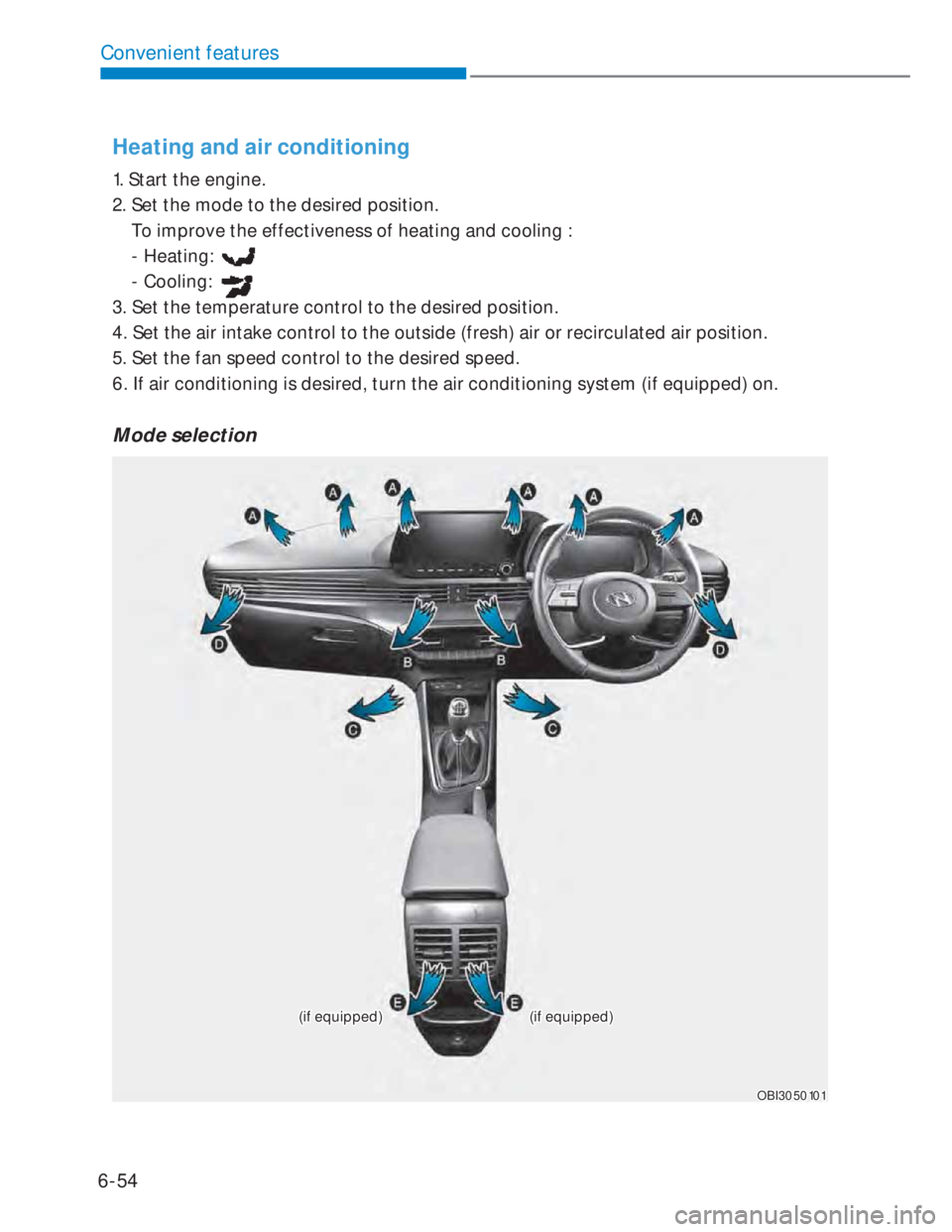
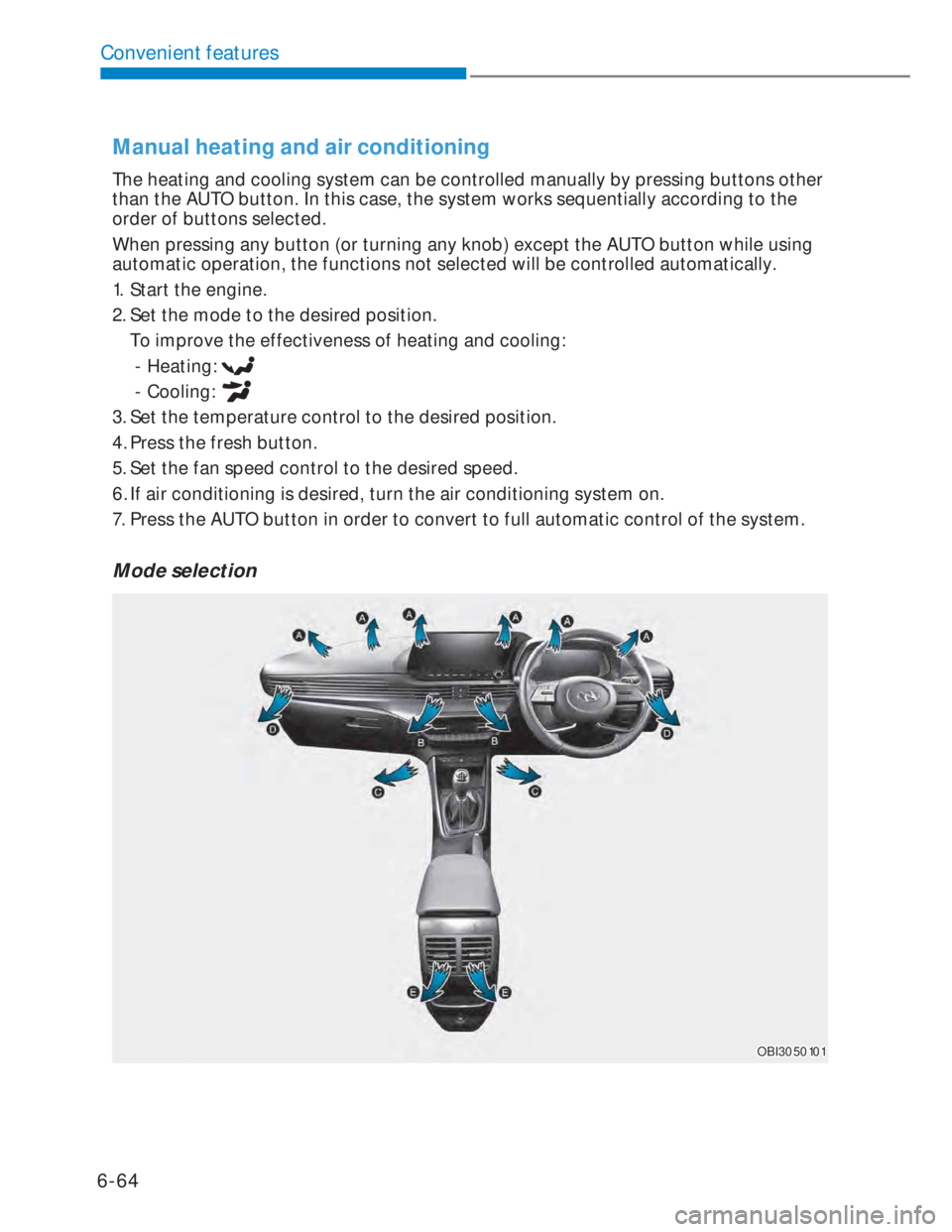
Mode selection
(if equipped)(if equipped)(if equipped)(if equipped)
OBI3050101OBI3050101
Page 187 of 444
6-59
06
Air conditioning
HYUNDAI Air Conditioning Systems are
filled with R-134a refrigerant.
1. Start the engine.
2. Push the air conditioning button.
3. Select the Face Level
mode.
4. Set the air intake control to
Recirculation mode temporarily to
allow the cabin to cool quickly. When
the desired temperature in the cabin
is reached, change the air intake
control back to Fresh mode.
5. Adjust the fan speed control and
temperature control to maintain
maximum comfort.
NOTICE
• The refrigerant system should only
be serviced by trained and certified
technicians to insure proper and safe
operation.
• The refrigerant system should be
serviced in a well-ventilated place.
• The air conditioning evaporator
(cooling coil) shall never be repaired
or replaced with one removed from
a used or salvaged vehicle and new
replacement MAC evaporators shall
be certified (and labeled) as meeting
SAE Standard J2842.
i Information
• When using the air conditioning system,
monitor the temperature gauge closely
while driving up hills or in heavy traffic
when outside temperatures are high.
Air conditioning system operation may
cause engine overheating. Continue
to use the blower fan but turn the
air conditioning system off if the
temperature gauge indicates engine
overheating.
• When opening the windows in humid
weather, air conditioning may create
water droplets inside the vehicle. Since
excessive water droplets may cause
damage to electrical equipment, air
conditioning should only be used with
the windows closed.
Page 188 of 444
6-60
Convenient features
Air conditioning system operation tips
• If the vehicle has been parked in direct
sunlight during hot weather, open the
windows for a short time to let the hot
air inside the vehicle escape.
• After sufficient cooling has been
achieved, switch back from
recirculation mode to fresh mode.
• To help reduce moisture inside of
the windows on rainy or humid
days, decrease the humidity inside
the vehicle by operating the air
conditioning system with the windows
and sunroof closed.
• During air conditioning system
operation, you may occasionally
notice a slight change in engine speed
as the air conditioning compressor
cycles. This is a normal system
operation characteristic.
• Use the air conditioning system
every month only for a few minutes
to ensure maximum system
performance.
• When using the air conditioning
system, you may notice clear water
dripping (or even puddling) on the
ground under the passenger side of
the vehicle. This is a normal system
operation characteristic.
• If you operate the air conditioner
excessively, the difference between
the temperature of the outside air and
that of the windshield could cause the
outer surface of the windshield to fog
up, causing loss of visibility. In this
case, set the mode selection button to
the
position and set the fan speed
control knob to the lowest speed
setting.
System maintenance
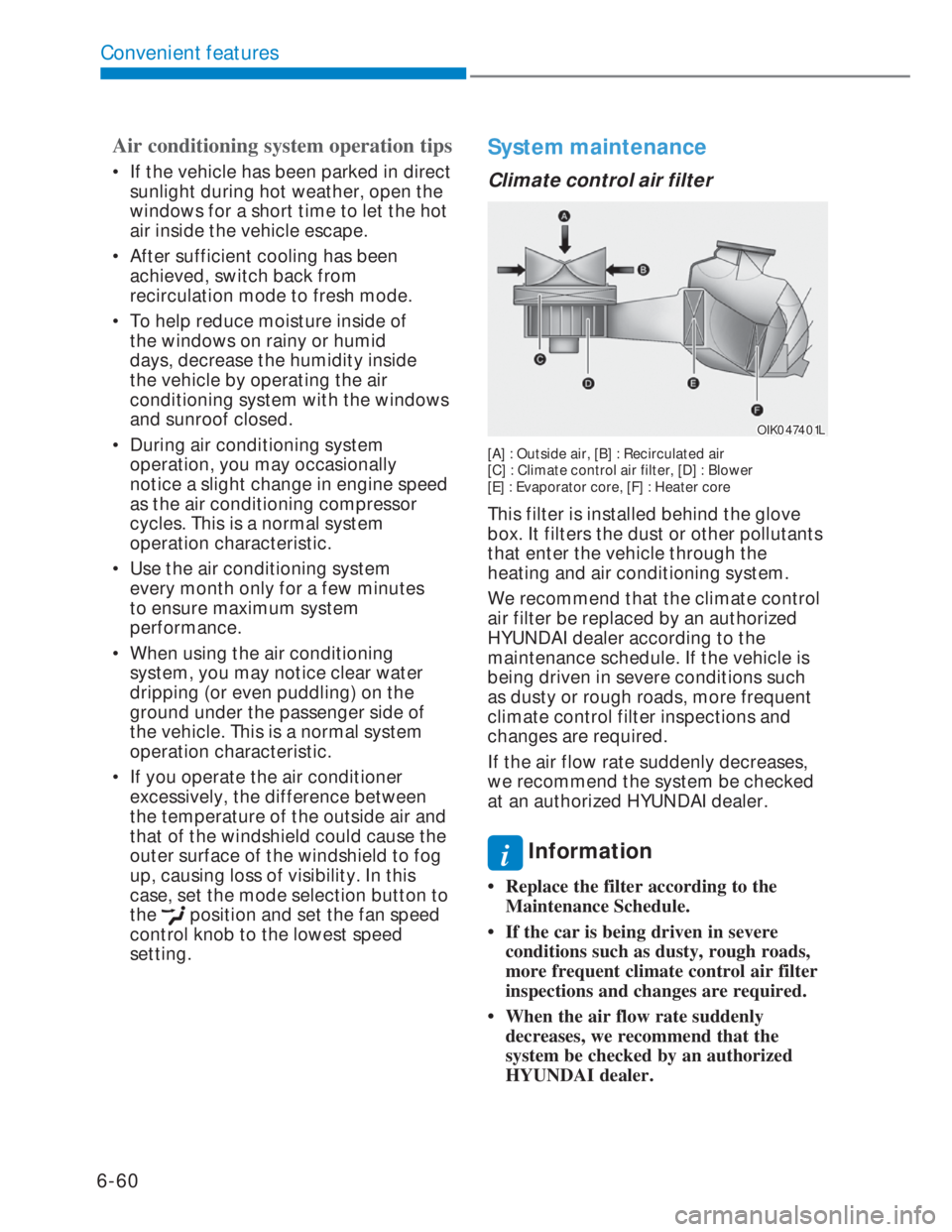
Climate control air filter
OIK047401LOIK047401L
[A] : Outside air, [B] : Recirculated air
[C] : Climate control air filter, [D] : Blower
[E] : Evaporator core, [F] : Heater core
This filter is installed behind the glove
box. It filters the dust or other pollutants
that enter the vehicle through the
heating and air conditioning system.
We recommend that the climate control
air filter be replaced by an authorized
HYUNDAI dealer according to the
maintenance schedule. If the vehicle is
being driven in severe conditions such
as dusty or rough roads, more frequent
climate control filter inspections and
changes are required.
If the air flow rate suddenly decreases,
we recommend the system be checked
at an authorized HYUNDAI dealer.
i Information
• Replace the filter according to the
Maintenance Schedule.
• If the car is being driven in severe
conditions such as dusty, rough roads,
more frequent climate control air filter
inspections and changes are required.
• When the air flow rate suddenly
decreases, we recommend that the
system be checked by an authorized
HYUNDAI dealer.
Page 191 of 444
6-63
06
Automatic heating and air
conditioning
The Automatic Climate Control System
is controlled by setting the desired
temperature.
OBI3050116OBI3050116
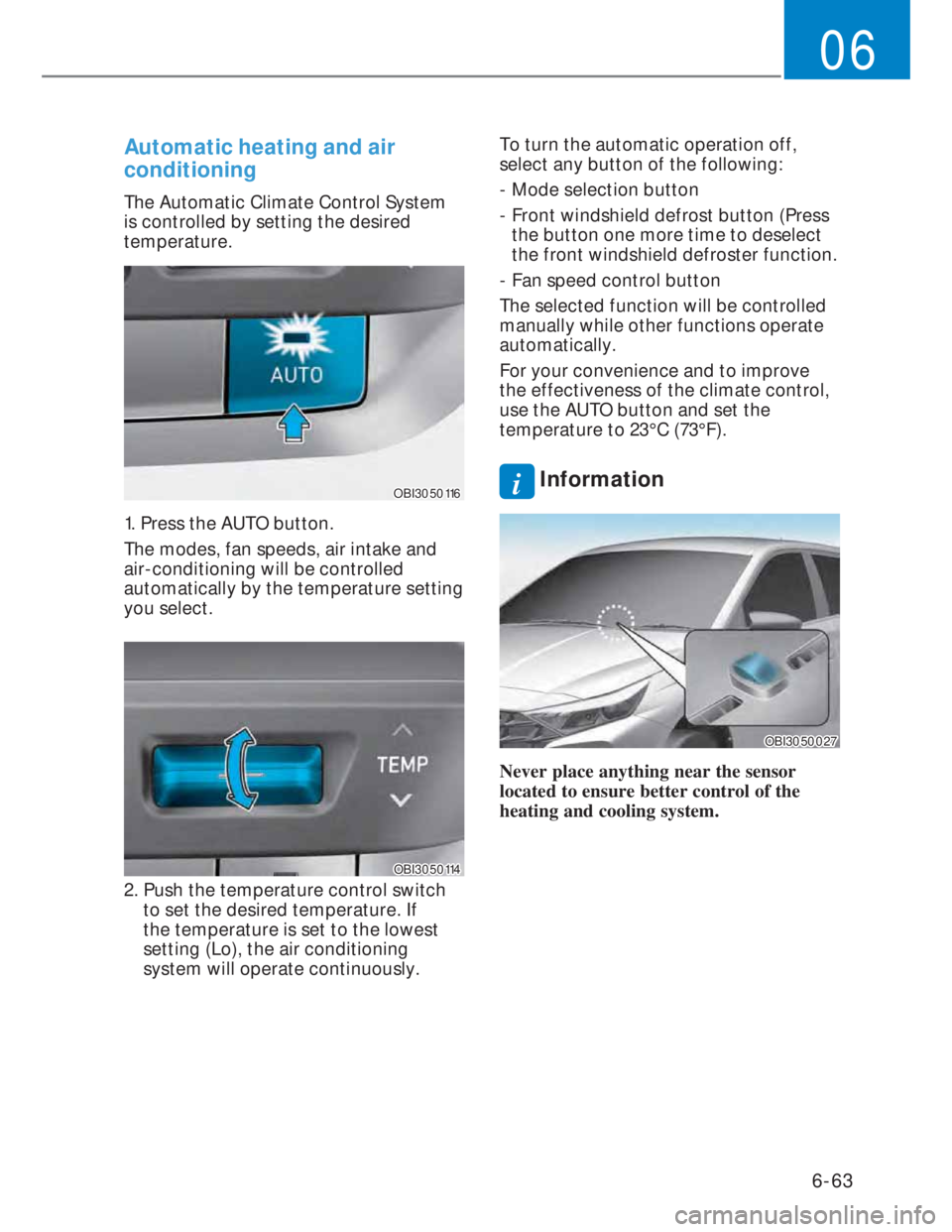
1. Press the AUTO button.
The modes, fan speeds, air intake and
air-conditioning will be controlled
automatically by the temperature setting
you select.
OBI3050114OBI3050114
2. Push the temperature control switch
to set the desired temperature. If
the temperature is set to the lowest
setting (Lo), the air conditioning
system will operate continuously.To turn the automatic operation off,
select any button of the following:
- Mode selection button
- Front windshield defrost button (Press
the button one more time to deselect
the front windshield defroster function.
- Fan speed control button
The selected function will be controlled
manually while other functions operate
automatically.
For your convenience and to improve
the effectiveness of the climate control,
use the AUTO button and set the
temperature to 23°C (73°F).
i Information
OBI3050027OBI3050027
Never place anything near the sensor
located to ensure better control of the
heating and cooling system.
Page 192 of 444
6-64
Convenient features
Manual heating and air conditioning
The heating and cooling system can be controlled manually by pressing buttons other
than the AUTO button. In this case, the system works sequentially according to the
order of buttons selected.
When pressing any button (or turning any knob) except the AUTO button while using
automatic operation, the functions not selected will be controlled automatically.
1. Start the engine.
2. Set the mode to the desired position.
To improve the effectiveness of heating and cooling:
- Heating:
- Cooling:
3. Set the temperature control to the desired position.
4. Press the fresh button.
5. Set the fan speed control to the desired speed.
6. If air conditioning is desired, turn the air conditioning system on.
7. Press the AUTO button in order to convert to full automatic control of the system.
Mode selection
OBI3050101OBI3050101
Page 198 of 444
6-70
Convenient features
NOTICE
• The refrigerant system should only
be serviced by trained and certified
technicians to insure proper and safe
operation.
• The refrigerant system should be
serviced in a well-ventilated place.
• The air conditioning evaporator
(cooling coil) shall never be repaired
or replaced with one removed from
a used or salvaged vehicle and new
replacement MAC evaporators shall
be certified (and labeled) as meeting
SAE Standard J2842.
i Information
• When using the air conditioning system,
monitor the temperature gauge closely
while driving up hills or in heavy traffic
when outside temperatures are high.
Air conditioning system operation may
cause engine overheating. Continue
to use the blower fan but turn the
air conditioning system off if the
temperature gauge indicates engine
overheating.
• When opening the windows in humid
weather, air conditioning may create
water droplets inside the vehicle. Since
excessive water droplets may cause
damage to electrical equipment, air
conditioning should only be used with
the windows closed.
Air conditioning system operation tips
• If the vehicle has been parked in direct
sunlight during hot weather, open the
windows for a short time to let the hot
air inside the vehicle escape.
• After sufficient cooling has been
achieved, switch back from
recirculation mode to fresh mode.
• To help reduce moisture inside of
the windows on rainy or humid
days, decrease the humidity inside
the vehicle by operating the air
conditioning system with the windows
and sunroof closed.
• During air conditioning system
operation, you may occasionally
notice a slight change in engine speed
as the air conditioning compressor
cycles. This is a normal system
operation characteristic.
• Use the air conditioning system
every month only for a few minutes
to ensure maximum system
performance.
• When using the air conditioning
system, you may notice clear water
dripping (or even puddling) on the
ground under the passenger side of
the vehicle. This is a normal system
operation characteristic.
• If you operate the air conditioner
excessively, the difference between
the temperature of the outside air and
that of the windshield could cause the
outer surface of the windshield to fog
up, causing loss of visibility. In this
case, set the mode selection button to
the
position and set the fan speed
control knob to the lowest speed
setting.
Page 200 of 444
6-72
Convenient features
WARNING
Do not use the or position
during cooling operation in extremely
humid weather. The difference
between the temperature of the
outside air and that of the windshield
could cause the outer surface of the
windshield to fog up, causing loss of
visibility. Set the mode selection to the
position and fan speed control to a
lower speed.
• For maximum defrosting, set the
temperature control to the extreme
right/hot position and the fan speed
control to the highest speed.
• If warm air to the floor is desired while
defrosting or defogging, set the mode
to the floor-defrost position.
• Before driving, clear all snow and ice
from the windshield, rear window,
outside rear view mirrors, and all side
windows.
• Clear all snow and ice from the hood
and air inlet at the buttom of the
windshield.
i Information
If the engine temperature is still cold after
starting, then a brief engine warm up
period may be required for the vented air
flow to become warm or hot.
Manual climate control system
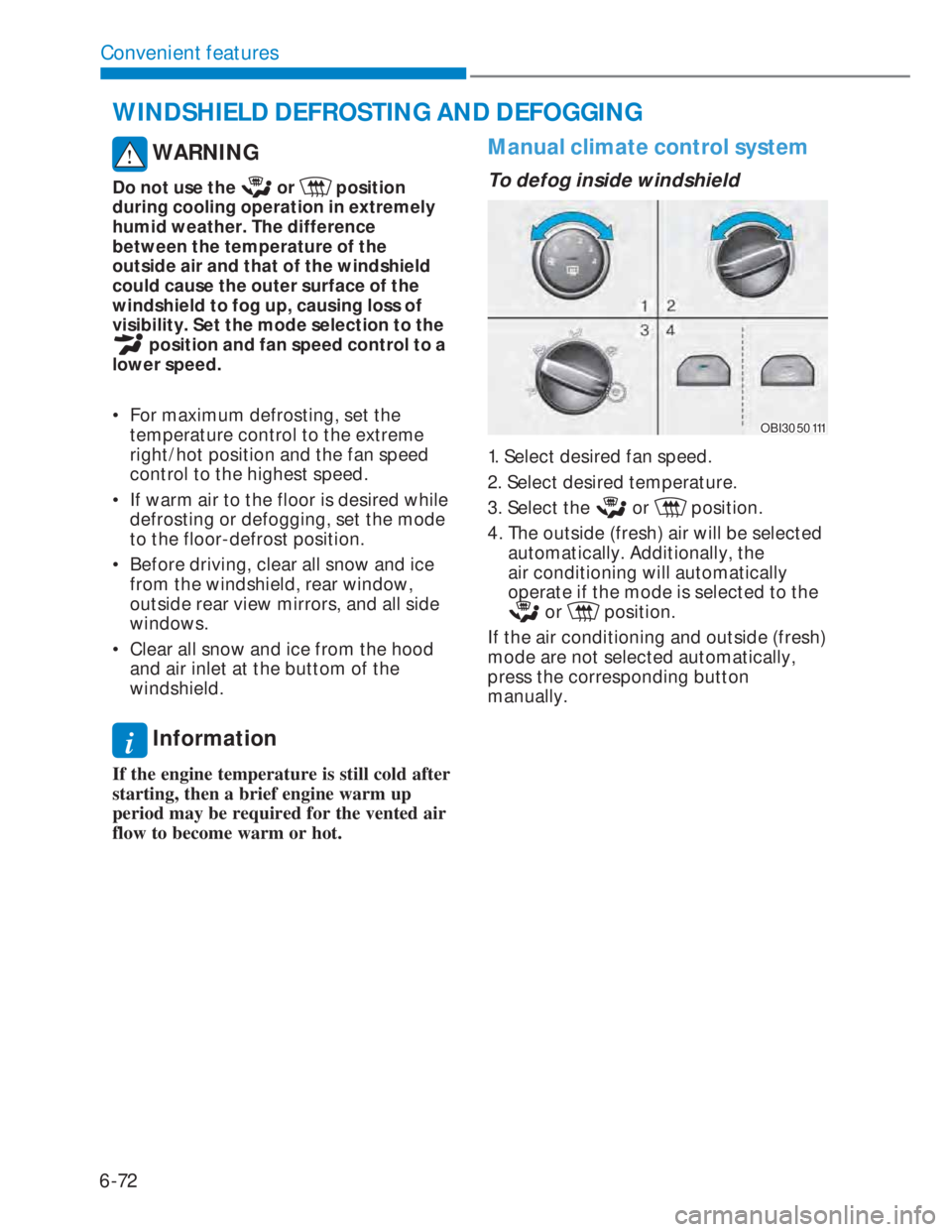
To defog inside windshield
OBI3050111OBI3050111
1. Select desired fan speed.
2. Select desired temperature.
3. Select the
or position.
4. The outside (fresh) air will be selected
automatically. Additionally, the
air conditioning will automatically
operate if the mode is selected to the
or position.
If the air conditioning and outside (fresh)
mode are not selected automatically,
press the corresponding button
manually.
WINDSHIELD DEFROSTING AND DEFOGGING
Page 206 of 444
6-78
Convenient features
Glove box
OBI3050061OBI3050061
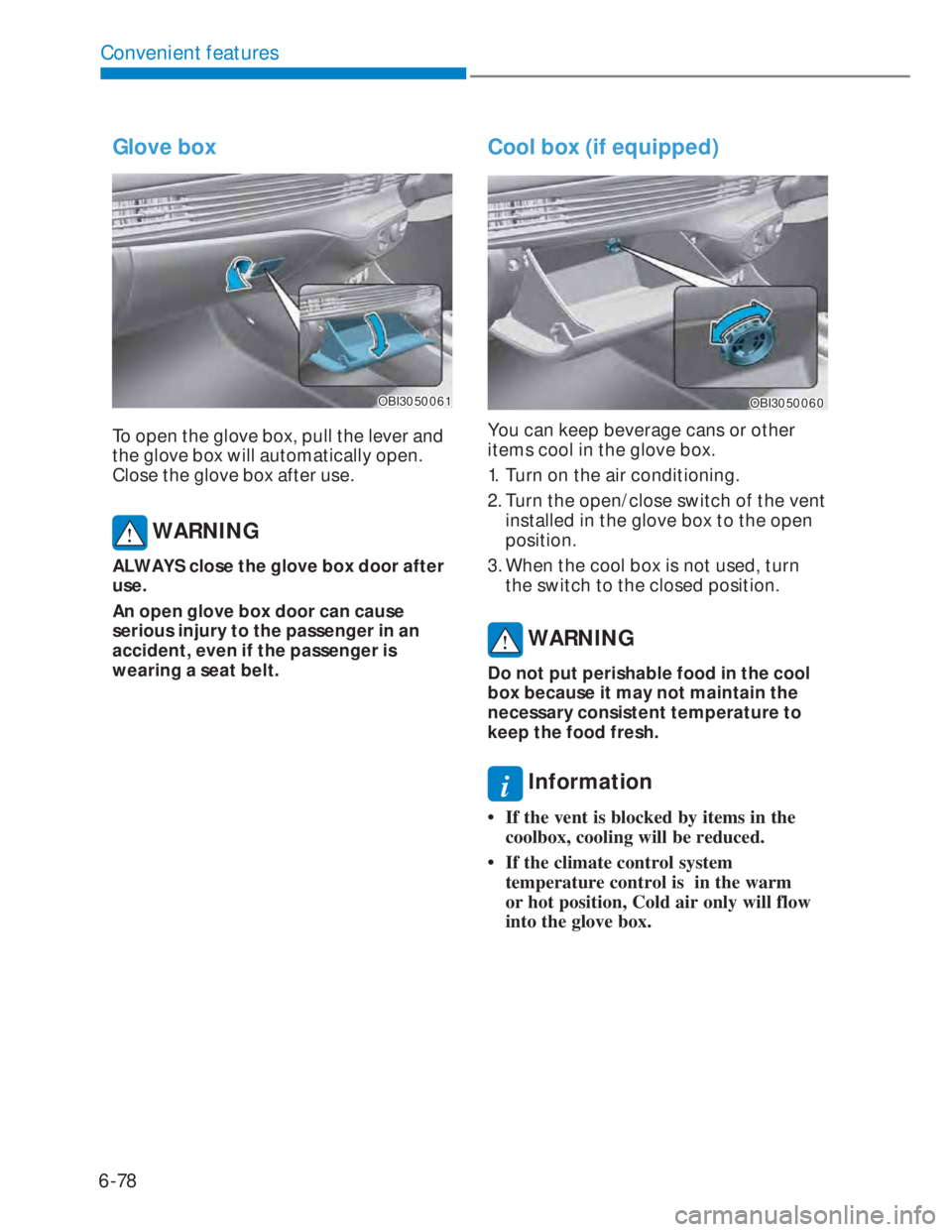
To open the glove box, pull the lever and
the glove box will automatically open.
Close the glove box after use.
WARNING
ALWAYS close the glove box door after
use.
An open glove box door can cause
serious injury to the passenger in an
accident, even if the passenger is
wearing a seat belt.
Cool box (if equipped)
OBI3050060OBI3050060
You can keep beverage cans or other
items cool in the glove box.
1. Turn on the air conditioning.
2. Turn the open/close switch of the vent
installed in the glove box to the open
position.
3. When the cool box is not used, turn
the switch to the closed position.
WARNING
Do not put perishable food in the cool
box because it may not maintain the
necessary consistent temperature to
keep the food fresh.
i Information
• If the vent is blocked by items in the
coolbox, cooling will be reduced.
• If the climate control system
temperature control is in the warm
or hot position, Cold air only will flow
into the glove box.
Page 212 of 444

6-84
Convenient features
NOTICE
• The wireless cellular phone charging
system may not support certain
cellular phones, which are not
verified for the Qi specification (
).
• When placing your cellular phone on
the charging mat, position the phone
in the middle of the mat for optimal
charging performance. If your cell
phone is off to the side, the charging
rate may be less and in some cases
the cell phone may experience higher
heat conduction.
• In some cases, the wireless charging
may stop temporarily when the
Remote Key or Smart Key is used,
either when starting the vehicle or
locking/unlocking the doors, etc.
• When charging certain cellular
phones, the charging indicator may
not change to green when the cell
phone is fully charged.
• The wireless charging process may
temporarily stop, when temperature
abnormally increases inside the
wireless cellular phone charging
system. The wireless charging
process restarts, when temperature
falls to a certain level.
• The wireless charging process may
temporarily stop when there is
any metallic item, such as a coin,
between the wireless cellular phone
charging system and a cellular
phone. In this case, immediately
remove a cellular phone from the pad
and remove coin after completely
cooling down. • When charging some cellular phones
with a self-protection feature,
the wireless charging speed may
decrease and the wireless charging
may stop.
• If the cellular phone has a thick
cover, the wireless charging may not
be possible.
• If the cellular phone is not completely
contacting the charging pad, wireless
charging may not operate properly.
• Some magnetic items (credit cards,
phone cards, passbook and tickets)
may be damaged while using the
wireless charging process.
• When any cellular phone without
a wireless charging function or a
metallic object is placed on the
charging pad, a small noise may
sound. This small sound is due to the
vehicle discerning compatibility of
the object placed on the charging
pad. It does not affect your vehicle or
the cellular phone in any way.
• Some cellular phones may not be
able to put on the charging pad due
to their size. In this case, wireless
charging may be limited.
• For some manufactures’ cellular
phones, the system may not warn
you even though the cellular phone is
left on the charging pad.
This is due to the particular
characteristic of the cellular phone
and not a malfunction of the wireless
charging.
i Information
If the ignition switch is in the LOCK/OFF
position, the charging also stops.
Page 300 of 444

7-53
07
Winter precautions
Use high quality ethylene glycol
coolant
Your vehicle is delivered with high
quality ethylene glycol coolant in the
cooling system. It is the only type of
coolant that should be used because it
helps prevent corrosion in the cooling
system, lubricates the water pump and
prevents freezing. Be sure to replace or
replenish your coolant in accordance
with the maintenance schedule in
chapter 8. Before winter, have your
coolant tested to assure that its freezing
point is sufficient for the temperatures
anticipated during the winter.
Check battery and cables
Winter puts additional burdens on the
battery system. Visually inspect the
battery and cables as described in
chapter 8. The level of charge in your
battery can be checked by an authorized
HYUNDAI dealer or a service station.
Change to “winter weight” oil if
necessary
In some climates it is recommended that
a lower viscosity “winter weight” oil be
used during cold weather. See chapter
2 for recommendations. If you aren’t
sure what weight oil you should use, we
recommend that you consult with an
authorized HYUNDAI dealer.
Check spark plugs and ignition
system
Inspect your spark plugs as described
in chapter 8 and replace them if
necessary. Also check all ignition wiring
and components to be sure they are not
cracked, worn or damaged in any way.
To keep locks from freezing
To keep the locks from freezing, squirt
an approved de-icer fluid or glycerine
into the key opening. If a lock is covered
with ice, squirt it with an approved
de-icing fluid to remove the ice. If the
lock is frozen internally, you may be able
to thaw it out by using a heated key.
Handle the heated key with care to avoid
injury.
Use approved window washer anti-
freeze in system
To keep the water in the window washer
system from freezing, add an approved
window washer anti-freeze solution in
accordance with instructions on the
container. Window washer anti-freeze is
available from an authorized HYUNDAI
dealer and most auto parts outlets. Do
not use engine coolant or other types
of anti-freeze as these may damage the
paint finish.