light HYUNDAI I30 2011 Owners Manual
[x] Cancel search | Manufacturer: HYUNDAI, Model Year: 2011, Model line: I30, Model: HYUNDAI I30 2011Pages: 635, PDF Size: 40.66 MB
Page 545 of 635
473
Features of your vehicle
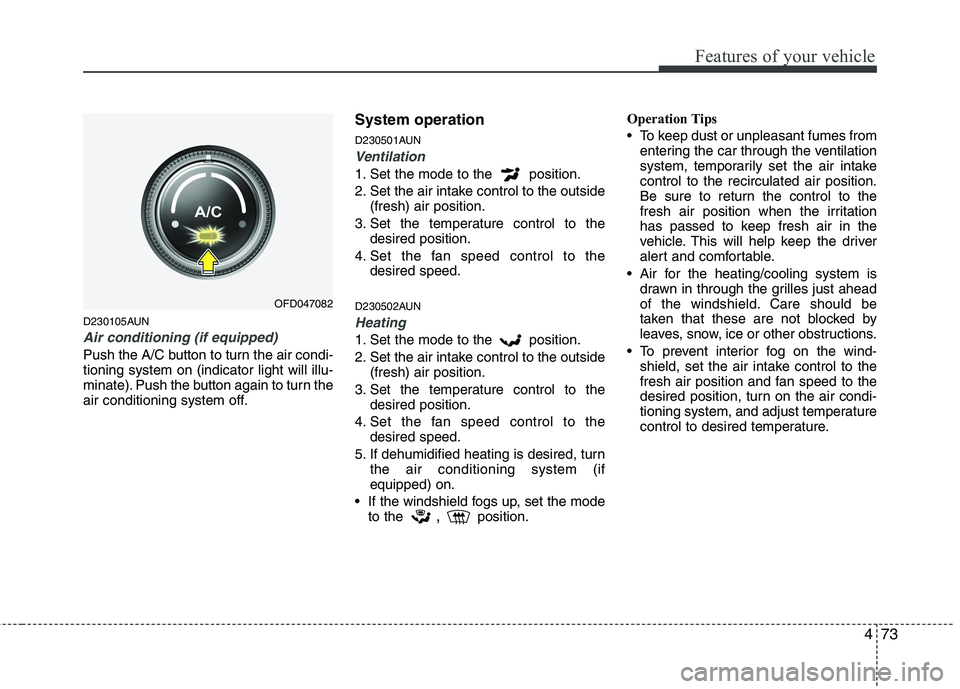
D230105AUN
Air conditioning (if equipped)
Push the A/C button to turn the air condi- tioning system on (indicator light will illu-
minate). Push the button again to turn the
air conditioning system off.System operation
D230501AUN
Ventilation
1. Set the mode to the position.
2. Set the air intake control to the outside
(fresh) air position.
3. Set the temperature control to the desired position.
4. Set the fan speed control to the desired speed.
D230502AUN
Heating
1. Set the mode to the position.
2. Set the air intake control to the outside (fresh) air position.
3. Set the temperature control to the desired position.
4. Set the fan speed control to the desired speed.
5. If dehumidified heating is desired, turn the air conditioning system (if equipped) on.
If the windshield fogs up, set the mode to the ,
position. Operation Tips
To keep dust or unpleasant fumes from
entering the car through the ventilation
system, temporarily set the air intakecontrol to the recirculated air position.
Be sure to return the control to the
fresh air position when the irritation
has passed to keep fresh air in the
vehicle. This will help keep the driver
alert and comfortable.
Air for the heating/cooling system is drawn in through the grilles just ahead
of the windshield. Care should be
taken that these are not blocked by
leaves, snow, ice or other obstructions.
To prevent interior fog on the wind- shield, set the air intake control to the
fresh air position and fan speed to the
desired position, turn on the air condi-
tioning system, and adjust temperature
control to desired temperature.
OFD047082
Page 546 of 635
Features of your vehicle
74
4
D230503AFD
Air conditioning (if equipped)
All HYUNDAI Air Conditioning Systems
are filled with environmentally friendly
R-134a refrigerant which does not dam-
age to the ozone layer.
1. Start the engine. Push the air condi-
tioning button.
2. Set the mode to the position.
3. Set the air intake control to the outside air or recirculated air position.
4. Adjust the fan speed control and tem- perature control to maintain maximum
comfort.
When maximum cooling is desired, set the temperature control to the extreme
left position then set the fan speedcontrol to the highest speed.
✽✽ NOTICE
When using the air conditioning sys- tem, monitor the temperature gauge
closely while driving up hills or in
heavy traffic when outside tempera-
tures are high. Air conditioning sys-
tem operation may cause engine over-
heating. Continue to use the blower
fan but turn the air conditioning sys-
tem off if the temperature gauge indi-
cates engine overheating.
When opening the windows in humid weather air conditioning may create
water droplets inside the vehicle.
Since excessive water droplets may
cause damage to electrical equipment,
air conditioning should only be run
with the windows closed.Air conditioning system operation tips
If the vehicle has been parked in directsunlight during hot weather, open the
windows for a short time to let the hot
air inside the vehicle escape.
To help reduce moisture inside of win- dows on rainy or humid days, decrease
the humidity inside the vehicle by oper-ating the air conditioning system.
During air conditioning system opera- tion, you may occasionally notice aslight change in engine speed as the
air conditioning compressor cycles.
This is a normal system operation
characteristic.
Use the air conditioning system every month if only for a few minutes to
ensure maximum system performance.
When using the air conditioning sys- tem, you may notice clear water drip-
ping (or even puddling) on the ground
under the passenger side of the vehi-
cle. This is a normal system operation
characteristic.
Operating the air conditioning system in the recirculated air position provides
maximum cooling, however, continual
operation in this mode may cause the
air inside the vehicle to become stale.
During cooling operation, you may occasionally notice a misty air flow
because of rapid cooling and humid air
intake. This is a normal system opera-
tion characteristics.
Page 554 of 635
Features of your vehicle
82
4
Temperature conversion
If the battery has been discharged or dis-
connected, the temperature mode dis-
play will reset to Centigrade.
This is normal condition. You can switch
the temperature mode between
Centigrade to Fahrenheit as follows;
While depressing the AUTO button,
depress the OFF button for 3 seconds or
more. The display will change from
Centigrade to Fahrenheit, or from
Fahrenheit to Centigrade.
D240203AFD
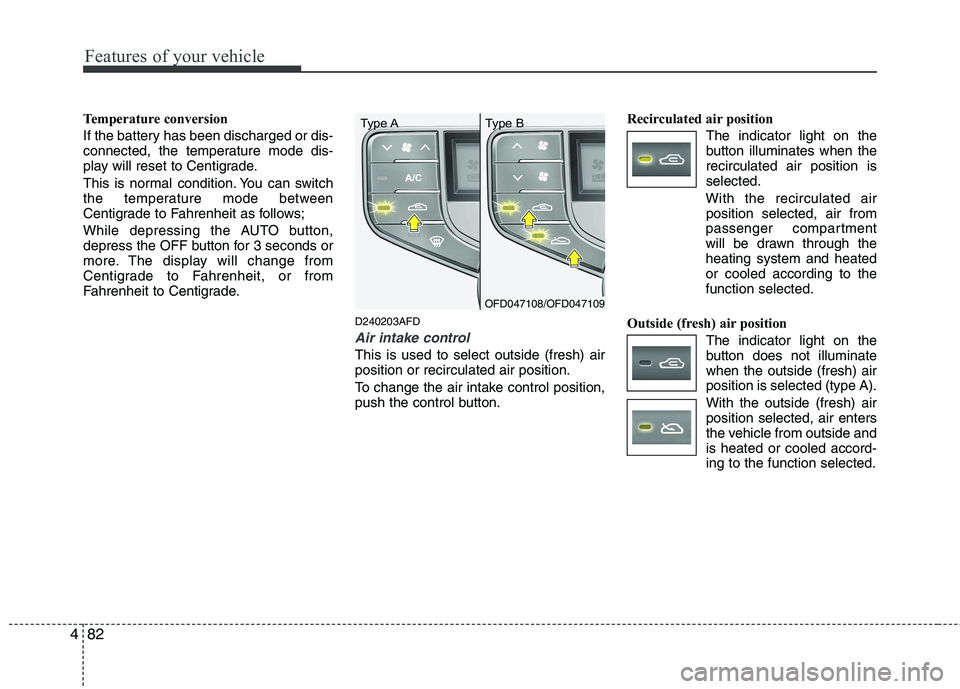
Air intake control
This is used to select outside (fresh) air position or recirculated air position.
To change the air intake control position,
push the control button.Recirculated air position
The indicator light on the
button illuminates when therecirculated air position isselected.
With the recirculated air position selected, air from
passenger compartment
will be drawn through theheating system and heatedor cooled according to thefunction selected.
Outside (fresh) air position The indicator light on the
button does not illuminatewhen the outside (fresh) airposition is selected (type A). With the outside (fresh) air position selected, air enters
the vehicle from outside andis heated or cooled accord-ing to the function selected.
OFD047108/OFD047109
Type A Type B
Page 555 of 635
483
Features of your vehicle
✽✽NOTICE
It should be noted that prolonged oper-
ation of the heating in recirculated air
position will cause fogging of the wind-
shield and side windows and the air
within the passenger compartment will
become stale.
In addition, prolonged use of the air
conditioning with the recirculated air
position selected, will result in excessive-
ly dry air in the passenger compart-
ment.
D240205AUN
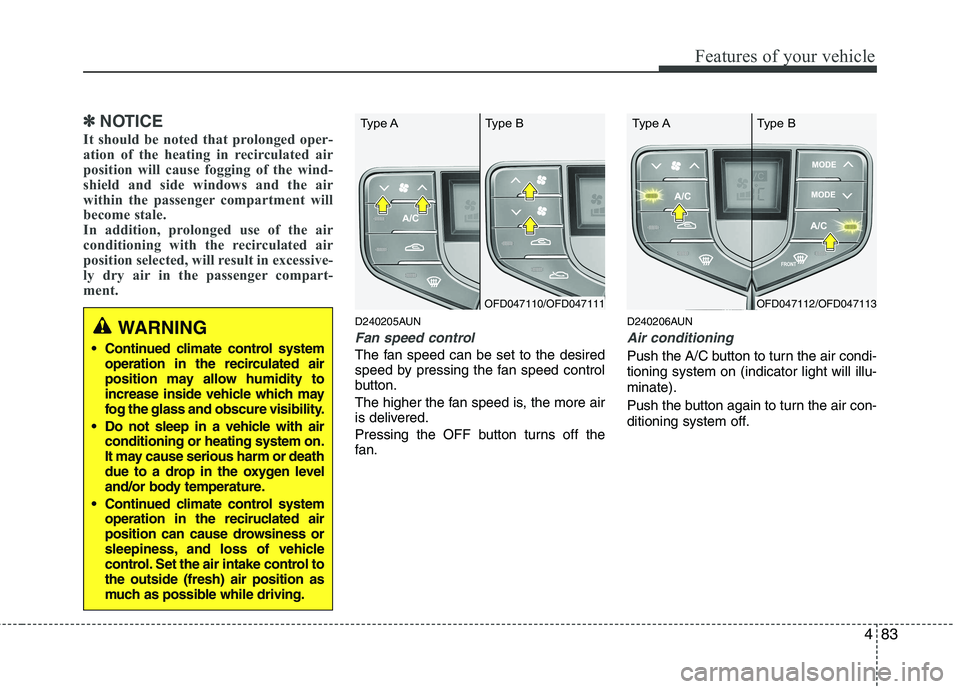
Fan speed control
The fan speed can be set to the desired
speed by pressing the fan speed control
button.
The higher the fan speed is, the more air
is delivered.
Pressing the OFF button turns off the
fan. D240206AUN
Air conditioning
Push the A/C button to turn the air condi- tioning system on (indicator light will illu-minate).
Push the button again to turn the air con-
ditioning system off.
WARNING
Continued climate control system operation in the recirculated air
position may allow humidity to
increase inside vehicle which may
fog the glass and obscure visibility.
Do not sleep in a vehicle with air conditioning or heating system on.
It may cause serious harm or death
due to a drop in the oxygen level
and/or body temperature.
Continued climate control system operation in the reciruclated air
position can cause drowsiness or
sleepiness, and loss of vehicle
control. Set the air intake control tothe outside (fresh) air position as
much as possible while driving.
OFD047110/OFD047111
Type A Type BOFD047112/OFD047113
Type A Type B
Page 559 of 635
487
Features of your vehicle
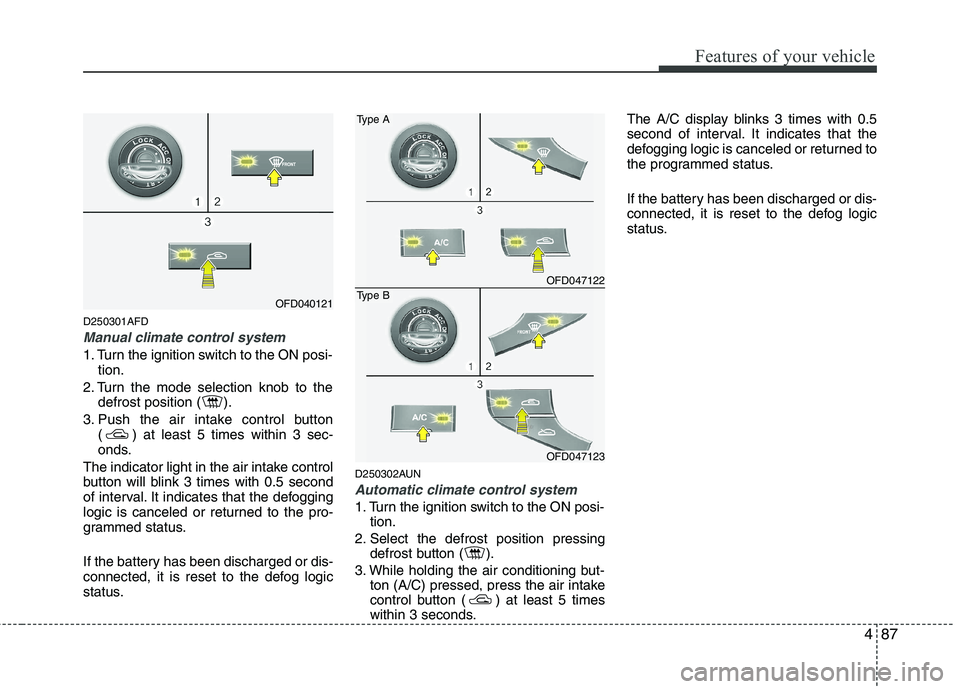
D250301AFD
Manual climate control system
1. Turn the ignition switch to the ON posi-tion.
2. Turn the mode selection knob to the defrost position ( ).
3. Push the air intake control button ( ) at least 5 times within 3 sec-
onds.
The indicator light in the air intake control
button will blink 3 times with 0.5 second
of interval. It indicates that the defogging
logic is canceled or returned to the pro-
grammed status.
If the battery has been discharged or dis-
connected, it is reset to the defog logic
status. D250302AUN
Automatic climate control system
1. Turn the ignition switch to the ON posi-
tion.
2. Select the defrost position pressing defrost button ( ).
3. While holding the air conditioning but- ton (A/C) pressed, press the air intake
control button ( ) at least 5 times
within 3 seconds. The A/C display blinks 3 times with 0.5
second of interval. It indicates that the
defogging logic is canceled or returned to
the programmed status.
If the battery has been discharged or dis-
connected, it is reset to the defog logic
status.
OFD040121
OFD047122
Type A
OFD047123
Type B
Page 560 of 635
Features of your vehicle
88
4
D270000AUN
These compartments can be used to
store small items required by the driver
or passengers.
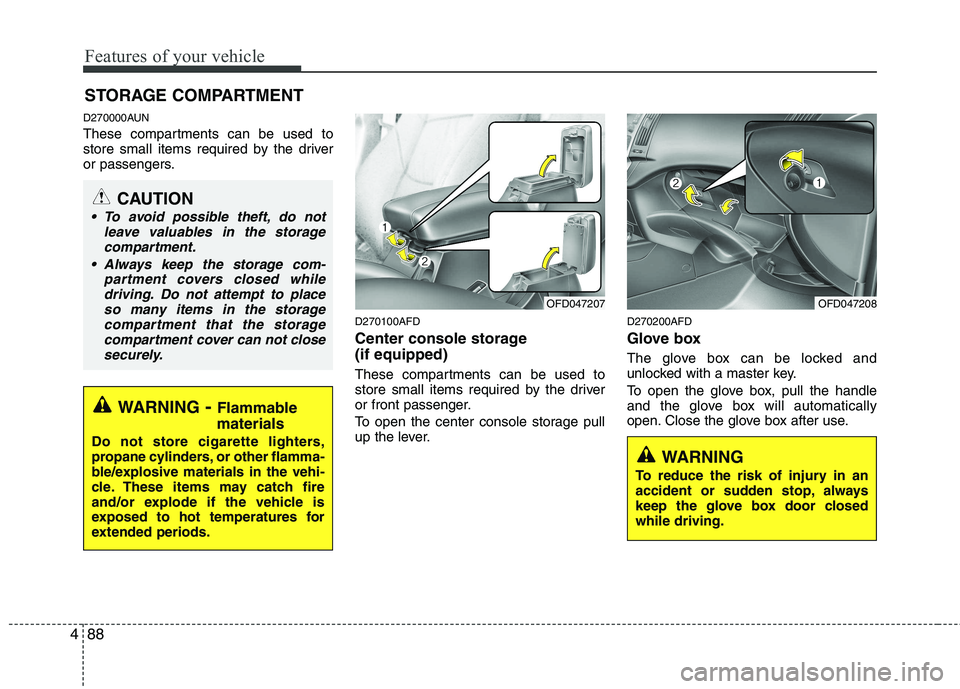
D270100AFD
Center console storage (if equipped)
These compartments can be used to
store small items required by the driver
or front passenger.
To open the center console storage pull
up the lever.D270200AFD
Glove box
The glove box can be locked and
unlocked with a master key.
To open the glove box, pull the handle
and the glove box will automatically
open. Close the glove box after use.
STORAGE COMPARTMENT
WARNING
- Flammable
materials
Do not store cigarette lighters,
propane cylinders, or other flamma-
ble/explosive materials in the vehi-
cle. These items may catch fire
and/or explode if the vehicle is
exposed to hot temperatures for
extended periods.
CAUTION
To avoid possible theft, do not leave valuables in the storage
compartment.
Always keep the storage com- partment covers closed whiledriving. Do not attempt to place
so many items in the storagecompartment that the storagecompartment cover can not closesecurely.
OFD047207OFD047208
WARNING
To reduce the risk of injury in an
accident or sudden stop, always
keep the glove box door closedwhile driving.
Page 564 of 635
Features of your vehicle
92
4
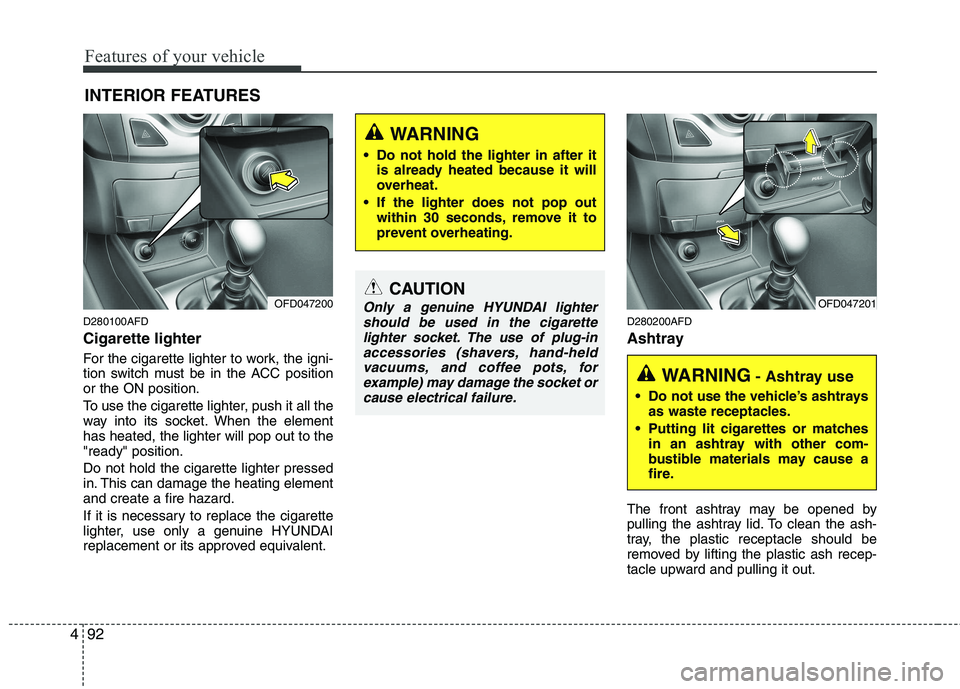
D280100AFD Cigarette lighter
For the cigarette lighter to work, the igni-
tion switch must be in the ACC positionor the ON position.
To use the cigarette lighter, push it all the
way into its socket. When the elementhas heated, the lighter will pop out to the"ready" position. Do not hold the cigarette lighter pressed
in. This can damage the heating elementand create a fire hazard.
If it is necessary to replace the cigarette
lighter, use only a genuine HYUNDAI
replacement or its approved equivalent. D280200AFD
Ashtray
The front ashtray may be opened by
pulling the ashtray lid. To clean the ash-
tray, the plastic receptacle should be
removed by lifting the plastic ash recep-
tacle upward and pulling it out.
INTERIOR FEATURES
OFD047200CAUTION
Only a genuine HYUNDAI lighter
should be used in the cigarettelighter socket. The use of plug-in
accessories (shavers, hand-heldvacuums, and coffee pots, for example) may damage the socket orcause electrical failure.OFD047201
WARNING - Ashtray use
Do not use the vehicle’s ashtrays as waste receptacles.
Putting lit cigarettes or matches in an ashtray with other com-
bustible materials may cause a
fire.
WARNING
Do not hold the lighter in after it is already heated because it will
overheat.
If the lighter does not pop out within 30 seconds, remove it to
prevent overheating.
Page 565 of 635
493
Features of your vehicle
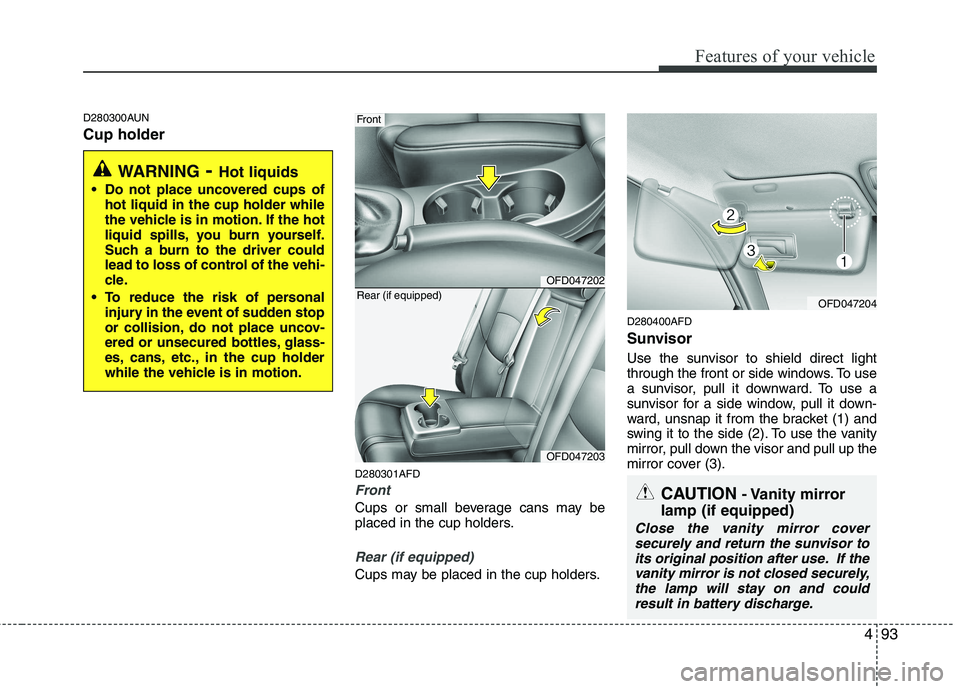
D280300AUN Cup holderD280301AFD
Front
Cups or small beverage cans may be
placed in the cup holders.
Rear (if equipped)
Cups may be placed in the cup holders.D280400AFD
Sunvisor
Use the sunvisor to shield direct light
through the front or side windows. To use
a sunvisor, pull it downward. To use a
sunvisor for a side window, pull it down-
ward, unsnap it from the bracket (1) and
swing it to the side (2). To use the vanity
mirror, pull down the visor and pull up the
mirror cover (3).
WARNING
- Hot liquids
Do not place uncovered cups of hot liquid in the cup holder while
the vehicle is in motion. If the hot
liquid spills, you burn yourself.
Such a burn to the driver could
lead to loss of control of the vehi-
cle.
To reduce the risk of personal injury in the event of sudden stop
or collision, do not place uncov-
ered or unsecured bottles, glass-
es, cans, etc., in the cup holder
while the vehicle is in motion.
OFD047202
Front
OFD047203
Rear (if equipped)OFD047204
CAUTION - Vanity mirror
lamp (if equipped)
Close the vanity mirror cover securely and return the sunvisor toits original position after use. If the
vanity mirror is not closed securely,the lamp will stay on and could result in battery discharge.
Page 579 of 635
4107
Features of your vehicle
Care of cassette tapes (if equipped)
Because the thickness of a cassettetape with the total playback time of
over 60 minutes (C-60) are too thin, we
suggest that you do not use any of
them to avoid having tapes being tan-gled.
To achieve better sound quality, period- ically clean the tape head using a cot-
ton stick with colorless alcohol (onceper month).
If a tape is too loose, fasten it to reel by winding with objects like a pencil.
Because dust or foreign objects on a cassette tape may damage the play-
back head, always store tapes in their
cases when not in use.
Make sure cassette tapes are kept away from magnetic devices (TV,
stereo system, etc) in order to achieve
better sound quality.
Be certain that no objects or substances
other than cassette tapes are inserted
into the cassette tape player.
Because tape media can be distorted when exposed to direct sunlight, do not
leave cassette tapes on the seats,
dashboard or near the back wind-shield. Care of disc (if equipped)
If the temperature inside the car is too
high, open the car windows for ventilation
before using your car audio.
It is illegal to copy and use MP3/WMA/AAC/WAVE files without
permission. Use CDs that are created
only by lawful means.
Do not apply volatile agents such as benzene and thinner, normal cleaners
and magnetic sprays made for ana-
logue disc onto CDs.
To prevent the disc surface from get- ting damaged. Hold and carry CDs bythe edges or the edges of the center
hole only.
Clean the disc surface with a piece of soft cloth before playback (wipe it fromthe center to the outside edge).
Do not damage the disc surface or attach pieces of sticky tape or paperonto it.
Make sure on undesirable matter other than CDs are inserted into the CD
player (Do not insert more than oneCD at a time).
Keep CDs in their cases after use to protect them from scratches or dirt. Depending on the type of CD-R/CD-
RW CDs, certain CDs may not operate
normally according to manufacturingcompanies or making and recording
methods. In such circumstances, if you
still continue to use those CDs, they
may cause the malfunction of your caraudio system.
✽✽ NOTICE - Playing an
Incompatible Copy-Protected
Audio CD
Some copy protected CDs, which do not
comply with the international audio CD
standards (Red Book), may not play on
your car audio. Please note that if you
try to play copy protected CDs and the
CD player does not perform correctly
the CDs maybe defective, not the CD
player.
Page 583 of 635
4111
Features of your vehicle
1. CD Loading Slot
Please face printed side upward and gently push in.
When the ignition switch is on ACC or
ON and power is OFF, power is automat-
ically turned on if the CD is loaded.
This CDP supports both 8cm and 12cm
CDs. But if VCD, Data CD, MP3 CD areloaded, "Disc-Err" message will appearand CD will be ejected.
2. CD Eject Button
Push button to eject the CD during
CD playback.
This button is enabled when ignition
switch is off.
3. AUX Selection Button
If the auxiliary device is connected, it
turns to AUX MODE to play the sound
from the auxiliary player.
If no Disc and auxiliary device is con- nected, it displays "NO Media" for 5 sec-
onds and returns to the previous mode. 4. SCAN Play Button
Play first 10 seconds of each song in the
DISC.
To cancel the mode, press the key once again.
5. Automatic Track Selection
Button
Push [SEEK ] button for less than 0.8 second to play from the beginning of current song.
Push [SEEK ] button for less than 0.8 second and press again within 1
second to play the previous song.
Push [SEEK ] button for 0.8 second or longer to initiate reverse directionhigh speed sound search of currentsong.
Push [SEEK ] button for less than 0.8 second to play the next song.
Push [SEEK ] button for less than 0.8 second or longer to initiate highspeed sound search of current song. 6. CD Indicator
When car ignition switch is ACC or ON and if the CD is loaded, this indicator islighted.
If the CD is ejected the light is turned off.
7. REPEAT Button
Repeats current song when the button is
pressed for less than 0.8 second.
Repeats the entire DISC when the button
is pressed for 0.8 second or longer.
8. RANDOM Play Button
Turns ON/OFF the randomization of the
play list of files in the currently played
DISC.
To cancel the mode, press the key once again.