AIr HYUNDAI I30 2012 Repair Manual
[x] Cancel search | Manufacturer: HYUNDAI, Model Year: 2012, Model line: I30, Model: HYUNDAI I30 2012Pages: 635, PDF Size: 40.66 MB
Page 165 of 635
487
Features of your vehicle
✽✽NOTICE
It should be noted that prolonged oper-
ation of the heating in recirculated airposition will cause fogging of the wind-shield and side windows and the air
within the passenger compartment willbecome stale.
In addition, prolonged use of the air
conditioning with the recirculated air
position selected, will result in excessive-
ly dry air in the passenger compart-ment.
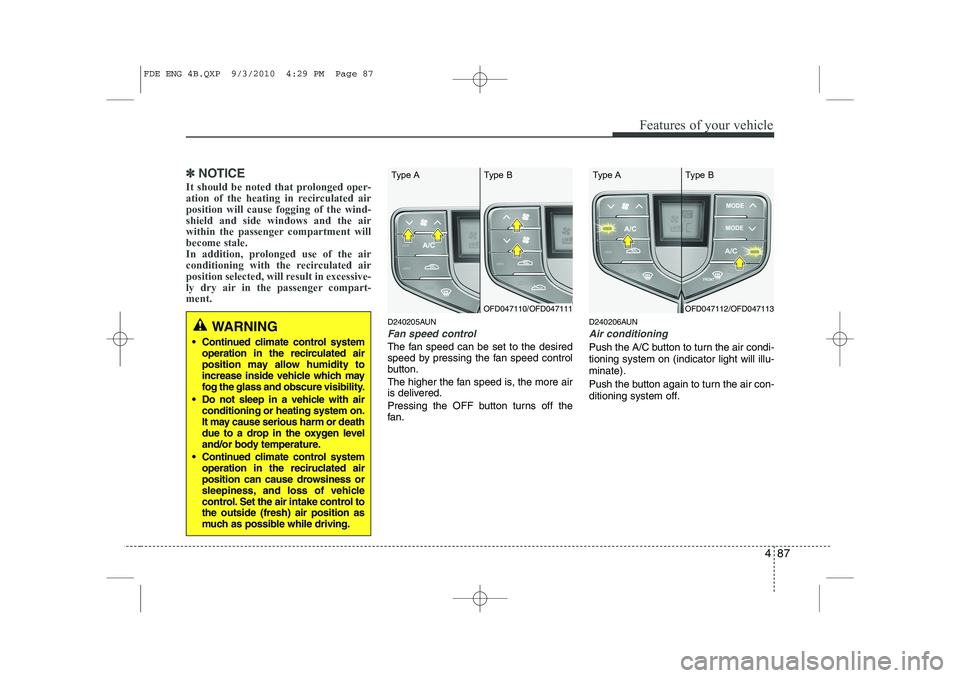
D240205AUN
Fan speed control
The fan speed can be set to the desired
speed by pressing the fan speed control
button.
The higher the fan speed is, the more air
is delivered.
Pressing the OFF button turns off the
fan. D240206AUN
Air conditioning
Push the A/C button to turn the air condi- tioning system on (indicator light will illu-minate).
Push the button again to turn the air con-
ditioning system off.
WARNING
Continued climate control system operation in the recirculated air
position may allow humidity to
increase inside vehicle which may
fog the glass and obscure visibility.
Do not sleep in a vehicle with air conditioning or heating system on.
It may cause serious harm or death
due to a drop in the oxygen level
and/or body temperature.
Continued climate control system operation in the reciruclated air
position can cause drowsiness or
sleepiness, and loss of vehicle
control. Set the air intake control tothe outside (fresh) air position as
much as possible while driving.
OFD047110/OFD047111
Type A Type BOFD047112/OFD047113
Type A Type B
FDE ENG 4B.QXP 9/3/2010 4:29 PM Page 87
Page 166 of 635
Features of your vehicle
88
4
D240208AUN
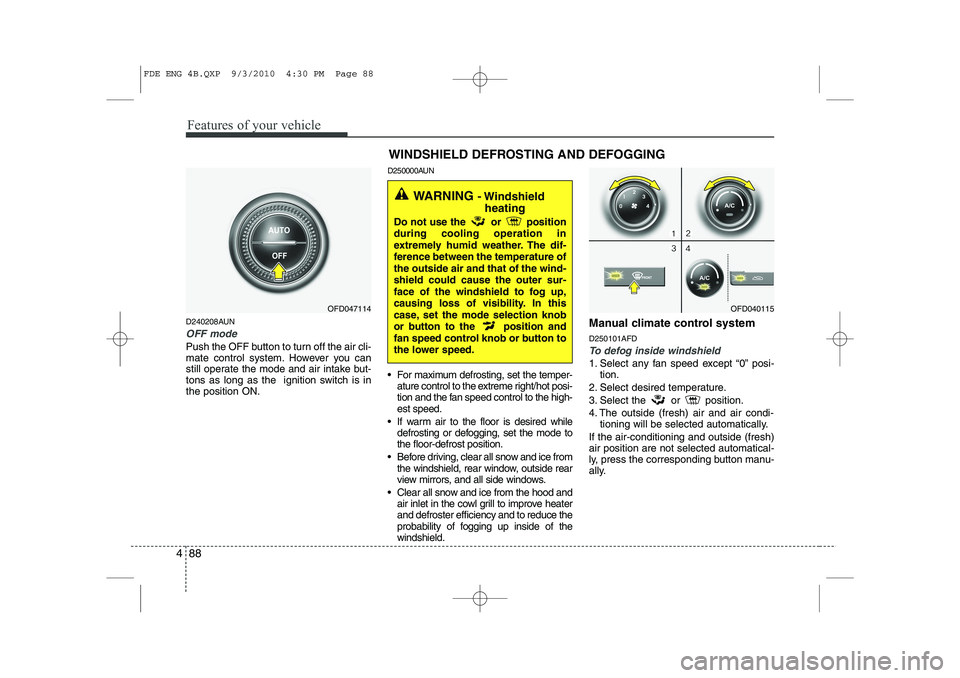
OFF mode
Push the OFF button to turn off the air cli-
mate control system. However you can
still operate the mode and air intake but-
tons as long as the ignition switch is inthe position ON. D250000AUN
For maximum defrosting, set the temper-
ature control to the extreme right/hot posi-
tion and the fan speed control to the high-est speed.
If warm air to the floor is desired while defrosting or defogging, set the mode tothe floor-defrost position.
Before driving, clear all snow and ice from the windshield, rear window, outside rear
view mirrors, and all side windows.
Clear all snow and ice from the hood and air inlet in the cowl grill to improve heaterand defroster efficiency and to reduce the
probability of fogging up inside of thewindshield. Manual climate control system D250101AFDTo defog inside windshield
1. Select any fan speed except “0” posi-
tion.
2. Select desired temperature.
3. Select the or position.
4. The outside (fresh) air and air condi- tioning will be selected automatically.
If the air-conditioning and outside (fresh) air position are not selected automatical-
ly, press the corresponding button manu-
ally.
OFD047114 WINDSHIELD DEFROSTING AND DEFOGGINGOFD040115
WARNING
- Windshield
heating
Do not use the or position during cooling operation in
extremely humid weather. The dif-
ference between the temperature ofthe outside air and that of the wind-shield could cause the outer sur-
face of the windshield to fog up,
causing loss of visibility. In this
case, set the mode selection knob
or button to the position and
fan speed control knob or button to
the lower speed.
FDE ENG 4B.QXP 9/3/2010 4:30 PM Page 88
Page 167 of 635
489
Features of your vehicle
D250102AFD
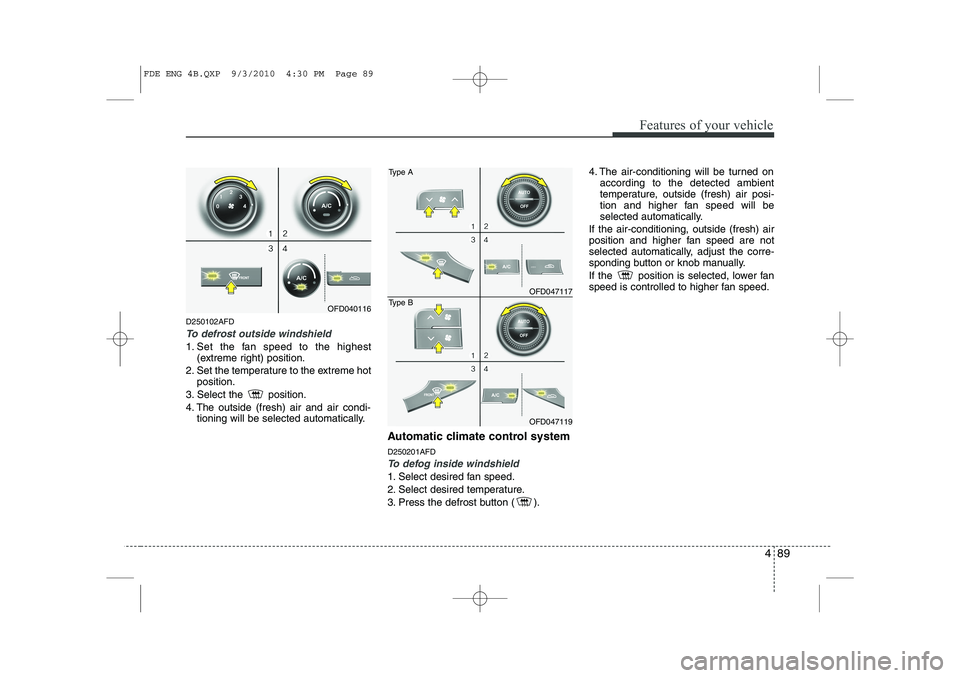
To defrost outside windshield
1. Set the fan speed to the highest(extreme right) position.
2. Set the temperature to the extreme hot position.
3. Select the position.
4. The outside (fresh) air and air condi- tioning will be selected automatically.
Automatic climate control system D250201AFD
To defog inside windshield
1. Select desired fan speed.
2. Select desired temperature.
3. Press the defrost button ( ). 4. The air-conditioning will be turned on
according to the detected ambient
temperature, outside (fresh) air posi-
tion and higher fan speed will be
selected automatically.
If the air-conditioning, outside (fresh) air
position and higher fan speed are not
selected automatically, adjust the corre-
sponding button or knob manually.
If the position is selected, lower fan
speed is controlled to higher fan speed.
OFD040116
OFD047117
Type A
OFD047119
Type B
FDE ENG 4B.QXP 9/3/2010 4:30 PM Page 89
Page 168 of 635
Features of your vehicle
90
4
D250202AFD
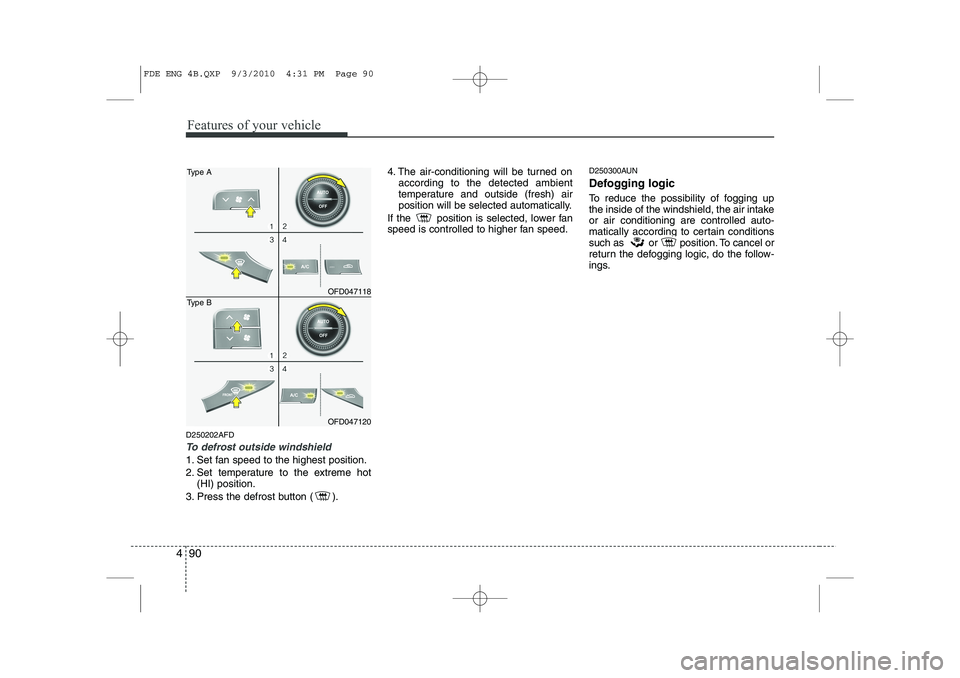
To defrost outside windshield
1. Set fan speed to the highest position.
2. Set temperature to the extreme hot
(HI) position.
3. Press the defrost button ( ). 4. The air-conditioning will be turned on
according to the detected ambient
temperature and outside (fresh) air
position will be selected automatically.
If the position is selected, lower fan
speed is controlled to higher fan speed. D250300AUN
Defogging logic
To reduce the possibility of fogging up
the inside of the windshield, the air intakeor air conditioning are controlled auto-
matically according to certain conditions
such as or position. To cancel or
return the defogging logic, do the follow-
ings.
OFD047118
Type A
OFD047120
Type B
FDE ENG 4B.QXP 9/3/2010 4:31 PM Page 90
Page 169 of 635
491
Features of your vehicle
D250301AFD
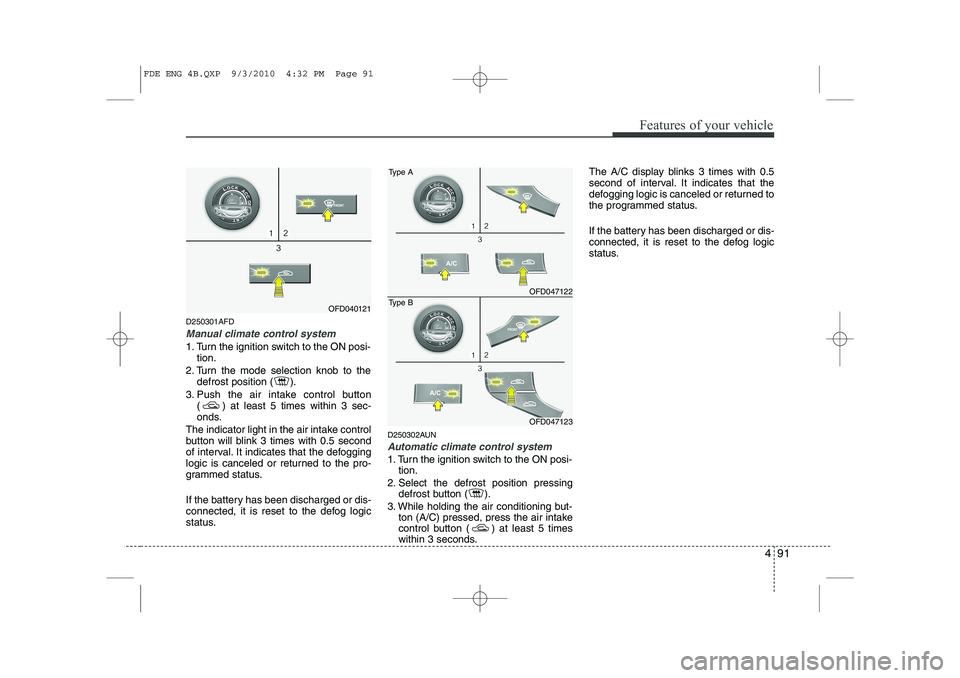
Manual climate control system
1. Turn the ignition switch to the ON posi-tion.
2. Turn the mode selection knob to the defrost position ( ).
3. Push the air intake control button ( ) at least 5 times within 3 sec-
onds.
The indicator light in the air intake control
button will blink 3 times with 0.5 second
of interval. It indicates that the defogging
logic is canceled or returned to the pro-
grammed status.
If the battery has been discharged or dis-
connected, it is reset to the defog logic
status. D250302AUN
Automatic climate control system
1. Turn the ignition switch to the ON posi-
tion.
2. Select the defrost position pressing defrost button ( ).
3. While holding the air conditioning but- ton (A/C) pressed, press the air intake
control button ( ) at least 5 times
within 3 seconds. The A/C display blinks 3 times with 0.5
second of interval. It indicates that the
defogging logic is canceled or returned to
the programmed status.
If the battery has been discharged or dis-
connected, it is reset to the defog logic
status.
OFD040121
OFD047122
Type A
OFD047123
Type B
FDE ENG 4B.QXP 9/3/2010 4:32 PM Page 91
Page 171 of 635
493
Features of your vehicle
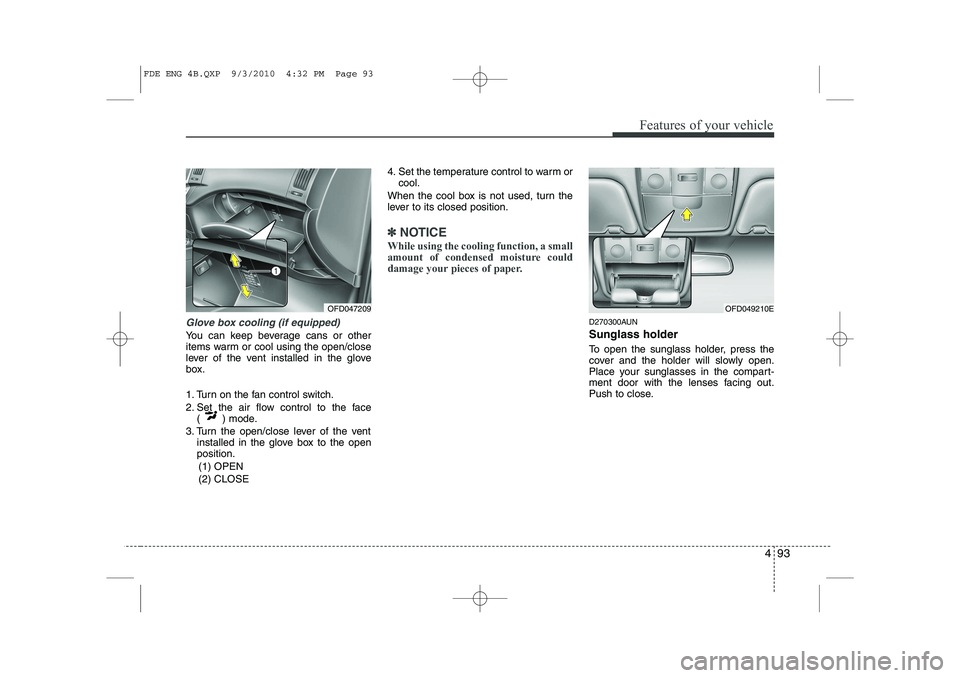
Glove box cooling (if equipped)
You can keep beverage cans or other
items warm or cool using the open/close
lever of the vent installed in the glove
box.
1. Turn on the fan control switch.
2. Set the air flow control to the face( ) mode.
3. Turn the open/close lever of the vent installed in the glove box to the open position.
(1) OPEN (2) CLOSE 4. Set the temperature control to warm or
cool.
When the cool box is not used, turn the
lever to its closed position.
✽✽ NOTICE
While using the cooling function, a small
amount of condensed moisture could
damage your pieces of paper.
D270300AUN Sunglass holder
To open the sunglass holder, press the
cover and the holder will slowly open.
Place your sunglasses in the compart-
ment door with the lenses facing out.
Push to close.
OFD047209OFD049210E
FDE ENG 4B.QXP 9/3/2010 4:32 PM Page 93
Page 176 of 635
Features of your vehicle
98
4
D280600AUN
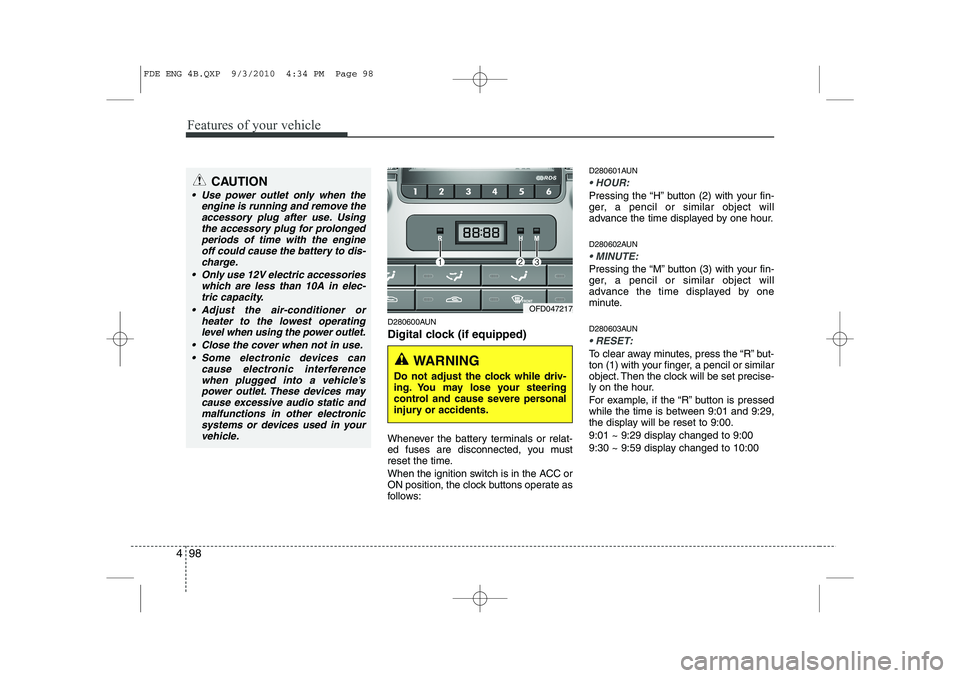
Digital clock (if equipped)
Whenever the battery terminals or relat-
ed fuses are disconnected, you must
reset the time.
When the ignition switch is in the ACC or
ON position, the clock buttons operate as
follows: D280601AUN
HOUR:
Pressing the “H” button (2) with your fin-
ger, a pencil or similar object will
advance the time displayed by one hour.
D280602AUN
MINUTE:
Pressing the “M” button (3) with your fin-
ger, a pencil or similar object will
advance the time displayed by one
minute.
D280603AUN
RESET:
To clear away minutes, press the “R” but-
ton (1) with your finger, a pencil or similar
object. Then the clock will be set precise-
ly on the hour.
For example, if the “R” button is pressed
while the time is between 9:01 and 9:29,
the display will be reset to 9:00.
9:01 ~ 9:29 display changed to 9:00
9:30 ~ 9:59 display changed to 10:00
CAUTION
Use power outlet only when the
engine is running and remove the
accessory plug after use. Usingthe accessory plug for prolongedperiods of time with the engine off could cause the battery to dis-
charge.
Only use 12V electric accessories which are less than 10A in elec-tric capacity.
Adjust the air-conditioner or heater to the lowest operatinglevel when using the power outlet.
Close the cover when not in use. Some electronic devices can cause electronic interference
when plugged into a vehicle’spower outlet. These devices maycause excessive audio static and malfunctions in other electronic
systems or devices used in yourvehicle.
OFD047217
WARNING
Do not adjust the clock while driv-
ing. You may lose your steering
control and cause severe personal
injury or accidents.
FDE ENG 4B.QXP 9/3/2010 4:34 PM Page 98
Page 245 of 635
Driving your vehicle
2
5
E010000AFD
WARNING - ENGINE EXHAUST CAN BE DANGEROUS!
Engine exhaust fumes can be extremely dangerous. If, at any time, you smell exhaust fumes inside the vehicle, open the win-
dows immediately.
• Do not inhale exhaust fumes.
Exhaust fumes contain carbon monoxide, a colorless, odorless gas that can cause unconsciousness and death by asphyxia- tion.
The exhaust system should be checked whenever the vehicle is raised to change the oil or for any other purpose. If you hear
a change in the sound of the exhaust or if you drive over something that strikes the underneath side of the car, have the
exhaust system checked as soon as possible by an authorized HYUNDAI dealer.
Letting the engine idle in your garage, even with the garage door open, is a hazardous practice. Never run the engine in your
garage any longer than it takes to start the engine and back the car out.
If it is necessary to idle the engine for a prolonged period with people inside the car, be sure to do so only in an open area
with the air intake set at "Fresh" and fan operating at one of the higher speeds so fresh air is drawn into the interior.
If you must drive with the tailgate open because you are carrying objects that make this necessary:
1. Close all windows.
2. Open side vents.
3. Set the air intake control at "Fresh", the air flow control at "Floor" or "Face" and the fan at one of the higher speeds.
To assure proper operation of the ventilation system, be sure the ventilation air intakes located just in front of the windshie ld are
kept clear of snow, ice, leaves or other obstructions.
Page 260 of 635
517
Driving your vehicle
E070100AUN
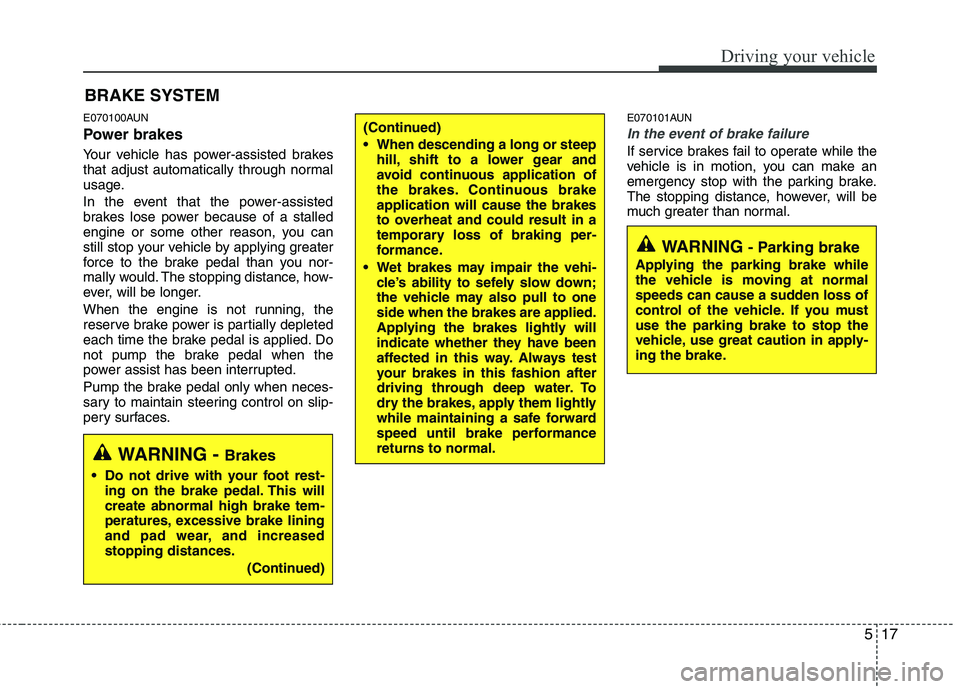
Power brakes
Your vehicle has power-assisted brakes
that adjust automatically through normal
usage.
In the event that the power-assisted
brakes lose power because of a stalled
engine or some other reason, you can
still stop your vehicle by applying greater
force to the brake pedal than you nor-
mally would. The stopping distance, how-
ever, will be longer.
When the engine is not running, the
reserve brake power is partially depleted
each time the brake pedal is applied. Do
not pump the brake pedal when the
power assist has been interrupted.
Pump the brake pedal only when neces-
sary to maintain steering control on slip-
pery surfaces.E070101AUN
In the event of brake failure
If service brakes fail to operate while the
vehicle is in motion, you can make an
emergency stop with the parking brake.
The stopping distance, however, will be
much greater than normal.
BRAKE SYSTEM
(Continued)
When descending a long or steep
hill, shift to a lower gear and
avoid continuous application of
the brakes. Continuous brakeapplication will cause the brakes
to overheat and could result in a
temporary loss of braking per-
formance.
Wet brakes may impair the vehi- cle’s ability to sefely slow down;
the vehicle may also pull to oneside when the brakes are applied.
Applying the brakes lightly will
indicate whether they have been
affected in this way. Always test
your brakes in this fashion after
driving through deep water. To
dry the brakes, apply them lightly
while maintaining a safe forward
speed until brake performancereturns to normal.
WARNING - Parking brake
Applying the parking brake while
the vehicle is moving at normal
speeds can cause a sudden loss of
control of the vehicle. If you mustuse the parking brake to stop the
vehicle, use great caution in apply-
ing the brake.
WARNING - Brakes
Do not drive with your foot rest- ing on the brake pedal. This will create abnormal high brake tem-
peratures, excessive brake lining
and pad wear, and increasedstopping distances.
(Continued)
Page 261 of 635
Driving your vehicle
18
5
E070102AUN
Disc brakes wear indicator
Your vehicle has disc brakes.
When your brake pads are worn and new
pads are required, you will hear a high-
pitched warning sound from your front
brakes or rear brakes (if equipped). You
may hear this sound come and go or it
may occur whenever you depress the
brake pedal.
Please remember that some driving con-
ditions or climates may cause a brake
squeal when you first apply (or lightly
apply) the brakes. This is normal and
does not indicate a problem with your
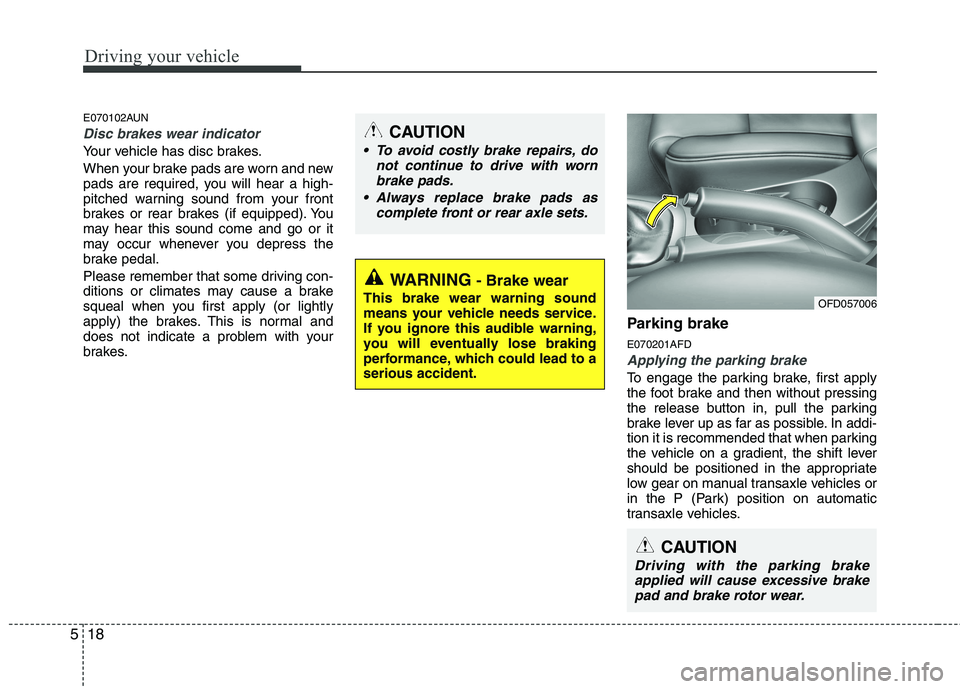
brakes. Parking brake E070201AFD
Applying the parking brake
To engage the parking brake, first apply
the foot brake and then without pressing
the release button in, pull the parking
brake lever up as far as possible. In addi-
tion it is recommended that when parking
the vehicle on a gradient, the shift lever
should be positioned in the appropriate
low gear on manual transaxle vehicles or
in the P (Park) position on automatic
transaxle vehicles.
WARNING
- Brake wear
This brake wear warning sound
means your vehicle needs service.
If you ignore this audible warning,
you will eventually lose braking
performance, which could lead to aserious accident.
CAUTION
To avoid costly brake repairs, do not continue to drive with worn
brake pads.
Always replace brake pads as complete front or rear axle sets.
CAUTION
Driving with the parking brakeapplied will cause excessive brake
pad and brake rotor wear.
OFD057006