audio HYUNDAI I30 2012 Repair Manual
[x] Cancel search | Manufacturer: HYUNDAI, Model Year: 2012, Model line: I30, Model: HYUNDAI I30 2012Pages: 635, PDF Size: 40.66 MB
Page 359 of 635
Maintenance
42
7
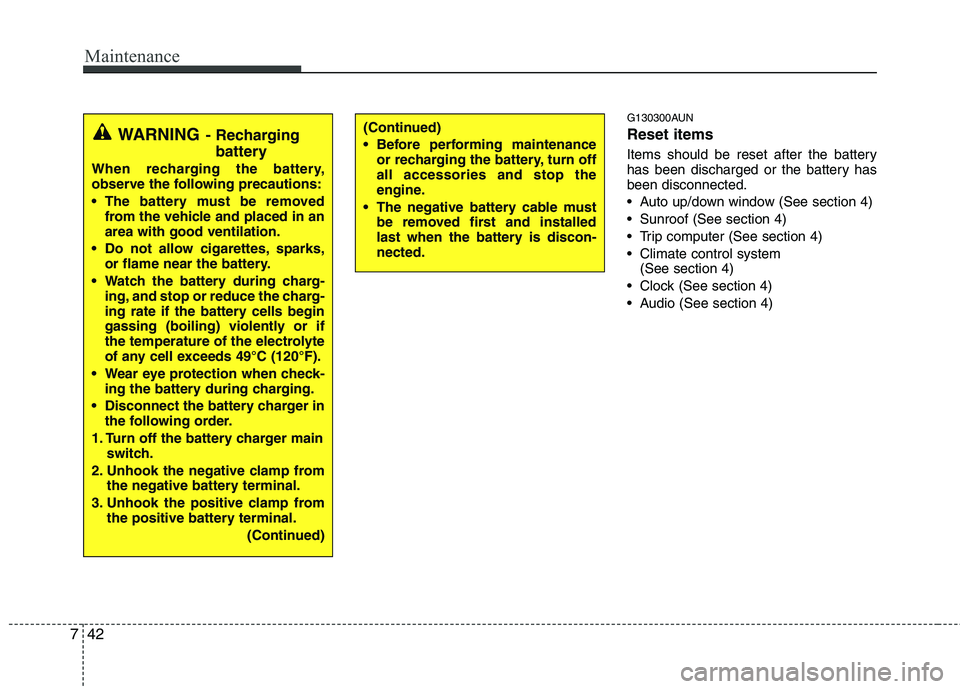
G130300AUN Reset items
Items should be reset after the battery
has been discharged or the battery hasbeen disconnected.
Auto up/down window (See section 4)
Sunroof (See section 4)
Trip computer (See section 4)
Climate control system
(See section 4)
Clock (See section 4)
Audio (See section 4)(Continued)
Before performing maintenance or recharging the battery, turn off all accessories and stop the
engine.
The negative battery cable must be removed first and installed
last when the battery is discon-nected.WARNING - Recharging
battery
When recharging the battery,
observe the following precautions:
The battery must be removed from the vehicle and placed in an area with good ventilation.
Do not allow cigarettes, sparks, or flame near the battery.
Watch the battery during charg- ing, and stop or reduce the charg-
ing rate if the battery cells begin
gassing (boiling) violently or if
the temperature of the electrolyte
of any cell exceeds 49°C (120°F).
Wear eye protection when check- ing the battery during charging.
Disconnect the battery charger in the following order.
1. Turn off the battery charger main switch.
2. Unhook the negative clamp from the negative battery terminal.
3. Unhook the positive clamp from the positive battery terminal.
(Continued)
Page 372 of 635
755
Maintenance
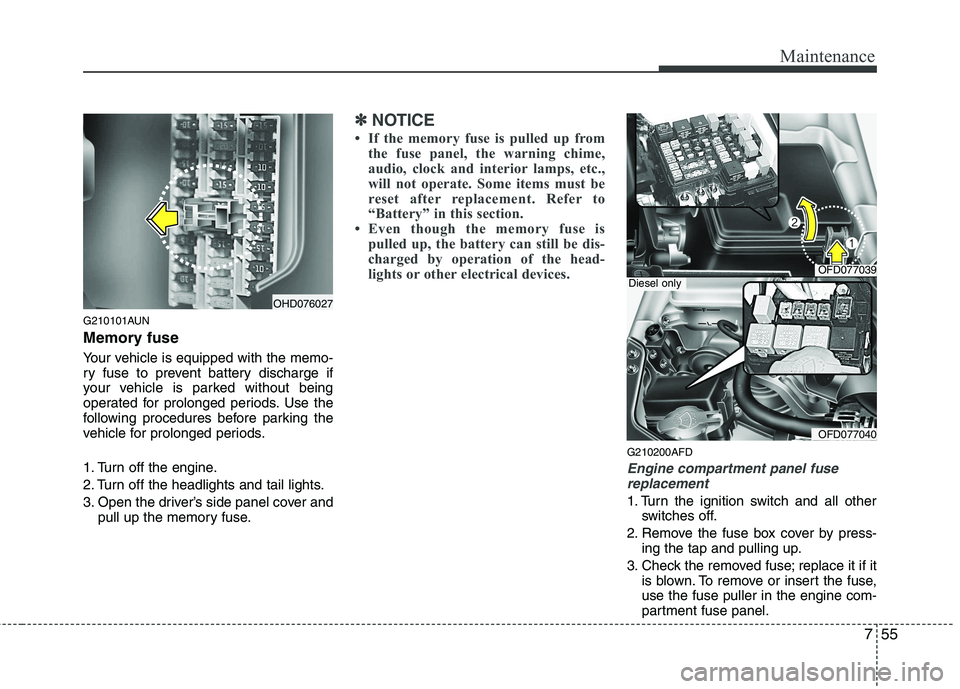
G210101AUN
Memory fuse
Your vehicle is equipped with the memo-
ry fuse to prevent battery discharge if
your vehicle is parked without being
operated for prolonged periods. Use the
following procedures before parking the
vehicle for prolonged periods.
1. Turn off the engine.
2. Turn off the headlights and tail lights.
3. Open the driver’s side panel cover andpull up the memory fuse.
✽✽ NOTICE
If the memory fuse is pulled up from the fuse panel, the warning chime,
audio, clock and interior lamps, etc.,
will not operate. Some items must be
reset after replacement. Refer to
“Battery” in this section.
Even though the memory fuse is
pulled up, the battery can still be dis-
charged by operation of the head-
lights or other electrical devices.
G210200AFD
Engine compartment panel fuse
replacement
1. Turn the ignition switch and all other switches off.
2. Remove the fuse box cover by press- ing the tap and pulling up.
3. Check the removed fuse; replace it if it is blown. To remove or insert the fuse, use the fuse puller in the engine com-
partment fuse panel.
OHD076027
OFD077039
OFD077040
Diesel only
Page 375 of 635
Maintenance
58
7
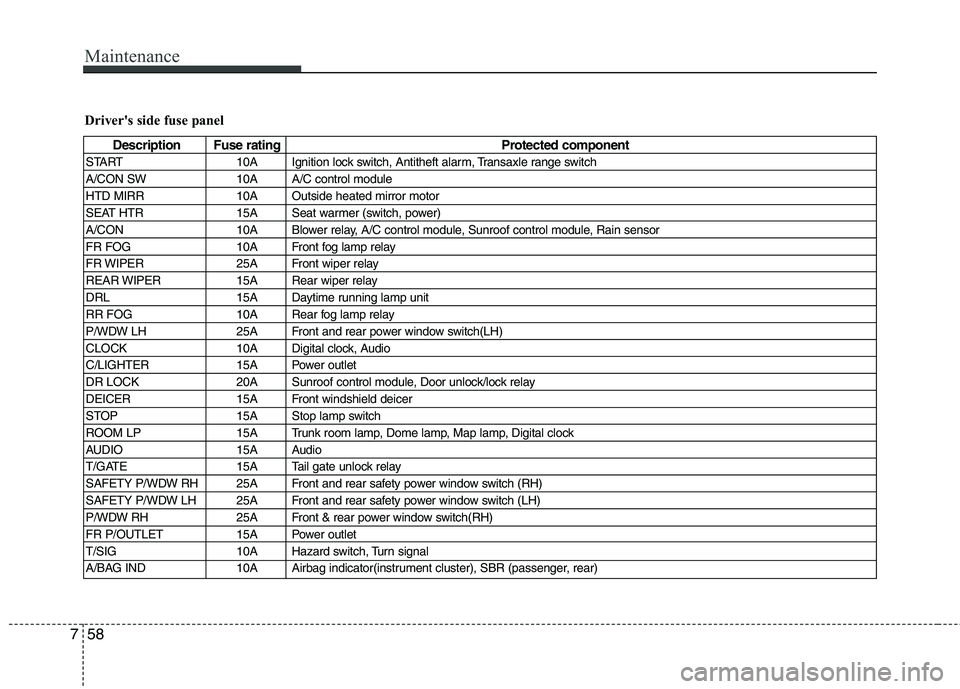
Driver's side fuse panel
Description Fuse rating Protected component
START 10A Ignition lock switch, Antitheft alarm, Transaxle range switch
A/CON SW 10A A/C control module
HTD MIRR 10A Outside heated mirror motor
SEAT HTR 15A Seat warmer (switch, power)
A/CON 10A Blower relay, A/C control module, Sunroof control module, Rain sensor
FR FOG 10A Front fog lamp relay
FR WIPER 25A Front wiper relay
REAR WIPER 15A Rear wiper relay
DRL 15A Daytime running lamp unit
RR FOG 10A Rear fog lamp relay
P/WDW LH 25A Front and rear power window switch(LH)
CLOCK 10A Digital clock, Audio
C/LIGHTER 15A Power outlet
DR LOCK 20A Sunroof control module, Door unlock/lock relay
DEICER 15A Front windshield deicer
STOP 15A Stop lamp switch
ROOM LP 15A Trunk room lamp, Dome lamp, Map lamp, Digital clock
AUDIO 15A Audio
T/GATE 15A Tail gate unlock relay
SAFETY P/WDW RH 25A Front and rear safety power window switch (RH)
SAFETY P/WDW LH 25A Front and rear safety power window switch (LH)
P/WDW RH 25A Front & rear power window switch(RH)
FR P/OUTLET 15A Power outlet
T/SIG 10A Hazard switch, Turn signal
A/BAG IND 10A Airbag indicator(instrument cluster), SBR (passenger, rear)
Page 405 of 635
Index
2
I
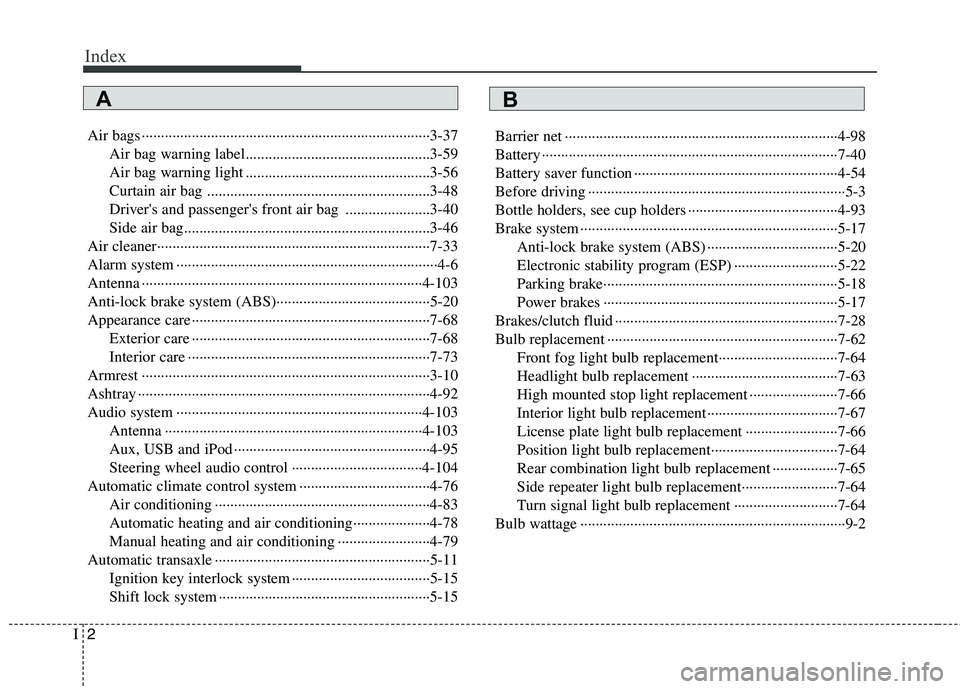
Air bags ···········································································3-37
Air bag warning label................................................3-59
Air bag warning light ................................................3-56
Curtain air bag ..........................................................3-48
Driver's and passenger's front air bag ......................3-40
Side air bag................................................................3-46
Air cleaner·······································································7-33
Alarm system ····································································4-6
Antenna ·········································································4-103
Anti-lock brake system (ABS)········································5-20
Appearance care······························································7-68 Exterior care ······························································7-68
Interior care ·······························································7-73
Armrest ···········································································3-10
Ashtray ············································································4-92
Audio system ································································4-103 Antenna ···································································4-103
Aux, USB and iPod ···················································4-95
Steering wheel audio control ··································4-104
Automatic climate control system ··································4-76 Air conditioning ························································4-83
Automatic heating and air conditioning····················4-78
Manual heating and air conditioning ························4-79
Automatic transaxle ························································5-11 Ignition key interlock system ····································5-15
Shift lock system ·······················································5-15 Barrier net ·······································································4-98
Battery ·············································································7-40
Battery saver function ·····················································4-54
Before driving ···································································5-3
Bottle holders, see cup holders ·······································4-93
Brake system ···································································5-17
Anti-lock brake system (ABS) ··································5-20
Electronic stability program (ESP) ···························5-22
Parking brake·····························································5-18
Power brakes ·····························································5-17
Brakes/clutch fluid ··························································7-28
Bulb replacement ····························································7-62 Front fog light bulb replacement·······························7-64
Headlight bulb replacement ······································7-63
High mounted stop light replacement ·······················7-66
Interior light bulb replacement··································7-67
License plate light bulb replacement ························7-66
Position light bulb replacement·································7-64
Rear combination light bulb replacement ·················7-65
Side repeater light bulb replacement·························7-64
Turn signal light bulb replacement ···························7-64
Bulb wattage ·····································································9-2
AB
Page 412 of 635
I9
Index
Smooth cornering ·····················································5-34
Speedometer ···································································4-36
Starting difficulties, see engine will not start ··················6-3
Starting the engine ···························································5-5
Steering wheel ·······························································4-28 Electric power steering ·············································4-28Horn ··········································································4-29
Tilt steering ······························································4-28
Steering wheel audio control ·······································4-104
Storage compartment ·····················································4-88 Center console storage ·············································4-88
Glove box ·································································4-88
Luggage box ······························································4-90
Multibox ····································································4-90
Sunglass holder ························································4-89
Sunroof············································································4-24
Sunvisor ··········································································4-93 Tachometer ·····································································4-37
Tailgate ···········································································4-12
Emergency tailgate safety release ····························4-13
Tether anchor system ·····················································3-32
Theft-alarm system ··························································4-6
Tie-down hook ·······························································6-24
Tilt steering ····································································4-28
Tire specification and pressure label ·······························8-3
Tire Pressure Monitoring System (TPMS) ·······················6-7
Tires and wheels ·····················································7-43, 9-3 Checking tire inflation pressure ·······························7-45
Compact spare tire replacement ·······························7-48
Recommended cold tire inflation pressures ·············7-43
Tire care ···································································7-43
Tire maintenance ······················································7-49
Tire replacement ·······················································7-47
Tire rotation ······························································7-46
Tire sidewall labeling ···············································7-49
Tire traction ······························································7-49
Wheel alignment and tire balance ····························7-47
Wheel replacement ···················································7-48
Towing ···········································································6-20 Emergency towing ····················································6-22
Removable towing hook ···········································6-21
Tie-down hook (for flatbed towing) ·························6-24T
Page 473 of 635
4
Keys / 4-2
Remote keyless entry / 4-4
Theft-alarm system / 4-6
Door locks / 4-8
Tailgate / 4-12
Windows / 4-14
Hood / 4-19
Fuel filler lid / 4-21
Sunroof / 4-24
Steering wheel / 4-28
Mirrors / 4-31
Instrument cluster / 4-35
Rear parking assist system / 4-51
Hazard warning flasher / 4-53
Lighting / 4-54
Wipers and washers / 4-60
Interior light / 4-64
Defroster / 4-66
Manual climate control system / 4-68
Automatic climate control system / 4-76
Windshield defrosting and defogging / 4-84
Storage compartment / 4-88
Interior features / 4-92
Exterior features / 4-101
Audio system / 4-103
Features of your vehicle
Page 566 of 635
Features of your vehicle
94
4
D280500AUN
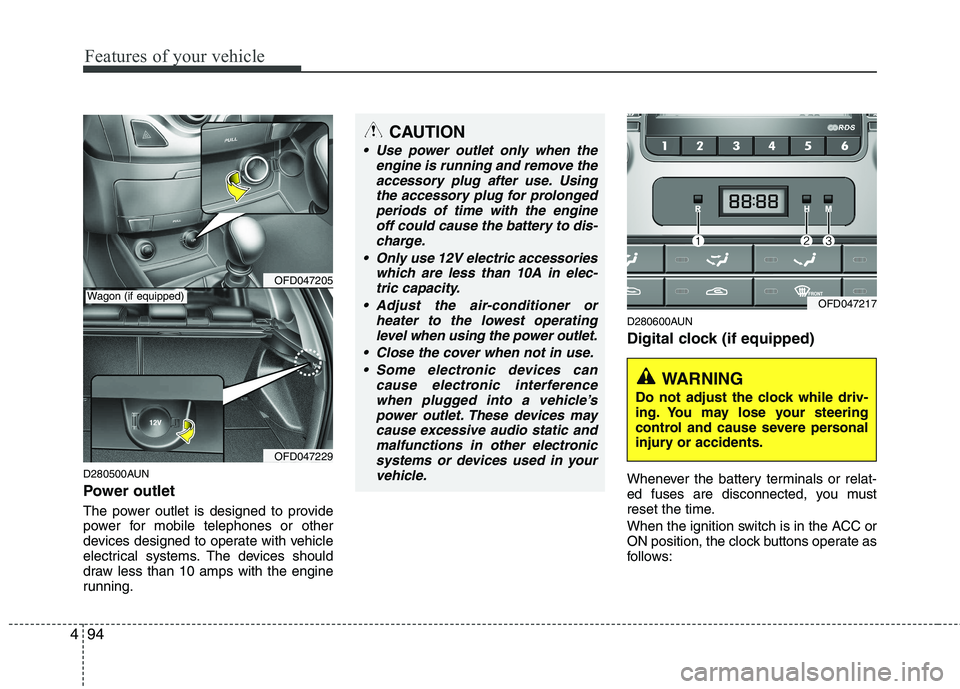
Power outlet
The power outlet is designed to provide
power for mobile telephones or other
devices designed to operate with vehicle
electrical systems. The devices should
draw less than 10 amps with the engine
running. D280600AUN
Digital clock (if equipped)
Whenever the battery terminals or relat-
ed fuses are disconnected, you must
reset the time.
When the ignition switch is in the ACC or
ON position, the clock buttons operate as
follows:
OFD047205
OFD047229
CAUTION
Use power outlet only when the
engine is running and remove the
accessory plug after use. Usingthe accessory plug for prolongedperiods of time with the engine off could cause the battery to dis-
charge.
Only use 12V electric accessories which are less than 10A in elec-tric capacity.
Adjust the air-conditioner or heater to the lowest operatinglevel when using the power outlet.
Close the cover when not in use. Some electronic devices can cause electronic interference
when plugged into a vehicle’spower outlet. These devices maycause excessive audio static andmalfunctions in other electronic
systems or devices used in yourvehicle.
Wagon (if equipped)OFD047217
WARNING
Do not adjust the clock while driv-
ing. You may lose your steering
control and cause severe personal
injury or accidents.
Page 567 of 635
495
Features of your vehicle
D280601AUN
Pressing the “H” button (2) with your
finger, a pencil or similar object will
advance the time displayed by one
hour.
D280602AUN
Pressing the “M” button (3) with your
finger, a pencil or similar object will
advance the time displayed by one
minute.
D280603AUN
To clear away minutes, press the “R”
button (1) with your finger, a pencil or
similar object. Then the clock will be
set precisely on the hour.
For example, if the “R” button is
pressed while the time is between 9:01
and 9:29, the display will be reset to9:00.
9:01 ~ 9:29 display changed to 9:00
9:30 ~ 9:59 display changed to 10:00 D280604AUN
To change the 12 hour format to the 24
hour format, press the “R” button (1) for
more than 4 seconds.
For example, if the “R” button is
pressed for more than 4 seconds while
the time is 10:15 p.m., the display willbe changed to 22:15.
D281400BFD
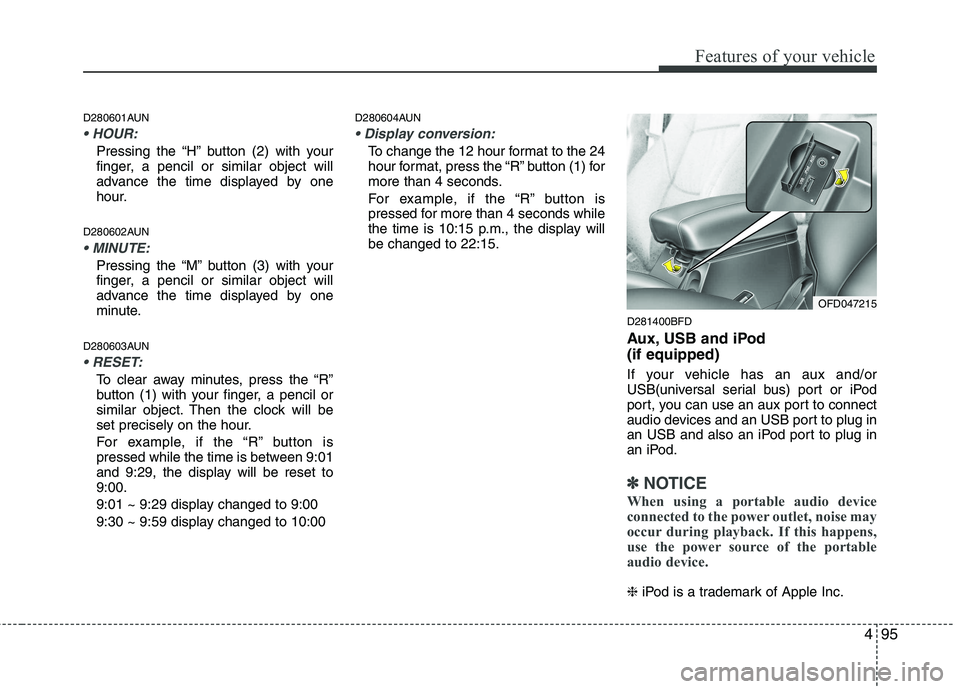
Aux, USB and iPod (if equipped)
If your vehicle has an aux and/or
USB(universal serial bus) port or iPod
port, you can use an aux port to connect
audio devices and an USB port to plug in
an USB and also an iPod port to plug in
an iPod.
✽✽NOTICE
When using a portable audio device
connected to the power outlet, noise may
occur during playback. If this happens,
use the power source of the portable
audio device.
❈ iPod is a trademark of Apple Inc.
OFD047215
Page 575 of 635
4103
Features of your vehicle
✽✽NOTICE
If you install an aftermarket HID head
lamp, your vehicle’s audio and electron-
ic device may malfunction.
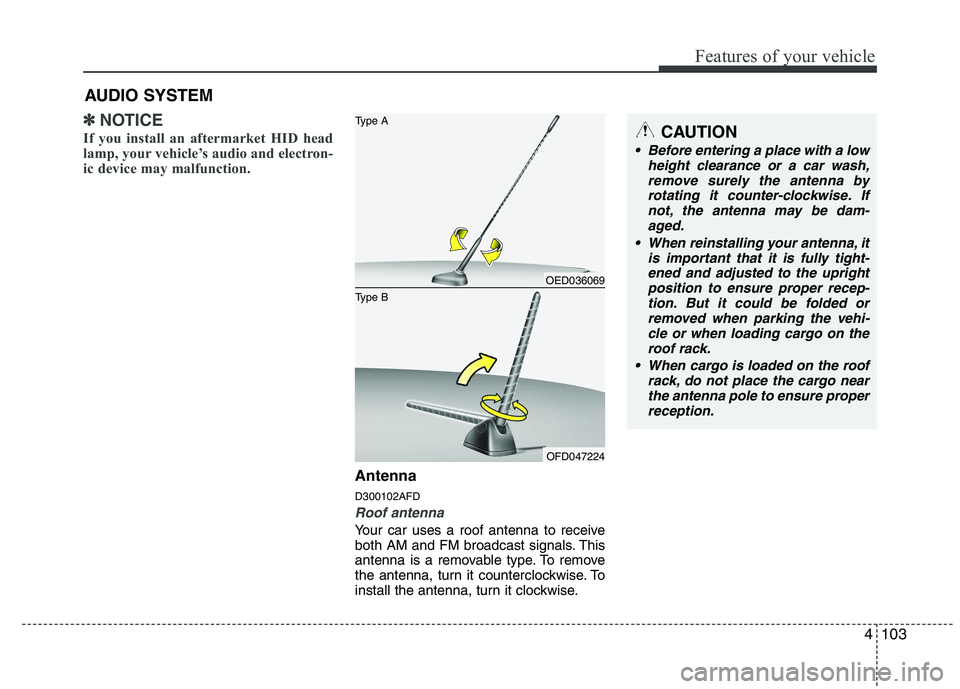
Antenna D300102AFD
Roof antenna
Your car uses a roof antenna to receive
both AM and FM broadcast signals. This
antenna is a removable type. To remove
the antenna, turn it counterclockwise. To
install the antenna, turn it clockwise.
AUDIO SYSTEM
CAUTION
• Before entering a place with a low
height clearance or a car wash,
remove surely the antenna by rotating it counter-clockwise. Ifnot, the antenna may be dam-aged.
When reinstalling your antenna, it is important that it is fully tight-ened and adjusted to the upright position to ensure proper recep-
tion. But it could be folded or removed when parking the vehi-cle or when loading cargo on the roof rack.
When cargo is loaded on the roof rack, do not place the cargo nearthe antenna pole to ensure properreception.
OED036069
OFD047224
Type B Type A
Page 576 of 635
Features of your vehicle
104
4
D300200AFD
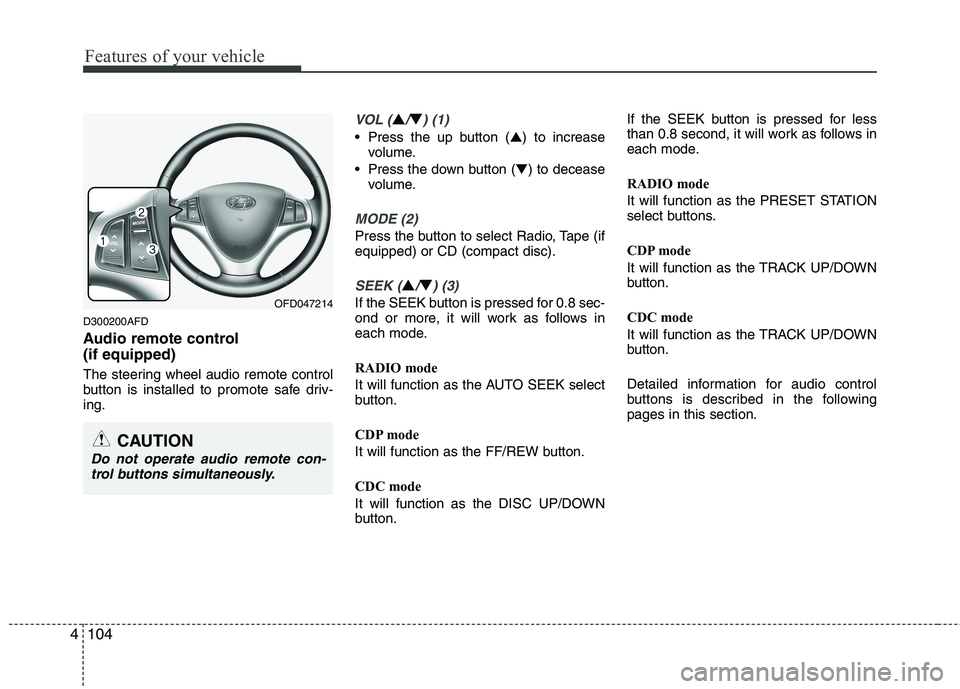
Audio remote control (if equipped)
The steering wheel audio remote control
button is installed to promote safe driv-ing.
VOL (▲/▼) (1)
• Press the up button ( ▲) to increase
volume.
Press the down button ( ▼) to decease
volume.
MODE (2)
Press the button to select Radio, Tape (if equipped) or CD (compact disc).
SEEK (▲/▼) (3)
If the SEEK button is pressed for 0.8 sec-
ond or more, it will work as follows in
each mode.
RADIO mode
It will function as the AUTO SEEK select
button.
CDP mode
It will function as the FF/REW button.
CDC mode
It will function as the DISC UP/DOWN
button. If the SEEK button is pressed for less
than 0.8 second, it will work as follows in
each mode.
RADIO mode
It will function as the PRESET STATION
select buttons.
CDP mode
It will function as the TRACK UP/DOWN
button.
CDC mode
It will function as the TRACK UP/DOWN
button.
Detailed information for audio control
buttons is described in the followingpages in this section.OFD047214
CAUTION
Do not operate audio remote con-
trol buttons simultaneously.