bulbs HYUNDAI I30 2013 Owners Manual
[x] Cancel search | Manufacturer: HYUNDAI, Model Year: 2013, Model line: I30, Model: HYUNDAI I30 2013Pages: 635, PDF Size: 40.66 MB
Page 140 of 635
Features of your vehicle
62
4
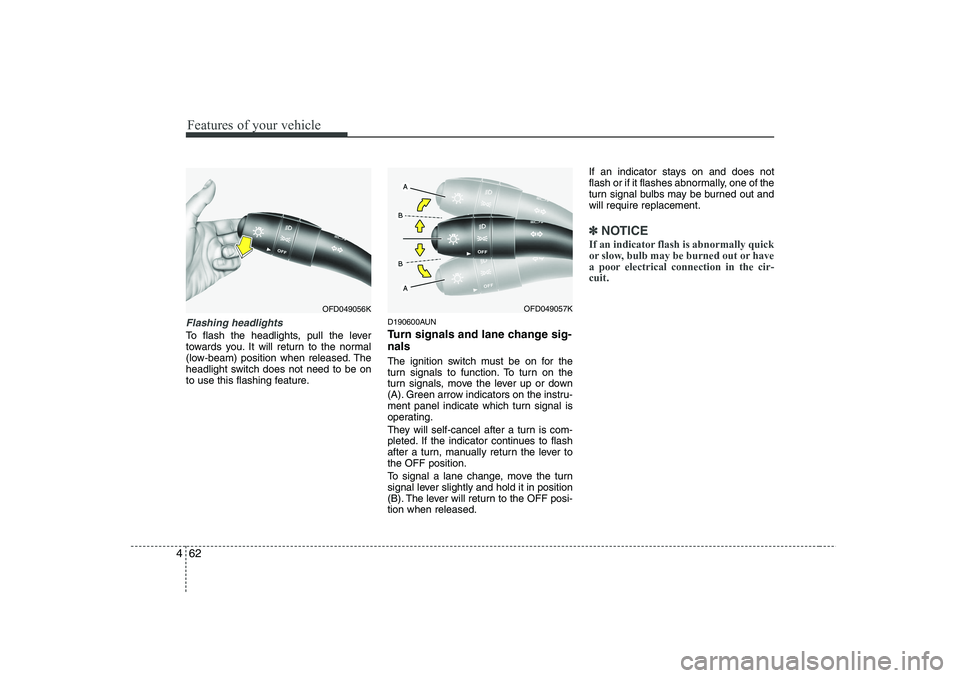
Flashing headlights
To flash the headlights, pull the lever
towards you. It will return to the normal
(low-beam) position when released. The
headlight switch does not need to be on
to use this flashing feature. D190600AUN
Turn signals and lane change sig- nals
The ignition switch must be on for the
turn signals to function. To turn on the
turn signals, move the lever up or down
(A). Green arrow indicators on the instru-
ment panel indicate which turn signal is
operating.
They will self-cancel after a turn is com-
pleted. If the indicator continues to flash
after a turn, manually return the lever tothe OFF position.
To signal a lane change, move the turn
signal lever slightly and hold it in position
(B). The lever will return to the OFF posi-tion when released.If an indicator stays on and does not
flash or if it flashes abnormally, one of the
turn signal bulbs may be burned out andwill require replacement.
✽✽
NOTICE
If an indicator flash is abnormally quick
or slow, bulb may be burned out or have
a poor electrical connection in the cir-cuit.
OFD049057KOFD049056K
Page 286 of 635
543
Driving your vehicle
E140400AUN Driving with a trailer
Towing a trailer requires a certain
amount of experience. Before setting out
for the open road, you must get to know
your trailer. Acquaint yourself with the
feel of handling and braking with the
added weight of the trailer. And always
keep in mind that the vehicle you are
driving is now a good deal longer and not
nearly so responsive as your vehicle is
by itself.
Before you start, check the trailer hitch
and platform, safety chains, electrical
connector(s), lights, tires and mirror
adjustment. If the trailer has electric
brakes, start your vehicle and trailer mov-
ing and then apply the trailer brake con-
troller by hand to be sure the brakes are
working. This lets you check your electri-
cal connection at the same time.
During your trip, check occasionally to be
sure that the load is secure, and that the
lights and any trailer brakes are still work-ing.
E140401AUN
Following distance
Stay at least twice as far behind the vehi-
cle ahead as you would when driving
your vehicle without a trailer. This can
help you avoid situations that require
heavy braking and sudden turns.E140402AUN
Passing
You’ll need more passing distance up
ahead when you’re towing a trailer. And,
because of the increased vehicle length,
you’ll need to go much farther beyond the
passed vehicle before you can return to
your lane.
E140403AUN
Backing up
Hold the bottom of the steering wheel
with one hand. Then, to move the trailer
to the left, just move your hand to the left.
To move the trailer to the right, move your
hand to the right. Always back up slowly
and, if possible, have someone guide
you.
E140404AUN
Making turns
When you’re turning with a trailer, make
wider turns than normal. Do this so your
trailer won’t strike soft shoulders, curbs,
road signs, trees, or other objects. Avoid
jerky or sudden maneuvers. Signal well
in advance.
E140405AFD
Turn signals when towing a trailer
When you tow a trailer, your vehicle has
to have a different turn signal flasher and
extra wiring. The green arrows on your
instrument panel will flash whenever you
signal a turn or lane change. Properly
connected, the trailer lights will also flash
to alert other drivers you’re about to turn,
change lanes, or stop.
When towing a trailer, the green arrows
on your instrument panel will flash for
turns even if the bulbs on the trailer are
burned out. Thus, you may think drivers
behind you are seeing your signals
when, in fact, they are not. It’s important
to check occasionally to be sure the trail-
er bulbs are still working. You must also
check the lights every time you discon-
nect and then reconnect the wires.
Do not connect a trailer lighting system
directly to your vehicle’s lighting system.
Use only an approved trailer wiring har-
ness.
An authorized HYUNDAI dealer can
assist you in installing the wiring harness.
WARNING
Failure to use an approved trailer wiring harness could result in dam-
age to the vehicle electrical system
and/or personal injury.
Page 318 of 635
7
Engine compartment / 7-2
Maintenance services / 7-4
Owner maintenance / 7-6
Scheduled maintenance service / 7-8
Explanation of scheduled maintenance items / 7-21
Engine oil / 7-24
Engine coolant / 7-25
Brakes and clutch fluid / 7-28
Automatic transaxle fluid / 7-29
Washer fluid / 7-31
Parking brake / 7-31
Fuel filter / 7-32
Air cleaner / 7-33
Climate control air filter / 7-34
Wiper blades / 7-36
Battery / 7-40
Tires and wheels / 7-43
Fuses / 7-53
Light bulbs / 7-62
Appearance care / 7-68
Emission control system / 7-74
Maintenance
Page 379 of 635
Maintenance
62
7
LIGHT BULBS
G220000AFD
Use only the bulbs of the specified wattage.
✽✽ NOTICE
After heavy, driving rain or washing,
headlight and taillight lenses could
appear frosty. This condition is caused by
the temperature difference between the
lamp inside and outside. This is similar
to the condensation on your windows
inside your vehicle during the rain and
doesn’t indicate a problem with your
vehicle. If the water leaks into the lamp
bulb circuitry, have the vehicle checked
by an authorized HYUNDAI dealer.
WARNING - Working on
the lights
Prior to working on the light, firmly
apply the parking brake, ensure
that the ignition switch is turned to
the “LOCK” position and turn off
the lights to avoid sudden move-
ment of the vehicle and burning
your fingers or receiving an electric
shock.
CAUTION
Be sure to replace the burned-out bulb with one of the same wattagerating. Otherwise, it may causedamage to the fuse or electric wiring system.
CAUTION
If you don’t have necessary tools,the correct bulbs and the expertise,
consult an authorized HYUNDAIdealer. In many cases, it is difficultto replace vehicle light bulbs because other parts of the vehicle
must be removed before you canget to the bulb. This is especiallytrue if you have to remove the head-
light assembly to
get to the bulb(s).
Removing/installingthe headlight
assembly can result in damage to the vehicle.
Page 380 of 635
763
Maintenance
G220100AUN
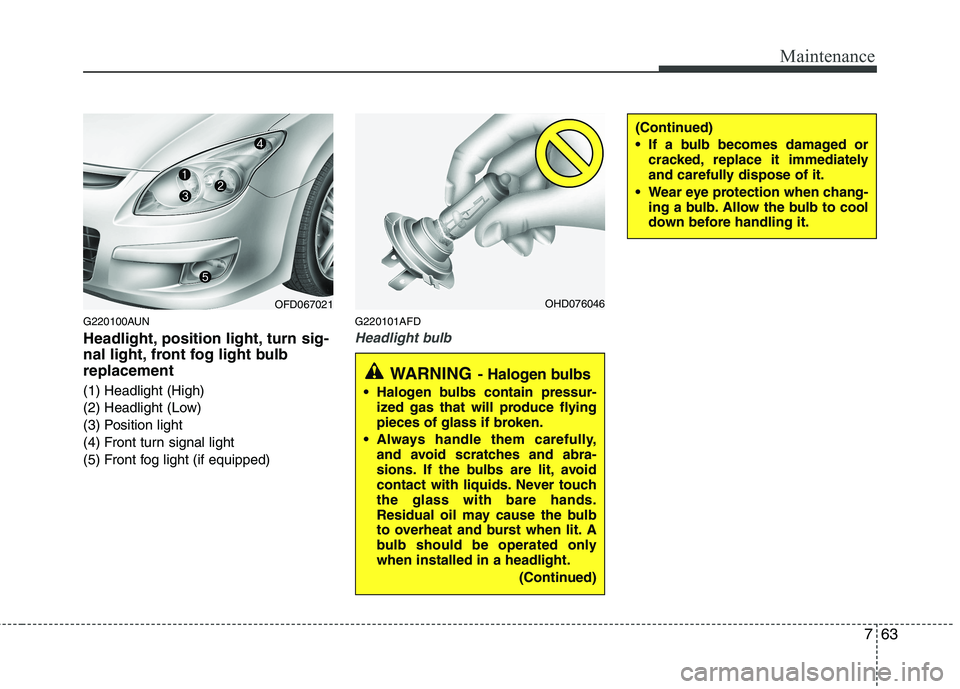
Headlight, position light, turn sig-
nal light, front fog light bulbreplacement
(1) Headlight (High)
(2) Headlight (Low)
(3) Position light
(4) Front turn signal light
(5) Front fog light (if equipped)G220101AFD
Headlight bulb
OFD067021OHD076046
WARNING
- Halogen bulbs
Halogen bulbs contain pressur-
ized gas that will produce flying
pieces of glass if broken.
Always handle them carefully, and avoid scratches and abra-
sions. If the bulbs are lit, avoid
contact with liquids. Never touchthe glass with bare hands.
Residual oil may cause the bulb
to overheat and burst when lit. A
bulb should be operated onlywhen installed in a headlight.
(Continued)
(Continued)
If a bulb becomes damaged orcracked, replace it immediately
and carefully dispose of it.
Wear eye protection when chang- ing a bulb. Allow the bulb to cool
down before handling it.
Page 409 of 635
Index
6
I
Ashtray ·····································································4-92
Aux, USB and iPod ··················································4-95
Barrier net··································································4-98
Cargo security screen ·············································4-100
Cigarette lighter ························································4-92
Clothes hanger···························································4-96
Cup holder ································································4-93
Digital clock ······································4-94, 4-114, 4-127
Floor mat anchor(s) ··················································4-96
Luggage net (holder) ················································4-97
Power outlet ·····························································4-94
Shopping bag holder ·················································4-96
Sunvisor ····································································4-93
Interior light ···································································4-64
Interior light bulb replacement ······································7-67
Interior overview ······························································2-2
Interlock system ·····························································5-15
ISOFIX system ·······························································3-34
Jack and tools ·································································6-12
Jump starting ····································································6-4
Key positions ···································································5-4
Keys ·················································································4-2 Label
Air bag warning label ···············································3-59
Tire sidewall labeling ···············································7-49
Tire specification and pressure label ··························8-3
Vehicle certification label ···········································8-3
Latch system, see ISOFIX system ·································3-34
License plate light bulb replacement ·····························7-66
Light bulbs ·····································································7-62 Front fog light bulb replacement·······························7-64
Headlight bulb replacement ······································7-63
High mounted stop light replacement ·······················7-66
Interior light bulb replacement··································7-67
License plate light bulb replacement ························7-66
Position light bulb replacement·································7-64
Rear combination light bulb replacement ·················7-65
Side repeater light bulb replacement·························7-64
Turn signal light bulb replacement ···························7-64
Lighting ··········································································4-54 Battery saver function ··············································4-54
Headlight escort function ·········································4-54
Headlight welcome function ····································4-55
Lubricants and capacities ·················································9-4
Luggage box ···································································4-90Luggage net (holder) ······················································4-97
Luggage rack, see roof rack ·········································4-102
Lumbar support ································································3-7L
K
J
Page 530 of 635
Features of your vehicle
58
4
They will self-cancel after a turn is com-
pleted. If the indicator continues to flash
after a turn, manually return the lever tothe OFF position.
To signal a lane change, move the turn
signal lever slightly and hold it in position
(B). The lever will return to the OFF posi-tion when released.
If an indicator stays on and does not
flash or if it flashes abnormally, one of the
turn signal bulbs may be burned out andwill require replacement.
One-touch triple turn signal
(if equipped)
To activate an one-touch triple turn signal
move the turn signal lever slightly and
then release it. The lane change signals
will blink 3 times.
✽✽ NOTICE
If an indicator flash is abnormally quick
or slow, bulb may be burned out or have
a poor electrical connection in the cir-
cuit.
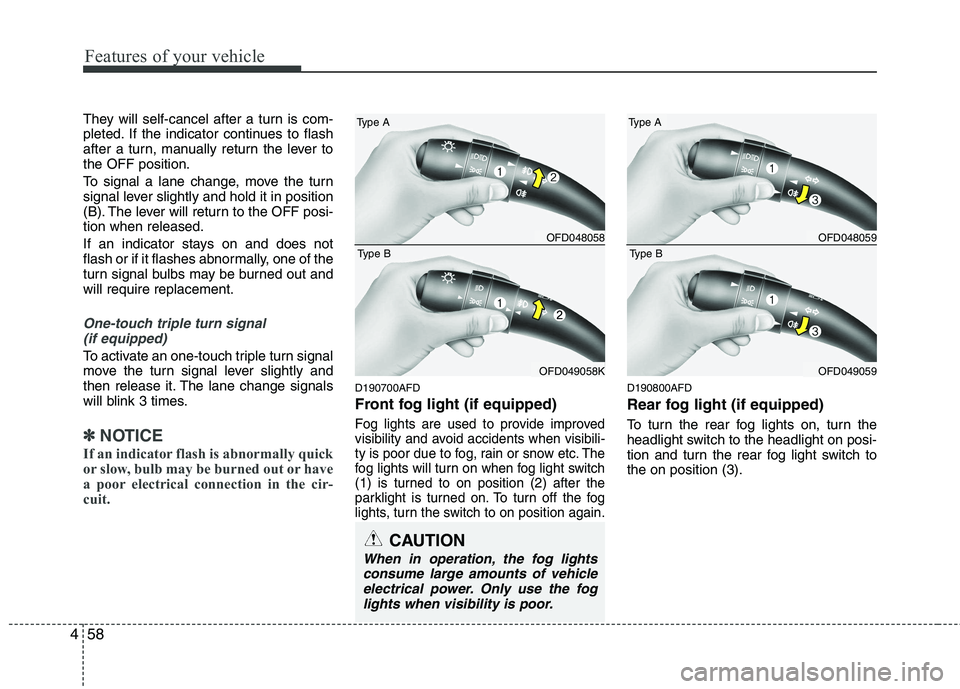
D190700AFD
Front fog light (if equipped)
Fog lights are used to provide improved
visibility and avoid accidents when visibili-
ty is poor due to fog, rain or snow etc. The
fog lights will turn on when fog light switch
(1) is turned to on position (2) after the
parklight is turned on. To turn off the fog
lights, turn the switch to on position again.
D190800AFD
Rear fog light (if equipped)
To turn the rear fog lights on, turn the
headlight switch to the headlight on posi-
tion and turn the rear fog light switch tothe on position (3).
CAUTION
When in operation, the fog lights consume large amounts of vehicleelectrical power. Only use the foglights when visibility is poor.
OFD048058
Type A
OFD049058K
Type B
OFD048059
Type A
OFD049059
Type B