radio HYUNDAI I30 2014 Owner's Manual
[x] Cancel search | Manufacturer: HYUNDAI, Model Year: 2014, Model line: I30, Model: HYUNDAI I30 2014Pages: 635, PDF Size: 40.66 MB
Page 477 of 635
45
Features of your vehicle
D020200AFD
Transmitter precautions
✽✽NOTICE
The transmitter will not work if any of
following occur:
The ignition key is in ignition switch.
You exceed the operating distance limit (about 10 m [30 feet]).
The battery in the transmitter is weak.
Other vehicles or objects may be blocking the signal.
The weather is extremely cold.
The transmitter is close to a radio transmitter such as a radio station or
an airport which can interfere with
normal operation of the transmitter.
When the transmitter does not work
correctly, open and close the door with
the ignition key. If you have a problem
with the transmitter, contact an author-
ized HYUNDAI dealer.
D020300AFD
Battery replacement
Transmitter uses a 3 volt lithium battery
which will normally last for several years.
When replacement is necessary, use the
following procedure.
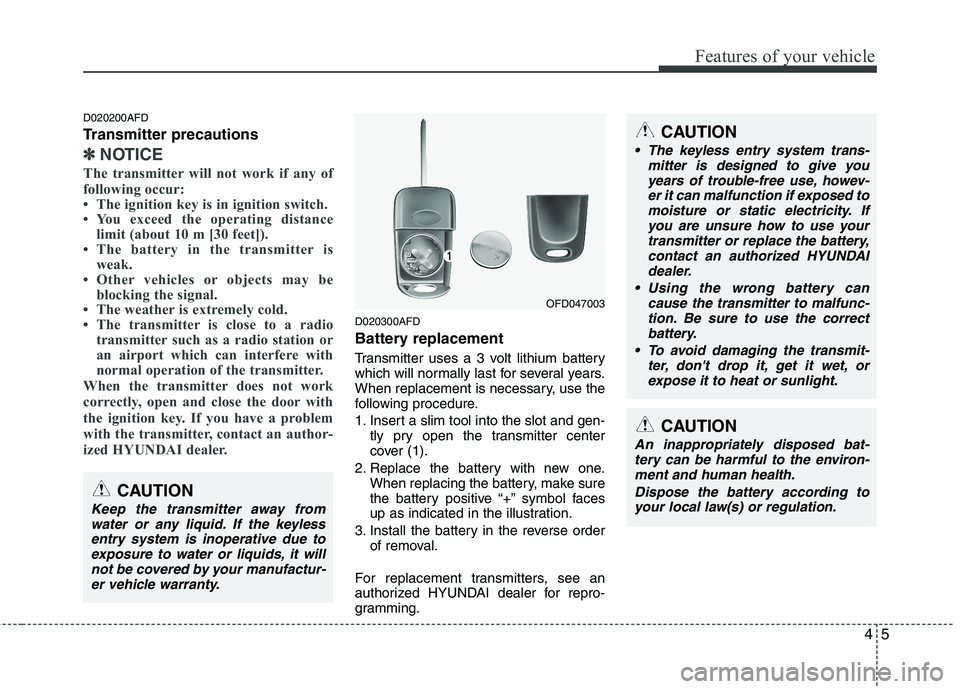
1. Insert a slim tool into the slot and gen- tly pry open the transmitter center
cover (1).
2. Replace the battery with new one. When replacing the battery, make sure
the battery positive “+” symbol faces
up as indicated in the illustration.
3. Install the battery in the reverse order of removal.
For replacement transmitters, see an
authorized HYUNDAI dealer for repro-
gramming.
CAUTION
Keep the transmitter away from water or any liquid. If the keylessentry system is inoperative due toexposure to water or liquids, it will not be covered by your manufactur-
er vehicle warranty.
OFD047003
CAUTION
• The keyless entry system trans- mitter is designed to give you
years of trouble-free use, howev- er it can malfunction if exposed tomoisture or static electricity. Ifyou are unsure how to use your
transmitter or replace the battery,contact an authorized HYUNDAI dealer.
Using the wrong battery can cause the transmitter to malfunc-tion. Be sure to use the correctbattery.
To avoid damaging the transmit- ter, don't drop it, get it wet, or
expose it to heat or sunlight.
CAUTION
An inappropriately disposed bat-tery can be harmful to the environ- ment and human health.
Dispose the battery according toyour local law(s) or regulation.
Page 576 of 635
Features of your vehicle
104
4
D300200AFD
Audio remote control (if equipped)
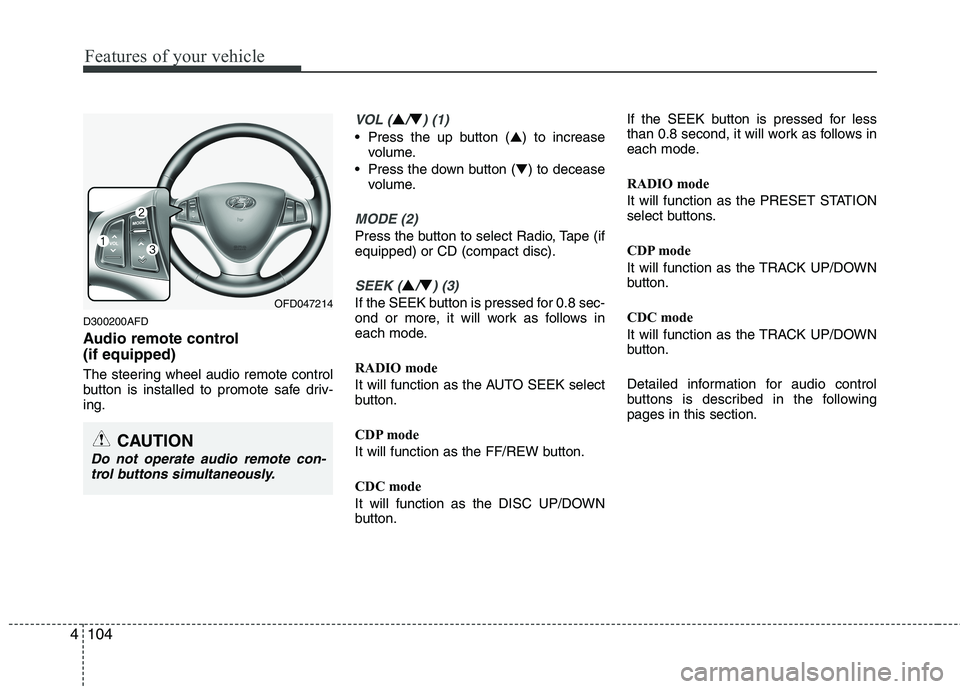
The steering wheel audio remote control
button is installed to promote safe driv-ing.
VOL (▲/▼) (1)
• Press the up button ( ▲) to increase
volume.
Press the down button ( ▼) to decease
volume.
MODE (2)
Press the button to select Radio, Tape (if equipped) or CD (compact disc).
SEEK (▲/▼) (3)
If the SEEK button is pressed for 0.8 sec-
ond or more, it will work as follows in
each mode.
RADIO mode
It will function as the AUTO SEEK select
button.
CDP mode
It will function as the FF/REW button.
CDC mode
It will function as the DISC UP/DOWN
button. If the SEEK button is pressed for less
than 0.8 second, it will work as follows in
each mode.
RADIO mode
It will function as the PRESET STATION
select buttons.
CDP mode
It will function as the TRACK UP/DOWN
button.
CDC mode
It will function as the TRACK UP/DOWN
button.
Detailed information for audio control
buttons is described in the followingpages in this section.OFD047214
CAUTION
Do not operate audio remote con-
trol buttons simultaneously.
Page 577 of 635
4105
Features of your vehicle
D300800AFD
How car audio works
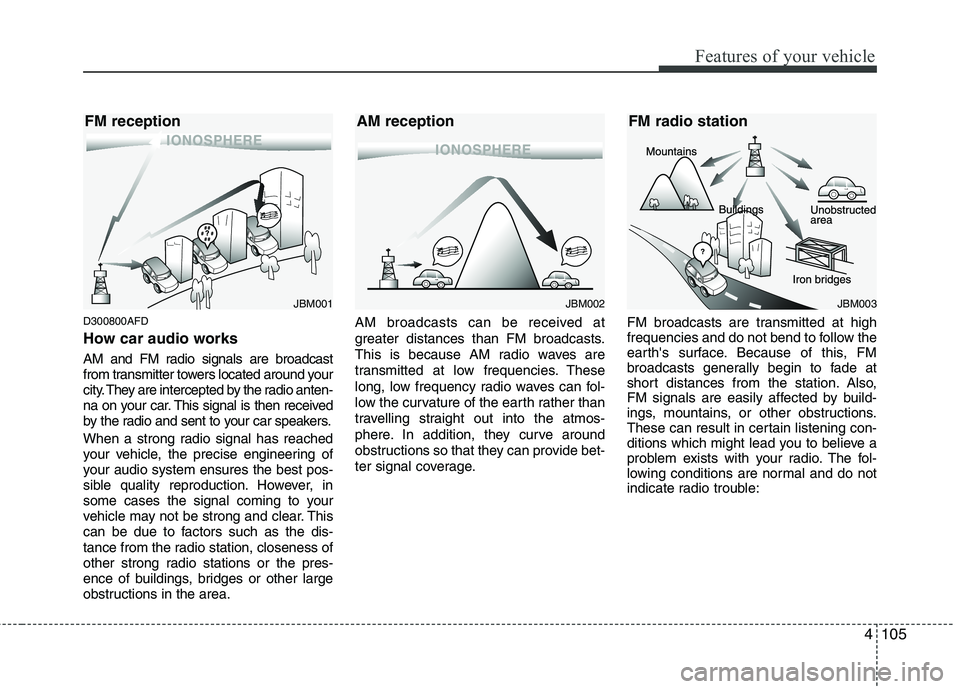
AM and FM radio signals are broadcast
from transmitter towers located around your
city. They are intercepted by the radio anten-
na on your car. This signal is then received
by the radio and sent to your car speakers.
When a strong radio signal has reached
your vehicle, the precise engineering of
your audio system ensures the best pos-
sible quality reproduction. However, in
some cases the signal coming to your
vehicle may not be strong and clear. This
can be due to factors such as the dis-
tance from the radio station, closeness of
other strong radio stations or the pres-
ence of buildings, bridges or other large
obstructions in the area.AM broadcasts can be received at
greater distances than FM broadcasts.
This is because AM radio waves are
transmitted at low frequencies. These
long, low frequency radio waves can fol-
low the curvature of the earth rather than
travelling straight out into the atmos-
phere. In addition, they curve around
obstructions so that they can provide bet-
ter signal coverage.
FM broadcasts are transmitted at high
frequencies and do not bend to follow the
earth's surface. Because of this, FM
broadcasts generally begin to fade at
short distances from the station. Also,
FM signals are easily affected by build-
ings, mountains, or other obstructions.
These can result in certain listening con-
ditions which might lead you to believe a
problem exists with your radio. The fol-
lowing conditions are normal and do not
indicate radio trouble:
JBM001JBM002JBM003
FM reception AM reception FM radio station
Page 578 of 635
Features of your vehicle
106
4
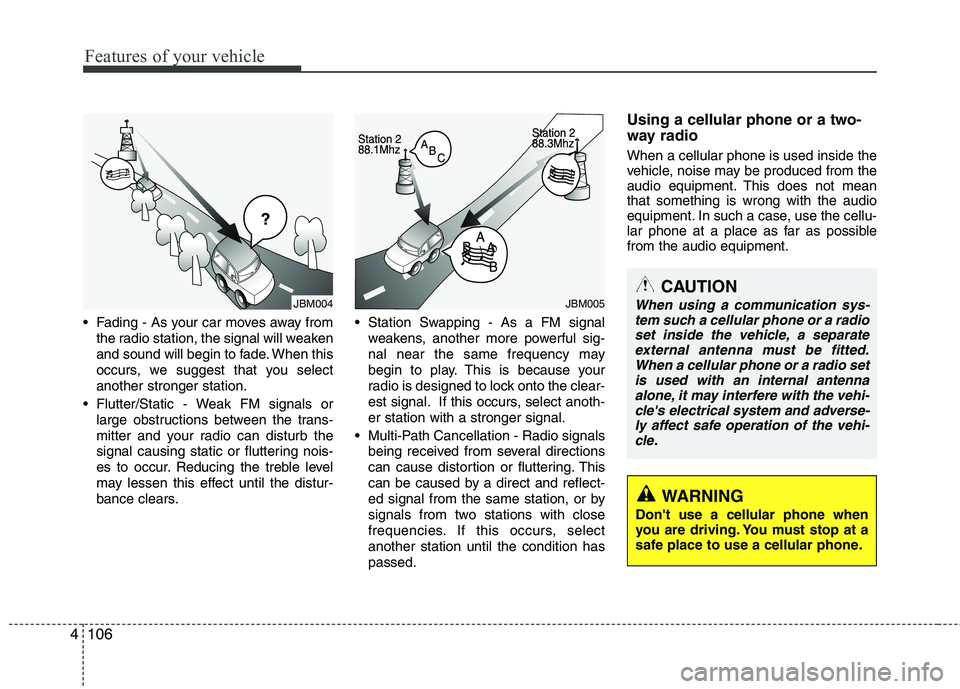
Fading - As your car moves away from
the radio station, the signal will weaken
and sound will begin to fade. When this
occurs, we suggest that you selectanother stronger station.
Flutter/Static - Weak FM signals or large obstructions between the trans-
mitter and your radio can disturb the
signal causing static or fluttering nois-
es to occur. Reducing the treble level
may lessen this effect until the distur-
bance clears. Station Swapping - As a FM signal
weakens, another more powerful sig-
nal near the same frequency may
begin to play. This is because your
radio is designed to lock onto the clear-
est signal. If this occurs, select anoth-er station with a stronger signal.
Multi-Path Cancellation - Radio signals being received from several directions
can cause distortion or fluttering. This
can be caused by a direct and reflect-
ed signal from the same station, or by
signals from two stations with close
frequencies. If this occurs, selectanother station until the condition haspassed. Using a cellular phone or a two-
way radio When a cellular phone is used inside the
vehicle, noise may be produced from the
audio equipment. This does not meanthat something is wrong with the audio
equipment. In such a case, use the cellu-
lar phone at a place as far as possiblefrom the audio equipment.
JBM004JBM005CAUTION
When using a communication sys-
tem such a cellular phone or a radioset inside the vehicle, a separate external antenna must be fitted.When a cellular phone or a radio set
is used with an internal antennaalone, it may interfere with the vehi- cle's electrical system and adverse-ly affect safe operation of the vehi-
cle.
WARNING
Don't use a cellular phone when
you are driving. You must stop at a
safe place to use a cellular phone.
Page 580 of 635
Features of your vehicle
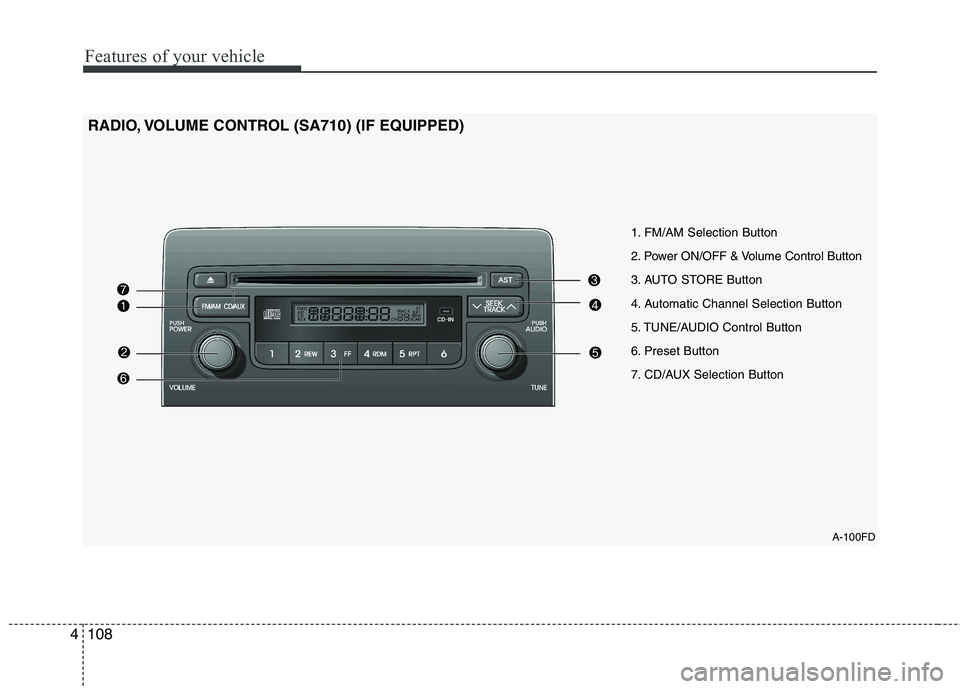
108
4
A-100FD
1. FM/AM Selection Button
2. Power ON/OFF & Volume Control Button
3. AUTO STORE Button
4. Automatic Channel Selection Button
5. TUNE/AUDIO Control Button
6. Preset Button
7. CD/AUX Selection Button
RADIO, VOLUME CONTROL (SA710) (IF EQUIPPED)
Page 584 of 635
Features of your vehicle
112
4
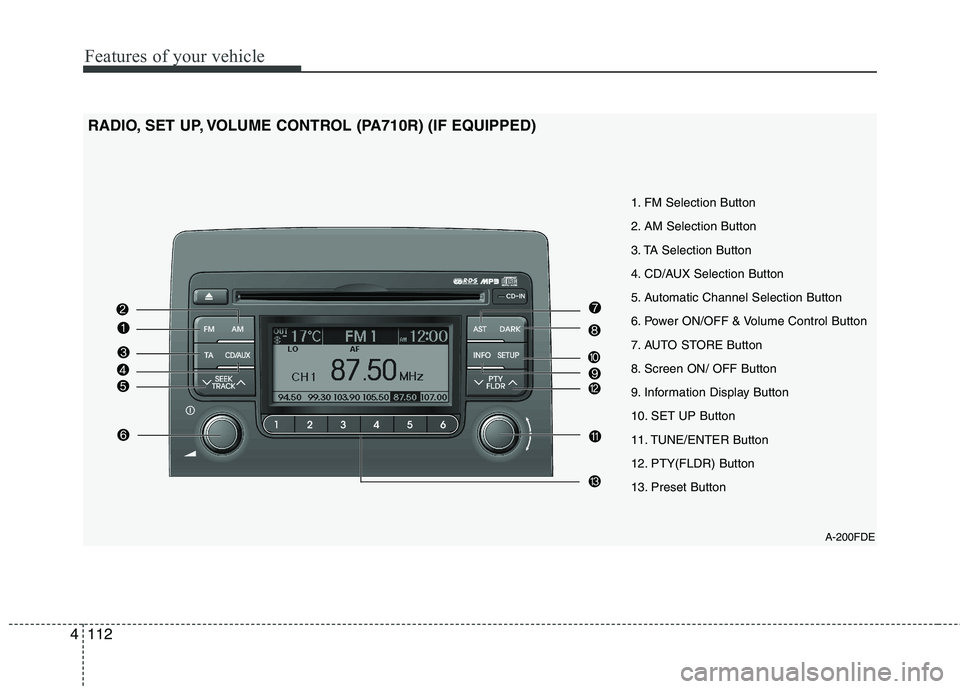
A-200FDE
1. FM Selection Button
2. AM Selection Button
3. TA Selection Button
4. CD/AUX Selection Button
5. Automatic Channel Selection Button
6. Power ON/OFF & Volume Control Button
7. AUTO STORE Button
8. Screen ON/ OFF Button
9. Information Display Button
10. SET UP Button
11. TUNE/ENTER Button
12. PTY(FLDR) Button
13. Preset Button
RADIO, SET UP, VOLUME CONTROL (PA710R) (IF EQUIPPED)
Page 586 of 635
Features of your vehicle
114
4
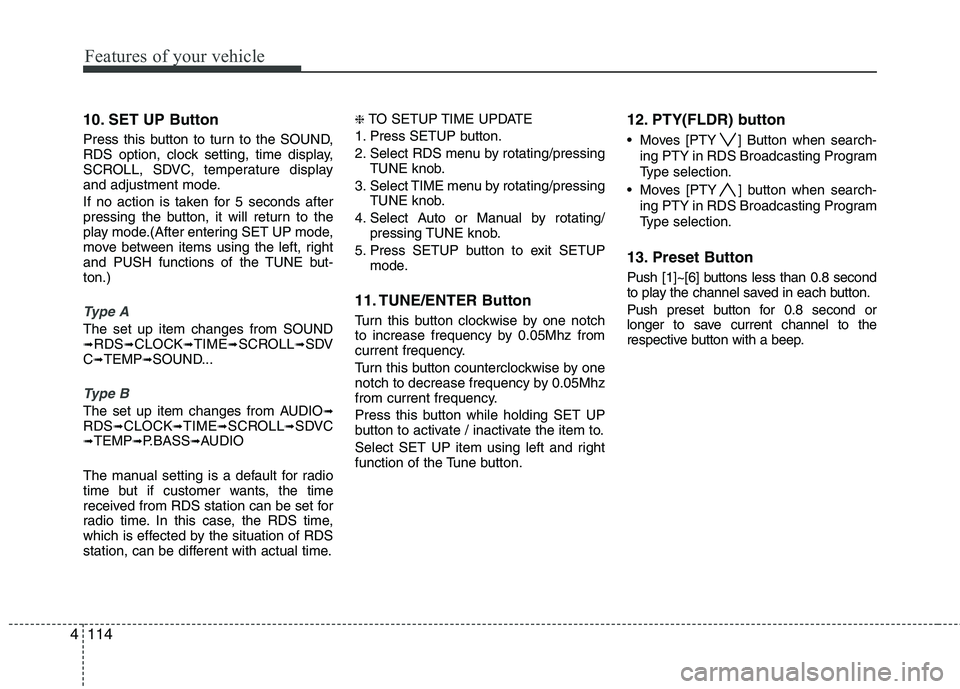
10. SET UP Button
Press this button to turn to the SOUND,
RDS option, clock setting, time display,
SCROLL, SDVC, temperature display
and adjustment mode.
If no action is taken for 5 seconds after
pressing the button, it will return to the
play mode.(After entering SET UP mode,
move between items using the left, right
and PUSH functions of the TUNE but-ton.)
Type A
The set up item changes from SOUND ➟ RDS ➟CLOCK ➟TIME ➟SCROLL ➟SDV
C ➟ TEMP ➟SOUND...
Type B
The set up item changes from AUDIO ➟
RDS ➟CLOCK ➟TIME ➟SCROLL ➟SDVC
➟ TEMP ➟P.BASS ➟AUDIO
The manual setting is a default for radio
time but if customer wants, the time
received from RDS station can be set for
radio time. In this case, the RDS time,
which is effected by the situation of RDS
station, can be different with actual time. ❈
TO SETUP TIME UPDATE
1. Press SETUP button.
2. Select RDS menu by rotating/pressing TUNE knob.
3. Select TIME menu by rotating/pressing TUNE knob.
4. Select Auto or Manual by rotating/ pressing TUNE knob.
5. Press SETUP button to exit SETUP mode.
11. TUNE/ENTER Button
Turn this button clockwise by one notch
to increase frequency by 0.05Mhz from
current frequency.
Turn this button counterclockwise by one
notch to decrease frequency by 0.05Mhz
from current frequency.
Press this button while holding SET UP
button to activate / inactivate the item to.
Select SET UP item using left and right
function of the Tune button. 12. PTY(FLDR) button
Moves [PTY ] Button when search-
ing PTY in RDS Broadcasting Program
Type selection.
Moves [PTY ] button when search- ing PTY in RDS Broadcasting Program
Type selection.
13. Preset Button
Push [1]~[6] buttons less than 0.8 second
to play the channel saved in each button.
Push preset button for 0.8 second or
longer to save current channel to the
respective button with a beep.
Page 597 of 635
4125
Features of your vehicle
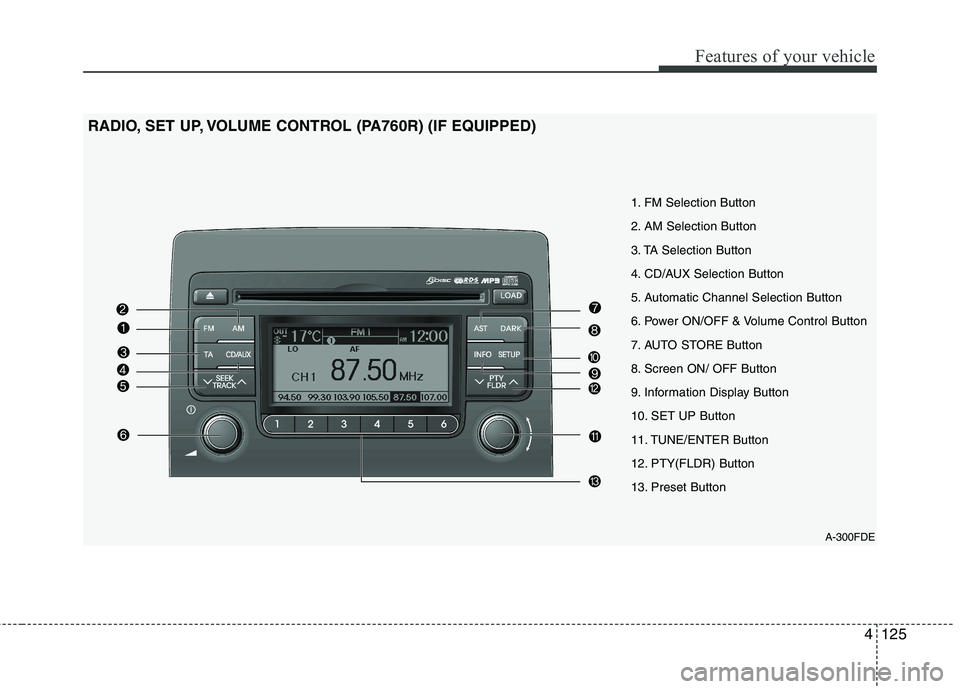
A-300FDE
1. FM Selection Button
2. AM Selection Button
3. TA Selection Button
4. CD/AUX Selection Button
5. Automatic Channel Selection Button
6. Power ON/OFF & Volume Control Button
7. AUTO STORE Button
8. Screen ON/ OFF Button
9. Information Display Button
10. SET UP Button
11. TUNE/ENTER Button
12. PTY(FLDR) Button
13. Preset Button
RADIO, SET UP, VOLUME CONTROL (PA760R) (IF EQUIPPED)
Page 599 of 635
4127
Features of your vehicle
10. SET UP Button
Press this button to turn to the SOUND,
RDS option, clock setting, time display,
SCROLL, SDVC, temperature display
and adjustment mode.
If no action is taken for 5 seconds after
pressing the button, it will return to the
play mode.(After entering SET UP mode,
move between items using the left, right
and PUSH functions of the TUNE but-ton.)
Type A
The set up item changes from SOUND ➟RDS ➟CLOCK ➟TIME ➟SCROLL ➟SDV
C ➟ TEMP ➟SOUND...
Type B
The set up item changes from AUDIO ➟
RDS ➟CLOCK ➟TIME ➟SCROLL ➟SDVC
➟ TEMP ➟AUDIO...
The manual setting is a default for radio
time but if customer wants, the time
received from RDS station can be set for
radio time. In this case, the RDS time,
which is effected by the situation of RDS
station, can be different with actual time. ❈
TO SETUP TIME UPDATE
1. Press SETUP button.
2. Select RDS menu by rotating/pressing TUNE knob.
3. Select TIME menu by rotating/pressing TUNE knob.
4. Select Auto or Manual by rotating/press- ing TUNE knob.
5. Press SETUP button to exit SETUP mode.
11. TUNE/ENTER Button
Turn this button clockwise by one notch
to increase frequency by 0.05Mhz from
current frequency.
Turn this button counterclockwise by one
notch to decrease frequency by 0.05Mhz
from current frequency.
Press this button while holding SET UP
button to activate / inactivate the item to.
Select SET UP item using left and right
function of the Tune button. 12. PTY(FLDR) Button
Moves [PTY ] button when search-
ing PTY in RDS Broadcasting Program
Type selection.
Moves [PTY ] button when search- ing PTY in RDS Broadcasting Program
Type selection.
13. Preset Button
Push [1]~[6] buttons less than 0.8 second
to play the channel saved in each button.
Push preset button for 0.8 second or
longer to save current channel to the
respective button with a beep.
Page 610 of 635
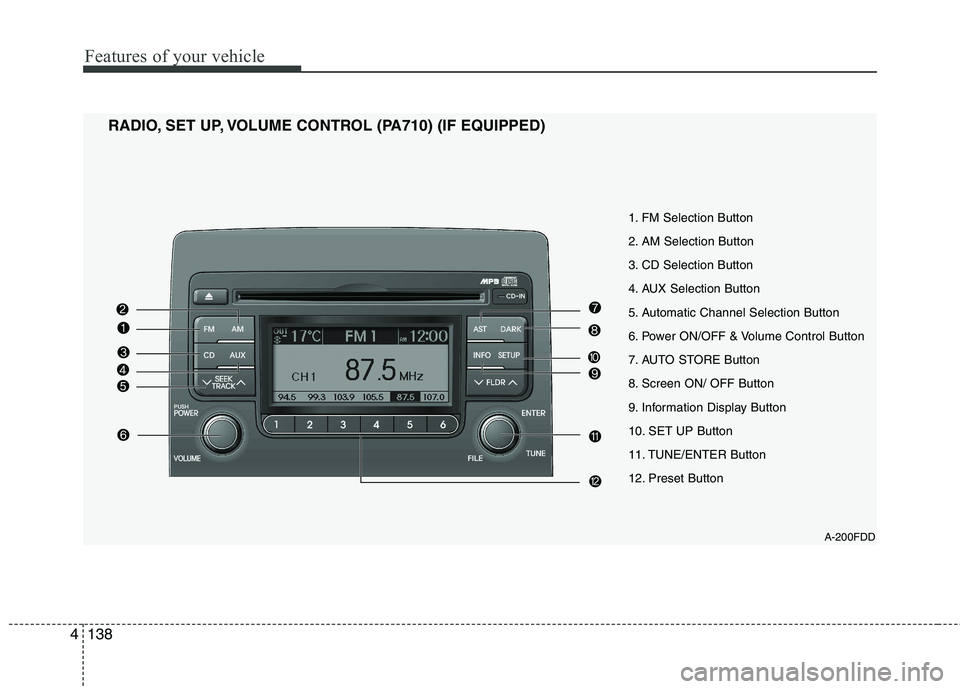
Features of your vehicle
138
4
1. FM Selection Button
2. AM Selection Button
3. CD Selection Button
4. AUX Selection Button
5. Automatic Channel Selection Button
6. Power ON/OFF & Volume Control Button
7. AUTO STORE Button
8. Screen ON/ OFF Button
9. Information Display Button
10. SET UP Button
11. TUNE/ENTER Button
12. Preset Button
RADIO, SET UP, VOLUME CONTROL (PA710) (IF EQUIPPED)
A-200FDD