reverse HYUNDAI I30 2015 Service Manual
[x] Cancel search | Manufacturer: HYUNDAI, Model Year: 2015, Model line: I30, Model: HYUNDAI I30 2015Pages: 635, PDF Size: 40.66 MB
Page 488 of 635
Features of your vehicle
16
4
D080103AUN
Auto up/down window (if equipped)
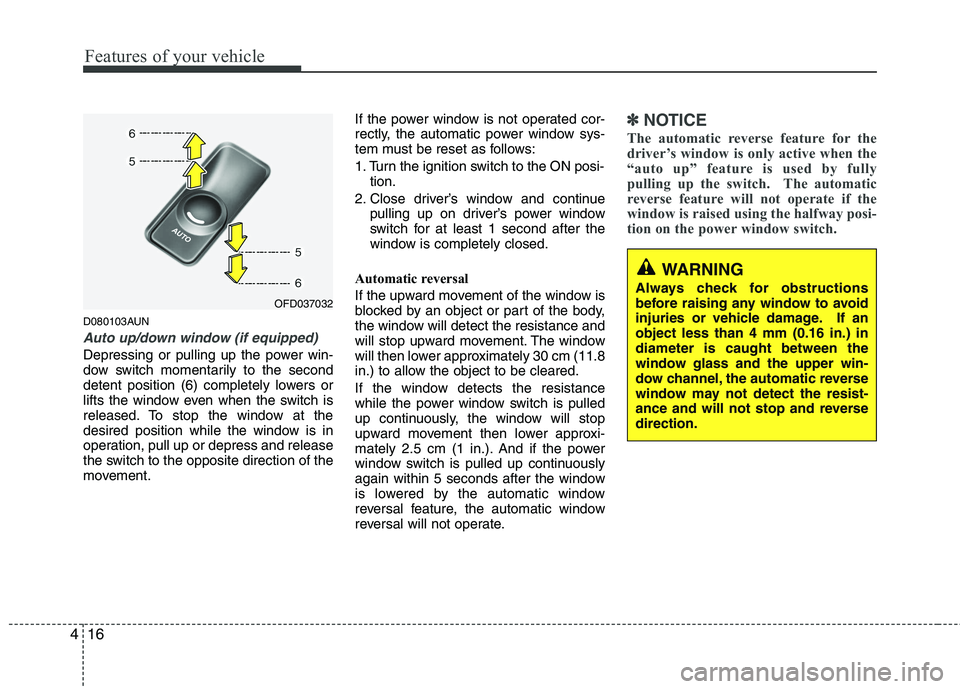
Depressing or pulling up the power win-
dow switch momentarily to the second
detent position (6) completely lowers or
lifts the window even when the switch is
released. To stop the window at the
desired position while the window is in
operation, pull up or depress and release
the switch to the opposite direction of the
movement. If the power window is not operated cor-
rectly, the automatic power window sys-
tem must be reset as follows:
1. Turn the ignition switch to the ON posi-
tion.
2. Close driver’s window and continue pulling up on driver’s power window
switch for at least 1 second after the
window is completely closed.
Automatic reversal
If the upward movement of the window is
blocked by an object or part of the body,
the window will detect the resistance and
will stop upward movement. The window
will then lower approximately 30 cm (11.8
in.) to allow the object to be cleared.
If the window detects the resistance
while the power window switch is pulled
up continuously, the window will stop
upward movement then lower approxi-
mately 2.5 cm (1 in.). And if the power
window switch is pulled up continuously
again within 5 seconds after the window
is lowered by the automatic window
reversal feature, the automatic window
reversal will not operate.
✽✽ NOTICE
The automatic reverse feature for the
driver’s window is only active when the
“auto up” feature is used by fully
pulling up the switch. The automatic
reverse feature will not operate if the
window is raised using the halfway posi-
tion on the power window switch.
WARNING
Always check for obstructions
before raising any window to avoid
injuries or vehicle damage. If anobject less than 4 mm (0.16 in.) indiameter is caught between the
window glass and the upper win-
dow channel, the automatic reverse
window may not detect the resist-
ance and will not stop and reversedirection.
OFD037032
Page 497 of 635
425
Features of your vehicle
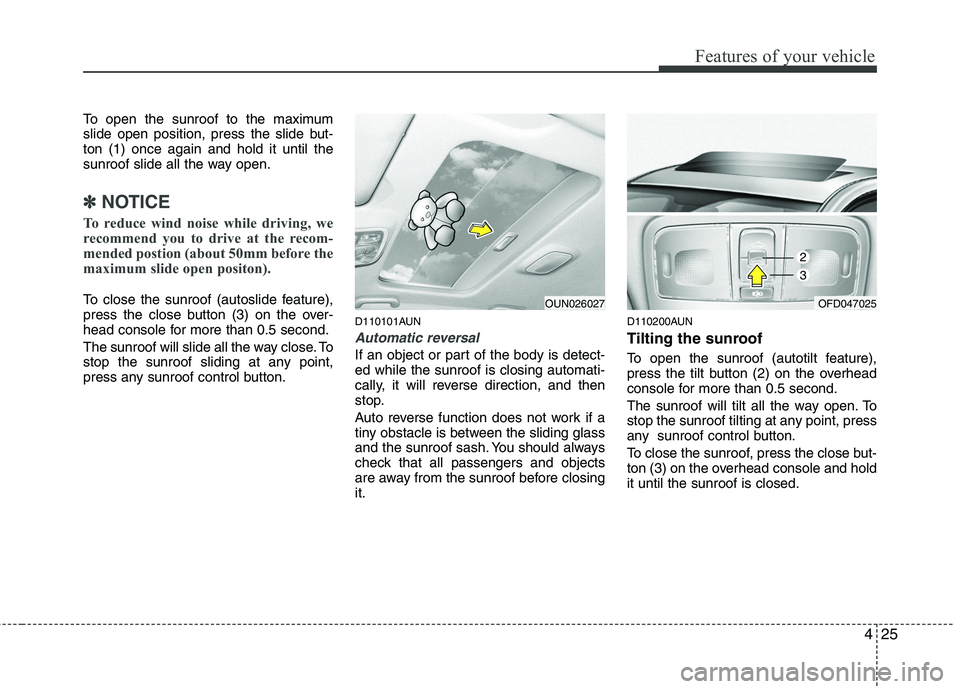
To open the sunroof to the maximum
slide open position, press the slide but-ton (1) once again and hold it until the
sunroof slide all the way open.
✽✽NOTICE
To reduce wind noise while driving, we
recommend you to drive at the recom-
mended postion (about 50mm before the
maximum slide open positon).
To close the sunroof (autoslide feature),
press the close button (3) on the over-
head console for more than 0.5 second.
The sunroof will slide all the way close. To
stop the sunroof sliding at any point,
press any sunroof control button. D110101AUN
Automatic reversal
If an object or part of the body is detect- ed while the sunroof is closing automati-
cally, it will reverse direction, and then
stop.
Auto reverse function does not work if a
tiny obstacle is between the sliding glass
and the sunroof sash. You should always
check that all passengers and objects
are away from the sunroof before closingit.D110200AUN
Tilting the sunroof
To open the sunroof (autotilt feature),
press the tilt button (2) on the overhead
console for more than 0.5 second.
The sunroof will tilt all the way open. To
stop the sunroof tilting at any point, press
any sunroof control button.
To close the sunroof, press the close but-
ton (3) on the overhead console and holdit until the sunroof is closed.
OFD047025OUN026027
2
3
Page 503 of 635
431
Features of your vehicle
D140100AUN
Inside rearview mirror
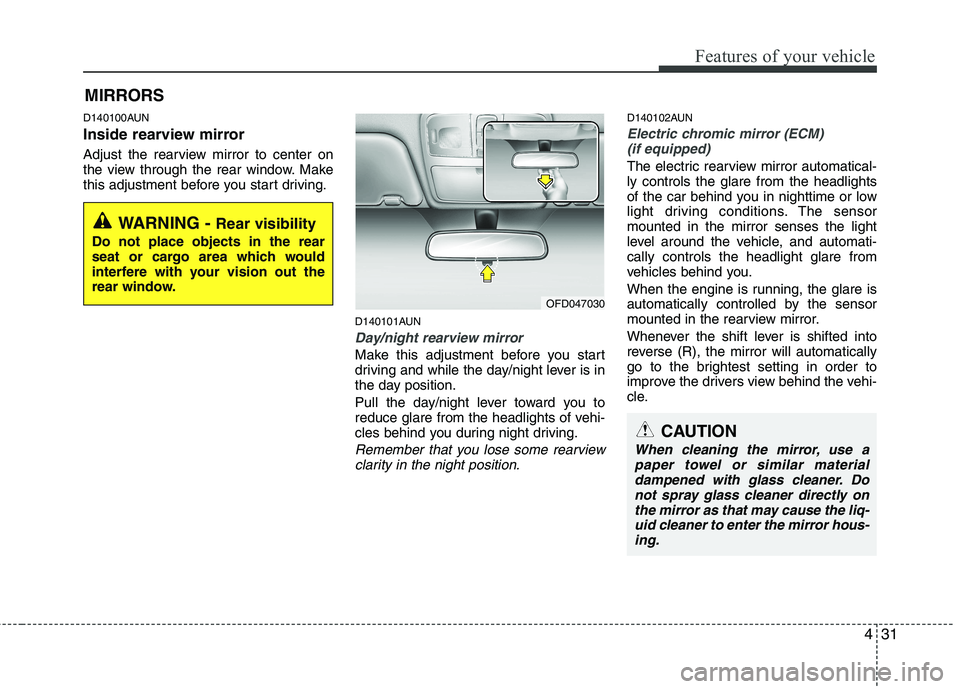
Adjust the rearview mirror to center on
the view through the rear window. Make
this adjustment before you start driving.D140101AUN
Day/night rearview mirror
Make this adjustment before you start
driving and while the day/night lever is in
the day position.
Pull the day/night lever toward you to
reduce glare from the headlights of vehi-
cles behind you during night driving.
Remember that you lose some rearviewclarity in the night position.
D140102AUN
Electric chromic mirror (ECM)(if equipped)
The electric rearview mirror automatical- ly controls the glare from the headlights
of the car behind you in nighttime or low
light driving conditions. The sensormounted in the mirror senses the light
level around the vehicle, and automati-cally controls the headlight glare from
vehicles behind you.
When the engine is running, the glare is
automatically controlled by the sensor
mounted in the rearview mirror.
Whenever the shift lever is shifted into
reverse (R), the mirror will automatically
go to the brightest setting in order to
improve the drivers view behind the vehi-
cle.
MIRRORS
WARNING -
Rear visibility
Do not place objects in the rear
seat or cargo area which would
interfere with your vision out the
rear window.
OFD047030
CAUTION
When cleaning the mirror, use a paper towel or similar materialdampened with glass cleaner. Do not spray glass cleaner directly on
the mirror as that may cause the liq- uid cleaner to enter the mirror hous-ing.
Page 525 of 635
453
Features of your vehicle
✽✽NOTICE
This system can only sense objects with-
in the range and location of the sensors;
It can not detect objects in other areas
where sensors are not installed. Also,
small or slim objects, such as poles or
objects located between sensors may not
be detected by the sensors.
Always visually check behind the vehi-
cle when backing up.
Be sure to inform any drivers of the
vehicle that may be unfamiliar with the
system regarding the systems capabili-
ties and limitations.D170400AFD
Self-diagnosis
If you don’t hear an audible warning
sound or if the buzzer sounds intermit-tently when shifting the gear to the R
(Reverse) position, this may indicate a
malfunction in the rear parking assist sys-
tem. If this occurs, have your vehicle
checked by an authorized HYUNDAI
dealer as soon as possible.
D180000AUN
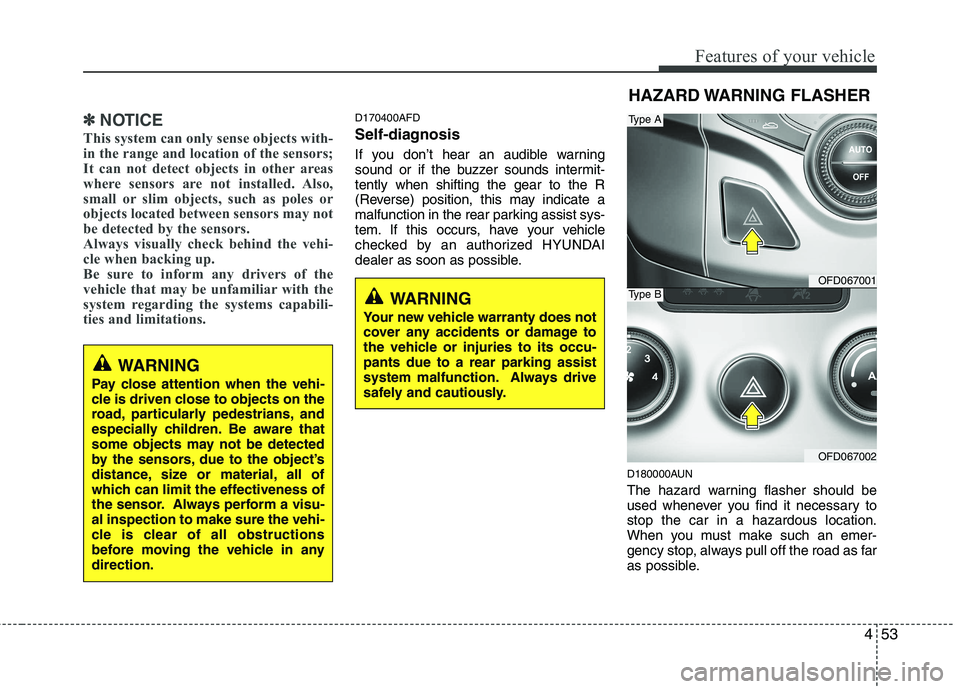
The hazard warning flasher should be
used whenever you find it necessary tostop the car in a hazardous location.
When you must make such an emer-
gency stop, always pull off the road as far
as possible.
WARNING
Pay close attention when the vehi-
cle is driven close to objects on the
road, particularly pedestrians, and
especially children. Be aware that
some objects may not be detected
by the sensors, due to the object’s
distance, size or material, all of
which can limit the effectiveness of
the sensor. Always perform a visu-al inspection to make sure the vehi-
cle is clear of all obstructions
before moving the vehicle in anydirection.
WARNING
Your new vehicle warranty does not
cover any accidents or damage to
the vehicle or injuries to its occu-pants due to a rear parking assist
system malfunction. Always drive
safely and cautiously.
OFD067001
OFD067002
Type A
Type B
HAZARD WARNING FLASHER
Page 573 of 635
4101
Features of your vehicle
D290300AFD
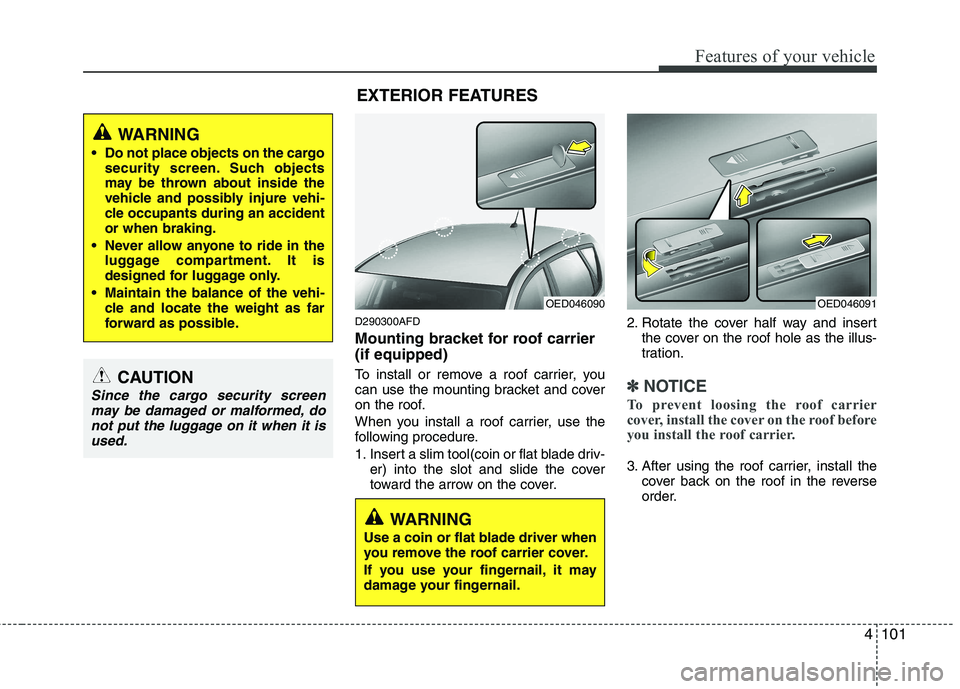
Mounting bracket for roof carrier (if equipped)
To install or remove a roof carrier, you
can use the mounting bracket and cover
on the roof.
When you install a roof carrier, use the
following procedure.
1. Insert a slim tool(coin or flat blade driv-er) into the slot and slide the cover
toward the arrow on the cover. 2. Rotate the cover half way and insert
the cover on the roof hole as the illus-
tration.
✽✽ NOTICE
To prevent loosing the roof carrier
cover, install the cover on the roof before
you install the roof carrier.
3. After using the roof carrier, install the cover back on the roof in the reverse
order.
OED046090OED046091
WARNING
Use a coin or flat blade driver when
you remove the roof carrier cover.
If you use your fingernail, it may
damage your fingernail.
WARNING
Do not place objects on the cargo security screen. Such objects
may be thrown about inside the
vehicle and possibly injure vehi-
cle occupants during an accidentor when braking.
Never allow anyone to ride in the luggage compartment. It is
designed for luggage only.
Maintain the balance of the vehi- cle and locate the weight as far
forward as possible.
CAUTION
Since the cargo security screen
may be damaged or malformed, do
not put the luggage on it when it isused.
EXTERIOR FEATURES
Page 583 of 635
4111
Features of your vehicle
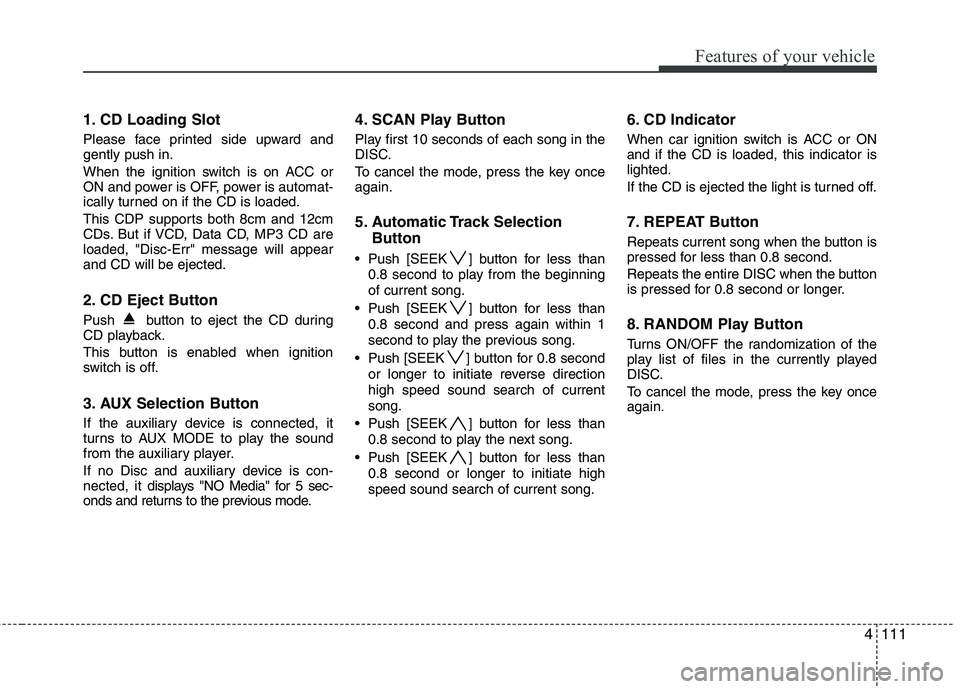
1. CD Loading Slot
Please face printed side upward and gently push in.
When the ignition switch is on ACC or
ON and power is OFF, power is automat-
ically turned on if the CD is loaded.
This CDP supports both 8cm and 12cm
CDs. But if VCD, Data CD, MP3 CD areloaded, "Disc-Err" message will appearand CD will be ejected.
2. CD Eject Button
Push button to eject the CD during
CD playback.
This button is enabled when ignition
switch is off.
3. AUX Selection Button
If the auxiliary device is connected, it
turns to AUX MODE to play the sound
from the auxiliary player.
If no Disc and auxiliary device is con- nected, it displays "NO Media" for 5 sec-
onds and returns to the previous mode. 4. SCAN Play Button
Play first 10 seconds of each song in the
DISC.
To cancel the mode, press the key once again.
5. Automatic Track Selection
Button
Push [SEEK ] button for less than 0.8 second to play from the beginning of current song.
Push [SEEK ] button for less than 0.8 second and press again within 1
second to play the previous song.
Push [SEEK ] button for 0.8 second or longer to initiate reverse directionhigh speed sound search of currentsong.
Push [SEEK ] button for less than 0.8 second to play the next song.
Push [SEEK ] button for less than 0.8 second or longer to initiate highspeed sound search of current song. 6. CD Indicator
When car ignition switch is ACC or ON and if the CD is loaded, this indicator islighted.
If the CD is ejected the light is turned off.
7. REPEAT Button
Repeats current song when the button is
pressed for less than 0.8 second.
Repeats the entire DISC when the button
is pressed for 0.8 second or longer.
8. RANDOM Play Button
Turns ON/OFF the randomization of the
play list of files in the currently played
DISC.
To cancel the mode, press the key once again.
Page 588 of 635
Features of your vehicle
116
4
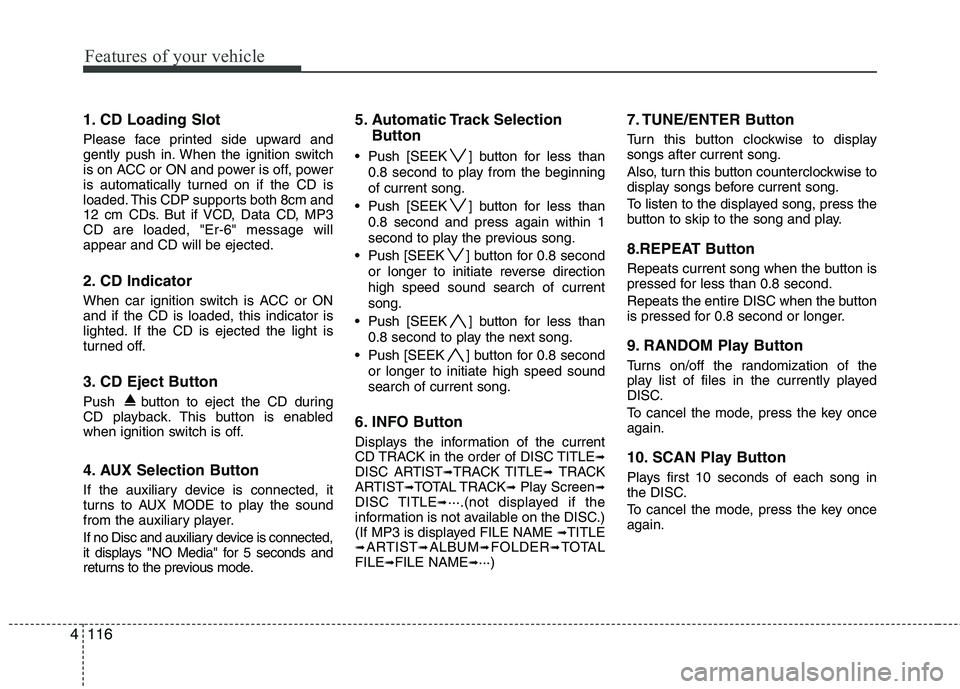
1. CD Loading Slot
Please face printed side upward and
gently push in. When the ignition switch
is on ACC or ON and power is off, power
is automatically turned on if the CD is
loaded. This CDP supports both 8cm and
12 cm CDs. But if VCD, Data CD, MP3CD are loaded, "Er-6" message willappear and CD will be ejected.
2. CD Indicator
When car ignition switch is ACC or ON and if the CD is loaded, this indicator is
lighted. If the CD is ejected the light is
turned off.
3. CD Eject Button
Push button to eject the CD during
CD playback. This button is enabled
when ignition switch is off.
4. AUX Selection Button
If the auxiliary device is connected, it
turns to AUX MODE to play the sound
from the auxiliary player.
If no Disc and auxiliary device is connected,
it displays "NO Media" for 5 seconds and
returns to the previous mode. 5. Automatic Track Selection
Button
Push [SEEK ] button for less than 0.8 second to play from the beginning of current song.
Push [SEEK ] button for less than 0.8 second and press again within 1
second to play the previous song.
Push [SEEK ] button for 0.8 second or longer to initiate reverse directionhigh speed sound search of currentsong.
Push [SEEK ] button for less than 0.8 second to play the next song.
Push [SEEK ] button for 0.8 second or longer to initiate high speed soundsearch of current song.
6. INFO Button
Displays the information of the current
CD TRACK in the order of DISC TITLE ➟
DISC ARTIST ➟TRACK TITLE ➟ TRACK
ARTIST ➟TOTAL TRACK ➟Play Screen ➟
DISC TITLE ➟···.(not displayed if the
information is not available on the DISC.)
(If MP3 is displayed FILE NAME ➟TITLE
➟ ARTIST ➟ALBUM ➟FOLDER ➟TOTAL
FILE ➟FILE NAME ➟···) 7. TUNE/ENTER Button
Turn this button clockwise to display songs after current song.
Also, turn this button counterclockwise to
display songs before current song.
To listen to the displayed song, press the
button to skip to the song and play.
8.REPEAT Button
Repeats current song when the button is
pressed for less than 0.8 second.
Repeats the entire DISC when the button
is pressed for 0.8 second or longer.
9. RANDOM Play Button
Turns on/off the randomization of the
play list of files in the currently played
DISC.
To cancel the mode, press the key once again.
10. SCAN Play Button
Plays first 10 seconds of each song in
the DISC.
To cancel the mode, press the key once again.
Page 591 of 635
4119
Features of your vehicle
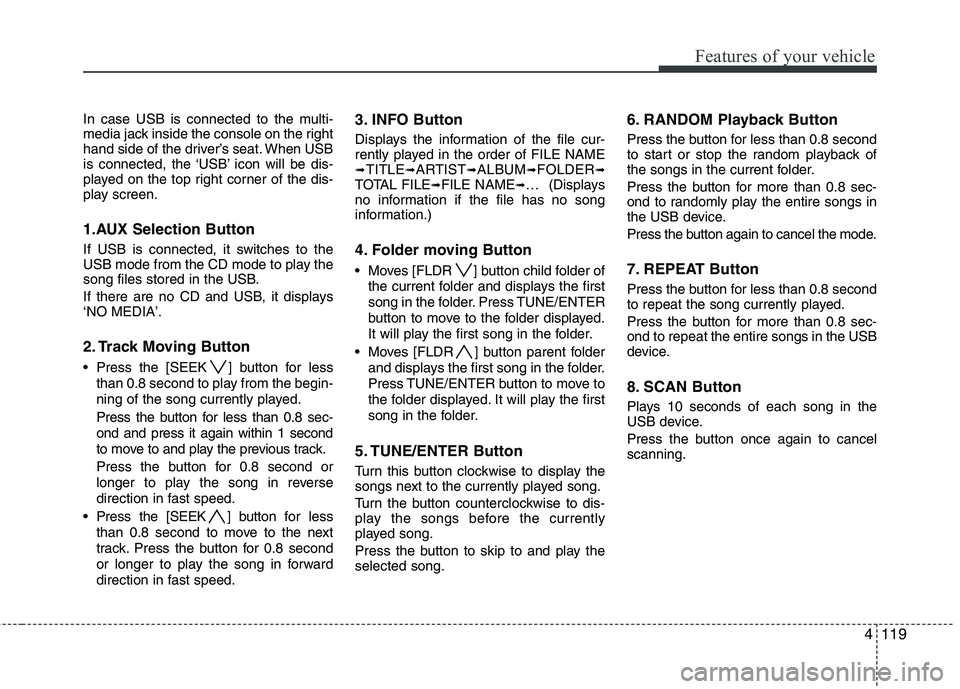
In case USB is connected to the multi-
media jack inside the console on the right
hand side of the driver’s seat. When USB
is connected, the ‘USB’ icon will be dis-
played on the top right corner of the dis-
play screen.
1.AUX Selection Button
If USB is connected, it switches to the
USB mode from the CD mode to play the
song files stored in the USB.
If there are no CD and USB, it displays ‘NO MEDIA’.
2. Track Moving Button
Press the [SEEK ] button for lessthan 0.8 second to play from the begin-
ning of the song currently played.
Press the button for less than 0.8 sec-
ond and press it again within 1 second
to move to and play the previous track.
Press the button for 0.8 second or
longer to play the song in reverse
direction in fast speed.
Press the [SEEK ] button for less
than 0.8 second to move to the next
track. Press the button for 0.8 second
or longer to play the song in forward
direction in fast speed. 3. INFO Button
Displays the information of the file cur-
rently played in the order of FILE NAME➟
TITLE ➟ARTIST ➟ALBUM ➟FOLDER ➟
TOTAL FILE ➟FILE NAME ➟… (Displays
no information if the file has no song
information.)
4. Folder moving Button
Moves [FLDR ] button child folder of
the current folder and displays the first
song in the folder. Press TUNE/ENTER
button to move to the folder displayed.
It will play the first song in the folder.
Moves [FLDR ] button parent folder and displays the first song in the folder.
Press TUNE/ENTER button to move to
the folder displayed. It will play the first
song in the folder.
5. TUNE/ENTER Button
Turn this button clockwise to display the
songs next to the currently played song.
Turn the button counterclockwise to dis-
play the songs before the currently
played song.
Press the button to skip to and play the selected song. 6. RANDOM Playback Button
Press the button for less than 0.8 second
to start or stop the random playback of
the songs in the current folder.
Press the button for more than 0.8 sec-
ond to randomly play the entire songs in
the USB device.
Press the button again to cancel the mode.
7. REPEAT Button
Press the button for less than 0.8 second
to repeat the song currently played.
Press the button for more than 0.8 sec-
ond to repeat the entire songs in the USB
device.
8. SCAN Button
Plays 10 seconds of each song in the
USB device.
Press the button once again to cancel scanning.
Page 595 of 635
4123
Features of your vehicle
In case the iPod exclusive cable is con-
nected to the multimedia jack inside the
console on the right hand side of the dri-
ver’s seat. When the iPod is connected,
the ‘iPod’ icon will be displayed on the top
right corner of the display screen.
1. iPod Selection Button
If iPod is connected, it switches to the
iPod mode from the CD mode to play the
song files stored in the iPod.
If there are no CD and AUX, it displays ‘NO MEDIA’.
2. Track Moving Button
Press the [SEEK ] button for less
than 0.8 second to play from the begin-
ning of the song currently played.
Press the button for less than 0.8 sec-
ond and press it again within 1 second
to move to and play the previous track.
Press the button for 0.8 second or
longer to play the song in reverse
direction in fast speed. Press the [SEEK ] button for
less
than 0.8 second to move to the next
track.
Press the button for 0.8 second or
longer to play the song in forward
direction in fast speed.
3. INFO Button
Displays the information of the file cur-
rently played in the order of FILE NAME ➟ TITLE ➟ARTIST ➟ALBUM ➟FILE
NAME ➟…
(Displays no information if the file has no
song information.)
4. Category Selection Button
Moves to the upper category from cur-
rently played category of the iPod.
You will be able to search through the
lower category of the selected category.
The order of iPod’s category is SONG,
ALBUMS, ARTISTS, GENRES, and
iPod. (Refer to the iPod user’s manual for
more information) 5. TUNE/ENTER Button
When you turn the button clockwise, it
will display the songs (category) next to
the song currently played (category in
the same level).
Also, when you turn the button counter-
clockwise, it will display the songs (cate-
gory) before the song currently played
(category in the same level).
If you want to listen to the song displayed
in the song category, press the button,then it will skip to the selected song and
play.
6. RANDOM Playback Button
Press the button for less than 0.8 second
to activate or deactivate the random play-
back of the songs within the current cat-
egory.
Press the button for longer than 0.8 sec-
ond to randomly play all songs in the
entire album of the iPod.
Press the button once again to cancel the
mode.
7. REPEAT Button
Repeats the song currently played.
Page 601 of 635
4129
Features of your vehicle
1. CD Loading Slot
Please face printed side upward and
gently push in. When the ignition switch
is on ACC or ON and power is off, power
is automatically turned on if the CD is
loaded. This CDP supports both 8cm and
12 cm CDs. But if VCD, Data CD, areloaded, "Er-6" message will appear andCD will be ejected.
2. CD Indicator
CD is loaded, this slot icon is displayed.
If the CD is ejected the slot icon is display
off.
3. CD Eject Button
Pressing the button for less than 0.8second will eject 1 disc while pressing
for 0.8 second ~ 3 seconds will eject all
discs.
Pressing the button for over 5 seconds will eject all discs by force. (EMER-GENCY EJECT) 4. CD LOAD Button
Push [LOAD] button to load CDs to avail-
able CDC deck (from 1~6). Push [LOAD]
button for more than 2 seconds to load
into all available decks.
The last CD will play. 10 seconds idle sta-
tus will disable loading process.
5. AUX Selection Button
If the auxiliary device is connected, it
turns to AUX MODE to play the sound
from the auxiliary player.
If no auxiliary device is connected, it dis-
plays "NO CONNECT" for 3 seconds and
returns to the previous mode.
6. Automatic Track Selection
Button
Push [SEEK ] button for less than 0.8 second to play from the beginning of current song.
Push [SEEK ] button for less than 0.8 second and press again within 1
second to play the previous song.
Push [SEEK ] button for 0.8 second or longer to initiate reverse directionhigh speed sound search of currentsong.
Push [SEEK ] button for less than 0.8 second to play the next song. Push [SEEK ] button for 0.8 second
or longer to initiate high speed soundsearch of current song.
7. INFO Button
Displays the information of the current CD
TRACK in the order of DISC TITLE ➟
DISC ARTIST ➟TRACK TITLE ➟TRACK
ARTIST ➟TOTAL TRACK ➟Play Screen ➟
DISC TITLE ➟···.(not displayed if the infor-
mation is not available on the DISC.)
(If MP3 is displayed FILE NAME ➟TITLE
➟ ARTIST ➟ALBUM ➟FOLDER ➟TOTAL
FILE ➟FILE NAME ➟···)
8. TUNE/ENTER Button
Turn this button clockwise to display songs after current song.
Also, turn this button counterclockwise to
display songs before current song.
To listen to the displayed song, press the
button to skip to the song and play.
9. REPEAT Button
Repeats current song when the button is
pressed for less than 0.8 second.
Repeats the entire DISC when the button
is pressed for 0.8 second or longer.