instrument cluster HYUNDAI I30 2016 Owner's Manual
[x] Cancel search | Manufacturer: HYUNDAI, Model Year: 2016, Model line: I30, Model: HYUNDAI I30 2016Pages: 659, PDF Size: 17.14 MB
Page 419 of 659
5-115
Driving your vehicle
5
LDWS operation
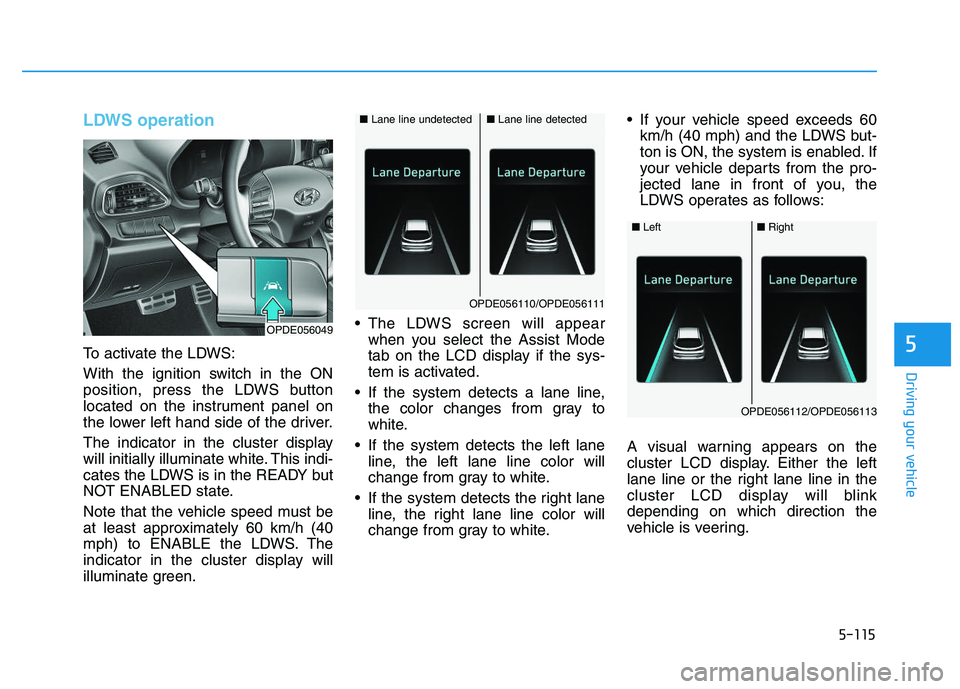
To activate the LDWS:
With the ignition switch in the ON
position, press the LDWS button
located on the instrument panel on
the lower left hand side of the driver.
The indicator in the cluster display
will initially illuminate white. This indi-
cates the LDWS is in the READY but
NOT ENABLED state.
Note that the vehicle speed must be
at least approximately 60 km/h (40
mph) to ENABLE the LDWS. The
indicator in the cluster display will
illuminate green. The LDWS screen will appear
when you select the Assist Mode
tab on the LCD display if the sys-
tem is activated.
If the system detects a lane line, the color changes from gray to
white.
If the system detects the left lane line, the left lane line color will
change from gray to white.
If the system detects the right lane line, the right lane line color will
change from gray to white. If your vehicle speed exceeds 60
km/h (40 mph) and the LDWS but-
ton is ON, the system is enabled. If
your vehicle departs from the pro-
jected lane in front of you, the
LDWS operates as follows:
A visual warning appears on the
cluster LCD display. Either the left
lane line or the right lane line in the
cluster LCD display will blink
depending on which direction the
vehicle is veering.
■ Lane line detected■Lane line undetected
OPDE056110/OPDE056111
OPDE056049
■Left■Right
OPDE056112/OPDE056113
Page 426 of 659
5-122
Driving your vehicle
Speed Limit Control operation
You can set the speed limit when you
do not want to drive over a specific
speed.
If you drive over the preset speed
limit, the warning system operates
(set speed limit will blink and chime
will sound) until the vehicle speed
returns within the speed limit.
Information
While speed limit control is in opera-
tion, the cruise control system cannot
be activated.
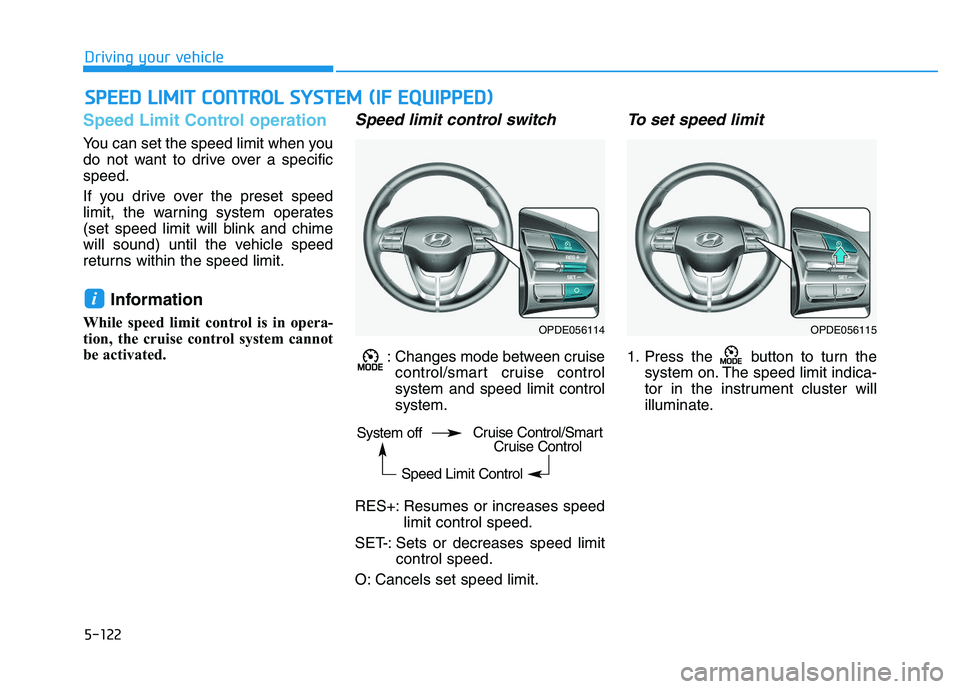
Speed limit control switch
: Changes mode between cruisecontrol/smart cruise control
system and speed limit control
system.
RES+: Resumes or increases speed limit control speed.
SET-: Sets or decreases speed limit control speed.
O: Cancels set speed limit.
To set speed limit
1. Press the button to turn the system on. The speed limit indica-
tor in the instrument cluster will
illuminate.
i
S
S P
P E
E E
E D
D
L
L I
I M
M I
I T
T
C
C O
O N
N T
T R
R O
O L
L
S
S Y
Y S
S T
T E
E M
M
(
( I
I F
F
E
E Q
Q U
U I
I P
P P
P E
E D
D )
)
OPDE056114OPDE056115
System off
Speed Limit ControlCruise Control/SmartCruise Control
Page 427 of 659
5-123
Driving your vehicle
5
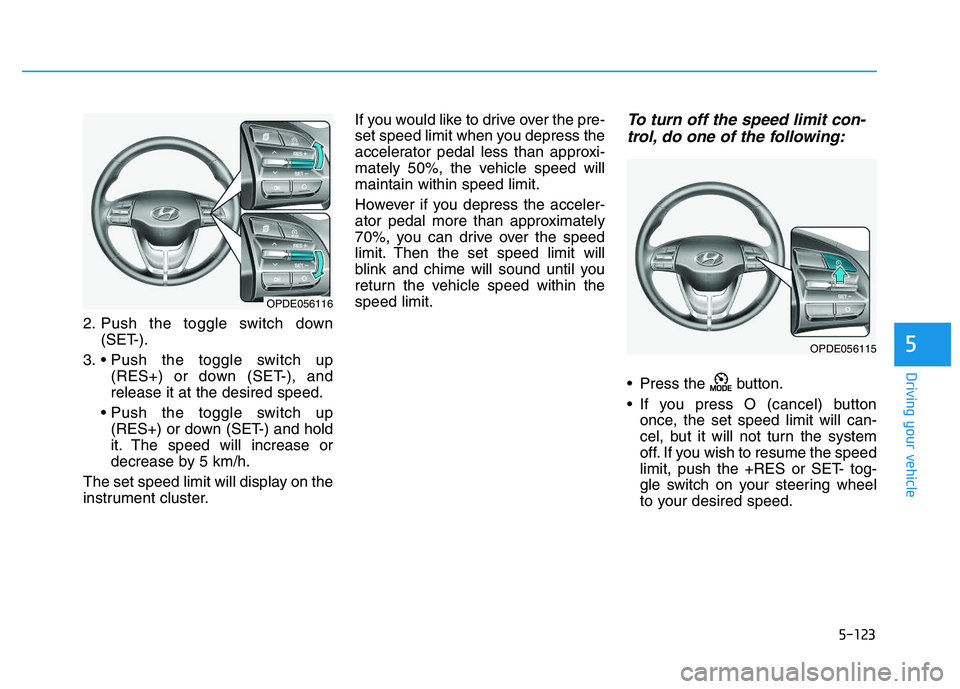
2. Push the toggle switch down(SET-).
3. (RES+) or down (SET-), and
release it at the desired speed.
(RES+) or down (SET-) and hold
it. The speed will increase or
decrease by 5 km/h.
The set speed limit will display on the
instrument cluster. If you would like to drive over the pre-
set speed limit when you depress the
accelerator pedal less than approxi-
mately 50%, the vehicle speed will
maintain within speed limit.
However if you depress the acceler-
ator pedal more than approximately
70%, you can drive over the speed
limit. Then the set speed limit will
blink and chime will sound until you
return the vehicle speed within the
speed limit.
To turn off the speed limit con-
trol, do one of the following:
Press the button.
If you press O (cancel) button
once, the set speed limit will can-
cel, but it will not turn the system
off. If you wish to resume the speed
limit, push the +RES or SET- tog-
gle switch on your steering wheel
to your desired speed.
OPDE056116
OPDE056115
Page 428 of 659
5-124
Driving your vehicle
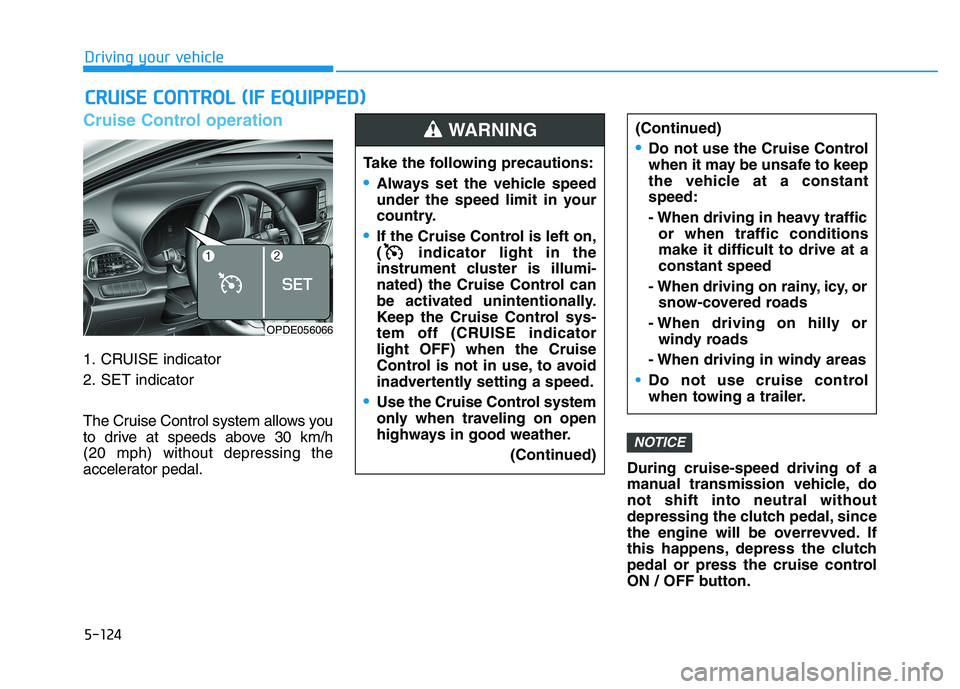
Cruise Control operation
1. CRUISE indicator
2. SET indicator
The Cruise Control system allows you
to drive at speeds above 30 km/h
(20 mph) without depressing the
accelerator pedal.During cruise-speed driving of a
manual transmission vehicle, do
not shift into neutral without
depressing the clutch pedal, since
the engine will be overrevved. If
this happens, depress the clutch
pedal or press the cruise control
ON / OFF button.
NOTICE
C
C R
R U
U I
I S
S E
E
C
C O
O N
N T
T R
R O
O L
L
(
( I
I F
F
E
E Q
Q U
U I
I P
P P
P E
E D
D )
)
Take the following precautions:
Always set the vehicle speed
under the speed limit in your
country.
If the Cruise Control is left on,
( indicator light in the
instrument cluster is illumi-
nated) the Cruise Control can
be activated unintentionally.
Keep the Cruise Control sys-
tem off (CRUISE indicator
light OFF) when the Cruise
Control is not in use, to avoid
inadvertently setting a speed.
Use the Cruise Control system
only when traveling on open
highways in good weather.
(Continued)
(Continued)
Do not use the Cruise Control
when it may be unsafe to keep
the vehicle at a constant
speed:
- When driving in heavy trafficor when traffic conditions
make it difficult to drive at a
constant speed
- When driving on rainy, icy, or snow-covered roads
- When driving on hilly or windy roads
- When driving in windy areas
Do not use cruise control
when towing a trailer.
WARNING
OPDE056066
Page 479 of 659
6-9
What to do in an emergency
6
The displayed tire pressure valuesmay differ from those measured
with a tire pressure gauge.
You can change the tire pressure unit in the User Settings mode on
the instrument cluster.
- psi, kpa, bar (Refer to "LCD
Modes" in chapter 3).Tire pressure monitoring sys-
tem
Each tire, including the spare (if pro-
vided), should be checked monthly
when cold and inflated to the inflation
pressure recommended by the vehi-
cle manufacturer on the vehicle plac-
ard or tire inflation pressure label. (If
your vehicle has tires of a different
size than the size indicated on the
vehicle placard or tire inflation pres-
sure label, you should determine the
proper tire inflation pressure for
those tires.) As an added safety feature, your
vehicle has been equipped with a tire
pressure monitoring system (TPMS)
that illuminates a low tire pressure
telltale when one or more of your
tires is significantly under-inflated.
Accordingly, when the low tire pres-
sure telltale illuminates, you should
stop and check your tires as soon as
possible, and inflate them to the
proper pressure. Driving on a signifi-
cantly under-inflated tire causes the
tire to overheat and can lead to tire
failure. Under-inflation also reduces
fuel efficiency and tire tread life, and
may affect the vehicle’s handling and
stopping ability.
Please note that the TPMS is not a
substitute for proper tire mainte-
nance, and it is the driver’s responsi-
bility to maintain correct tire pres-
sure, even if under-inflation has not
reached the level to trigger illumina-
tion of the TPMS low tire pressure
telltale.
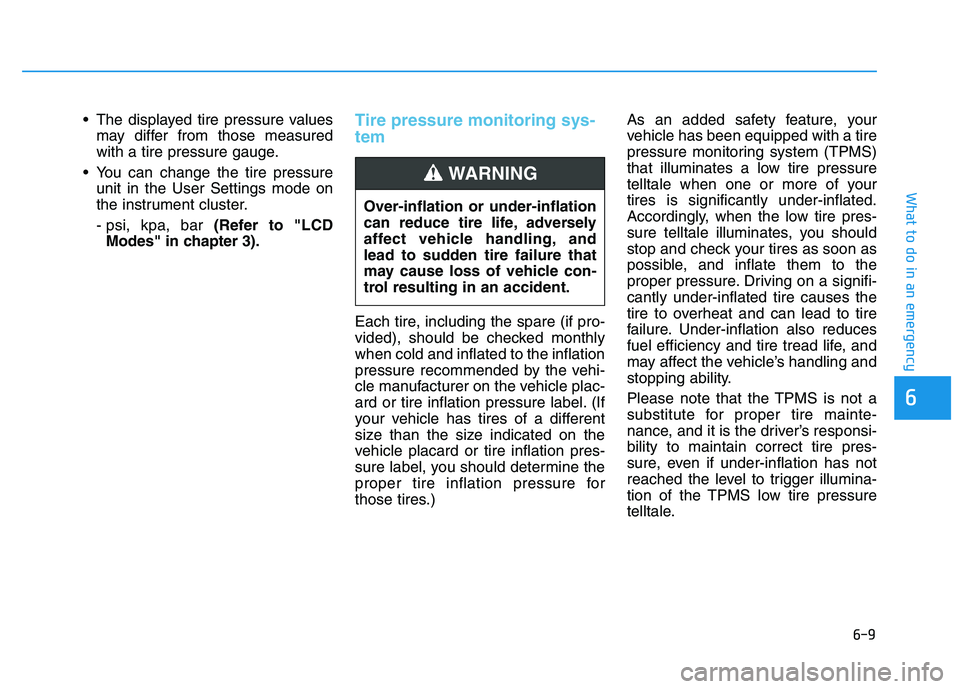
Over-inflation or under-inflation
can reduce tire life, adversely
affect vehicle handling, and
lead to sudden tire failure that
may cause loss of vehicle con-
trol resulting in an accident.
WARNING
Page 581 of 659
7-68
Maintenance
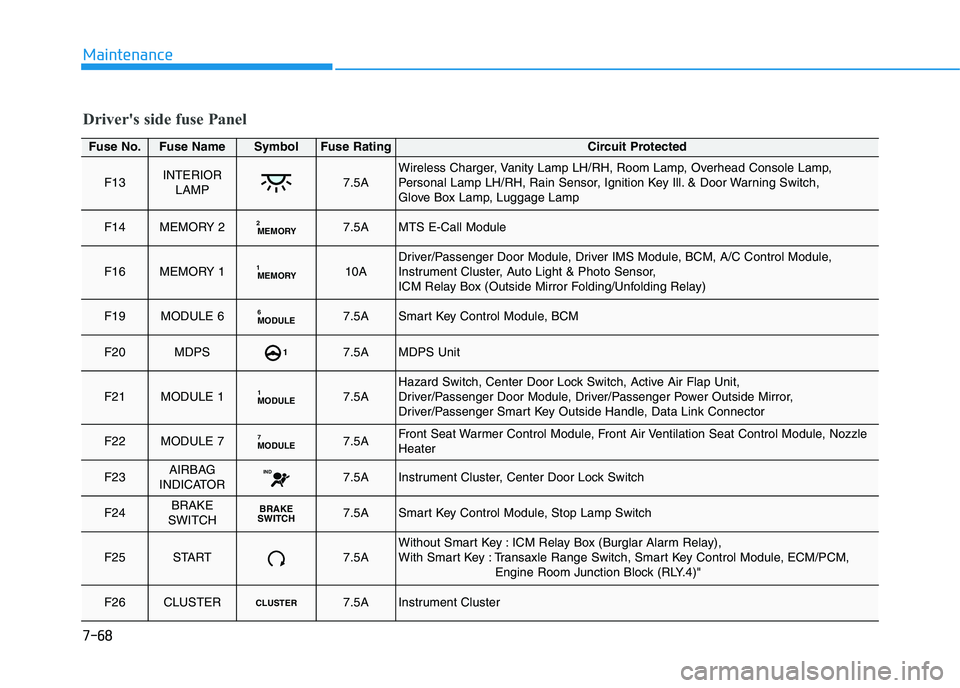
Driver's side fuse Panel
Fuse No.Fuse NameSymbolFuse RatingCircuit Protected
F13INTERIORLAMP7.5AWireless Charger, Vanity Lamp LH/RH, Room Lamp, Overhead Console Lamp,
Personal Lamp LH/RH, Rain Sensor, Ignition Key Ill. & Door Warning Switch,
Glove Box Lamp, Luggage Lamp
F14MEMORY 2MEMORY27.5AMTS E-Call Module
F16MEMORY 1MEMORY110ADriver/Passenger Door Module, Driver IMS Module, BCM, A/C Control Module,
Instrument Cluster, Auto Light & Photo Sensor,
ICM Relay Box (Outside Mirror Folding/Unfolding Relay)
F19MODULE 6 MODULE67.5ASmart Key Control Module, BCM
F20MDPS17.5AMDPS Unit
F21MODULE 1MODULE17.5AHazard Switch, Center Door Lock Switch, Active Air Flap Unit,
Driver/Passenger Door Module, Driver/Passenger Power Outside Mirror,
Driver/Passenger Smart Key Outside Handle, Data Link Connector
F22MODULE 7MODULE77.5AFront Seat Warmer Control Module, Front Air Ventilation Seat Control Module, Nozzle
Heater
F23AIRBAG
INDICATORIND7.5AInstrument Cluster, Center Door Lock Switch
F24BRAKE
SWITCHBRAKE
S WITCH7.5ASmart Key Control Module, Stop Lamp Switch
F25START7.5AWithout Smart Key : ICM Relay Box (Burglar Alarm Relay),
With Smart Key : Transaxle Range Switch, Smart Key Control Module, ECM/PCM,
Engine Room Junction Block (RLY.4)"
F26CLUSTERCLUSTER7.5AInstrument Cluster