warning HYUNDAI I30 2017 Workshop Manual
[x] Cancel search | Manufacturer: HYUNDAI, Model Year: 2017, Model line: I30, Model: HYUNDAI I30 2017Pages: 659, PDF Size: 17.14 MB
Page 88 of 659
3-86
The high beam switches to low beam
in the below conditions.
- When the Smart High Beam is off.
- When the light switch is not in theAUTO position.
- When the headlamp is detected from the on-coming vehicle.
- When the tail lamp is detected from the front vehicle.
- When the surrounding is bright enough high beams are not needed.
- When streetlights or other lights are detected.
- When vehicle speed is below 35km/h (15mph).Warning light and message
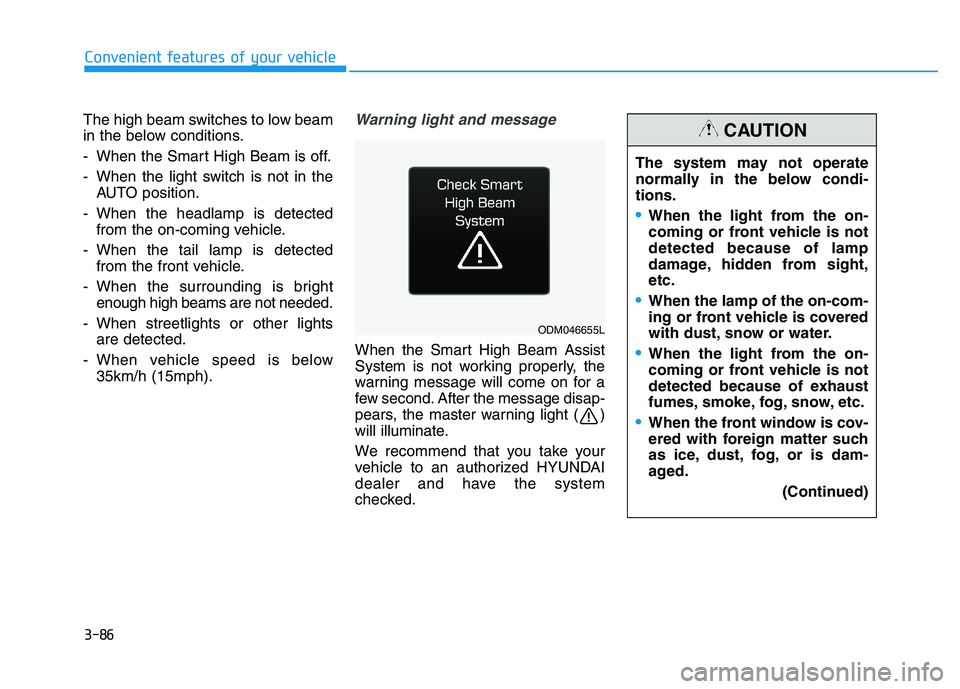
When the Smart High Beam Assist
System is not working properly, the
warning message will come on for a
few second. After the message disap-
pears, the master warning light ( )
will illuminate.
We recommend that you take your
vehicle to an authorized HYUNDAI
dealer and have the system
checked.
Convenient features of your vehicle
ODM046655L
The system may not operate
normally in the below condi-
tions.
When the light from the on-
coming or front vehicle is not
detected because of lamp
damage, hidden from sight,
etc.
When the lamp of the on-com-
ing or front vehicle is covered
with dust, snow or water.
When the light from the on-
coming or front vehicle is not
detected because of exhaust
fumes, smoke, fog, snow, etc.
When the front window is cov-
ered with foreign matter such
as ice, dust, fog, or is dam-
aged.
(Continued)
CAUTION
Page 89 of 659
3-87
Convenient features of your vehicle
3
(Continued)
When there is a similar
shaped lamp with the front
vehicle’s lamps.
When it is hard to see
because of fog, heavy rain or
snow.
When the headlamp is not
repaired or replaced at an
authorized dealer.
When headlamp aiming is not
properly adjusted.
When driving on a narrow
winding road or rough road.
When driving downhill or
uphill.
When only part of the vehicle
in front is visible on a cross-
road or on a corner.
When there is a traffic light,
reflecting sign, flashing sign
or mirror.
When the road conditions are
bad such as being wet or cov-
ered with snow.(Continued)
(Continued)
When the front vehicle’s head-
lamps are off but the fog
lamps on.
When a vehicle suddenly
appears from a around a cor-
ner.
When the vehicle is tilted from
a flat tyre or being towed.
When the LDWS (Lane Departure
Warning System) or LKAS (Lane
Keeping Assist System) warning
light illuminates. (if equipped)
Do not place any accessories,
stickers or tint the windshield.
Have the windshield glass
replaced by an authorised
dealer.
Do not remove or impact relat-
ed parts of the Smart High
Beam system.
Be careful that water doesn’t
get into the Smart High Beam
unit.
Do not place objects on the
instrument panel that reflect
light such as mirrors, white
paper, etc. The system may
malfunction if sunlight is
reflected.
At times, the Smart High
Beam system may not work
properly, always check the
road conditions for your safe-
ty. When the system does not
operate normally, manually
change between the high
beam and low beam.
WARNING
Page 94 of 659
3-92
Automatic type
It automatically adjusts the headlight
beam level according to the number
of passengers and loading weight in
the luggage area.
And it offers proper headlight beam
under various conditions.
Static bending light
(if equipped)
While driving a corner, for greater
visibility and safety, either the left or
right side static bending light will turn
on automatically. The static bending
light will turn on when one of the fol-
lowing conditions occur.
Vehicle speed is less than 10 km/h(6 mph) and steering wheel angle
is turned approximately 80 degrees
with the low beam on.
Vehicle speed is between 10 km/h (6 mph) to 90 km/h (56 mph) and
steering wheel angle is turned
approximately 35 degrees with the
low beam on.
When the vehicle is in reverse with one of the conditions above satis-
fied, the light opposite to the direc-
tion the steering wheel is steered
will turn on.
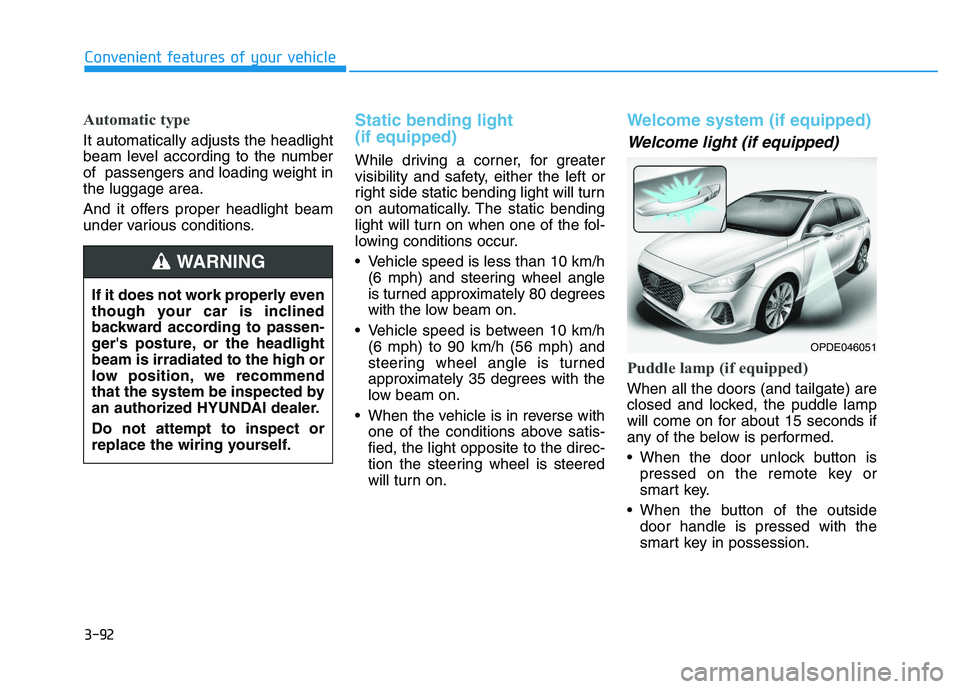
Welcome system (if equipped)
Welcome light (if equipped)
Puddle lamp (if equipped)
When all the doors (and tailgate) are
closed and locked, the puddle lamp
will come on for about 15 seconds if
any of the below is performed.
When the door unlock button ispressed on the remote key or
smart key.
When the button of the outside door handle is pressed with the
smart key in possession.
Convenient features of your vehicle
If it does not work properly even
though your car is inclined
backward according to passen-
ger's posture, or the headlight
beam is irradiated to the high or
low position, we recommend
that the system be inspected by
an authorized HYUNDAI dealer.
Do not attempt to inspect or
replace the wiring yourself.
WARNING
OPDE046051
Page 95 of 659
3-93
Convenient features of your vehicle
Door handle lamp (if equipped)
When all the doors (and tailgate) are
closed and locked, the door handle
lamp will come on for about 15 sec-
onds if any of the below is performed.
When the door unlock button ispressed on the remote key or
smart key.
When the button of the outside door handle is pressed with the
smart key in possession.
Headlamp and position lamp
When the headlamp (lamp switch in
the headlamp or AUTO position) is on
and all doors (and tailgate) are locked
and closed, the position lamp and
headlamp will come on for 15 seconds
if/or any of the below is performed.
When the door unlock button ispressed on the remote key or
smart key.
At this time, if you press the door lock
or unlock button, the position lamp and
headlamp will turn off immediately.
You can activate or deactivate the
Welcome Light from the User
Settings mode on the LCD display.
For more details, refer to "LCD
Display" in this chapter.
Interior lamp
When the interior lamp switch is in
the DOOR position and all doors (and
tailgate) are closed and locked, the
room lamp will come on for 30 sec-
onds if any of the below is performed.
When the door unlock button is pressed on the remote key or
smart key.
When the button of the outside door handle is pressed with the
smart key in possession.
At this time, if you press the door lock
or unlock button, the room lamp will
turn off immediately.
Interior lights
Do not use the interior lights for
extended periods when the engine
is turned off or the battery will dis-
charge.
Interior lamp AUTO cut
The interior lamps will automatically
go off approximately 20 minutes after
the engine is turned off and the
doors closed. If a door is opened, the
lamp will go off 40 minutes after the
engine is turned off. If the doors are
locked and the vehicle enters the
armed stage of the theft alarm sys-
tem, the lamps will go off five sec-
onds later.
NOTICE
3
Do not use the interior lights
when driving in the dark. The inte-
rior lights may obscure your view
and cause an accident.
WARNING
Page 100 of 659
3-98
Convenient features of your vehicle
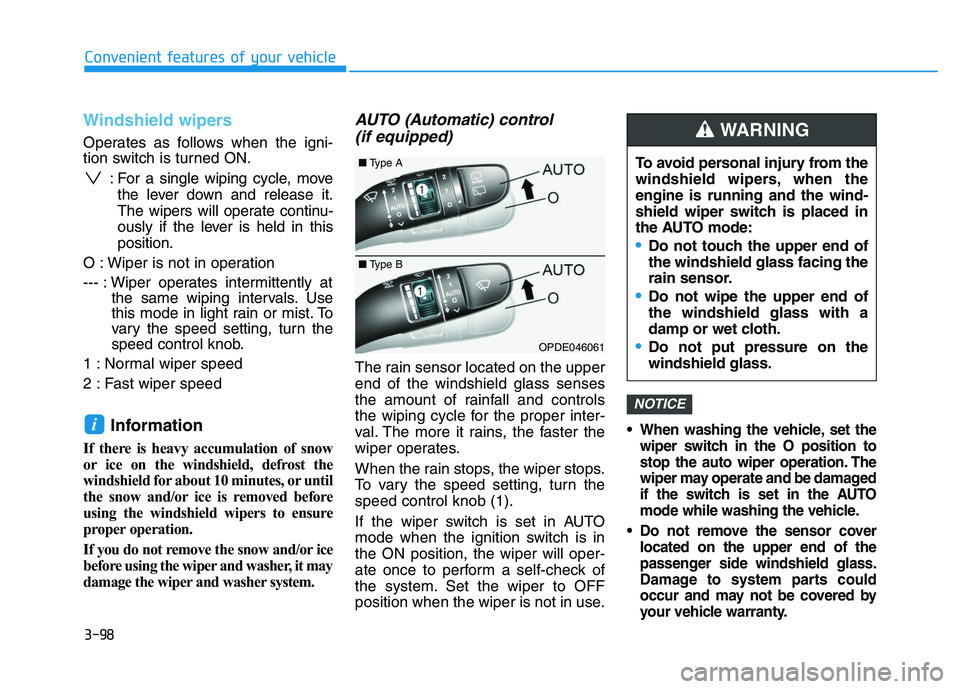
Windshield wipers
Operates as follows when the igni-
tion switch is turned ON.: For a single wiping cycle, movethe lever down and release it.
The wipers will operate continu-
ously if the lever is held in this
position.
O : Wiper is not in operation
--- : Wiper operates intermittently at the same wiping intervals. Use
this mode in light rain or mist. To
vary the speed setting, turn the
speed control knob.
1 : Normal wiper speed
2 : Fast wiper speed
Information
If there is heavy accumulation of snow
or ice on the windshield, defrost the
windshield for about 10 minutes, or until
the snow and/or ice is removed before
using the windshield wipers to ensure
proper operation.
If you do not remove the snow and/or ice
before using the wiper and washer, it may
damage the wiper and washer system.
AUTO (Automatic) control (if equipped)
The rain sensor located on the upper
end of the windshield glass senses
the amount of rainfall and controls
the wiping cycle for the proper inter-
val. The more it rains, the faster the
wiper operates.
When the rain stops, the wiper stops.
To vary the speed setting, turn the
speed control knob (1).
If the wiper switch is set in AUTO
mode when the ignition switch is in
the ON position, the wiper will oper-
ate once to perform a self-check of
the system. Set the wiper to OFF
position when the wiper is not in use.
When washing the vehicle, set the
wiper switch in the O position to
stop the auto wiper operation. The
wiper may operate and be damaged
if the switch is set in the AUTO
mode while washing the vehicle.
Do not remove the sensor cover located on the upper end of the
passenger side windshield glass.
Damage to system parts could
occur and may not be covered by
your vehicle warranty.
NOTICE
i
OPDE046061
To avoid personal injury from the
windshield wipers, when the
engine is running and the wind-
shield wiper switch is placed in
the AUTO mode:
Do not touch the upper end of
the windshield glass facing the
rain sensor.
Do not wipe the upper end of
the windshield glass with a
damp or wet cloth.
Do not put pressure on the
windshield glass.
WARNING
■ Type A
■Type B
Page 101 of 659
3-99
Convenient features of your vehicle
3
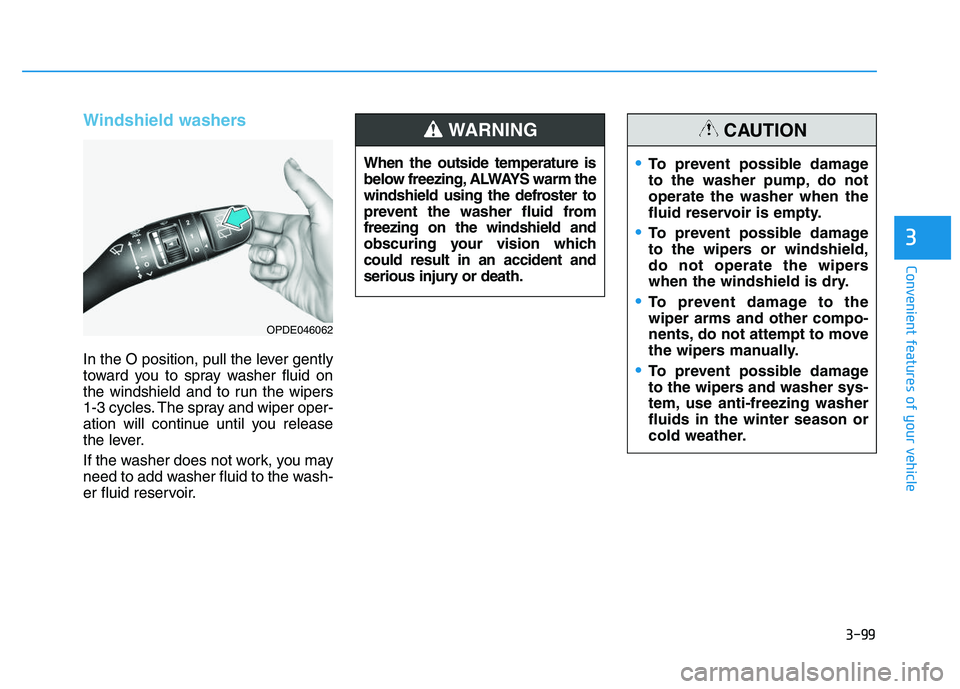
Windshield washers
In the O position, pull the lever gently
toward you to spray washer fluid on
the windshield and to run the wipers
1-3 cycles. The spray and wiper oper-
ation will continue until you release
the lever.
If the washer does not work, you may
need to add washer fluid to the wash-
er fluid reservoir.When the outside temperature is
below freezing, ALWAYS warm the
windshield using the defroster to
prevent the washer fluid from
freezing on the windshield and
obscuring your vision which
could result in an accident and
serious injury or death.
WARNING
To prevent possible damage
to the washer pump, do not
operate the washer when the
fluid reservoir is empty.
To prevent possible damage
to the wipers or windshield,
do not operate the wipers
when the windshield is dry.
To prevent damage to the
wiper arms and other compo-
nents, do not attempt to move
the wipers manually.
To prevent possible damage
to the wipers and washer sys-
tem, use anti-freezing washer
fluids in the winter season or
cold weather.
CAUTION
OPDE046062
Page 103 of 659
3-101
Convenient features of your vehicle
3
D
D R
R I
I V
V E
E R
R
A
A S
S S
S I
I S
S T
T
S
S Y
Y S
S T
T E
E M
M
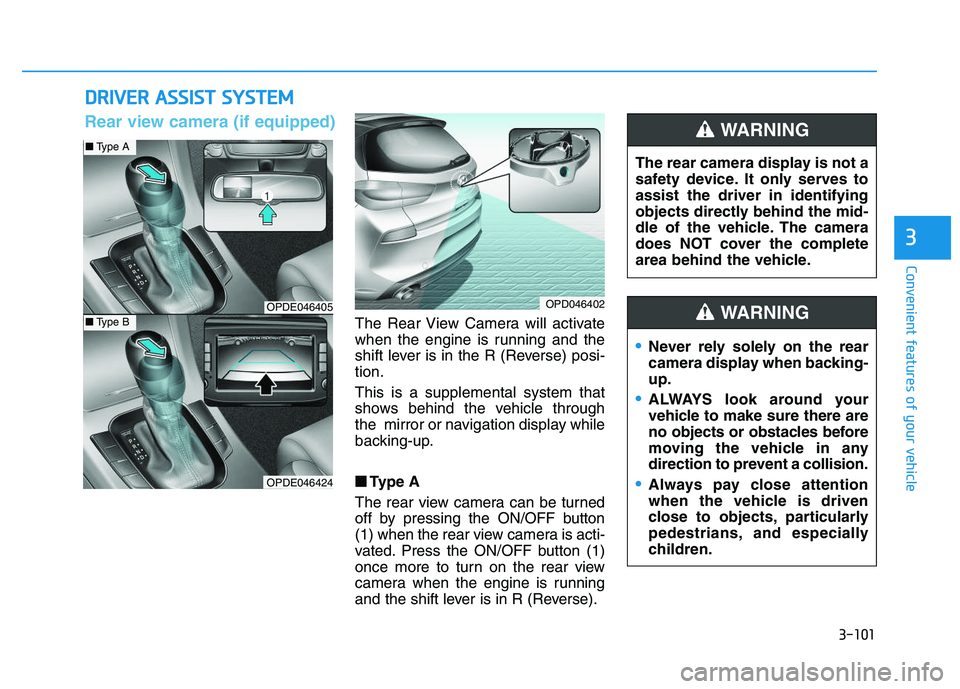
The Rear View Camera will activate
when the engine is running and the
shift lever is in the R (Reverse) posi-
tion.
This is a supplemental system that
shows behind the vehicle through
the mirror or navigation display while
backing-up.
■
■
Type A
The rear view camera can be turned
off by pressing the ON/OFF button
(1) when the rear view camera is acti-
vated. Press the ON/OFF button (1)
once more to turn on the rear view
camera when the engine is running
and the shift lever is in R (Reverse). The rear camera display is not a
safety device. It only serves to
assist the driver in identifying
objects directly behind the mid-
dle of the vehicle. The camera
does NOT cover the complete
area behind the vehicle.
WARNING
OPDE046405
OPDE046424
OPD046402
■
Type A
■Type B
Rear view camera (if equipped)
Never rely solely on the rear
camera display when backing-
up.
ALWAYS look around your
vehicle to make sure there are
no objects or obstacles before
moving the vehicle in any
direction to prevent a collision.
Always pay close attention
when the vehicle is driven
close to objects, particularly
pedestrians, and especially
children.
WARNING
Page 104 of 659
3-102
Convenient features of your vehicle
• Do not spray the camera or its surrounding area directly with a
high pressure washer. Shock
applied from high pressure
water may cause the device to
not operate normally.
Do not use any cleanser con- taining acid or alkaline deter-
gents when cleaning the lens.
Use only a mild soap or neutral
detergent, and rinse thoroughly
with water.
Information
Always keep the camera lens clean. The
camera may not work normally if the
lens is covered with foreign material.
Rear parking assist system
(if equipped)
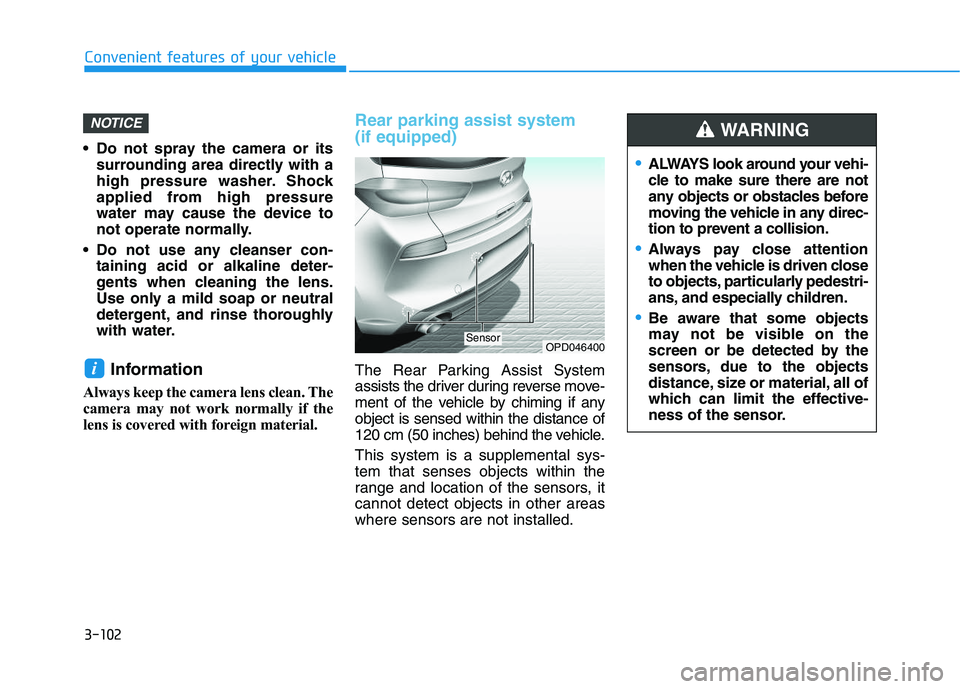
The Rear Parking Assist System
assists the driver during reverse move-
ment of the vehicle by chiming if any
object is sensed within the distance of
120 cm (50 inches) behind the vehicle.
This system is a supplemental sys-
tem that senses objects within the
range and location of the sensors, it
cannot detect objects in other areas
where sensors are not installed.i
NOTICE
OPD046400Sensor
ALWAYS look around your vehi-
cle to make sure there are not
any objects or obstacles before
moving the vehicle in any direc-
tion to prevent a collision.
Always pay close attention
when the vehicle is driven close
to objects, particularly pedestri-
ans, and especially children.
Be aware that some objects
may not be visible on the
screen or be detected by the
sensors, due to the objects
distance, size or material, all of
which can limit the effective-
ness of the sensor.
WARNING
Page 105 of 659
3-103
Convenient features of your vehicle
3
Operation of the Rear ParkingAssist System
Operating condition
This system will activate when
backing up with the ignition switch
in the ON position. However, if vehi-
cle speed exceeds 5 km/h (3 mph),
the system may not detect objects.
If vehicle speed exceeds 10 km/h (6 mph), the system will not warn you
even though objects are detected.
When more than two objects are sensed at the same time, the clos-
est one will be recognized first.
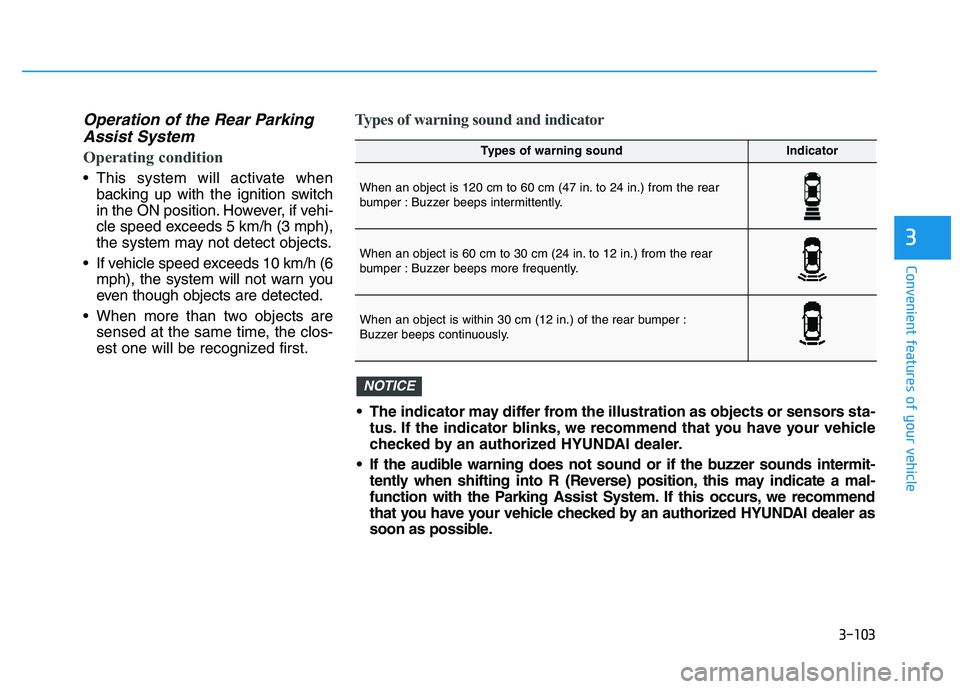
Types of warning sound and indicator
Types of warning soundIndicator
When an object is 120 cm to 60 cm (47 in. to 24 in.) from the rear
bumper : Buzzer beeps intermittently.
When an object is 60 cm to 30 cm (24 in. to 12 in.) from the rear
bumper : Buzzer beeps more frequently.
When an object is within 30 cm (12 in.) of the rear bumper :
Buzzer beeps continuously.
The indicator may differ from the illustration as objects or sensors sta-tus. If the indicator blinks, we recommend that you have your vehicle
checked by an authorized HYUNDAI dealer.
If the audible warning does not sound or if the buzzer sounds intermit- tently when shifting into R (Reverse) position, this may indicate a mal-
function with the Parking Assist System. If this occurs, we recommend
that you have your vehicle checked by an authorized HYUNDAI dealer as
soon as possible.
NOTICE
Page 107 of 659
3-105
Convenient features of your vehicle
3
The following objects may not be
recognized by the sensor:
Sharp or slim objects such asropes, chains or small poles.
Objects, which tend to absorb sen- sor frequency such as clothes,
spongy material or snow.
Rear parking assist system pre-cautions
The rear parking assist system may
not sound consistently depending on
the speed and shapes of the objects
detected.
The rear parking assist system may malfunction if the vehicle bumper
height or sensor installation has
been modified or damaged. Any
non-factory installed equipment or
accessories may also interfere with
the sensor performance.
The sensor may not recognize objects less than 30 cm (11 in.) from
the sensor, or it may sense an incor-
rect distance. Use caution.
When the sensor is frozen or stained with snow, dirt, or water, the sensor
may be inoperative until the stains
are removed using a soft cloth.
Do not push, scratch or strike the sensor with any hard objects that
could damage the surface of the
sensor. Sensor damage could occur. Do not spray the sensors or its sur-
rounding area directly with a high
pressure washer. Shock applied
from high pressure water may cause
the device to not operate normally.
Your new vehicle warranty does
not cover any accidents or dam-
age to the vehicle or injuries to
its occupants related to a Rear
Parking Assist System. Always
drive safely and cautiously.
WARNING