cruise control HYUNDAI I30 2020 User Guide
[x] Cancel search | Manufacturer: HYUNDAI, Model Year: 2020, Model line: I30, Model: HYUNDAI I30 2020Pages: 659, PDF Size: 17.14 MB
Page 426 of 659
5-122
Driving your vehicle
Speed Limit Control operation
You can set the speed limit when you
do not want to drive over a specific
speed.
If you drive over the preset speed
limit, the warning system operates
(set speed limit will blink and chime
will sound) until the vehicle speed
returns within the speed limit.
Information
While speed limit control is in opera-
tion, the cruise control system cannot
be activated.
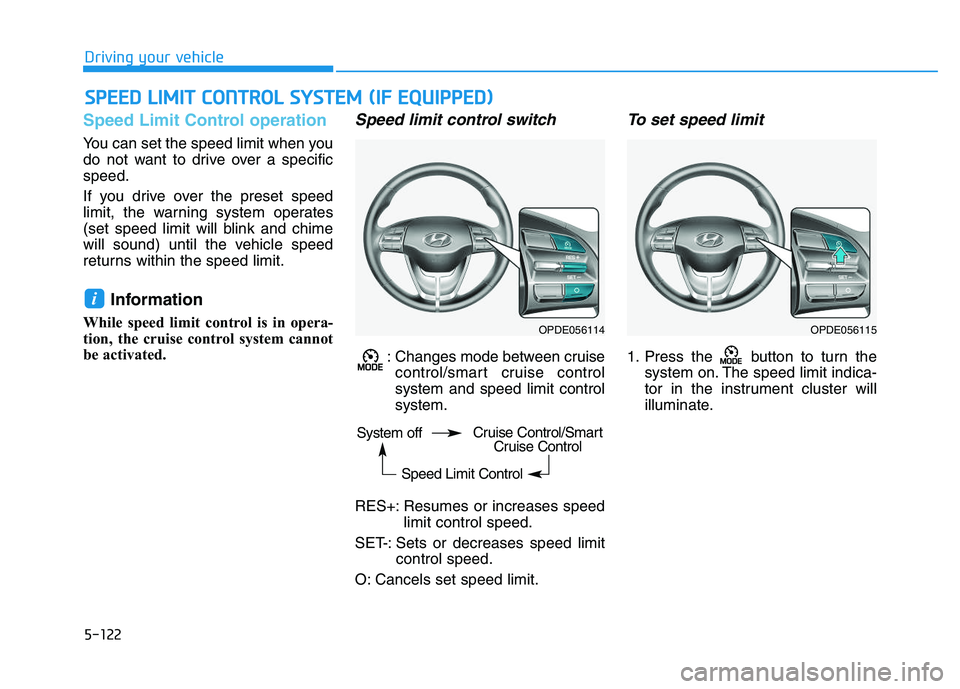
Speed limit control switch
: Changes mode between cruisecontrol/smart cruise control
system and speed limit control
system.
RES+: Resumes or increases speed limit control speed.
SET-: Sets or decreases speed limit control speed.
O: Cancels set speed limit.
To set speed limit
1. Press the button to turn the system on. The speed limit indica-
tor in the instrument cluster will
illuminate.
i
S
S P
P E
E E
E D
D
L
L I
I M
M I
I T
T
C
C O
O N
N T
T R
R O
O L
L
S
S Y
Y S
S T
T E
E M
M
(
( I
I F
F
E
E Q
Q U
U I
I P
P P
P E
E D
D )
)
OPDE056114OPDE056115
System off
Speed Limit ControlCruise Control/SmartCruise Control
Page 428 of 659
5-124
Driving your vehicle
Cruise Control operation
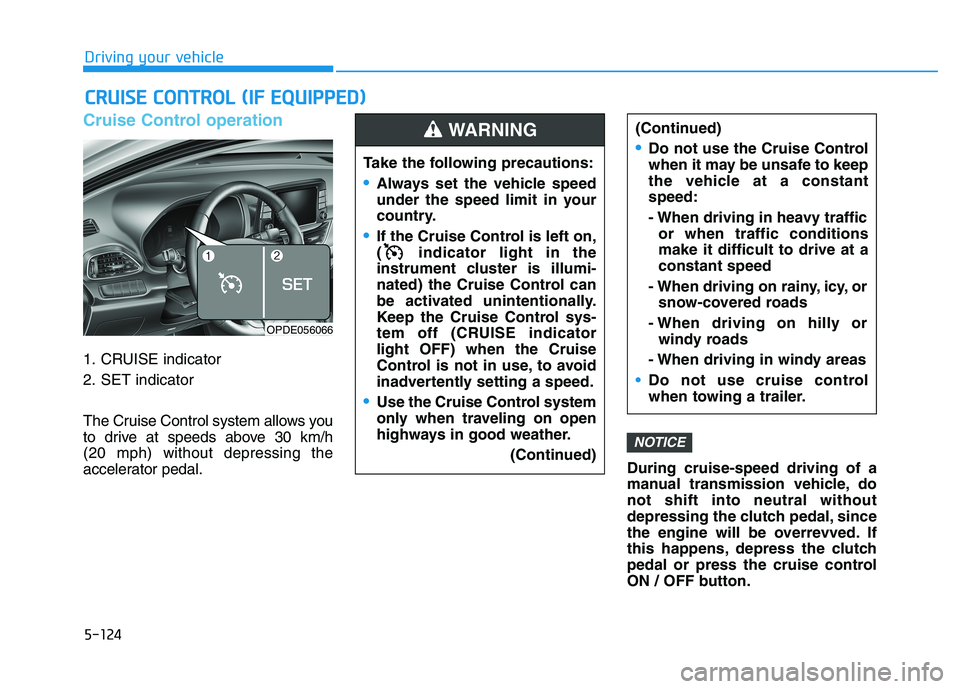
1. CRUISE indicator
2. SET indicator
The Cruise Control system allows you
to drive at speeds above 30 km/h
(20 mph) without depressing the
accelerator pedal.During cruise-speed driving of a
manual transmission vehicle, do
not shift into neutral without
depressing the clutch pedal, since
the engine will be overrevved. If
this happens, depress the clutch
pedal or press the cruise control
ON / OFF button.
NOTICE
C
C R
R U
U I
I S
S E
E
C
C O
O N
N T
T R
R O
O L
L
(
( I
I F
F
E
E Q
Q U
U I
I P
P P
P E
E D
D )
)
Take the following precautions:
Always set the vehicle speed
under the speed limit in your
country.
If the Cruise Control is left on,
( indicator light in the
instrument cluster is illumi-
nated) the Cruise Control can
be activated unintentionally.
Keep the Cruise Control sys-
tem off (CRUISE indicator
light OFF) when the Cruise
Control is not in use, to avoid
inadvertently setting a speed.
Use the Cruise Control system
only when traveling on open
highways in good weather.
(Continued)
(Continued)
Do not use the Cruise Control
when it may be unsafe to keep
the vehicle at a constant
speed:
- When driving in heavy trafficor when traffic conditions
make it difficult to drive at a
constant speed
- When driving on rainy, icy, or snow-covered roads
- When driving on hilly or windy roads
- When driving in windy areas
Do not use cruise control
when towing a trailer.
WARNING
OPDE056066
Page 429 of 659
5-125
Driving your vehicle
5
Information
• During normal cruise control opera-tion, when the SET switch is activat-
ed or reactivated after applying the
brakes, the cruise control will ener-
gize after approximately 3 seconds.
This delay is normal.
• Before activating the cruise control function, the system will check to
verify that the brake switch is oper-
ating normally. Depress the brake
pedal at least once after turning ON
the ignition or starting the vehicle.
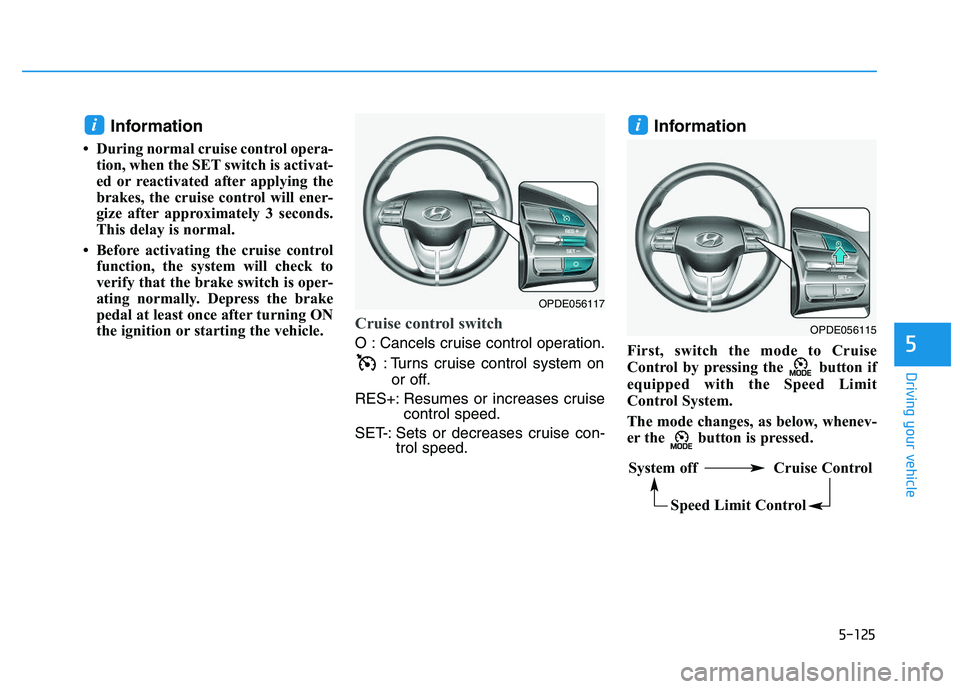
Cruise control switch
O : Cancels cruise control operation.
: Turns cruise control system onor off.
RES+: Resumes or increases cruise control speed.
SET-: Sets or decreases cruise con- trol speed.
Information
First, switch the mode to Cruise
Control by pressing the button if
equipped with the Speed Limit
Control System.
The mode changes, as below, whenev-
er the button is pressed.
ii
OPDE056115
System off Cruise Control
Speed Limit Control
OPDE056117
Page 430 of 659
5-126
Driving your vehicle
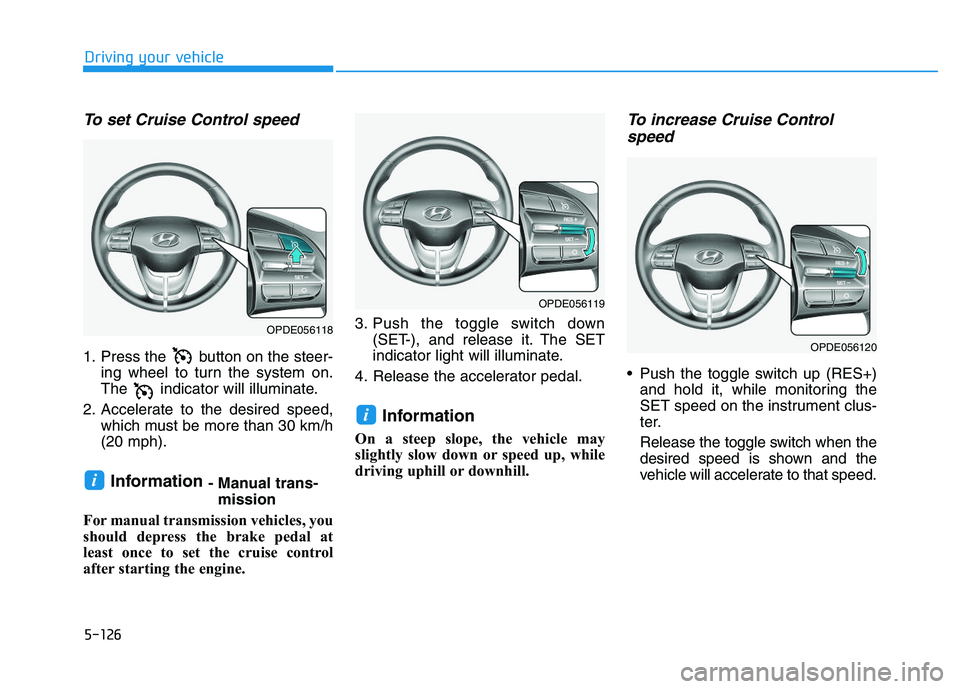
To set Cruise Control speed
1. Press the button on the steer-ing wheel to turn the system on.
The indicator will illuminate.
2. Accelerate to the desired speed, which must be more than 30 km/h
(20 mph).
Information - Manual trans-mission
For manual transmission vehicles, you
should depress the brake pedal at
least once to set the cruise control
after starting the engine. 3. Push the toggle switch down
(SET-), and release it. The SET
indicator light will illuminate.
4. Release the accelerator pedal.
Information
On a steep slope, the vehicle may
slightly slow down or speed up, while
driving uphill or downhill.
To increase Cruise Control speed
Push the toggle switch up (RES+)
and hold it, while monitoring the
SET speed on the instrument clus-
ter.
Release the toggle switch when the
desired speed is shown and the
vehicle will accelerate to that speed.
i
i
OPDE056118
OPDE056119
OPDE056120
Page 431 of 659
5-127
Driving your vehicle
5
Push the toggle switch up (RES+)and release it immediately. The
cruising speed will increase 2.0
km/h (1.2 mph) each time the tog-
gle switch is operated in this man-
ner.
Depress the accelerator pedal. When the vehicle attains the
desired speed, push the toggle
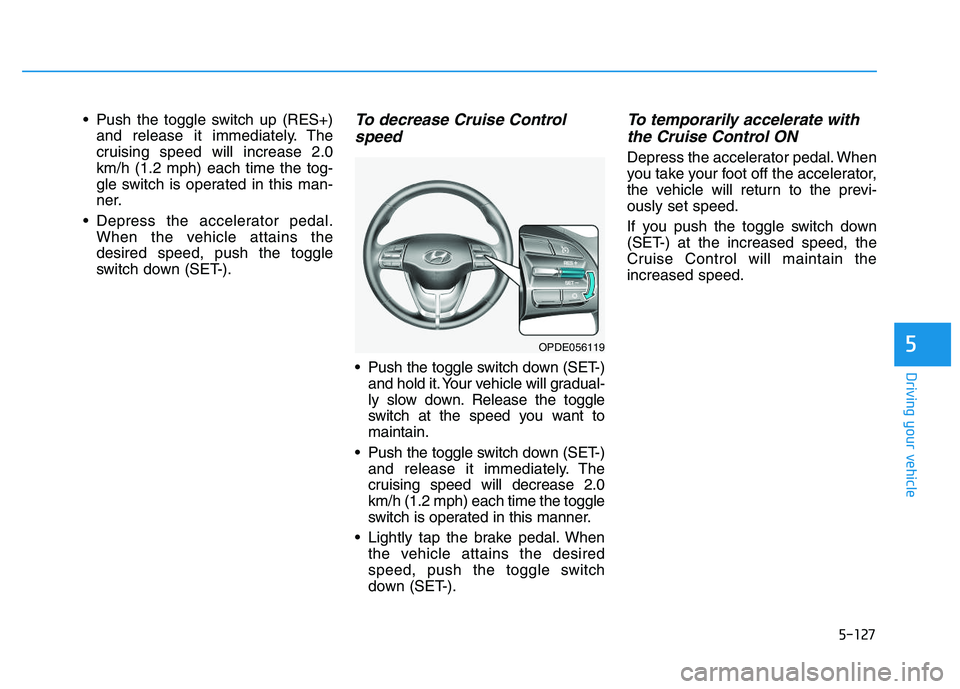
switch down (SET-).To decrease Cruise Controlspeed
Push the toggle switch down (SET-)
and hold it. Your vehicle will gradual-
ly slow down. Release the toggle
switch at the speed you want to
maintain.
Push the toggle switch down (SET-) and release it immediately. The
cruising speed will decrease 2.0
km/h (1.2 mph) each time the toggle
switch is operated in this manner.
Lightly tap the brake pedal. When the vehicle attains the desired
speed, push the toggle switch
down (SET-).
To temporarily accelerate withthe Cruise Control ON
Depress the accelerator pedal. When
you take your foot off the accelerator,
the vehicle will return to the previ-
ously set speed.
If you push the toggle switch down
(SET-) at the increased speed, the
Cruise Control will maintain the
increased speed.
OPDE056119
Page 432 of 659
5-128
Driving your vehicle
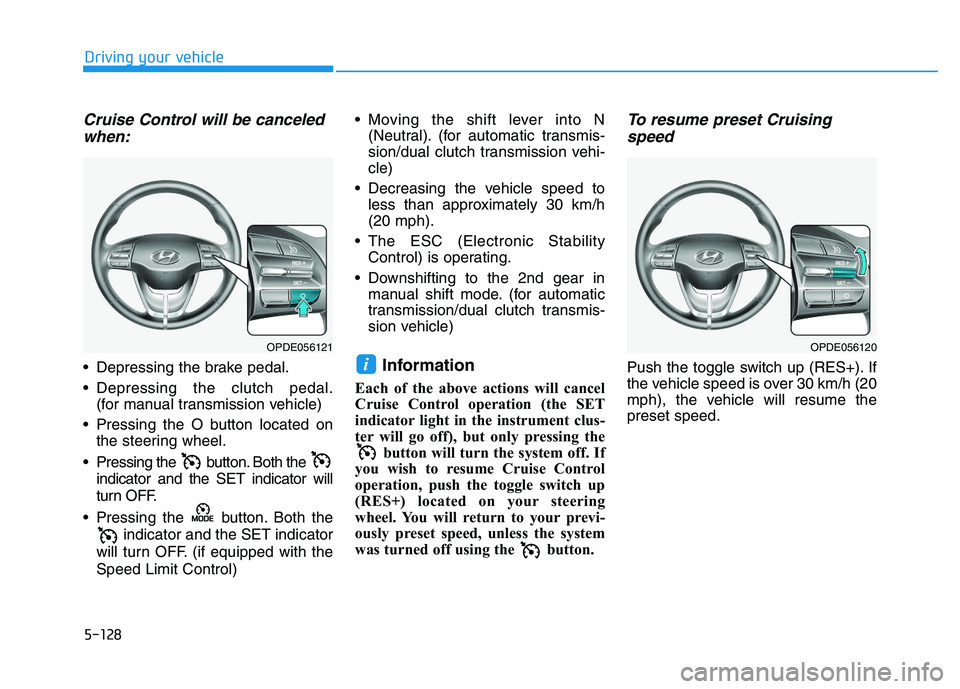
Cruise Control will be canceledwhen:
Depressing the brake pedal.
Depressing the clutch pedal.
(for manual transmission vehicle)
Pressing the O button located on the steering wheel.
Pressing the button. Both the indicator and the SET indicator will
turn OFF.
Pressing the button. Both the indicator and the SET indicator
will turn OFF. (if equipped with the
Speed Limit Control) Moving the shift lever into N
(Neutral). (for automatic transmis-
sion/dual clutch transmission vehi-
cle)
Decreasing the vehicle speed to less than approximately 30 km/h
(20 mph).
The ESC (Electronic Stability Control) is operating.
Downshifting to the 2nd gear in manual shift mode. (for automatic
transmission/dual clutch transmis-
sion vehicle)Information
Each of the above actions will cancel
Cruise Control operation (the SET
indicator light in the instrument clus-
ter will go off), but only pressing the button will turn the system off. If
you wish to resume Cruise Control
operation, push the toggle switch up
(RES+) located on your steering
wheel. You will return to your previ-
ously preset speed, unless the system
was turned off using the button.
To resume preset Cruising speed
Push the toggle switch up (RES+). If
the vehicle speed is over 30 km/h (20
mph), the vehicle will resume the
preset speed.i
OPDE056120OPDE056121
Page 433 of 659
5-129
Driving your vehicle
5
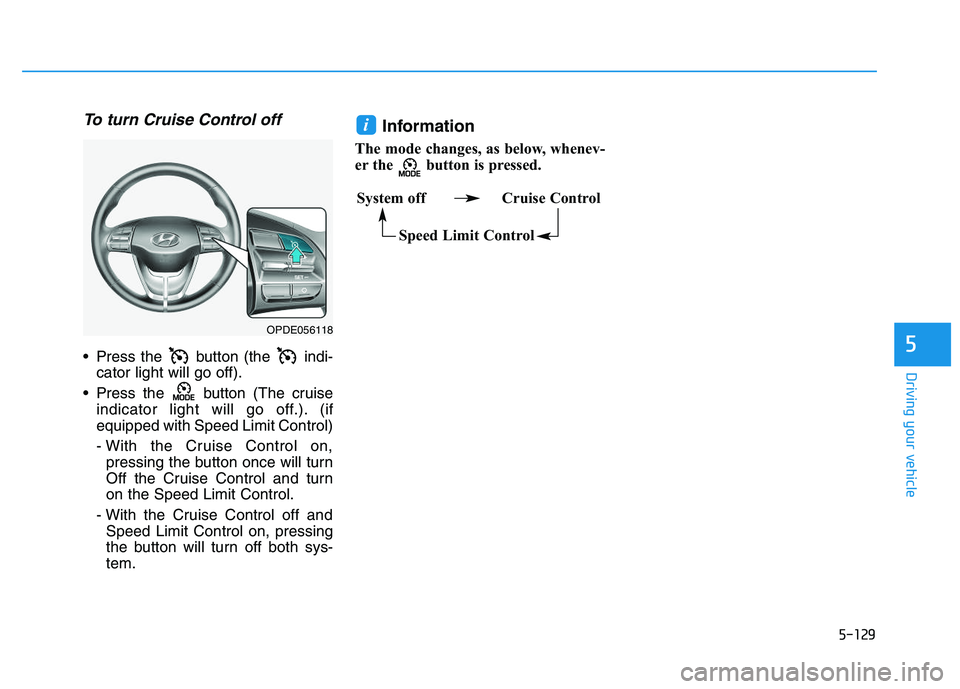
To turn Cruise Control off
Press the button (the indi-cator light will go off).
Press the button (The cruise indicator light will go off.). (if
equipped with Speed Limit Control)
- With the Cruise Control on,pressing the button once will turn
Off the Cruise Control and turn
on the Speed Limit Control.
- With the Cruise Control off and Speed Limit Control on, pressing
the button will turn off both sys-
tem.
Information
The mode changes, as below, whenev-
er the button is pressed.
i
System off Cruise Control
Speed Limit Control
OPDE056118
Page 434 of 659
5-130
Driving your vehicle
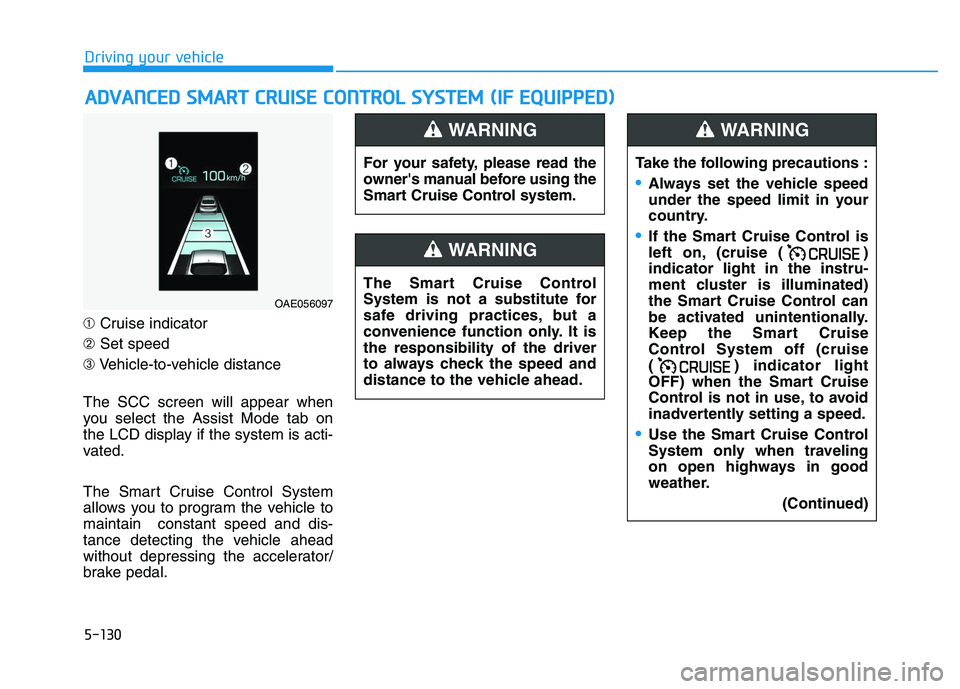
➀ Cruise indicator
➁ Set speed
➂ Vehicle-to-vehicle distance
The SCC screen will appear when
you select the Assist Mode tab on
the LCD display if the system is acti-
vated.
The Smart Cruise Control System
allows you to program the vehicle to
maintain constant speed and dis-
tance detecting the vehicle ahead
without depressing the accelerator/
brake pedal.
A
A D
D V
V A
A N
N C
C E
E D
D
S
S M
M A
A R
R T
T
C
C R
R U
U I
I S
S E
E
C
C O
O N
N T
T R
R O
O L
L
S
S Y
Y S
S T
T E
E M
M
(
( I
I F
F
E
E Q
Q U
U I
I P
P P
P E
E D
D )
)
For your safety, please read the
owner's manual before using the
Smart Cruise Control system.
WARNING
The Smart Cruise Control
System is not a substitute for
safe driving practices, but a
convenience function only. It is
the responsibility of the driver
to always check the speed and
distance to the vehicle ahead.
WARNING
Take the following precautions :
Always set the vehicle speed
under the speed limit in your
country.
If the Smart Cruise Control is
left on, (cruise ( )
indicator light in the instru-
ment cluster is illuminated)
the Smart Cruise Control can
be activated unintentionally.
Keep the Smart Cruise
Control System off (cruise
( ) indicator light
OFF) when the Smart Cruise
Control is not in use, to avoid
inadvertently setting a speed.
Use the Smart Cruise Control
System only when traveling
on open highways in good
weather.
(Continued)
WARNING
OAE056097
Page 435 of 659
5-131
Driving your vehicle
5
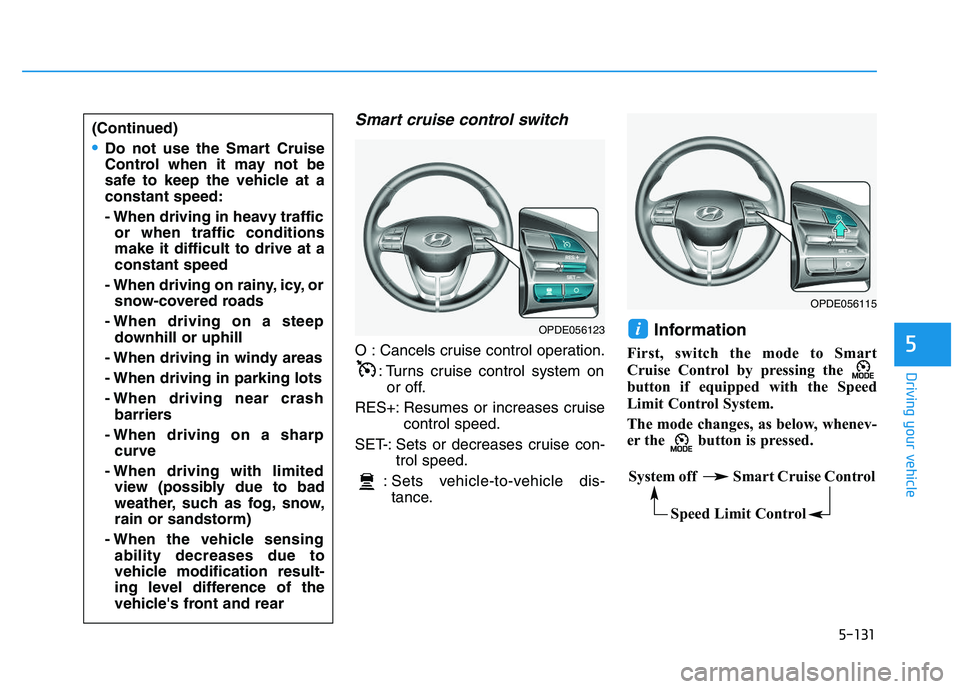
Smart cruise control switch
O : Cancels cruise control operation.: Turns cruise control system onor off.
RES+: Resumes or increases cruise control speed.
SET-: Sets or decreases cruise con- trol speed.
: Sets vehicle-to-vehicle dis- tance.
Information
First, switch the mode to Smart
Cruise Control by pressing the
button if equipped with the Speed
Limit Control System.
The mode changes, as below, whenev-
er the button is pressed.
i
(Continued)
Do not use the Smart Cruise
Control when it may not be
safe to keep the vehicle at a
constant speed:
- When driving in heavy traffic or when traffic conditions
make it difficult to drive at a
constant speed
- When driving on rainy, icy, or snow-covered roads
- When driving on a steep downhill or uphill
- When driving in windy areas
- When driving in parking lots
- When driving near crash barriers
- When driving on a sharp curve
- When driving with limited view (possibly due to bad
weather, such as fog, snow,
rain or sandstorm)
- When the vehicle sensing ability decreases due to
vehicle modification result-
ing level difference of the
vehicle's front and rear
OPDE056123
OPDE056115
System off Smart Cruise Control
Speed Limit Control
Page 436 of 659
5-132
Driving your vehicle
Smart Cruise Control speed
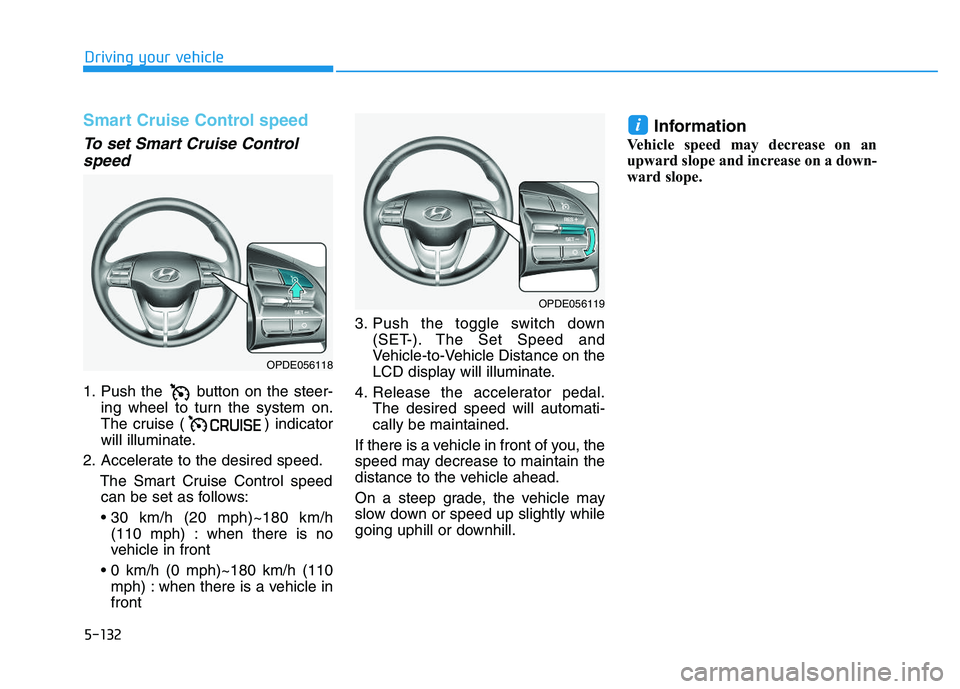
To set Smart Cruise Controlspeed
1. Push the button on the steer-
ing wheel to turn the system on.
The cruise ( ) indicator
will illuminate.
2. Accelerate to the desired speed. The Smart Cruise Control speedcan be set as follows:
(110 mph) : when there is no
vehicle in front
mph) : when there is a vehicle in
front 3. Push the toggle switch down
(SET-). The Set Speed and
Vehicle-to-Vehicle Distance on the
LCD display will illuminate.
4. Release the accelerator pedal. The desired speed will automati-
cally be maintained.
If there is a vehicle in front of you, the
speed may decrease to maintain the
distance to the vehicle ahead.
On a steep grade, the vehicle may
slow down or speed up slightly while
going uphill or downhill.
Information
Vehicle speed may decrease on an
upward slope and increase on a down-
ward slope.
i
OPDE056118
OPDE056119