release HYUNDAI I30 2021 Repair Manual
[x] Cancel search | Manufacturer: HYUNDAI, Model Year: 2021, Model line: I30, Model: HYUNDAI I30 2021Pages: 659, PDF Size: 17.14 MB
Page 427 of 659
5-123
Driving your vehicle
5
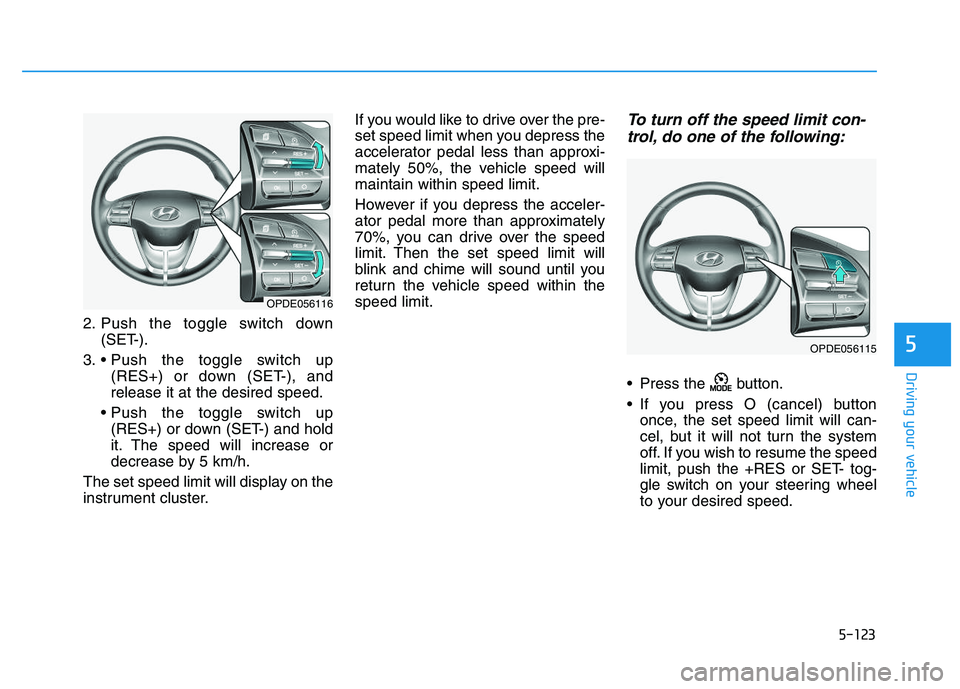
2. Push the toggle switch down(SET-).
3. (RES+) or down (SET-), and
release it at the desired speed.
(RES+) or down (SET-) and hold
it. The speed will increase or
decrease by 5 km/h.
The set speed limit will display on the
instrument cluster. If you would like to drive over the pre-
set speed limit when you depress the
accelerator pedal less than approxi-
mately 50%, the vehicle speed will
maintain within speed limit.
However if you depress the acceler-
ator pedal more than approximately
70%, you can drive over the speed
limit. Then the set speed limit will
blink and chime will sound until you
return the vehicle speed within the
speed limit.
To turn off the speed limit con-
trol, do one of the following:
Press the button.
If you press O (cancel) button
once, the set speed limit will can-
cel, but it will not turn the system
off. If you wish to resume the speed
limit, push the +RES or SET- tog-
gle switch on your steering wheel
to your desired speed.
OPDE056116
OPDE056115
Page 430 of 659
5-126
Driving your vehicle
To set Cruise Control speed
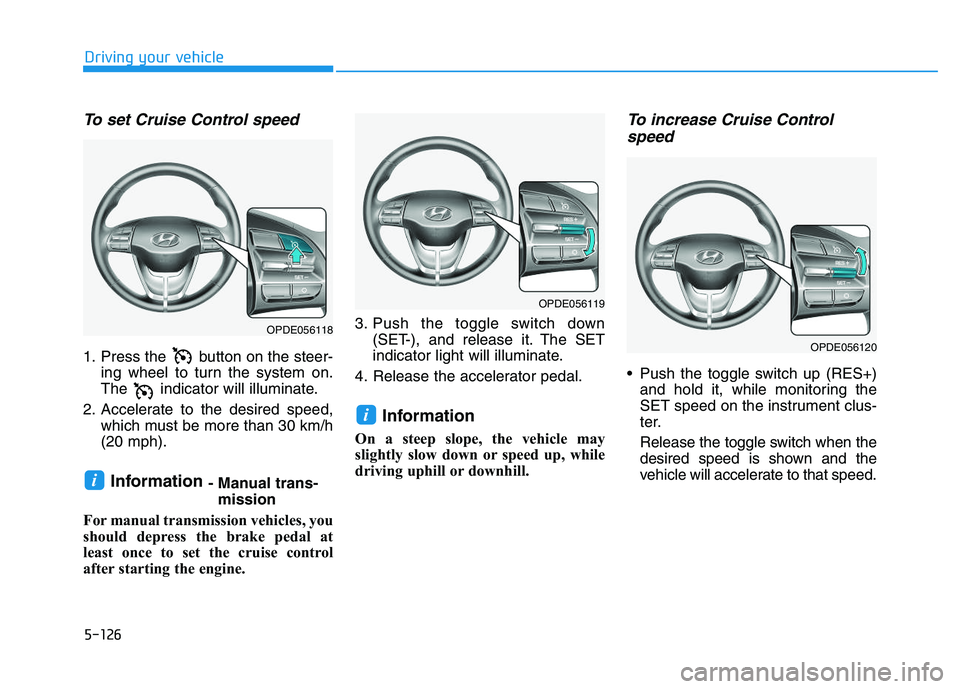
1. Press the button on the steer-ing wheel to turn the system on.
The indicator will illuminate.
2. Accelerate to the desired speed, which must be more than 30 km/h
(20 mph).
Information - Manual trans-mission
For manual transmission vehicles, you
should depress the brake pedal at
least once to set the cruise control
after starting the engine. 3. Push the toggle switch down
(SET-), and release it. The SET
indicator light will illuminate.
4. Release the accelerator pedal.
Information
On a steep slope, the vehicle may
slightly slow down or speed up, while
driving uphill or downhill.
To increase Cruise Control speed
Push the toggle switch up (RES+)
and hold it, while monitoring the
SET speed on the instrument clus-
ter.
Release the toggle switch when the
desired speed is shown and the
vehicle will accelerate to that speed.
i
i
OPDE056118
OPDE056119
OPDE056120
Page 431 of 659
5-127
Driving your vehicle
5
Push the toggle switch up (RES+)and release it immediately. The
cruising speed will increase 2.0
km/h (1.2 mph) each time the tog-
gle switch is operated in this man-
ner.
Depress the accelerator pedal. When the vehicle attains the
desired speed, push the toggle
switch down (SET-).To decrease Cruise Controlspeed
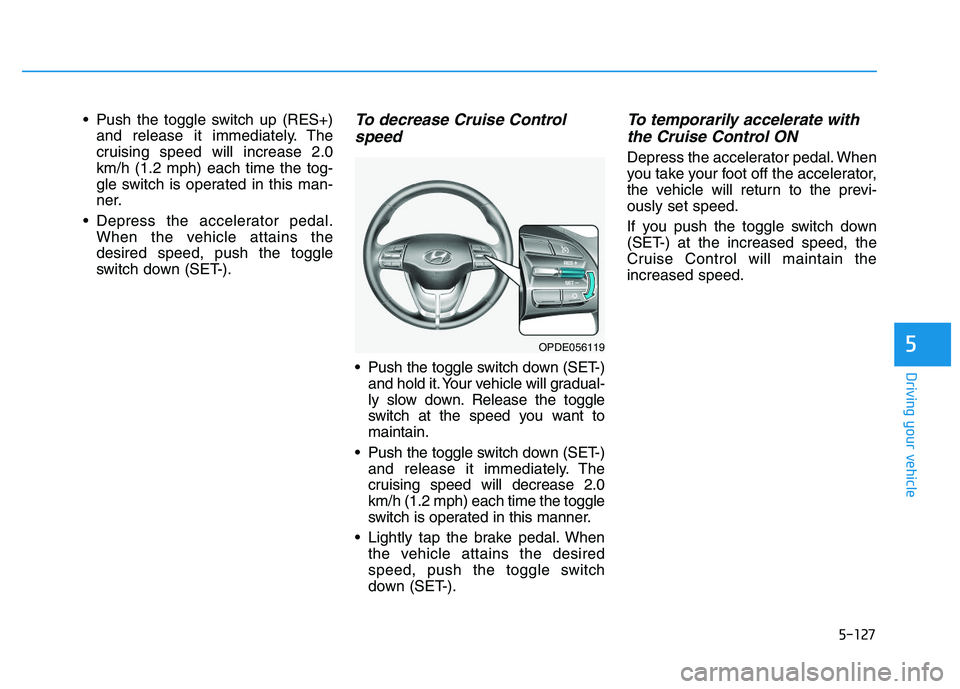
Push the toggle switch down (SET-)
and hold it. Your vehicle will gradual-
ly slow down. Release the toggle
switch at the speed you want to
maintain.
Push the toggle switch down (SET-) and release it immediately. The
cruising speed will decrease 2.0
km/h (1.2 mph) each time the toggle
switch is operated in this manner.
Lightly tap the brake pedal. When the vehicle attains the desired
speed, push the toggle switch
down (SET-).
To temporarily accelerate withthe Cruise Control ON
Depress the accelerator pedal. When
you take your foot off the accelerator,
the vehicle will return to the previ-
ously set speed.
If you push the toggle switch down
(SET-) at the increased speed, the
Cruise Control will maintain the
increased speed.
OPDE056119
Page 436 of 659
5-132
Driving your vehicle
Smart Cruise Control speed
To set Smart Cruise Controlspeed
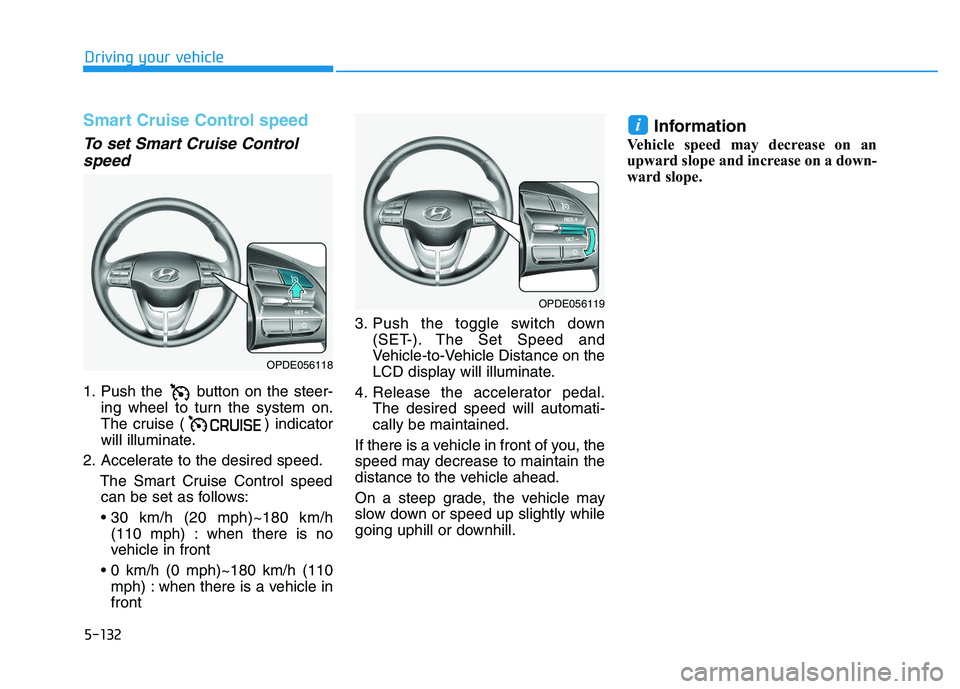
1. Push the button on the steer-
ing wheel to turn the system on.
The cruise ( ) indicator
will illuminate.
2. Accelerate to the desired speed. The Smart Cruise Control speedcan be set as follows:
(110 mph) : when there is no
vehicle in front
mph) : when there is a vehicle in
front 3. Push the toggle switch down
(SET-). The Set Speed and
Vehicle-to-Vehicle Distance on the
LCD display will illuminate.
4. Release the accelerator pedal. The desired speed will automati-
cally be maintained.
If there is a vehicle in front of you, the
speed may decrease to maintain the
distance to the vehicle ahead.
On a steep grade, the vehicle may
slow down or speed up slightly while
going uphill or downhill.
Information
Vehicle speed may decrease on an
upward slope and increase on a down-
ward slope.
i
OPDE056118
OPDE056119
Page 437 of 659
5-133
Driving your vehicle
5
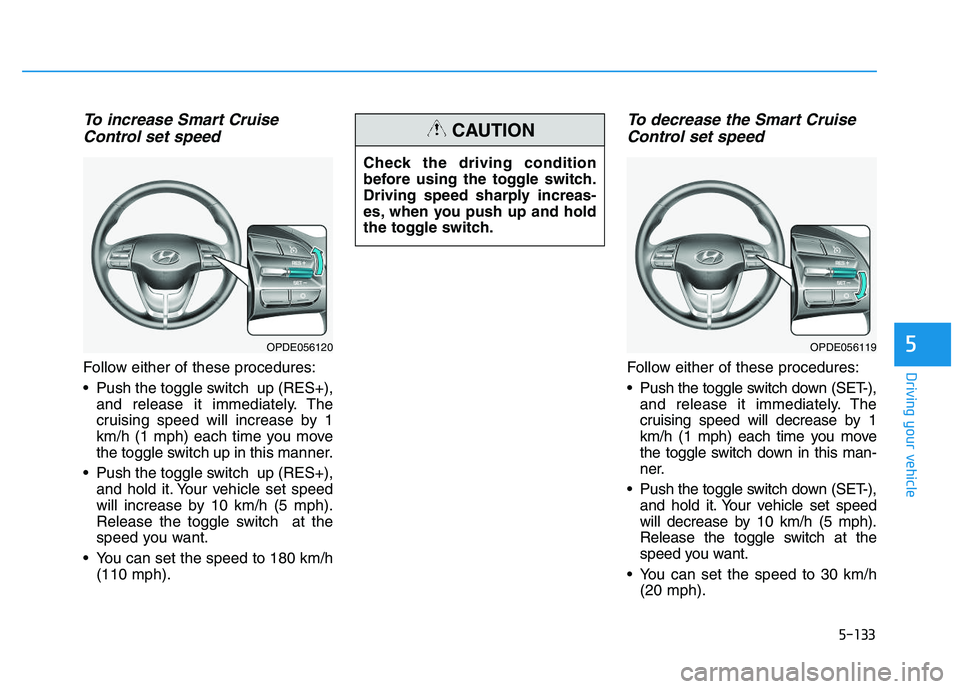
To increase Smart CruiseControl set speed
Follow either of these procedures:
Push the toggle switch up (RES+),
and release it immediately. The
cruising speed will increase by 1
km/h (1 mph) each time you move
the toggle switch up in this manner.
Push the toggle switch up (RES+), and hold it. Your vehicle set speed
will increase by 10 km/h (5 mph).
Release the toggle switch at the
speed you want.
You can set the speed to 180 km/h (110 mph).
To decrease the Smart CruiseControl set speed
Follow either of these procedures:
Push the toggle switch down (SET-),
and release it immediately. The
cruising speed will decrease by 1
km/h (1 mph) each time you move
the toggle switch down in this man-
ner.
Push the toggle switch down (SET-), and hold it. Your vehicle set speed
will decrease by 10 km/h (5 mph).
Release the toggle switch at the
speed you want.
You can set the speed to 30 km/h (20 mph).
OPDE056120
Check the driving condition
before using the toggle switch.
Driving speed sharply increas-
es, when you push up and hold
the toggle switch.
CAUTION
OPDE056119
Page 443 of 659
5-139
Driving your vehicle
5
In traffic situation
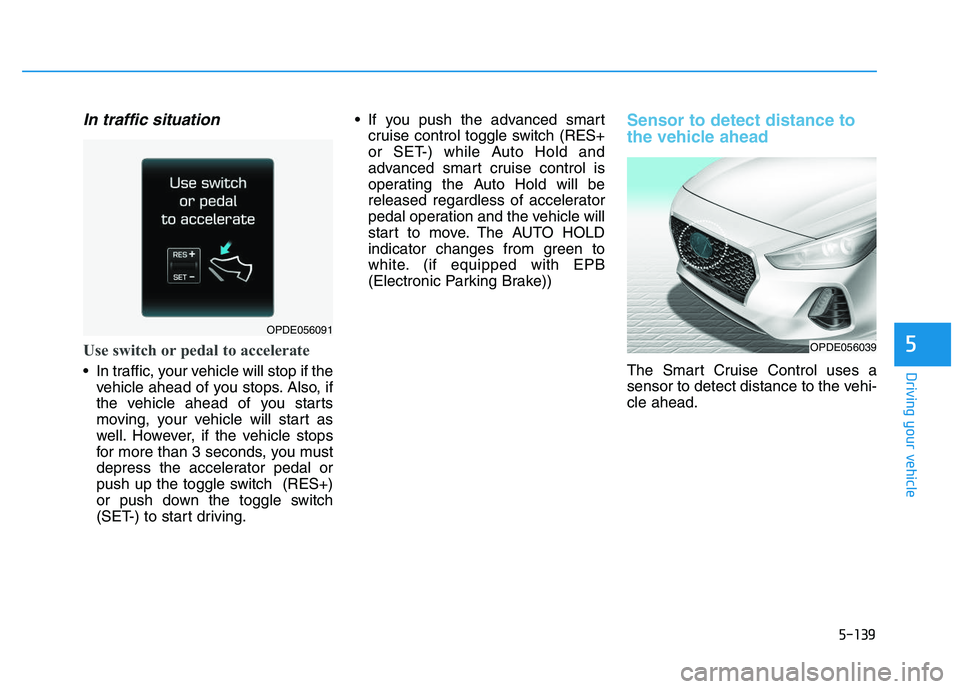
Use switch or pedal to accelerate
In traffic, your vehicle will stop if thevehicle ahead of you stops. Also, if
the vehicle ahead of you starts
moving, your vehicle will start as
well. However, if the vehicle stops
for more than 3 seconds, you must
depress the accelerator pedal or
push up the toggle switch (RES+)
or push down the toggle switch
(SET-) to start driving. If you push the advanced smart
cruise control toggle switch (RES+
or SET-) while Auto Hold and
advanced smart cruise control is
operating the Auto Hold will be
released regardless of accelerator
pedal operation and the vehicle will
start to move. The AUTO HOLD
indicator changes from green to
white. (if equipped with EPB
(Electronic Parking Brake))
Sensor to detect distance to
the vehicle ahead
The Smart Cruise Control uses a
sensor to detect distance to the vehi-
cle ahead.
OPDE056039
OPDE056091
Page 451 of 659
5-147
Driving your vehicle
5
Hazardous driving conditions
When hazardous driving elements
are encountered such as water,
snow, ice, mud and sand, take the
bellow suggestions:
Drive cautiously and keep a longerbraking distance.
Avoid abrupt braking or steering.
When your vehicle is stuck in snow, mud, or sand, use the second
gear. Accelerate slowly to avoid
unnecessary wheel spinning.
Put sand, rock salt, tire chains or other non-slip materials under the
wheels to provide additional trac-
tion while being stuck in ice, snow,
or mud.
Rocking the vehicle
If it is necessary to rock the vehicle
to free it from snow, sand, or mud,
first turn the steering wheel right and
left to clear the area around your
front wheels. Then, shift back and
forth between R (Reverse) and a for-
ward gear.
Try to avoid spinning the wheels, and
do not race the engine.
To prevent transmission wear, wait
until the wheels stop spinning before
shifting gears. Release the accelera-
tor pedal while shifting, and press
lightly on the accelerator pedal while
the transmission is in gear. Slowly
spinning the wheels in forward and
reverse directions causes a rocking
motion that may free the vehicle.
S
S P
P E
E C
C I
I A
A L
L
D
D R
R I
I V
V I
I N
N G
G
C
C O
O N
N D
D I
I T
T I
I O
O N
N S
S
Downshifting with an automatic
transmission while driving on
slippery surfaces can cause an
accident. The sudden change in
tire speed could cause the tires
to skid. Be careful when down-
shifting on slippery surfaces.
WARNING
If the vehicle is stuck and
excessive wheel spin occurs,
the temperature in the tires can
increase very quickly. If the tires
become damaged, a tire blow
out or tire explosion can occur.
This condition is dangerous -
you and others may be injured.
Do not attempt this procedure if
people or objects are anywhere
near the vehicle.
If you attempt to free the vehi-
cle, the vehicle can overheat
quickly, possibly causing an
engine compartment fire or
other damage. Try to avoid spin-
ning the wheels as much as
possible to prevent overheating
of either the tires or the engine.
DO NOT allow the vehicle to
spin the wheels above 56 km/h
(35 mph).
WARNING
Page 459 of 659
5-155
Driving your vehicle
5
Do not let your parking brake
freeze
Under some conditions your parking
brake can freeze in the engaged
position. This is most likely to hap-
pen when there is an accumulation
of snow or ice around or near the
rear brakes or if the brakes are wet.
When there is the risk that your park-
ing brake may freeze, temporarily
apply it with the shift lever in P
(Park). Also, block the rear wheels in
advance, so the vehicle may not roll.
Then, release the parking brake.Do not let ice and snow accumu-
late underneath
Under some conditions, snow and
ice can build up under the fenders
and interfere with the steering. When
driving in such conditions during the
severe winter, you should check
underneath the vehicle on a regular
basis, so that moving the front
wheels and the steering components
is unblocked.
Carry emergency equipment
In accordance with weather condi-
tions, you should carry appropriate
emergency equipment, while driving.
Some of the items you may want to
carry include tire chains, tow straps
or chains, flashlight, emergency
flares, sand, shovel, jumper cables,
window scraper, gloves, ground
cloth, coveralls, blanket, etc.Do not place objects or materials
in the engine compartment
Putting objects or materials in the
engine compartment may cause an
engine failure or combustion,
because those may block the engine
cooling. Such damage will not be
covered by the manufacturer’s war-
ranty.
Page 468 of 659
5-164
Driving your vehicle
Parking on hills
Generally, if you have a trailer
attached to your vehicle, you should
not park your vehicle on a hill.
However, if you ever have to park
your trailer on a hill, here's how to do
it:
1. Pull the vehicle into the parkingspace.
Turn the steering wheel in the direction of the curb (right if head-
ed down hill, left if headed up hill).
2. Shift the vehicle to P (Park, for automatic transmission/dual
clutch transmission vehicle) or
neutral (for manual transmission
vehicle).
3. Set the parking brake and shut off the vehicle.
4. Place wheel chocks under the trailer wheels on the down hill side
of the wheels.
5. Start the vehicle, hold the brakes, shift to neutral, release the park-
ing brake and slowly release the
brakes until the trailer chocks
absorb the load. 6. Reapply the brakes and parking
brakes.
7. Move the shift lever to P (Park, for automatic transmission/dual
clutch transmission vehicle) or 1st
gear when the vehicle is parked
on a uphill grade and in R
(Reverse) on a downhill (for man-
ual transmission vehicle).
8. Shut off the vehicle and release the vehicle brakes but leave the
parking brake set.
Ready to leave after parking ona hill
1. With the shift lever to P (Park, for
automatic transmission/dual clutch
transmission vehicle) or neutral (for
manual transmission vehicle),
apply your brakes and hold the
brake pedal down while you:
and
2. Slowly remove your foot from the brake pedal.
3. Drive slowly until the trailer is clear of the chocks.
4. Stop and have someone pick up and store the chocks.
To prevent serious or fatal
injury:
Do not get out of the vehicle
without the parking brake
firmly set. If you have left the
engine running, the vehicle
can move suddenly. You and
others could be seriously or
fatally injured.
Do not apply the accelerator
pedal to hold the vehicle on
an uphill.
WARNING
Page 477 of 659
6-7
What to do in an emergency
6
If your temperature gauge indicates
overheating, you experience a loss
of power, or hear loud pinging or
knocking, the engine may be over-
heating. If this happens, you should:
1. Pull off the road and stop as soonas it is safe to do so.
2. Place the shift lever in P (Park, for automatic transmission/dual clutch
transmission vehicle) or neutral (for
manual transmission/dual clutch
transmission vehicle) and set the
parking brake. If the air condition-
ing is ON, turn it OFF.
3. If engine coolant is running out under the vehicle or steam is com-
ing out from the hood, stop the
engine. Do not open the hood until
the coolant has stopped running
or the steaming has stopped. If
there is no visible loss of engine
coolant and no steam, leave the
engine running and check to be
sure the engine cooling fan is
operating. If the fan is not running,
turn the engine off. 4. Check for coolant leaking from the
radiator, hoses or under the vehi-
cle. (If the air conditioning had been
in use, it is normal for cold water to
be draining from it when you stop.)
5. If engine coolant is leaking out, stop the engine immediately and we rec-
ommend that you call an authorized
HYUNDAI dealer for assistance.
I
I F
F
T
T H
H E
E
E
E N
N G
G I
I N
N E
E
O
O V
V E
E R
R H
H E
E A
A T
T S
S
While the engine is
running, keep hands,
clothing and tools
away from the mov-
ing parts such as the
cooling fan and drive
belt to prevent seri-
ous injury.
WARNING
NEVER remove the
radiator cap or the
drain plug while the
engine and radiator
are hot. Hot coolant
and steam may blow out under
pressure, causing serious injury.
Turn the engine off and wait
until the engine cools down.
Use extreme care when remov-
ing the radiator cap. Wrap a
thick towel around it, and turn it
counterclockwise slowly to the
first stop. Step back while the
pressure is released from the
cooling system. When you are
sure all the pressure has been
released, press down on the
cap, using a thick towel, and
continue turning counterclock-
wise to remove it.
WARNING