warning HYUNDAI I40 2011 Owners Manual
[x] Cancel search | Manufacturer: HYUNDAI, Model Year: 2011, Model line: I40, Model: HYUNDAI I40 2011Pages: 534, PDF Size: 11.05 MB
Page 228 of 534
Downloaded from www.Manualslib.com manuals search engine 4141
Features of your vehicle
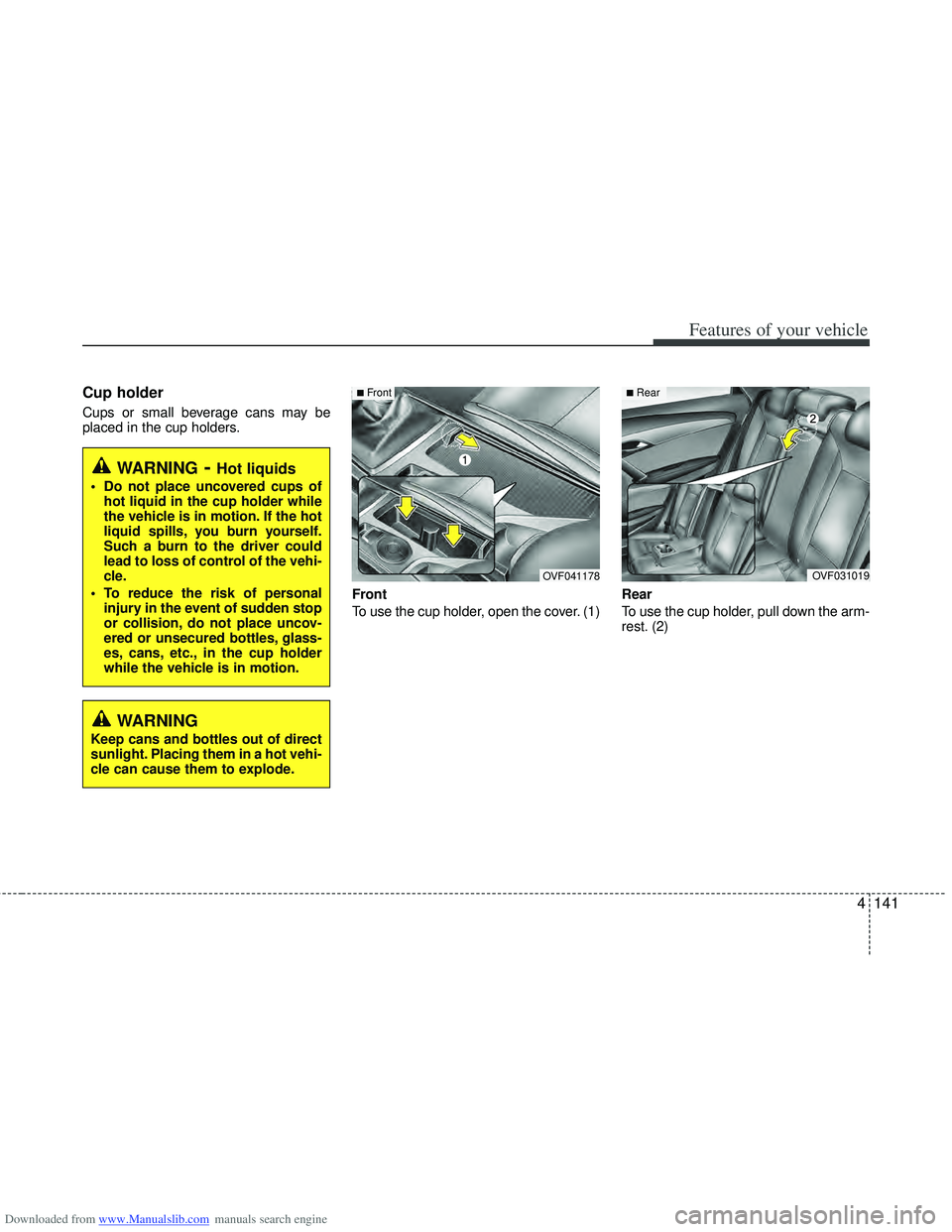
Cup holder
Cups or small beverage cans may be
placed in the cup holders.Front
To use the cup holder, open the cover. (1)Rear
To use the cup holder, pull down the arm-
rest. (2)
WARNING- Hot liquids
Do not place uncovered cups of
hot liquid in the cup holder while
the vehicle is in motion. If the hot
liquid spills, you burn yourself.
Such a burn to the driver could
lead to loss of control of the vehi-
cle.
To reduce the risk of personal injury in the event of sudden stop
or collision, do not place uncov-
ered or unsecured bottles, glass-
es, cans, etc., in the cup holder
while the vehicle is in motion.
OVF031019
■Rear
OVF041178
■Front
WARNING
Keep cans and bottles out of direct
sunlight. Placing them in a hot vehi-
cle can cause them to explode.
Page 229 of 534
Downloaded from www.Manualslib.com manuals search engine Features of your vehicle
142
4
CAUTION
Use power outlet only when the
engine is running and remove theaccessory plug after use. Using the accessory plug for prolongedperiods of time with the engineoff could cause the battery to dis-charge.
Only use 12V electric accessories which are less than 10A in elec-tric capacity.
Adjust the air-conditioner or heater to the lowest operatinglevel when using the power outlet.
Close the cover when not in use. Some electronic devices can cause electronic interferencewhen plugged into a vehicle’s power outlet. These devices maycause excessive audio static and malfunctions in other electronicsystems or devices used in yourvehicle.
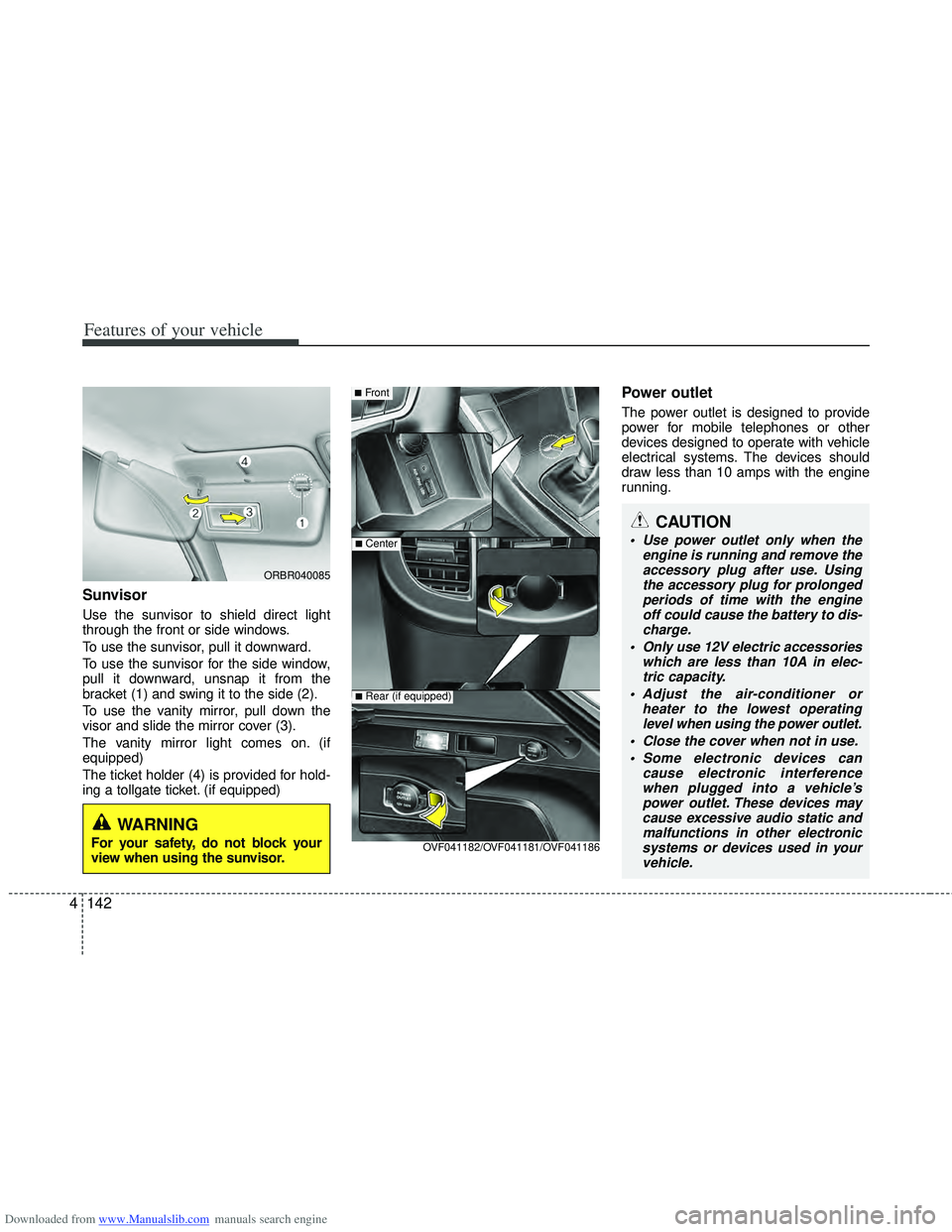
Sunvisor
Use the sunvisor to shield direct light
through the front or side windows.
To use the sunvisor, pull it downward.
To use the sunvisor for the side window,
pull it downward, unsnap it from the
bracket (1) and swing it to the side (2).
To use the vanity mirror, pull down the
visor and slide the mirror cover (3).
The vanity mirror light comes on. (if
equipped)
The ticket holder (4) is provided for hold-
ing a tollgate ticket. (if equipped)
Power outlet
The power outlet is designed to provide
power for mobile telephones or other
devices designed to operate with vehicle
electrical systems. The devices should
draw less than 10 amps with the engine
running.
■Front
■Center
OVF041182/OVF041181/OVF041186
■Rear (if equipped)
ORBR040085
WARNING
For your safety, do not block your
view when using the sunvisor.
Page 230 of 534
Downloaded from www.Manualslib.com manuals search engine 4143
Features of your vehicle
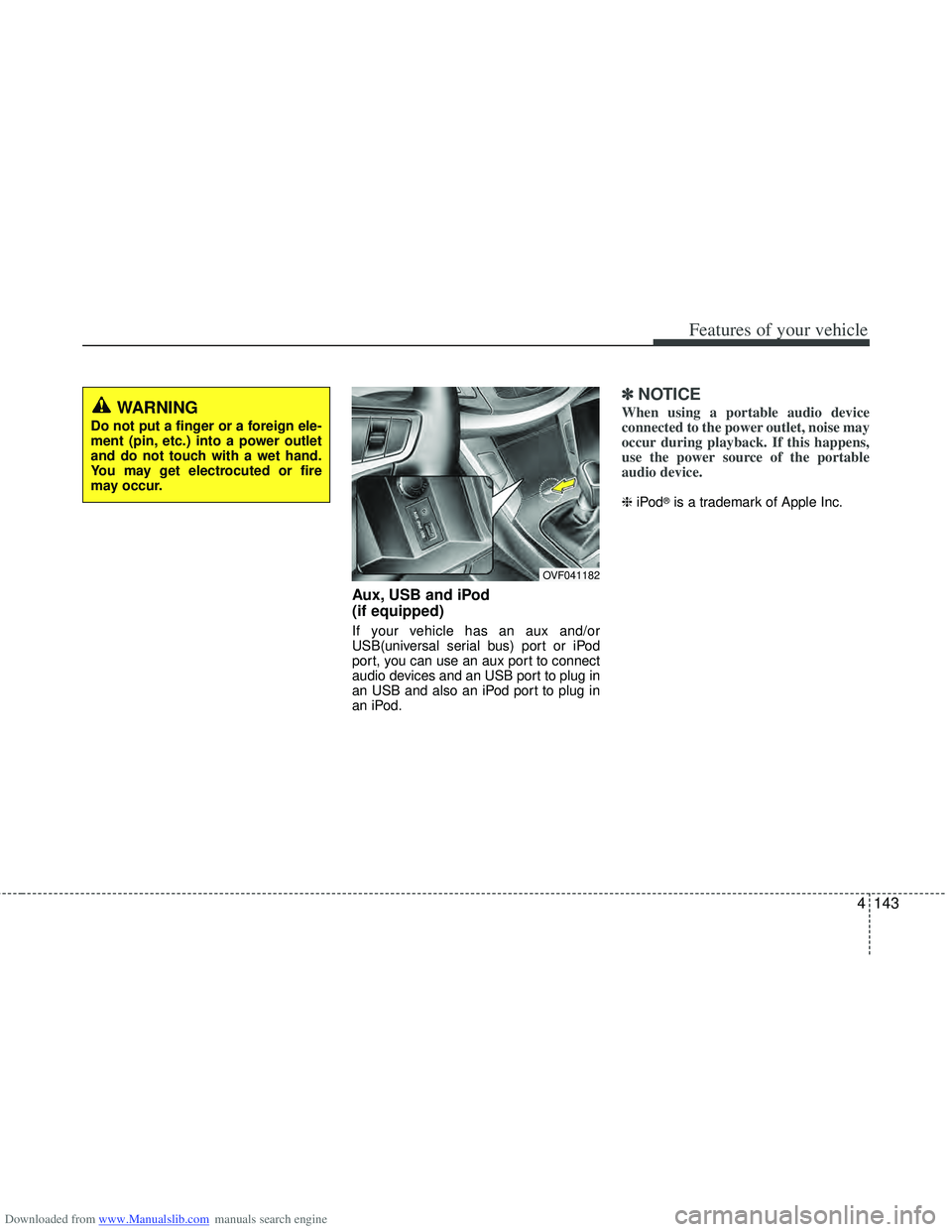
Aux, USB and iPod
(if equipped)
If your vehicle has an aux and/or
USB(universal serial bus) port or iPod
port, you can use an aux port to connect
audio devices and an USB port to plug in
an USB and also an iPod port to plug in
an iPod.
✽ ✽NOTICE
When using a portable audio device
connected to the power outlet, noise may
occur during playback. If this happens,
use the power source of the portable
audio device.
❈ iPod®is a trademark of Apple Inc.
OVF041182
WARNING
Do not put a finger or a foreign ele-
ment (pin, etc.) into a power outlet
and do not touch with a wet hand.
You may get electrocuted or fire
may occur.
Page 231 of 534
Downloaded from www.Manualslib.com manuals search engine Features of your vehicle
144
4
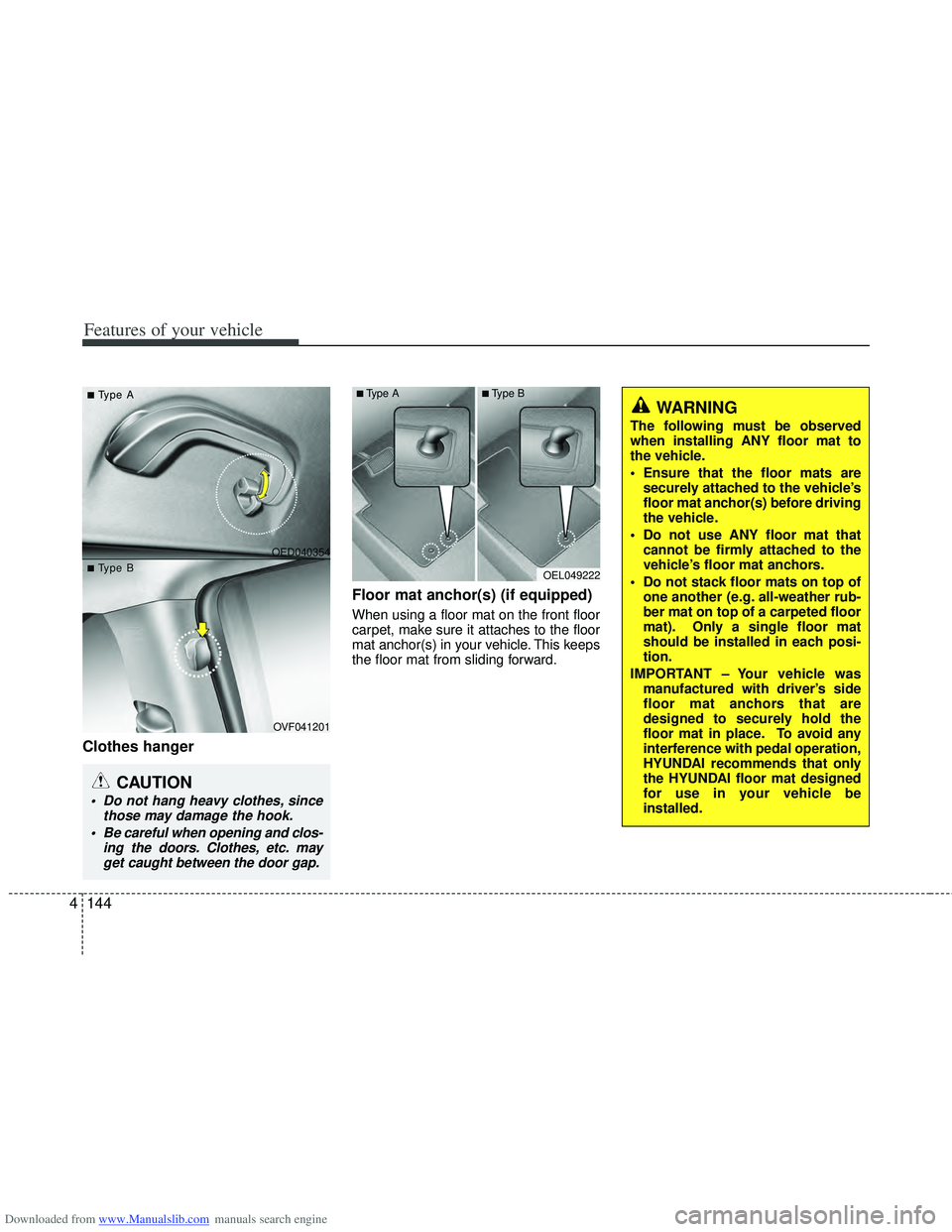
Clothes hanger Floor mat anchor(s) (if equipped)
When using a floor mat on the front floor
carpet, make sure it attaches to the floor
mat anchor(s) in your vehicle. This keeps
the floor mat from sliding forward.
OED040354
OVF041201
CAUTION
Do not hang heavy clothes, since
those may damage the hook.
Be careful when opening and clos- ing the doors. Clothes, etc. mayget caught between the door gap.
■
■T
T
ype A
ype A
■
■T
T
ype B
ype BOEL049222
■Type A■Type B
WARNING
The following must be observed
when installing ANY floor mat to
the vehicle.
Ensure that the floor mats are
securely attached to the vehicle’s
floor mat anchor(s) before driving
the vehicle.
Do not use ANY floor mat that cannot be firmly attached to the
vehicle’s floor mat anchors.
Do not stack floor mats on top of one another (e.g. all-weather rub-
ber mat on top of a carpeted floor
mat). Only a single floor mat
should be installed in each posi-
tion.
IMPORTANT – Your vehicle was manufactured with driver’s side
floor mat anchors that are
designed to securely hold the
floor mat in place. To avoid any
interference with pedal operation,
HYUNDAI recommends that only
the HYUNDAI floor mat designed
for use in your vehicle be
installed.
Page 232 of 534
Downloaded from www.Manualslib.com manuals search engine 4145
Features of your vehicle
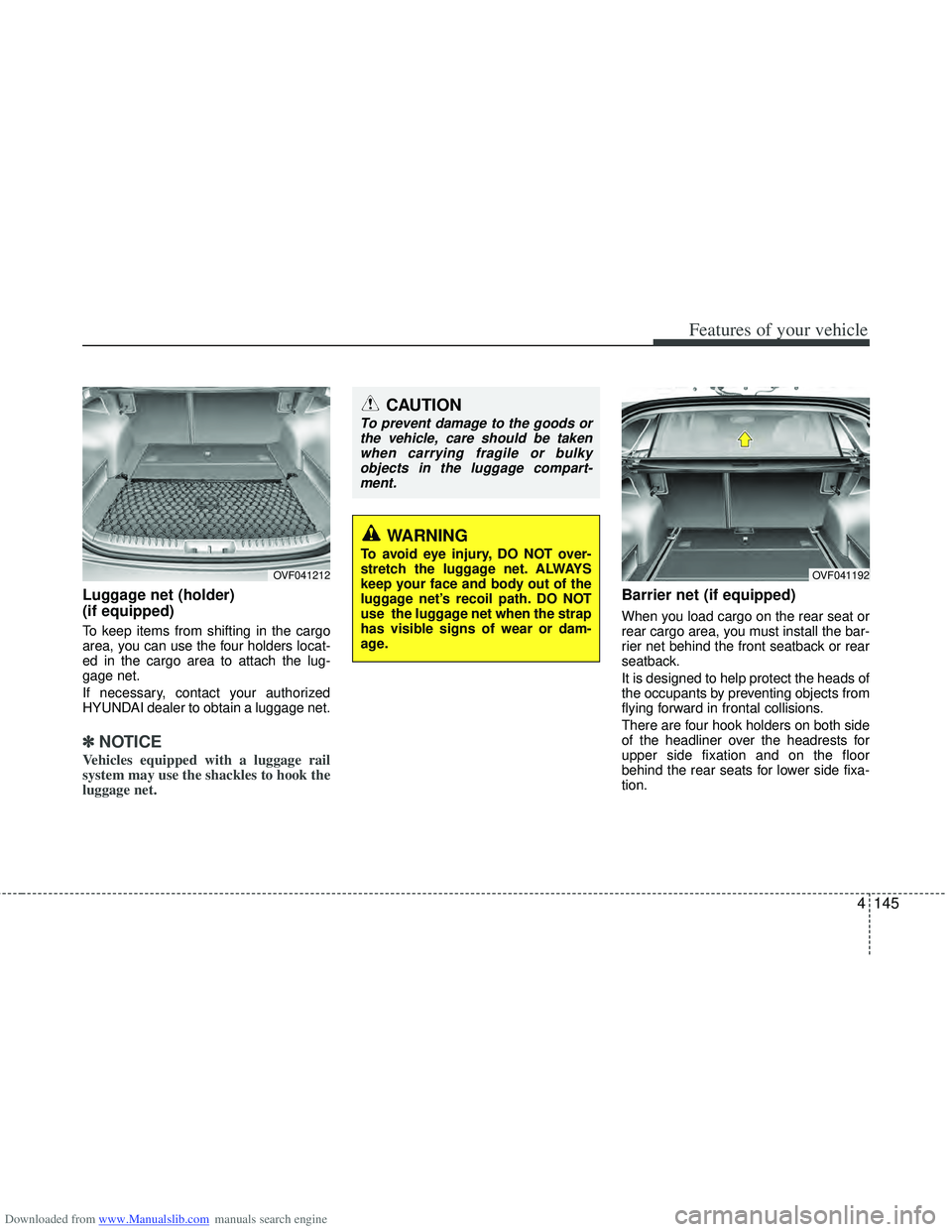
Luggage net (holder)
(if equipped)
To keep items from shifting in the cargo
area, you can use the four holders locat-
ed in the cargo area to attach the lug-
gage net.
If necessary, contact your authorized
HYUNDAI dealer to obtain a luggage net.
✽ ✽NOTICE
Vehicles equipped with a luggage rail
system may use the shackles to hook the
luggage net.
Barrier net (if equipped)
When you load cargo on the rear seat or
rear cargo area, you must install the bar-
rier net behind the front seatback or rear
seatback.
It is designed to help protect the heads of
the occupants by preventing objects from
flying forward in frontal collisions.
There are four hook holders on both side
of the headliner over the headrests for
upper side fixation and on the floor
behind the rear seats for lower side fixa-
tion.
OVF041212
CAUTION
To prevent damage to the goods or
the vehicle, care should be takenwhen carrying fragile or bulkyobjects in the luggage compart-ment.
WARNING
To avoid eye injury, DO NOT over-
stretch the luggage net. ALWAYS
keep your face and body out of the
luggage net’s recoil path. DO NOT
use the luggage net when the strap
has visible signs of wear or dam-
age.
OVF041192
Page 233 of 534
Downloaded from www.Manualslib.com manuals search engine Features of your vehicle
146
4
WARNING
Do not put passengers in the rear
seat or cargo area behind the bar-
rier net.
Do not put passenger in the rear center seat when the barrier net
is installed behind the rear seats.
The barrier net may interfere with
use of the rear center safety belt.
Do not load cargo in the area higher than the barrier net's
upper end.
Do not load heavy cargo in the area higher than the seatback to
avoid accident even if the barrier
net is installed.
Do not load cargo which has sharp edge that can pass through
the barrier net.
Do not apply excessive force to the barrier net by hanging on to
the net or by suspending heavy
cargo and so on.
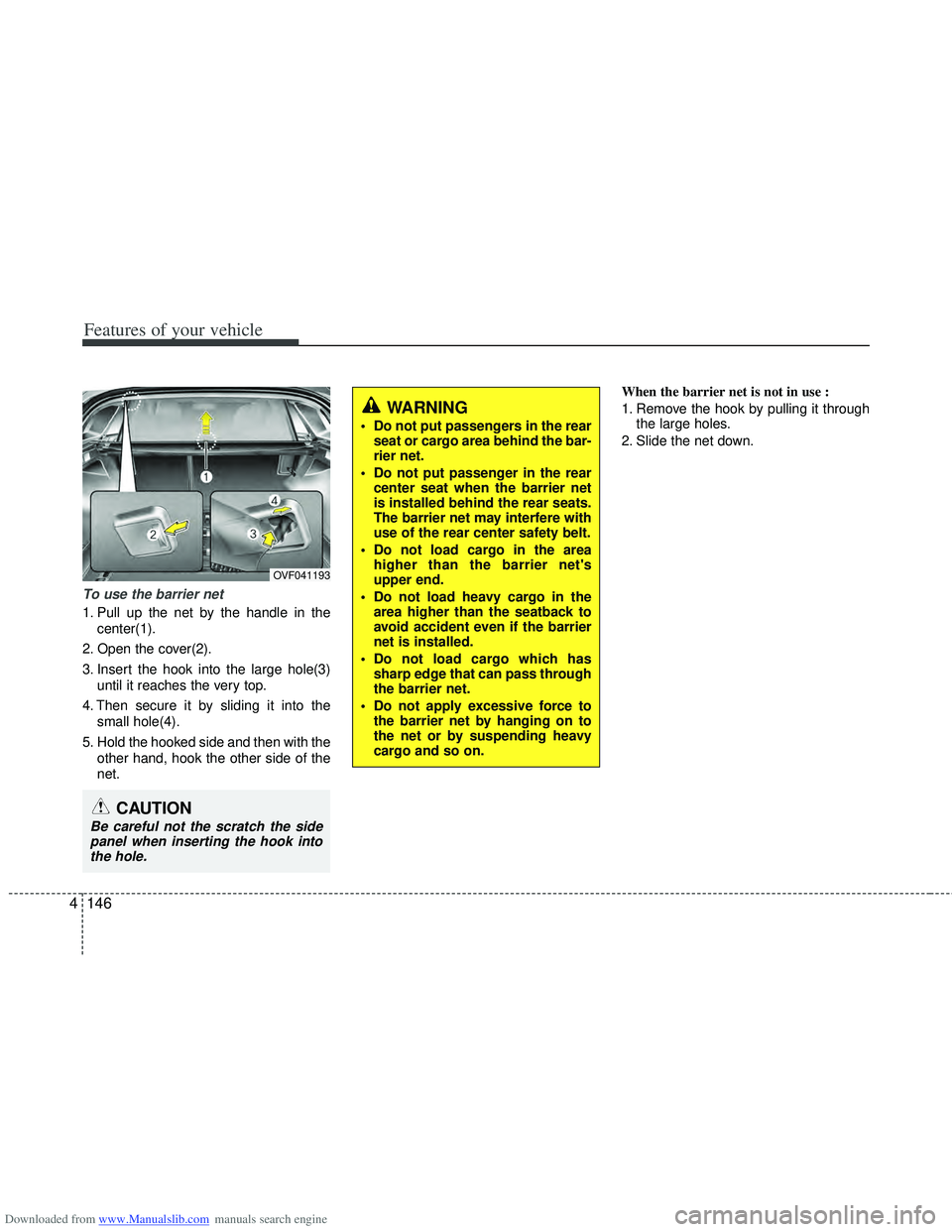
To use the barrier net
1. Pull up the net by the handle in the
center(1).
2. Open the cover(2).
3. Insert the hook into the large hole(3) until it reaches the very top.
4. Then secure it by sliding it into the small hole(4).
5. Hold the hooked side and then with the other hand, hook the other side of the
net. When the barrier net is not in use :
1. Remove the hook by pulling it through
the large holes.
2. Slide the net down.
CAUTION
Be careful not the scratch the side panel when inserting the hook into the hole.
OVF041193
Page 235 of 534
Downloaded from www.Manualslib.com manuals search engine Features of your vehicle
148
4
When the cargo security screen is not in
use:
1. Push down the center of the cargo
security screen (approximately 70
degree).
2. The cargo security screen will auto- matically slide back in.
✽ ✽NOTICE
The cargo security screen may not auto-
matically slide back in if the cargo secu-
rity screen is not fully pulled out. Fully
pull it out and then let go.
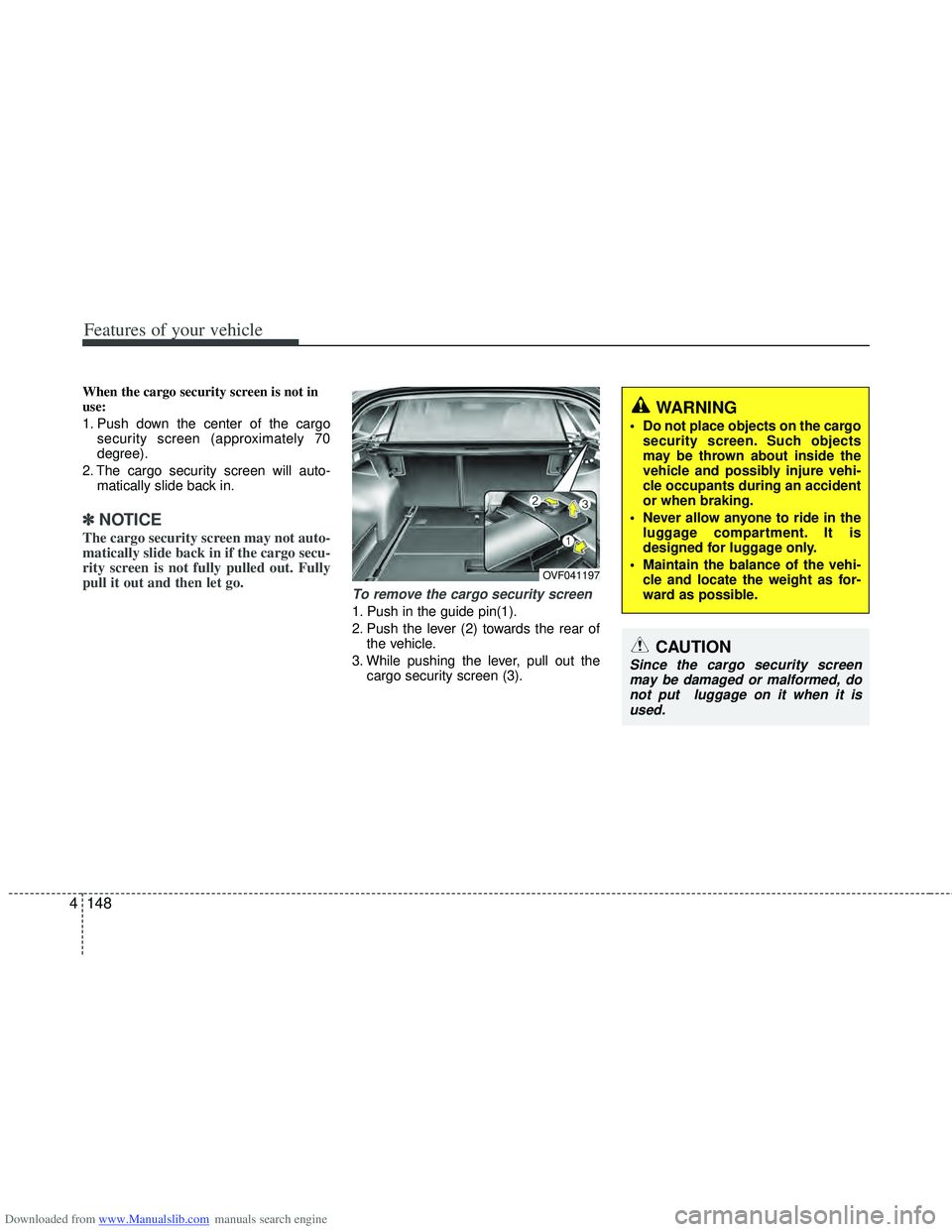
To remove the cargo security screen
1. Push in the guide pin(1).
2. Push the lever (2) towards the rear of
the vehicle.
3. While pushing the lever, pull out the cargo security screen (3).
WARNING
Do not place objects on the cargosecurity screen. Such objects
may be thrown about inside the
vehicle and possibly injure vehi-
cle occupants during an accident
or when braking.
Never allow anyone to ride in the luggage compartment. It is
designed for luggage only.
Maintain the balance of the vehi- cle and locate the weight as for-
ward as possible.
CAUTION
Since the cargo security screenmay be damaged or malformed, donot put luggage on it when it is used.
OVF041197
Page 238 of 534
Downloaded from www.Manualslib.com manuals search engine 4151
Features of your vehicle
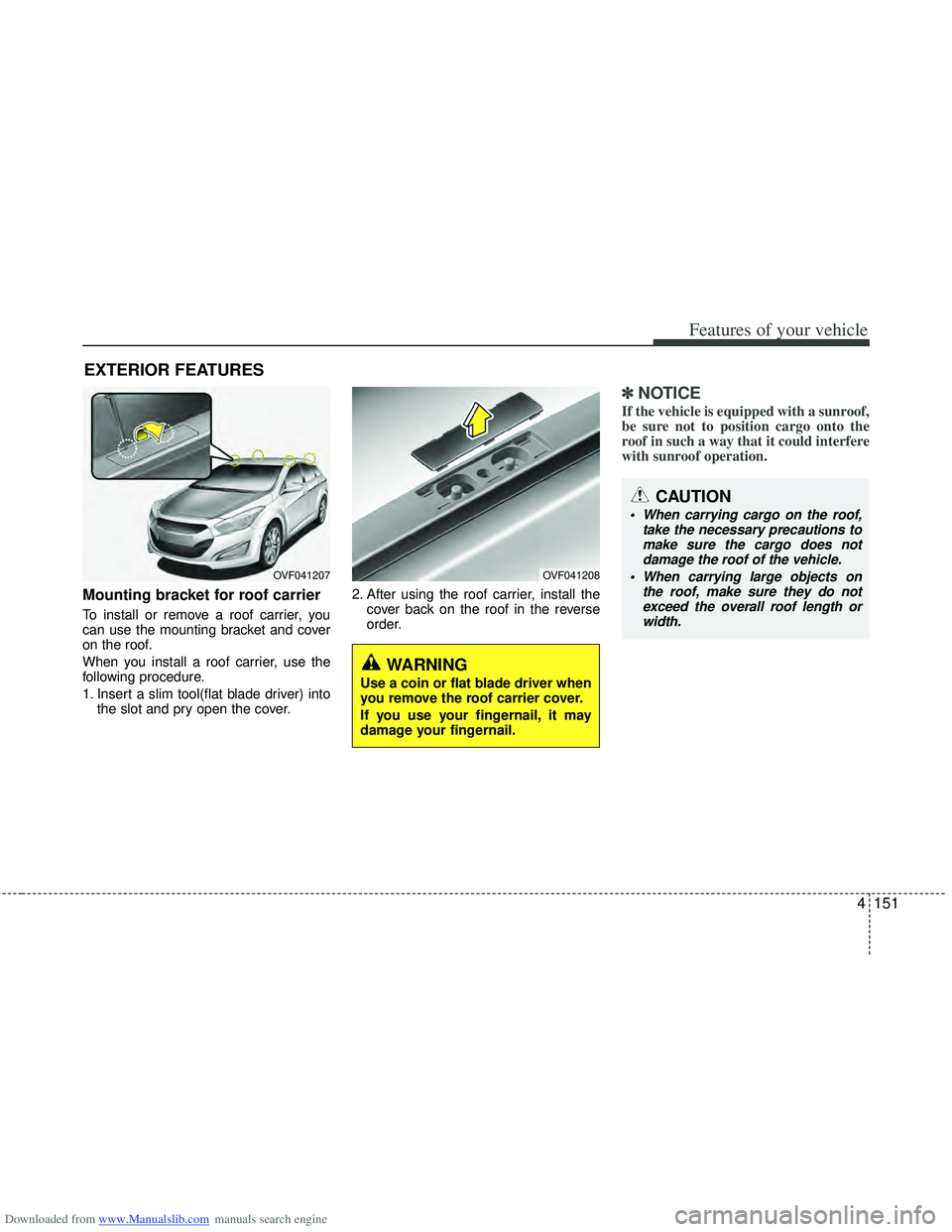
Mounting bracket for roof carrier
To install or remove a roof carrier, you
can use the mounting bracket and cover
on the roof.
When you install a roof carrier, use the
following procedure.
1. Insert a slim tool(flat blade driver) intothe slot and pry open the cover. 2. After using the roof carrier, install the
cover back on the roof in the reverse
order.
✽ ✽NOTICE
If the vehicle is equipped with a sunroof,
be sure not to position cargo onto the
roof in such a way that it could interfere
with sunroof operation.
EXTERIOR FEATURES
OVF041207OVF041208
WARNING
Use a coin or flat blade driver when
you remove the roof carrier cover.
If you use your fingernail, it may
damage your fingernail.
CAUTION
When carrying cargo on the roof,
take the necessary precautions tomake sure the cargo does not damage the roof of the vehicle.
When carrying large objects on the roof, make sure they do notexceed the overall roof length or width.
Page 239 of 534
Downloaded from www.Manualslib.com manuals search engine WARNING
The vehicle center of gravity willbe higher when items are loaded
onto the roof. Avoid sudden
starts, braking, sharp turns,
abrupt maneuvers or high speeds
that may result in loss of vehicle
control or rollover resulting in an
accident.
Always drive slowly and turn cor- ners carefully when carrying
items on the roof. Severe wind
updrafts, caused by passing
vehicles or natural causes, can
cause sudden upward pressure
on items loaded on the roof. This
is especially true when carrying
large, flat items such as wood
panels or mattresses. This could
cause the items to fall off the roof
and cause damage to your vehi-
cle or others around you.
To prevent damage or loss of cargo while driving, check fre-
quently before or while driving to
make sure the items on the roof
are securely fastened.
4152
Features of your vehicle
Page 243 of 534
Downloaded from www.Manualslib.com manuals search engine Features of your vehicle
156
4
CAUTION
When using a communication sys-
tem such a cellular phone or a radio set inside the vehicle, a separateexternal antenna must be fitted. When a cellular phone or a radio setis used with an internal antenna alone, it may interfere with the vehi-cle's electrical system and adverse- ly affect safe operation of the vehi-cle.
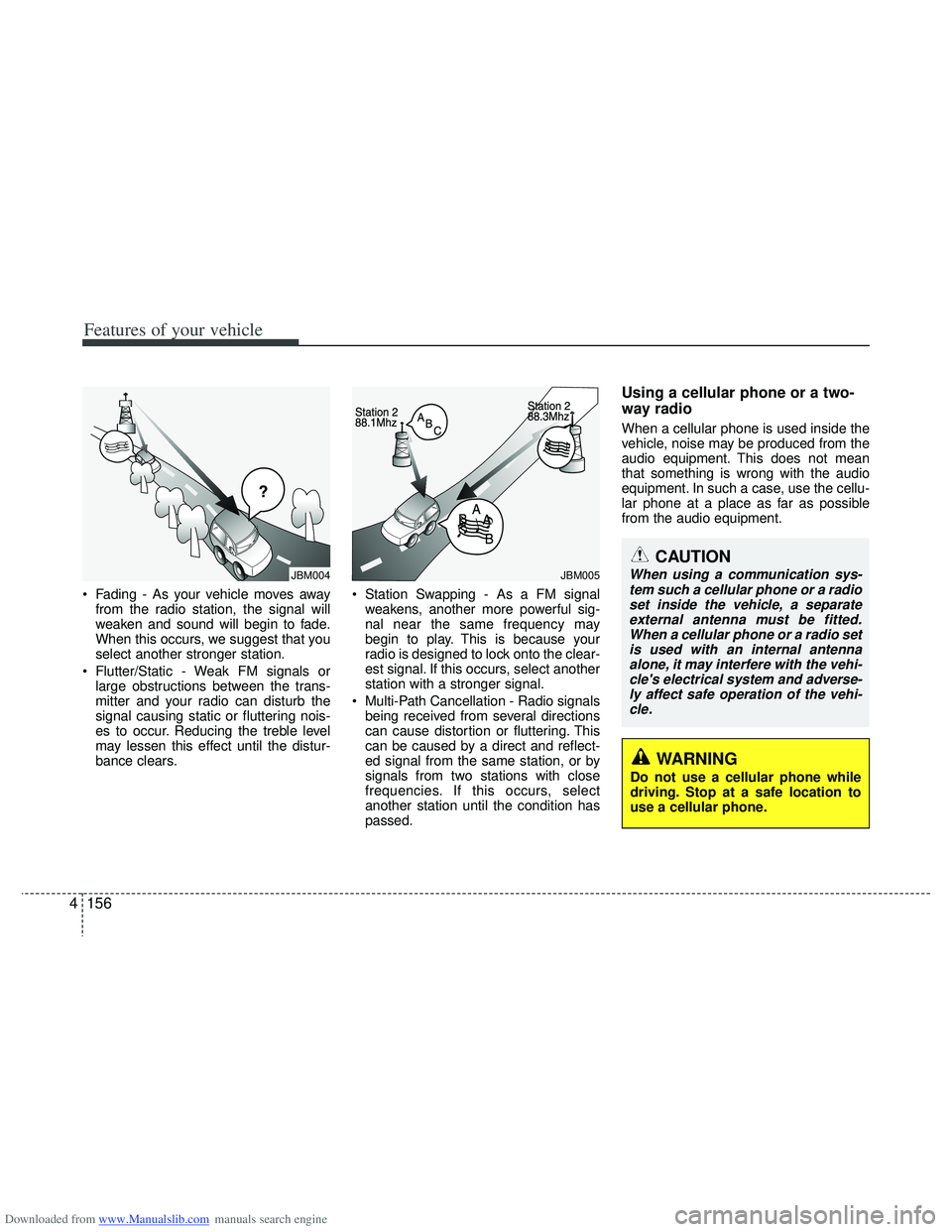
Fading - As your vehicle moves away from the radio station, the signal will
weaken and sound will begin to fade.
When this occurs, we suggest that you
select another stronger station.
Flutter/Static - Weak FM signals or large obstructions between the trans-
mitter and your radio can disturb the
signal causing static or fluttering nois-
es to occur. Reducing the treble level
may lessen this effect until the distur-
bance clears. Station Swapping - As a FM signal
weakens, another more powerful sig-
nal near the same frequency may
begin to play. This is because your
radio is designed to lock onto the clear-
est signal. If this occurs, select another
station with a stronger signal.
Multi-Path Cancellation - Radio signals being received from several directions
can cause distortion or fluttering. This
can be caused by a direct and reflect-
ed signal from the same station, or by
signals from two stations with close
frequencies. If this occurs, select
another station until the condition has
passed.
Using a cellular phone or a two-
way radio
When a cellular phone is used inside the
vehicle, noise may be produced from the
audio equipment. This does not mean
that something is wrong with the audio
equipment. In such a case, use the cellu-
lar phone at a place as far as possible
from the audio equipment.
¢¢¢
JBM004JBM005
WARNING
Do not use a cellular phone while
driving. Stop at a safe location to
use a cellular phone.