lock HYUNDAI I40 2011 Repair Manual
[x] Cancel search | Manufacturer: HYUNDAI, Model Year: 2011, Model line: I40, Model: HYUNDAI I40 2011Pages: 534, PDF Size: 11.05 MB
Page 217 of 534
Downloaded from www.Manualslib.com manuals search engine Features of your vehicle
130
4
Operation Tips
To keep dust or unpleasant fumes from
entering the vehicle through the venti-
lation system, temporarily set the air
intake control to the recirculated air
position. Be sure to return the control
to the fresh air position when the irrita-
tion has passed to keep fresh air in the
vehicle. This will help keep the driver
alert and comfortable.
Air for the heating/cooling system is drawn in through the grilles just ahead
of the windshield. Care should be
taken that these are not blocked by
leaves, snow, ice or other obstructions.
To prevent interior fog on the wind- shield, set the air intake control to the
fresh air position and fan speed to the
desired position, turn on the air condi-
tioning system, and adjust the temper-
ature control to desired temperature.Air conditioning (if equipped)
All HYUNDAI Air Conditioning Systems
are filled with environmentally friendly
R-134a refrigerant which does not dam-
age to the ozone layer.
1. Start the engine. Push the air condi- tioning button.
2. Set the mode to the position.
3. Set the air intake control to the outside air or recirculated air position.
4. Adjust the fan speed control and tem- perature control to maintain maximum
comfort.✽ ✽NOTICE
• When using the air conditioning sys-
tem, monitor the temperature gauge
closely while driving up hills or in
heavy traffic when outside tempera-
tures are high. Air conditioning sys-
tem operation may cause engine over-
heating. Continue to use the blower
fan but turn the air conditioning sys-
tem off if the temperature gauge indi-
cates engine overheating.
• When opening the windows in humid weather air conditioning may create
water droplets inside the vehicle.
Since excessive water droplets may
cause damage to electrical equipment,
air conditioning should only be used
with the windows closed.
Page 223 of 534
Downloaded from www.Manualslib.com manuals search engine Features of your vehicle
136
4
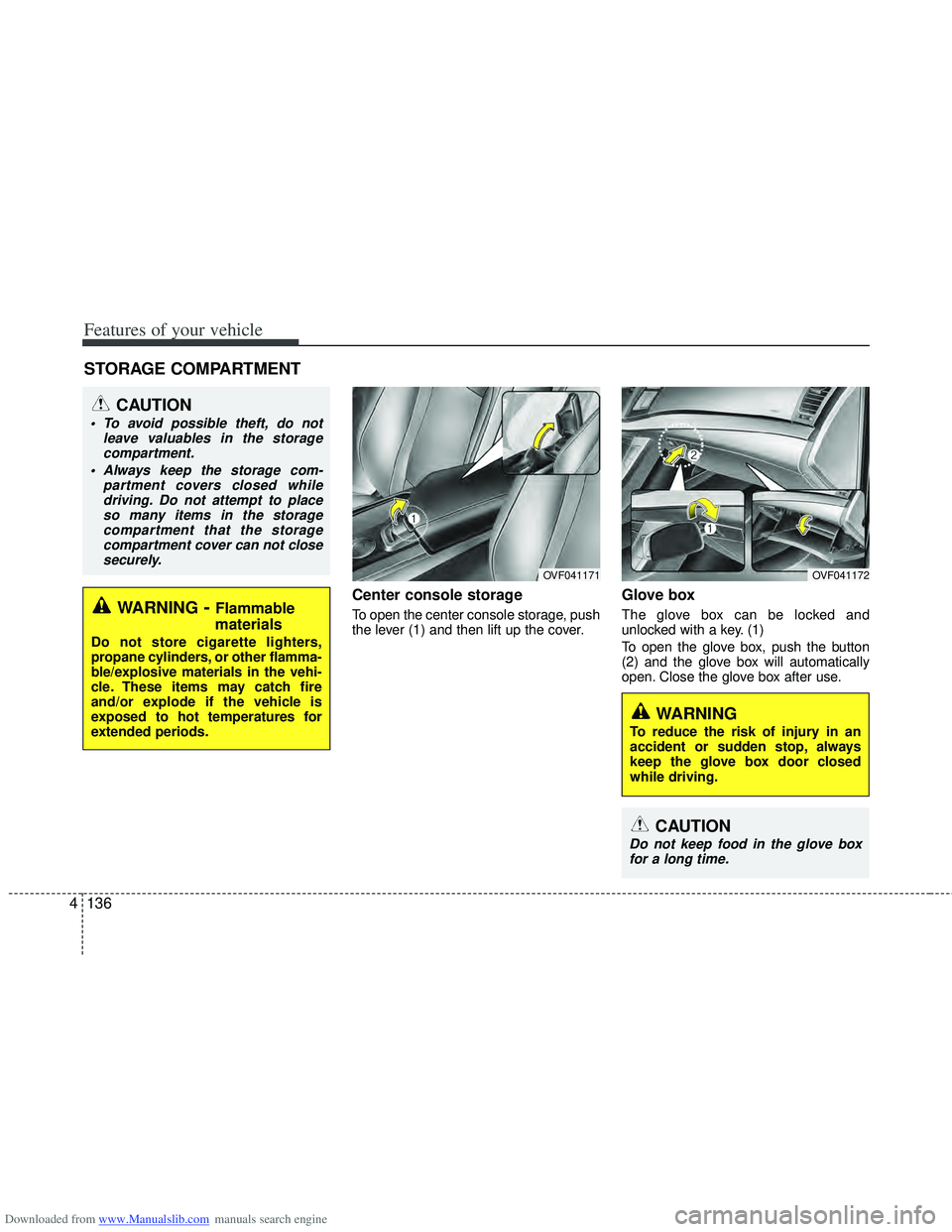
Center console storage
To open the center console storage, push
the lever (1) and then lift up the cover.
Glove box
The glove box can be locked and
unlocked with a key. (1)
To open the glove box, push the button
(2) and the glove box will automatically
open. Close the glove box after use.
STORAGE COMPARTMENT
WARNING- Flammable
materials
Do not store cigarette lighters,
propane cylinders, or other flamma-
ble/explosive materials in the vehi-
cle. These items may catch fire
and/or explode if the vehicle is
exposed to hot temperatures for
extended periods.
CAUTION
To avoid possible theft, do not
leave valuables in the storagecompartment.
Always keep the storage com- partment covers closed whiledriving. Do not attempt to placeso many items in the storage compartment that the storagecompartment cover can not closesecurely.
OVF041171OVF041172
WARNING
To reduce the risk of injury in an
accident or sudden stop, always
keep the glove box door closed
while driving.
CAUTION
Do not keep food in the glove boxfor a long time.
Page 224 of 534
Downloaded from www.Manualslib.com manuals search engine 4137
Features of your vehicle
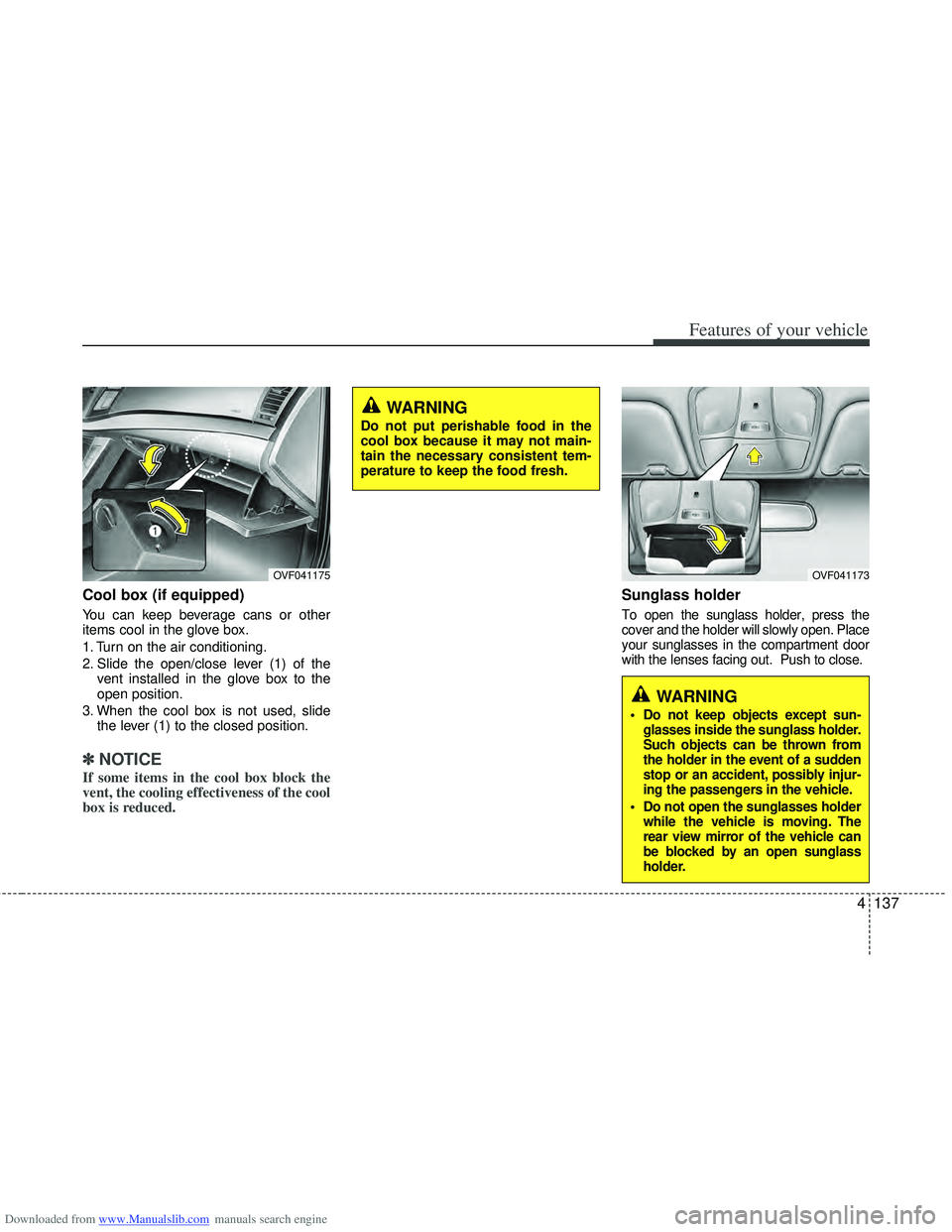
Cool box (if equipped)
You can keep beverage cans or other
items cool in the glove box.
1. Turn on the air conditioning.
2. Slide the open/close lever (1) of thevent installed in the glove box to the
open position.
3. When the cool box is not used, slide the lever (1) to the closed position.
✽ ✽NOTICE
If some items in the cool box block the
vent, the cooling effectiveness of the cool
box is reduced.
Sunglass holder
To open the sunglass holder, press the
cover and the holder will slowly open. Place
your sunglasses in the compartment door
with the lenses facing out. Push to close.
OVF041173
WARNING
Do not keep objects except sun-
glasses inside the sunglass holder.
Such objects can be thrown from
the holder in the event of a sudden
stop or an accident, possibly injur-
ing the passengers in the vehicle.
Do not open the sunglasses holder while the vehicle is moving. The
rear view mirror of the vehicle can
be blocked by an open sunglass
holder.
OVF041175
WARNING
Do not put perishable food in the
cool box because it may not main-
tain the necessary consistent tem-
perature to keep the food fresh.
Page 229 of 534
Downloaded from www.Manualslib.com manuals search engine Features of your vehicle
142
4
CAUTION
Use power outlet only when the
engine is running and remove theaccessory plug after use. Using the accessory plug for prolongedperiods of time with the engineoff could cause the battery to dis-charge.
Only use 12V electric accessories which are less than 10A in elec-tric capacity.
Adjust the air-conditioner or heater to the lowest operatinglevel when using the power outlet.
Close the cover when not in use. Some electronic devices can cause electronic interferencewhen plugged into a vehicle’s power outlet. These devices maycause excessive audio static and malfunctions in other electronicsystems or devices used in yourvehicle.
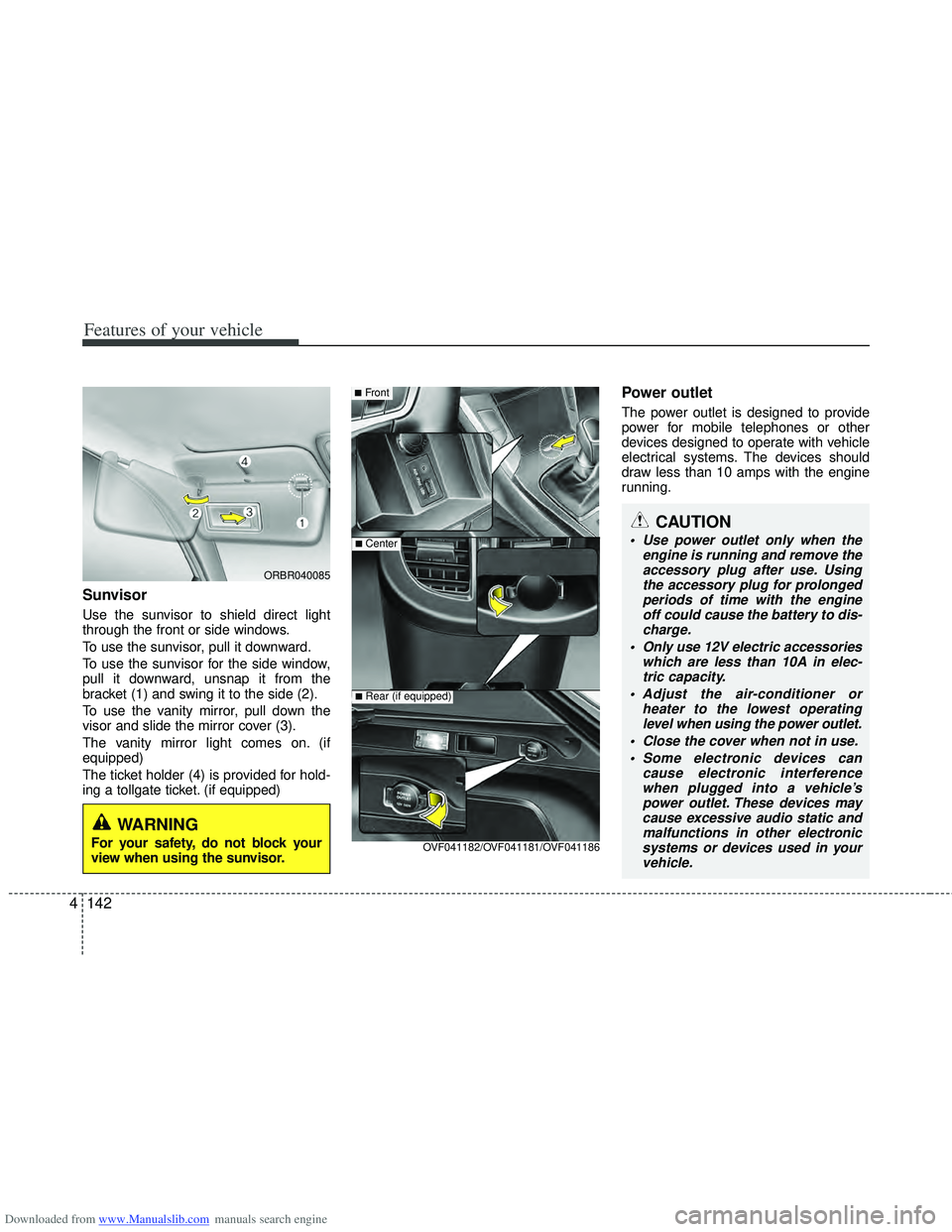
Sunvisor
Use the sunvisor to shield direct light
through the front or side windows.
To use the sunvisor, pull it downward.
To use the sunvisor for the side window,
pull it downward, unsnap it from the
bracket (1) and swing it to the side (2).
To use the vanity mirror, pull down the
visor and slide the mirror cover (3).
The vanity mirror light comes on. (if
equipped)
The ticket holder (4) is provided for hold-
ing a tollgate ticket. (if equipped)
Power outlet
The power outlet is designed to provide
power for mobile telephones or other
devices designed to operate with vehicle
electrical systems. The devices should
draw less than 10 amps with the engine
running.
■Front
■Center
OVF041182/OVF041181/OVF041186
■Rear (if equipped)
ORBR040085
WARNING
For your safety, do not block your
view when using the sunvisor.
Page 234 of 534
Downloaded from www.Manualslib.com manuals search engine 4147
Features of your vehicle
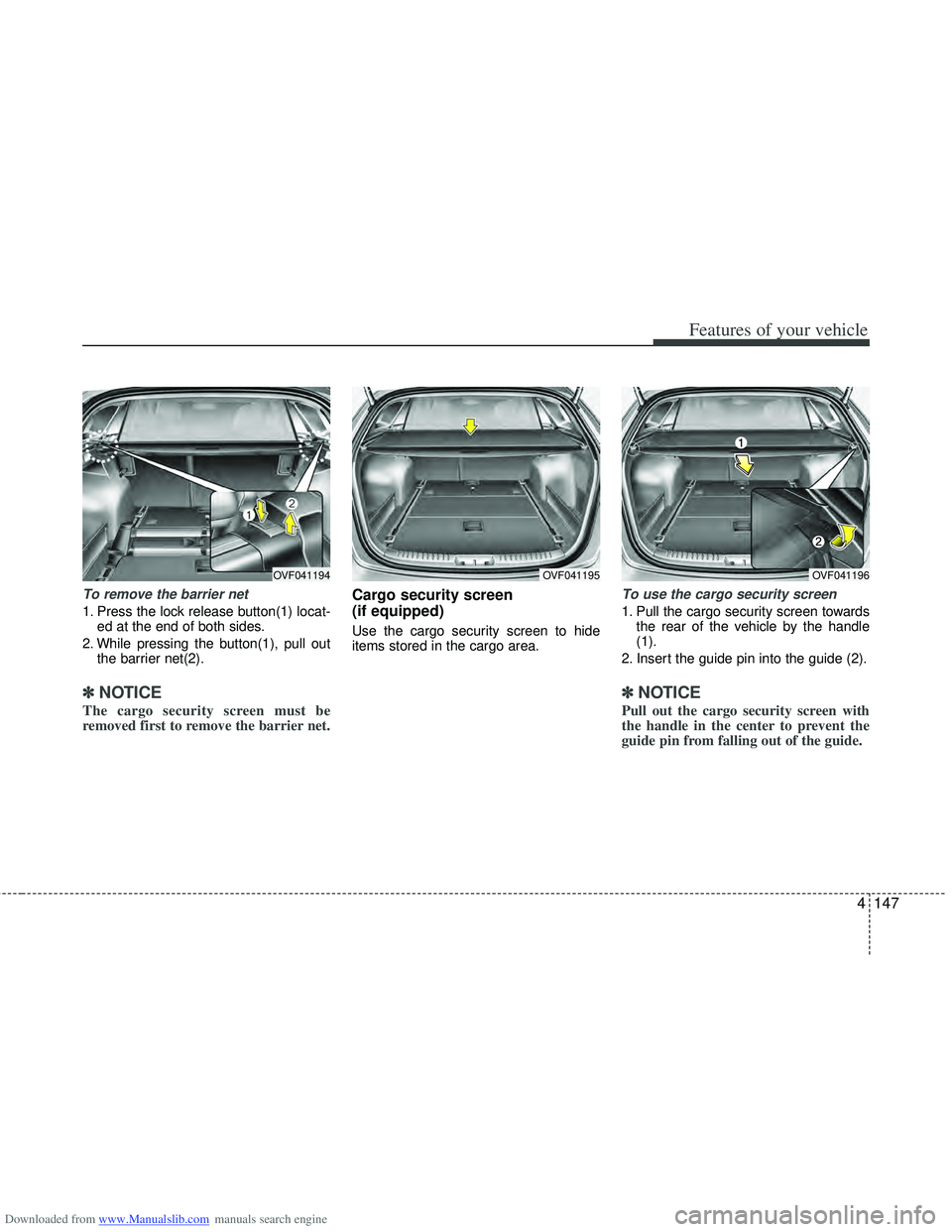
To remove the barrier net
1. Press the lock release button(1) locat-ed at the end of both sides.
2. While pressing the button(1), pull out the barrier net(2).
✽
✽NOTICE
The cargo security screen must be
removed first to remove the barrier net.
Cargo security screen
(if equipped)
Use the cargo security screen to hide
items stored in the cargo area.
To use the cargo security screen
1. Pull the cargo security screen towards
the rear of the vehicle by the handle
(1).
2. Insert the guide pin into the guide (2).
✽ ✽ NOTICE
Pull out the cargo security screen with
the handle in the center to prevent the
guide pin from falling out of the guide.
OVF041194OVF041195OVF041196
Page 236 of 534
Downloaded from www.Manualslib.com manuals search engine 4149
Features of your vehicle
Luggage rail system
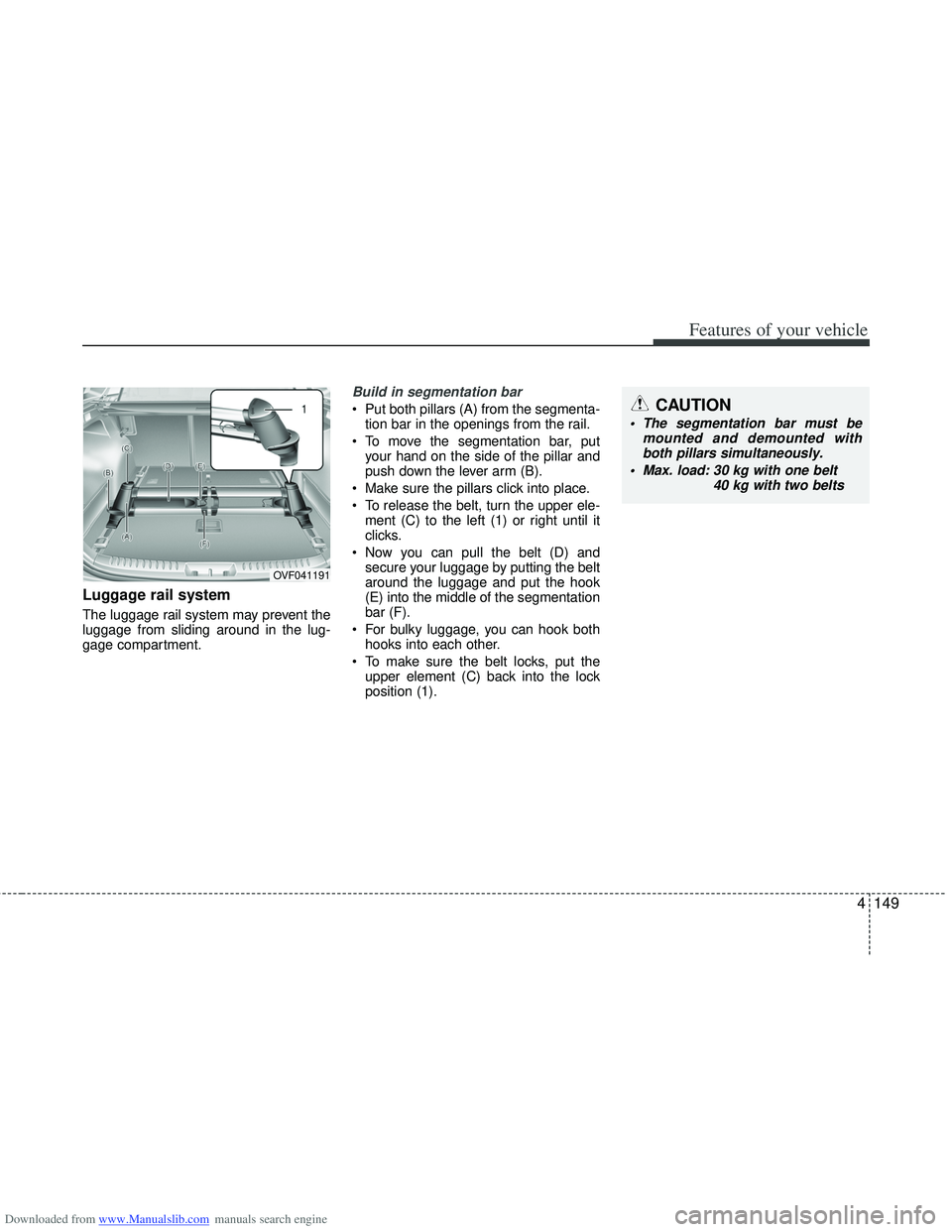
The luggage rail system may prevent the
luggage from sliding around in the lug-
gage compartment.
Build in segmentation bar
Put both pillars (A) from the segmenta-tion bar in the openings from the rail.
To move the segmentation bar, put your hand on the side of the pillar and
push down the lever arm (B).
Make sure the pillars click into place.
To release the belt, turn the upper ele- ment (C) to the left (1) or right until it
clicks.
Now you can pull the belt (D) and secure your luggage by putting the belt
around the luggage and put the hook
(E) into the middle of the segmentation
bar (F).
For bulky luggage, you can hook both hooks into each other.
To make sure the belt locks, put the upper element (C) back into the lock
position (1).
OVF041191
CAUTION
The segmentation bar must be mounted and demounted withboth pillars simultaneously.
Max. load: 30 kg with one belt
40 kg with two belts
Page 240 of 534
Downloaded from www.Manualslib.com manuals search engine 4153
Features of your vehicle
✽
✽NOTICE
If you install an aftermarket HID head
lamp, your vehicle’s audio and electron-
ic device may malfunction.
Antenna
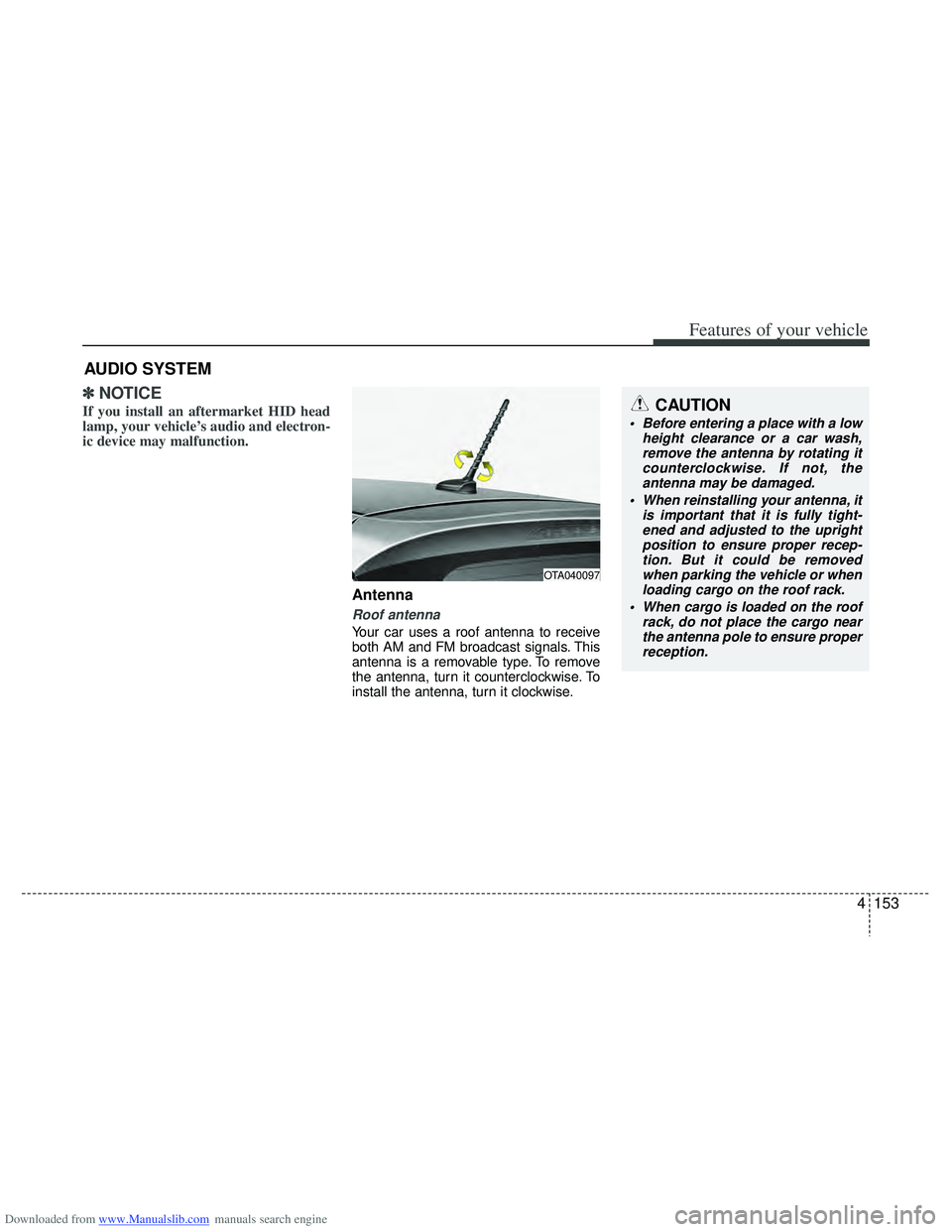
Roof antenna
Your car uses a roof antenna to receive
both AM and FM broadcast signals. This
antenna is a removable type. To remove
the antenna, turn it counterclockwise. To
install the antenna, turn it clockwise.
AUDIO SYSTEM
CAUTION
• Before entering a place with a low
height clearance or a car wash,remove the antenna by rotating it counterclockwise. If not, theantenna may be damaged.
When reinstalling your antenna, it is important that it is fully tight-ened and adjusted to the uprightposition to ensure proper recep- tion. But it could be removedwhen parking the vehicle or when loading cargo on the roof rack.
When cargo is loaded on the roof rack, do not place the cargo nearthe antenna pole to ensure properreception.
OTA040097
Page 243 of 534
Downloaded from www.Manualslib.com manuals search engine Features of your vehicle
156
4
CAUTION
When using a communication sys-
tem such a cellular phone or a radio set inside the vehicle, a separateexternal antenna must be fitted. When a cellular phone or a radio setis used with an internal antenna alone, it may interfere with the vehi-cle's electrical system and adverse- ly affect safe operation of the vehi-cle.
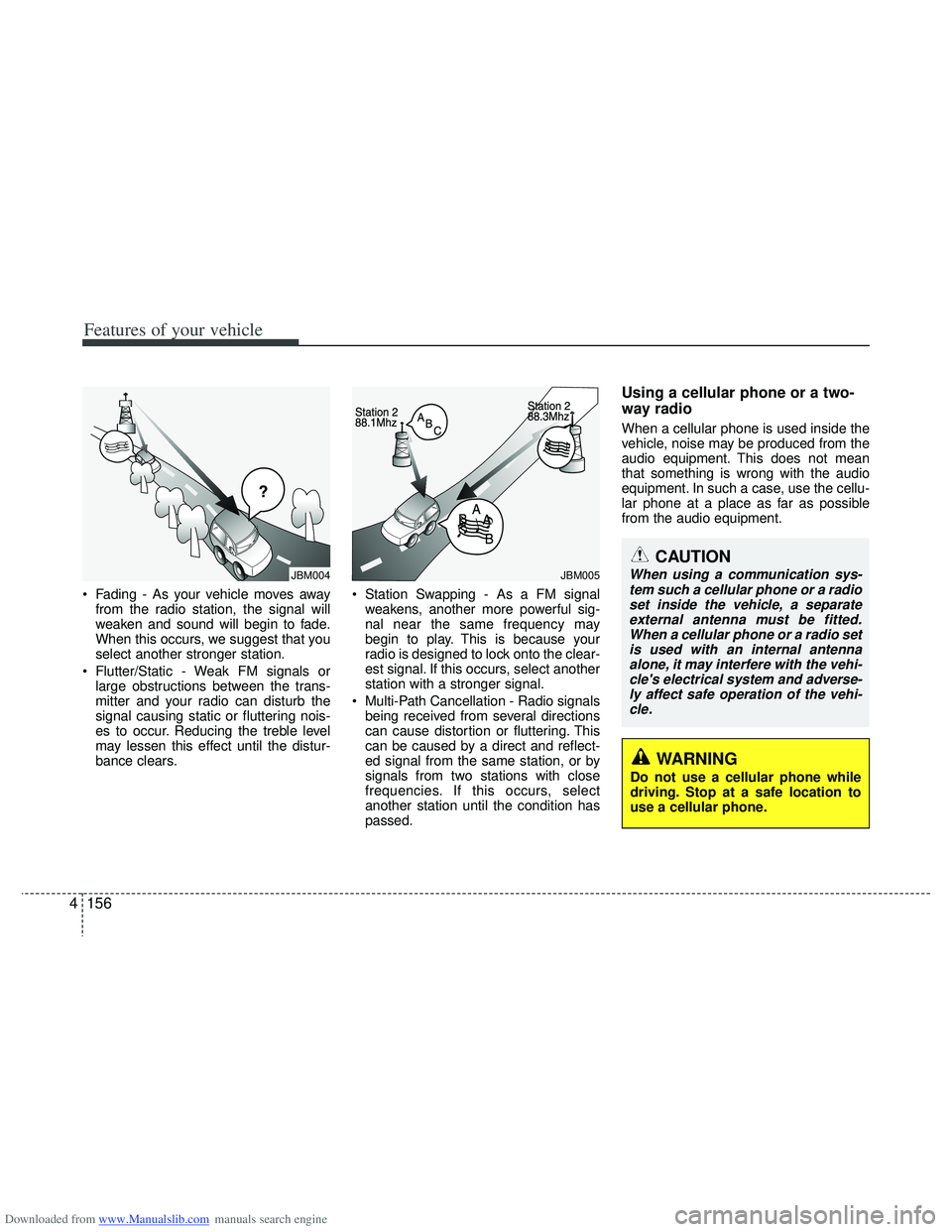
Fading - As your vehicle moves away from the radio station, the signal will
weaken and sound will begin to fade.
When this occurs, we suggest that you
select another stronger station.
Flutter/Static - Weak FM signals or large obstructions between the trans-
mitter and your radio can disturb the
signal causing static or fluttering nois-
es to occur. Reducing the treble level
may lessen this effect until the distur-
bance clears. Station Swapping - As a FM signal
weakens, another more powerful sig-
nal near the same frequency may
begin to play. This is because your
radio is designed to lock onto the clear-
est signal. If this occurs, select another
station with a stronger signal.
Multi-Path Cancellation - Radio signals being received from several directions
can cause distortion or fluttering. This
can be caused by a direct and reflect-
ed signal from the same station, or by
signals from two stations with close
frequencies. If this occurs, select
another station until the condition has
passed.
Using a cellular phone or a two-
way radio
When a cellular phone is used inside the
vehicle, noise may be produced from the
audio equipment. This does not mean
that something is wrong with the audio
equipment. In such a case, use the cellu-
lar phone at a place as far as possible
from the audio equipment.
¢¢¢
JBM004JBM005
WARNING
Do not use a cellular phone while
driving. Stop at a safe location to
use a cellular phone.
Page 246 of 534
Downloaded from www.Manualslib.com manuals search engine 4159
Features of your vehicle
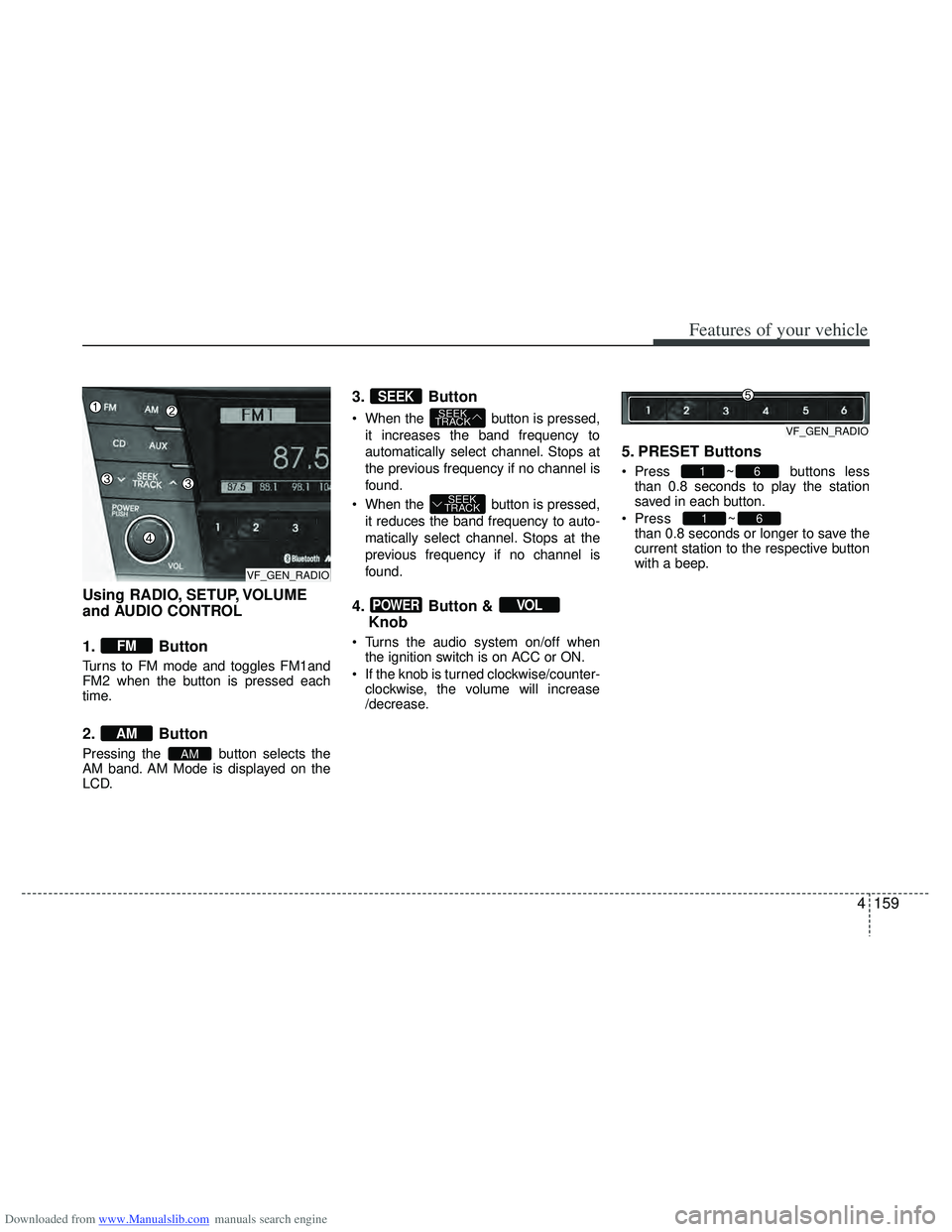
Using RADIO, SETUP, VOLUME
and AUDIO CONTROL
1. Button
Turns to FM mode and toggles FM1and
FM2 when the button is pressed each
time.
2. Button
Pressing the button selects the
AM band. AM Mode is displayed on the
LCD.
3. Button
When the button is pressed,it increases the band frequency to
automatically select channel. Stops at
the previous frequency if no channel is
found.
When the button is pressed, it reduces the band frequency to auto-
matically select channel. Stops at the
previous frequency if no channel is
found.
4. Button & Knob
Turns the audio system on/off when
the ignition switch is on ACC or ON.
If the knob is turned clockwise/counter- clockwise, the volume will increase
/decrease.
5. PRESET Buttons
Press ~ buttons lessthan 0.8 seconds to play the station
saved in each button.
Press ~
button more
than 0.8 seconds or longer to save the
current station to the respective button
with a beep.
61
61
VOLPOWER
SEEK
TRACK
SEEK
TRACK
SEEK
AM
AM
FM
VF_GEN_RADIOVF_GEN_RADIO
VF_GEN_RADIO
Page 248 of 534
Downloaded from www.Manualslib.com manuals search engine 4161
Features of your vehicle
Select default display of MP3 play infor-
mation. “Folder/File” or “Artist/Title” can
be selected.
)
This function displays the previous
MODE screen.
Select this item to enter CLOCK setup
mode.
Adjust the hour and press the
button to set. Adjust the minute and
press the button to complete
and exit from clock adjustment mode.
Pressing the button more than
0.8 seconds while in power off, screen
will allow the user to make immediately
adjustments to the clock.
Select this item to enter PHONE setup
mode. Refer to “BLUETOOTH PHONE
OPERATION” section for detailed infor-
mation.
❈
“PHONE” menu is not available if the
audio does not support Bluetooth fea-
tures.
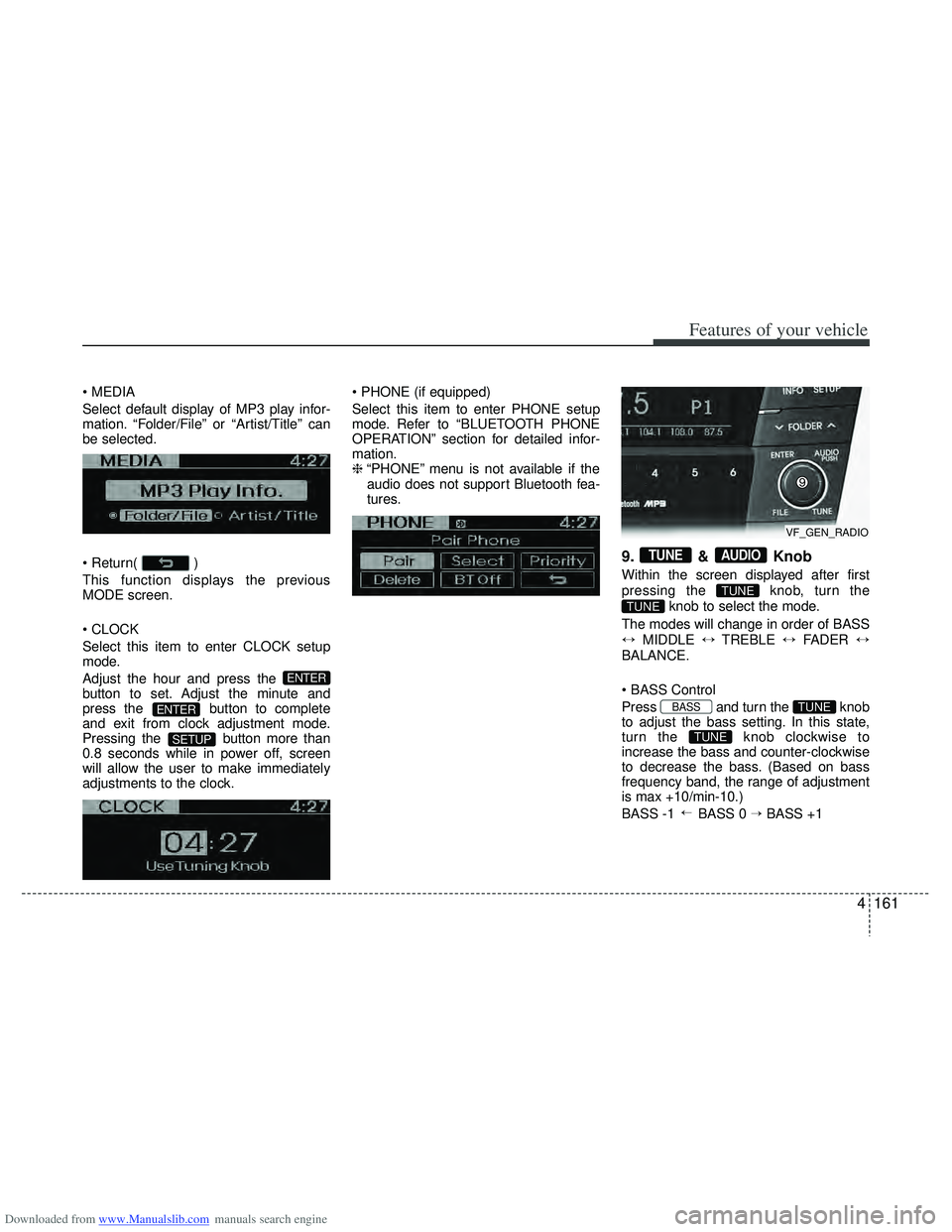
9. & Knob
Within the screen displayed after first
pressing the knob, turn the
knob to select the mode.
The modes will change in order of BASS
↔ MIDDLE ↔TREBLE ↔FADER ↔
BALANCE.
Press and turn the knob
to adjust the bass setting. In this state,
turn the knob clockwise to
increase the bass and counter-clockwise
to decrease the bass. (Based on bass
frequency band, the range of adjustment
is max +10/min-10.)
BASS -1 BASS 0 → BASS +1
→
TUNE
TUNEBASS
TUNE
TUNE
AUDIOTUNE
SETUP
ENTER
ENTER
VF_GEN_RADIO