door lock HYUNDAI I40 2012 Owner's Manual
[x] Cancel search | Manufacturer: HYUNDAI, Model Year: 2012, Model line: I40, Model: HYUNDAI I40 2012Pages: 534, PDF Size: 11.05 MB
Page 105 of 534
Downloaded from www.Manualslib.com manuals search engine Features of your vehicle
18
4
Deadlocks (if equipped)
Some vehicles are equipped with a
deadlock system. Deadlocks prevent
opening of a door from either inside or
outside the vehicle once the deadlocks
have been activated providing an addi-
tional measure of vehicle security.
To lock the vehicle using the deadlock
function, the doors must be locked by
using the transmitter or smart key. To
unlock the vehicle, the transmitter or
smart key must be used again.
Door lock/unlock features
Impact sensing door unlock system
All doors will automatically unlock when
an impact causes the air bags to deploy.
Speed sensing door lock system
(if equipped)
All doors will automatically lock after the
vehicle speed exceeds 15 km/h.
Engine off door unlock system (if equipped)
All doors will automatically unlock:
Without smart key system
When the key is removed from the igni-
tion switch.
With smart key system
When the engine start/stop button is in
the OFF position.
Shift lever door lock/unlock system
All doors will automatically lock when the shift lever is moved out of P (Park).
All doors will automatically unlock when the shift lever is moved into P
(Park).
You can activate or deactivate the auto
lock/unlock features in the vehicle. Refer
to "User setting" in this section.
WARNING
Do not lock the doors with the
transmitter or the smart key with
anybody left in the vehicle. The pas-
senger in the vehicle cannot unlock
the doors with the door lock button.
For example, if the door is locked
with the transmitter, the passenger
in the vehicle cannot unlock the
door without the transmitter.
Page 106 of 534
Downloaded from www.Manualslib.com manuals search engine 419
Features of your vehicle
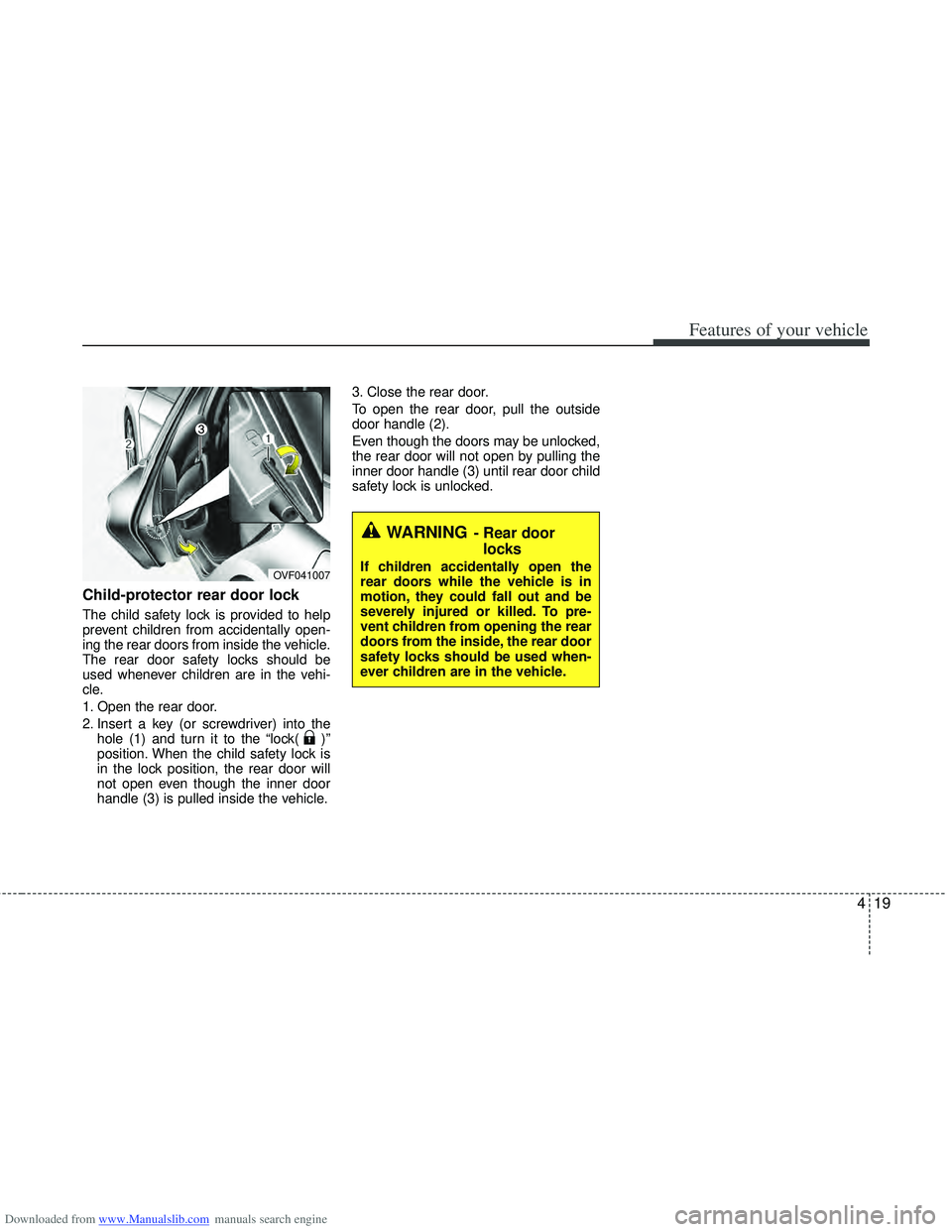
Child-protector rear door lock
The child safety lock is provided to help
prevent children from accidentally open-
ing the rear doors from inside the vehicle.
The rear door safety locks should be
used whenever children are in the vehi-
cle.
1. Open the rear door.
2. Insert a key (or screwdriver) into thehole (1) and turn it to the “lock( )”
position. When the child safety lock is
in the lock position, the rear door will
not open even though the inner door
handle (3) is pulled inside the vehicle. 3. Close the rear door.
To open the rear door, pull the outside
door handle (2).
Even though the doors may be unlocked,
the rear door will not open by pulling the
inner door handle (3) until rear door child
safety lock is unlocked.
WARNING- Rear door
locks
If children accidentally open the
rear doors while the vehicle is in
motion, they could fall out and be
severely injured or killed. To pre-
vent children from opening the rear
doors from the inside, the rear door
safety locks should be used when-
ever children are in the vehicle.OVF041007
Page 107 of 534
Downloaded from www.Manualslib.com manuals search engine Features of your vehicle
20
4
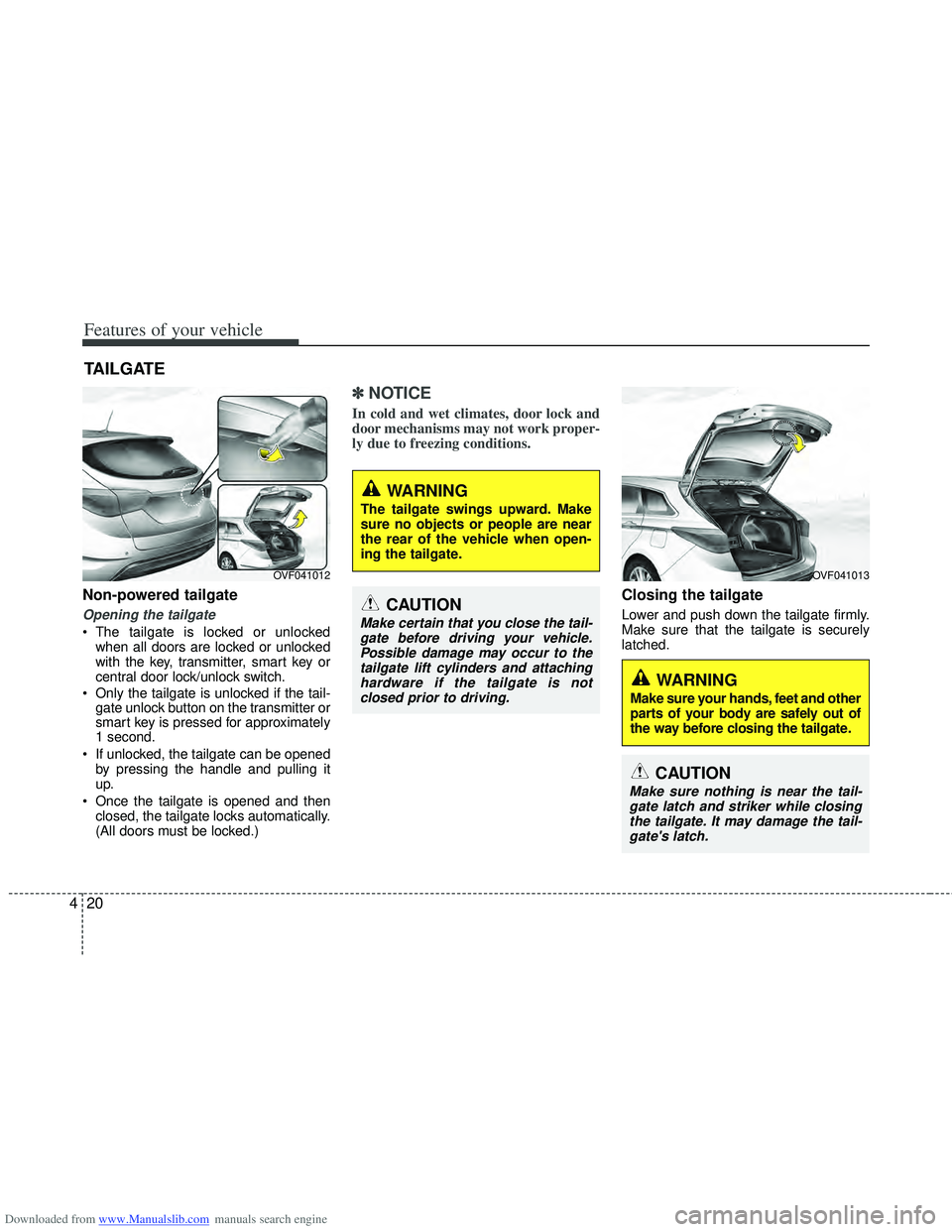
Non-powered tailgate
Opening the tailgate
The tailgate is locked or unlocked
when all doors are locked or unlocked
with the key, transmitter, smart key or
central door lock/unlock switch.
Only the tailgate is unlocked if the tail- gate unlock button on the transmitter or
smart key is pressed for approximately
1 second.
If unlocked, the tailgate can be opened by pressing the handle and pulling it
up.
Once the tailgate is opened and then closed, the tailgate locks automatically.
(All doors must be locked.)
✽ ✽ NOTICE
In cold and wet climates, door lock and
door mechanisms may not work proper-
ly due to freezing conditions.
Closing the tailgate
Lower and push down the tailgate firmly.
Make sure that the tailgate is securely
latched.
TAILGATE
OVF041012
WARNING
The tailgate swings upward. Make
sure no objects or people are near
the rear of the vehicle when open-
ing the tailgate.
CAUTION
Make certain that you close the tail-
gate before driving your vehicle.Possible damage may occur to thetailgate lift cylinders and attachinghardware if the tailgate is not closed prior to driving.
OVF041013
WARNING
Make sure your hands, feet and other
parts of your body are safely out of
the way before closing the tailgate.
CAUTION
Make sure nothing is near the tail-gate latch and striker while closing the tailgate. It may damage the tail-gate's latch.
Page 113 of 534
Downloaded from www.Manualslib.com manuals search engine Features of your vehicle
26
4
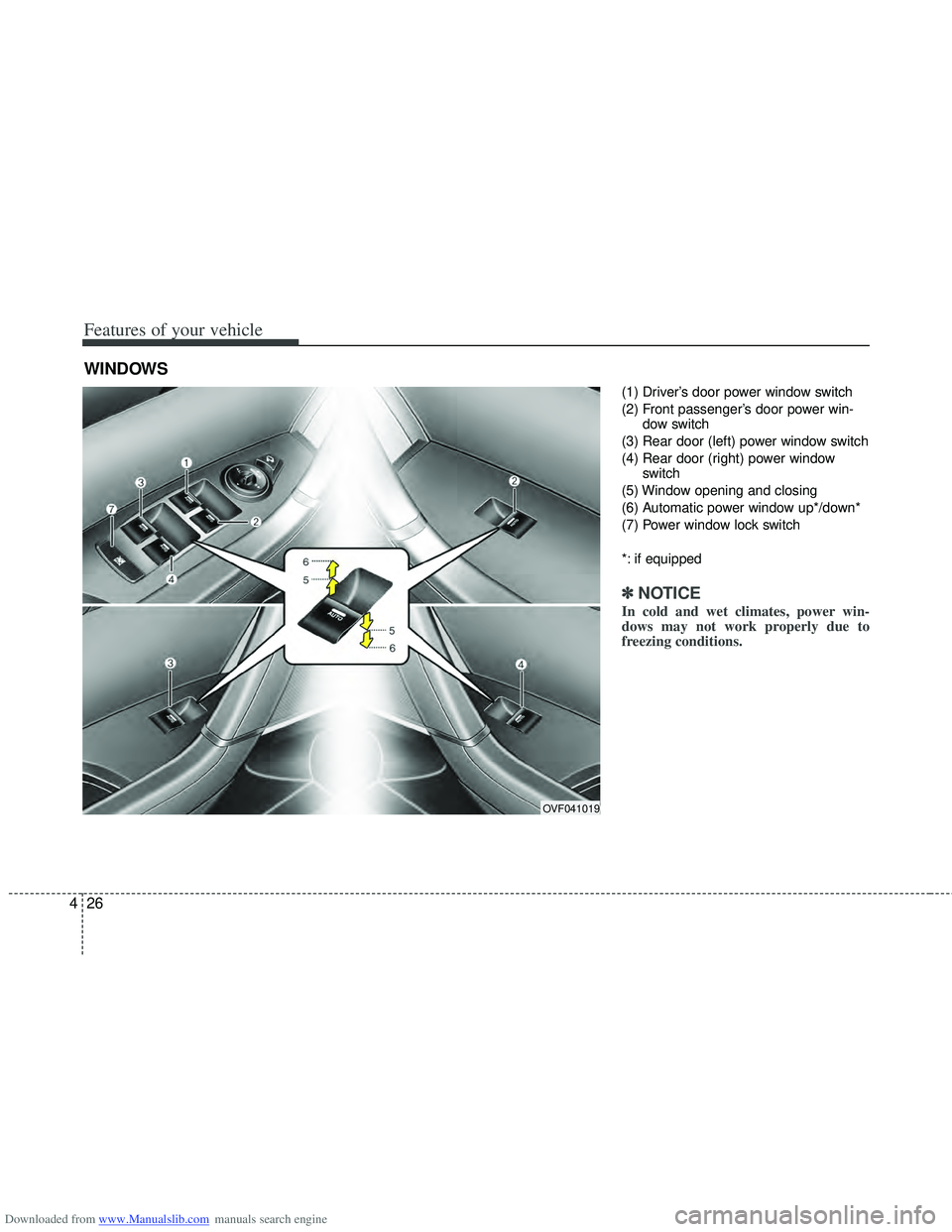
(1) Driver’s door power window switch
(2) Front passenger’s door power win-
dow switch
(3) Rear door (left) power window switch
(4) Rear door (right) power window switch
(5) Window opening and closing
(6) Automatic power window up*/down*
(7) Power window lock switch
*: if equipped
✽ ✽ NOTICE
In cold and wet climates, power win-
dows may not work properly due to
freezing conditions.
WINDOWS
OVF041019
Page 114 of 534
Downloaded from www.Manualslib.com manuals search engine 427
Features of your vehicle
Power windows
The ignition switch must be in the ON
position for power windows to operate.
Each door has a power window switch
that controls the door’s window. The dri-
ver’s door has a master power window
switch that controls all the windows in the
vehicle. Also, the driver has a power win-
dow lock switch which can block the
operation of rear passenger windows.
The power windows can be operated for
approximately 30 seconds after the igni-
tion key is removed or turned to the ACC
or LOCK position. However, if the front
doors are opened, the power windows
cannot be operated even within the 30
seconds period.
✽ ✽NOTICE
While driving with the rear windows
down or with the sunroof (if equipped) in
an open (or partially open position), your
vehicle may demonstrate a wind buffet-
ing or pulsation noise. This noise is a
normal occurrence and can be reduced
or eliminated by taking the following
actions. If the noise occurs with one or
both of the rear windows down, partially
lower both front windows approximate-
ly one inch. If you experience the noise
with the sunroof open, slightly reduce the
size of the sunroof opening.
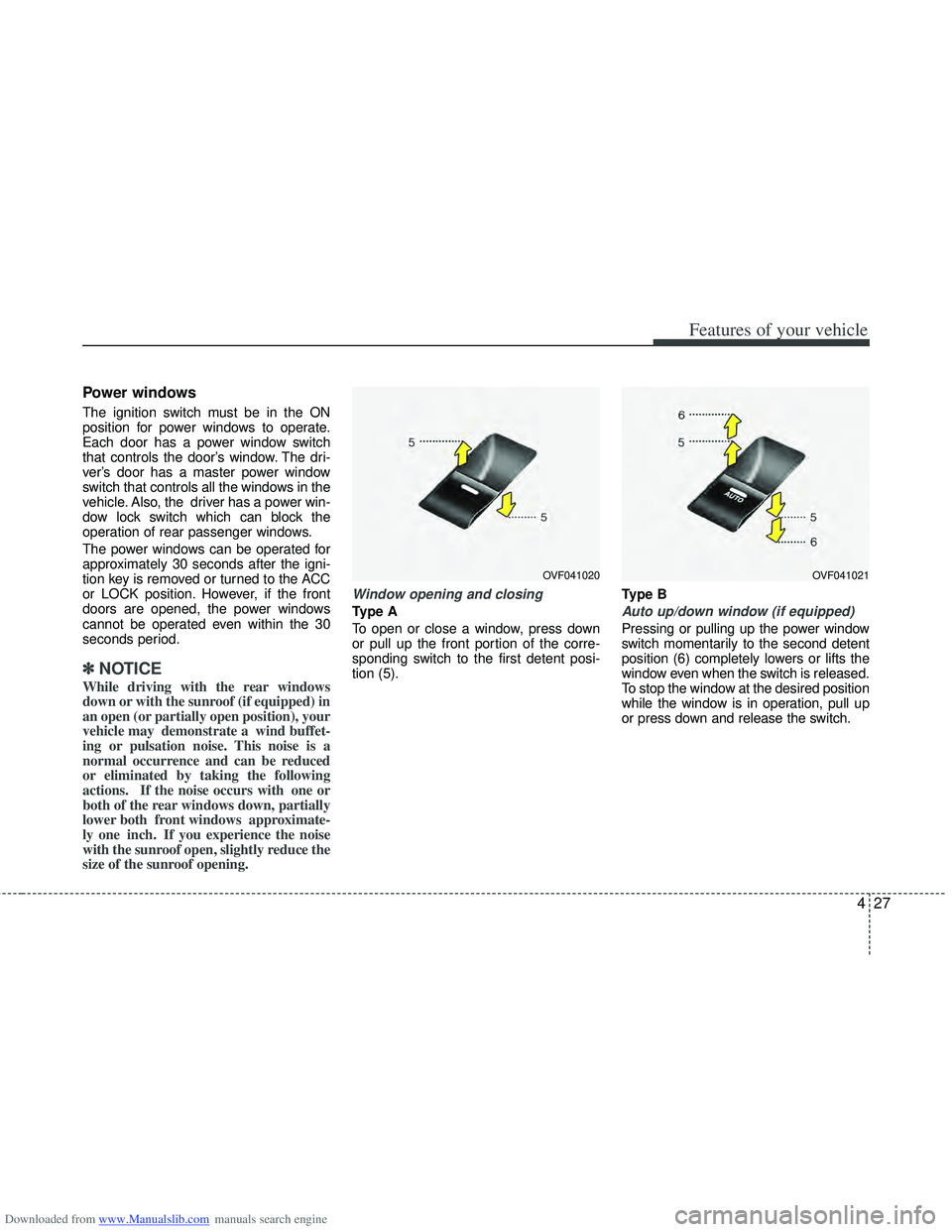
Window opening and closing
Type A
To open or close a window, press down
or pull up the front portion of the corre-
sponding switch to the first detent posi-
tion (5). Type BAuto up/down window (if equipped)
Pressing or pulling up the power window
switch momentarily to the second detent
position (6) completely lowers or lifts the
window even when the switch is released.
To stop the window at the desired position
while the window is in operation, pull up
or press down and release the switch.
OVF041020OVF041021
Page 116 of 534
Downloaded from www.Manualslib.com manuals search engine 429
Features of your vehicle
WARNING - Windows
NEVER leave the ignition key inthe vehicle.
NEVER leave any child unattend- ed in the vehicle. Even very
young children may inadvertently
cause the vehicle to move, entan-
gle themselves in the windows,
or otherwise injure themselves or
others.
Always double check to make sure all arms, hands, head and
other obstructions are safely out
of the way before closing a win-
dow.
Do not allow children to play with the power windows. Keep the dri-
ver’s door power window lock
switch in the LOCK position
(pressed). Serious injury can
result from unintentional window
operation by the child.
Do not extend face or arms out- side the window while driving.
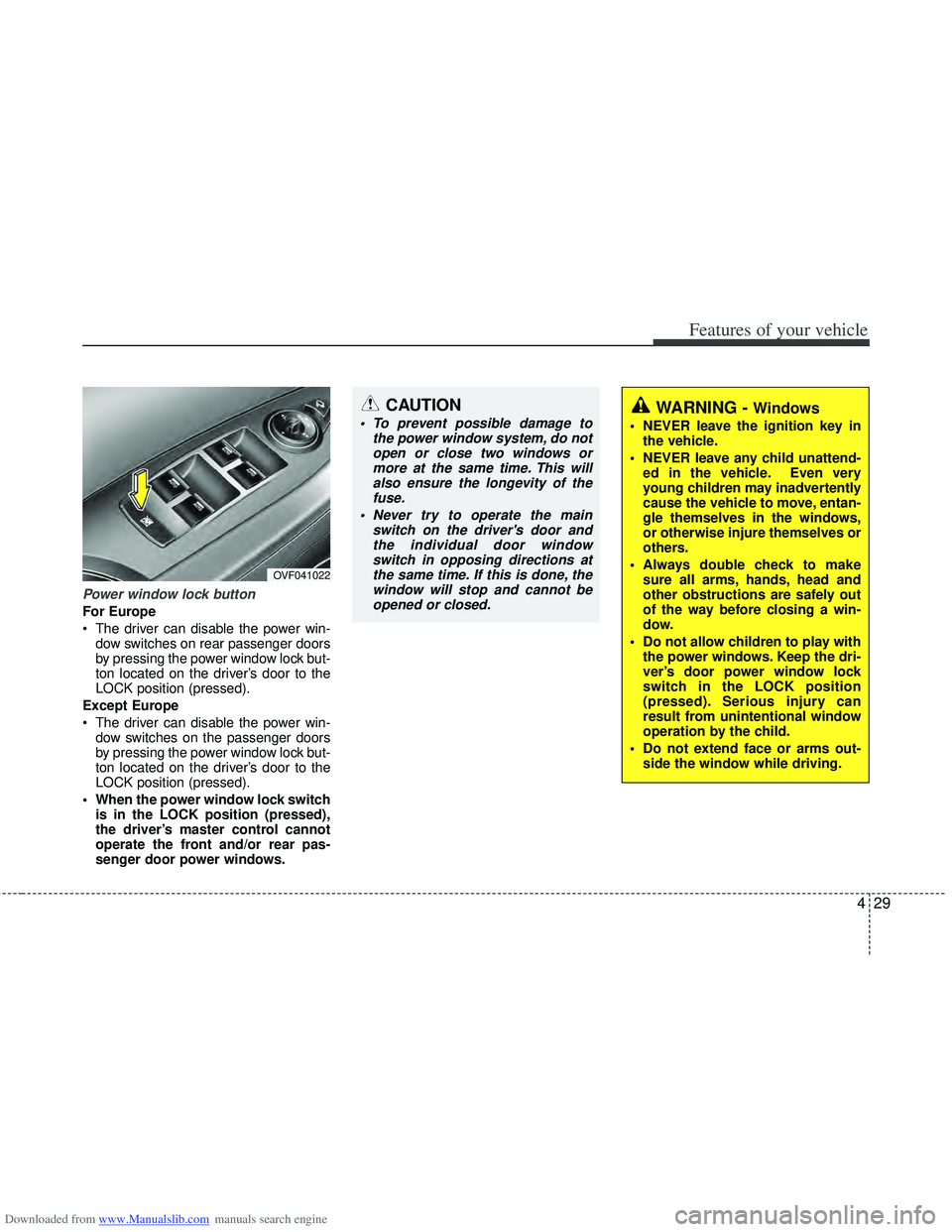
Power window lock button
For Europe
The driver can disable the power win-dow switches on rear passenger doors
by pressing the power window lock but-
ton located on the driver’s door to the
LOCK position (pressed).
Except Europe
The driver can disable the power win- dow switches on the passenger doors
by pressing the power window lock but-
ton located on the driver’s door to the
LOCK position (pressed).
When the power window lock switch is in the LOCK position (pressed),
the driver’s master control cannot
operate the front and/or rear pas-
senger door power windows.
OVF041022
CAUTION
To prevent possible damage to the power window system, do notopen or close two windows ormore at the same time. This willalso ensure the longevity of the fuse.
Never try to operate the main switch on the driver's door andthe individual door windowswitch in opposing directions atthe same time. If this is done, thewindow will stop and cannot beopened or closed.
Page 119 of 534
Downloaded from www.Manualslib.com manuals search engine Features of your vehicle
32
4
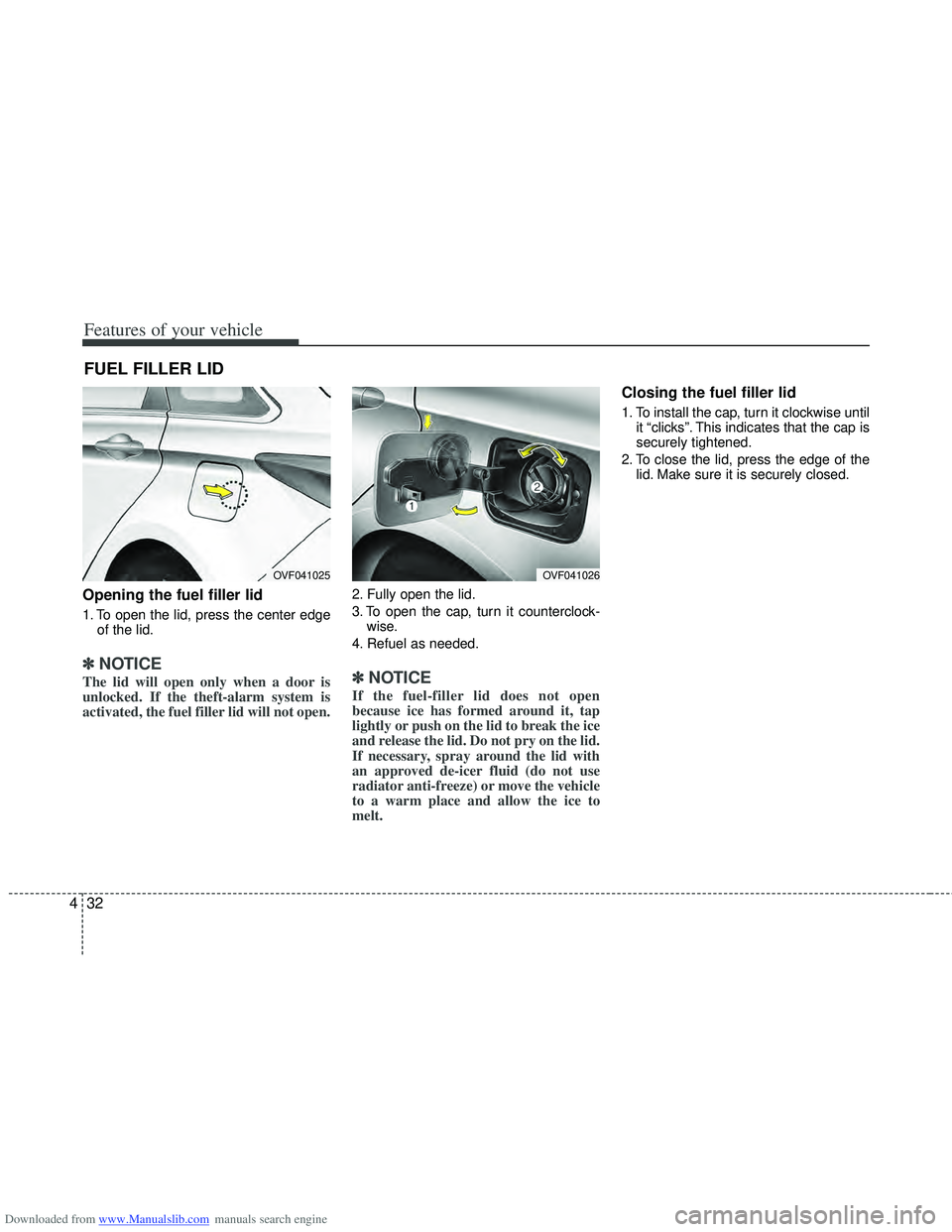
Opening the fuel filler lid
1. To open the lid, press the center edge
of the lid.
✽
✽NOTICE
The lid will open only when a door is
unlocked. If the theft-alarm system is
activated, the fuel filler lid will not open.
2. Fully open the lid.
3. To open the cap, turn it counterclock-
wise.
4. Refuel as needed.
✽ ✽ NOTICE
If the fuel-filler lid does not open
because ice has formed around it, tap
lightly or push on the lid to break the ice
and release the lid. Do not pry on the lid.
If necessary, spray around the lid with
an approved de-icer fluid (do not use
radiator anti-freeze) or move the vehicle
to a warm place and allow the ice to
melt.
Closing the fuel filler lid
1. To install the cap, turn it clockwise until
it “clicks”. This indicates that the cap is
securely tightened.
2. To close the lid, press the edge of the lid. Make sure it is securely closed.
FUEL FILLER LID
OVF041025OVF041026
Page 144 of 534
Downloaded from www.Manualslib.com manuals search engine 457
Features of your vehicle
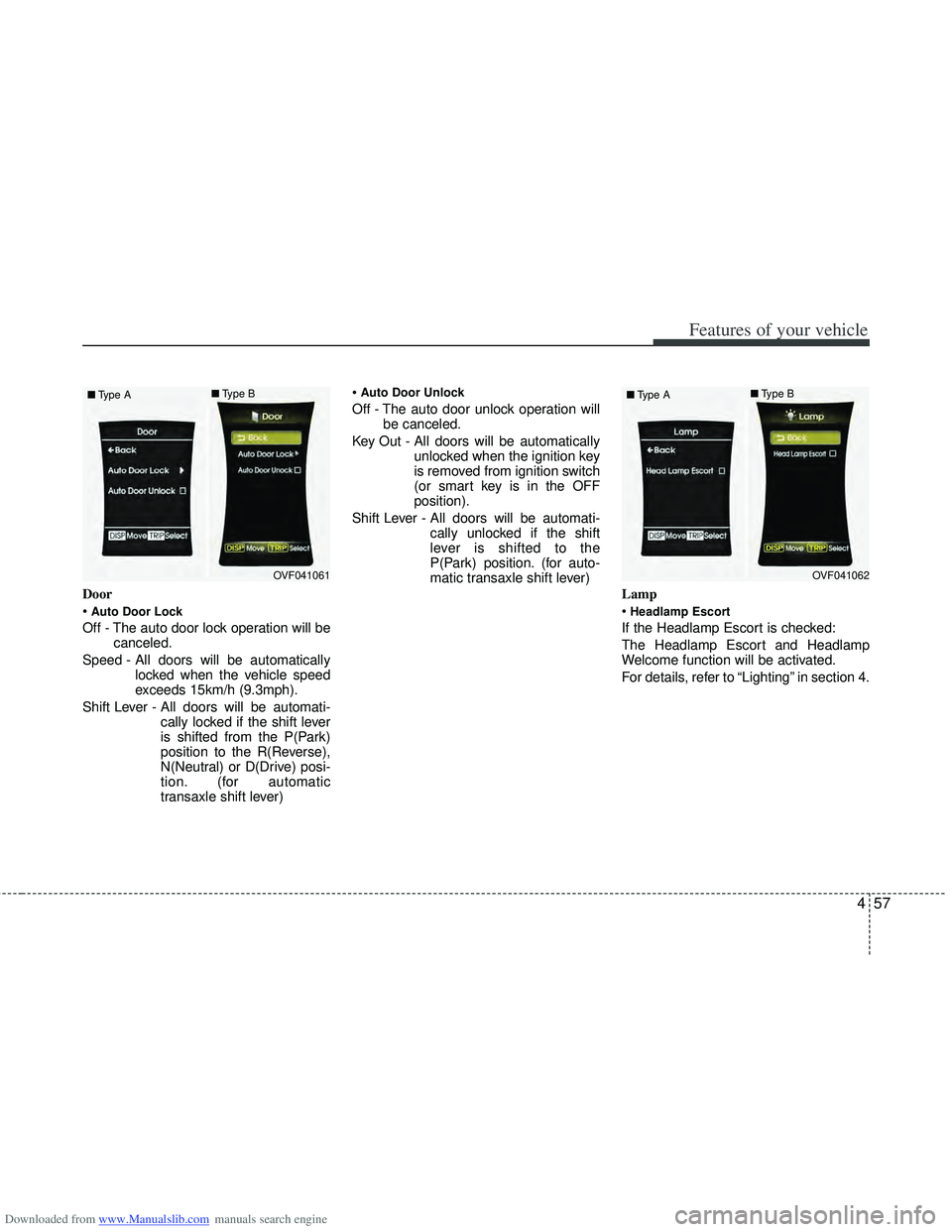
Door
Auto Door Lock
Off - The auto door lock operation will becanceled.
Speed - All doors will be automatically locked when the vehicle speed
exceeds 15km/h (9.3mph).
Shift Lever - All doors will be automati- cally locked if the shift lever
is shifted from the P(Park)
position to the R(Reverse),
N(Neutral) or D(Drive) posi-
tion. (for automatic
transaxle shift lever)
Auto Door Unlock
Off - The auto door unlock operation will
be canceled.
Key Out - All doors will be automatically unlocked when the ignition key
is removed from ignition switch
(or smart key is in the OFF
position).
Shift Lever - All doors will be automati- cally unlocked if the shift
lever is shifted to the
P(Park) position. (for auto-
matic transaxle shift lever)
Lamp
Headlamp Escort
If the Headlamp Escort is checked:
The Headlamp Escort and Headlamp
Welcome function will be activated.
For details, refer to “Lighting” in section 4.
OVF041061
■
Type A ■
Type BOVF041062
■
Type A ■
Type B
Page 146 of 534
Downloaded from www.Manualslib.com manuals search engine 459
Features of your vehicle
LCD display informations
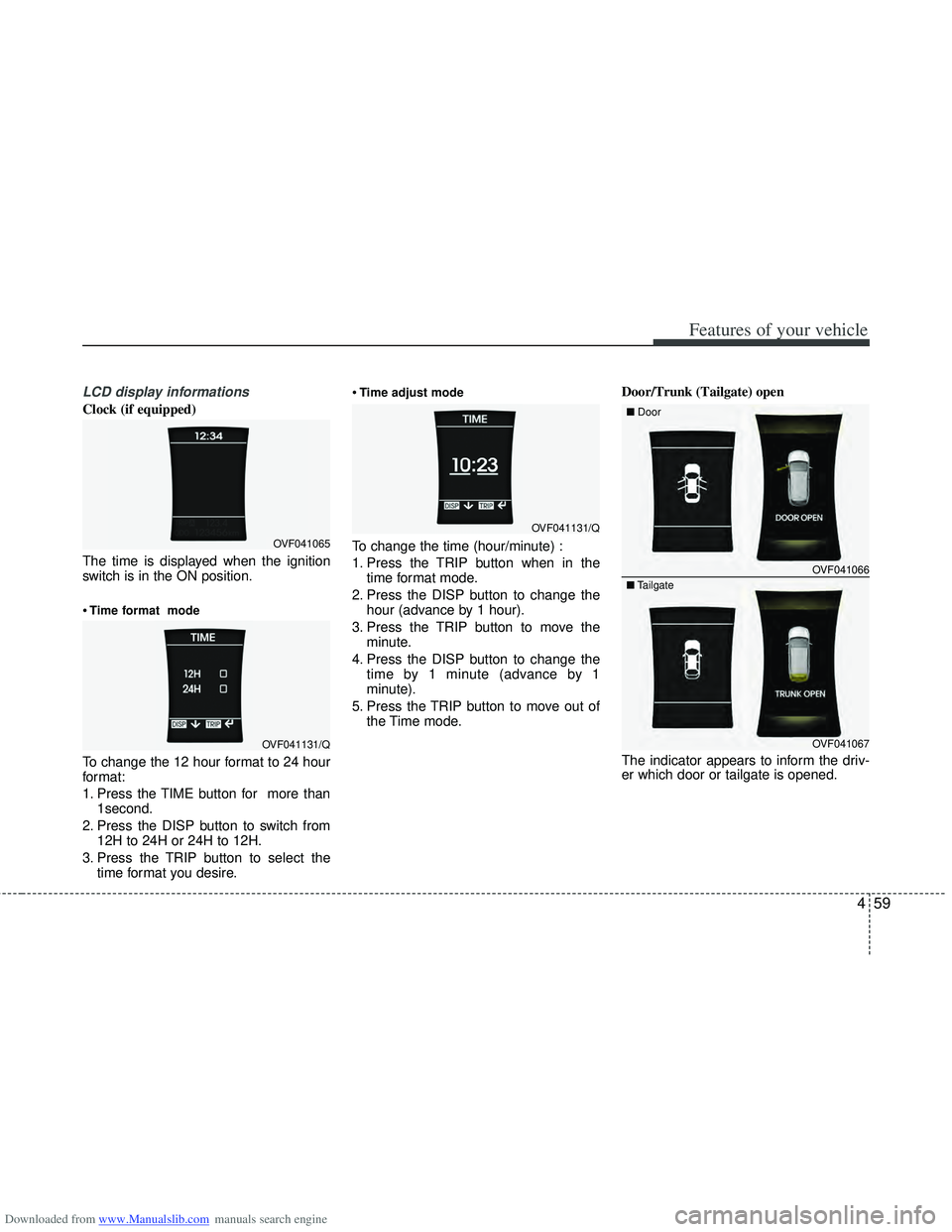
Clock (if equipped)
The time is displayed when the ignition
switch is in the ON position.
Time format mode
To change the 12 hour format to 24 hour
format:
1. Press the TIME button for more than1second.
2. Press the DISP button to switch from 12H to 24H or 24H to 12H.
3. Press the TRIP button to select the time format you desire.
Time adjust mode
To change the time (hour/minute) :
1. Press the TRIP button when in the
time format mode.
2. Press the DISP button to change the hour (advance by 1 hour).
3. Press the TRIP button to move the minute.
4. Press the DISP button to change the time by 1 minute (advance by 1
minute).
5. Press the TRIP button to move out of the Time mode. Door/Trunk (Tailgate) open
The indicator appears to inform the driv-
er which door or tailgate is opened.OVF041065
OVF041131/Q
OVF041131/Q
OVF041066
■
Door
OVF041067
■
Tailgate
Page 183 of 534
Downloaded from www.Manualslib.com manuals search engine Features of your vehicle
96
4
Battery saver function
The purpose of this feature is to pre-
vent the battery from being dis-
charged. The system automatically
turns off the parking lights when the
driver removes the ignition key and
opens the driver- side door.
With this feature, the parking lights will be turned off automatically if the driver
parks on the side of road at night.
If necessary, to keep the lights on
when the ignition key is removed, per-
form the following :
1) Open the driver-side door.
2) Turn the parking lights OFF and ON again using the light switch on the
steering column.
Headlight (Headlamp) escort
function (if equipped)
The headlights (and/or taillights) remain
on for approximately 20 minutes after the
ignition key is removed or turned to the
ACC or LOCK position. However, if the
driver’s door is opened and closed, the
headlights are turned off after 30 sec-
onds.
The headlights can be turned off by
pressing the lock button on the transmit-
ter or smart key twice or turning off the
light switch from the headlight or Auto
light position.
Headlight (Headlamp) welcome
function (if equipped)
When the headlight switch is in the ON or
AUTO position and all doors (and tail-
gate) are closed and locked, if you press
the door unlock button on the transmitter
or smart key, the headlights will come on
for about 15 seconds.
If the headlight switch is in the AUTO
position, the function can only operate at
night.
At this time, if you press the door unlock
button again or door lock button on the
transmitter or smart key, the headlights
will turn off immediately.
LIGHTING
CAUTION
If the driver gets out of the vehiclethrough other doors (except dri-ver’s door), the battery saver func-tion does not operate and the head-light escort function does not turnoff automatically. Therefore, it caus-es the battery to be discharged. Inthis case, make sure to turn off thelamp before getting out of the vehi- cle.