ignition HYUNDAI I40 2012 Repair Manual
[x] Cancel search | Manufacturer: HYUNDAI, Model Year: 2012, Model line: I40, Model: HYUNDAI I40 2012Pages: 534, PDF Size: 11.05 MB
Page 192 of 534
Downloaded from www.Manualslib.com manuals search engine 4105
Features of your vehicle
Windshield wipers
Operates as follows when the ignition
switch is turned ON./ MIST : For a single wiping cycle, move the lever to this ( /
MIST) position and release
it. The wipers will operate
continuously if the lever is
held in this position.
O / OFF : Wiper is not in operation
--- / INT : Wiper operates intermittently at the same wiping intervals. Use
this mode in light rain or mist.
To vary the speed setting, turn
the speed control knob.
1 / LO : Normal wiper speed
2 / HI : Fast wiper speed
✽ ✽ NOTICE
If there is heavy accumulation of snow
or ice on the windshield, defrost the
windshield for about 10 minutes, or
until the snow and/or ice is removed
before using the windshield wipers to
ensure proper operation.
Auto control (if equipped)
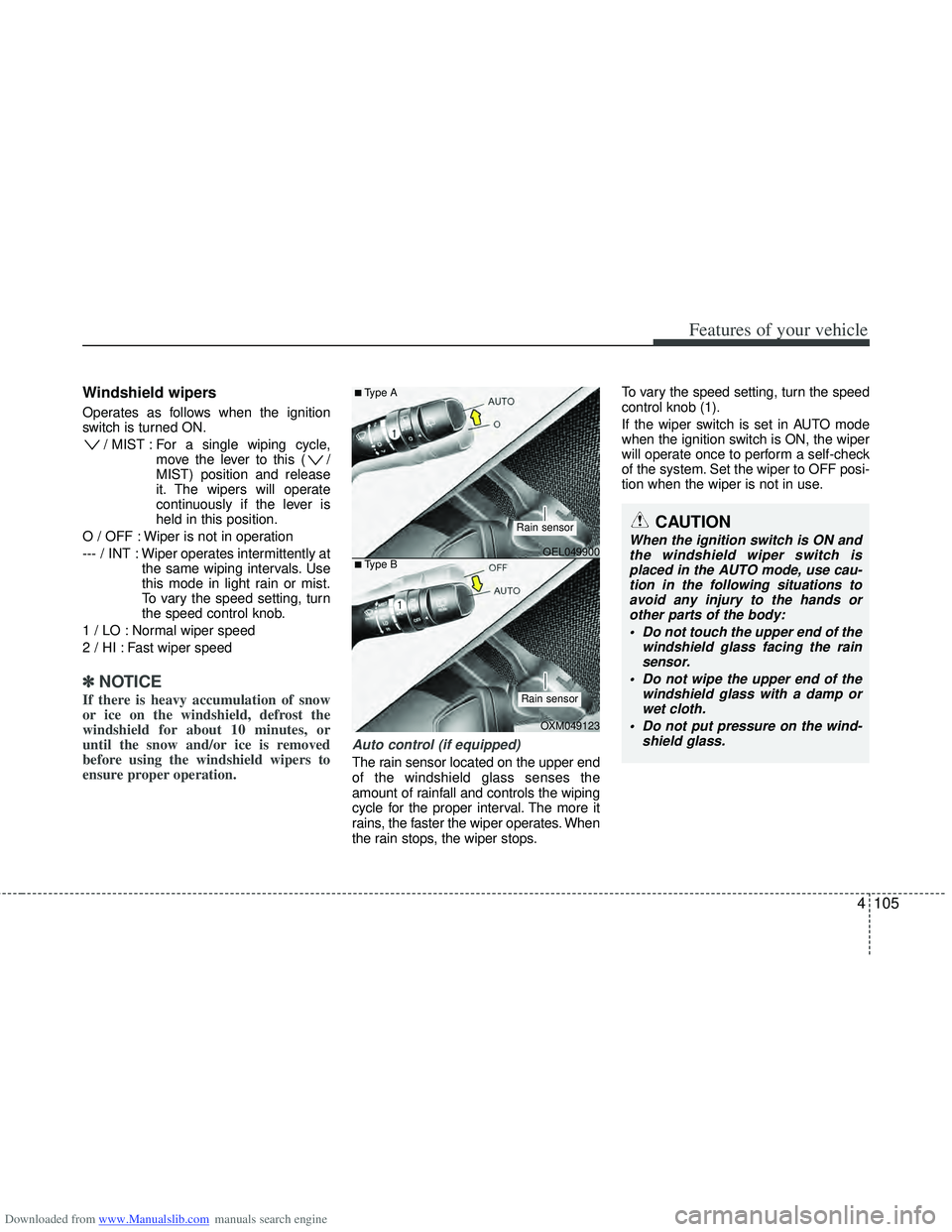
The rain sensor located on the upper end
of the windshield glass senses the
amount of rainfall and controls the wiping
cycle for the proper interval. The more it
rains, the faster the wiper operates. When
the rain stops, the wiper stops. To vary the speed setting, turn the speed
control knob (1).
If the wiper switch is set in AUTO mode
when the ignition switch is ON, the wiper
will operate once to perform a self-check
of the system. Set the wiper to OFF posi-
tion when the wiper is not in use.
CAUTION
When the ignition switch is ON and
the windshield wiper switch isplaced in the AUTO mode, use cau- tion in the following situations toavoid any injury to the hands orother parts of the body:
Do not touch the upper end of the windshield glass facing the rainsensor.
Do not wipe the upper end of the windshield glass with a damp orwet cloth.
Do not put pressure on the wind- shield glass.OEL049900
OXM049123
■Type A
■Type B
Rain sensor
Rain sensor
Page 194 of 534
Downloaded from www.Manualslib.com manuals search engine 4107
Features of your vehicle
Headlight washer (if equipped)
If your vehicle is equipped with the head-
light washer it will operate at the same
time when you operate the windshield
washer. It will operate when the headlight
switch is in the first or second position
and the ignition switch or engine
start/stop button is in the ON position.
The washer fluid will be sprayed on to the
headlights.
✽ ✽NOTICE
Check the headlight washers periodical-
ly to confirm that the washer fluid is
being sprayed properly onto the head-
light lenses.
Rear window wiper and washer
switch
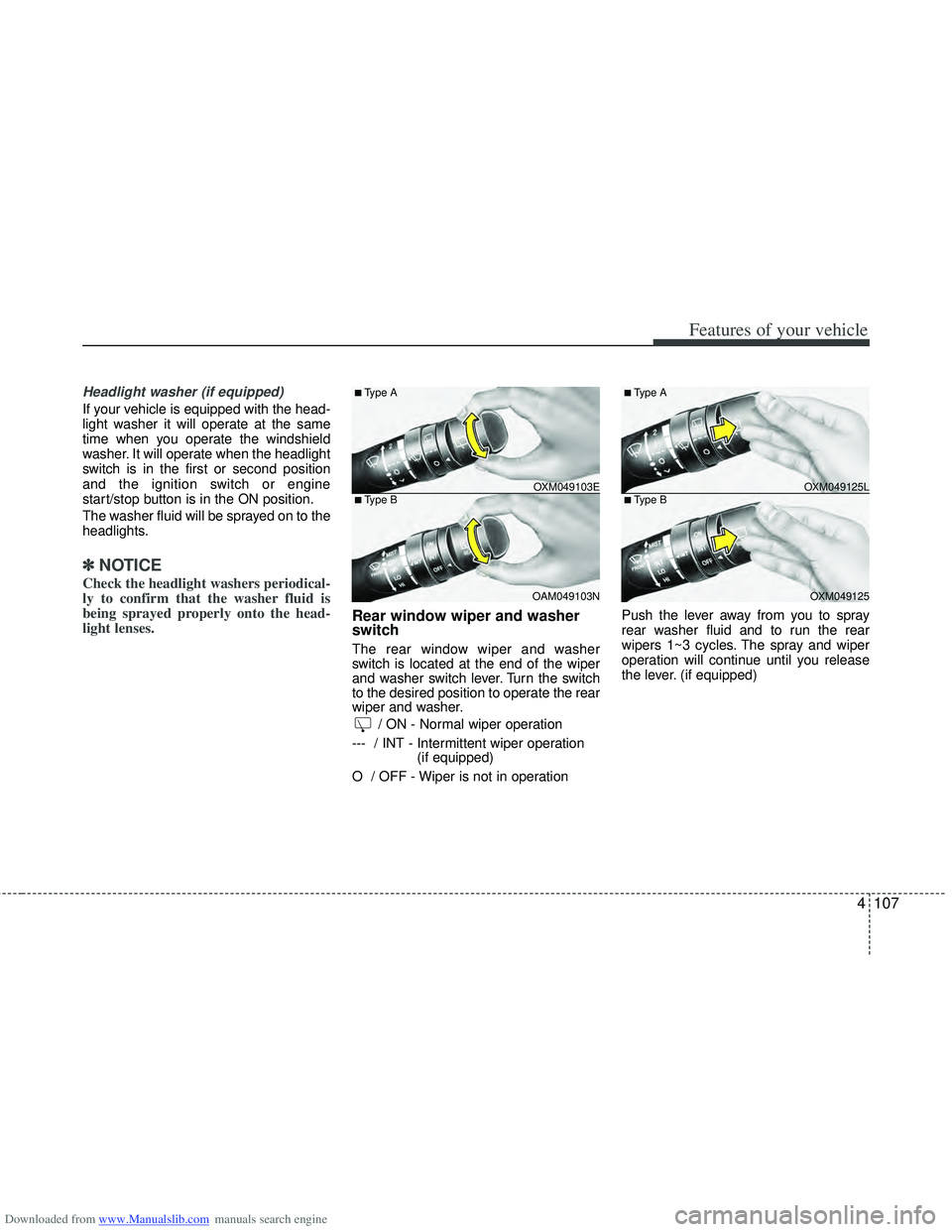
The rear window wiper and washer
switch is located at the end of the wiper
and washer switch lever. Turn the switch
to the desired position to operate the rear
wiper and washer.
/ ON - Normal wiper operation
--- / INT - Intermittent wiper operation (if equipped)
O / OFF - Wiper is not in operation Push the lever away from you to spray
rear washer fluid and to run the rear
wipers 1~3 cycles. The spray and wiper
operation will continue until you release
the lever. (if equipped)
OXM049103E
OAM049103N
■Type A
■Type BOXM049125L OXM049125
■Type A
■Type B
Page 195 of 534
Downloaded from www.Manualslib.com manuals search engine Features of your vehicle
108
4
Interior lamp AUTO cut
When all entrances are closed, if you
lock the vehicle by using the transmit-
ter or the smart key, all interior lamp
will be off within 5 seconds.
If you do not operate anything in the vehicle after turning off the engine, the
lights will turn off after 20 minutes.
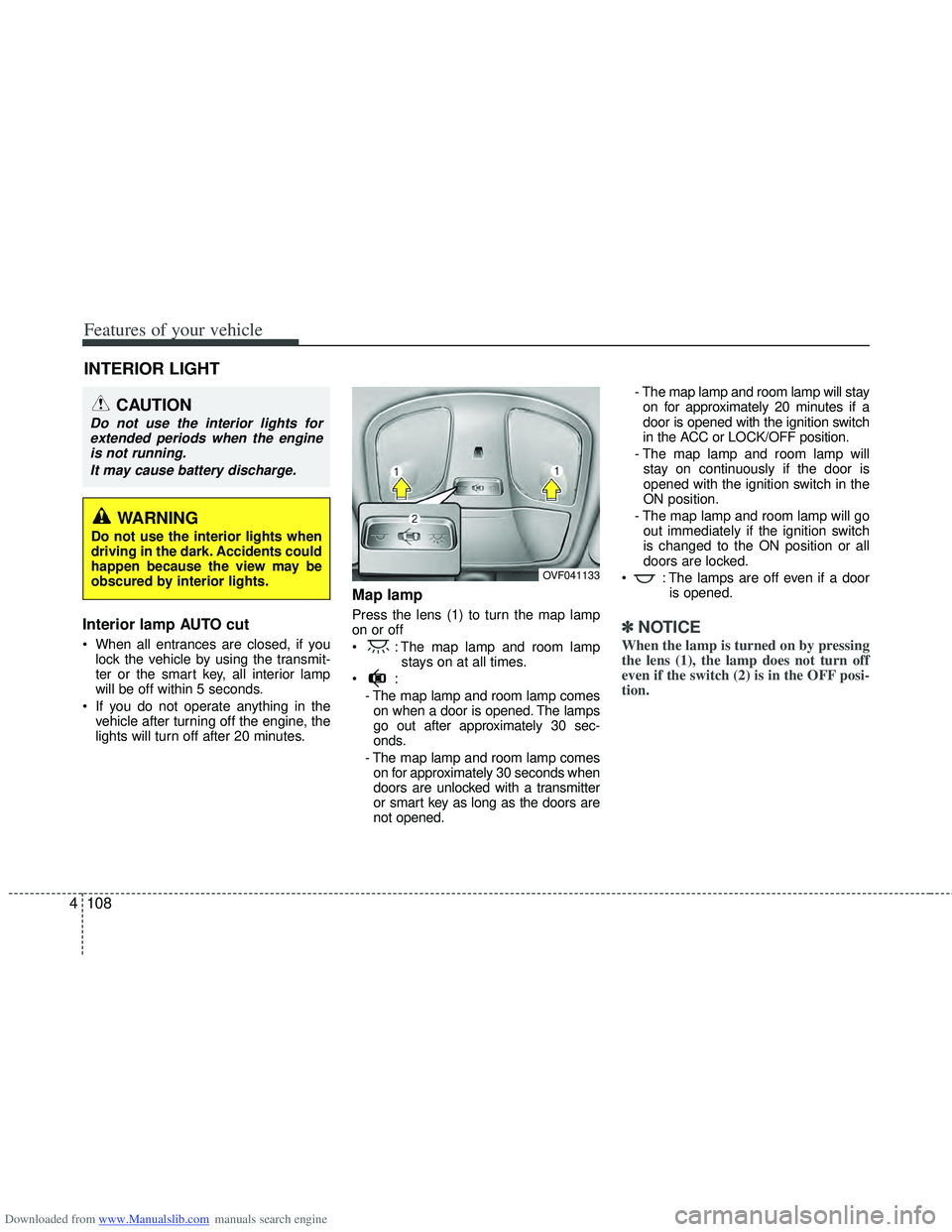
Map lamp
Press the lens (1) to turn the map lamp
on or off
: The map lamp and room lamp stays on at all times.
- The map lamp and room lamp comeson when a door is opened. The lamps
go out after approximately 30 sec-
onds.
- The map lamp and room lamp comes on for approximately 30 seconds when
doors are unlocked with a transmitter
or smart key as long as the doors are
not opened. - The map lamp and room lamp will stay
on for approximately 20 minutes if a
door is opened with the ignition switch
in the ACC or LOCK/OFF position.
- The map lamp and room lamp will stay on continuously if the door is
opened with the ignition switch in the
ON position.
- The map lamp and room lamp will go out immediately if the ignition switch
is changed to the ON position or all
doors are locked.
: The lamps are off even if a door is opened.✽ ✽NOTICE
When the lamp is turned on by pressing
the lens (1), the lamp does not turn off
even if the switch (2) is in the OFF posi-
tion.
INTERIOR LIGHT
CAUTION
Do not use the interior lights for
extended periods when the engineis not running.
It may cause battery discharge.
OVF041133
WARNING
Do not use the interior lights when
driving in the dark. Accidents could
happen because the view may be
obscured by interior lights.
Page 198 of 534
Downloaded from www.Manualslib.com manuals search engine 4111
Features of your vehicle
✽
✽NOTICE
If you want to defrost and defog the
front windshield, refer to “Windshield
Defrosting and Defogging” in this sec-
tion.
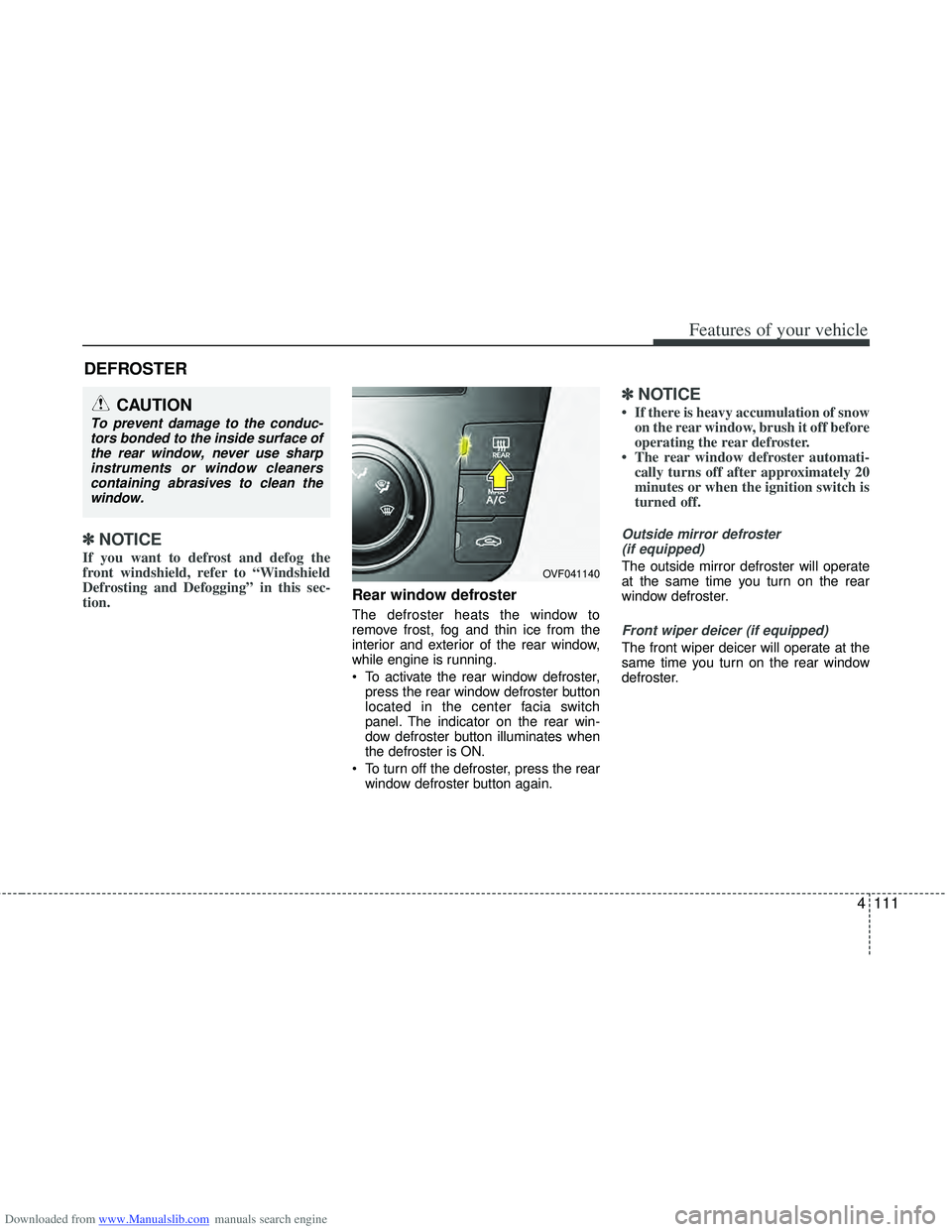
Rear window defroster
The defroster heats the window to
remove frost, fog and thin ice from the
interior and exterior of the rear window,
while engine is running.
To activate the rear window defroster,
press the rear window defroster button
located in the center facia switch
panel. The indicator on the rear win-
dow defroster button illuminates when
the defroster is ON.
To turn off the defroster, press the rear window defroster button again.
✽ ✽ NOTICE
• If there is heavy accumulation of snow
on the rear window, brush it off before
operating the rear defroster.
• The rear window defroster automati- cally turns off after approximately 20
minutes or when the ignition switch is
turned off.
Outside mirror defroster
(if equipped)
The outside mirror defroster will operate
at the same time you turn on the rear
window defroster.
Front wiper deicer (if equipped)
The front wiper deicer will operate at the
same time you turn on the rear window
defroster.
DEFROSTER
CAUTION
To prevent damage to the conduc-tors bonded to the inside surface ofthe rear window, never use sharpinstruments or window cleanerscontaining abrasives to clean the window.
OVF041140
Page 204 of 534
Downloaded from www.Manualslib.com manuals search engine 4117
Features of your vehicle
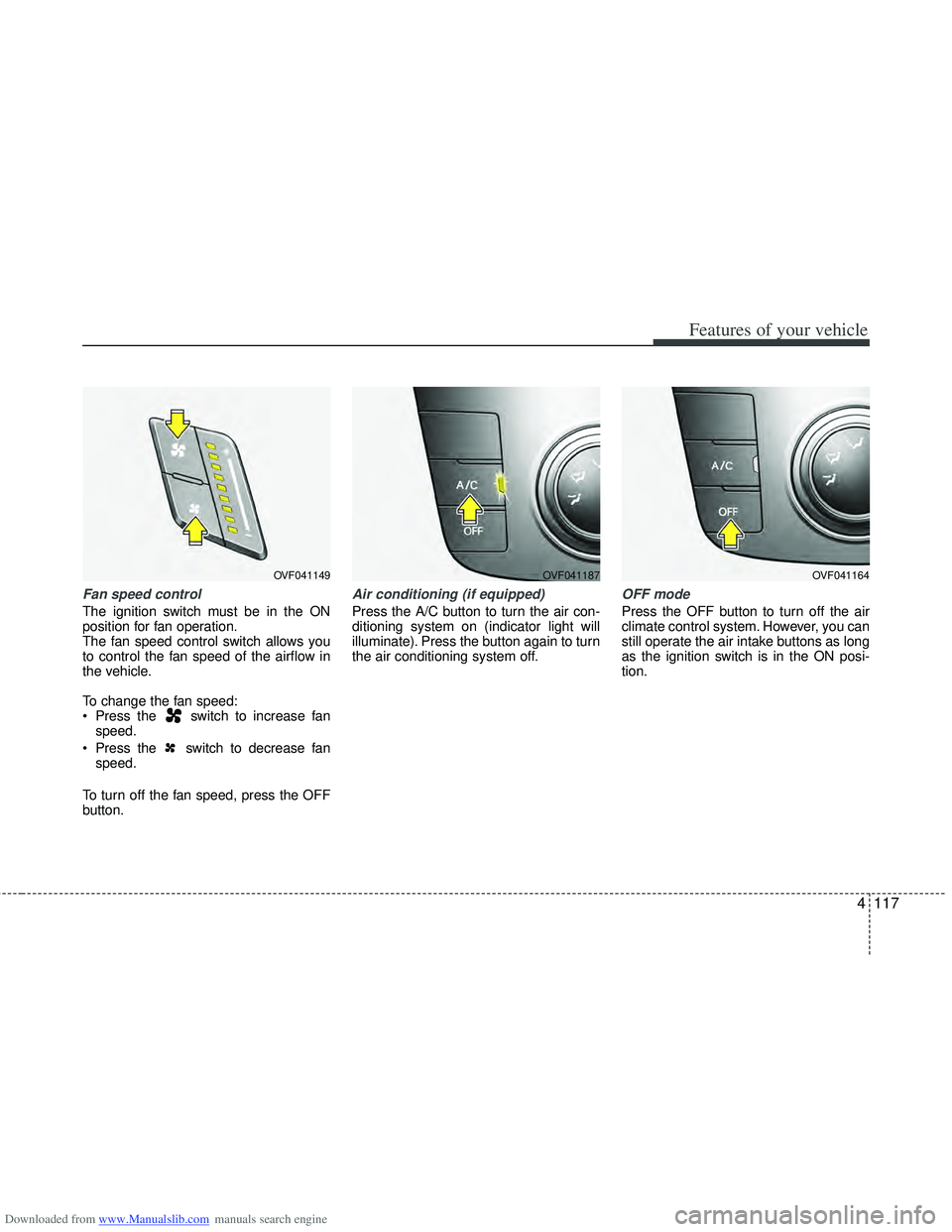
Fan speed control
The ignition switch must be in the ON
position for fan operation.
The fan speed control switch allows you
to control the fan speed of the airflow in
the vehicle.
To change the fan speed:
Press the switch to increase fanspeed.
Press the switch to decrease fan speed.
To turn off the fan speed, press the OFF
button.
Air conditioning (if equipped)
Press the A/C button to turn the air con-
ditioning system on (indicator light will
illuminate). Press the button again to turn
the air conditioning system off.
OFF mode
Press the OFF button to turn off the air
climate control system. However, you can
still operate the air intake buttons as long
as the ignition switch is in the ON posi-
tion.
OVF041187OVF041164OVF041149
Page 216 of 534
Downloaded from www.Manualslib.com manuals search engine 4129
Features of your vehicle
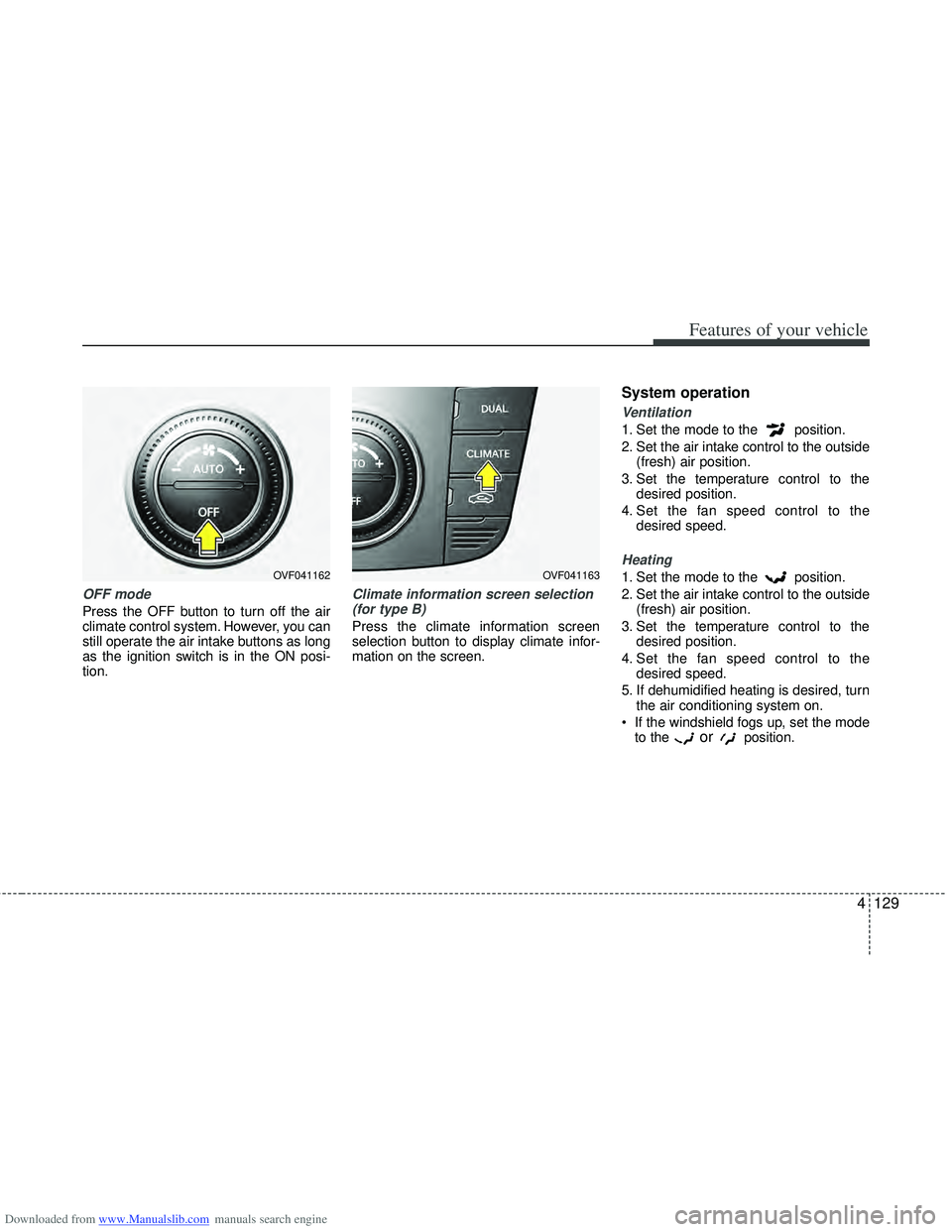
OFF mode
Press the OFF button to turn off the air
climate control system. However, you can
still operate the air intake buttons as long
as the ignition switch is in the ON posi-
tion.
Climate information screen selection(for type B)
Press the climate information screen
selection button to display climate infor-
mation on the screen.
System operation
Ventilation
1. Set the mode to the position.
2. Set the air intake control to the outside (fresh) air position.
3. Set the temperature control to the desired position.
4. Set the fan speed control to the desired speed.
Heating
1. Set the mode to the position.
2. Set the air intake control to the outside(fresh) air position.
3. Set the temperature control to the desired position.
4. Set the fan speed control to the desired speed.
5. If dehumidified heating is desired, turn the air conditioning system on.
If the windshield fogs up, set the mode to the
orposition.
OVF041162OVF041163
Page 246 of 534
Downloaded from www.Manualslib.com manuals search engine 4159
Features of your vehicle
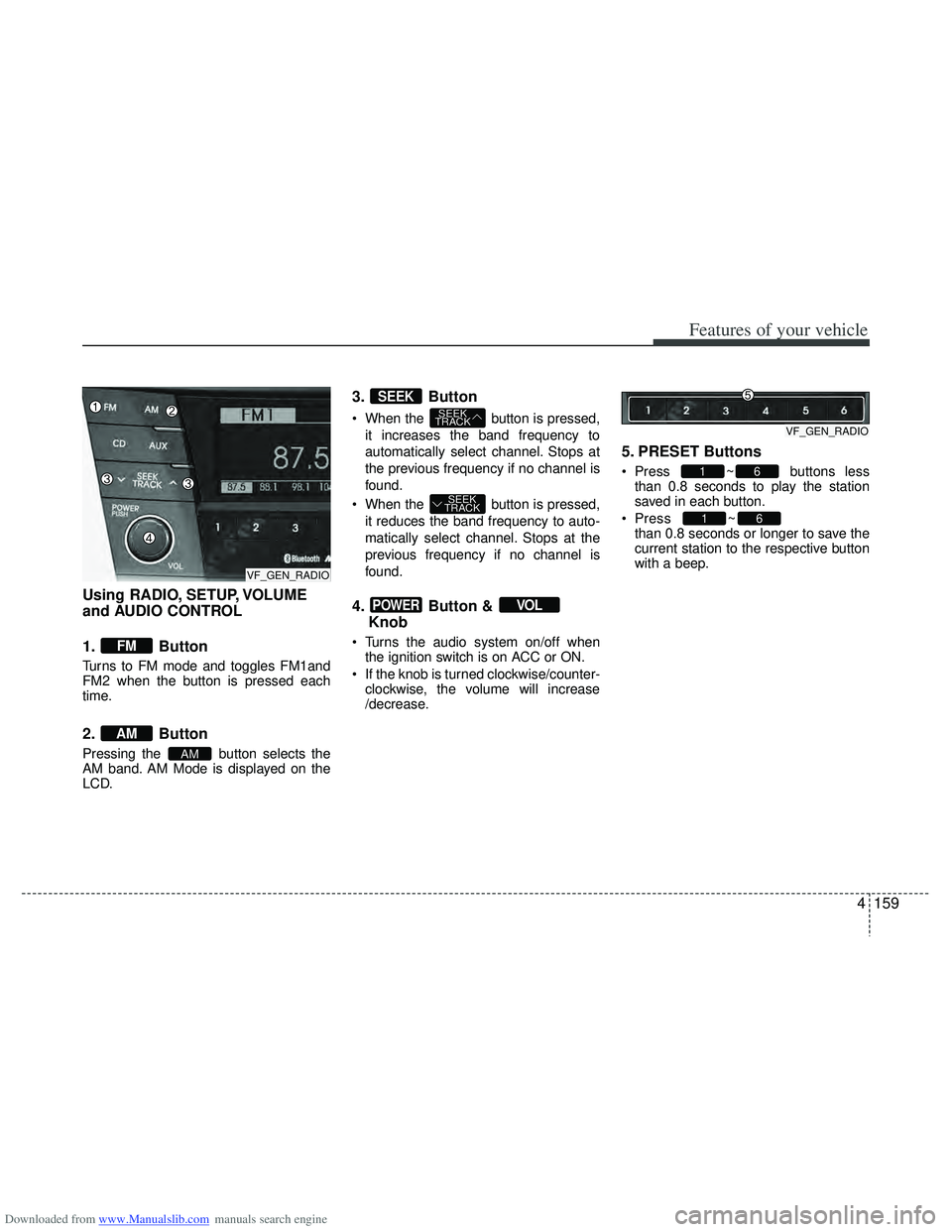
Using RADIO, SETUP, VOLUME
and AUDIO CONTROL
1. Button
Turns to FM mode and toggles FM1and
FM2 when the button is pressed each
time.
2. Button
Pressing the button selects the
AM band. AM Mode is displayed on the
LCD.
3. Button
When the button is pressed,it increases the band frequency to
automatically select channel. Stops at
the previous frequency if no channel is
found.
When the button is pressed, it reduces the band frequency to auto-
matically select channel. Stops at the
previous frequency if no channel is
found.
4. Button & Knob
Turns the audio system on/off when
the ignition switch is on ACC or ON.
If the knob is turned clockwise/counter- clockwise, the volume will increase
/decrease.
5. PRESET Buttons
Press ~ buttons lessthan 0.8 seconds to play the station
saved in each button.
Press ~
button more
than 0.8 seconds or longer to save the
current station to the respective button
with a beep.
61
61
VOLPOWER
SEEK
TRACK
SEEK
TRACK
SEEK
AM
AM
FM
VF_GEN_RADIOVF_GEN_RADIO
VF_GEN_RADIO
Page 252 of 534
Downloaded from www.Manualslib.com manuals search engine 4165
Features of your vehicle
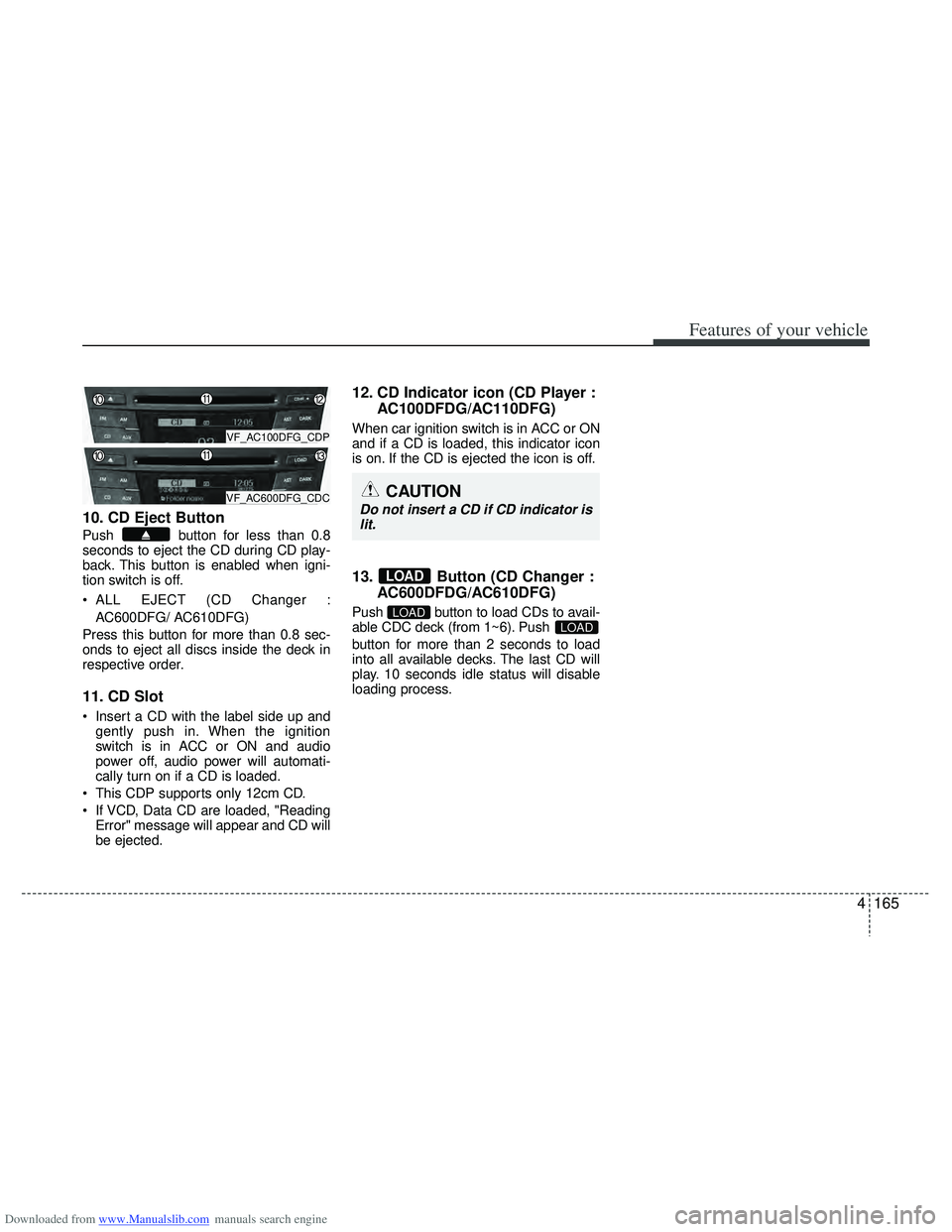
10. CD Eject Button
Push button for less than 0.8
seconds to eject the CD during CD play-
back. This button is enabled when igni-
tion switch is off.
ALL EJECT (CD Changer :AC600DFG/ AC610DFG)
Press this button for more than 0.8 sec-
onds to eject all discs inside the deck in
respective order.
11. CD Slot
Insert a CD with the label side up and gently push in. When the ignition
switch is in ACC or ON and audio
power off, audio power will automati-
cally turn on if a CD is loaded.
This CDP supports only 12cm CD.
If VCD, Data CD are loaded, "Reading Error" message will appear and CD will
be ejected.
12. CD Indicator icon (CD Player : AC100DFDG/AC110DFG)
When car ignition switch is in ACC or ON
and if a CD is loaded, this indicator icon
is on. If the CD is ejected the icon is off.
13. Button (CD Changer :AC600DFDG/AC610DFG)
Push button to load CDs to avail-
able CDC deck (from 1~6). Push
button for more than 2 seconds to load
into all available decks. The last CD will
play. 10 seconds idle status will disable
loading process.LOADLOAD
LOAD
VF_AC100DFG_CDP
VF_AC600DFG_CDCCAUTION
Do not insert a CD if CD indicator is
lit.
Page 269 of 534
Downloaded from www.Manualslib.com manuals search engine Features of your vehicle
182
4
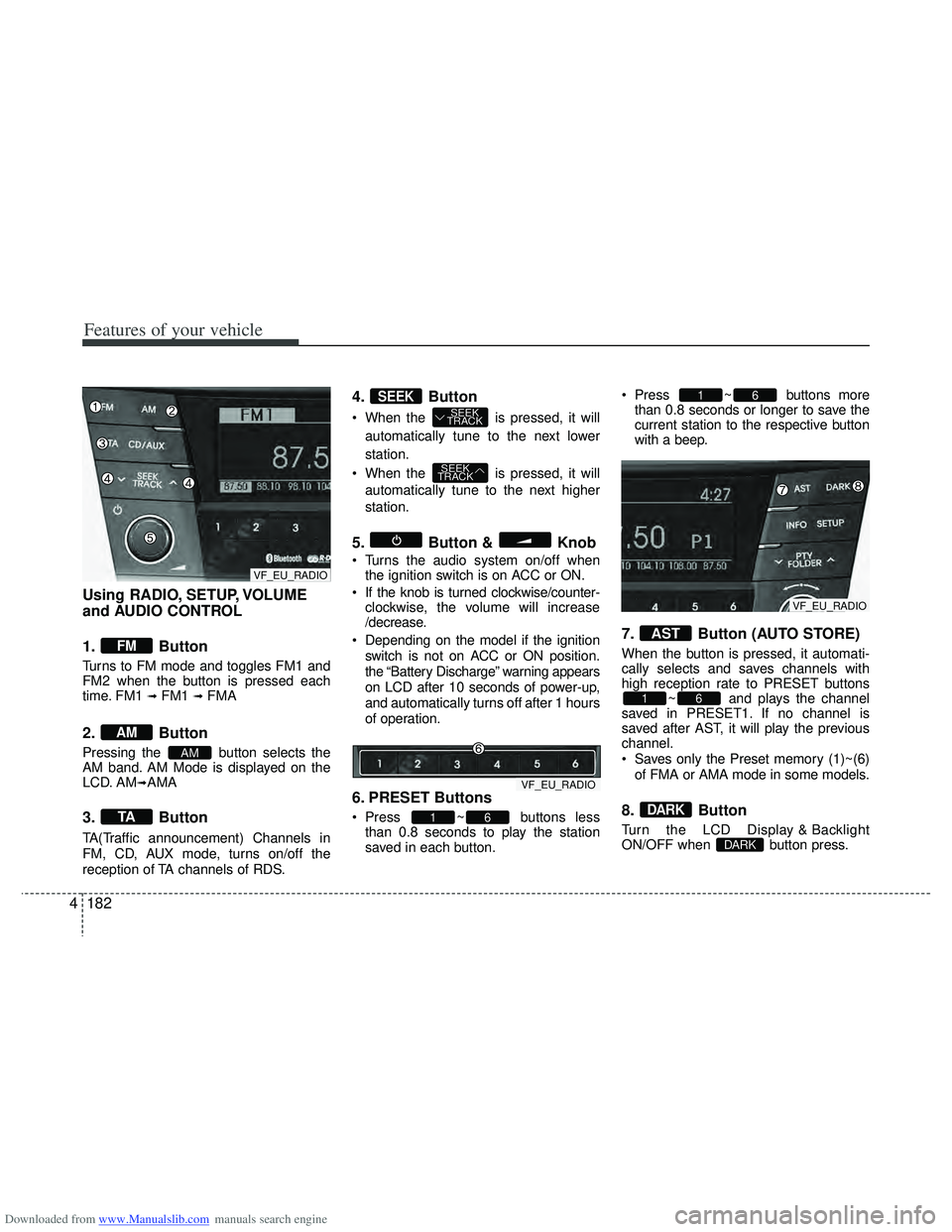
Using RADIO, SETUP, VOLUME
and AUDIO CONTROL
1. Button
Turns to FM mode and toggles FM1 and
FM2 when the button is pressed each
time. FM1
\b FM1 \b FMA
2. Button
Pressing the button selects the
AM band. AM Mode is displayed on the
LCD. AM
\bAMA
3. Button
TA(Traffic announcement) Channels in
FM, CD, AUX mode, turns on/off the
reception of TA channels of RDS.
4. Button
When the is pressed, it will
automatically tune to the next lower
station.
When the is pressed, it will automatically tune to the next higher
station.
5. Button & Knob
Turns the audio system on/off whenthe ignition switch is on ACC or ON.
If the knob is turned clockwise/counter- clockwise, the volume will increase
/decrease.
Depending on the model if the ignition switch is not on ACC or ON position.
the “Battery Discharge” warning appears
on LCD after 10 seconds of power-up,
and automatically turns off after 1 hours
of operation.
6. PRESET Buttons
Press ~ buttons lessthan 0.8 seconds to play the station
saved in each button. Press ~ buttons more
than 0.8 seconds or longer to save the
current station to the respective button
with a beep.
7. Button (AUTO STORE)
When the button is pressed, it automati-
cally selects and saves channels with
high reception rate to PRESET buttons ~ and plays the channel
saved in PRESET1. If no channel is
saved after AST, it will play the previous
channel.
Saves only the Preset memory (1)~(6)
of FMA or AMA mode in some models.
8. Button
Turn the LCD Display & Backlight
ON/OFF when button press.DARK
DARK
61
AST
61
61
SEEK
TRACK
SEEK
TRACKSEEK
TA
AM
AM
FM
VF_EU_RADIO
VF_EU_RADIO
VF_EU_RADIO
Page 274 of 534
Downloaded from www.Manualslib.com manuals search engine 4187
Features of your vehicle
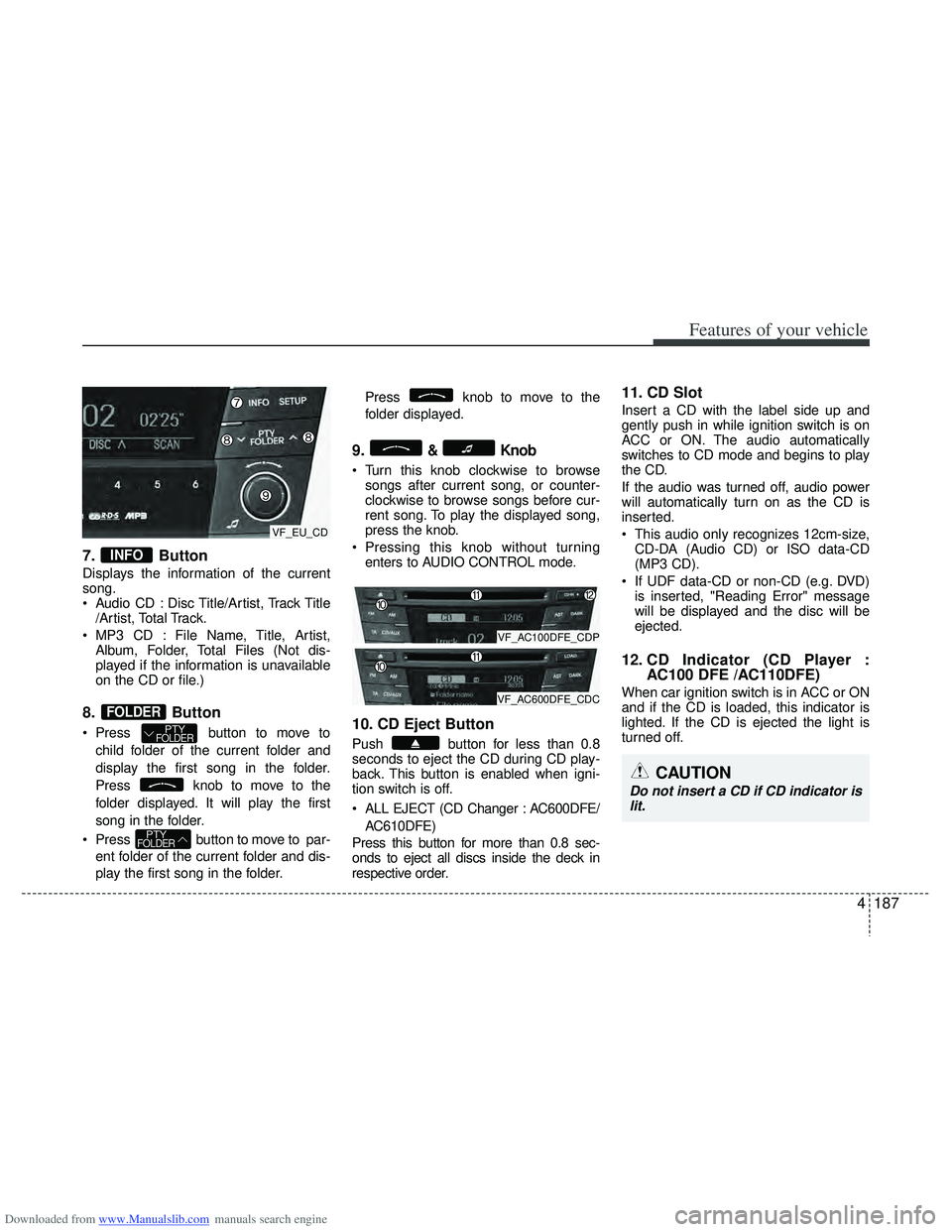
7. Button
Displays the information of the current
song.
Audio CD : Disc Title/Artist, Track Title/Artist, Total Track.
MP3 CD : File Name, Title, Artist, Album, Folder, Total Files (Not dis-
played if the information is unavailable
on the CD or file.)
8. Button
Press button to move to
child folder of the current folder and
display the first song in the folder.
Press knob to move to the
folder displayed. It will play the first
song in the folder.
Press button to move to par- ent folder of the current folder and dis-
play the first song in the folder. Press knob to move to the
folder displayed.
9.& Knob
Turn this knob clockwise to browse
songs after current song, or counter-
clockwise to browse songs before cur-
rent song. To play the displayed song,
press the knob.
Pressing this knob without turning enters to AUDIO CONTROL mode.
10. CD Eject Button
Push button for less than 0.8
seconds to eject the CD during CD play-
back. This button is enabled when igni-
tion switch is off.
ALL EJECT (CD Changer : AC600DFE/
AC610DFE)
Press this button for more than 0.8 sec-
onds to eject all discs inside the deck in
respective order.
11. CD Slot
Insert a CD with the label side up and
gently push in while ignition switch is on
ACC or ON. The audio automatically
switches to CD mode and begins to play
the CD.
If the audio was turned off, audio power
will automatically turn on as the CD is
inserted.
This audio only recognizes 12cm-size, CD-DA (Audio CD) or ISO data-CD
(MP3 CD).
If UDF data-CD or non-CD (e.g. DVD) is inserted, "Reading Error" message
will be displayed and the disc will be
ejected.
12. CD Indicator (CD Player : AC100 DFE /AC110DFE)
When car ignition switch is in ACC or ON
and if the CD is loaded, this indicator is
lighted. If the CD is ejected the light is
turned off.
PTYFOLDER
PTYFOLDER
FOLDER
INFO
CAUTION
Do not insert a CD if CD indicator is
lit.
VF_AC100DFE_CDP
VF_AC600DFE_CDC
VF_EU_CD