entry HYUNDAI I40 2012 Owners Manual
[x] Cancel search | Manufacturer: HYUNDAI, Model Year: 2012, Model line: I40, Model: HYUNDAI I40 2012Pages: 534, PDF Size: 11.05 MB
Page 88 of 534
Downloaded from www.Manualslib.com manuals search engine 4
Keys / 4-3
Remote keyless entry / 4-5
Smart key / 4-9
Theft-alarm system / 4-12
Door locks / 4-15
Tailgate / 4-20
Windows / 4-26
Hood / 4-30
Fuel filler lid / 4-32
Panorama Sunroof / 4-35
Driver position memory system / 4-39
Steering wheel / 4-41
Mirrors / 4-44
Instrument cluster / 4-48
Parking assist system / 4-79
Smart parking assist system / 4-83
Rearview camera / 4-94
Hazard warning flasher / 4-95
Lighting / 4-96
Wipers and washers / 4-104
Interior light / 4-108
Welcome system / 4-110
Defroster / 4-111
Features of your vehicle
Page 92 of 534
Downloaded from www.Manualslib.com manuals search engine 45
Features of your vehicle
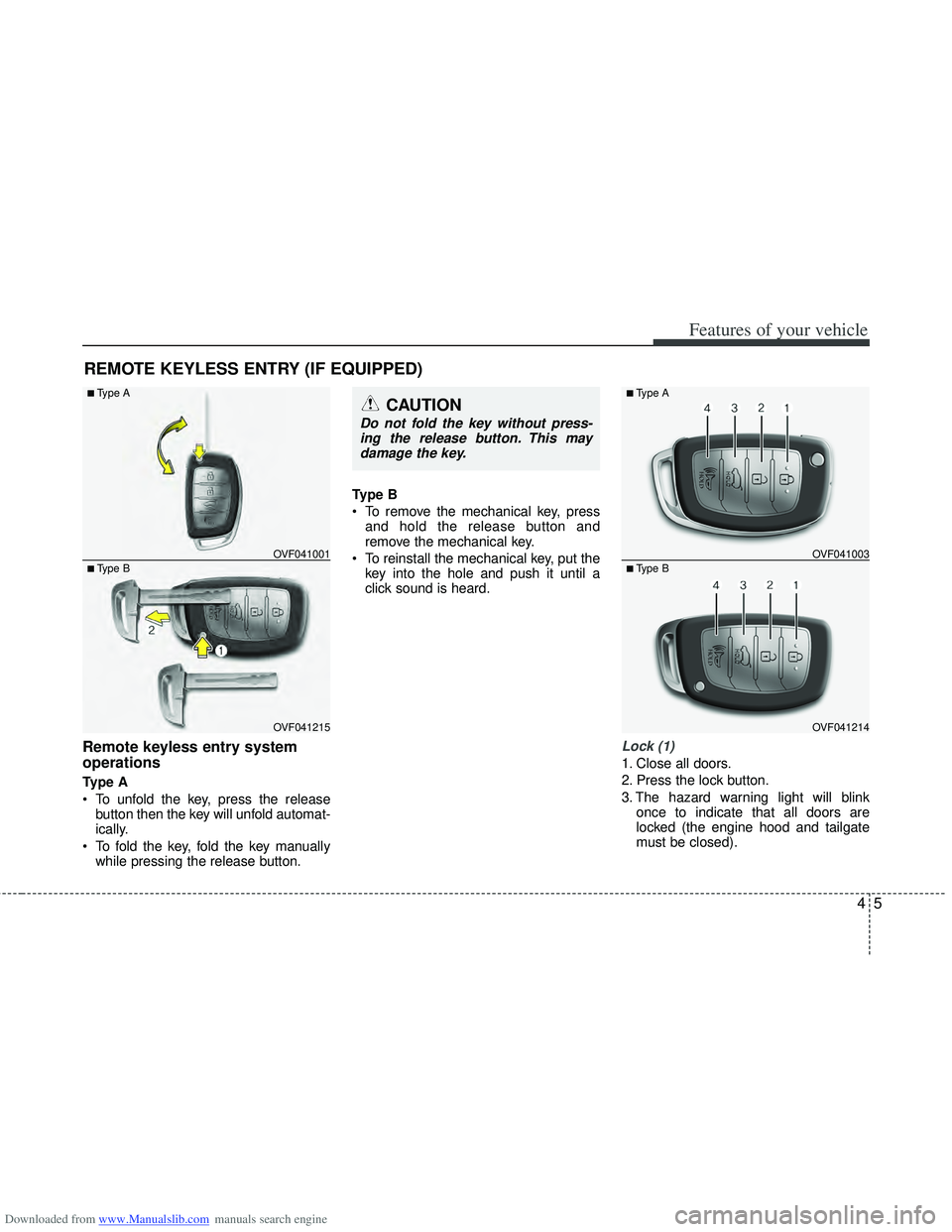
Remote keyless entry system
operations
Type A
To unfold the key, press the releasebutton then the key will unfold automat-
ically.
To fold the key, fold the key manually while pressing the release button. Type B
To remove the mechanical key, press
and hold the release button and
remove the mechanical key.
To reinstall the mechanical key, put the key into the hole and push it until a
click sound is heard.
Lock (1)
1. Close all doors.
2. Press the lock button.
3. The hazard warning light will blink once to indicate that all doors are
locked (the engine hood and tailgate
must be closed).
REMOTE KEYLESS ENTRY (IF EQUIPPED)
OVF041215
■Type B OVF041001
■Type ACAUTION
Do not fold the key without press-
ing the release button. This maydamage the key.
OVF041214
■Type B OVF041003
■Type A
Page 94 of 534
Downloaded from www.Manualslib.com manuals search engine 47
Features of your vehicle
Transmitter precautions
✽
✽NOTICE
The transmitter will not work if any of
following occur:
• The ignition key is in ignition switch.
• You exceed the operating distance
limit (about 10 m [30 feet]).
• The battery in the transmitter is weak.
• Other vehicles or objects may be blocking the signal.
• The weather is extremely cold.
• The transmitter is close to a radio transmitter such as a radio station or
an airport which can interfere with
normal operation of the transmitter.
When the transmitter does not work
correctly, open and close the door with
the ignition key. If you have a problem
with the transmitter, contact an author-
ized HYUNDAI dealer.
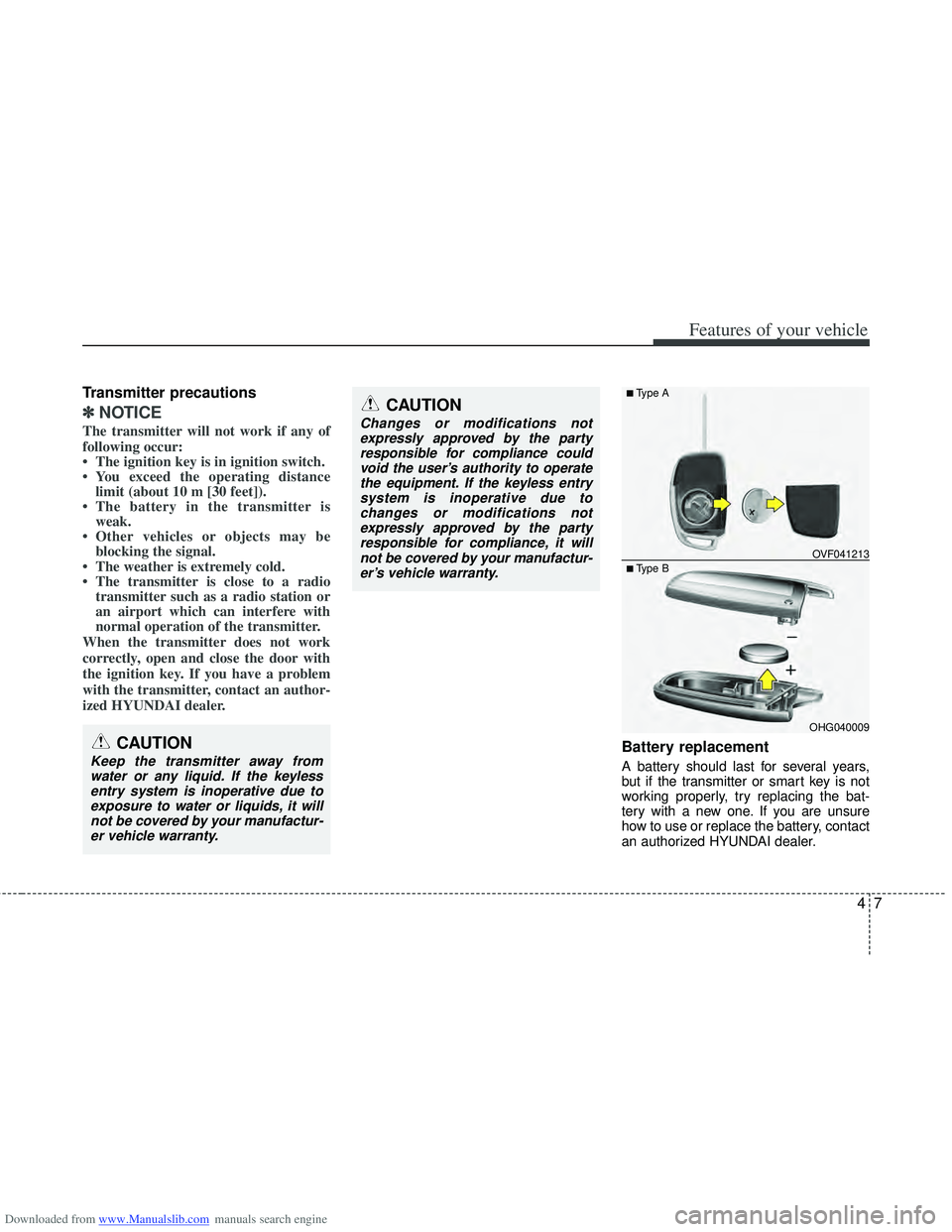
Battery replacement
A battery should last for several years,
but if the transmitter or smart key is not
working properly, try replacing the bat-
tery with a new one. If you are unsure
how to use or replace the battery, contact
an authorized HYUNDAI dealer.
CAUTION
Changes or modifications not expressly approved by the partyresponsible for compliance couldvoid the user’s authority to operatethe equipment. If the keyless entry system is inoperative due tochanges or modifications notexpressly approved by the partyresponsible for compliance, it willnot be covered by your manufactur-er’s vehicle warranty.
CAUTION
Keep the transmitter away fromwater or any liquid. If the keylessentry system is inoperative due to exposure to water or liquids, it willnot be covered by your manufactur-er vehicle warranty.
■Type B OVF041213
■Type A
OHG040009
Page 96 of 534
Downloaded from www.Manualslib.com manuals search engine 49
Features of your vehicle
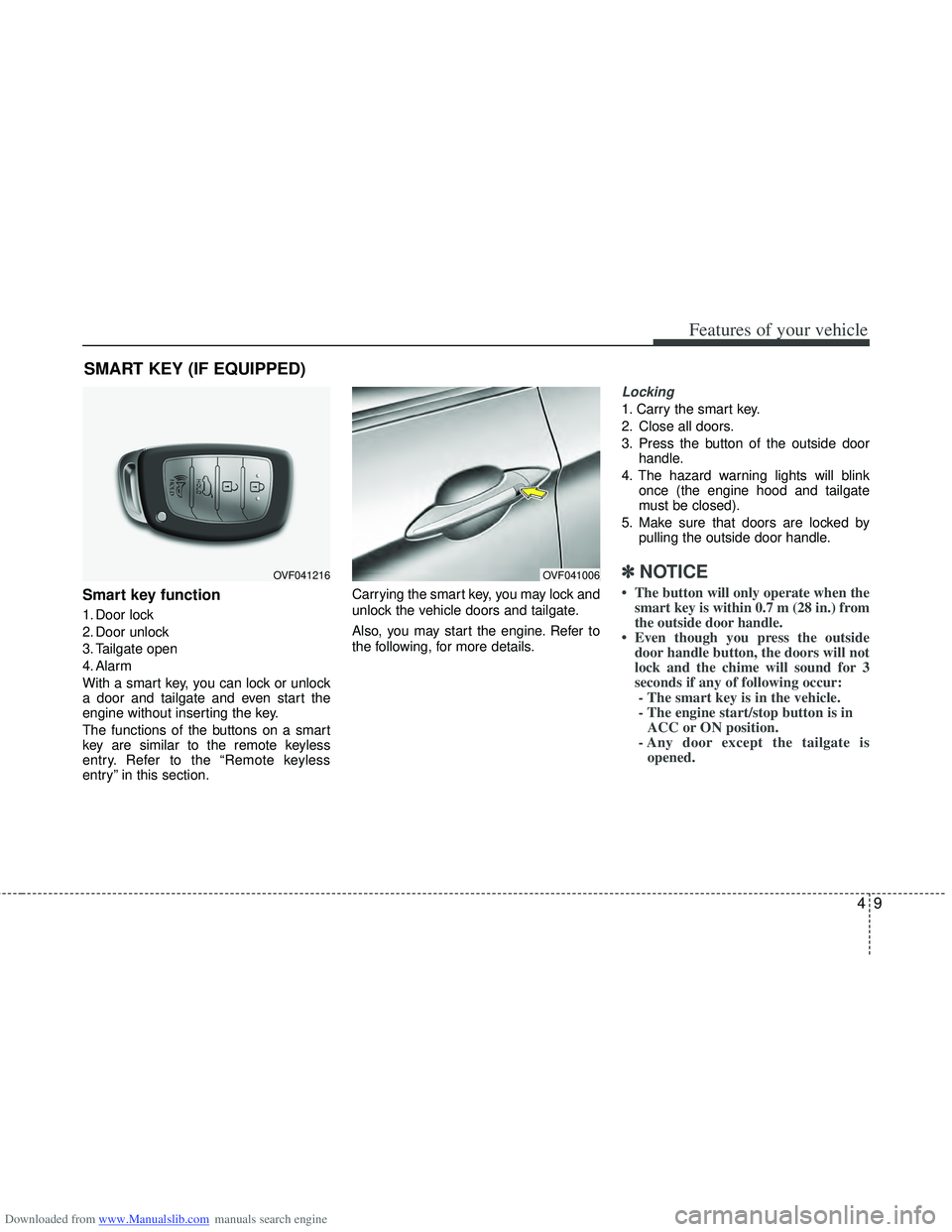
Smart key function
1. Door lock
2. Door unlock
3. Tailgate open
4. Alarm
With a smart key, you can lock or unlock
a door and tailgate and even start the
engine without inserting the key.
The functions of the buttons on a smart
key are similar to the remote keyless
entry. Refer to the “Remote keyless
entry” in this section.Carrying the smart key, you may lock and
unlock the vehicle doors and tailgate.
Also, you may start the engine. Refer to
the following, for more details.
Locking
1. Carry the smart key.
2. Close all doors.
3. Press the button of the outside door
handle.
4. The hazard warning lights will blink once (the engine hood and tailgate
must be closed).
5. Make sure that doors are locked by pulling the outside door handle.
✽ ✽NOTICE
• The button will only operate when the
smart key is within 0.7 m (28 in.) from
the outside door handle.
• Even though you press the outside door handle button, the doors will not
lock and the chime will sound for 3
seconds if any of following occur:- The smart key is in the vehicle.
- The engine start/stop button is in ACC or ON position.
- Any door except the tailgate is opened.
SMART KEY (IF EQUIPPED)
OVF041216OVF041006
Page 98 of 534
Downloaded from www.Manualslib.com manuals search engine 411
Features of your vehicle
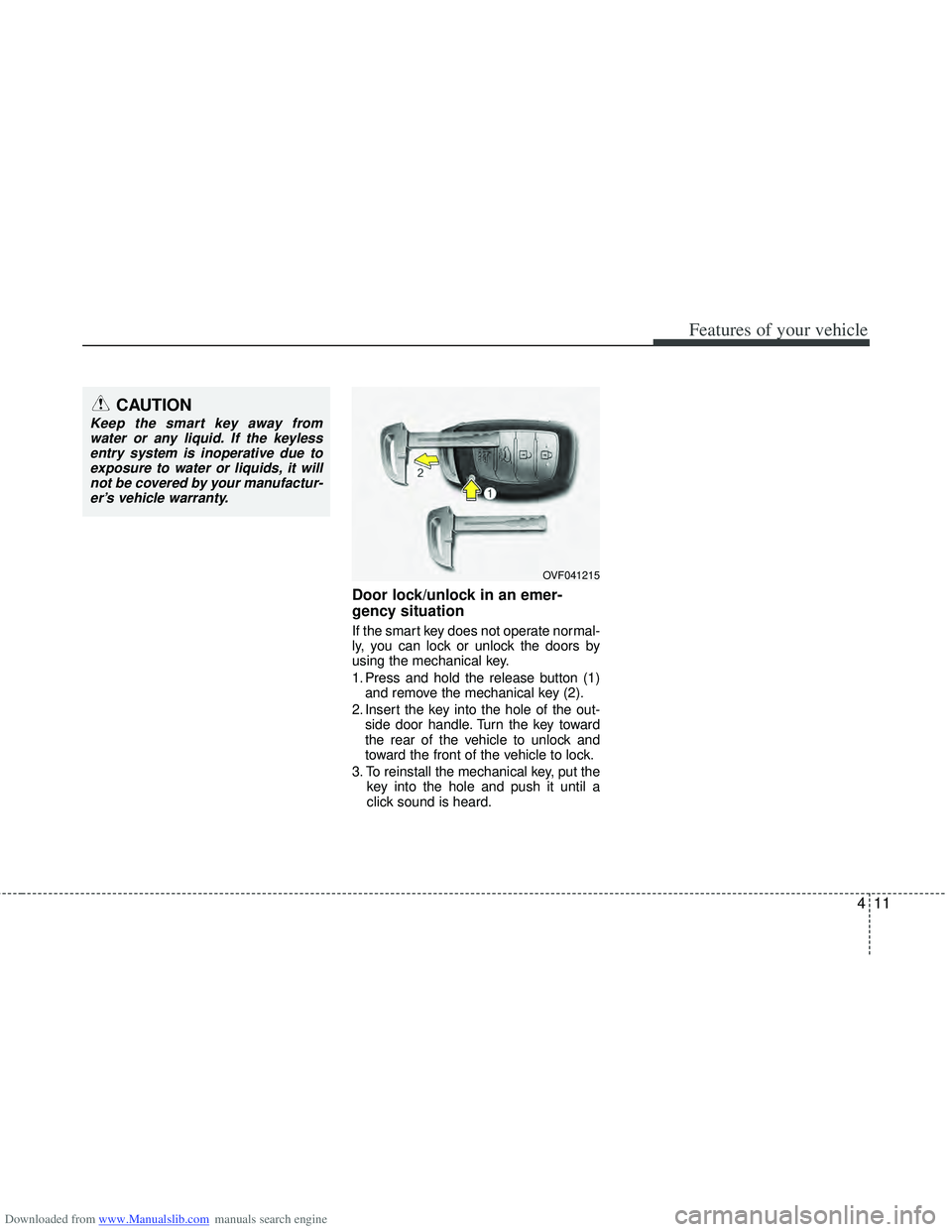
Door lock/unlock in an emer-
gency situation
If the smart key does not operate normal-
ly, you can lock or unlock the doors by
using the mechanical key.
1. Press and hold the release button (1)and remove the mechanical key (2).
2. Insert the key into the hole of the out- side door handle. Turn the key toward
the rear of the vehicle to unlock and
toward the front of the vehicle to lock.
3. To reinstall the mechanical key, put the key into the hole and push it until a
click sound is heard.
CAUTION
Keep the smart key away fromwater or any liquid. If the keylessentry system is inoperative due toexposure to water or liquids, it willnot be covered by your manufactur- er’s vehicle warranty.
OVF041215
Page 99 of 534
Downloaded from www.Manualslib.com manuals search engine Features of your vehicle
12
4
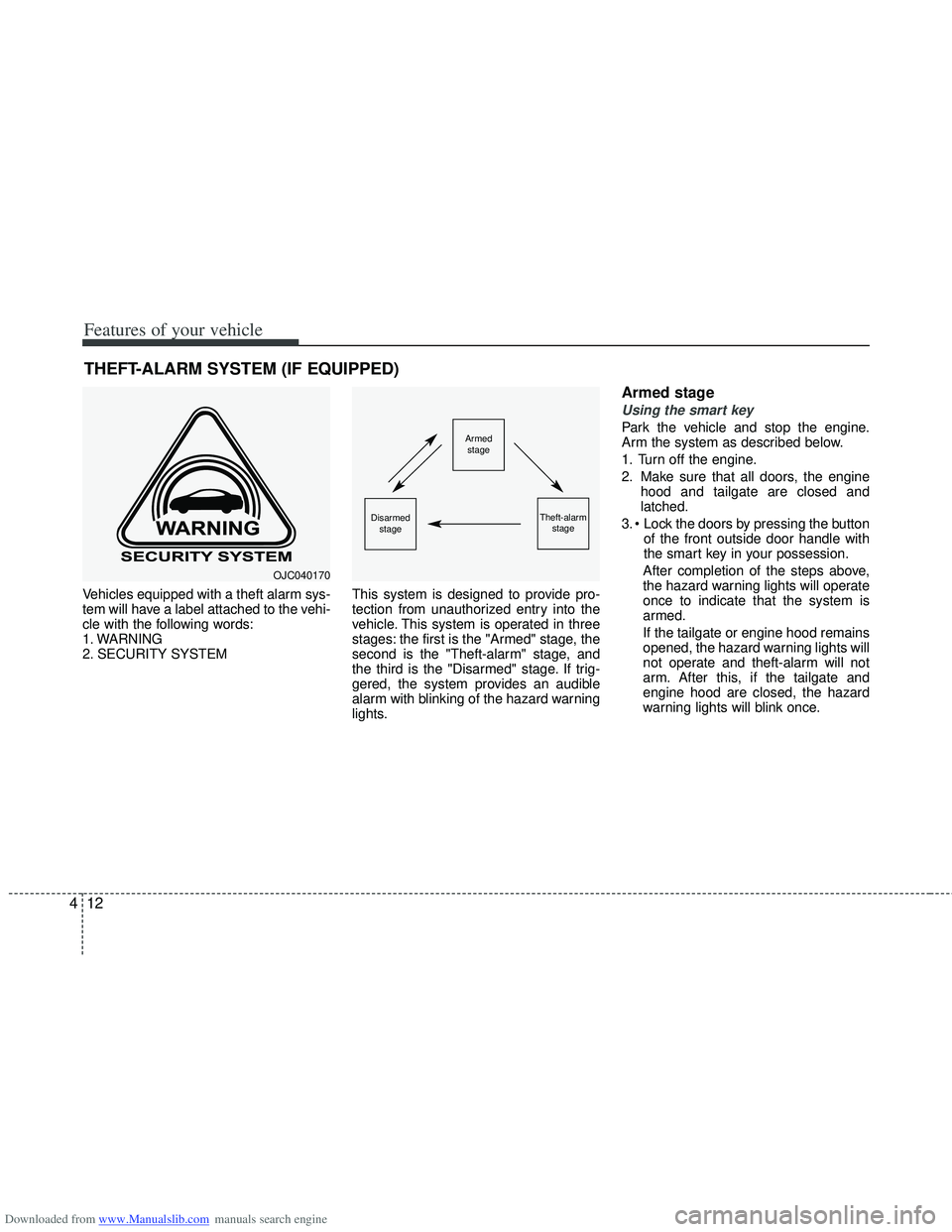
Vehicles equipped with a theft alarm sys-
tem will have a label attached to the vehi-
cle with the following words:
1. WARNING
2. SECURITY SYSTEM This system is designed to provide pro-
tection from unauthorized entry into the
vehicle. This system is operated in three
stages: the first is the "Armed" stage, the
second is the "Theft-alarm" stage, and
the third is the "Disarmed" stage. If trig-
gered, the system provides an audible
alarm with blinking of the hazard warning
lights.
Armed stage
Using the smart key
Park the vehicle and stop the engine.
Arm the system as described below.
1. Turn off the engine.
2. Make sure that all doors, the engine
hood and tailgate are closed and
latched.
3. of the front outside door handle with
the smart key in your possession.
After completion of the steps above,
the hazard warning lights will operate
once to indicate that the system is
armed.
If the tailgate or engine hood remains
opened, the hazard warning lights will
not operate and theft-alarm will not
arm. After this, if the tailgate and
engine hood are closed, the hazard
warning lights will blink once.
THEFT-ALARM SYSTEM (IF EQUIPPED)
Armed stage
Theft-alarm stageDisarmedstage
OJC040170
Page 104 of 534
Downloaded from www.Manualslib.com manuals search engine 417
Features of your vehicle
If any door is unlocked, the indicator ofthe central door lock switch will go off.
When you press the central door unlock switch, all vehicle doors will
unlock.
✽ ✽ NOTICE
Once the doors are locked with the
transmitter or smart key, the doors can-
not be unlocked with the central door
lock/unlock switch.
WARNING - Doors
The doors should always be fully
closed and locked while the vehi-
cle is in motion to prevent acci-
dental opening of the door.
Locked doors will also discour-
age potential intruders when the
vehicle stops or slows.
Be careful when opening doors and watch for vehicles, motorcy-
cles, bicycles or pedestrians
approaching the vehicle in the
path of the door. Opening a door
when something is approaching
can cause damage or injury.
WARNING- Unlocked
vehicles
Leaving your vehicle unlocked can
invite theft or possible harm to you
or others from someone hiding in
your vehicle while you are gone.
Always remove the ignition key,
engage the parking brake, close all
windows and lock all doors when
leaving your vehicle unattended.
WARNING- Unattendedchildren
An enclosed vehicle can become
extremely hot, causing death or
severe injury to unattended chil-
dren or animals who cannot escape
the vehicle. Furthermore, children
might operate features of the vehi-
cle that could injure them, or they
could encounter other harm, possi-
bly from someone gaining entry to
the vehicle. Never leave children or
animals unattended in your vehicle.
WARNING - Door lock mal-function
If a power door lock ever fails to
function while you are in the vehi-
cle, try one or more of the follow-
ing:
Operate the other door locks and
handles.
Lower the driver’s window and use the key to unlock the door
from outside.
Move to the cargo area and open the tailgate.
Page 267 of 534
Downloaded from www.Manualslib.com manuals search engine Features of your vehicle
180
4
CAUTION IN USING
BLUETOOTH®CELLULAR
PHONE
Do not use a cellular phone or
perform Bluetooth®settings (e.g.
pairing a phone) while driving.
Some Bluetooth
®-enabled phones
may not be recognized by the system or fully compatible withthe system.
Before using Bluetooth
®related
features of the audio system, refer your phone’s User’s Manual for phone-side Bluetooth
®opera-
tions.
The phone must be paired to the audio system to use Bluetooth
®
related features.
You will not be able to use the hands-free feature when yourphone (in the car) is outside ofthe cellular service area (e.g. in atunnel, in a underground, in amountainous area, etc.).
If the cellular phone signal is poor or the vehicles interior noise istoo loud, it may be difficult to hearthe other person’s voice during a call.
(Continued)
(continued) Do not place the phone near or inside metallic objects, otherwise
communications with Bluetooth
®
system or cellular service sta- tions can be disturbed.
While a phone is connected through Bluetooth
®your phone
may discharge quicker than usual for additional Bluetooth
®-related
operations.
Some cellular phones or other devices may cause interferencenoise or malfunction to audiosystem. In this case, store thedevice in a different location mayresolve the situation.
Please save your phone name in English, or your phone name maynot be displayed correctly.
If Priority is set upon vehicle igni- tion (IGN/ACC ON), the Bluetoothphone will be automatically con-nected. Even if you are outside,the Bluetooth phone will be auto-matically connected once you arein the vicinity of the vehicle.
If you do not want automaticBluetooth power off.
(Continued)
(continued) Bluetooth connection may become intermittently discon-nected in some mobile phones.Follow the following steps to try again.
1) Turn the Bluetooth Function within the mobile phoneON/OFF and try to connect again.
2) Turn the mobile phone power ON/OFF and try to connectagain.
3) Completely remove the mobile phone battery, reboot, and thentry to connect again.
4) Reboot the Audio and try to connect again.
5) Delete all paired devices from the mobile phone and Audioand re-pair for use.
The hands-free call volume and quality may differ depending onthe mobile phone.
Page 284 of 534
Downloaded from www.Manualslib.com manuals search engine 4197
Features of your vehicle
■Bluetooth®Language Setting
The system language can be changed by
the following steps:
1. Power on the audio system with thevolume set to an audible level.
2. Press and hold button on the steering wheel until the audio displays
“Please Wait”.
- The Bluetooth
®system will reply in
currently selected language that it is
changing to the next language.
- System language cycles between
FRENCH/GERMAN/UK ENGLISH
SPANISH/DUTCH/ITALIAN/DANISH/
RUSSIAN/POLISH/SWEDISH.
3. When completed, the audio display returns to normal.
4. Repeat steps 2 and 3 for the next lan- guage selection.
NOTE:
The phone needs to be paired again
after changing system language.
- Avoid resting your thumb or fingeron the button as the language
could unintentionally change.
■Voice Recognition Activation
in the Bluetooth®System can be acti-
vated in the following conditions:
- Button Activation
The voice recognition system will be
active when the button is pressed
and after the sound of a Beep.
- Active Listening The voice recognition system will be
active for a period of time when the
Voice Recognition system has asked
for a customer response.
from zero to nine while number greater
than ten will not be recognized.
system will announce "Pardon" or No
input voice signal from microphone. (No
response)
tion mode in following cases : When
pressing the button and saying
cancel following the beep. When not
making a call and pressing the
button. When voice recognition has
failed 3 consecutive times.
will announce what commands are
available.
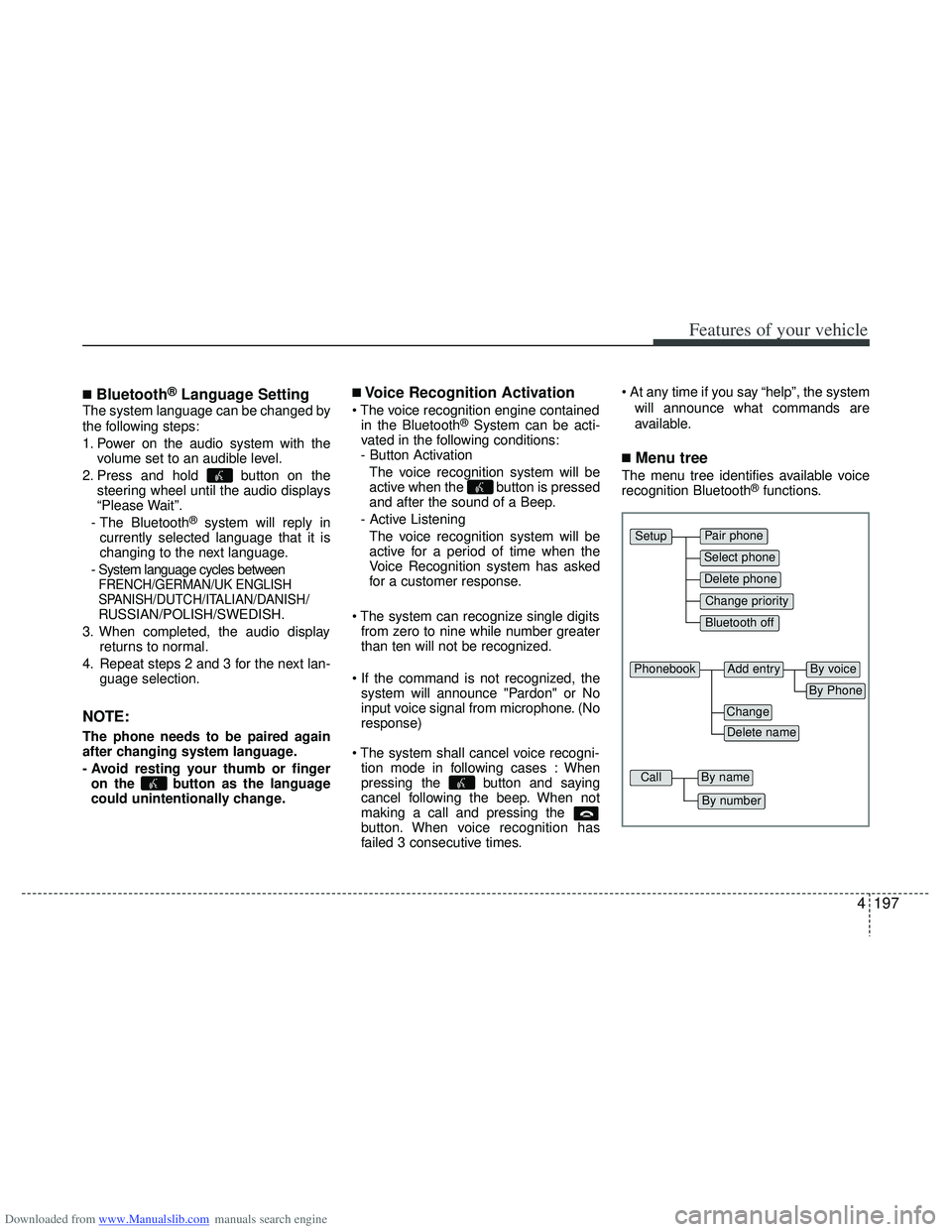
■Menu tree
The menu tree identifies available voice
recognition Bluetooth®functions.
Pair phone
Select phone
Change priority
Delete phone
Bluetooth off
Setup
Add entryPhonebook
Change
Delete name
By Phone
By voice
CallBy name
By number
Page 288 of 534
Downloaded from www.Manualslib.com manuals search engine 4201
Features of your vehicle
- By Voice Command:
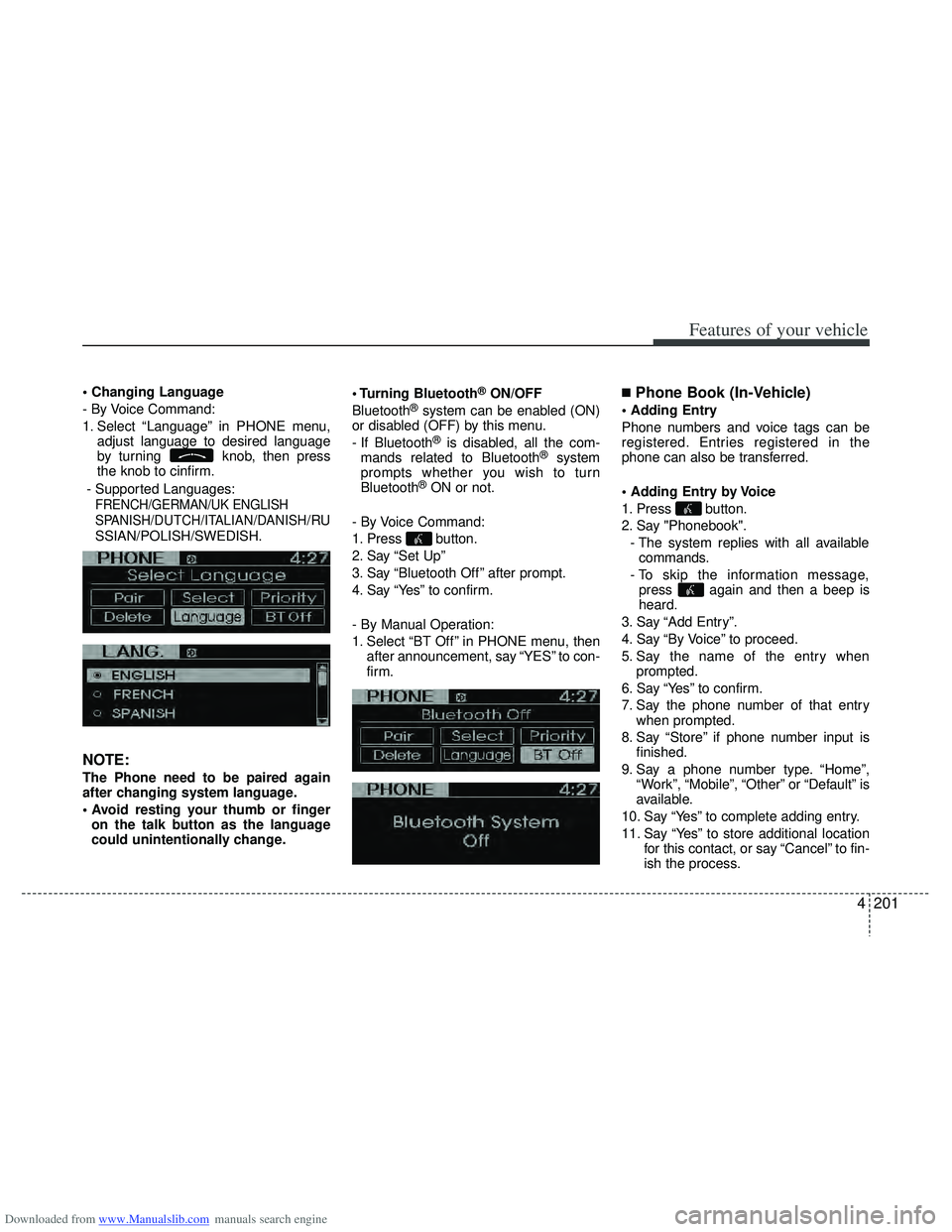
1. Select “Language” in PHONE menu,adjust language to desired language
by turning knob, then press
the knob to cinfirm.
- Supported Languages:
FRENCH/GERMAN/UK ENGLISH
SPANISH/DUTCH/ITALIAN/DANISH
/RU
SSIAN/POLISH/SWEDISH.
NOTE:
The Phone need to be paired again
after changing system language.
on the talk button as the language
could unintentionally change. Bluetooth
®ON/OFF
Bluetooth®system can be enabled (ON)
or disabled (OFF) by this menu.
- If Bluetooth
®is disabled, all the com-
mands related to Bluetooth®system
prompts whether you wish to turn
Bluetooth
®ON or not.
- By Voice Command:
1. Press button.
2. Say “Set Up”
3. Say “Bluetooth Off ” after prompt.
4. Say “Yes” to confirm.
- By Manual Operation:
1. Select “BT Off ” in PHONE menu, then after announcement, say “YES” to con-
firm.
■Phone Book (In-Vehicle)
Phone numbers and voice tags can be
registered. Entries registered in the
phone can also be transferred.
1. Press button.
2. Say "Phonebook".
- The system replies with all availablecommands.
- To skip the information message, press again and then a beep is
heard.
3. Say “Add Entry”.
4. Say “By Voice” to proceed.
5. Say the name of the entry when prompted.
6. Say “Yes” to confirm.
7. Say the phone number of that entry when prompted.
8. Say “Store” if phone number input is finished.
9. Say a phone number type. “Home”, “Work”, “Mobile”, “Other” or “Default” is
available.
10. Say “Yes” to complete adding entry.
11. Say “Yes” to store additional location for this contact, or say “Cancel” to fin-
ish the process.