change time HYUNDAI I40 2017 User Guide
[x] Cancel search | Manufacturer: HYUNDAI, Model Year: 2017, Model line: I40, Model: HYUNDAI I40 2017Pages: 534, PDF Size: 11.05 MB
Page 179 of 534
Downloaded from www.Manualslib.com manuals search engine Features of your vehicle
92
4
6. Smart Parking Assist System com-
pleted
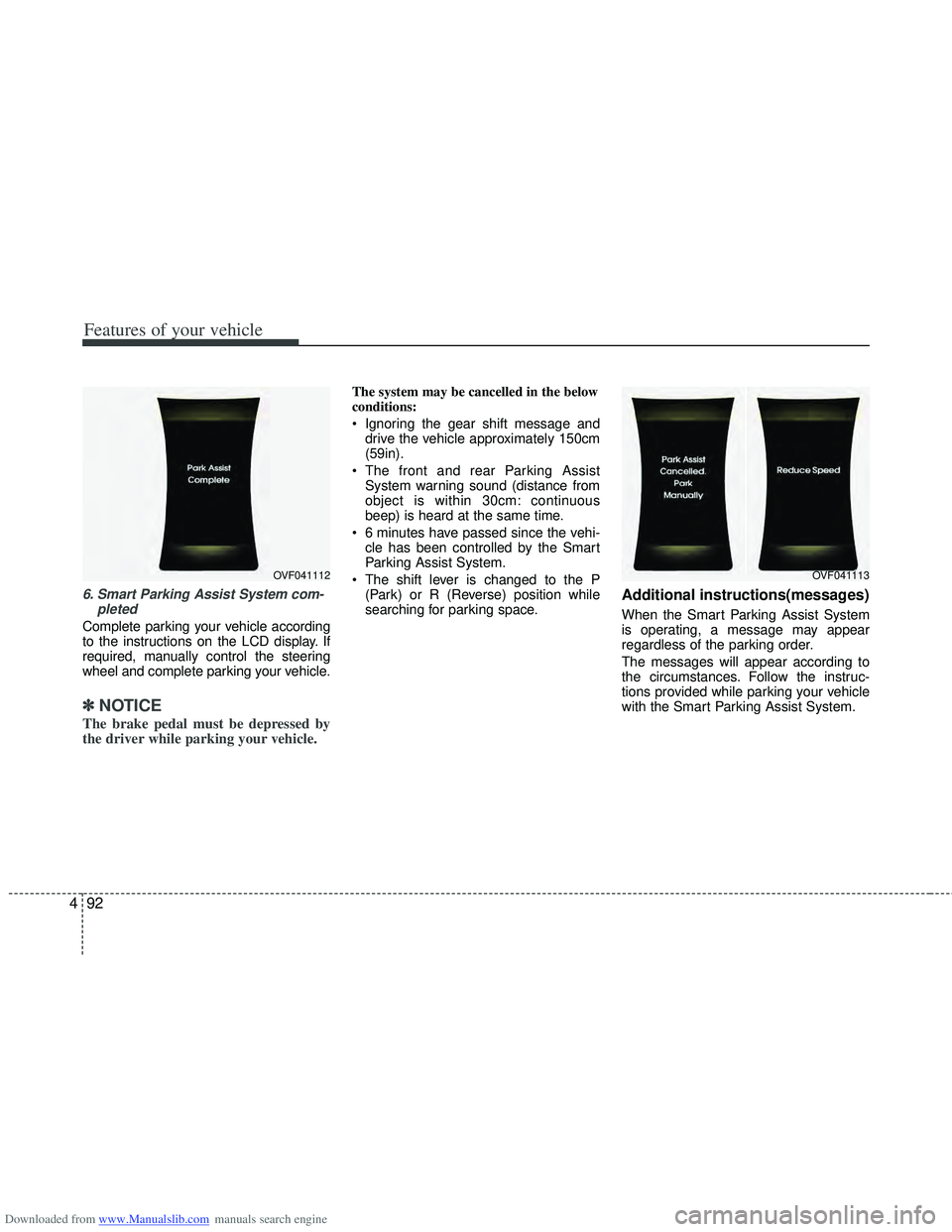
Complete parking your vehicle according
to the instructions on the LCD display. If
required, manually control the steering
wheel and complete parking your vehicle.
✽ ✽NOTICE
The brake pedal must be depressed by
the driver while parking your vehicle.
The system may be cancelled in the below
conditions:
Ignoring the gear shift message and
drive the vehicle approximately 150cm
(59in).
The front and rear Parking Assist System warning sound (distance from
object is within 30cm: continuous
beep) is heard at the same time.
6 minutes have passed since the vehi- cle has been controlled by the Smart
Parking Assist System.
The shift lever is changed to the P (Park) or R (Reverse) position while
searching for parking space.
Additional instructions(messages)
When the Smart Parking Assist System
is operating, a message may appear
regardless of the parking order.
The messages will appear according to
the circumstances. Follow the instruc-
tions provided while parking your vehicle
with the Smart Parking Assist System.
OVF041112OVF041113
Page 186 of 534
Downloaded from www.Manualslib.com manuals search engine 499
Features of your vehicle
Traffic change (for Europe) (vehicle’s equipped with AFLS)
Use this function when you visit a coun-
try with opposite traffic direction.
Follow the below procedure.
1. Stop the vehicle with the engine run- ning.
2. Change the switch from the park light ( ) position to the headlight position
( ) 10 times within 15 seconds.
3. A beep sound will be heard 3 times to notify you the change has been made
successfully.
4. To cancel the change, follow the above procedure again.
✽ ✽NOTICE
• If the traffic change function is acti-
vated, a beep sound will be heard 3
times.
• If the engine is turned off with the traffic change function activated, and
the engine turned on again, a beep
sound will be heard 3 times. It is to
notify the driver the function is acti-
vated.
• If the traffic change is activated when you visit a country with opposite traf-
fic direction, it will decrease the dazzle
on oncoming vehicle drivers.
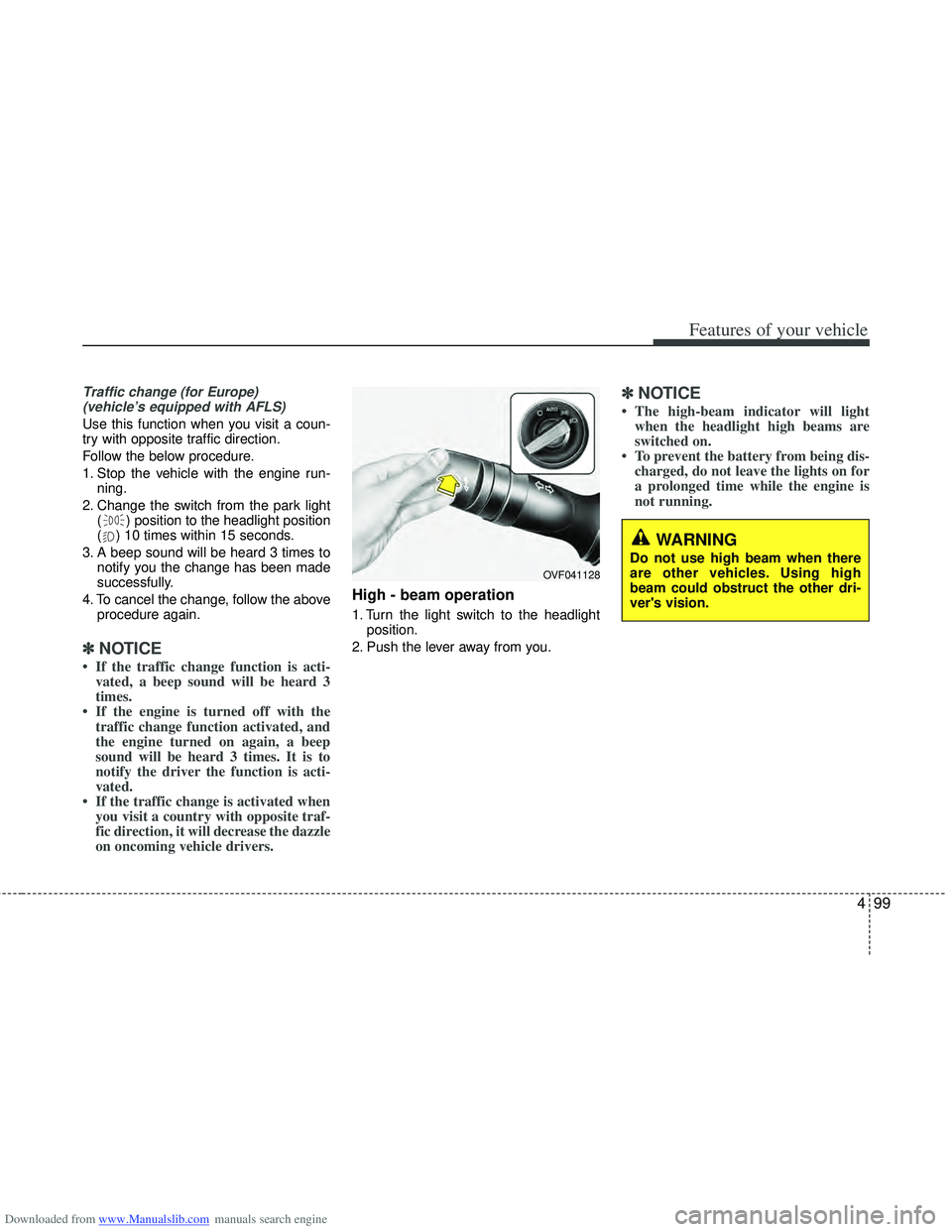
High - beam operation
1. Turn the light switch to the headlight
position.
2. Push the lever away from you.
✽ ✽ NOTICE
• The high-beam indicator will light
when the headlight high beams are
switched on.
• To prevent the battery from being dis- charged, do not leave the lights on for
a prolonged time while the engine is
not running.
WARNING
Do not use high beam when there
are other vehicles. Using high
beam could obstruct the other dri-
ver's vision.
OVF041128
Page 187 of 534
Downloaded from www.Manualslib.com manuals search engine Features of your vehicle
100
4
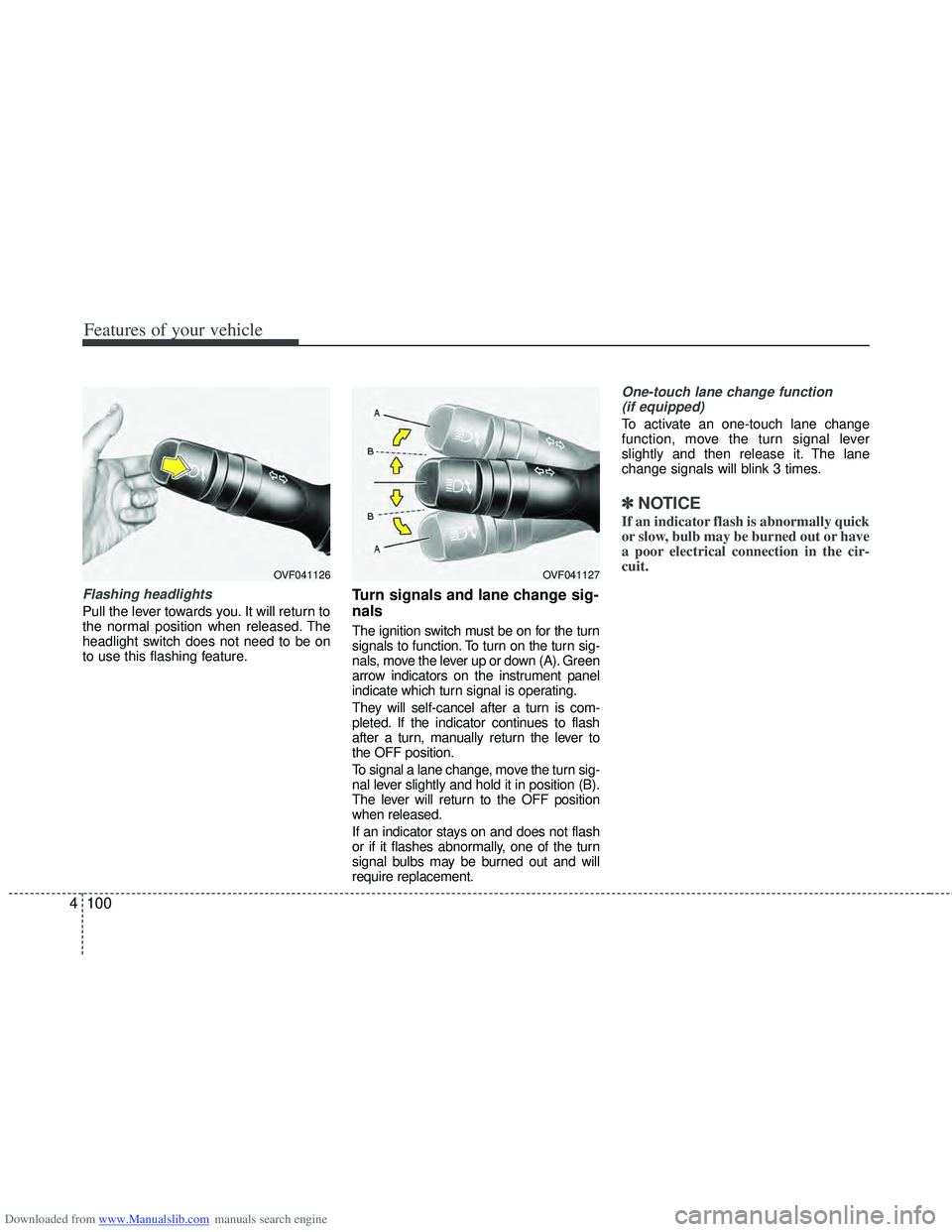
Flashing headlights
Pull the lever towards you. It will return to
the normal position when released. The
headlight switch does not need to be on
to use this flashing feature.
Turn signals and lane change sig-
nals
The ignition switch must be on for the turn
signals to function. To turn on the turn sig-
nals, move the lever up or down (A). Green
arrow indicators on the instrument panel
indicate which turn signal is operating.
They will self-cancel after a turn is com-
pleted. If the indicator continues to flash
after a turn, manually return the lever to
the OFF position.
To signal a lane change, move the turn sig-
nal lever slightly and hold it in position (B).
The lever will return to the OFF position
when released.
If an indicator stays on and does not flash
or if it flashes abnormally, one of the turn
signal bulbs may be burned out and will
require replacement.
One-touch lane change function
(if equipped)
To activate an one-touch lane change
function, move the turn signal lever
slightly and then release it. The lane
change signals will blink 3 times.
✽ ✽ NOTICE
If an indicator flash is abnormally quick
or slow, bulb may be burned out or have
a poor electrical connection in the cir-
cuit.
OVF041127OVF041126
Page 195 of 534
Downloaded from www.Manualslib.com manuals search engine Features of your vehicle
108
4
Interior lamp AUTO cut
When all entrances are closed, if you
lock the vehicle by using the transmit-
ter or the smart key, all interior lamp
will be off within 5 seconds.
If you do not operate anything in the vehicle after turning off the engine, the
lights will turn off after 20 minutes.
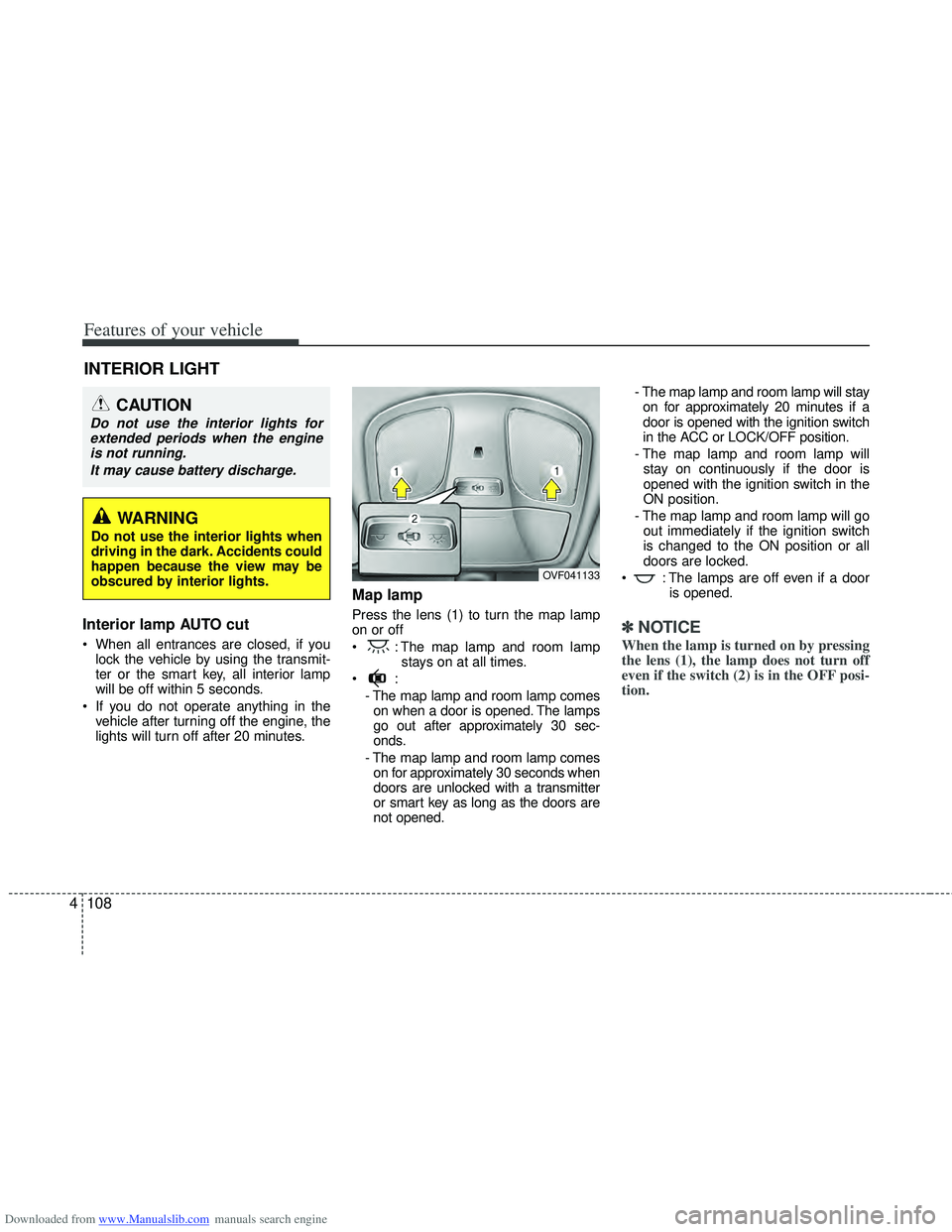
Map lamp
Press the lens (1) to turn the map lamp
on or off
: The map lamp and room lamp stays on at all times.
- The map lamp and room lamp comeson when a door is opened. The lamps
go out after approximately 30 sec-
onds.
- The map lamp and room lamp comes on for approximately 30 seconds when
doors are unlocked with a transmitter
or smart key as long as the doors are
not opened. - The map lamp and room lamp will stay
on for approximately 20 minutes if a
door is opened with the ignition switch
in the ACC or LOCK/OFF position.
- The map lamp and room lamp will stay on continuously if the door is
opened with the ignition switch in the
ON position.
- The map lamp and room lamp will go out immediately if the ignition switch
is changed to the ON position or all
doors are locked.
: The lamps are off even if a door is opened.✽ ✽NOTICE
When the lamp is turned on by pressing
the lens (1), the lamp does not turn off
even if the switch (2) is in the OFF posi-
tion.
INTERIOR LIGHT
CAUTION
Do not use the interior lights for
extended periods when the engineis not running.
It may cause battery discharge.
OVF041133
WARNING
Do not use the interior lights when
driving in the dark. Accidents could
happen because the view may be
obscured by interior lights.
Page 206 of 534
Downloaded from www.Manualslib.com manuals search engine 4119
Features of your vehicle
✽
✽NOTICE
• When using the air conditioning sys-
tem, monitor the temperature gauge
closely while driving up hills or in
heavy traffic when outside tempera-
tures are high. Air conditioning sys-
tem operation may cause engine over-
heating. Continue to use the blower
fan but turn the air conditioning sys-
tem off if the temperature gauge indi-
cates engine overheating.
• When opening the windows in humid weather air conditioning may create
water droplets inside the vehicle.
Since excessive water droplets may
cause damage to electrical equipment,
air conditioning should only be used
with the windows closed.
Air conditioning system operation tips
If the vehicle has been parked in direct
sunlight during hot weather, open the
windows for a short time to let the hot
air inside the vehicle escape.
Use air conditioning to reduce humidi- ty and moisture inside the vehicle on
rainy or humid days.
During air conditioning system opera- tion, you may occasionally notice a
slight change in engine speed as the
air conditioning compressor cycles.
This is a normal system operation
characteristic.
Use the air conditioning system every month only for a few minutes to ensure
maximum system performance. When using the air conditioning sys-
tem, you may notice clear water drip-
ping (or even puddling) on the ground
under the passenger side of the vehi-
cle. This is a normal system operation
characteristic.
Operating the air conditioning system in the recirculated air position provides
maximum cooling, however, continual
operation in this mode may cause the
air inside the vehicle to become stale.
During cooling operation, you may occasionally notice a misty air flow
because of rapid cooling and humid air
intake. This is a normal system opera-
tion characteristic.
Page 207 of 534
Downloaded from www.Manualslib.com manuals search engine Features of your vehicle
120
4
Climate control air filter
(if equipped)
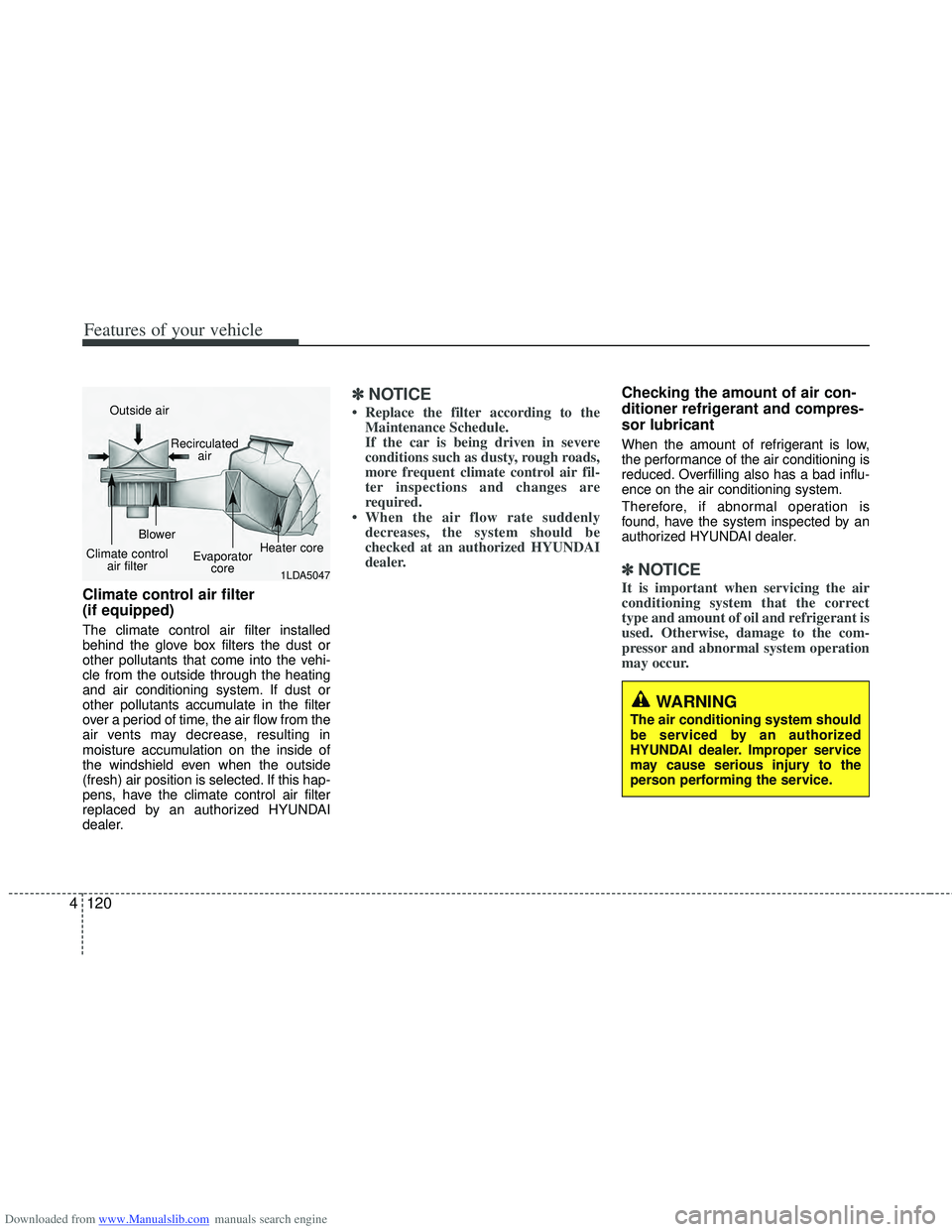
The climate control air filter installed
behind the glove box filters the dust or
other pollutants that come into the vehi-
cle from the outside through the heating
and air conditioning system. If dust or
other pollutants accumulate in the filter
over a period of time, the air flow from the
air vents may decrease, resulting in
moisture accumulation on the inside of
the windshield even when the outside
(fresh) air position is selected. If this hap-
pens, have the climate control air filter
replaced by an authorized HYUNDAI
dealer.
✽ ✽
NOTICE
• Replace the filter according to the
Maintenance Schedule.
If the car is being driven in severe
conditions such as dusty, rough roads,
more frequent climate control air fil-
ter inspections and changes are
required.
• When the air flow rate suddenly decreases, the system should be
checked at an authorized HYUNDAI
dealer.
Checking the amount of air con-
ditioner refrigerant and compres-
sor lubricant
When the amount of refrigerant is low,
the performance of the air conditioning is
reduced. Overfilling also has a bad influ-
ence on the air conditioning system.
Therefore, if abnormal operation is
found, have the system inspected by an
authorized HYUNDAI dealer.
✽ ✽ NOTICE
It is important when servicing the air
conditioning system that the correct
type and amount of oil and refrigerant is
used. Otherwise, damage to the com-
pressor and abnormal system operation
may occur.
WARNING
The air conditioning system should
be serviced by an authorized
HYUNDAI dealer. Improper service
may cause serious injury to the
person performing the service.
1LDA5047
Outside air
Recirculatedair
Climate control air filter Blower
Evaporatorcore Heater core
Page 218 of 534
Downloaded from www.Manualslib.com manuals search engine 4131
Features of your vehicle
Air conditioning system operation tips
If the vehicle has been parked in directsunlight during hot weather, open the
windows for a short time to let the hot
air inside the vehicle escape.
Use air conditioning to reduce humidi- ty and moisture inside the vehicle on
rainy or humid days.
During air conditioning system opera- tion, you may occasionally notice a
slight change in engine speed as the
air conditioning compressor cycles.
This is a normal system operation
characteristic.
Use the air conditioning system every month only for a few minutes to ensure
maximum system performance. When using the air conditioning sys-
tem, you may notice clear water drip-
ping (or even puddling) on the ground
under the passenger side of the vehi-
cle. This is a normal system operation
characteristic.
Operating the air conditioning system in the recirculated air position provides
maximum cooling, however, continual
operation in this mode may cause the
air inside the vehicle to become stale.
During cooling operation, you may occasionally notice a misty air flow
because of rapid cooling and humid air
intake. This is a normal system opera-
tion characteristic.
Climate control air filter
(if equipped)
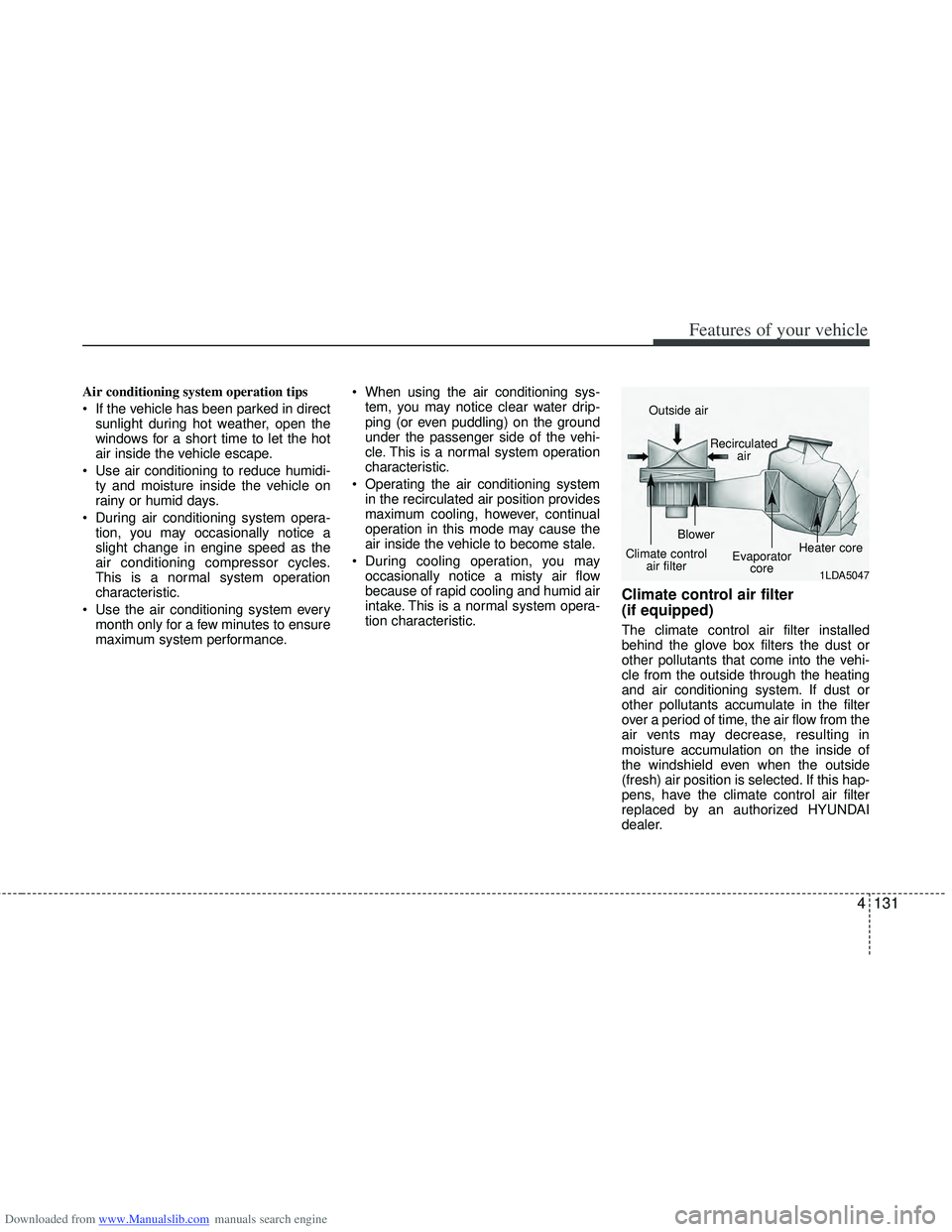
The climate control air filter installed
behind the glove box filters the dust or
other pollutants that come into the vehi-
cle from the outside through the heating
and air conditioning system. If dust or
other pollutants accumulate in the filter
over a period of time, the air flow from the
air vents may decrease, resulting in
moisture accumulation on the inside of
the windshield even when the outside
(fresh) air position is selected. If this hap-
pens, have the climate control air filter
replaced by an authorized HYUNDAI
dealer.
1LDA5047
Outside air
Recirculatedair
Climate control air filter Blower
Evaporatorcore Heater core
Page 251 of 534
Downloaded from www.Manualslib.com manuals search engine Features of your vehicle
164
4
4. Button (REPEAT)
Press this button for less than 0.8 second
to activate ‘RPT’ mode and more than 0.8
seconds to activate ‘FLD.RPT’ mode.
RPT : Only a track(file) is repeatedly
played back.
FLD.RPT (MP3/WMA Only) : Only files in a folder are repeatedly played back.
5. Button (SCAN)
Play each song in the CD for 10 seconds.
To cancel SCAN Play, press this button
again.
6. DISC Button (CD changer : AC600 DFG/AC610DFG)
Preset button changes disc to
the previous disc.
Preset button changes disc to the next disc.
7. Button
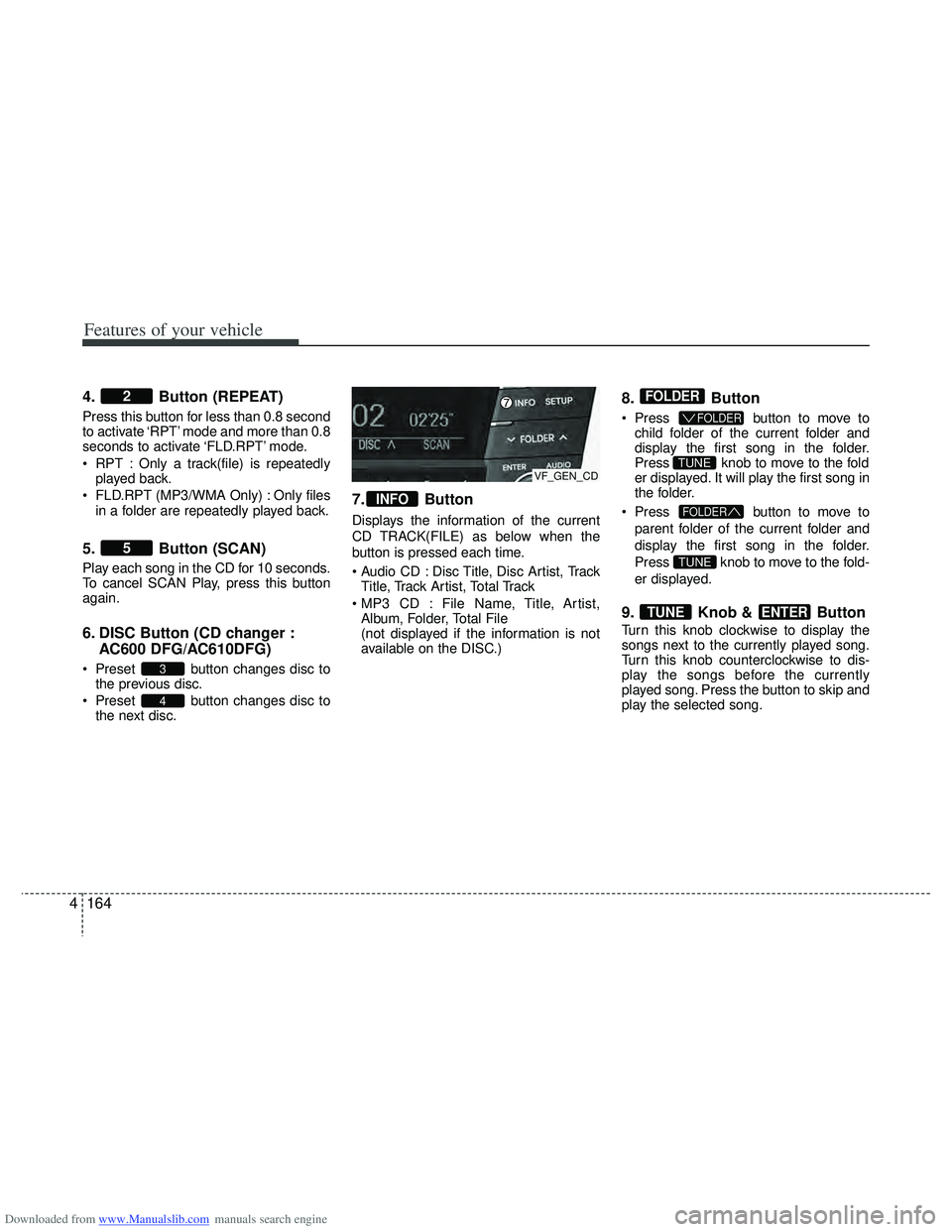
Displays the information of the current
CD TRACK(FILE) as below when the
button is pressed each time.
Disc Title, Disc Artist, TrackTitle, Track Artist, Total Track
File Name, Title, Artist, Album, Folder, Total File
(not displayed if the information is not
available on the DISC.)
8. Button
Press button to move to
child folder of the current folder and
display the first song in the folder.
Press knob to move to the fold
er displayed. It will play the first song in
the folder.
Press button to move to
parent folder of the current folder and
display the first song in the folder.
Press knob to move to the fold-
er displayed.
9. Knob & Button
Turn this knob clockwise to display the
songs next to the currently played song.
Turn this knob counterclockwise to dis-
play the songs before the currently
played song. Press the button to skip and
play the selected song.
ENTERTUNE
TUNE
FOLDER
TUNE
FOLDER
FOLDER
INFO
4
3
5
2
VF_GEN_CD
Page 266 of 534
Downloaded from www.Manualslib.com manuals search engine 4179
Features of your vehicle
✽
✽NOTICEIn the following situations, you or the
other party may have difficulty hearing
each other:
1. Speaking at the same time, your voice
may not reach each other parties.
(This is not a malfunction.) Speak
alternately with the other party on the
phone.
2. Keep the Bluetooth
®volume to a low
level. High-level volume may result in
distortion and echo.
3. When driving on a rough road.
4. When driving at high speeds.
5. When the window is open.
6. When the air conditioning vents are facing the microphone.
7. When the sound of the air condition- ing fan is loud.
■Bluetooth®Audio Music
Streaming
This audio system supports A2DP (Audio
Advanced Distribution Profile) and
AVRCP(Audio Video Remote Control
Profile).
Both profiles are available for listening to
the MP3 music via Bluetooth cellular
phone supporting above Bluetooth pro-
files.
To play MP3 music from the Bluetooth
cellular phone, press the button
until “MP3 Play” is displayed on the LCD.
Then try playing music by phone.
When playing music from the Bluetooth
cellular phone, the head unit displays
MP3 MODE.
NOTE:
• Not only MP3 files, all the sounds that the phone supports can be heard by
the audio system.
• The Bluetooth cellular phones shall feature A2DP and AVRCP functions.
• Some A2DP and AVRCP Bluetooth cellular phones may not play music
through the head unit on first try.
Please try the below;
i.e : Menu \b \b
Filemanager \b
\b
Music \b
\b
Option \b
\b
Play via Bluetooth
• Please refer to User's Guide of your phone for more.
To stop music, try stop playing music
from the phone then change the audio
mode to other than “MP3 Play” mode
(e.g. FM, AM, CD, etc.)
AUX
Page 284 of 534
Downloaded from www.Manualslib.com manuals search engine 4197
Features of your vehicle
■Bluetooth®Language Setting
The system language can be changed by
the following steps:
1. Power on the audio system with thevolume set to an audible level.
2. Press and hold button on the steering wheel until the audio displays
“Please Wait”.
- The Bluetooth
®system will reply in
currently selected language that it is
changing to the next language.
- System language cycles between
FRENCH/GERMAN/UK ENGLISH
SPANISH/DUTCH/ITALIAN/DANISH/
RUSSIAN/POLISH/SWEDISH.
3. When completed, the audio display returns to normal.
4. Repeat steps 2 and 3 for the next lan- guage selection.
NOTE:
The phone needs to be paired again
after changing system language.
- Avoid resting your thumb or fingeron the button as the language
could unintentionally change.
■Voice Recognition Activation
in the Bluetooth®System can be acti-
vated in the following conditions:
- Button Activation
The voice recognition system will be
active when the button is pressed
and after the sound of a Beep.
- Active Listening The voice recognition system will be
active for a period of time when the
Voice Recognition system has asked
for a customer response.
from zero to nine while number greater
than ten will not be recognized.
system will announce "Pardon" or No
input voice signal from microphone. (No
response)
tion mode in following cases : When
pressing the button and saying
cancel following the beep. When not
making a call and pressing the
button. When voice recognition has
failed 3 consecutive times.
will announce what commands are
available.
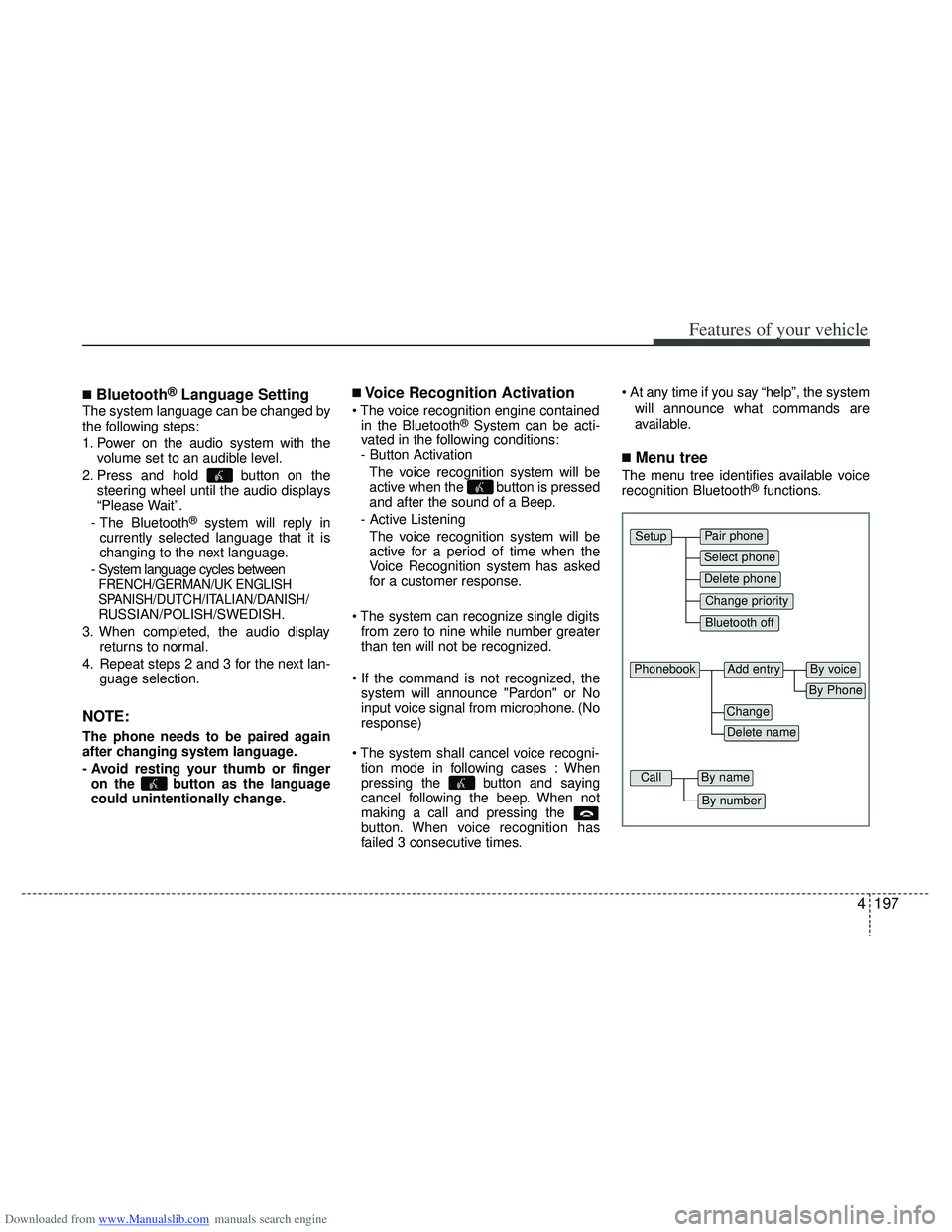
■Menu tree
The menu tree identifies available voice
recognition Bluetooth®functions.
Pair phone
Select phone
Change priority
Delete phone
Bluetooth off
Setup
Add entryPhonebook
Change
Delete name
By Phone
By voice
CallBy name
By number