parking HYUNDAI I800 2015 User Guide
[x] Cancel search | Manufacturer: HYUNDAI, Model Year: 2015, Model line: I800, Model: HYUNDAI I800 2015Pages: 339, PDF Size: 7.25 MB
Page 118 of 339
447
Features of your vehicle
REAR PARKING ASSIST SYSTEM (IF EQUIPPED)
D170000AEN-UK
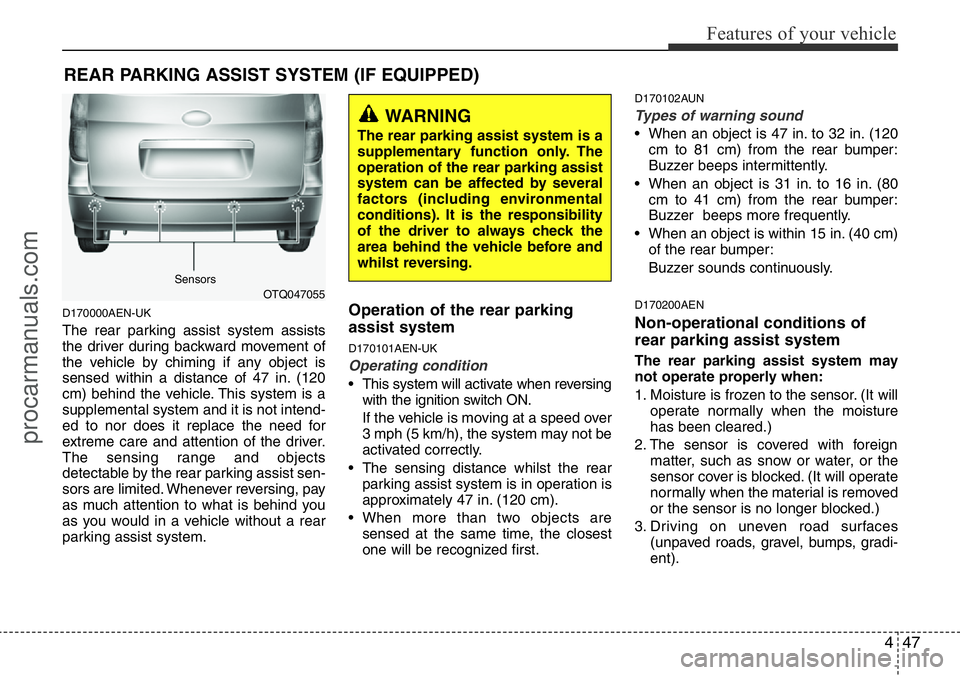
The rear parking assist system assists
the driver during backward movement of
the vehicle by chiming if any object is
sensed within a distance of 47 in. (120
cm) behind the vehicle. This system is a
supplemental system and it is not intend-
ed to nor does it replace the need for
extreme care and attention of the driver.
The sensing range and objects
detectable by the rear parking assist sen-
sors are limited. Whenever reversing, pay
as much attention to what is behind you
as you would in a vehicle without a rear
parking assist system.
Operation of the rear parking
assist system
D170101AEN-UK
Operating condition
• This system will activate when reversing
with the ignition switch ON.
If the vehicle is moving at a speed over
3 mph (5 km/h), the system may not be
activated correctly.
• The sensing distance whilst the rear
parking assist system is in operation is
approximately 47 in. (120 cm).
• When more than two objects are
sensed at the same time, the closest
one will be recognized first.
D170102AUN
Types of warning sound
• When an object is 47 in. to 32 in. (120
cm to 81 cm) from the rear bumper:
Buzzer beeps intermittently.
• When an object is 31 in. to 16 in. (80
cm to 41 cm) from the rear bumper:
Buzzer beeps more frequently.
• When an object is within 15 in. (40 cm)
of the rear bumper:
Buzzer sounds continuously.
D170200AEN
Non-operational conditions of
rear parking assist system
The rear parking assist system may
not operate properly when:
1. Moisture is frozen to the sensor. (It will
operate normally when the moisture
has been cleared.)
2. The sensor is covered with foreign
matter, such as snow or water, or the
sensor cover is blocked. (It will operate
normally when the material is removed
or the sensor is no longer blocked.)
3. Driving on uneven road surfaces
(unpaved roads, gravel, bumps, gradi-
ent).
OTQ047055
WARNING
The rear parking assist system is a
supplementary function only. The
operation of the rear parking assist
system can be affected by several
factors (including environmental
conditions). It is the responsibility
of the driver to always check the
area behind the vehicle before and
whilst reversing.
Sensors
procarmanuals.com
Page 119 of 339
Features of your vehicle
48 4
4. Objects generating excessive noise
(vehicle horns, loud motorcycle
engines, or truck air brakes) are within
range of the sensor.
5. Heavy rain or water spray exists.
6. Wireless transmitters or mobile phones
are within range of the sensor.
7. The sensor is covered with snow.
8. Trailer towing
The detecting range may decrease
when:
1. The sensor is stained with foreign mat-
ter such as snow or water. (The sens-
ing range will return to normal when
removed.)
2. Outside air temperature is extremely
hot or cold.
The following objects may not be rec-
ognized by the sensor:
1. Sharp or slim objects such as ropes,
chains or small poles.
2. Objects which tend to absorb the sen-
sor frequency such as clothes, spongy
material or snow.
3. Undetectable objects smaller than 40 in.
(1 m) in height and narrower than 6 in.
(14 cm) in diameter.D170300AEN-UK
Rear parking assist system pre-
cautions
• The rear parking assist system may
not sound sequentially depending on
the speed and shapes of the objects
detected.
• The rear parking assist system may
malfunction if the vehicle bumper
height or sensor installation has been
modified or damaged. Any non-factory
installed equipment or accessories
may also interfere with the sensor per-
formance.
• The sensor may not recognize objects
less than 15 in. (40 cm) from the sen-
sor, or it may sense an incorrect dis-
tance. Use caution.
• When the sensor is frozen or stained
with snow, dirt, or water, the sensor
may be inoperative until the stains are
removed using a soft cloth.
• Do not push, scratch or strike the sen-
sor. Sensor damage could occur.
✽NOTICE
This system can only sense objects with-
in the range and location of the sensors;
It can not detect objects in other areas
where sensors are not installed. Also,
small or slim objects, such as poles or
objects located between sensors may not
be detected by the sensors.
Always visually check behind the vehi-
cle when reversing.
Be sure to inform any drivers of the
vehicle that may be unfamiliar with the
system regarding the systems capabili-
ties and limitations.
WARNING
Pay close attention when the vehi-
cle is driven close to objects on the
road, particularly pedestrians, and
especially children. Be aware that
some objects may not be detected
by the sensors, due to the object’s
distance, size or material, all of
which can limit the effectiveness of
the sensor. Always perform a visu-
al inspection to make sure the vehi-
cle is clear of all obstructions
before moving the vehicle in any
direction.
procarmanuals.com
Page 120 of 339
449
Features of your vehicle
D170400AEN-UK
Self-diagnosis
If you don’t hear an audible warning
sound or if the buzzer sounds intermit-
tently when shifting the gear to the R
(Reverse) position, this may indicate a
malfunction in the rear parking assist sys-
tem. If this occurs, we recommend that
the system be checked by a HYUNDAI
authorised repairer.
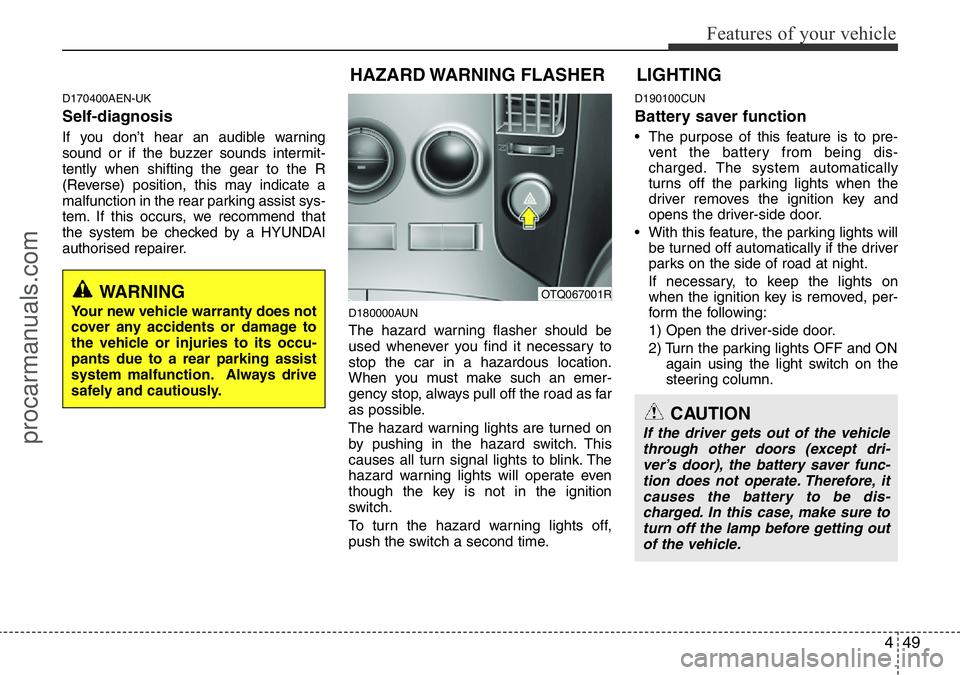
D180000AUN
The hazard warning flasher should be
used whenever you find it necessary to
stop the car in a hazardous location.
When you must make such an emer-
gency stop, always pull off the road as far
as possible.
The hazard warning lights are turned on
by pushing in the hazard switch. This
causes all turn signal lights to blink. The
hazard warning lights will operate even
though the key is not in the ignition
switch.
To turn the hazard warning lights off,
push the switch a second time.
D190100CUN
Battery saver function
• The purpose of this feature is to pre-
vent the battery from being dis-
charged. The system automatically
turns off the parking lights when the
driver removes the ignition key and
opens the driver-side door.
• With this feature, the parking lights will
be turned off automatically if the driver
parks on the side of road at night.
If necessary, to keep the lights on
when the ignition key is removed, per-
form the following:
1) Open the driver-side door.
2) Turn the parking lights OFF and ON
again using the light switch on the
steering column.
WARNING
Your new vehicle warranty does not
cover any accidents or damage to
the vehicle or injuries to its occu-
pants due to a rear parking assist
system malfunction. Always drive
safely and cautiously.
HAZARD WARNING FLASHER
OTQ067001R
CAUTION
If the driver gets out of the vehicle
through other doors (except dri-
ver’s door), the battery saver func-
tion does not operate. Therefore, it
causes the battery to be dis-
charged. In this case, make sure to
turn off the lamp before getting out
of the vehicle.
LIGHTING
procarmanuals.com
Page 121 of 339
Features of your vehicle
50 4
D190400ATQ
Lighting control
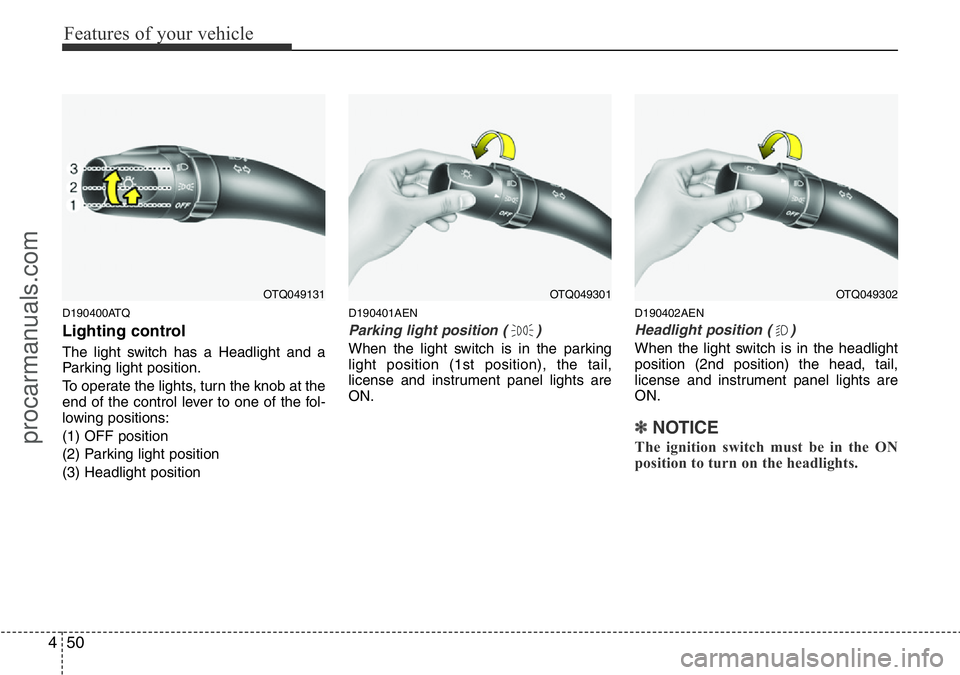
The light switch has a Headlight and a
Parking light position.
To operate the lights, turn the knob at the
end of the control lever to one of the fol-
lowing positions:
(1) OFF position
(2) Parking light position
(3) Headlight position
D190401AEN
Parking light position ( )
When the light switch is in the parking
light position (1st position), the tail,
license and instrument panel lights are
ON.
D190402AEN
Headlight position ( )
When the light switch is in the headlight
position (2nd position) the head, tail,
license and instrument panel lights are
ON.
✽NOTICE
The ignition switch must be in the ON
position to turn on the headlights.
OTQ049131OTQ049301OTQ049302
procarmanuals.com
Page 151 of 339
Features of your vehicle
80 4
✽NOTICE
• If you install an aftermarket HID
head lamp, your vehicle’s audio and
electronic device may malfunction.
• Prevent chemicals such as perfume,
cosmetic oil, sun cream, hand cleaner
and air freshener from contacting the
interior parts because they may cause
damage or discoloration.
Antenna
D300102ATQ
Roof antenna (if equipped)
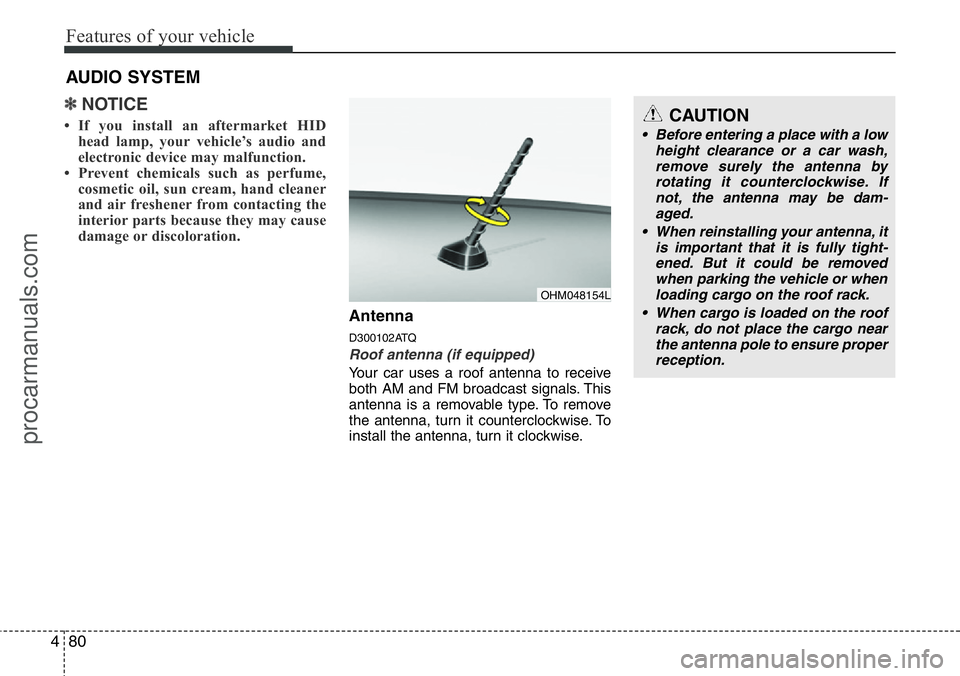
Your car uses a roof antenna to receive
both AM and FM broadcast signals. This
antenna is a removable type. To remove
the antenna, turn it counterclockwise. To
install the antenna, turn it clockwise.
AUDIO SYSTEM
CAUTION
• Before entering a place with a low
height clearance or a car wash,
remove surely the antenna by
rotating it counterclockwise. If
not, the antenna may be dam-
aged.
• When reinstalling your antenna, it
is important that it is fully tight-
ened. But it could be removed
when parking the vehicle or when
loading cargo on the roof rack.
• When cargo is loaded on the roof
rack, do not place the cargo near
the antenna pole to ensure proper
reception.
OHM048154L
procarmanuals.com
Page 193 of 339
53
Driving your vehicle
E020100AUN-UK
Before entering vehicle
• Ensure that all windows, mirrors and
lamps are clean.
• Check condition of all tyres.
• Ensure that no fluid leaks are evident.
• Ensure that the area around the vehi-
cle is clear before driving off.
E020200BUN
Necessary inspections
Fluid levels, such as engine oil, engine
coolant, brake fluid, and washer fluid
should be checked on a regular basis,
with the exact interval depending on the
fluid. Further details are provided in
Section 7, “Maintenance”.
E020300AUN-UK
Before starting
• Close and lock all doors.
• Position the seat so that all controls are
easily reached.
• Adjust the inside and outside rearview
mirrors.
• Be sure that all lights work.
• Check all gauges.
• Check the operation of warning lights
when the ignition switch is turned to
the ON position.
• Release the parking brake and make
sure the brake warning light goes out.
For safe operation, be sure you are famil-
iar with your vehicle and its equipment.
BEFORE DRIVING
WARNING
All passengers must be properly
belted whenever the vehicle is mov-
ing. Refer to “Seat belts” in section
3 for more information on their
proper use.
WARNING
Always check the surrounding
areas near your vehicle for people,
especially children, before putting a
car into D (Drive) or R (Reverse).
WARNING
Driving whilst distracted can result
in a loss of vehicle control, that
may lead to an accident, severe
personal injury, and death. The dri-
ver’s primary responsibility is in
the safe and legal operation of a
vehicle, and use of any handheld
devices, other equipment, or vehi-
cle systems which take the driver’s
eyes, attention and focus away
from the safe operation of a vehicle
or which are not permissible by law
should never be used during oper-
ation of the vehicle.
procarmanuals.com
Page 195 of 339
55
Driving your vehicle
E030202AUN-UK
ACC (Accessory)
The steering wheel is unlocked and elec-
trical accessories are operative.
✽NOTICE
If difficulty is experienced in turning the
ignition switch to the ACC position, turn
the key whilst turning steering wheel
right and left to release the tension.
E030203AUN
ON
The warning lights can be checked
before the engine is started. This is the
normal running position after the engine
is started.
Do not leave the ignition switch ON if the
engine is not running to prevent battery
discharge.
E030204AUN
START
Turn the ignition switch to the START
position to start the engine. The engine
will crank until you release the key; then
it returns to the ON position. The brake
warning lamp can be checked in this
position.
E030205AUN-UK
WARNING - Ignition
switch
• Never turn the ignition switch to
LOCK or ACC whilst the vehicle is
moving. This would result in loss
of directional control and braking
function, which could cause an
accident.
• The anti-theft steering column lock
is not a substitute for the parking
brake. Before leaving the driver’s
seat, always make sure the shift
lever is engaged in P (Park) for the
automatic transmission and set
the parking brake fully and shut
the engine off. Unexpected and
sudden vehicle movement may
occur if these precautions are not
taken.
(Continued)
(Continued)
• Never reach for the ignition switch,
or any other controls through the
steering wheel whilst the vehicle is
in motion. The presence of your
hand or arm in this area could
cause a loss of vehicle control, an
accident and serious bodily injury
or death.
• Do not place any movable objects
around the driver’s seat as they
may move whilst driving, interfere
with the driver and lead to an acci-
dent.
procarmanuals.com
Page 196 of 339
Driving your vehicle
6 5
STARTING THE ENGINE
WARNING
• Always wear appropriate shoes
when operating your vehicle.
Unsuitable shoes (high heels, ski
boots,etc.) may interfere with
your ability to use the brake and
accelerator pedal, and the clutch
(if equipped).
• Do not start the vehicle with the
accelerator pedal depressed. The
vehicle can move and lead to an
accident.
• Wait until the engine rpm is nor-
mal. The vehicle may suddenly
move if the brake padel is
released when the rpm is high.
CAUTION
If the engine stalls whilst you are in
motion, do not attempt to move the
shift lever to the P (Park) position. If
traffic and road conditions permit,
you may put the shift lever in the N
(Neutral) position whilst the vehicle
is still moving and turn the ignition
switch to the START position in an
attempt to restart the engine.
CAUTION
• Do not engage the starter for
more than 10 seconds. If the
engine stalls or fails to start, wait
5 to 10 seconds before re-engag-
ing the starter. Improper use of
the starter may damage it.
• Do not turn the ignition switch to
the START position with the
engine running. It may damage
the starter.
E040000AUN E040100AUN-UK
Starting the petrol engine
1. Make sure the parking brake is
applied.
2.Manual Transmission- Depress the
clutch pedal fully and shift the trans-
mission into Neutral. Keep the clutch
pedal and brake pedal depressed
whilst turning the ignition switch to the
start position.
Automatic Transmission- Place the
transmission shift lever in P (Park).
Depress the brake pedal fully.
You can also start the engine when
the shift lever is in the N (Neutral)
position.
3. Turn the ignition switch to START and
hold it there until the engine starts (a
maximum of 10 seconds), then
release the key.
It should be started without depressing
the accelerator.
4. Do not wait for the engine to warm up
whilst the vehicle remains stationary.
Start driving at moderate engine
speeds. (Steep accelerating and decel-
erating should be avoided.)
procarmanuals.com
Page 197 of 339
57
Driving your vehicle
E040101AUN-UK
Starting the diesel engine
To start the diesel engine when the
engine is cold, it has to be pre-heated
before starting the engine and then have
to be warmed up before starting to drive.
1. Make sure the parking brake is
applied.
2.Manual Transmission- Depress the
clutch pedal fully and shift the trans-
mission into Neutral. Keep the clutch
pedal and brake pedal depressed
whilst turning the ignition switch to the
start position.
Automatic Transmission- Place the
transmission shift lever in P(park).
Depress the brake pedal fully.
You can also start the engine when the
shift lever is in the N(neutral) position.
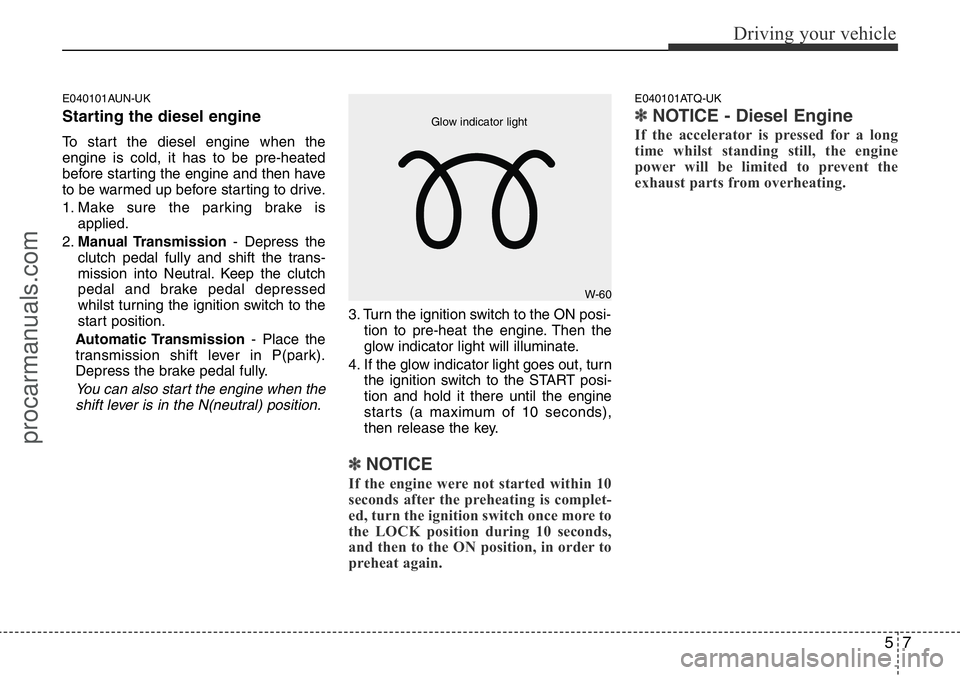
3. Turn the ignition switch to the ON posi-
tion to pre-heat the engine. Then the
glow indicator light will illuminate.
4. If the glow indicator light goes out, turn
the ignition switch to the START posi-
tion and hold it there until the engine
starts (a maximum of 10 seconds),
then release the key.
✽ NOTICE
If the engine were not started within 10
seconds after the preheating is complet-
ed, turn the ignition switch once more to
the LOCK position during 10 seconds,
and then to the ON position, in order to
preheat again.
E040101ATQ-UK
✽ NOTICE - Diesel Engine
If the accelerator is pressed for a long
time whilst standing still, the engine
power will be limited to prevent the
exhaust parts from overheating.
W-60 Glow indicator light
procarmanuals.com
Page 200 of 339
Driving your vehicle
10 5
• During cold weather, shifting may be
difficult until the transmission lubricant
is warmed up. This is normal and not
harmful to the transmission.
• If you've come to a complete stop and
it's hard to shift into 1st or R(Reverse),
leave the shift lever at N(Neutral) posi-
tion and release the clutch. Press the
clutch pedal back down, and then shift
into 1st or R(Reverse) gear position.E050101AUN-UK
Using the clutch
The clutch should be pressed all the way
to the floor before shifting, then released
slowly. The clutch pedal should always be
fully released whilst driving. Do not rest
your foot on the clutch pedal whilst driv-
ing. This can cause unnecessary wear.
Do not partially engage the clutch to hold
the car on an incline. This causes unnec-
essary wear. Use the foot brake or park-
ing brake to hold the car on an incline. Do
not operate the clutch pedal rapidly and
repeatedly.
E050102AUN-UK
Downshifting
When you must slow down in heavy traf-
fic or whilst driving up steep hills, down-
shift before the engine starts to labour.
Downshifting reduces the chance of
stalling and gives better acceleration
when you again need to increase your
speed. When the vehicle is travelling
down steep hills, downshifting helps
maintain safe speed and prolongs brake
life.
CAUTION
• To avoid premature clutch wear
and damage, do not drive with
your foot resting on the clutch
pedal. Also, don’t use the clutch
to hold the vehicle stopped on an
uphill grade, whilst waiting for a
traffic light, etc.
• Do not use the shift lever as a
handrest during driving, as this
can result in premature wear of
the transmission shift forks.
• To prevent possible damage to
the clutch system, do not start
with the 2nd (second) gear
engaged except when you start
on a slippery road.
WARNING
• Before leaving the driver’s seat,
always set the parking brake fully
and shut the engine off. Then
make sure the transmission is
shifted into 1st gear when the
vehicle is parked on a level or
uphill grade, and shifted into R
(Reverse) on a downhill grade.
Unexpected and sudden vehicle
movement can occur if these pre-
cautions are not followed in the
order identified.
• If your vehicle has a manual
transmission not equipped with a
ignition lock switch, it may move
and cause a serious accident
when starting the engine without
depressing the clutch pedal
whilst the parking brake is
released and the shift lever not in
the N(Neutral) position.
• Do not use the engine brake
(shifting from a high gear to
lower gear) rapidly on slippery
roads. The vehicle may slip caus-
ing an accident.
procarmanuals.com