ECO mode HYUNDAI I800 2015 Owner's Manual
[x] Cancel search | Manufacturer: HYUNDAI, Model Year: 2015, Model line: I800, Model: HYUNDAI I800 2015Pages: 339, PDF Size: 7.25 MB
Page 185 of 339
Features of your vehicle
114 4
USING USB/AUX
1. USB Button
If USB/AUX is connected, it switches to
the USB/AUX mode from the other mode
to play the song files stored in the USB.
If no USB and auxiliary device is con-
nected, it displays "NO Media" for 3 sec-
onds and returns to the previous mode.
❋ AUX Button
If the auxiliary device is connected, it
turns to AUX mode from the other mode
to play the sound from the auxiliary play-
er. If no auxiliary device is connected, it
displays "NO Media" for 3 seconds and
returns to the previous mode.
2. TRACK Button
• Press the [TRACK ] button for less
than 0.8 second to play from the begin-
ning of the song currently played.
Press the button for less than 0.8 sec-
ond and press it again within 1 second
to move and play the previous track.
• Press the [SEEK ] button for less
than 0.8 second to move to the next
track.
3. FF (FAST FORWORD) Button
Press the button for 0.8 second or longer
to play the song in forward direction in
fast speed.
4. REW (REWIND) Button
Press the button for 0.8 second or longer
to play the song in reverse direction in
fast speed.
5. RPT (REPEAT) Button
Press this button for less than 0.8 second
to activate 'RPT' mode and more than
0.8 second to activate 'FLD RPT' mode.
• RPT : Only a file is repeatedly played
back.
• FLD RPT : Only files in a folder are
repeatedly played back.
6. RDM (RANDOM) Button
Press this button for less than 0.8 second
to activate 'RDM' mode and more than
0.8 second to activate 'ALL RDM' mode.
• RDM : Only files in a folder are played
back in a random sequence.
• ALL RDM : All files in a USB memory
are played back in the random
sequence.
7. FLDR (FOLDER) Button
• Moves [FLDR ] button sub folder of
the current folder and displays the first
song in the folder.
Press TUNE/ENTER knob to move to
the folder displayed. It will play the first
song in the folder.
• Moves [FLDR ] button main folder
and displays the first song in the folder.
Press TUNE/ENTER knob to move to
the folder displayed.
8. SCAN Button
Plays 10 seconds of each song in the
USB device.
Press the button once again to cancel
scanning.
9. INFO Button
Displays the information of the file cur-
rently played in the order of FILE NAME
➟TITLE ➟ARTIST ➟ALBUM ➟FOLD-
ER ➟TOTAL FILE ➟NORMAL DISPLAY
➟FILE NAME... (Displays no information
if the file has no song information.)
procarmanuals.com
Page 187 of 339
Features of your vehicle
116 4
(Continued)
• If you disconnect the external
USB device during playback in
USB mode, the external USB
device can be damaged or may
malfunction. Therefore, discon-
nect the external USB device
when the audio is turned off or in
another mode. (e.g, Radio or AUX)
• Depending on the type and
capacity of the external USB
device or the type of the files
stored in the device, there is a dif-
ference in the time taken for
recognition of the device.
• Do not use the USB device for
purposes other than playing
music files.
• Use of USB accessories such as
rechargers or heaters using USB
I/F may lower performance or
cause trouble.
• If you use devices such as a USB
hub purchased separately, the
vehicle’s audio system may not
recognize the USB device. In that
case, connect the USB device
directly to the multimedia termi-
nal of the vehicle.
(Continued)(Continued)
• If the USB device is divided by
logical drives, only the music files
on the highest-priority drive are
recognized by car audio.
• Devices such as MP3 Player/
Cellular phone/Digital camera can
be unrecognizable by standard
USB I/F can be unrecognizable.
• Some non-standard USB devices
(METAL COVER TYPE USB) can
be unrecognizable.
• Some USB flash memory readers
(such as CF, SD, microSD, etc.) or
external-HDD type devices can be
unrecognizable.
• Music files protected by DRM
(DIGITAL RIGHTS MANAGE-
MENT) are not recognizalbe.
• The data in the USB memory may
be lost while using this audio.
Always back up important data on
a personal storage device.
(Continued)(Continued)
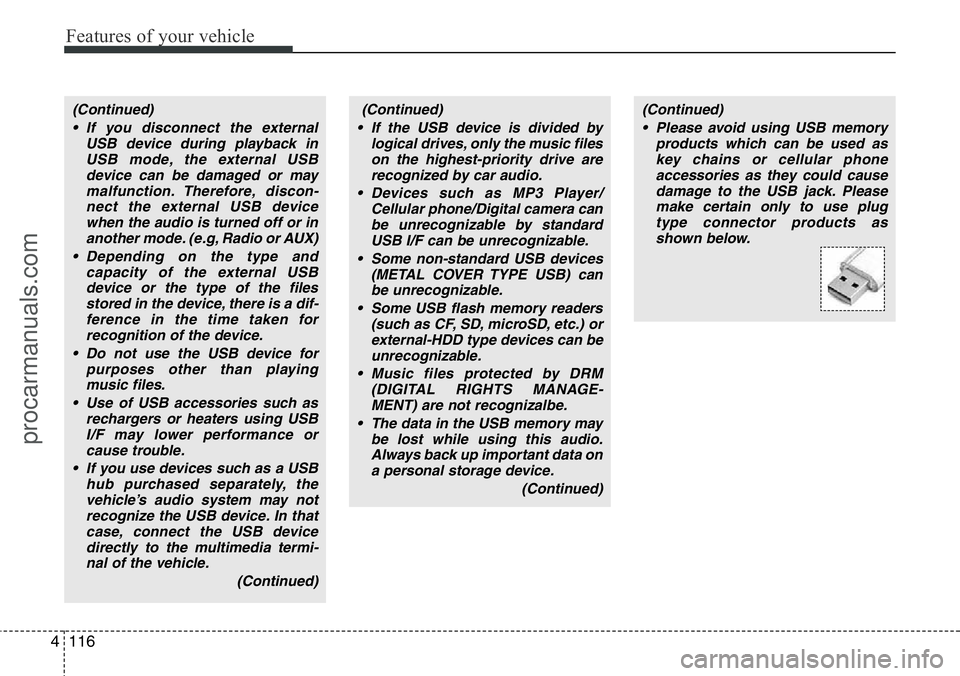
• Please avoid using USB memory
products which can be used as
key chains or cellular phone
accessories as they could cause
damage to the USB jack. Please
make certain only to use plug
type connector products as
shown below.
procarmanuals.com
Page 189 of 339
Features of your vehicle
118 4
USING iPod®
When the iPod is connected, the 'iPod'
icon will be displayed on the top left cor-
ner of the display screen.
1. iPod Button
If iPod is connected, it switches to the
iPod mode from the Radio mode to play
the song files stored in the iPod. If iPod is
not connected, it displays "NO Media" for
3 seconds and returns to the previous
mode.
2. TRACK Button
• Press the [TRACK ] button for less
than 0.8 second to play from the begin-
ning of the song currently played.
Press the button for less than 0.8 sec-
ond and press it again within 1 second
to move and play the previous track.
Press the button for 0.8 second or
longer to play the song in reverse
direction in fast speed.
• Press the [SEEK ] button for less
than 0.8 second to move to the next
track. Press the button for 0.8 second
or longer to play the song in forward
direction in fast speed.
3. RDM (RANDOM) Button
Press the button for less than 0.8 second
to activate or deactivate the random play-
back of the songs within the current cat-
egory. Press the button for longer than
0.8 second to randomly play all songs in
the entire album of the iPod.
Press the button once again to cancel
the mode.
4. RPT (REPEAT) Button
Repeats the song currently played.
5. MENU Button
Moves to the upper category from cur-
rently played category of the iPod.
To move to (play) the category (song)
displayed, MENU (preset6) You will be
able to search through the lower catego-
ry of the selected category.
The order of iPod's category is SONG,
ALBUMS, ARTISTS, GENRES, and
iPod.
6. INFO Button
Displays the information of the file cur-
rently played in the order of TITLE ➟
ARTIST ➟ALBUM ➟NORMAL DIS-
PLAY ➟TITLE ➟... (Displays no informa-
tion if the file has no song information.)
7. TUNE Knob & ENTER Button
When you turn the button clockwise, it
will display the songs (category) next to
the song currently played (category in
the same level).
Also, when you turn the button counter-
clockwise, it will display the songs (cate-
gory) before the song currently played
(category in the same level).
If you want to listen to the song displayed
in the song category, press the button,
then it will skip to the selected song and
play.
procarmanuals.com
Page 196 of 339
Driving your vehicle
6 5
STARTING THE ENGINE
WARNING
• Always wear appropriate shoes
when operating your vehicle.
Unsuitable shoes (high heels, ski
boots,etc.) may interfere with
your ability to use the brake and
accelerator pedal, and the clutch
(if equipped).
• Do not start the vehicle with the
accelerator pedal depressed. The
vehicle can move and lead to an
accident.
• Wait until the engine rpm is nor-
mal. The vehicle may suddenly
move if the brake padel is
released when the rpm is high.
CAUTION
If the engine stalls whilst you are in
motion, do not attempt to move the
shift lever to the P (Park) position. If
traffic and road conditions permit,
you may put the shift lever in the N
(Neutral) position whilst the vehicle
is still moving and turn the ignition
switch to the START position in an
attempt to restart the engine.
CAUTION
• Do not engage the starter for
more than 10 seconds. If the
engine stalls or fails to start, wait
5 to 10 seconds before re-engag-
ing the starter. Improper use of
the starter may damage it.
• Do not turn the ignition switch to
the START position with the
engine running. It may damage
the starter.
E040000AUN E040100AUN-UK
Starting the petrol engine
1. Make sure the parking brake is
applied.
2.Manual Transmission- Depress the
clutch pedal fully and shift the trans-
mission into Neutral. Keep the clutch
pedal and brake pedal depressed
whilst turning the ignition switch to the
start position.
Automatic Transmission- Place the
transmission shift lever in P (Park).
Depress the brake pedal fully.
You can also start the engine when
the shift lever is in the N (Neutral)
position.
3. Turn the ignition switch to START and
hold it there until the engine starts (a
maximum of 10 seconds), then
release the key.
It should be started without depressing
the accelerator.
4. Do not wait for the engine to warm up
whilst the vehicle remains stationary.
Start driving at moderate engine
speeds. (Steep accelerating and decel-
erating should be avoided.)
procarmanuals.com
Page 220 of 339
Driving your vehicle
30 5
E100000AFD-UK
Your vehicle's fuel economy depends
mainly on your style of driving, where you
drive and when you drive.
Each of these factors affects how many
miles (kilometers) you can get from a gal-
lon (litre) of fuel. To operate your vehicle
as economically as possible, use the fol-
lowing driving suggestions to help save
money in both fuel and repairs:
• Drive smoothly. Accelerate at a moder-
ate rate. Don't make "jack-rabbit" starts
or full-throttle shifts and maintain a
steady cruising speed. Do not race
between stoplights. Try to adjust your
speed to that of the other traffic so you
don't have to change speeds unneces-
sarily. Avoid heavy traffic whenever
possible. Always maintain a safe dis-
tance from other vehicles so you can
avoid unnecessary braking. This also
reduces brake wear.
• Drive at a moderate speed. The faster
you drive, the more fuel your car uses.
Driving at a moderate speed, especial-
ly on the highway, is one of the most
effective ways to reduce fuel consump-
tion.• Do not "ride" the brake or clutch pedal.
This can increase fuel consumption
and also increase wear on these com-
ponents. In addition, driving with your
foot resting on the brake pedal may
cause the brakes to overheat, which
reduces their effectiveness and may
lead to more serious consequences.
• Take care of your tyres. Keep them
inflated to the recommended pressure.
Incorrect inflation, either too much or
too little, results in unnecessary tyre
wear. Check the tyre pressures at least
once a month.
• Be sure that the wheels are aligned
correctly. Improper alignment can
result from hitting kerbs or driving too
fast over irregular surfaces. Poor align-
ment causes faster tyre wear and may
also result in other problems as well as
greater fuel consumption.
• Keep your car in good condition. For
better fuel economy and reduced
maintenance costs, maintain your car
in accordance with the maintenance
schedule. If you drive your car in
severe conditions, more frequent main-
tenance is required.• Keep your car clean. For maximum
service, your vehicle should be kept
clean and free of corrosive materials. It
is especially important that mud, dirt,
ice, etc. not be allowed to accumulate
on the underside of the car. This extra
weight can result in increased fuel con-
sumption and also contribute to corro-
sion.
• Travel lightly. Do not carry unnecessary
weight in your car. Weight reduces fuel
economy.
• Do not let the engine idle longer than
necessary. If you are waiting (and not
in traffic), turn off your engine and
restart only when you're ready to go.
• Remember, your vehicle does not
require extended warm-up. After the
engine has started, allow the engine to
run for 10 to 20 seconds prior to plac-
ing the vehicle in gear. In very cold
weather, however, give your engine a
slightly longer warm-up period.
• Do not "labour" or "over-rev" the
engine. Labouring is driving too slowly
in too high a gear resulting in the vehi-
cle kangarooing. If this happens, shift
to a lower gear. Over-revving is racing
the engine beyond its safe limit. This
can be avoided by shifting at the rec-
ommended speeds.
ECONOMICAL OPERATION
procarmanuals.com
Page 236 of 339
Driving your vehicle
46 5
E140600ATQ-UK
If you do decide to pull a trailer
Here are some important points if you
decide to pull a trailer:
• Consider using a sway control. You can
ask a towbar dealer about sway con-
trol.
• Do not do any towing with your car dur-
ing its first 1,000 miles in order to allow
the engine to properly run-in. Failure to
heed this caution may result in serious
engine or transmission damage.
• When towing a trailer, we recommend
that you consult a HYUNDAI autho-
rised repairer on additional require-
ments such as a towing kit, etc.
• Always drive your vehicle at a moder-
ate speed (less than 60 mph (100
km/h)).
• On a long uphill grade, do not exceed
45 mph (70 km/h) or the posted towing
speed limit, whichever is lower.
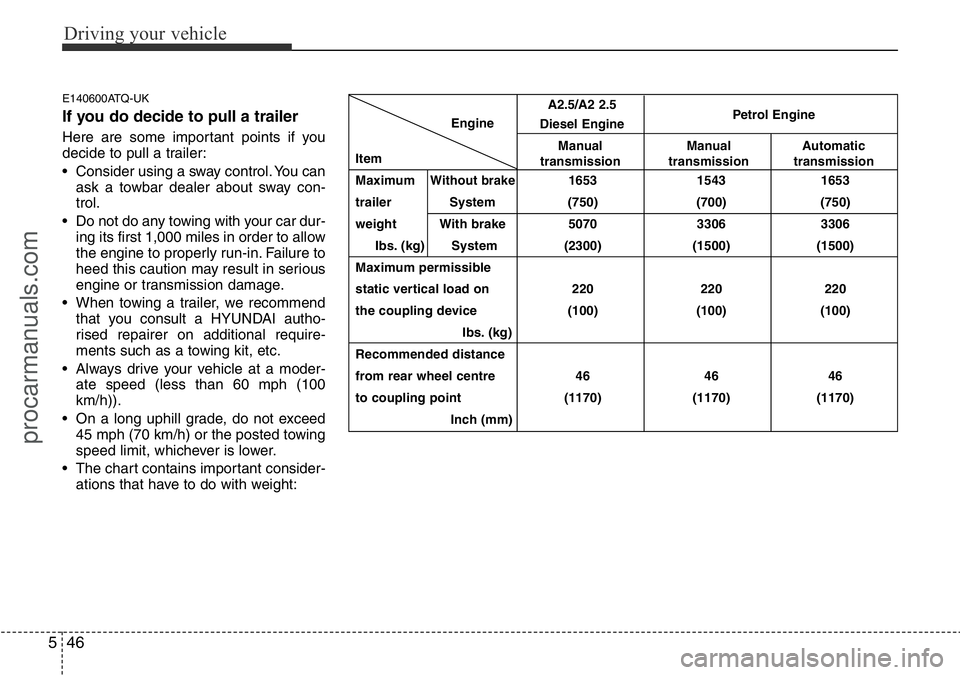
• The chart contains important consider-
ations that have to do with weight:Engine
Item
Maximum
Without brake1653 1543 1653
trailer System (750) (700) (750)
weight With brake 5070 3306 3306
Ibs. (kg) System (2300) (1500) (1500)
Maximum permissible
static vertical load on 220 220 220
the coupling device (100) (100) (100)
Ibs. (kg)
Recommended distance
from rear wheel centre 46 46 46
to coupling point (1170) (1170) (1170)
Inch (mm)
A2.5/A2 2.5
Diesel EnginePetrol Engine
Manual
transmissionManual
transmissionAutomatic
transmission
procarmanuals.com
Page 248 of 339
What to do in an emergency
10 6
Changing a Tyre with TPMS
If you have a flat tyre, the Low Tyre
Pressure Telltale will illuminate. If you
believe you have a flat tyre or feel
any vehicle instability, take your foot
off the accelerator pedal and let the
vehicle slow down whilst driving
straight ahead. Do not apply the
brakes immediately or attempt to pull
off the road as this may cause a loss
of control resulting in an accident.
When the vehicle has slowed to such
a speed that it is safe to do so, brake
carefully and pull off the road. Drive
off the road as far as possible and
park on firm, level ground. If you are
on a divided highway, do not park in
the median area between the two
traffic lanes. Replace the flat tyre
with the compact spare tyre.The spare tyre is not equipped with a
tyre pressure monitoring sensor.
When the low pressure tyre or the flat
tyre is replaced with the spare tyre,
the Low Tyre Pressure Telltale will
remain on. Also, the TPMS
Malfunction Indicator will illuminate
after blinking for one minute if the
vehicle is driven at speed above 25
km/h (15.5 mph) for approximately 10
minutes.
Once the original tyre equipped with
a tyre pressure monitoring sensor is
reinflated to the recommended pres-
sure and reinstalled on the vehicle,
the Low Tyre Pressure Telltale and
TPMS Malfunction Indicator will go
off within a few minutes.
If the indicator is not extinguished
after a few minutes of driving, We rec-
ommend that the system be checked
by a HYUNDAI authorised repairer.
Each wheel is equipped with a tyre
pressure sensor mounted inside the
tyre behind the valve stem (except for
the spare tyre). You must use TPMS
specific wheels. It is recommended
that you always have your tyres serv-
iced by a HYUNDAI authorised
repairer as soon as possible.
CAUTION
To prevent damaging your tyre
pressure sensor, never use a
puncture-repairing agents or
tyre sealants to repair and/or
inflate a low pressure tyre. If
used, you will have to replace
the tyre pressure sensor.
WARNING - For EUROPE
• Do not modify the vehicle, it
may interfere with the TPMS
function.
• The wheels on the market do
not have a TPMS sensor.
For your safety, we recom-
mend that you use parts for
replacement from a HYUNDAI
authorised repairer.
• If you use the wheels on the
market, use a TPMS sensor
approved by a HYUNDAI dealer.
If your vehicle is not equipped
with a TPMS sensor or TPMS
does not work properly, you
may fail the periodic vehicle
inspection conducted in your
country.
❈All vehicles sold in the
EUROPE market during below
period must be equipped with
TPMS.
- New model vehicle :
Nov. 1, 2012 ~
- Current model vehicle :
Nov. 1, 2014~ (Based on vehi-
cle registrations)
procarmanuals.com