display HYUNDAI I800 2015 Owners Manual
[x] Cancel search | Manufacturer: HYUNDAI, Model Year: 2015, Model line: I800, Model: HYUNDAI I800 2015Pages: 339, PDF Size: 7.25 MB
Page 107 of 339
Features of your vehicle
36 4
D150206ATQ-UK
Trip computer (if equipped)
The trip computer is a microcomputer-
controlled driver information system that
displays information related to driving,
including distance to empty, tripmeter
and average speed on the display when
the ignition switch is in the ON position.All stored driving information (except
odometer) is reset if the battery is dis-
connected. The odometer is always dis-
played until the display is turned off.
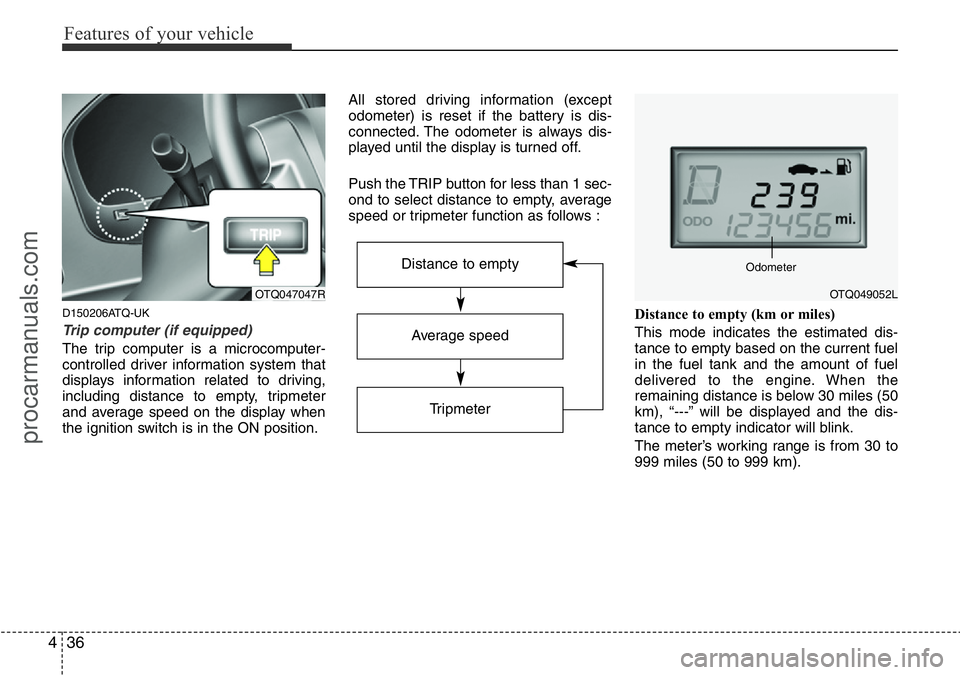
Push the TRIP button for less than 1 sec-
ond to select distance to empty, average
speed or tripmeter function as follows :
Distance to empty (km or miles)
This mode indicates the estimated dis-
tance to empty based on the current fuel
in the fuel tank and the amount of fuel
delivered to the engine. When the
remaining distance is below 30 miles (50
km), “---” will be displayed and the dis-
tance to empty indicator will blink.
The meter’s working range is from 30 to
999 miles (50 to 999 km).
OTQ047047R
Average speed
Tripmeter
Distance to empty
OTQ049052L Odometer
procarmanuals.com
Page 108 of 339
437
Features of your vehicle
✽NOTICE
• If the vehicle is not on level ground or
the battery power has been interrupt-
ed, the “Distance to empty” function
may not operate correctly.
The trip computer may not register
additional fuel if less than 6 litres (1.6
gallons) of fuel are added to the vehi-
cle.
• The fuel consumption and distance to
empty values may vary significantly
based on driving conditions, driving
habits, and condition of the vehicle.
• The distance to empty value is an esti-
mate of the available driving distance.
This value may differ from the actual
driving distance available.
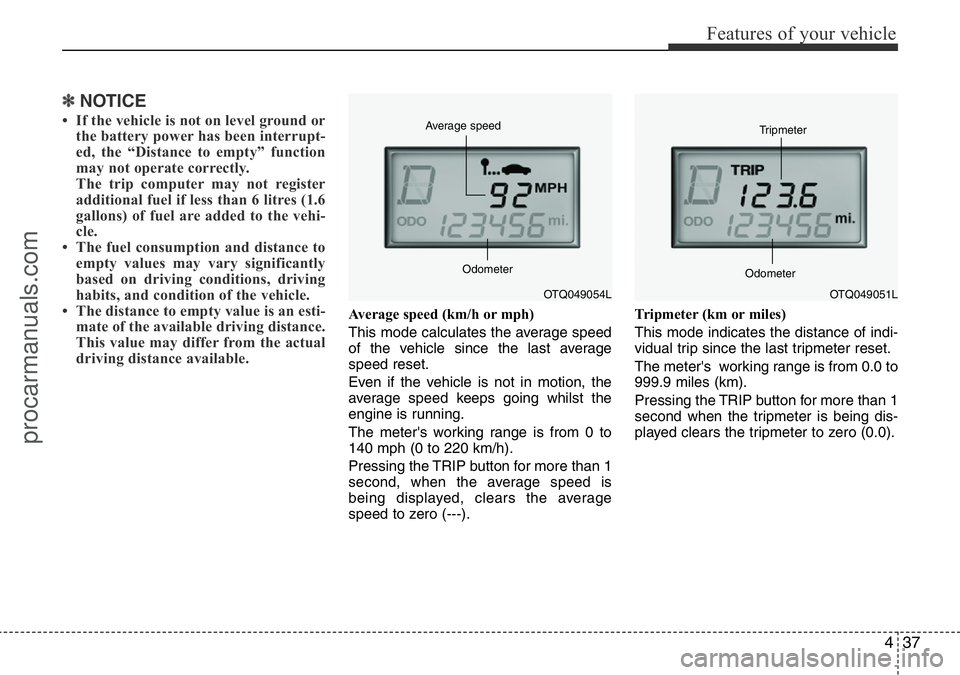
Average speed (km/h or mph)
This mode calculates the average speed
of the vehicle since the last average
speed reset.
Even if the vehicle is not in motion, the
average speed keeps going whilst the
engine is running.
The meter's working range is from 0 to
140 mph (0 to 220 km/h).
Pressing the TRIP button for more than 1
second, when the average speed is
being displayed, clears the average
speed to zero (---).Tripmeter (km or miles)
This mode indicates the distance of indi-
vidual trip since the last tripmeter reset.
The meter's working range is from 0.0 to
999.9 miles (km).
Pressing the TRIP button for more than 1
second when the tripmeter is being dis-
played clears the tripmeter to zero (0.0).
OTQ049054L Average speed
OdometerOTQ049051L Tripmeter
Odometer
procarmanuals.com
Page 113 of 339
Features of your vehicle
42 4
Low brake vacuum pressure warning
(diesel engine only, if equipped)
If the warning light remains on, it may
indicate that the brake vacuum pump has
any problem. Therefore you should avoid
high speed driving or sudden stop, and
you should depress the brake pedal
deeper and harder than usual in braking.
We recommend that the system be serv-
iced by a HYUNDAI authorised repairer.D150312AUN
Shift pattern indicator
(if equipped)
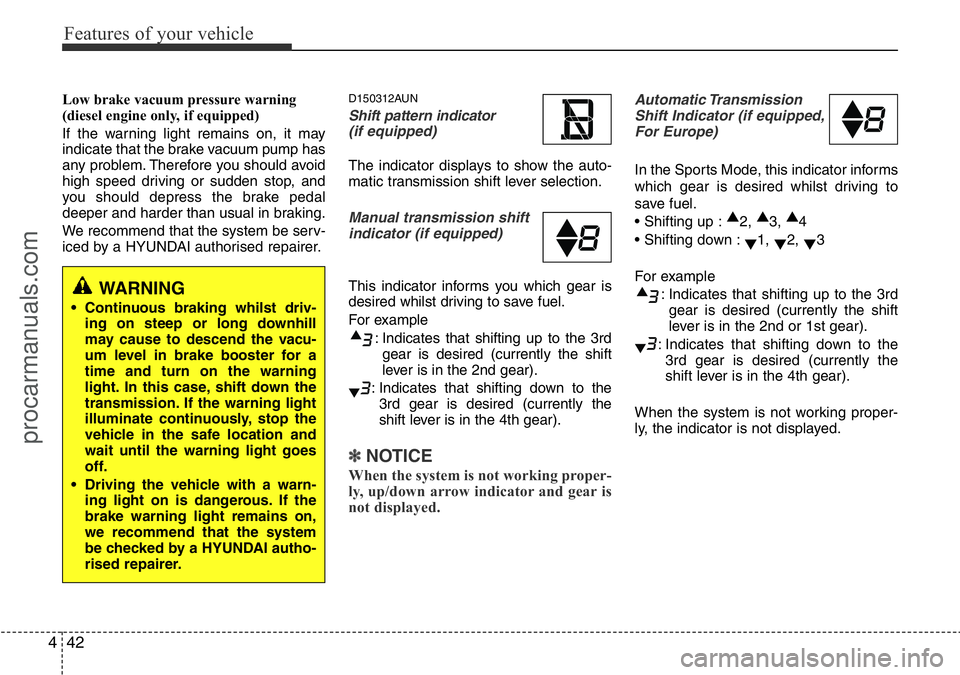
The indicator displays to show the auto-
matic transmission shift lever selection.
Manual transmission shift
indicator (if equipped)
This indicator informs you which gear is
desired whilst driving to save fuel.
For example
: Indicates that shifting up to the 3rd
gear is desired (currently the shift
lever is in the 2nd gear).
: Indicates that shifting down to the
3rd gear is desired (currently the
shift lever is in the 4th gear).
✽ NOTICE
When the system is not working proper-
ly, up/down arrow indicator and gear is
not displayed.
Automatic Transmission
Shift Indicator (if equipped,
For Europe)
In the Sports Mode, this indicator informs
which gear is desired whilst driving to
save fuel.
• Shifting up :▲
2, ▲
3, ▲
4
• Shifting down :
▼1,
▼2,
▼3
For example
: Indicates that shifting up to the 3rd
gear is desired (currently the shift
lever is in the 2nd or 1st gear).
: Indicates that shifting down to the
3rd gear is desired (currently the
shift lever is in the 4th gear).
When the system is not working proper-
ly, the indicator is not displayed.
WARNING
• Continuous braking whilst driv-
ing on steep or long downhill
may cause to descend the vacu-
um level in brake booster for a
time and turn on the warning
light. In this case, shift down the
transmission. If the warning light
illuminate continuously, stop the
vehicle in the safe location and
wait until the warning light goes
off.
• Driving the vehicle with a warn-
ing light on is dangerous. If the
brake warning light remains on,
we recommend that the system
be checked by a HYUNDAI autho-
rised repairer.
procarmanuals.com
Page 149 of 339
Features of your vehicle
78 4
D280600AEN-UK
Digital clock (if equipped)
Whenever the battery terminals or relat-
ed fuses are disconnected, you must
reset the time.
When the ignition switch is in the ACC or
ON position, the clock buttons operate as
follows:
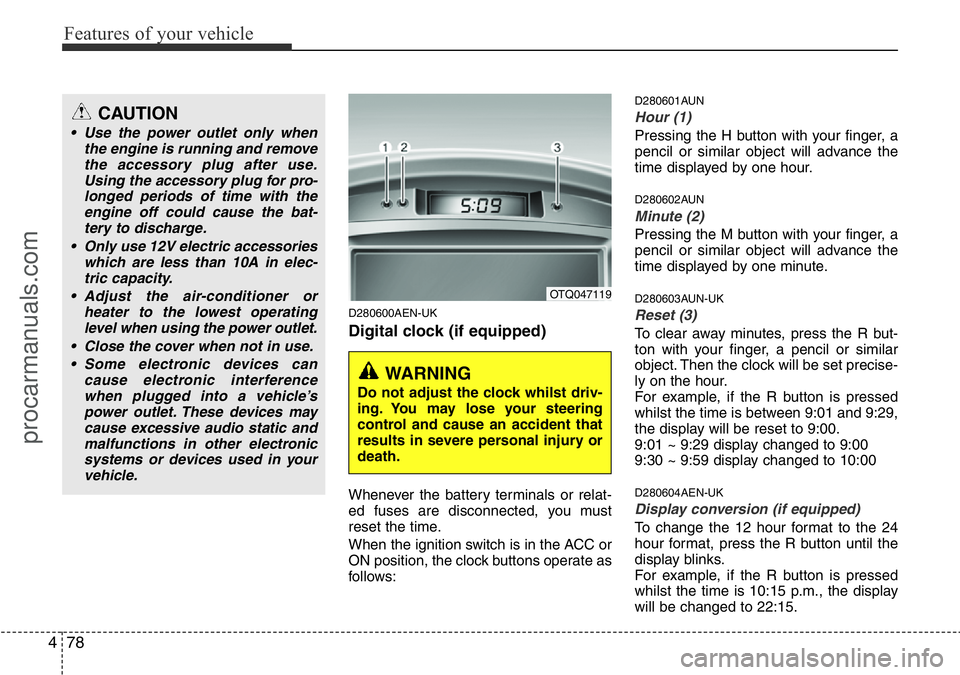
D280601AUN
Hour (1)
Pressing the H button with your finger, a
pencil or similar object will advance the
time displayed by one hour.
D280602AUN
Minute (2)
Pressing the M button with your finger, a
pencil or similar object will advance the
time displayed by one minute.
D280603AUN-UK
Reset (3)
To clear away minutes, press the R but-
ton with your finger, a pencil or similar
object. Then the clock will be set precise-
ly on the hour.
For example, if the R button is pressed
whilst the time is between 9:01 and 9:29,
the display will be reset to 9:00.
9:01 ~ 9:29 display changed to 9:00
9:30 ~ 9:59 display changed to 10:00
D280604AEN-UK
Display conversion (if equipped)
To change the 12 hour format to the 24
hour format, press the R button until the
display blinks.
For example, if the R button is pressed
whilst the time is 10:15 p.m., the display
will be changed to 22:15.
OTQ047119
WARNING
Do not adjust the clock whilst driv-
ing. You may lose your steering
control and cause an accident that
results in severe personal injury or
death.
CAUTION
• Use the power outlet only when
the engine is running and remove
the accessory plug after use.
Using the accessory plug for pro-
longed periods of time with the
engine off could cause the bat-
tery to discharge.
• Only use 12V electric accessories
which are less than 10A in elec-
tric capacity.
• Adjust the air-conditioner or
heater to the lowest operating
level when using the power outlet.
• Close the cover when not in use.
• Some electronic devices can
cause electronic interference
when plugged into a vehicle’s
power outlet. These devices may
cause excessive audio static and
malfunctions in other electronic
systems or devices used in your
vehicle.
procarmanuals.com
Page 158 of 339
487
Features of your vehicle
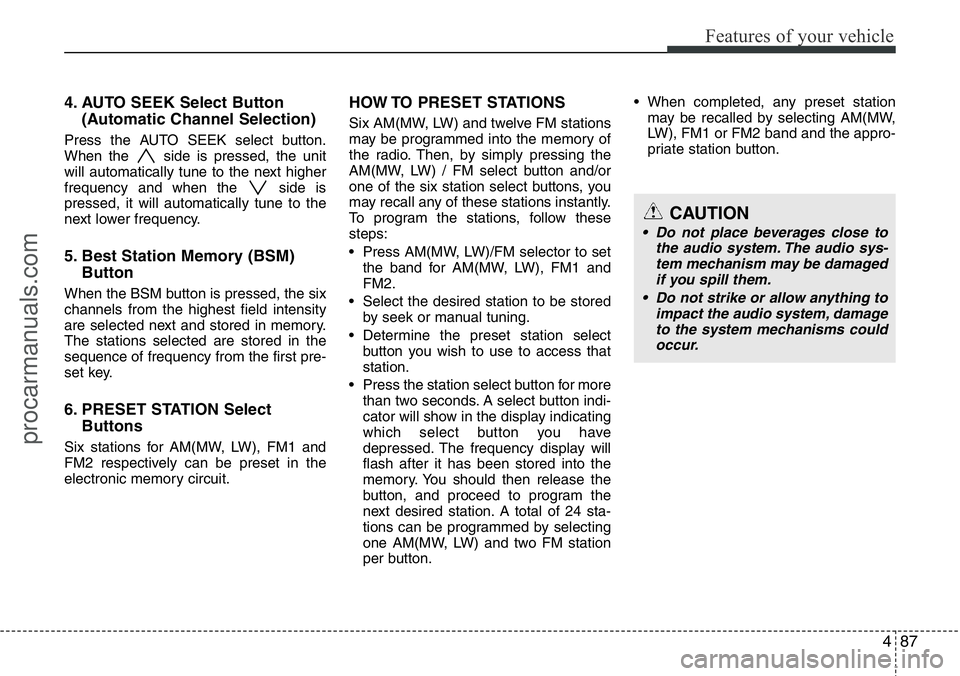
4. AUTO SEEK Select Button
(Automatic Channel Selection)
Press the AUTO SEEK select button.
When the side is pressed, the unit
will automatically tune to the next higher
frequency and when the side is
pressed, it will automatically tune to the
next lower frequency.
5. Best Station Memory (BSM)
Button
When the BSM button is pressed, the six
channels from the highest field intensity
are selected next and stored in memory.
The stations selected are stored in the
sequence of frequency from the first pre-
set key.
6. PRESET STATION Select
Buttons
Six stations for AM(MW, LW), FM1 and
FM2 respectively can be preset in the
electronic memory circuit.
HOW TO PRESET STATIONS
Six AM(MW, LW) and twelve FM stations
may be programmed into the memory of
the radio. Then, by simply pressing the
AM(MW, LW) / FM select button and/or
one of the six station select buttons, you
may recall any of these stations instantly.
To program the stations, follow these
steps:
• Press AM(MW, LW)/FM selector to set
the band for AM(MW, LW), FM1 and
FM2.
• Select the desired station to be stored
by seek or manual tuning.
• Determine the preset station select
button you wish to use to access that
station.
• Press the station select button for more
than two seconds. A select button indi-
cator will show in the display indicating
which select button you have
depressed. The frequency display will
flash after it has been stored into the
memory. You should then release the
button, and proceed to program the
next desired station. A total of 24 sta-
tions can be programmed by selecting
one AM(MW, LW) and two FM station
per button.• When completed, any preset station
may be recalled by selecting AM(MW,
LW), FM1 or FM2 band and the appro-
priate station button.
CAUTION
• Do not place beverages close to
the audio system. The audio sys-
tem mechanism may be damaged
if you spill them.
• Do not strike or allow anything to
impact the audio system, damage
to the system mechanisms could
occur.
procarmanuals.com
Page 160 of 339
489
Features of your vehicle
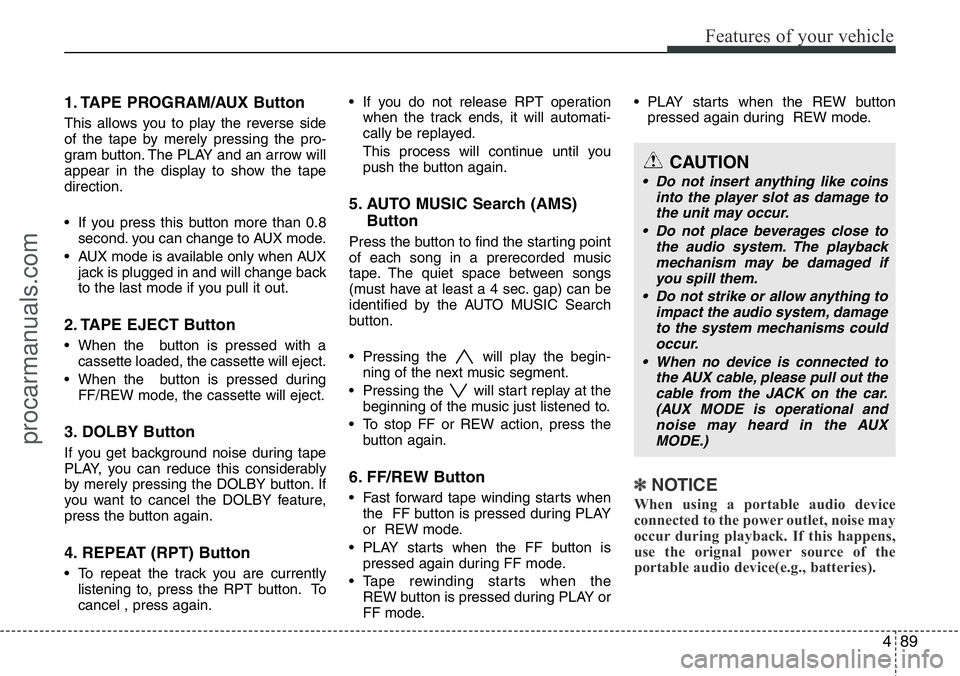
1. TAPE PROGRAM/AUX Button
This allows you to play the reverse side
of the tape by merely pressing the pro-
gram button. The PLAY and an arrow will
appear in the display to show the tape
direction.
• If you press this button more than 0.8
second. you can change to AUX mode.
• AUX mode is available only when AUX
jack is plugged in and will change back
to the last mode if you pull it out.
2. TAPE EJECT Button
• When the button is pressed with a
cassette loaded, the cassette will eject.
• When the button is pressed during
FF/REW mode, the cassette will eject.
3. DOLBY Button
If you get background noise during tape
PLAY, you can reduce this considerably
by merely pressing the DOLBY button. If
you want to cancel the DOLBY feature,
press the button again.
4. REPEAT (RPT) Button
• To repeat the track you are currently
listening to, press the RPT button. To
cancel , press again.• If you do not release RPT operation
when the track ends, it will automati-
cally be replayed.
This process will continue until you
push the button again.
5. AUTO MUSIC Search (AMS)
Button
Press the button to find the starting point
of each song in a prerecorded music
tape. The quiet space between songs
(must have at least a 4 sec. gap) can be
identified by the AUTO MUSIC Search
button.
• Pressing the will play the begin-
ning of the next music segment.
• Pressing the will start replay at the
beginning of the music just listened to.
• To stop FF or REW action, press the
button again.
6. FF/REW Button
• Fast forward tape winding starts when
the FF button is pressed during PLAY
or REW mode.
• PLAY starts when the FF button is
pressed again during FF mode.
• Tape rewinding starts when the
REW button is pressed during PLAY or
FF mode.• PLAY starts when the REW button
pressed again during REW mode.✽NOTICE
When using a portable audio device
connected to the power outlet, noise may
occur during playback. If this happens,
use the orignal power source of the
portable audio device(e.g., batteries).
CAUTION
• Do not insert anything like coins
into the player slot as damage to
the unit may occur.
• Do not place beverages close to
the audio system. The playback
mechanism may be damaged if
you spill them.
• Do not strike or allow anything to
impact the audio system, damage
to the system mechanisms could
occur.
• When no device is connected to
the AUX cable, please pull out the
cable from the JACK on the car.
(AUX MODE is operational and
noise may heard in the AUX
MODE.)
procarmanuals.com
Page 162 of 339
491
Features of your vehicle
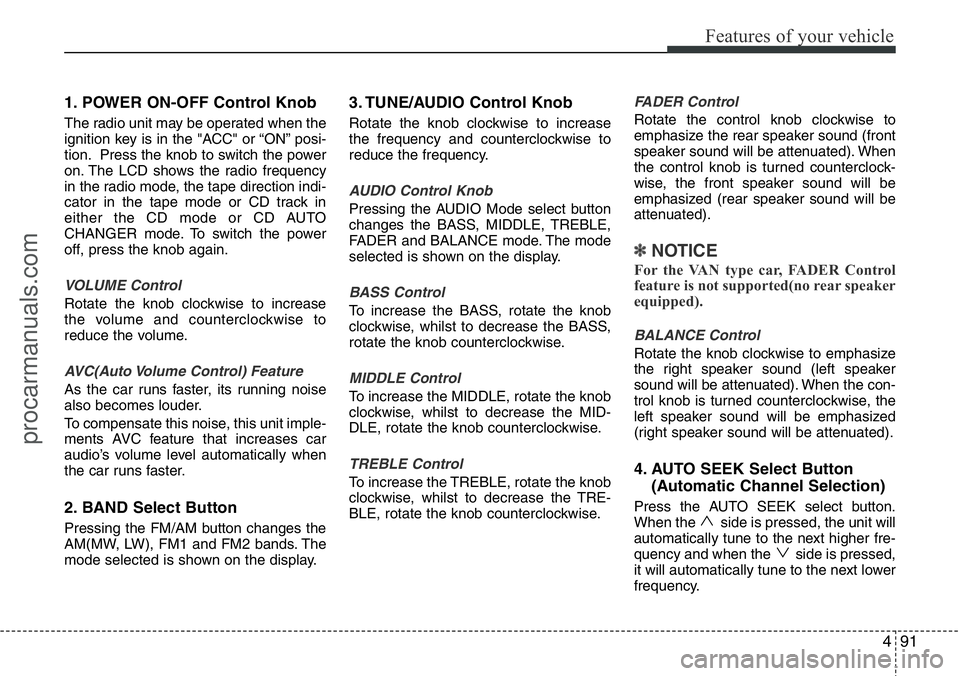
1. POWER ON-OFF Control Knob
The radio unit may be operated when the
ignition key is in the "ACC" or “ON” posi-
tion. Press the knob to switch the power
on. The LCD shows the radio frequency
in the radio mode, the tape direction indi-
cator in the tape mode or CD track in
either the CD mode or CD AUTO
CHANGER mode. To switch the power
off, press the knob again.
VOLUME Control
Rotate the knob clockwise to increase
the volume and counterclockwise to
reduce the volume.
AVC(Auto Volume Control) Feature
As the car runs faster, its running noise
also becomes louder.
To compensate this noise, this unit imple-
ments AVC feature that increases car
audio’s volume level automatically when
the car runs faster.
2. BAND Select Button
Pressing the FM/AM button changes the
AM(MW, LW), FM1 and FM2 bands. The
mode selected is shown on the display.
3. TUNE/AUDIO Control Knob
Rotate the knob clockwise to increase
the frequency and counterclockwise to
reduce the frequency.
AUDIO Control Knob
Pressing the AUDIO Mode select button
changes the BASS, MIDDLE, TREBLE,
FADER and BALANCE mode. The mode
selected is shown on the display.
BASS Control
To increase the BASS, rotate the knob
clockwise, whilst to decrease the BASS,
rotate the knob counterclockwise.
MIDDLE Control
To increase the MIDDLE, rotate the knob
clockwise, whilst to decrease the MID-
DLE, rotate the knob counterclockwise.
TREBLE Control
To increase the TREBLE, rotate the knob
clockwise, whilst to decrease the TRE-
BLE, rotate the knob counterclockwise.
FADER Control
Rotate the control knob clockwise to
emphasize the rear speaker sound (front
speaker sound will be attenuated). When
the control knob is turned counterclock-
wise, the front speaker sound will be
emphasized (rear speaker sound will be
attenuated).
✽NOTICE
For the VAN type car, FADER Control
feature is not supported(no rear speaker
equipped).
BALANCE Control
Rotate the knob clockwise to emphasize
the right speaker sound (left speaker
sound will be attenuated). When the con-
trol knob is turned counterclockwise, the
left speaker sound will be emphasized
(right speaker sound will be attenuated).
4. AUTO SEEK Select Button
(Automatic Channel Selection)
Press the AUTO SEEK select button.
When the side is pressed, the unit will
automatically tune to the next higher fre-
quency and when the side is pressed,
it will automatically tune to the next lower
frequency.
procarmanuals.com
Page 163 of 339
Features of your vehicle
92 4
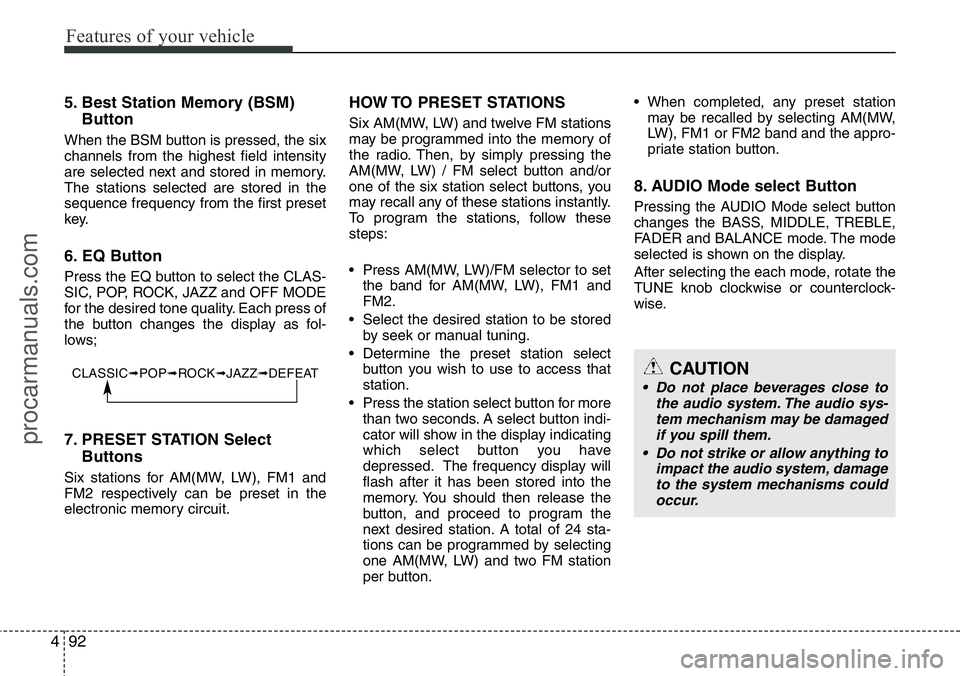
5. Best Station Memory (BSM)
Button
When the BSM button is pressed, the six
channels from the highest field intensity
are selected next and stored in memory.
The stations selected are stored in the
sequence frequency from the first preset
key.
6. EQ Button
Press the EQ button to select the CLAS-
SIC, POP, ROCK, JAZZ and OFF MODE
for the desired tone quality. Each press of
the button changes the display as fol-
lows;
7. PRESET STATION Select
Buttons
Six stations for AM(MW, LW), FM1 and
FM2 respectively can be preset in the
electronic memory circuit.
HOW TO PRESET STATIONS
Six AM(MW, LW) and twelve FM stations
may be programmed into the memory of
the radio. Then, by simply pressing the
AM(MW, LW) / FM select button and/or
one of the six station select buttons, you
may recall any of these stations instantly.
To program the stations, follow these
steps:
• Press AM(MW, LW)/FM selector to set
the band for AM(MW, LW), FM1 and
FM2.
• Select the desired station to be stored
by seek or manual tuning.
• Determine the preset station select
button you wish to use to access that
station.
• Press the station select button for more
than two seconds. A select button indi-
cator will show in the display indicating
which select button you have
depressed. The frequency display will
flash after it has been stored into the
memory. You should then release the
button, and proceed to program the
next desired station. A total of 24 sta-
tions can be programmed by selecting
one AM(MW, LW) and two FM station
per button.• When completed, any preset station
may be recalled by selecting AM(MW,
LW), FM1 or FM2 band and the appro-
priate station button.
8. AUDIO Mode select Button
Pressing the AUDIO Mode select button
changes the BASS, MIDDLE, TREBLE,
FADER and BALANCE mode. The mode
selected is shown on the display.
After selecting the each mode, rotate the
TUNE knob clockwise or counterclock-
wise.
CLASSIC➟POP➟ROCK➟JAZZ➟DEFEATCAUTION
• Do not place beverages close to
the audio system. The audio sys-
tem mechanism may be damaged
if you spill them.
• Do not strike or allow anything to
impact the audio system, damage
to the system mechanisms could
occur.
procarmanuals.com
Page 165 of 339
Features of your vehicle
94 4
1. CD/AUX Select Button
• Insert the CD with the label facing
upward.
• Insert the CD to start CD playback,
during radio operation.
• When a disc is in the CD deck, if you
press the CD button the CD player will
begin playing even if the radio player is
being used.
• The CD player can be used when the
ignition switch is in either the “ON” or
“ACC” position.
• Push the CD button to start CD play-
back without pushing Power ON-OFF
control knob. (Only when a CD is in the
deck.)
• If you press this button you can change
to AUX mode.
• AUX mode is available only when AUX
jack is plugged in and change back to
last mode if you pull it out.
2. CD EJECT Button
• When the EJECT button is pressed
with a CD loaded, the CD will eject.
• To eject all of the discs, press this but-
ton for one second or more.
✽NOTICE
• Do not stick paper or tape etc., on the
label side or the recording side of any
discs, as it may cause a malfunction.
• The unit cannot play a CD-
R(Recordable CD) and CD-
RW(Rewritable CD) that is not final-
ized. Please refer to the manual of CD-
R/CD-RW recoder or CD-R/CD-RW
software for more information on
finalization process.
• Depending on the recording status,
some CD-Rs/CD-RWs may not be
played on this unit.
3. TRACK UP/DOWN Button
• The desired track on the disc currently
being played can be selected using the
track number.
• Press button once to skip forward to
the beginning of the next track.
Press within a second after play-
back begins to quickly move backward
through a CD.
If you press after more than a sec-
ond, it will take you to the beginning of
the track you are now listening to.
4. FF/REW Button
If you want to fast forward or reverse
through the compact disc track, push and
hold the FF or REW button.
When you release the button, the com-
pact disc player will resume playing.
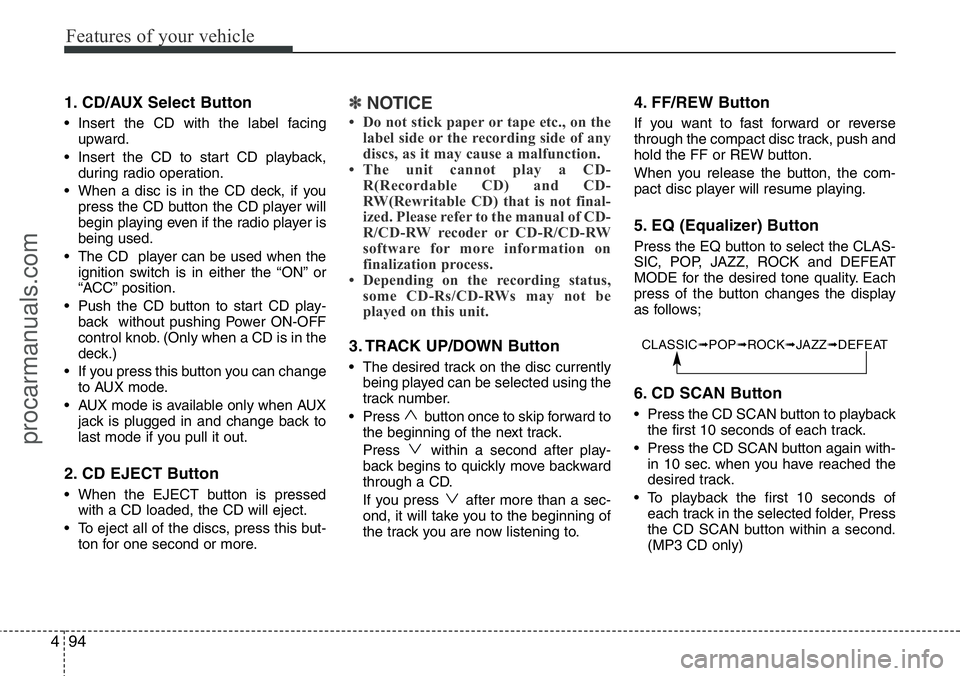
5. EQ (Equalizer) Button
Press the EQ button to select the CLAS-
SIC, POP, JAZZ, ROCK and DEFEAT
MODE for the desired tone quality. Each
press of the button changes the display
as follows;
6. CD SCAN Button
• Press the CD SCAN button to playback
the first 10 seconds of each track.
• Press the CD SCAN button again with-
in 10 sec. when you have reached the
desired track.
• To playback the first 10 seconds of
each track in the selected folder, Press
the CD SCAN button within a second.
(MP3 CD only)
CLASSIC➟POP➟ROCK➟JAZZ➟DEFEAT
procarmanuals.com
Page 166 of 339
495
Features of your vehicle
7. MARK (Bookmark) Button
When the CD player unit is operating, the
desired track on the disc can be book-
marked by using the MARK button.
• Press the MARK button for more than
one second to bookmark the desired
track. "M" will be displayed on the LCD
and "MEMORY NO." will display for
approximately five seconds with a
beep sound. To play the bookmarked
tracks, press the MARK button within
one second and select the book-
marked track to play.
• To erase a bookmarked track, press
the MARK button for more than one
second. This will erase the bookmark
with a beep sound.
If you want to delete all tracks stored on
Mark Memory, press FILE SEARCH
knob in the Mark Play mode for more
than one second. You will hear a beep
sound and all tracks will be deleted from
Mark Memory with "MARK DELETE
ALL" displayed on the LCD.
✽NOTICE
Tracks stored on Mark Memory will be
automatically erased after you eject CDs
that contain those tracks.
8. RPT (Repeat) Button
• To repeat the track you are currently
listening to, press the RPT button. To
cancel, press it again. If it is pressed
for more than one second, it will repeat
all tracks within the currently played
CD.
• To repeat the music within currently
played folder, press the RPT button for
more than one second. Then it will
repeat in sequential order within the
currently played folder. To cancel,
press it again. (MP3 CD only)
• If you do not release RPT operation
when the track ends, it will automati-
cally be replayed. This process will
continue until you push the button
again.
9. RDM (Random) Button
• To listen to the music in random order,
press the RDM Button with a beep
sound for more than one second. To
cancel, press it again.
• To listen to the music within the cur-
rently played folder in random order,
press the RDM Button within one sec-
ond.To cancel, press it again within one
second. If it is pressed for more than
one second, it will be played in random
order within currently played CD (MP3
CD only).
10. FILE SEARCH Knob (TUNE
Select Knob)
• You can move through the track by
turning the FILE SEARCH knob clock-
wise or counterclockwise.
• After moving through the desired file,
press the FILE SEARCH knob to play-
back in the selected file.
• If you do not press the FILE SEARCH
knob within five seconds, the file
searching function will be released.
11. FLDR (FOLDER Search)
Button
• You can move through the folder by
pushing the FLDR button to up ( )
and down ( ).
• After moving the desired folder, press
the FILE SEARCH knob to play back in
the selected folder. If you do not press
the FILE SEARCH knob within 5 sec-
onds, the folder searching function will
be released. It is not operated in a sin-
gle folder.
procarmanuals.com