ECO mode HYUNDAI I800 2016 User Guide
[x] Cancel search | Manufacturer: HYUNDAI, Model Year: 2016, Model line: I800, Model: HYUNDAI I800 2016Pages: 419, PDF Size: 9.23 MB
Page 202 of 419
Features of your vehicle
128 4
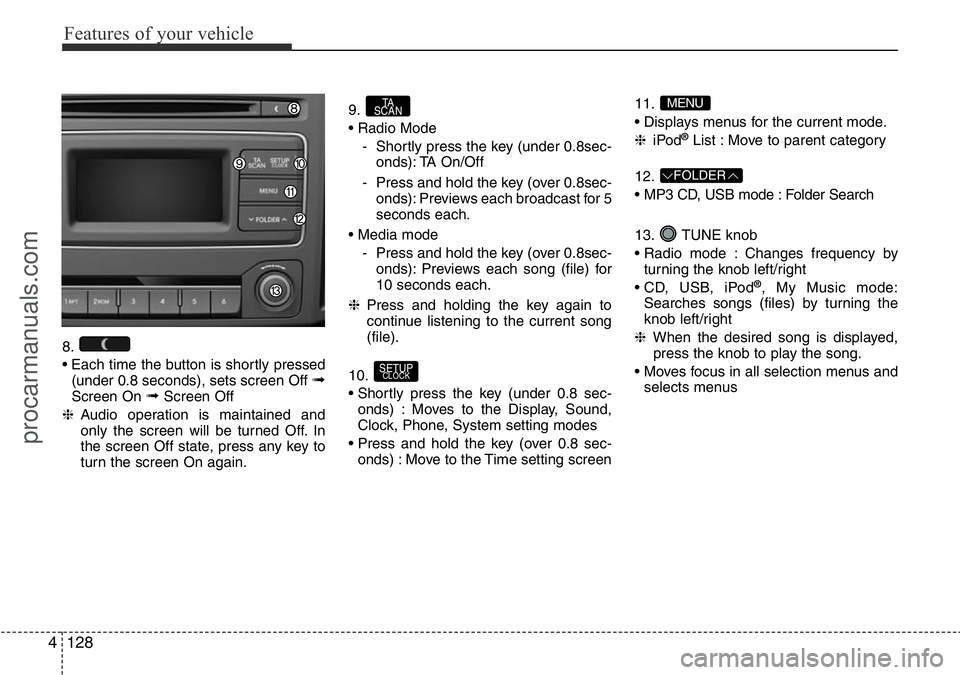
8.
• Each time the button is shortly pressed
(under 0.8 seconds), sets screen Off
➟Screen On ➟Screen Off
❈Audio operation is maintained and
only the screen will be turned Off. In
the screen Off state, press any key to
turn the screen On again.9.
• Radio Mode
- Shortly press the key (under 0.8sec-
onds): TA On/Off
- Press and hold the key (over 0.8sec-
onds): Previews each broadcast for 5
seconds each.
• Media mode
- Press and hold the key (over 0.8sec-
onds): Previews each song (file) for
10 seconds each.
❈Press and holding the key again to
continue listening to the current song
(file).
10.
• Shortly press the key (under 0.8 sec-
onds) : Moves to the Display, Sound,
Clock, Phone, System setting modes
• Press and hold the key (over 0.8 sec-
onds) : Move to the Time setting screen11.
• Displays menus for the current mode.
❈iPod
®List : Move to parent category
12.
• MP3 CD, USB mode : Folder Search
13. TUNE knob
• Radio mode : Changes frequency by
turning the knob left/right
• CD, USB, iPod
®, My Music mode:
Searches songs (files) by turning the
knob left/right
❈When the desired song is displayed,
press the knob to play the song.
• Moves focus in all selection menus and
selects menus
FOLDER
MENU
SETUPCLOCK
TA
SCAN
procarmanuals.com
Page 205 of 419
4131
Features of your vehicle
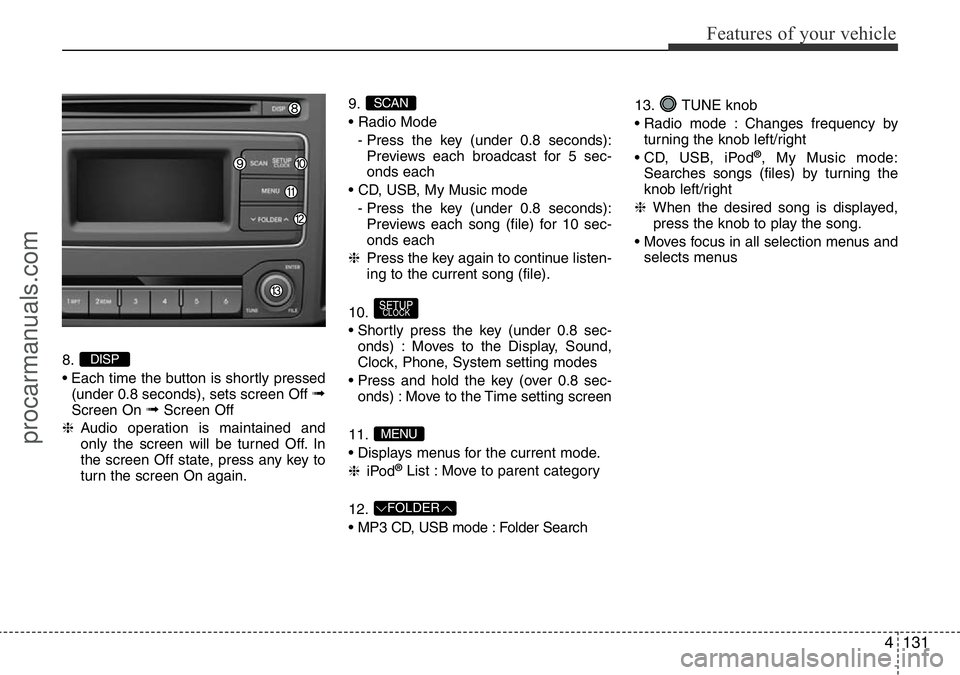
8.
• Each time the button is shortly pressed
(under 0.8 seconds), sets screen Off
➟Screen On ➟Screen Off
❈Audio operation is maintained and
only the screen will be turned Off. In
the screen Off state, press any key to
turn the screen On again.9.
• Radio Mode
- Press the key (under 0.8 seconds):
Previews each broadcast for 5 sec-
onds each
• CD, USB, My Music mode
- Press the key (under 0.8 seconds):
Previews each song (file) for 10 sec-
onds each
❈Press the key again to continue listen-
ing to the current song (file).
10.
• Shortly press the key (under 0.8 sec-
onds) : Moves to the Display, Sound,
Clock, Phone, System setting modes
• Press and hold the key (over 0.8 sec-
onds) : Move to the Time setting screen
11.
• Displays menus for the current mode.
❈iPod
®List : Move to parent category
12.
• MP3 CD, USB mode : Folder Search13. TUNE knob
• Radio mode : Changes frequency by
turning the knob left/right
• CD, USB, iPod
®, My Music mode:
Searches songs (files) by turning the
knob left/right
❈When the desired song is displayed,
press the knob to play the song.
• Moves focus in all selection menus and
selects menus
FOLDER
MENU
SETUPCLOCK
SCAN
DISP
procarmanuals.com
Page 219 of 419
4145
Features of your vehicle
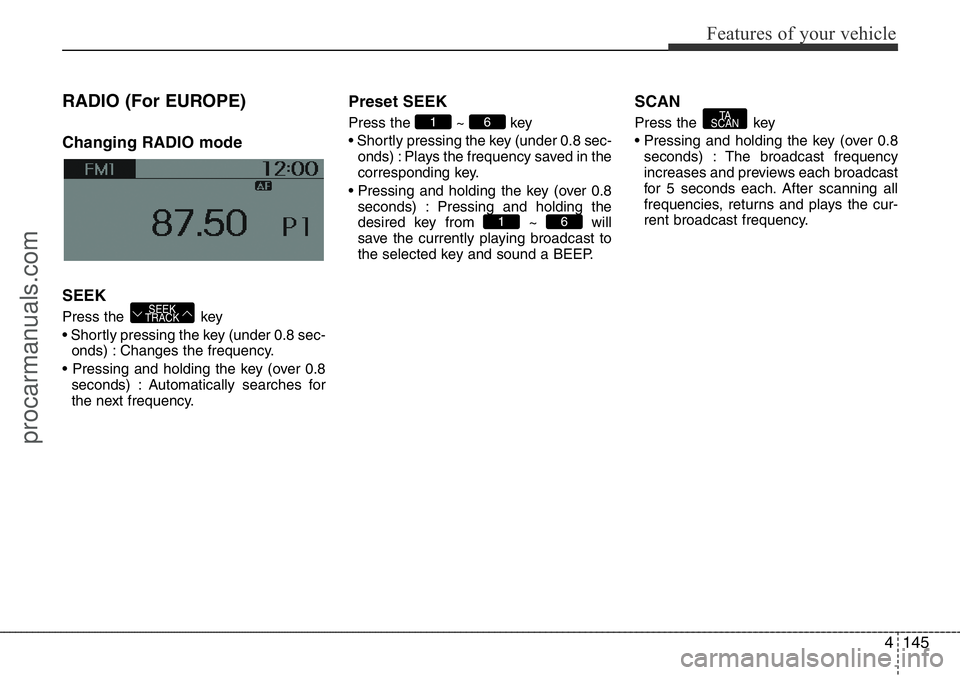
RADIO (For EUROPE)
Changing RADIO mode
SEEK
Press the key
• Shortly pressing the key (under 0.8 sec-
onds) : Changes the frequency.
• Pressing and holding the key (over 0.8
seconds) : Automatically searches for
the next frequency.
Preset SEEK
Press the ~ key
• Shortly pressing the key (under 0.8 sec-
onds) : Plays the frequency saved in the
corresponding key.
• Pressing and holding the key (over 0.8
seconds) : Pressing and holding the
desired key from ~ will
save the currently playing broadcast to
the selected key and sound a BEEP.
SCAN
Press the key
• Pressing and holding the key (over 0.8
seconds) : The broadcast frequency
increases and previews each broadcast
for 5 seconds each. After scanning all
frequencies, returns and plays the cur-
rent broadcast frequency.TA
SCAN
61
61
SEEK
TRACK
procarmanuals.com
Page 220 of 419
Features of your vehicle
146 4
Selecting through manual
search
Turn the TUNE knob left/right to adjust
the frequency.
Traffic Announcement (TA)
Shortly pressing the key (under
0.8 seconds) : Set / TA Traffic
Announcement) mode.
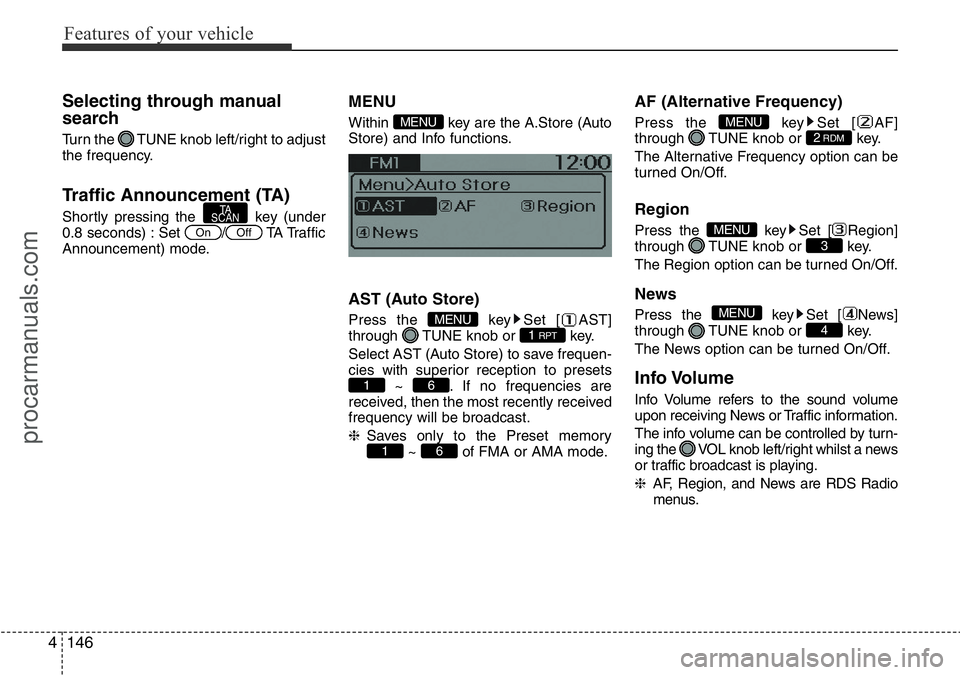
MENU
Within key are the A.Store (Auto
Store) and Info functions.
AST (Auto Store)
Press the key Set [ AST]
through TUNE knob or key.
Select AST (Auto Store) to save frequen-
cies with superior reception to presets
~ . If no frequencies are
received, then the most recently received
frequency will be broadcast.
❈Saves only to the Preset memory
~ of FMA or AMA mode.
AF (Alternative Frequency)
Press the key Set [ AF]
through TUNE knob or key.
The Alternative Frequency option can be
turned On/Off.
Region
Press the key Set [ Region]
through TUNE knob or key.
The Region option can be turned On/Off.
News
Press the key Set [ News]
through TUNE knob or key.
The News option can be turned On/Off.
Info Volume
Info Volume refers to the sound volume
upon receiving News or Traffic information.
The info volume can be controlled by turn-
ing the VOL knob left/right whilst a news
or traffic broadcast is playing.
❈AF, Region, and News are RDS Radio
menus.
4
MENU
3MENU
2RDMMENU
61
61
1 RPTMENU
MENU
OffOn
TA
SCAN
procarmanuals.com
Page 221 of 419
4147
Features of your vehicle
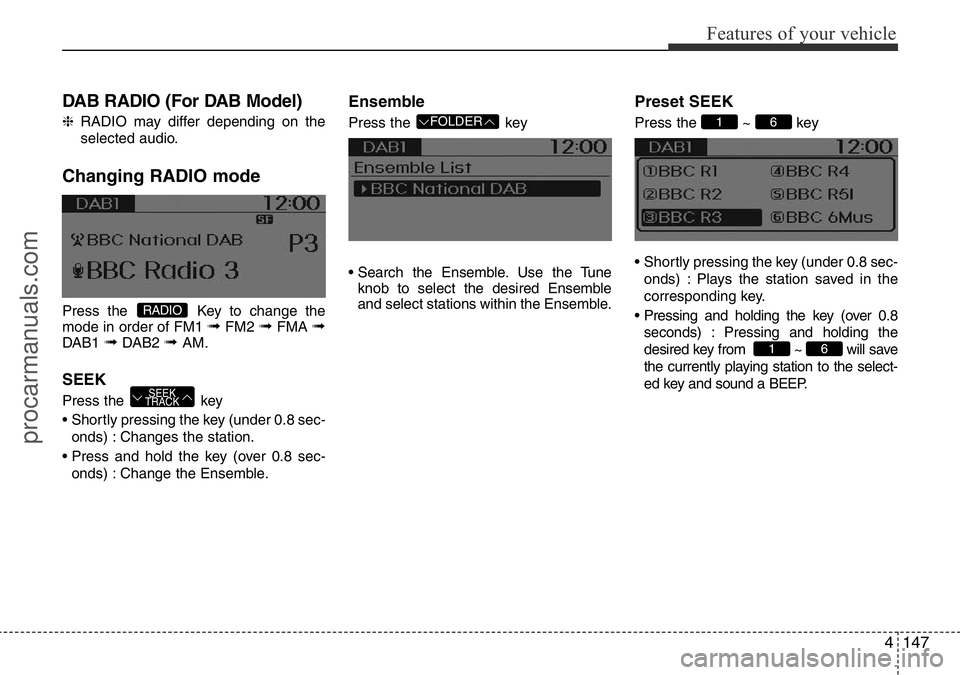
DAB RADIO (For DAB Model)
❈RADIO may differ depending on the
selected audio.
Changing RADIO mode
Press the Key to change the
mode in order of FM1 ➟FM2 ➟FMA ➟DAB1 ➟DAB2 ➟ AM.
SEEK
Press the key
• Shortly pressing the key (under 0.8 sec-
onds) : Changes the station.
• Press and hold the key (over 0.8 sec-
onds) : Change the Ensemble.
Ensemble
Press the key
• Search the Ensemble. Use the Tune
knob to select the desired Ensemble
and select stations within the Ensemble.
Preset SEEK
Press the ~ key
• Shortly pressing the key (under 0.8 sec-
onds) : Plays the station saved in the
corresponding key.
• Pressing and holding the key (over 0.8
seconds) : Pressing and holding the
desired key from ~ will save
the currently playing station to the select-
ed key and sound a BEEP.
61
61 FOLDER
SEEK
TRACK
RADIO
procarmanuals.com
Page 223 of 419
4149
Features of your vehicle
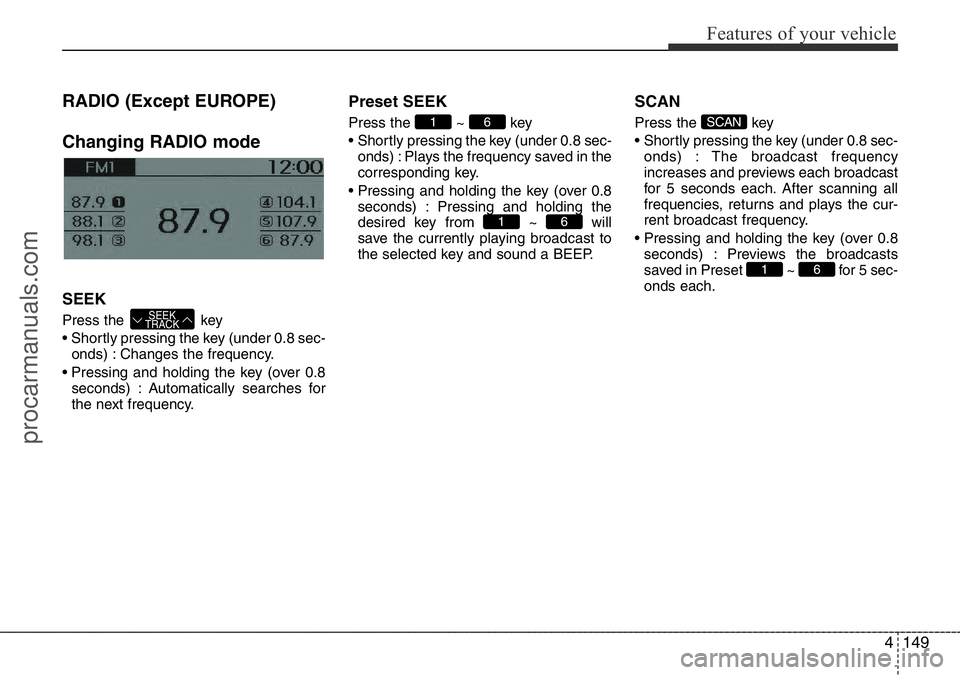
RADIO (Except EUROPE)
Changing RADIO mode
SEEK
Press the key
• Shortly pressing the key (under 0.8 sec-
onds) : Changes the frequency.
• Pressing and holding the key (over 0.8
seconds) : Automatically searches for
the next frequency.
Preset SEEK
Press the ~ key
• Shortly pressing the key (under 0.8 sec-
onds) : Plays the frequency saved in the
corresponding key.
• Pressing and holding the key (over 0.8
seconds) : Pressing and holding the
desired key from ~ will
save the currently playing broadcast to
the selected key and sound a BEEP.
SCAN
Press the key
• Shortly pressing the key (under 0.8 sec-
onds) : The broadcast frequency
increases and previews each broadcast
for 5 seconds each. After scanning all
frequencies, returns and plays the cur-
rent broadcast frequency.
• Pressing and holding the key (over 0.8
seconds) : Previews the broadcasts
saved in Preset ~ for 5 sec-
onds each.
61
SCAN
61
61
SEEK
TRACK
procarmanuals.com
Page 225 of 419
4151
Features of your vehicle
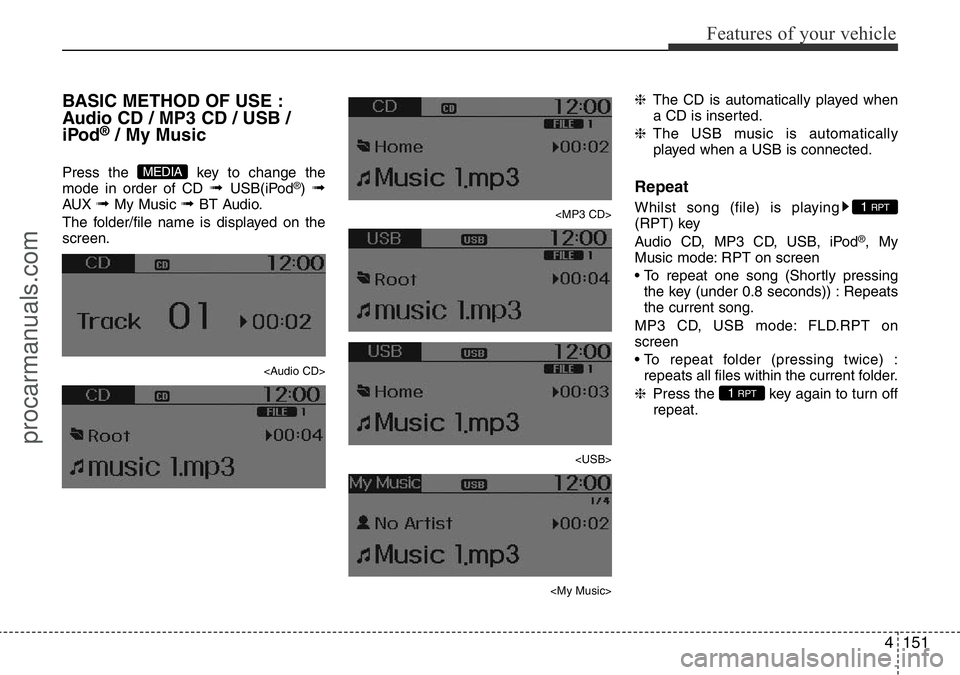
BASIC METHOD OF USE :
Audio CD / MP3 CD / USB /
iPod
®/ My Music
Press the key to change the
mode in order of CD ➟ USB(iPod®) ➟AUX ➟ My Music ➟ BT Audio.
The folder/file name is displayed on the
screen.
Page 226 of 419
Features of your vehicle
152 4
Random
Whilst song (file) is playing
(RDM) key
Audio CD, My Music mode: RDM on
screen
• Random (Shortly pressing the key ) :
Plays all songs in random order.
MP3 CD, USB mode: FLD.RDM on
screen
• Folder Random (Shortly pressing the
key) : Plays all files within the current
folder in random order.
MP3 CD, USB mode: RDM on screen
• Random (pressing twice) : Plays all files
in random order.
iPod®mode: RDM on screen
• Random (press the key) : Plays all files
in random order.
❈Press the key again to turn off
random.
Changing Song/File
Whilst song (file) is playing
key
• Shortly pressing the key : Plays the cur-
rent song from the beginning.
❈If the key is pressed again
within 1 second, the previous song is
played.
• Pressing and holding the key (over 0.8
seconds) : Rewinds the song.
Whilst song (file) is playing
key
• Shortly pressing the key : Plays the next
song.
• Pressing and holding the key (over 0.8
seconds) : Fast forwards the song.
Scan (For EUROPE)
Whilst song (file) is playing key
• Pressing and holding the key (over 0.8
seconds) : Scans all songs for 10 sec-
onds starting from the next song.
❈Pressing and holding the key
again to turn off.
Scan (Except EUROPE)
Whilst song (file) is playing key
• Shortly pressing the key (under 0.8 sec-
onds) : Scans all songs from the next
song for 10 seconds each.
❈Press the key again to turn
off.
❈The SCAN function is not supported in
iPod
®mode.
SCAN
SCAN
TA
SCAN
TA
SCAN
SEEK
TRACK
SEEK
TRACK
SEEK
TRACK
2 RDM
2 RDM
procarmanuals.com
Page 234 of 419
Features of your vehicle
160 4
PHONE (If equipped)
Before using the Bluetooth®Wireless
Technology phone features
• In order to use
Bluetooth®Wireless
Technology phone, you must first pair
and connect the
Bluetooth®Wireless
Technology mobile phone.
• If the mobile phone is not paired or con-
nected, it is not possible to enter Phone
mode. Once a phone is paired or con-
nected, the guidance screen will be dis-
played.
• If Priority is set upon vehicle ignition
(IGN/ACC ON), the
Bluetooth®Wireless
Technology phone will be automatically
connected. Even if you are outside, the
Bluetooth®Wireless Technology phone
will be automatically connected once
you are in the vicinity of the vehicle. If
you do not want automatic
Bluetooth®
Wireless Technology phone connec-
tion, set the Bluetooth®Wireless
Technology power to OFF.
Making a call using the Steering
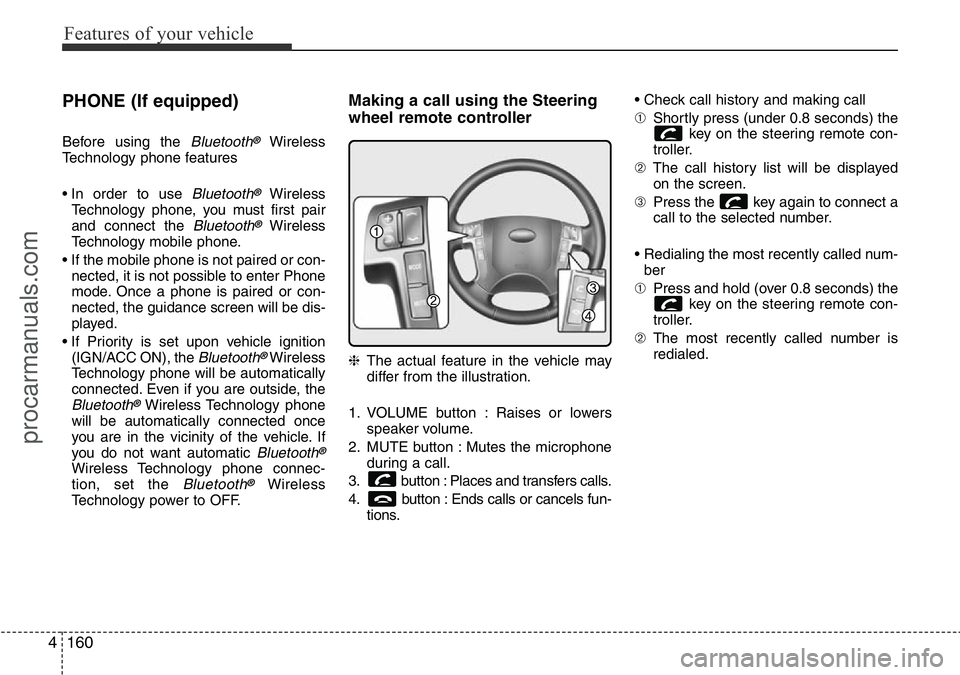
wheel remote controller
❈The actual feature in the vehicle may
differ from the illustration.
1. VOLUME button : Raises or lowers
speaker volume.
2. MUTE button : Mutes the microphone
during a call.
3. button : Places and transfers calls.
4. button : Ends calls or cancels fun-
tions.• Check call history and making call
➀Shortly press (under 0.8 seconds) the
key on the steering remote con-
troller.
➁The call history list will be displayed
on the screen.
➂Press the key again to connect a
call to the selected number.
• Redialing the most recently called num-
ber
➀Press and hold (over 0.8 seconds) the
key on the steering remote con-
troller.
➁The most recently called number is
redialed.
procarmanuals.com
Page 239 of 419
4165
Features of your vehicle
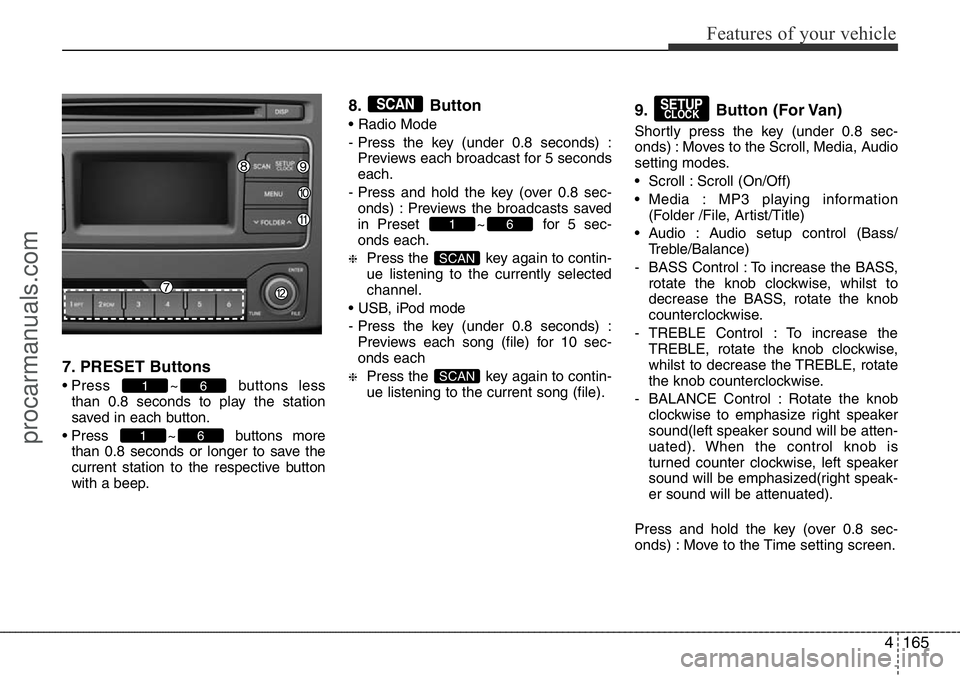
7. PRESET Buttons
• Press ~ buttons less
than 0.8 seconds to play the station
saved in each button.
• Press ~ buttons more
than 0.8 seconds or longer to save the
current station to the respective button
with a beep.
8. Button
• Radio Mode
- Press the key (under 0.8 seconds) :
Previews each broadcast for 5 seconds
each.
- Press and hold the key (over 0.8 sec-
onds) : Previews the broadcasts saved
in Preset ~ for 5 sec-
onds each.
❈Press the key again to contin-
ue listening to the currently selected
channel.
• USB, iPod mode
- Press the key (under 0.8 seconds) :
Previews each song (file) for 10 sec-
onds each
❈Press the key again to contin-
ue listening to the current song (file).
9. Button (For Van)
Shortly press the key (under 0.8 sec-
onds) : Moves to the Scroll, Media, Audio
setting modes.
• Scroll : Scroll (On/Off)
• Media : MP3 playing information
(Folder /File, Artist/Title)
• Audio : Audio setup control (Bass/
Treble/Balance)
- BASS Control : To increase the BASS,
rotate the knob clockwise, whilst to
decrease the BASS, rotate the knob
counterclockwise.
- TREBLE Control : To increase the
TREBLE, rotate the knob clockwise,
whilst to decrease the TREBLE, rotate
the knob counterclockwise.
- BALANCE Control : Rotate the knob
clockwise to emphasize right speaker
sound(left speaker sound will be atten-
uated). When the control knob is
turned counter clockwise, left speaker
sound will be emphasized(right speak-
er sound will be attenuated).
Press and hold the key (over 0.8 sec-
onds) : Move to the Time setting screen.
SETUPCLOCK
SCAN
SCAN
61
SCAN
61
61
procarmanuals.com