clock HYUNDAI I800 2016 User Guide
[x] Cancel search | Manufacturer: HYUNDAI, Model Year: 2016, Model line: I800, Model: HYUNDAI I800 2016Pages: 419, PDF Size: 9.23 MB
Page 208 of 419
![HYUNDAI I800 2016 User Guide Features of your vehicle
134 4
Clock Settings
Press the key Select [Clock]
through TUNE knob or key
Select menu through TUNE knob
Clock Settings
This menu is used to set the time.
Select [Clock Se](/img/35/57914/w960_57914-207.png "HYUNDAI I800 2016 User Guide Features of your vehicle
134 4
Clock Settings
Press the key Select [Clock]
through TUNE knob or key
Select menu through TUNE knob
Clock Settings
This menu is used to set the time.
Select [Clock Se")
Features of your vehicle
134 4
Clock Settings
Press the key Select [Clock]
through TUNE knob or key
Select menu through TUNE knob
Clock Settings
This menu is used to set the time.
Select [Clock Settings] Set through
TUNE knob Press TUNE knob
❈Adjust the number currently in focus to
set the [hour] and press the tune knob
to set the [minute].
Day Settings
This menu is used to set the date
(DD.MM.YYYY).
Select [Day Settings] Set through
TUNE knob Press TUNE knob
❈Adjust the number currently in focus to
make the settings and press the tune
knob to move to the next setting. (Set
in order of Day/Month/Year)
Time Format
This function is used to set the 12/24
hour time format of the audio system.
Select [Time Format] Set 12Hr / 24Hr
through TUNE knob
Clock Display when Power is OFF
Select [Clock Disp.(Pwr Off) Set /
through TUNE knob
• : Displays time/date on screen
• : Turn off.
Automatic RDS Time
This option is used to automatically set
the time by synchronizing with RDS.
Select [Automatic RDS Time] Set
/ through TUNE knob
• : Turn on Automatic Time
• : Turn off.
Off
On
OffOn
Off
On
OffOn
3
SETUPCLOCK
procarmanuals.com
Page 209 of 419
![HYUNDAI I800 2016 User Guide 4135
Features of your vehicle
System Settings
Press the key Select [System]
through tune knob or key Select
menu through TUNE knob
Memory Information
(If equipped)
Displays currently used memory a](/img/35/57914/w960_57914-208.png "HYUNDAI I800 2016 User Guide 4135
Features of your vehicle
System Settings
Press the key Select [System]
through tune knob or key Select
menu through TUNE knob
Memory Information
(If equipped)
Displays currently used memory a")
4135
Features of your vehicle
System Settings
Press the key Select [System]
through tune knob or key Select
menu through TUNE knob
Memory Information
(If equipped)
Displays currently used memory and
total system memory.
Select [Memory Information] OK
The currently used memory is displayed
on the left side whilst the total system
memory is displayed on the right side.
Language
This menu is used to set the display and
voice recognition language.
Select [Language] Set through
TUNE knob
❈The system will reboot after the lan-
guage is changed.
❈Language support by region
-
5
SETUPCLOCK
procarmanuals.com
Page 210 of 419
![HYUNDAI I800 2016 User Guide Features of your vehicle
136 4
SETUP (Except EUROPE)
Display Settings
Press the key Select [Display]
through TUNE knob or key
Select menu through TUNE knob
Mode Pop up
[Mode Pop up] Changes . s](/img/35/57914/w960_57914-209.png "HYUNDAI I800 2016 User Guide Features of your vehicle
136 4
SETUP (Except EUROPE)
Display Settings
Press the key Select [Display]
through TUNE knob or key
Select menu through TUNE knob
Mode Pop up
[Mode Pop up] Changes . s")
Features of your vehicle
136 4
SETUP (Except EUROPE)
Display Settings
Press the key Select [Display]
through TUNE knob or key
Select menu through TUNE knob
Mode Pop up
[Mode Pop up] Changes . selec-
tion mode
• During On state, press the or
key to display the mode
change pop up screen.
• When the pop up screen is displayed,
use the TUNE knob or keys ~
to select the desired mode.
Text Scroll
[Text Scroll] Set /
• : Maintains scroll
• : Scrolls only one (1) time.
Media Display
When playing an MP3 file, select the
desired display info from ‘Folder/File’ or
‘Album/Artist/Song’.
Sound Settings
Press the key Select [Sound]
through TUNE knob or key
Select menu through TUNE knob.2 RDM
SETUPCLOCK
Off
On
OffOn
6
1
MEDIARADIO
On
1 RPT
SETUPCLOCK
procarmanuals.com
Page 212 of 419
![HYUNDAI I800 2016 User Guide Features of your vehicle
138 4
Clock Settings
Press the key Select [Clock]
through TUNE knob or key
Select menu through TUNE knob
Clock Settings
This menu is used to set the time.
Select [Clock Se](/img/35/57914/w960_57914-211.png "HYUNDAI I800 2016 User Guide Features of your vehicle
138 4
Clock Settings
Press the key Select [Clock]
through TUNE knob or key
Select menu through TUNE knob
Clock Settings
This menu is used to set the time.
Select [Clock Se")
Features of your vehicle
138 4
Clock Settings
Press the key Select [Clock]
through TUNE knob or key
Select menu through TUNE knob
Clock Settings
This menu is used to set the time.
Select [Clock Settings] Set through
TUNE knob Press TUNE knob
❈Adjust the number currently in focus to
set the [hour] and press the tune knob
to set the [minute].
Calendar Settings
This menu is used to set the date
(YYYY.MM.DD).
Select [Calendar Settings] Set through
TUNE knob Press TUNE knob
❈Adjust the number currently in focus to
make the settings and press the tune
knob to move to the next setting. (Set
in order of Year/Month/Day)
Time Format
This function is used to set the 12/24 hour
time format of the audio system.
Select [Time Format] Set 12Hr / 24Hr
through
TUNEknob
Clock Display when Power is OFF
Select [Clock Disp.(Pwr Off)Set /
through TUNE knob
• : Displays time/date on screen
• : Turn off.Off
On
Off
On
3
SETUPCLOCK
procarmanuals.com
Page 213 of 419
![HYUNDAI I800 2016 User Guide 4139
Features of your vehicle
System Settings
Press the keySelect [System]
Memory Information
(if equipped)
Displays currently used memory and
total system memory.
Select [Memory Information] OK
The c](/img/35/57914/w960_57914-212.png "HYUNDAI I800 2016 User Guide 4139
Features of your vehicle
System Settings
Press the keySelect [System]
Memory Information
(if equipped)
Displays currently used memory and
total system memory.
Select [Memory Information] OK
The c")
4139
Features of your vehicle
System Settings
Press the keySelect [System]
Memory Information
(if equipped)
Displays currently used memory and
total system memory.
Select [Memory Information] OK
The currently used memory is displayed
on the left side whilst the total system
memory is displayed on the right side.
SETUPCLOCK
procarmanuals.com
Page 214 of 419
![HYUNDAI I800 2016 User Guide Features of your vehicle
140 4
Phone Settings
Press the keySelect [Phone]
(For EUROPE)
Press the keySelect [Phone]
(Except EUROPE)Pair Phone
Select [Pair Phone] Set through
TUNE knob
➀Search for dev](/img/35/57914/w960_57914-213.png "HYUNDAI I800 2016 User Guide Features of your vehicle
140 4
Phone Settings
Press the keySelect [Phone]
(For EUROPE)
Press the keySelect [Phone]
(Except EUROPE)Pair Phone
Select [Pair Phone] Set through
TUNE knob
➀Search for dev")
Features of your vehicle
140 4
Phone Settings
Press the keySelect [Phone]
(For EUROPE)
Press the keySelect [Phone]
(Except EUROPE)Pair Phone
Select [Pair Phone] Set through
TUNE knob
➀Search for device names as displayed
on your mobile phone and connect.
➁Input the passkey displayed on the
screen. (Passkey : 0000)
❈The device name and passkey will be
displayed on the screen for up to 3
minutes. If pairing is not completed
within the 3 minutes, the mobile phone
pairing process will automatically be
canceled.
➂ Pairing completion is displayed.
❈In some mobile phones, pairing will
automatically be followed by connec-
tion.
❈It is possible to pair up to five
Bluetooth®
Wireless Technology enabled mobile
phones.
SETUPCLOCK
SETUPCLOCKCAUTION
To pair a Bluetooth®Wireless
Technology enabled mobile phone,
authentication and connection
processes are first required. As a
result, you cannot pair your mobile
phone whilst driving the vehicle.
First park your vehicle before use.
procarmanuals.com
Page 218 of 419
![HYUNDAI I800 2016 User Guide Features of your vehicle
144 4
Bluetooth®Wireless
Technology System Off
This feature is used when you do not
wish to use the Bluetooth®Wireless
Technology system.
Select [Bluetooth System Off] Set
t](/img/35/57914/w960_57914-217.png "HYUNDAI I800 2016 User Guide Features of your vehicle
144 4
Bluetooth®Wireless
Technology System Off
This feature is used when you do not
wish to use the Bluetooth®Wireless
Technology system.
Select [Bluetooth System Off] Set
t")
Features of your vehicle
144 4
Bluetooth®Wireless
Technology System Off
This feature is used when you do not
wish to use the Bluetooth®Wireless
Technology system.
Select [Bluetooth System Off] Set
through TUNE knob
❈If a phone is already connected, dis-
connect the currently connected
phone and turn the
Bluetooth®
Wireless Technology system off.
Using the Bluetooth®Wireless
Technology System
To use Bluetooth®Wireless Technology
when the system is currently off, follow
these next steps.
• Turning On
Bluetooth®Wireless
Technology through the Key
Press the key Screen Guidance
❈Moves to the screen where
Bluetooth®Wireless Technology func-
tions can be used and displays guid-
ance.• Turning On
Bluetooth®Wireless
Technology through the Key
Press the key Select [Phone]
➀A screen asking whether to turn on
Bluetooth®Wireless Technology will be
displayed.
➁On the screen, select to turn on
Bluetooth®Wireless Technology and
display guidance.
❈I f the
Bluetooth®Wireless Technologysys-
tem is turned on, the system will auto-
matically try to connect the most
recently connected
Bluetooth®Wireless
Technologymobile phone.
YES
SETUPCLOCK
SETUPCLOCK
PHONE
PHONE
CAUTION
Bluetooth®Wireless Technology
connection may become intermit-
tently disconnected in some mobile
phones. Follow these next steps to
try again.
1) Turn the Bluetooth
®Wireless
Technology function within the
mobile phone ON/OFF and try to
connect again.
2) Turn the mobile phone power
ON/OFF and try to connect
again.
3) Completely remove the mobile
phone battery, reboot, and then
try to connect again.
4) Reboot the audio system and try
to connect again
5) Delete all paired devices in your
mobile phone and the audio sys-
tem and pair again for use.
procarmanuals.com
Page 232 of 419
Features of your vehicle
158 4
Bluetooth®Wireless
Technology AUDIO
(If equipped)
What is Bluetooth®Wireless
Technology?
Bluetooth®Wireless Technology allows
devices to be connected in a short dis-
tance, including hands-free devices,
stereo headsets, wireless remote con-
trollers, etc. For more information, visit
the
Bluetooth®Wireless Technology web-
site at www.Bluetooth.com
Before using Bluetooth®Wireless
Technology audio features
•
Bluetooth®Wireless Technology audio
may not be supported depending on the
compatibility of your
Bluetooth®Wireless
Technologymobile phone.
• In order to use
Bluetooth®Wireless
Technology audio, you must first pair
and connect the
Bluetooth®Wireless
Technology mobile phone.• The Bluetooth
®word mark and logos are
registered trademarks owned by
Bluetooth
®SIG, Inc. and any use of such
marks is under license. Other trade-
marks and trade names are those of
their respective owners. A Bluetooth
®
enabled cell phone is required to useBluetooth®Wireless Technology
•
Bluetooth®Wireless Technology audio
can be used only when the [Audio
Streaming] of Phone is turned On.
❈Setting
Bluetooth®Wireless
Technology Audio Streaming : Press
the key Select [Phone]
through the tune knob Select [Audio
Streaming] through the TUNE
knob Set /
Starting Bluetooth®Wireless
Technology Audio
• Press the key to change the
mode in order of CD ➟USB ➟AUX ➟My Music ➟BT Audio.
• If BT Audio is selected,
Bluetooth®
Wireless Technology audio will start
playing.
❈Audio may not automatically start
playing in some mobile phones.
MEDIA
OffOn
SETUPCLOCK
procarmanuals.com
Page 238 of 419
Features of your vehicle
164 4
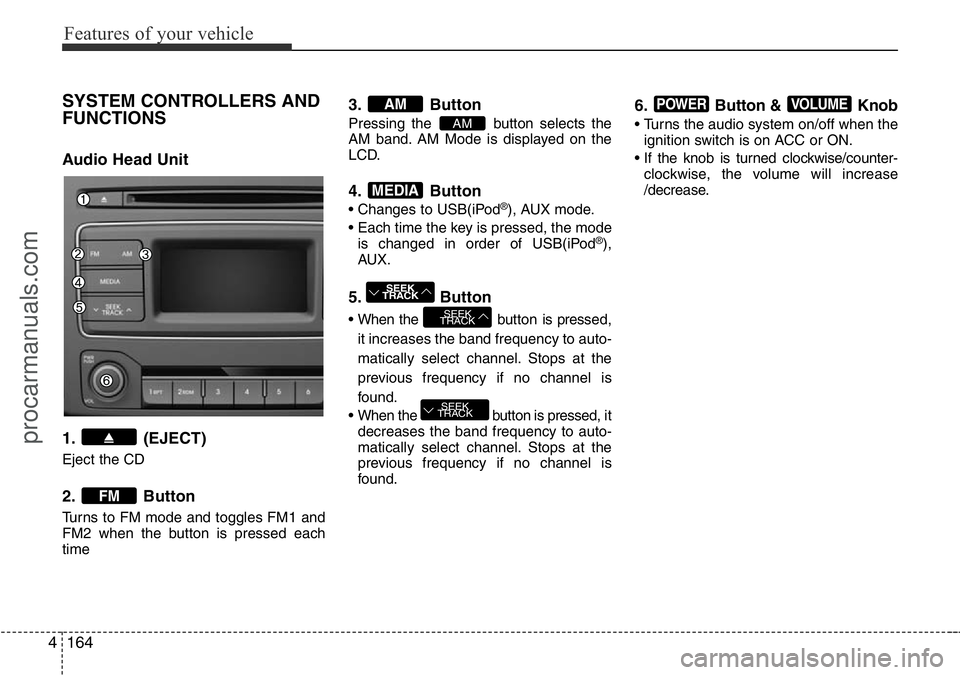
SYSTEM CONTROLLERS AND
FUNCTIONS
Audio Head Unit
1. (EJECT)
Eject the CD
2. Button
Turns to FM mode and toggles FM1 and
FM2 when the button is pressed each
time
3. Button
Pressing the button selects the
AM band. AM Mode is displayed on the
LCD.
4. Button
• Changes to USB(iPod®), AUX mode.
• Each time the key is pressed, the mode
is changed in order of USB(iPod
®),
AUX.
5. Button
• When the button is pressed,
it increases the band frequency to auto-
matically select channel. Stops at the
previous frequency if no channel is
found.
• When the button is pressed, it
decreases the band frequency to auto-
matically select channel. Stops at the
previous frequency if no channel is
found.
6. Button & Knob
• Turns the audio system on/off when the
ignition switch is on ACC or ON.
• If the knob is turned clockwise/counter-
clockwise, the volume will increase
/decrease.
VOLUMEPOWER
SEEK
TRACK
SEEK
TRACK
SEEK
TRACK
MEDIA
AM
AM
FM
procarmanuals.com
Page 239 of 419
4165
Features of your vehicle
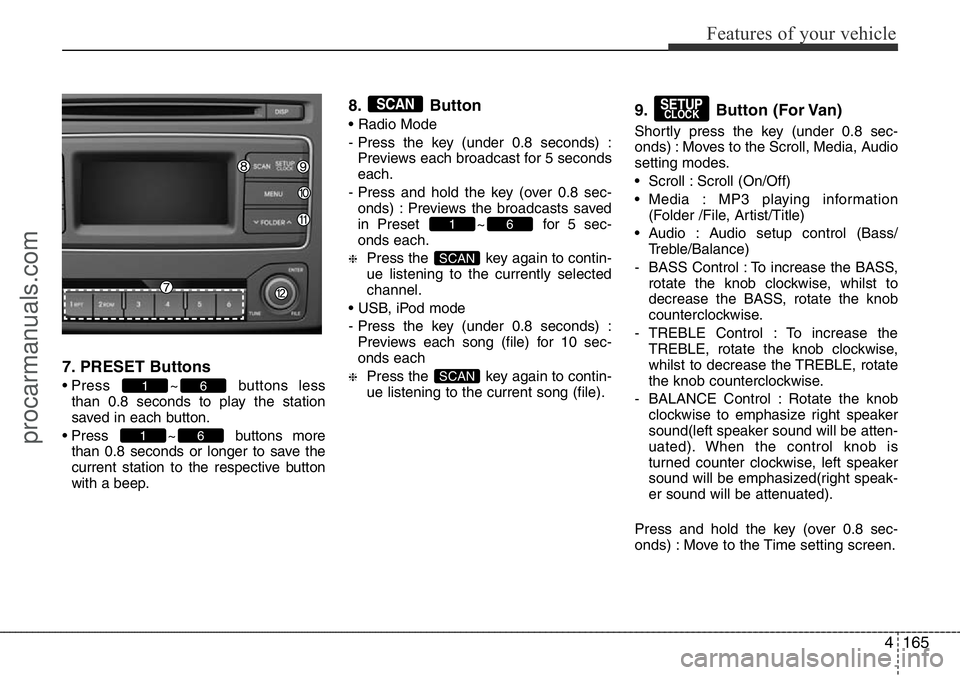
7. PRESET Buttons
• Press ~ buttons less
than 0.8 seconds to play the station
saved in each button.
• Press ~ buttons more
than 0.8 seconds or longer to save the
current station to the respective button
with a beep.
8. Button
• Radio Mode
- Press the key (under 0.8 seconds) :
Previews each broadcast for 5 seconds
each.
- Press and hold the key (over 0.8 sec-
onds) : Previews the broadcasts saved
in Preset ~ for 5 sec-
onds each.
❈Press the key again to contin-
ue listening to the currently selected
channel.
• USB, iPod mode
- Press the key (under 0.8 seconds) :
Previews each song (file) for 10 sec-
onds each
❈Press the key again to contin-
ue listening to the current song (file).
9. Button (For Van)
Shortly press the key (under 0.8 sec-
onds) : Moves to the Scroll, Media, Audio
setting modes.
• Scroll : Scroll (On/Off)
• Media : MP3 playing information
(Folder /File, Artist/Title)
• Audio : Audio setup control (Bass/
Treble/Balance)
- BASS Control : To increase the BASS,
rotate the knob clockwise, whilst to
decrease the BASS, rotate the knob
counterclockwise.
- TREBLE Control : To increase the
TREBLE, rotate the knob clockwise,
whilst to decrease the TREBLE, rotate
the knob counterclockwise.
- BALANCE Control : Rotate the knob
clockwise to emphasize right speaker
sound(left speaker sound will be atten-
uated). When the control knob is
turned counter clockwise, left speaker
sound will be emphasized(right speak-
er sound will be attenuated).
Press and hold the key (over 0.8 sec-
onds) : Move to the Time setting screen.
SETUPCLOCK
SCAN
SCAN
61
SCAN
61
61
procarmanuals.com