turn signal HYUNDAI I800 2016 Owners Manual
[x] Cancel search | Manufacturer: HYUNDAI, Model Year: 2016, Model line: I800, Model: HYUNDAI I800 2016Pages: 419, PDF Size: 9.23 MB
Page 14 of 419
23
Your vehicle at a glance
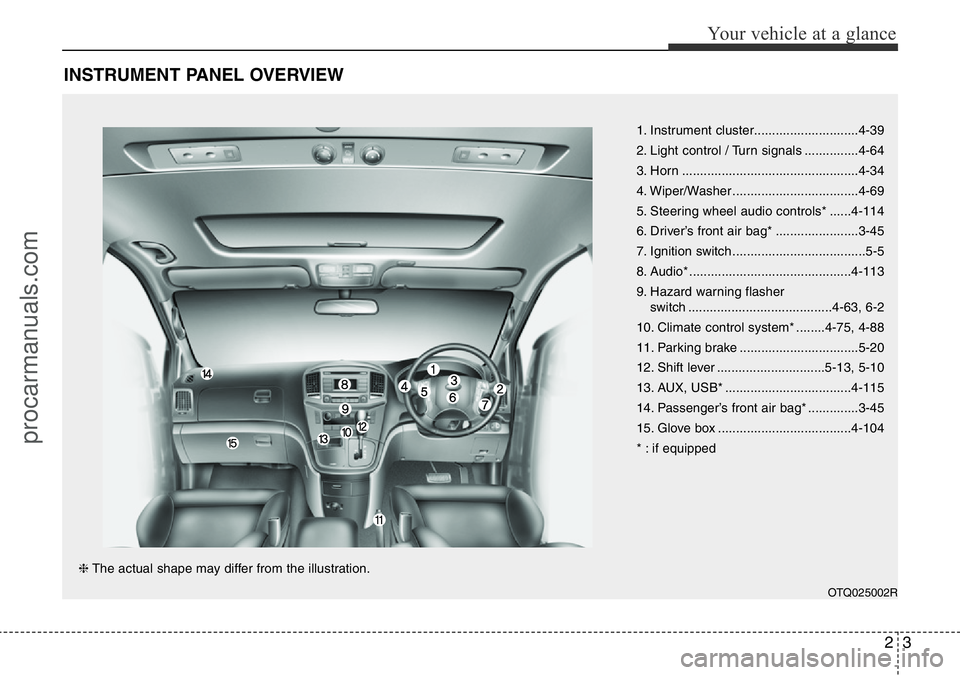
INSTRUMENT PANEL OVERVIEW
1. Instrument cluster.............................4-39
2. Light control / Turn signals ...............4-64
3. Horn .................................................4-34
4. Wiper/Washer ...................................4-69
5. Steering wheel audio controls* ......4-114
6. Driver’s front air bag* .......................3-45
7. Ignition switch .....................................5-5
8. Audio* .............................................4-113
9. Hazard warning flasher
switch ........................................4-63, 6-2
10. Climate control system* ........4-75, 4-88
11. Parking brake .................................5-20
12. Shift lever ..............................5-13, 5-10
13. AUX, USB* ...................................4-115
14. Passenger’s front air bag* ..............3-45
15. Glove box .....................................4-104
* : if equipped
OTQ025002R
❈The actual shape may differ from the illustration.
procarmanuals.com
Page 57 of 419

Safety features of your vehicle
42 3
How does the air bag system
operate
• Air bags are activated (able to inflate if
necessary) only when the ignition
switch is turned to the ON or START
position.
• Air bags inflate instantly in the event of
a serious frontal collision in order to
help protect the occupants from seri-
ous physical injury.
• There is no single speed at which the
air bags will inflate.
Generally, air bags are designed to
inflate based upon the severity of a col-
lision and its direction. These two fac-
tors determine whether the sensors
produce an electronic deployment/
inflation signal.
• Air bag deployment depends on a
number of factors including vehicle
speed, angles of impact and the densi-
ty and stiffness of the vehicles or
objects which your vehicle hits in the
collision. The determining factors are
not limited to those mentioned above.
• The front air bags will completely
inflate and deflate in an instant.
It is virtually impossible for you to see
the air bags inflate during an accident.It is much more likely that you will sim-
ply see the deflated air bags hanging
out of their storage compartments after
the collision.
• In order to help provide protection in a
severe collision, the air bags must
inflate rapidly. The speed of air bag
inflation is a consequence of the
extremely short time in which a colli-
sion occurs and the need to inflate the
air bag between the occupant and the
vehicle structures before the occupant
impacts those structures. This speed of
inflation reduces the risk of serious or
life-threatening injuries in a severe col-
lision and is thus a necessary part of
air bag design.
However, air bag inflation can also
cause injuries which can include facial
abrasions, bruises and broken bones
because the inflation speed also caus-
es the air bags to expand with a great
deal of force.
• There are even circumstances
under which contact with the steer-
ing wheel air bag can cause fatal
injuries, especially if the occupant
is positioned excessively close to
the steering wheel.
WARNING
• To avoid severe personal injury
or death caused by deploying air
bags in a collision, the driver
should sit as far back from the
steering wheel air bag as possi-
ble (at least 10 inches (250 mm)
away). The front passengers
should always move their seats
as far back as possible and sit
back in their seat.
• Air bags inflate instantly in the
event of collision, and passen-
gers may be injured by the air bag
expansion force if they are not in
proper position.
• Air bag inflation may cause
injuries including facial or bodily
abrasions, injuries from broken
glasses or burns.
procarmanuals.com
Page 77 of 419
43
Features of your vehicle
Immobiliser system
Your vehicle may be equipped with an
electronic engine immobiliser system to
reduce the risk of unauthorised vehicle
use.
Your immobiliser system is comprised of
a small transponder in the ignition key
and electronic devices inside the vehicle.
With the immobiliser system, whenever
you insert your ignition key into the igni-
tion switch and turn it to ON, it checks
and determines and verifies if the ignition
key is valid or not.
If the key is determined to be valid, the
engine will start.
If the key is determined to be invalid, the
engine will not start.
To deactivate the immobiliser sys-
tem:
Insert the ignition key into the key cylin-
der and turn it to the ON position.
To activate the immobiliser system:
Turn the ignition key to the OFF position.
The immobiliser system activates auto-
matically. Without a valid ignition key for
your vehicle, the engine will not start.
✽NOTICE
The immobiliser system detects the
presence of a key in the ignition switch.
To ensure the system performs correct-
ly, the keys should be separated after
delivery of the vehicle so that only one
key is near the ignition switch when
using the vehicle. The engine may not
start or may stop shortly after starting if
more than one key is near the ignition
switch.
✽NOTICE
If you need additional keys or lose your
keys, we recommend that you consult a
HYUNDAI authorised repairer.
CAUTION
The transponder in your ignition
key is an important part of the
immobiliser system. It is designed
to give years of trouble-free service,
however you should avoid expo-
sure to moisture, static electricity
and rough handling. Immobiliser
system malfunction could occur.
CAUTION
Do not change, alter or adjust the
immobiliser system because it
could cause the immobiliser sys-
tem to malfunction.We recommend
that the system be serviced by a
HYUNDAI authorised repairer.
Malfunctions caused by improper
alterations, adjustments or modifi-
cations to the immobiliser system
are not covered by your vehicle
manufacturer warranty.
CAUTION
Do not put metal accessories near
the ignition switch.
The engine may not start for the
metal accessories may interrupt the
transponder signal from normally
transmitting.
WARNING
In order to prevent theft of your
vehicle, do not leave spare keys
anywhere in your vehicle. Your
immobiliser password is a cus-
tomer unique password and should
be kept confidential. Do not leave
this number anywhere in your vehi-
cle.
procarmanuals.com
Page 113 of 419
439
Features of your vehicle
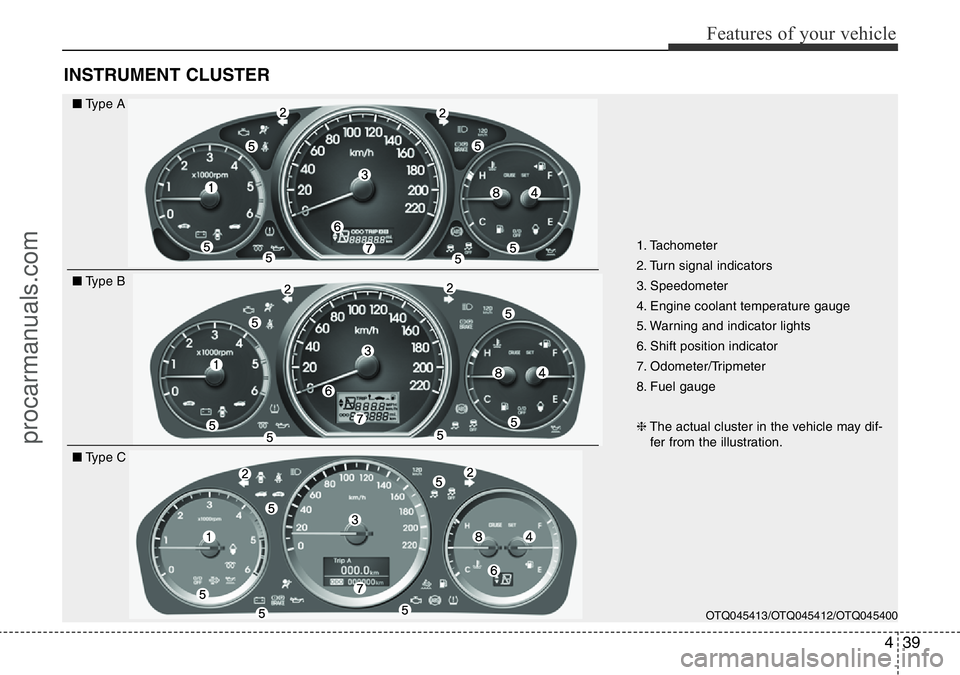
INSTRUMENT CLUSTER
1. Tachometer
2. Turn signal indicators
3. Speedometer
4. Engine coolant temperature gauge
5. Warning and indicator lights
6. Shift position indicator
7. Odometer/Tripmeter
8. Fuel gauge
❈The actual cluster in the vehicle may dif-
fer from the illustration.
OTQ045413/OTQ045412/OTQ045400
■Type A
■Type B
■Type C
procarmanuals.com
Page 123 of 419
449
Features of your vehicle
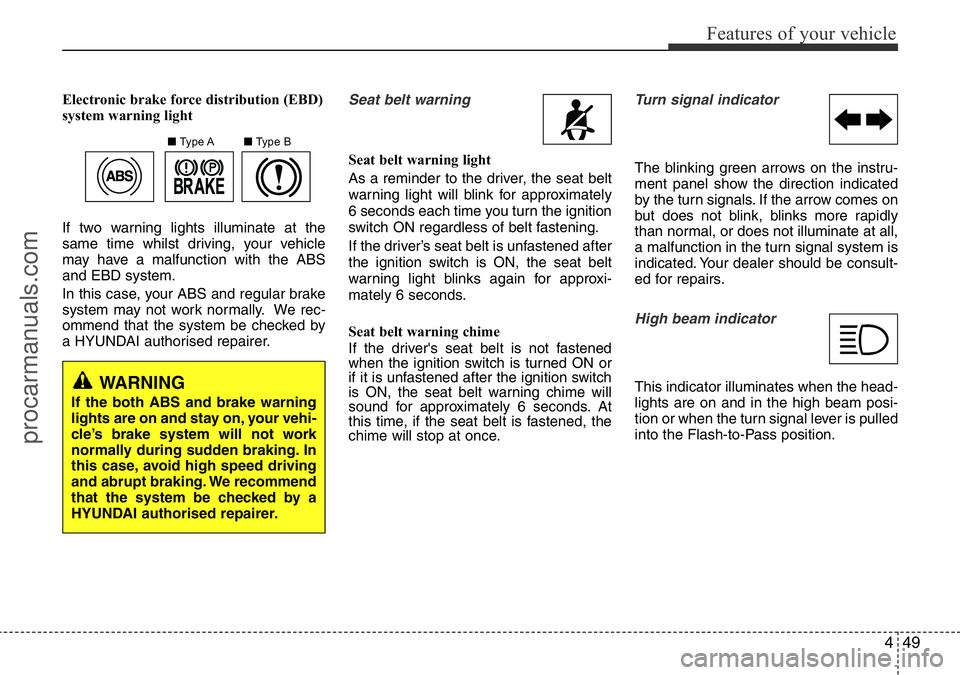
Electronic brake force distribution (EBD)
system warning light
If two warning lights illuminate at the
same time whilst driving, your vehicle
may have a malfunction with the ABS
and EBD system.
In this case, your ABS and regular brake
system may not work normally. We rec-
ommend that the system be checked by
a HYUNDAI authorised repairer.Seat belt warning
Seat belt warning light
As a reminder to the driver, the seat belt
warning light will blink for approximately
6 seconds each time you turn the ignition
switch ON regardless of belt fastening.
If the driver’s seat belt is unfastened after
the ignition switch is ON, the seat belt
warning light blinks again for approxi-
mately 6 seconds.
Seat belt warning chime
If the driver's seat belt is not fastened
when the ignition switch is turned ON or
if it is unfastened after the ignition switch
is ON, the seat belt warning chime will
sound for approximately 6 seconds. At
this time, if the seat belt is fastened, the
chime will stop at once.
Turn signal indicator
The blinking green arrows on the instru-
ment panel show the direction indicated
by the turn signals. If the arrow comes on
but does not blink, blinks more rapidly
than normal, or does not illuminate at all,
a malfunction in the turn signal system is
indicated. Your dealer should be consult-
ed for repairs.
High beam indicator
This indicator illuminates when the head-
lights are on and in the high beam posi-
tion or when the turn signal lever is pulled
into the Flash-to-Pass position.
■Type A■Type B
WARNING
If the both ABS and brake warning
lights are on and stay on, your vehi-
cle’s brake system will not work
normally during sudden braking. In
this case, avoid high speed driving
and abrupt braking. We recommend
that the system be checked by a
HYUNDAI authorised repairer.
procarmanuals.com
Page 137 of 419
463
Features of your vehicle
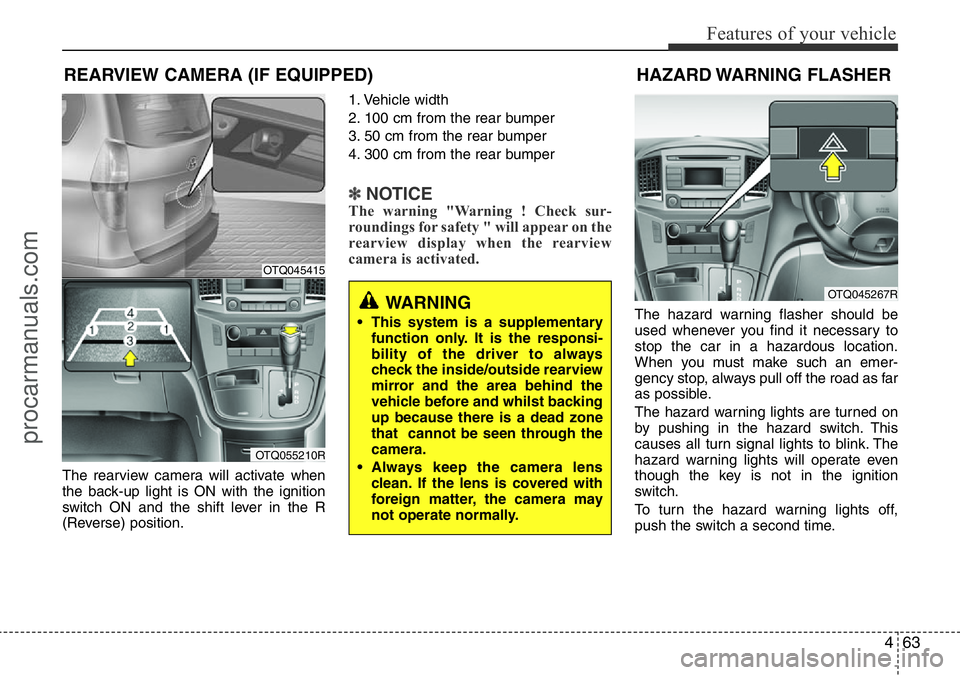
The rearview camera will activate when
the back-up light is ON with the ignition
switch ON and the shift lever in the R
(Reverse) position.1. Vehicle width
2. 100 cm from the rear bumper
3. 50 cm from the rear bumper
4. 300 cm from the rear bumper
✽NOTICEThe warning "Warning ! Check sur-
roundings for safety " will appear on the
rearview display when the rearview
camera is activated.
The hazard warning flasher should be
used whenever you find it necessary to
stop the car in a hazardous location.
When you must make such an emer-
gency stop, always pull off the road as far
as possible.
The hazard warning lights are turned on
by pushing in the hazard switch. This
causes all turn signal lights to blink. The
hazard warning lights will operate even
though the key is not in the ignition
switch.
To turn the hazard warning lights off,
push the switch a second time.
REARVIEW CAMERA (IF EQUIPPED)
WARNING
• This system is a supplementary
function only. It is the responsi-
bility of the driver to always
check the inside/outside rearview
mirror and the area behind the
vehicle before and whilst backing
up because there is a dead zone
that cannot be seen through the
camera.
• Always keep the camera lens
clean. If the lens is covered with
foreign matter, the camera may
not operate normally.
OTQ045415
OTQ055210R
HAZARD WARNING FLASHER
OTQ045267R
procarmanuals.com
Page 140 of 419
Features of your vehicle
66 4
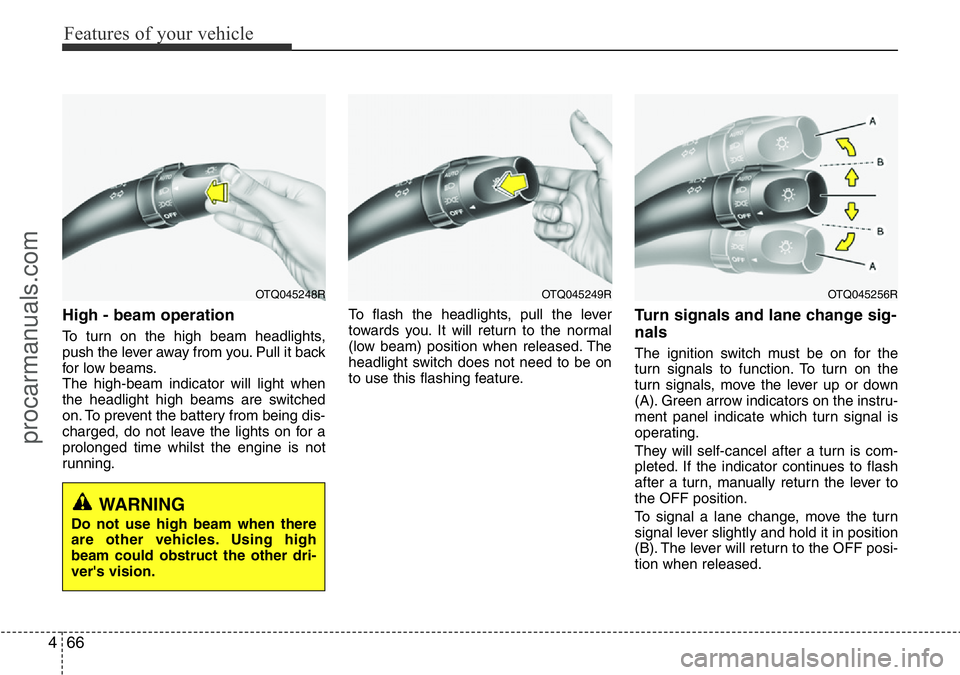
High - beam operation
To turn on the high beam headlights,
push the lever away from you. Pull it back
for low beams.
The high-beam indicator will light when
the headlight high beams are switched
on. To prevent the battery from being dis-
charged, do not leave the lights on for a
prolonged time whilst the engine is not
running.To flash the headlights, pull the lever
towards you. It will return to the normal
(low beam) position when released. The
headlight switch does not need to be on
to use this flashing feature.
Turn signals and lane change sig-
nals
The ignition switch must be on for the
turn signals to function. To turn on the
turn signals, move the lever up or down
(A). Green arrow indicators on the instru-
ment panel indicate which turn signal is
operating.
They will self-cancel after a turn is com-
pleted. If the indicator continues to flash
after a turn, manually return the lever to
the OFF position.
To signal a lane change, move the turn
signal lever slightly and hold it in position
(B). The lever will return to the OFF posi-
tion when released.
OTQ045249ROTQ045256ROTQ045248R
WARNING
Do not use high beam when there
are other vehicles. Using high
beam could obstruct the other dri-
ver's vision.
procarmanuals.com
Page 141 of 419
467
Features of your vehicle
If an indicator stays on and does not
flash or if it flashes abnormally, one of the
turn signal bulbs may be burned out and
will require replacement.
✽NOTICE
If an indicator flash is abnormally quick
or slow, a bulb may be burned out or
have a poor electrical connection in the
circuit.
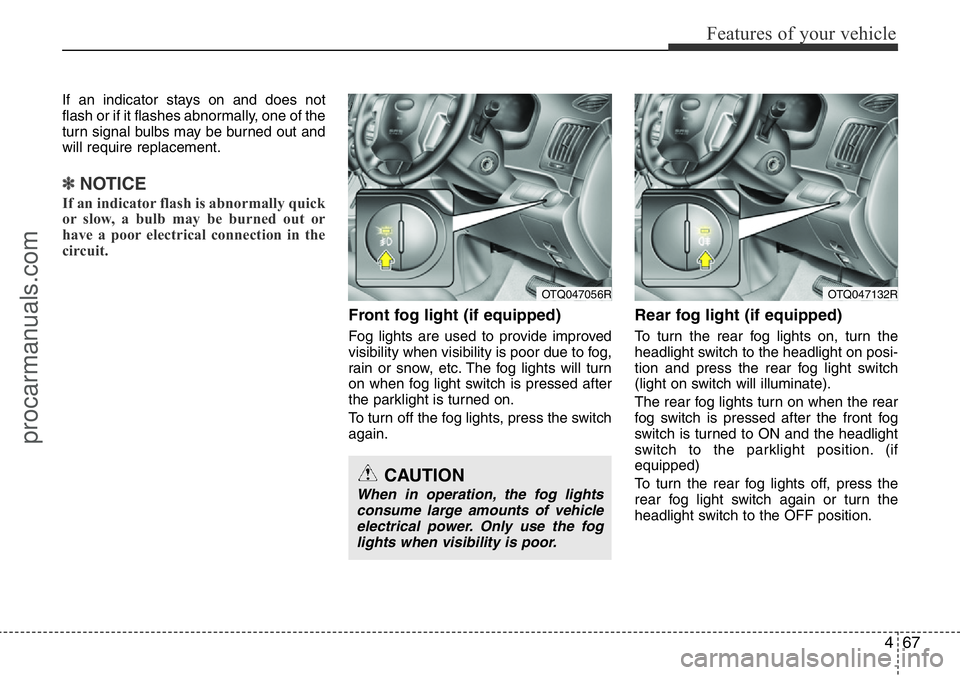
Front fog light (if equipped)
Fog lights are used to provide improved
visibility when visibility is poor due to fog,
rain or snow, etc. The fog lights will turn
on when fog light switch is pressed after
the parklight is turned on.
To turn off the fog lights, press the switch
again.
Rear fog light (if equipped)
To turn the rear fog lights on, turn the
headlight switch to the headlight on posi-
tion and press the rear fog light switch
(light on switch will illuminate).
The rear fog lights turn on when the rear
fog switch is pressed after the front fog
switch is turned to ON and the headlight
switch to the parklight position. (if
equipped)
To turn the rear fog lights off, press the
rear fog light switch again or turn the
headlight switch to the OFF position.
OTQ047132ROTQ047056R
CAUTION
When in operation, the fog lights
consume large amounts of vehicle
electrical power. Only use the fog
lights when visibility is poor.
procarmanuals.com
Page 187 of 419
4113
Features of your vehicle
✽NOTICE
• If you install an aftermarket HID
head lamp, your vehicle’s audio and
electronic device may malfunction.
• Prevent chemicals such as perfume,
cosmetic oil, sun cream, hand cleaner
and air freshener from contacting the
interior parts because they may cause
damage or discoloration.
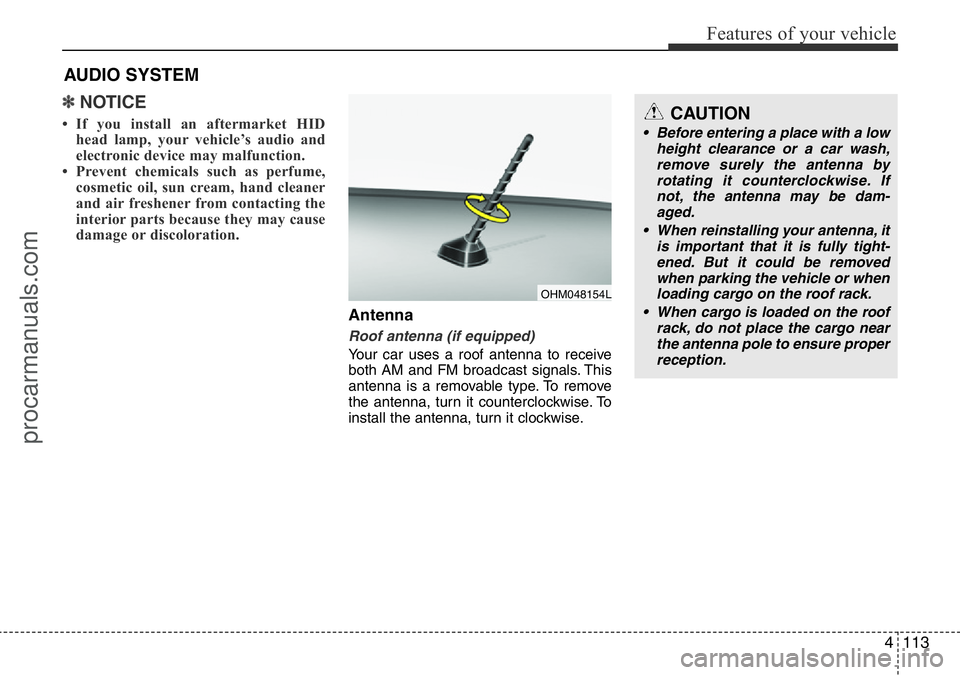
Antenna
Roof antenna (if equipped)
Your car uses a roof antenna to receive
both AM and FM broadcast signals. This
antenna is a removable type. To remove
the antenna, turn it counterclockwise. To
install the antenna, turn it clockwise.
AUDIO SYSTEM
CAUTION
• Before entering a place with a low
height clearance or a car wash,
remove surely the antenna by
rotating it counterclockwise. If
not, the antenna may be dam-
aged.
• When reinstalling your antenna, it
is important that it is fully tight-
ened. But it could be removed
when parking the vehicle or when
loading cargo on the roof rack.
• When cargo is loaded on the roof
rack, do not place the cargo near
the antenna pole to ensure proper
reception.
OHM048154L
procarmanuals.com
Page 198 of 419
Features of your vehicle
124 4
✽NOTICE - USING THE
Bluetooth®Wireless Technology
MOBILE PHONE
• Do not use a mobile phone or perform
Bluetooth®Wireless Technology settings
(e.g. pairing a phone) whilst driving.
• Some Bluetooth
®Wireless Technology -
enabled phones may not be recognized by
the system or fully compatible with the
system.
• Before using Bluetooth
®Wireless
Technology related features of the
audio system, refer your phone’s User’s
Manual for phone-side Bluetooth
®
Wireless Technology operations.
• The phone must be paired to the audio
system to use Bluetooth
®Wireless
Technology related features.
• You will not be able to use the hands-
free feature when your phone (in the
car) is outside of the mobile service area
(e.g. in a tunnel, in a underground, in a
mountainous area, etc.).
(Continued)(Continued)
• If the mobile phone signal is poor or
the vehicles interior noise is too loud, it
may be difficult to hear the other per-
son’s voice during a call.
• Do not place the phone near or inside
metallic objects, otherwise communi-
cations with Bluetooth
®Wireless
Technology system or mobile service
stations can be disturbed.
• Whilst a phone is connected through
Bluetooth
®Wireless Technology your
phone may discharge quicker than
usual for additional Bluetooth
®Wireless
Technology-related operations.
• Some mobile phones or other devices
may cause interference noise or mal-
function to audio system. In this case,
store the device in a different location
may resolve the condition.
• Phone contact names should be saved
in English or they may not be displayed
correctly.
(Continued)(Continued)
• If Priority is set upon vehicle
ignition(IGN/ACC ON), the Bluetooth
®
Wireless Technology phone will be
automatically connected.
Even if you are outside, the Bluetooth
®
Wireless Technology phone will be
automatically connected once you are
in the vicinity of the vehicle.
If you do not want automatic
Bluetooth
®Wireless Technology con-
nection, turn the Bluetooth®Wireless
Technology feature off.
• The hands-free call volume and quali-
ty may differ depending on the mobile
phone type.
•Bluetooth
®Wireless Technology features
can be used only when the mobile phone
has been paired and connected with the
device. For more information on pairing
and connecting Bluetooth
®Wireless
Technology enabled mobile phones,
refer to the “Phone Setup” section.
(Continued)
procarmanuals.com