heating HYUNDAI IONIQ 2020 User Guide
[x] Cancel search | Manufacturer: HYUNDAI, Model Year: 2020, Model line: IONIQ, Model: HYUNDAI IONIQ 2020Pages: 561, PDF Size: 24.5 MB
Page 280 of 561
5-44
Driving your vehicle
Good Braking Practices
Wet brakes can be dangerous! The
brakes may get wet if the vehicle is
driven through standing water or if it
is washed. Your vehicle will not stop
as quickly if the brakes are wet. Wet
brakes may cause the vehicle to pull
to one side.To dry the brakes, apply the brakes
lightly until the braking action returns
to normal. If the braking action does
not return to normal, stop as soon as
it is safe to do so and call an author-
ized HYUNDAI dealer for assistance.
DO NOT drive with your foot resting
on the brake pedal. Even light, but
constant pedal pressure can result in
the brakes overheating, brake wear,
and possibly even brake failure.
If a tire goes flat while you are driv-
ing, apply the brakes gently and
keep the vehicle pointed straight
ahead while you slow down. When
you are moving slowly enough for it
to be safe to do so, pull off the road
and stop in a safe location.
Keep your foot firmly on the brake
pedal when the vehicle is stopped to
prevent the vehicle from rolling for-
ward. Whenever leaving the vehicle or
parking, always come to a com-
plete stop and continue to
depress the brake pedal. Shift
to the P (Park) position, then
apply the parking brake, and
place the POWER button in the
OFF position.
Vehicles parked with the park-
ing brake not applied or not
fully engaged may roll inadver-
tently and may cause injury to
the driver and others. ALWAYS
apply the parking brake before
exiting the vehicle.
WARNING
Page 371 of 561
5-135
Driving your vehicle
5
Hazardous Driving Conditions
When hazardous driving elements
are encountered such as water,
snow, ice, mud and sand, take the
bellow suggestions:
Drive cautiously and keep a longer
braking distance.
Avoid abrupt braking or steering.
When your vehicle is stuck in snow,
mud, or sand, use second gear.
Accelerate slowly to avoid unnec-
essary wheel spin.
Put sand, rock salt, tire chains or
other non-slip materials under the
wheels to provide additional trac-
tion while the vehicle becomes
stuck in ice, snow, or mud.
Rocking the Vehicle
If it is necessary to rock the vehicle
to free it from snow, sand, or mud,
first turn the steering wheel right and
left to clear the area around your
front wheels. Then, shift back and
forth between R (Reverse) and a for-
ward gear.
Try to avoid spinning the wheels, and
do not race the vehicle.
To prevent reduction gear wear, wait
until the wheels stop spinning before
shifting gears. Release the accelera-
tor pedal while shifting, and press
lightly on the accelerator pedal while
the reduction gear is in gear. Slowly
spinning the wheels in forward and
reverse directions causes a rocking
motion that may free the vehicle.
S SP
PE
EC
CI
IA
AL
L
D
DR
RI
IV
VI
IN
NG
G
C
CO
ON
ND
DI
IT
TI
IO
ON
NS
S
If the vehicle is stuck and
excessive wheel spin occurs,
the temperature in the tires can
increase very quickly. If the tires
become damaged, a tire blow
out or tire explosion can occur.
This condition is dangerous -
you and others may be injured.
Do not attempt this procedure if
people or objects are anywhere
near the vehicle.
If you attempt to free the vehi-
cle, the vehicle can overheat
quickly, possibly causing an
motor compartment fire or
other damage. Try to avoid spin-
ning the wheels as much as
possible to prevent overheating
of either the tires or the vehicle.
DO NOT allow the vehicle to
spin the wheels above 56 km/h
(35 mph).
WARNING
Page 372 of 561
5-136
Driving your vehicle
Information
The ESC system (if equipped) must be
turned OFF before rocking the vehi-
cle.
If you are still stuck after rocking
the vehicle a few times, have the
vehicle pulled out by a tow vehicle
to avoid vehicle overheating, pos-
sible damage to the reduction
gear and tire damage. See
"Towing" in chapter 6.
Smooth Cornering
Avoid braking or gear changing in
corners, especially when roads are
wet. Ideally, corners should always
be taken under gentle acceleration.
Driving at Night
Night driving presents more hazards
than driving in the daylight. Here are
some important tips to remember:
Slow down and keep more dis-
tance between you and other vehi-
cles, as it may be more difficult to
see at night, especially in areas
where there may not be any street
lights.
Adjust your mirrors to reduce the
glare from other driver's head-
lamps.
Keep your headlamps clean and
properly aimed. Dirty or improperly
aimed headlamps will make it
much more difficult to see at night.
Avoid staring directly at the head-
lamps of oncoming vehicles. You
could be temporarily blinded, and it
will take several seconds for your
eyes to readjust to the darkness.
Driving in the Rain
Rain and wet roads can make driving
dangerous. Here are a few things to
consider when driving in the rain or
on slick pavement:
Slow down and allow extra follow-
ing distance. A heavy rainfall
makes it harder to see and increas-
es the distance needed to stop
your vehicle.
Turn OFF your Cruise Control. (if
equipped)
Replace your windshield wiper
blades when they show signs of
streaking or missing areas on the
windshield.
Be sure your tires have enough
tread. If your tires do not have
enough tread, making a quick stop
on wet pavement can cause a skid
and possibly lead to an accident.
See "Tire Tread" in chapter 7.
Turn on your headlamps to make it
easier for others to see you.
Driving too fast through large pud-
dles can affect your brakes. If you
must go through puddles, try to
drive through them slowly.
NOTICE
i
Page 389 of 561
6-7
What to do in an emergency
6
1. Pull off the road and stop as soon
as it is safe to do so.
2. Shift to P (Park) and set the park-
ing brake. If the air conditioning is
on, turn it off.
3. If coolant is running out under the
vehicle or steam is coming out
from the hood, stop the vehicle.
Do not open the hood until the
coolant has stopped running or
the steaming has stopped. If there
is no visible loss of coolant and no
steam, leave the vehicle running
and check to be sure the vehicle
cooling fan is operating. If the fan
is not running, turn the vehicle off.
4. Check for coolant leaking from the
radiator, hoses or under the vehi-
cle. (If the air conditioning had
been in use, it is normal for cold
water to be draining from it when
you stop.)
5. If coolant is leaking out, stop the
vehicle immediately and call the
nearest authorized HYUNDAI
dealer for assistance.6. If you cannot find the cause of the
overheating, wait until the radiator
temperature has returned to nor-
mal. Then, if coolant has been
lost, call an authorized HYUNDAI
dealer for assistance.
Serious loss of coolant indicates
there is a leak in the cooling sys-
tem and we recommend that the
system be checked by an author-
ized HYUNDAI dealer.
NOTICE
I IF
F
T
TH
HE
E
V
VE
EH
HI
IC
CL
LE
E
O
OV
VE
ER
RH
HE
EA
AT
TS
S
Page 498 of 561
H10
E EV
V
M
MO
OD
DE
E
(
(C
CO
ON
NT
T.
.)
)
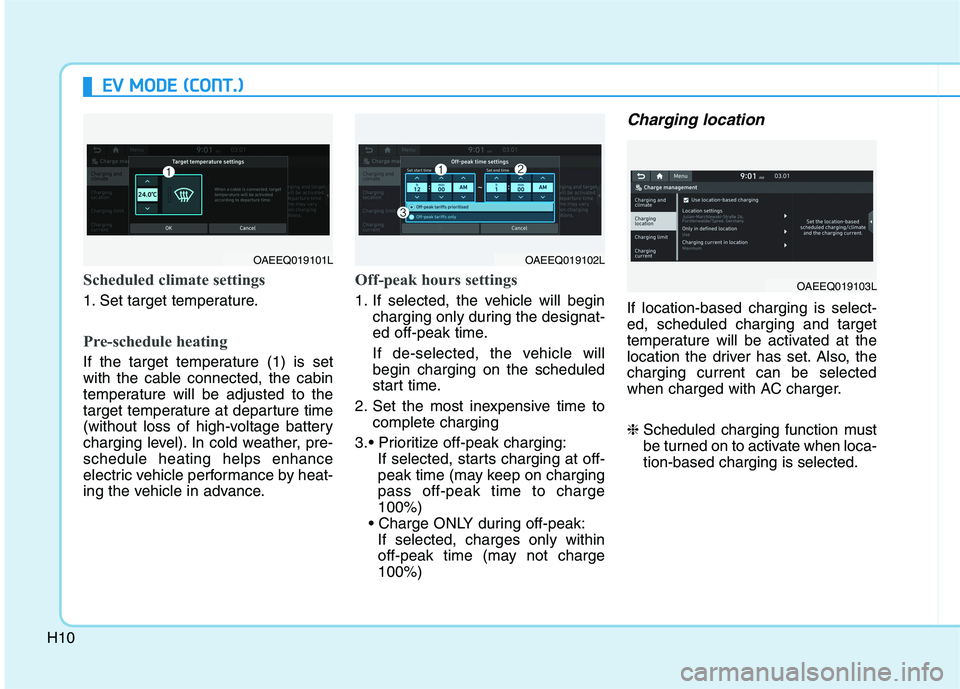
Scheduled climate settings
1. Set target temperature.
Pre-schedule heating
If the target temperature (1) is set
with the cable connected, the cabin
temperature will be adjusted to the
target temperature at departure time
(without loss of high-voltage battery
charging level). In cold weather, pre-
schedule heating helps enhance
electric vehicle performance by heat-
ing the vehicle in advance.
Off-peak hours settings
1. If selected, the vehicle will begin
charging only during the designat-
ed off-peak time.
If de-selected, the vehicle will
begin charging on the scheduled
start time.
2. Set the most inexpensive time to
complete charging
If selected, starts charging at off-
peak time (may keep on charging
pass off-peak time to charge
100%)
If selected, charges only within
off-peak time (may not charge
100%)
Charging location
If location-based charging is select-
ed, scheduled charging and target
temperature will be activated at the
location the driver has set. Also, the
charging current can be selected
when charged with AC charger.
❈Scheduled charging function must
be turned on to activate when loca-
tion-based charging is selected.
OAEEQ019101LOAEEQ019102L
OAEEQ019103L
Page 555 of 561
I-2
Accessing your vehicle .....................................................3-3
Immobilizer System .....................................................3-8
Smart Key ....................................................................3-3
Air bag - Advanced Supplemental Restraint System .....2-47
Additional Safety Precautions ....................................2-69
Air Bag Warning Labels.............................................2-70
How Does the Air Bag System Operate? ...................2-53
Occupant Classification System (OCS) .....................2-58
SRS Care ....................................................................2-68
What to Expect After an Air Bag Inflates ..................2-57
Where Are the Air Bags? ...........................................2-49
Why Didn't My Air Bag Go Off in a Collision?........2-63
Air Conditioning System ..................................................8-5
Appearance Care .............................................................7-63
Exterior Care ..............................................................7-63
Interior Care ...............................................................7-69
Automatic climate control system ................................3-119
Automatic Heating and Air Conditioning ................3-120
Manual Heating and Air Conditioning .....................3-121
System Maintenance ................................................3-130
System Operation .....................................................3-128Battery(12V) ...................................................................7-20
Battery Recharging .....................................................7-21
For Best Battery Service ............................................7-21
Reset Features ............................................................7-22
Before driving ...................................................................5-3
Before Entering the Vehicle .........................................5-3
Before Starting .............................................................5-3
Blind-spot Collision Warning (BCW) ...........................5-71
Declaration of conformity .........................................5-82
System description .....................................................5-71
System setting and operation .....................................5-72
Warning message and system control ........................5-74
Brake Fluid .....................................................................7-13
Checking the Brake Fluid Level ................................7-13
Braking system ..............................................................5-26
Anti-lock Brake System (ABS)..................................5-36
Auto Hold ...................................................................5-32
Disc Brake Wear Indicator .........................................5-27
Electronic Parking Brake (EPB) ................................5-27
Electronic Stability Control (ESC).............................5-38
Good Braking Practices..............................................5-44
Hill-Start Assist Control (HAC) .................................5-43
Power Brakes..............................................................5-26
Vehicle Stability Management (VSM) .......................5-42
Bulb Wattage .....................................................................8-3
Index
AB