roof HYUNDAI IONIQ 2020 User Guide
[x] Cancel search | Manufacturer: HYUNDAI, Model Year: 2020, Model line: IONIQ, Model: HYUNDAI IONIQ 2020Pages: 561, PDF Size: 24.5 MB
Page 159 of 561
3-74
Convenient features of your vehicle
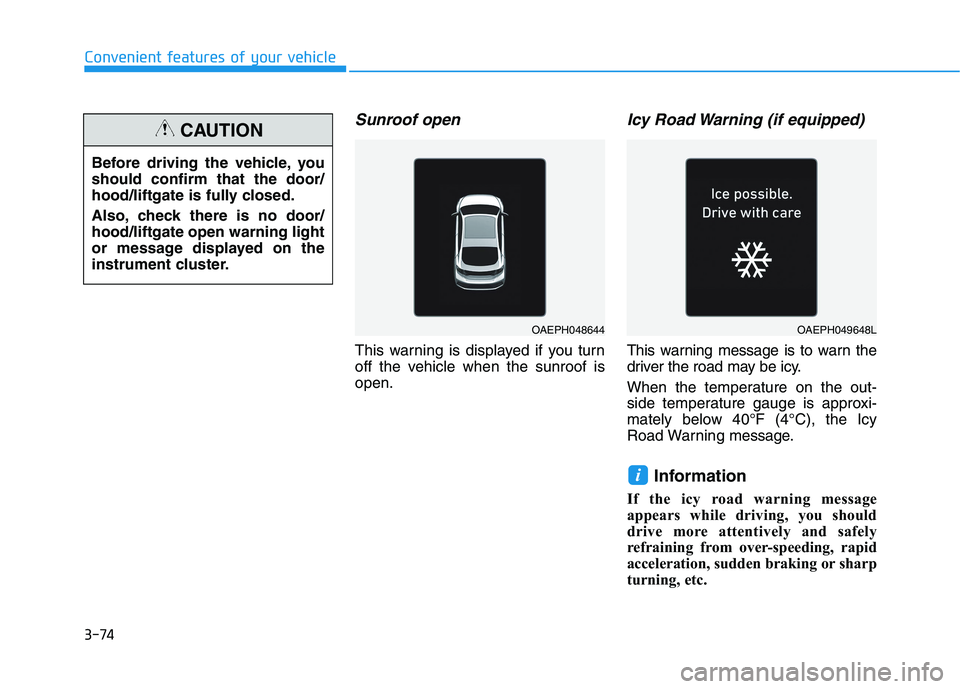
Sunroof open
This warning is displayed if you turn
off the vehicle when the sunroof is
open.
Icy Road Warning (if equipped)
This warning message is to warn the
driver the road may be icy.
When the temperature on the out-
side temperature gauge is approxi-
mately below 40°F (4°C), the Icy
Road Warning message.
Information
If the icy road warning message
appears while driving, you should
drive more attentively and safely
refraining from over-speeding, rapid
acceleration, sudden braking or sharp
turning, etc.
i
Before driving the vehicle, you
should confirm that the door/
hood/liftgate is fully closed.
Also, check there is no door/
hood/liftgate open warning light
or message displayed on the
instrument cluster.
CAUTION
OAEPH048644OAEPH049648L
Page 214 of 561
3-129
Convenient features of your vehicle
3
Air conditioning
All HYUNDAI Air Conditioning
Systems are filled with environmen-
tally friendly R-134a refrigerant.
1. Start the vehicle.
2. Push the air conditioning button.
3. Set the mode to the Face Level
mode.
4. Set the air intake control to the
recirculated air position. However,
prolonged operation of the recircu-
lated air position will excessively
dry the air. In this case, change the
air position.
5. Adjust the fan speed control and
temperature control to maintain
maximum comfort.
When maximum cooling is desired,
set the temperature control to the
extreme left position then set the fan
speed control to the highest speed.
Air conditioning system operation
tips
If the vehicle has been parked in
direct sunlight during hot weather,
open the windows for a short time
to let the hot air inside the vehicle
escape.
After sufficient cooling has been
achieved, switch back from the
recirculated air to the fresh outside
air position.
To help reduce moisture inside of
the windows on rainy or humid
days, decrease the humidity inside
the vehicle by operating the air
conditioning system with the win-
dows and sunroof closed.
Use the air conditioning system
every month only for a few minutes
to ensure maximum system per-
formance. If you operate air conditioner
excessively, the difference between
the temperature of the outside air
and that of the windshield could
cause the outer surface of the
windshield to fog up, causing loss
of visibility. In this case, set the
mode selection knob or button to
the position and fan speed
control to the lower speed.
Page 234 of 561
4-3
Infotainment System
4
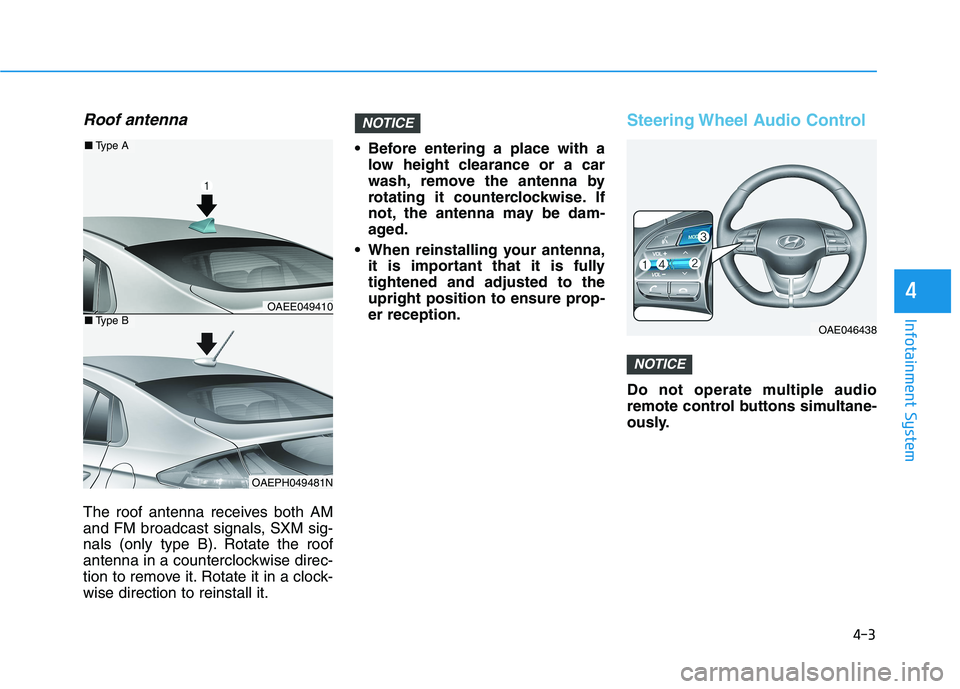
Roof antenna
The roof antenna receives both AM
and FM broadcast signals, SXM sig-
nals (only type B). Rotate the roof
antenna in a counterclockwise direc-
tion to remove it. Rotate it in a clock-
wise direction to reinstall it. Before entering a place with a
low height clearance or a car
wash, remove the antenna by
rotating it counterclockwise. If
not, the antenna may be dam-
aged.
When reinstalling your antenna,
it is important that it is fully
tightened and adjusted to the
upright position to ensure prop-
er reception.
Steering Wheel Audio Control
Do not operate multiple audio
remote control buttons simultane-
ously.
NOTICE
NOTICE
OAE046438
OAEE049410
OAEPH049481N
■Type A
■Type B
Page 416 of 561
7-10
Maintenance
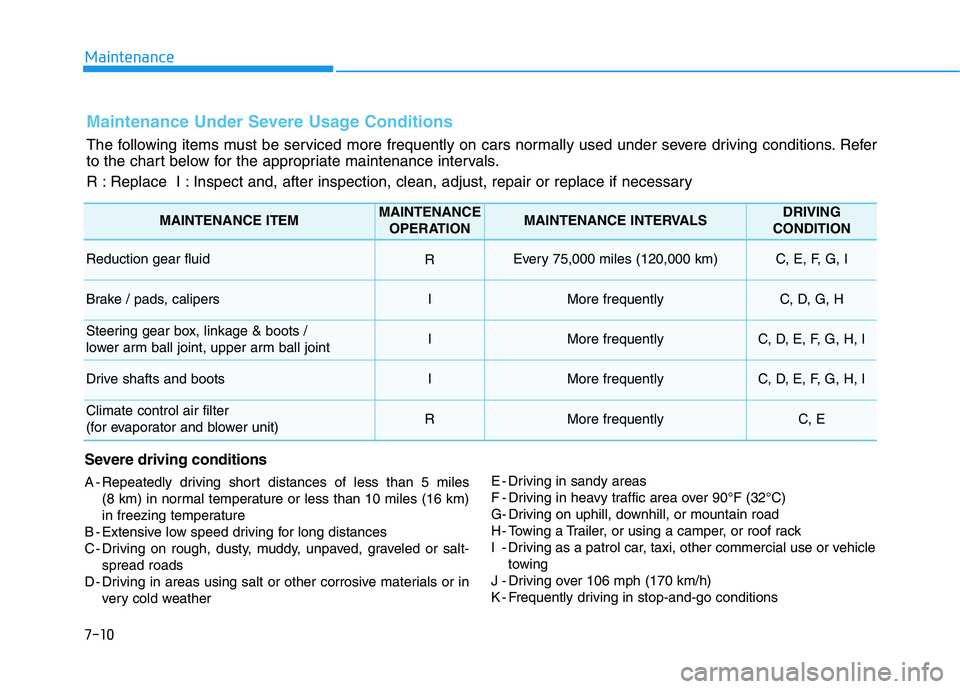
Maintenance Under Severe Usage Conditions
The following items must be serviced more frequently on cars normally used under severe driving conditions. Refer
to the chart below for the appropriate maintenance intervals.
R : Replace I : Inspect and, after inspection, clean, adjust, repair or replace if necessary
Severe driving conditions
A - Repeatedly driving short distances of less than 5 miles
(8 km) in normal temperature or less than 10 miles (16 km)
in freezing temperature
B - Extensive low speed driving for long distances
C - Driving on rough, dusty, muddy, unpaved, graveled or salt-
spread roads
D - Driving in areas using salt or other corrosive materials or in
very cold weatherE - Driving in sandy areas
F - Driving in heavy traffic area over 90°F (32°C)
G- Driving on uphill, downhill, or mountain road
H - Towing a Trailer, or using a camper, or roof rack
I - Driving as a patrol car, taxi, other commercial use or vehicle
towing
J - Driving over 106 mph (170 km/h)
K - Frequently driving in stop-and-go conditions
MAINTENANCE ITEMMAINTENANCE
OPERATIONMAINTENANCE INTERVALSDRIVING
CONDITION
Reduction gear fluid REvery 75,000 miles (120,000 km) C, E, F, G, I
Brake / pads, calipersIMore frequentlyC, D, G, H
Steering gear box, linkage & boots /
lower arm ball joint, upper arm ball jointIMore frequentlyC, D, E, F, G, H, I
Drive shafts and bootsIMore frequentlyC, D, E, F, G, H, I
Climate control air filter
(for evaporator and blower unit)RMore frequentlyC, E
Page 428 of 561
7-22
Maintenance
By jump starting
After a jump start from a good bat-
tery, drive the vehicle for 20-30 min-
utes before it is shutoff. The vehicle
may not restart if you shut it off
before the battery had a chance to
adequately recharge. See "Jump
Starting" in chapter 6 for more infor-
mation on jump starting procedures.
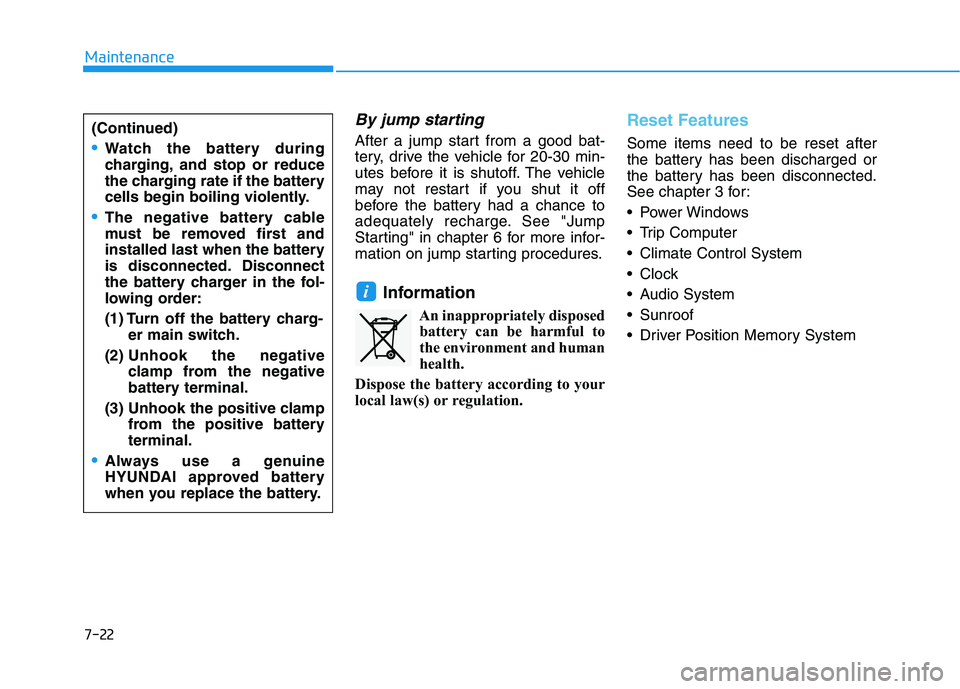
Information
An inappropriately disposed
battery can be harmful to
the environment and human
health.
Dispose the battery according to your
local law(s) or regulation.
Reset Features
Some items need to be reset after
the battery has been discharged or
the battery has been disconnected.
See chapter 3 for:
Power Windows
Trip Computer
Climate Control System
Clock
Audio System
Sunroof
Driver Position Memory System
i
(Continued)
Watch the battery during
charging, and stop or reduce
the charging rate if the battery
cells begin boiling violently.
The negative battery cable
must be removed first and
installed last when the battery
is disconnected. Disconnect
the battery charger in the fol-
lowing order:
(1) Turn off the battery charg-
er main switch.
(2) Unhook the negative
clamp from the negative
battery terminal.
(3) Unhook the positive clamp
from the positive battery
terminal.
Always use a genuine
HYUNDAI approved battery
when you replace the battery.
Page 440 of 561
7-34
Maintenance
Maximum Inflation Pressure
The maximum air pressure to which
a cold tire may be inflated. The max-
imum air pressure is molded onto the
sidewall.
Maximum Load Rating
The load rating for a tire at the maxi-
mum permissible inflation pressure
for that tire.
Maximum Loaded Vehicle
Weight
The sum of curb weight; accessory
weight; vehicle capacity weight; and
production options weight.
Normal Occupant Weight
The number of occupants a vehicle
is designed to seat multiplied by 150
pounds (68 kg).
Occupant Distribution
Designated seating positions.
Outward Facing Sidewall
An asymmetrical tire has a particular
side that faces outward when mount-
ed on a vehicle. The outward facing
sidewall bears white lettering or
bears manufacturer, brand, and/or
model name molding that is higher or
deeper than the same moldings on
the inner facing sidewall.
Passenger (P-Metric) tire
A tire used on passenger cars and
some light duty trucks and multipur-
pose vehicles.
Ply
A layer of rubber-coated parallel
cords.
Pneumatic tire
A mechanical device made of rubber,
chemicals, fabric and steel or other
materials, that, when mounted on an
automotive wheel provides the trac-
tion and contains the gas or fluid that
sustains the load.
Pneumatic options weight
The combined weight of installed
regular production options weighing
over 5 lb. (2.3 kg) in excess of the
standard items which they replace,
not previously considered in curb
weight or accessory weight, includ-
ing heavy duty breaks, ride levelers,
roof rack, heavy duty battery, and
special trim.
Recommended Inflation
Pressure
Vehicle manufacturer's recommend-
ed tire inflation pressure as shown
on the tire placard.
Page 452 of 561
7-46
Maintenance
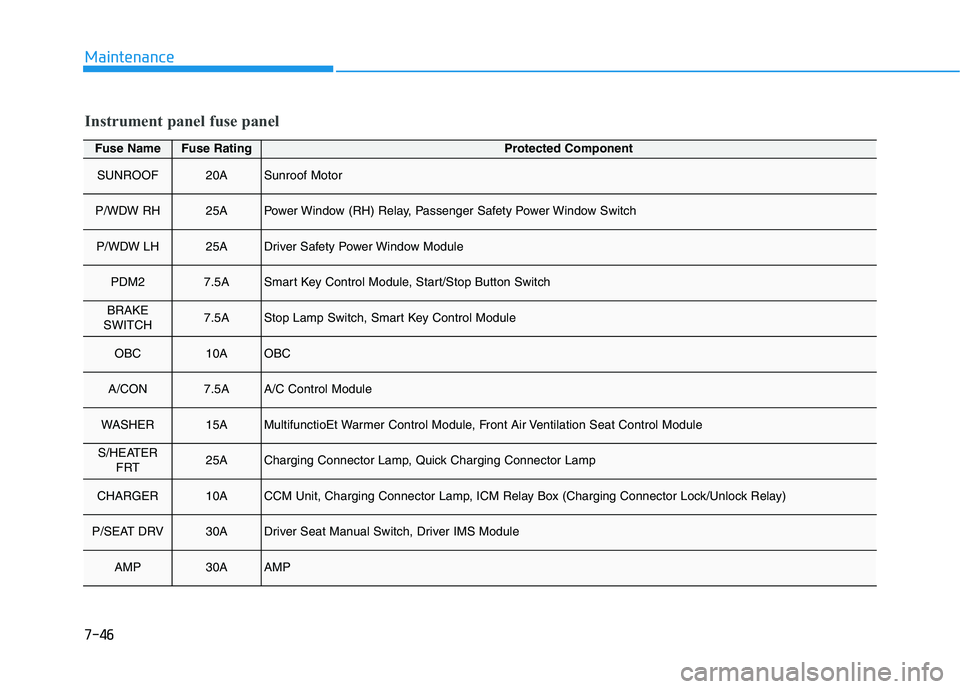
Fuse NameFuse RatingProtected Component
SUNROOF20ASunroof Motor
P/WDW RH25APower Window (RH) Relay, Passenger Safety Power Window Switch
P/WDW LH25ADriver Safety Power Window Module
PDM27.5ASmart Key Control Module, Start/Stop Button Switch
BRAKE
SWITCH7.5AStop Lamp Switch, Smart Key Control Module
OBC10AOBC
A/CON7.5AA/C Control Module
WASHER15AMultifunctioEt Warmer Control Module, Front Air Ventilation Seat Control Module
S/HEATER
FRT25ACharging Connector Lamp, Quick Charging Connector Lamp
CHARGER10ACCM Unit, Charging Connector Lamp, ICM Relay Box (Charging Connector Lock/Unlock Relay)
P/SEAT DRV30ADriver Seat Manual Switch, Driver IMS Module
AMP30AAMP
Instrument panel fuse panel
Page 455 of 561
7-49
7
Maintenance
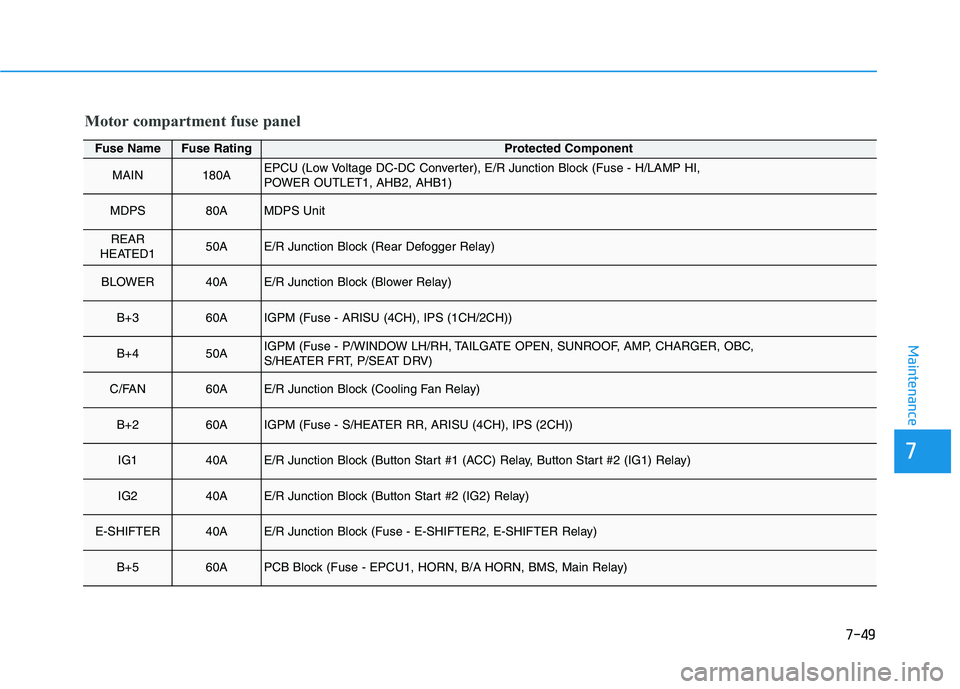
Motor compartment fuse panel
Fuse NameFuse RatingProtected Component
MAIN180AEPCU (Low Voltage DC-DC Converter), E/R Junction Block (Fuse - H/LAMP HI,
POWER OUTLET1, AHB2, AHB1)
MDPS80AMDPS Unit
REAR
HEATED150AE/R Junction Block (Rear Defogger Relay)
BLOWER40AE/R Junction Block (Blower Relay)
B+360AIGPM (Fuse - ARISU (4CH), IPS (1CH/2CH))
B+450AIGPM (Fuse - P/WINDOW LH/RH, TAILGATE OPEN, SUNROOF, AMP, CHARGER, OBC,
S/HEATER FRT, P/SEAT DRV)
C/FAN60AE/R Junction Block (Cooling Fan Relay)
B+260AIGPM (Fuse - S/HEATER RR, ARISU (4CH), IPS (2CH))
IG140AE/R Junction Block (Button Start #1 (ACC) Relay, Button Start #2 (IG1) Relay)
IG240AE/R Junction Block (Button Start #2 (IG2) Relay)
E-SHIFTER40AE/R Junction Block (Fuse - E-SHIFTER2, E-SHIFTER Relay)
B+560APCB Block (Fuse - EPCU1, HORN, B/A HORN, BMS, Main Relay)
Page 507 of 561
H19
Charging Precautions
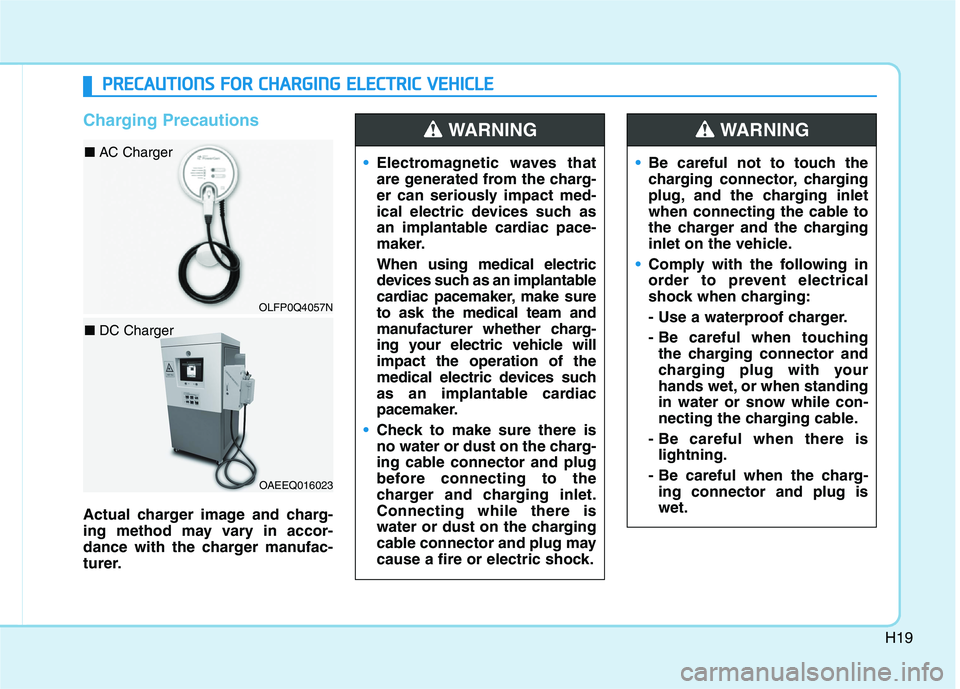
Actual charger image and charg-
ing method may vary in accor-
dance with the charger manufac-
turer.Electromagnetic waves that
are generated from the charg-
er can seriously impact med-
ical electric devices such as
an implantable cardiac pace-
maker.
When using medical electric
devices such as an implantable
cardiac pacemaker, make sure
to ask the medical team and
manufacturer whether charg-
ing your electric vehicle will
impact the operation of the
medical electric devices such
as an implantable cardiac
pacemaker.
Check to make sure there is
no water or dust on the charg-
ing cable connector and plug
before connecting to the
charger and charging inlet.
Connecting while there is
water or dust on the charging
cable connector and plug may
cause a fire or electric shock.
WARNING
Be careful not to touch the
charging connector, charging
plug, and the charging inlet
when connecting the cable to
the charger and the charging
inlet on the vehicle.
Comply with the following in
order to prevent electrical
shock when charging:
- Use a waterproof charger.
- Be careful when touching
the charging connector and
charging plug with your
hands wet, or when standing
in water or snow while con-
necting the charging cable.
- Be careful when there is
lightning.
- Be careful when the charg-
ing connector and plug is
wet.
WARNING
P PR
RE
EC
CA
AU
UT
TI
IO
ON
NS
S
F
FO
OR
R
C
CH
HA
AR
RG
GI
IN
NG
G
E
EL
LE
EC
CT
TR
RI
IC
C
V
VE
EH
HI
IC
CL
LE
E
OAEEQ016023
■ DC Charger
OLFP0Q4057N
■ AC Charger
Page 560 of 561
I-7
Resuming the Smart Regeneration System ................5-20
System Setting ............................................................5-18
Vehicle-to-Vehicle Front Recognition
- Front Radar Sensor ................................................5-20
Warning Message .......................................................5-21
Special driving conditions ............................................5-135
Driving at Night .......................................................5-136
Driving in Flooded Areas .........................................5-137
Driving in the Rain ...................................................5-136
Hazardous Driving Conditions .................................5-135
Highway Driving ......................................................5-137
Rocking the Vehicle .................................................5-135
Smooth Cornering ....................................................5-136
Steering wheel.................................................................3-16
Electric Power Steering (EPS) ...................................3-16
Heated Steering Wheel (for Canada) .........................3-18
Horn ............................................................................3-18
Tilt Steering / Telescope Steering ..............................3-17
Storage compartment ....................................................3-136
Center Console Storage ............................................3-136
Glove Box ................................................................3-136
Multi Box .................................................................3-137
Sunglass Holder........................................................3-137
Sunroof............................................................................3-45
Resetting the sunroof..................................................3-48
Sliding the sunroof .....................................................3-46
Sunroof opening and closing......................................3-46
Sunshade.....................................................................3-47
Tilting the sunroof ......................................................3-47Theft-alarm system .........................................................3-13
Tire Pressure Monitoring System (TPMS) .......................6-8
Changing a Tire with TPMS ......................................6-12
Check Tire Pressure......................................................6-8
Low Tire Pressure LCD Display with Position
Indicator ...................................................................6-10
Low Tire Pressure Telltale..........................................6-10
Tire Pressure Monitoring System.................................6-9
TPMS Malfunction Indicator .....................................6-11
Tire Specification and Pressure Label ..............................8-8
Tires and Wheels .....................................................7-23, 8-4
All Season Tires .........................................................7-36
Check Tire Inflation Pressure .....................................7-25
Low Aspect Ratio Tires ..............................................7-37
Radial-Ply Tires ..........................................................7-36
Recommended Cold Tire Inflation Pressures.............7-24
Snow Tires ..................................................................7-36
Summer Tires .............................................................7-36
Tire Care .....................................................................7-23
Tire Maintenance ........................................................7-28
Tire Replacement........................................................7-27
Tire Rotation...............................................................7-26
Tire Sidewall Labeling ...............................................7-28
Tire Terminology and Definitions ..............................7-32
Tire Traction ...............................................................7-28
Wheel Alignment and Tire Balance ...........................7-27
Wheel Replacement....................................................7-28
I
Index
T