warning HYUNDAI IONIQ 2020 Owners Manual
[x] Cancel search | Manufacturer: HYUNDAI, Model Year: 2020, Model line: IONIQ, Model: HYUNDAI IONIQ 2020Pages: 561, PDF Size: 24.5 MB
Page 489 of 561
E El
le
ec
ct
tr
ri
ic
c
V
Ve
eh
hi
ic
cl
le
e
S
Sy
ys
st
te
em
m
O
Ov
ve
er
rv
vi
ie
ew
w
Electric Vehicle ........................................................H3
Characteristics of Electric Vehicles ......................H3
Battery Information ................................................H3
Main Components ....................................................H4
High Voltage Battery (lithium-ion polymer)........H5
High Voltage Battery Warmer System .................H6
Nearby Stations .......................................................H7
Energy Information .................................................H8
Battery information ............................................................H8
Energy consumption .........................................................H8
Charge Management ...............................................H9
Charging and climate..........................................................H9
Charging location ..............................................................H10
Charging limit .....................................................................H11
Charging current ...............................................................H11
ECO Driving ............................................................H11
CO2 reduction ....................................................................H12
Driving history ...................................................................H12
EV Settings .............................................................H12
Winter mode for the EV Battery ..................................H12
Warning ...............................................................................H13
EV route ..............................................................................H13
Charging Information ............................................H14
Charging Time Information ..................................H14
Charging Types ......................................................H15
Charging Status .....................................................H16
Locking Charging Cable ........................................H17
When the Charging Connector is Locked ...................H17
Scheduled Charging...............................................H18
Charging Precautions............................................H19
AC Charge ...............................................................H21
How to Connect AC Charger ..........................................H21
Unlock Charging Door in Emergency ..........................H24
Checking Charging Status ...............................................H25
How to Disconnect AC Charger.....................................H26
Unlock Charging Connector in Emergency ................H27
DC Charge ..............................................................H28
How to Connect DC Charger ..........................................H28
Unlock Charging Door in Emergency ..........................H30
Checking Charging Status ...............................................H31
How to Disconnect DC Charger.....................................H32
Trickle Charge ........................................................H33
How to set the charge level of the portable
charger ................................................................................H33
How to Connect Portable Charger
(ICCB: In-Cable Control Box) ..........................................H34
Page 490 of 561
Unlock Charging Door in Emergency ..........................H38
Checking Charging Status ...............................................H39
Charging Status Indicator Lamp for Portable
Charger ................................................................................H40
How to Disconnect Portable Charger
(ICCB: In-Cable Control Box) ..........................................H43
Unlock Charging Connector in Emergency ................H44
Precautions for Portable Charger
(ICCB: In-Cable Control Box) ..........................................H44
EV Charging Troubleshooting
- Steps to Consider ...............................................H45
How to Start the Vehicle ......................................H46
How to Stop the Vehicle.......................................H46
Virtual Engine Sound System ..............................H47
Distance to Empty .................................................H47
When destination is not set ...........................................H48
When destination is set...................................................H48
Tips for Improving Distance to Empty ...............H49
Power/Charge Gauge............................................H49
State of Charge (SOC) Gauge for High Voltage
Battery ...................................................................H49
Warning and Indicator Lights
(related to electric vehicle) .................................H50
Ready Indicator ................................................................H50
Service Warning Light .....................................................H51
This warning light illuminates : ......................................H51
Power Down Warning Light ...........................................H51
Charging Indicator Light..................................................H52
High Voltage Battery Level Warning Light .................H52
Regenerative Brake Warning Light ..............................H52
LCD Display Messages ..........................................H52
Shift to P to charge .........................................................H52
Remaining Time .................................................................H53
Charging Door Open ........................................................H53
Charging Stopped. Check the AC/DC charger ...........H53
Charging Stopped. Check the cable connection .......H54
Check regenerative brakes/
Stop vehicle and check regenerative brakes ............H55
Low Battery........................................................................H55
Charge immediately. Power limited ..............................H55
Low outside temperature may limit power output.
Charge EV battery/Low EV battery temperature.
Power limited .....................................................................H56
Battery Overheated! Stop safety .................................H56
Power limited .....................................................................H57
Stop vehicle and check power supply .........................H57
Check virtual engine sound System .............................H58
Check electric vehicle system .......................................H58
Energy Flow ..........................................................H58
Vehicle Stop........................................................................H59
EV Propulsion ....................................................................H59
Regeneration ......................................................................H59
Aux. Battery Saver+ .............................................H60
Mode ....................................................................................H60
System Setting...................................................................H61
Utility Mode ............................................................H61
System Setting and Activation ......................................H62
System Deactivation .........................................................H62
If an Accident Occurs ...........................................H63
Other Precautions for Electric Vehicle ..............H65
Service Plug ...........................................................H65
Page 492 of 561
H4
Main Components
On-Board Charger (OBC) :
A device that charges the high volt-
age battery by converting AC
power from a charging station to
DC power.
• Inverter :A device that transforms
direct current (DC) from the high
voltage battery into alternating cur-
rent (AC) to supply power to the
electric motor and transforms AC
back into DC when available to
charge the high voltage battery.
LDC :An LDC is a Low Voltage
DC-to-DC converter that trans-
forms power from the high voltage
battery to the low voltage battery
(12V) in order to supply electrical
power to the vehicle to operate the
lights, wipers, multimedia, etc. Electric Motor :A device that con-
verts electrical energy from the
high voltage battery into mechani-
cal energy which is then trans-
ferred as rotational torque to the
wheels in order to drive the vehicle.
Reduction gear :Delivers rota-
tional force of the motor to the tires
at appropriate speeds and torque.
EV Battery (Lithium-ion) :On
board high voltage storage device
with a capacity up to 64 kWh
❈OBC : On-Board Charger
❈LDC : Low Voltage DC-DC Converter
M
MA
AI
IN
N
C
CO
OM
MP
PO
ON
NE
EN
NT
TS
S
O
OF
F
E
EL
LE
EC
CT
TR
RI
IC
C
V
VE
EH
HI
IC
CL
LE
E
Do not remove or disassem-
ble high voltage components
and high voltage battery con-
nectors and wires. Also, be
careful not to damage high
voltage components and the
high voltage battery. It may
cause serious injury and sig-
nificantly impact the perform-
ance and durability of the
vehicle.
When inspection and mainte-
nance is required for high volt-
age components, contact an
authorized HYUNDAI dealer.
WARNING
Page 500 of 561
H12
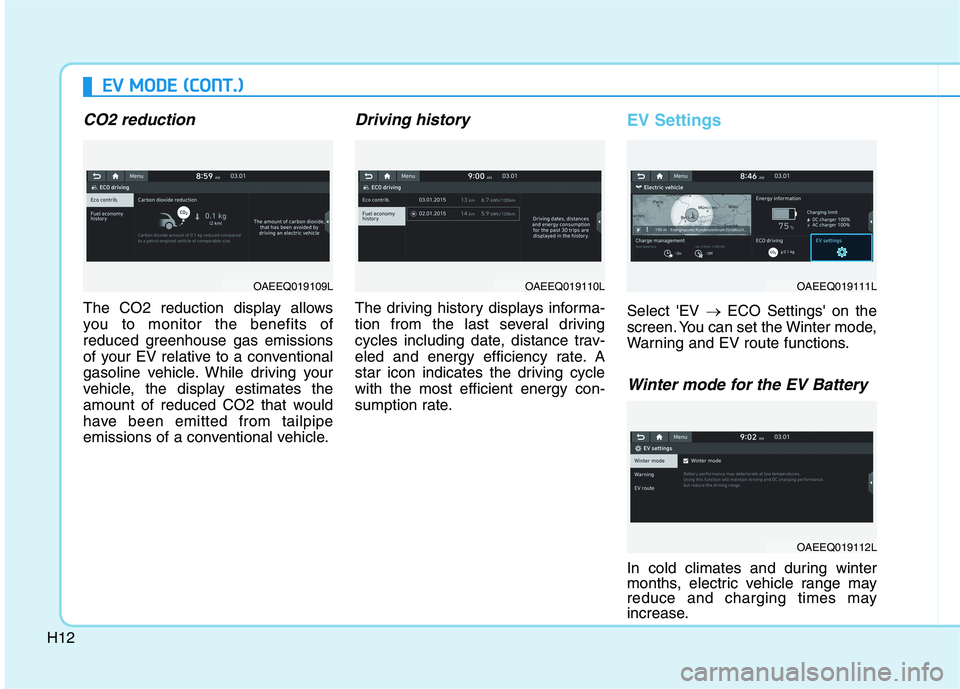
CO2 reduction
The CO2 reduction display allows
you to monitor the benefits of
reduced greenhouse gas emissions
of your EV relative to a conventional
gasoline vehicle. While driving your
vehicle, the display estimates the
amount of reduced CO2 that would
have been emitted from tailpipe
emissions of a conventional vehicle.
Driving history
The driving history displays informa-
tion from the last several driving
cycles including date, distance trav-
eled and energy efficiency rate. A
star icon indicates the driving cycle
with the most efficient energy con-
sumption rate.
EV Settings
Select 'EV →ECO Settings' on the
screen. You can set the Winter mode,
Warning and EV route functions.
Winter mode for the EV Battery
In cold climates and during winter
months, electric vehicle range may
reduce and charging times may
increase.
E EV
V
M
MO
OD
DE
E
(
(C
CO
ON
NT
T.
.)
)
OAEEQ019109LOAEEQ019110LOAEEQ019111L
OAEEQ019112L
Page 501 of 561
H13
This is primarily due to reduced per-
formance of the EV battery when
exposed to cold temperatures.
Some vehicles may come equipped
with Winter mode selectable option.
The Winter mode feature can be
selected in the EV Settings menu.
When selected, Winter mode
enables the use of the EV battery
coolant heater. This mode is recom-
mended to improve EV battery per-
formance in cold climate conditions.
Note that EV range may reduce
when Winter mode is enabled, as
electrical energy is used to maintain
the EV battery temperature.
Winter mode enables operation of
the EV battery coolant heater. While
driving your vehicle, if the battery
temperature is low or the A/C and/or
heater is turned ON, the EV battery
coolant heater will be used.
Note that the EV battery coolant
heater will not be used when the EV
battery SOC is low.
❈This mode is available for the vehi-
cles equipped with the battery
heater.Warning
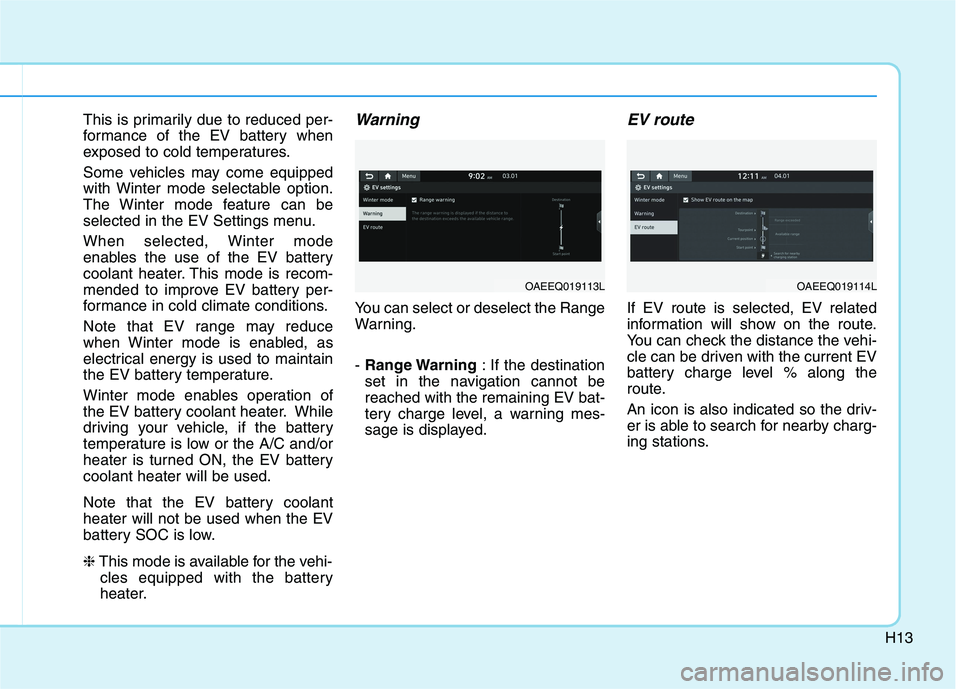
You can select or deselect the Range
Warning.
- Range Warning: If the destination
set in the navigation cannot be
reached with the remaining EV bat-
tery charge level, a warning mes-
sage is displayed.
EV route
If EV route is selected, EV related
information will show on the route.
You can check the distance the vehi-
cle can be driven with the current EV
battery charge level % along the
route.
An icon is also indicated so the driv-
er is able to search for nearby charg-
ing stations.
OAEEQ019113LOAEEQ019114L
Page 507 of 561
H19
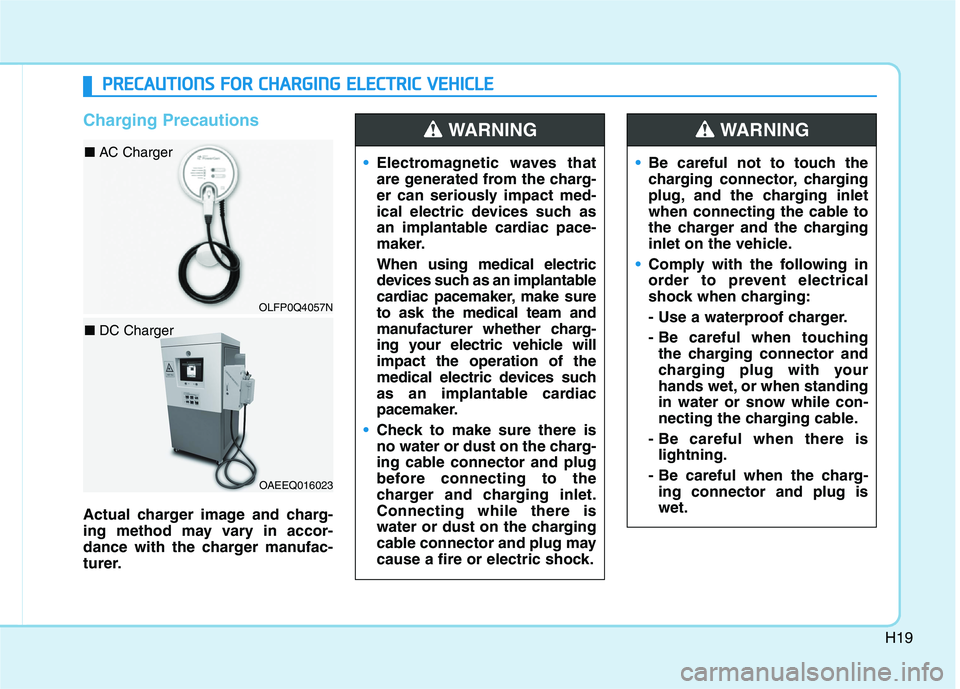
Charging Precautions
Actual charger image and charg-
ing method may vary in accor-
dance with the charger manufac-
turer.Electromagnetic waves that
are generated from the charg-
er can seriously impact med-
ical electric devices such as
an implantable cardiac pace-
maker.
When using medical electric
devices such as an implantable
cardiac pacemaker, make sure
to ask the medical team and
manufacturer whether charg-
ing your electric vehicle will
impact the operation of the
medical electric devices such
as an implantable cardiac
pacemaker.
Check to make sure there is
no water or dust on the charg-
ing cable connector and plug
before connecting to the
charger and charging inlet.
Connecting while there is
water or dust on the charging
cable connector and plug may
cause a fire or electric shock.
WARNING
Be careful not to touch the
charging connector, charging
plug, and the charging inlet
when connecting the cable to
the charger and the charging
inlet on the vehicle.
Comply with the following in
order to prevent electrical
shock when charging:
- Use a waterproof charger.
- Be careful when touching
the charging connector and
charging plug with your
hands wet, or when standing
in water or snow while con-
necting the charging cable.
- Be careful when there is
lightning.
- Be careful when the charg-
ing connector and plug is
wet.
WARNING
P PR
RE
EC
CA
AU
UT
TI
IO
ON
NS
S
F
FO
OR
R
C
CH
HA
AR
RG
GI
IN
NG
G
E
EL
LE
EC
CT
TR
RI
IC
C
V
VE
EH
HI
IC
CL
LE
E
OAEEQ016023
■ DC Charger
OLFP0Q4057N
■ AC Charger
Page 508 of 561
H20
Immediately stop charging
when you find abnormal
symptoms (odor, smoke).
Replace the charging cable if
the cable coating is damaged
to prevent electrical shock.
When connecting or removing
the charging cable, make sure
to hold the charging connec-
tor handle and charging plug.
If you pull the cable itself
(without using the handle), the
internal wires may disconnect
or get damaged. This may lead
to electric shock or fire.
WARNING
Always keep the charging con-
nector and charging plug in
clean and dry condition. Be
sure to keep the charging
cable in a condition where
there is no water or moisture.
Make sure to use the designat-
ed charger for charging the
electric vehicle. Using any
other charger may cause fail-
ure.
Before charging the battery,
turn the vehicle OFF.
When the vehicle is switched
OFF while charging, the cool-
ing fan inside the motor com-
partment may automatically
operate. Do not touch the cool-
ing fan while charging.
Be careful not to drop the
charging connector. The
charging connector can be
damaged.
CAUTION
P PR
RE
EC
CA
AU
UT
TI
IO
ON
NS
S
F
FO
OR
R
C
CH
HA
AR
RG
GI
IN
NG
G
E
EL
LE
EC
CT
TR
RI
IC
C
V
VE
EH
HI
IC
CL
LE
E
(
(C
CO
ON
NT
T.
.)
)
Page 528 of 561
H40
C CH
HA
AR
RG
GI
IN
NG
G
E
EL
LE
EC
CT
TR
RI
IC
C
V
VE
EH
HI
IC
CL
LE
E
(
(T
TR
RI
IC
CK
KL
LE
E
C
CH
HA
AR
RG
GE
E)
)
(
(C
CO
ON
NT
T.
.)
)
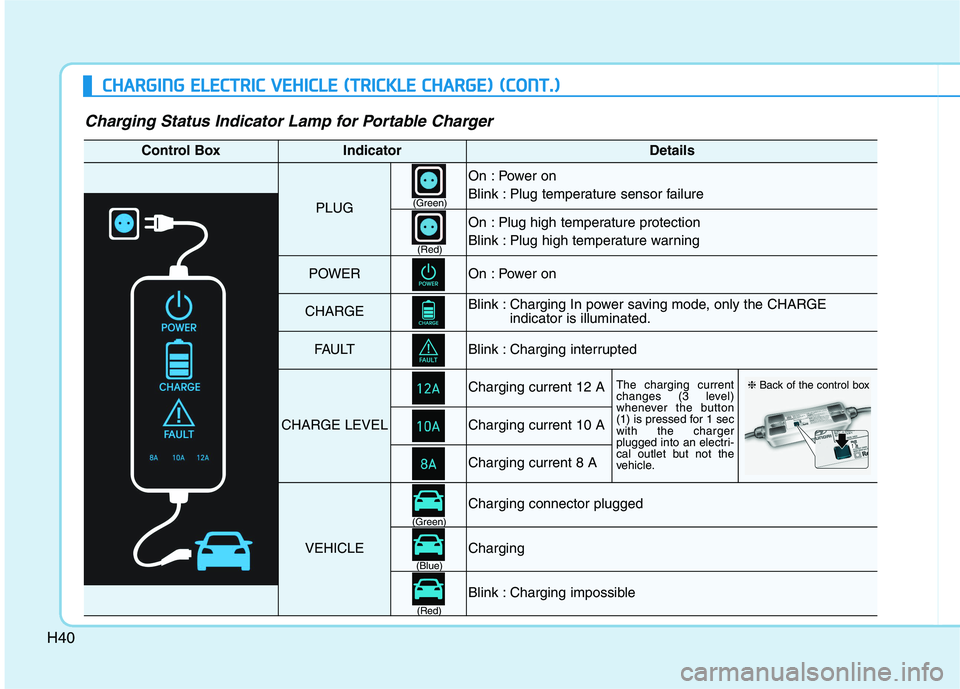
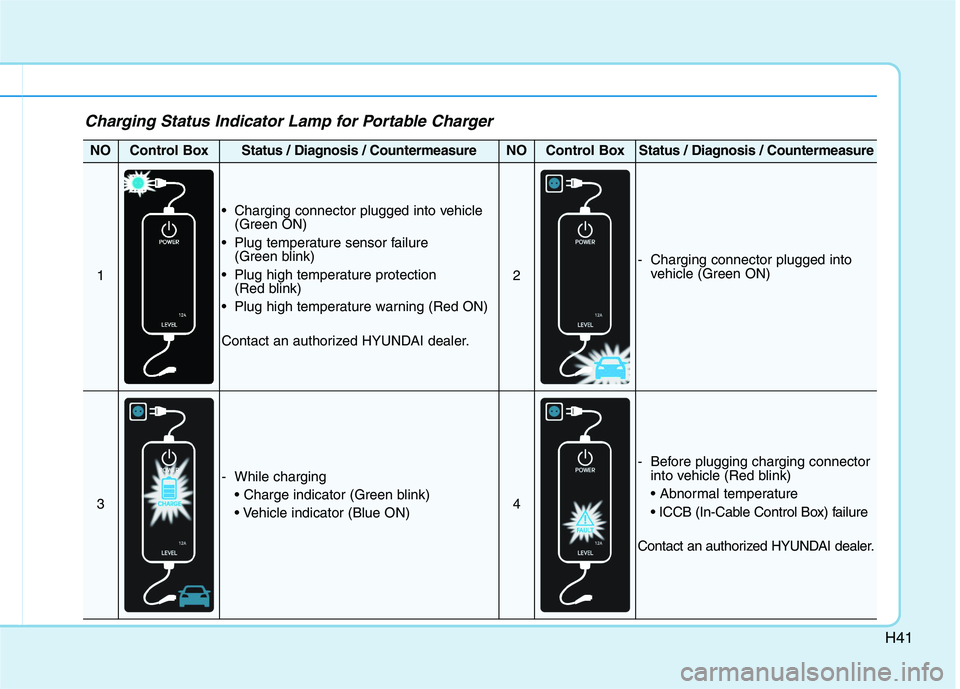
Charging Status Indicator Lamp for Portable Charger
Control BoxIndicatorDetails
PLUG
On : Power on
Blink : Plug temperature sensor failure
On : Plug high temperature protection
Blink : Plug high temperature warning
POWEROn : Power on
CHARGEBlink : Charging In power saving mode, only the CHARGE
indicator is illuminated.
FAU LTBlink : Charging interrupted
CHARGE LEVEL
Charging current 12 AThe charging current
changes (3 level)
whenever the button
(1) is pressed for 1 sec
with the charger
plugged into an electri-
cal outlet but not the
vehicle.
Charging current 10 A
Charging current 8 A
VEHICLE
Charging connector plugged
Charging
Blink : Charging impossible
(Green)
(Green)
(Blue)
(Red)(Red)
❈Back of the control box
Page 529 of 561
H41
Charging Status Indicator Lamp for Portable Charger
NOControl BoxStatus / Diagnosis / CountermeasureNOControl BoxStatus / Diagnosis / Countermeasure
1
Charging connector plugged into vehicle
(Green ON)
Plug temperature sensor failure
(Green blink)
Plug high temperature protection
(Red blink)
Plug high temperature warning (Red ON)
Contact an authorized HYUNDAI dealer.
2
- Charging connector plugged into
vehicle (Green ON)
3
- While charging
4
- Before plugging charging connector
into vehicle (Red blink)
Contact an authorized HYUNDAI dealer.
Page 530 of 561
H42
C CH
HA
AR
RG
GI
IN
NG
G
E
EL
LE
EC
CT
TR
RI
IC
C
V
VE
EH
HI
IC
CL
LE
E
(
(T
TR
RI
IC
CK
KL
LE
E
C
CH
HA
AR
RG
GE
E)
)
(
(C
CO
ON
NT
T.
.)
)
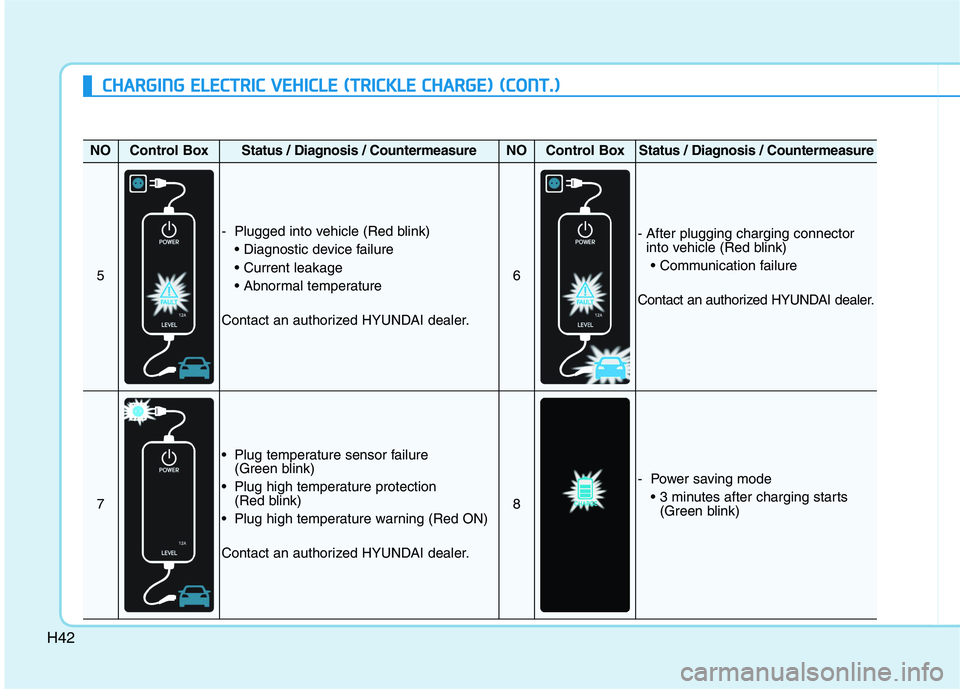
NOControl BoxStatus / Diagnosis / CountermeasureNOControl BoxStatus / Diagnosis / Countermeasure
5
- Plugged into vehicle (Red blink)
Contact an authorized HYUNDAI dealer.
6
- After plugging charging connector
into vehicle (Red blink)
Contact an authorized HYUNDAI dealer.
7
Plug temperature sensor failure
(Green blink)
Plug high temperature protection
(Red blink)
Plug high temperature warning (Red ON)
Contact an authorized HYUNDAI dealer.
8
- Power saving mode
(Green blink)