lights HYUNDAI IONIQ 2020 Owner's Guide
[x] Cancel search | Manufacturer: HYUNDAI, Model Year: 2020, Model line: IONIQ, Model: HYUNDAI IONIQ 2020Pages: 561, PDF Size: 24.5 MB
Page 277 of 561
5-41
Driving your vehicle
5Driving with wheels and tires with
different sizes may cause the ESC
system to malfunction. Before
replacing tires, make sure all four
tires and wheels are the same
size. Never drive the vehicle with
different sized wheels and tires
installed.
ESC OFF usage
When Driving
The ESC OFF mode should only be
used briefly to help free the vehicle if
stuck in snow or mud, by temporarily
stopping operation of the ESC, to
maintain wheel torque.
To turn ESC off while driving, press
the ESC OFF button while driving on
a flat road surface. Do not allow wheel(s) of one
axle to spin excessively while
the ESC, ABS, and parking brake
warning lights are displayed.
The repairs would not be cov-
ered by the vehicle warranty.
Reduce vehicle power and do
not spin the wheel(s) excessive-
ly while these lights are dis-
played.
When operating the vehicle on a
dynamometer, make sure the
ESC is turned off (ESC OFF light
illuminated).
Information
Turning the ESC off does not affect
ABS or standard brake system opera-
tion.
i
NOTICE
NOTICE
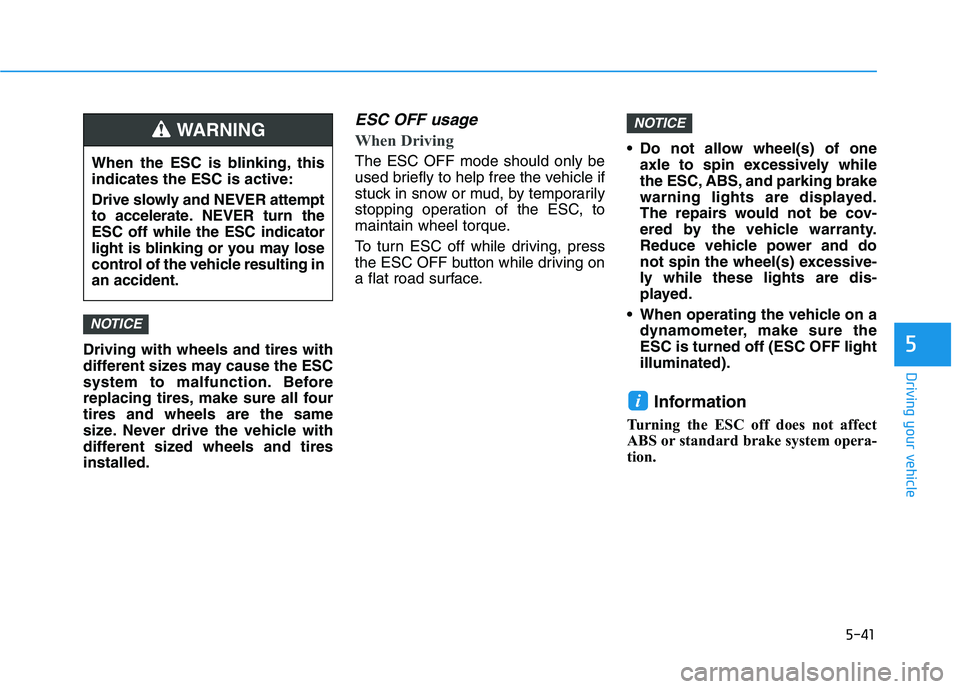
When the ESC is blinking, this
indicates the ESC is active:
Drive slowly and NEVER attempt
to accelerate. NEVER turn the
ESC off while the ESC indicator
light is blinking or you may lose
control of the vehicle resulting in
an accident.
WARNING
Page 292 of 561
5-56
Driving your vehicle
The vehicle in front is an oversize
vehicle or trailer that is too big to
be detected by the front view cam-
era recognition system (for exam-
ple a tractor trailer, etc.)
The front view camera's field of
view is not well illuminated (either
too dark or too much reflection or
too much backlight that obscures
the field of view)
The vehicle in front does not have
their rear lights or their rear lights
does not turned ON or their rear
lights are located unusually
The outside brightness changes
suddenly, for example when enter-
ing or exiting a tunnel
Light coming from a street light or
an oncoming vehicle is reflected on
a wet road surface such as a pud-
dle in the road
The field of view in front is obstruct-
ed by sun glare or head light of
oncoming vehicle
The windshield glass is fogged up; a
clear view of the road is obstructed The vehicle in front is driving errati-
cally
The vehicle is on unpaved or
uneven rough surfaces, or road
with sudden gradient changes
The vehicle is driven near areas
containing metal substances as a
construction zone, railroad, etc.
The vehicle drives inside a building,
such as a basement parking lot
The front view camera does not
recognize the entire vehicle in front
The front view camera is damaged
The brightness outside is too low
such as when the headlamps are
not on at night or the vehicle is
going through a tunnel
The shadow is on the road by a
median strip, trees, etc.
The vehicle drives through a toll-
gate
The windshield glass is fogged up; a
clear view of the road is obstructed The rear part of the vehicle in front
is not normally visible. (the vehicle
turns in other direction or the vehi-
cle is overturned.)
The adverse road conditions cause
excessive vehicle vibrations while
driving
The sensor recognition changes
suddenly when passing over a
speed bump
The vehicle in front is moving verti-
cally to the driving direction
The vehicle in front is stopped ver-
tically
The vehicle in front is driving
towards your vehicle or reversing
You are on a roundabout and the
vehicle in front circles
Page 372 of 561
5-136
Driving your vehicle
Information
The ESC system (if equipped) must be
turned OFF before rocking the vehi-
cle.
If you are still stuck after rocking
the vehicle a few times, have the
vehicle pulled out by a tow vehicle
to avoid vehicle overheating, pos-
sible damage to the reduction
gear and tire damage. See
"Towing" in chapter 6.
Smooth Cornering
Avoid braking or gear changing in
corners, especially when roads are
wet. Ideally, corners should always
be taken under gentle acceleration.
Driving at Night
Night driving presents more hazards
than driving in the daylight. Here are
some important tips to remember:
Slow down and keep more dis-
tance between you and other vehi-
cles, as it may be more difficult to
see at night, especially in areas
where there may not be any street
lights.
Adjust your mirrors to reduce the
glare from other driver's head-
lamps.
Keep your headlamps clean and
properly aimed. Dirty or improperly
aimed headlamps will make it
much more difficult to see at night.
Avoid staring directly at the head-
lamps of oncoming vehicles. You
could be temporarily blinded, and it
will take several seconds for your
eyes to readjust to the darkness.
Driving in the Rain
Rain and wet roads can make driving
dangerous. Here are a few things to
consider when driving in the rain or
on slick pavement:
Slow down and allow extra follow-
ing distance. A heavy rainfall
makes it harder to see and increas-
es the distance needed to stop
your vehicle.
Turn OFF your Cruise Control. (if
equipped)
Replace your windshield wiper
blades when they show signs of
streaking or missing areas on the
windshield.
Be sure your tires have enough
tread. If your tires do not have
enough tread, making a quick stop
on wet pavement can cause a skid
and possibly lead to an accident.
See "Tire Tread" in chapter 7.
Turn on your headlamps to make it
easier for others to see you.
Driving too fast through large pud-
dles can affect your brakes. If you
must go through puddles, try to
drive through them slowly.
NOTICE
i
Page 384 of 561
6-2
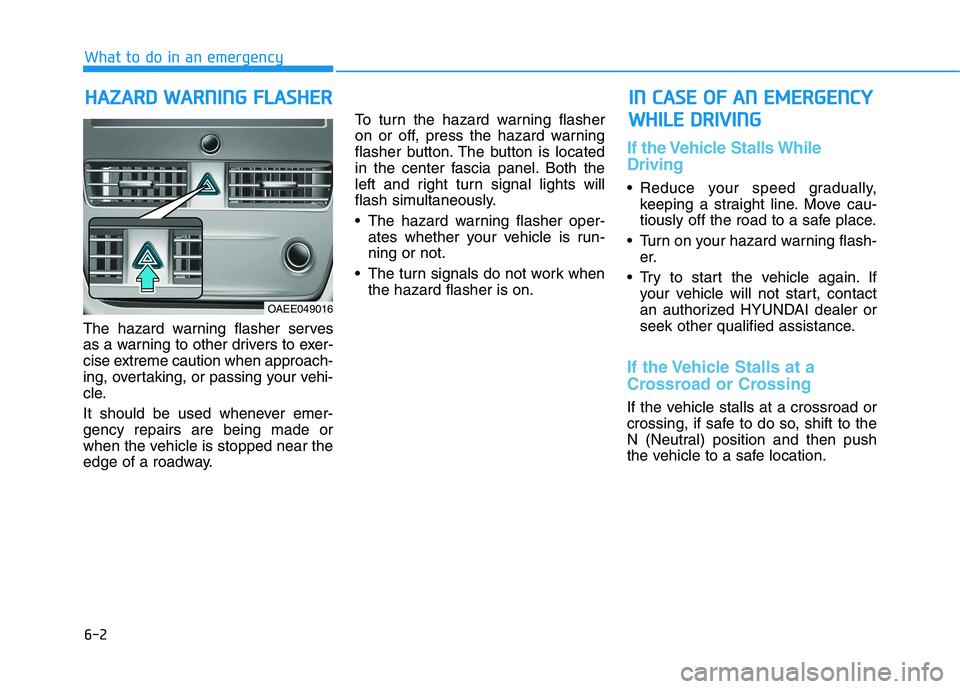
The hazard warning flasher serves
as a warning to other drivers to exer-
cise extreme caution when approach-
ing, overtaking, or passing your vehi-
cle.
It should be used whenever emer-
gency repairs are being made or
when the vehicle is stopped near the
edge of a roadway.To turn the hazard warning flasher
on or off, press the hazard warning
flasher button. The button is located
in the center fascia panel. Both the
left and right turn signal lights will
flash simultaneously.
• The hazard warning flasher oper-
ates whether your vehicle is run-
ning or not.
The turn signals do not work when
the hazard flasher is on.
If the Vehicle Stalls While
Driving
Reduce your speed gradually,
keeping a straight line. Move cau-
tiously off the road to a safe place.
Turn on your hazard warning flash-
er.
Try to start the vehicle again. If
your vehicle will not start, contact
an authorized HYUNDAI dealer or
seek other qualified assistance.
If the Vehicle Stalls at a
Crossroad or Crossing
If the vehicle stalls at a crossroad or
crossing, if safe to do so, shift to the
N (Neutral) position and then push
the vehicle to a safe location.
H HA
AZ
ZA
AR
RD
D
W
WA
AR
RN
NI
IN
NG
G
F
FL
LA
AS
SH
HE
ER
R
What to do in an emergency
I
IN
N
C
CA
AS
SE
E
O
OF
F
A
AN
N
E
EM
ME
ER
RG
GE
EN
NC
CY
Y
W WH
HI
IL
LE
E
D
DR
RI
IV
VI
IN
NG
G
OAEE049016
Page 387 of 561
6-5
What to do in an emergency
6
Information
An inappropriately disposed
battery can be harmful to the
environment and human
health. Dispose the battery
according to your local law(s)
or regulations.
To prevent damage to your vehi-
cle:
Only use a 12-volt power supply
(battery or jumper system) to
jump start your vehicle.
Do not attempt to jump start
your vehicle by push-starting.
Jump starting procedure
1. Position the vehicles close enough
that the jumper cables will reach,
but do not allow the vehicles to
touch.
2. Avoid fans or any moving parts in
the motor compartment at all
times, even when the vehicles are
turned off.
3. Turn off all electrical devices such
as radios, lights, air conditioning,
etc. Put the vehicles in P (Park)
and set the parking brakes. Turn
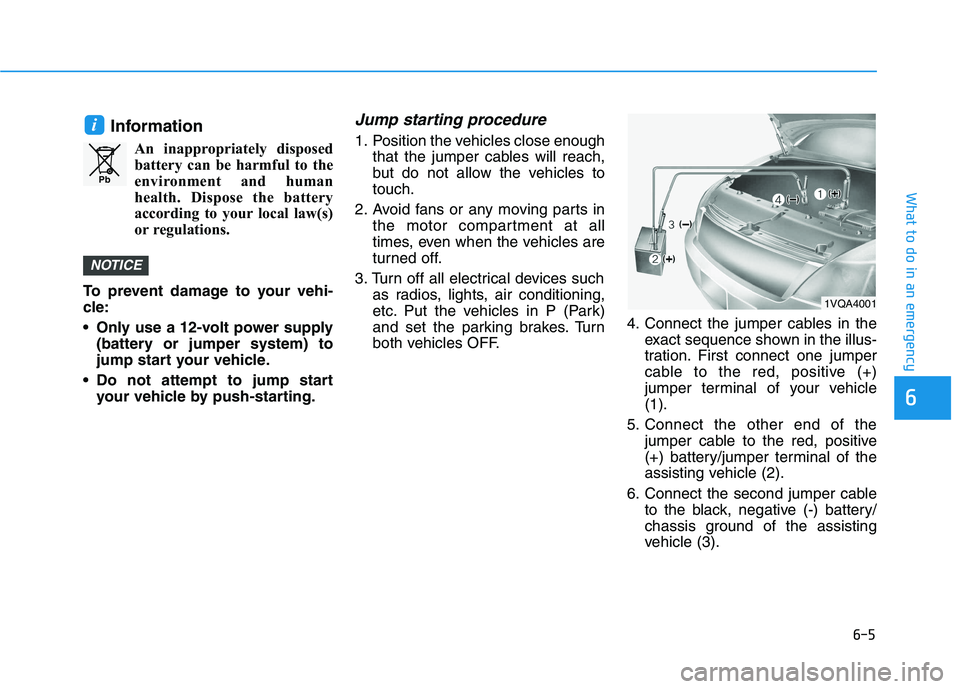
both vehicles OFF.4. Connect the jumper cables in the
exact sequence shown in the illus-
tration. First connect one jumper
cable to the red, positive (+)
jumper terminal of your vehicle
(1).
5. Connect the other end of the
jumper cable to the red, positive
(+) battery/jumper terminal of the
assisting vehicle (2).
6. Connect the second jumper cable
to the black, negative (-) battery/
chassis ground of the assisting
vehicle (3).
NOTICE
i
Pb
1VQA4001
Page 412 of 561
7-6
Maintenance
Owner Maintenance Schedule
When you stop for fuel:
• Check coolant level in the coolant
reservoir.
Check the windshield washer fluid
level.
Check for low or under-inflated
tires.
While operating your vehicle:
Check for vibrations in the steering
wheel. Notice if there is any
increased steering effort or loose-
ness in the steering wheel, or
change in its straight-ahead posi-
tion.
Notice if your vehicle constantly
turns slightly or "pulls" to one side
when traveling on smooth, level
road.
When stopping, listen and check
for unusual sounds, pulling to one
side, increased brake pedal travel
or "hard-to-push" brake pedal.
If any slipping or changes in the
operation of your reduction gear
occurs, check the reduction gear
fluid level.
Check the reduction gear P (Park)
function.
Check the parking brake.
Check for fluid leaks under your
vehicle (water dripping from the air
conditioning system during or after
use is normal).
At least monthly:
Check coolant level in the coolant
reservoir.
Check the operation of all exterior
lights, including the brake lights,
turn signals and hazard warning
flashers.
Check the inflation pressures of all
tires including the spare for tires
that are worn, show uneven wear,
or are damaged.
Check for loose wheel lug nuts.
Be careful when checking your
coolant level when the parts in
the motor compartment are hot.
This may result in coolant being
blown out of the opening and
cause serious burns and other
injuries.
WARNING
Page 445 of 561
7-39
7
Maintenance
F FU
US
SE
ES
S
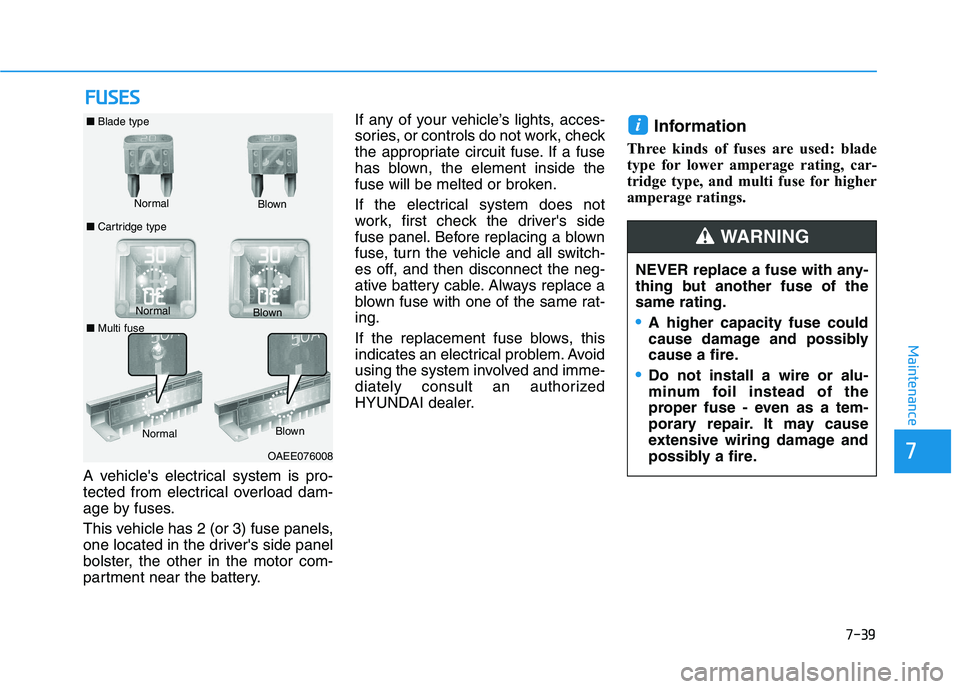
A vehicle's electrical system is pro-
tected from electrical overload dam-
age by fuses.
This vehicle has 2 (or 3) fuse panels,
one located in the driver's side panel
bolster, the other in the motor com-
partment near the battery.If any of your vehicle’s lights, acces-
sories, or controls do not work, check
the appropriate circuit fuse. If a fuse
has blown, the element inside the
fuse will be melted or broken.
If the electrical system does not
work, first check the driver's side
fuse panel. Before replacing a blown
fuse, turn the vehicle and all switch-
es off, and then disconnect the neg-
ative battery cable. Always replace a
blown fuse with one of the same rat-
ing.
If the replacement fuse blows, this
indicates an electrical problem. Avoid
using the system involved and imme-
diately consult an authorized
HYUNDAI dealer.
Information
Three kinds of fuses are used: blade
type for lower amperage rating, car-
tridge type, and multi fuse for higher
amperage ratings.
i
NEVER replace a fuse with any-
thing but another fuse of the
same rating.
A higher capacity fuse could
cause damage and possibly
cause a fire.
Do not install a wire or alu-
minum foil instead of the
proper fuse - even as a tem-
porary repair. It may cause
extensive wiring damage and
possibly a fire.
WARNING
Normal ■Blade type
■Cartridge typeBlown
NormalBlown
OAEE076008 Normal
Blown
■Multi fuse
Page 468 of 561
7-62
Maintenance
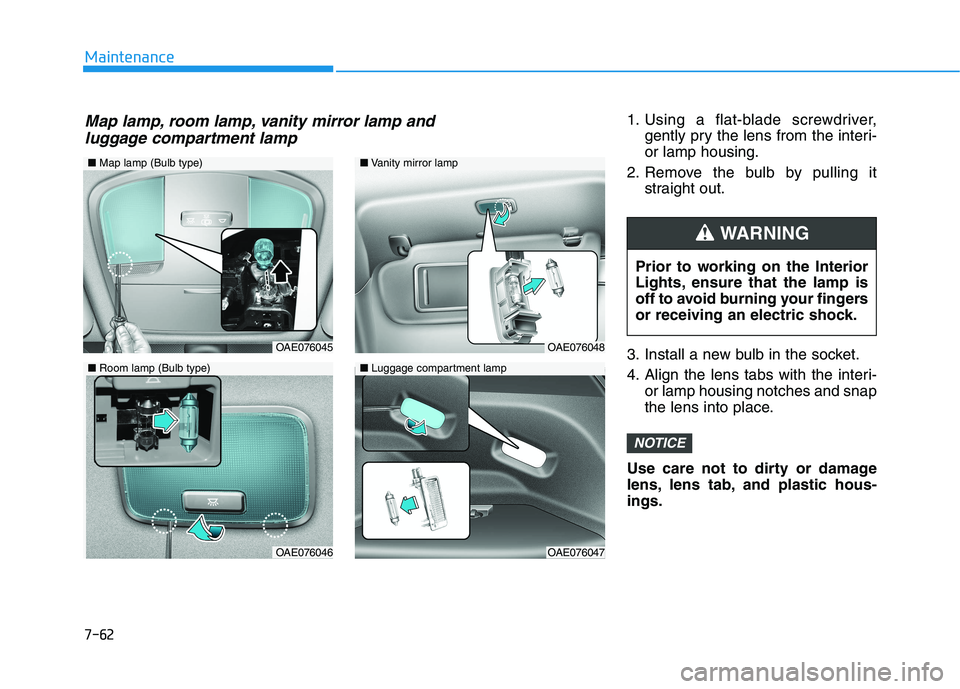
1. Using a flat-blade screwdriver,
gently pry the lens from the interi-
or lamp housing.
2. Remove the bulb by pulling it
straight out.
3. Install a new bulb in the socket.
4. Align the lens tabs with the interi-
or lamp housing notches and snap
the lens into place.
Use care not to dirty or damage
lens, lens tab, and plastic hous-
ings.
NOTICE
Prior to working on the Interior
Lights, ensure that the lamp is
off to avoid burning your fingers
or receiving an electric shock.
WARNING
■Map lamp (Bulb type)
OAE076045
OAE076046
■Vanity mirror lamp
■Luggage compartment lamp
OAE076048
OAE076047
■Room lamp (Bulb type)
Map lamp, room lamp, vanity mirror lamp and
luggage compartment lamp
Page 490 of 561
Unlock Charging Door in Emergency ..........................H38
Checking Charging Status ...............................................H39
Charging Status Indicator Lamp for Portable
Charger ................................................................................H40
How to Disconnect Portable Charger
(ICCB: In-Cable Control Box) ..........................................H43
Unlock Charging Connector in Emergency ................H44
Precautions for Portable Charger
(ICCB: In-Cable Control Box) ..........................................H44
EV Charging Troubleshooting
- Steps to Consider ...............................................H45
How to Start the Vehicle ......................................H46
How to Stop the Vehicle.......................................H46
Virtual Engine Sound System ..............................H47
Distance to Empty .................................................H47
When destination is not set ...........................................H48
When destination is set...................................................H48
Tips for Improving Distance to Empty ...............H49
Power/Charge Gauge............................................H49
State of Charge (SOC) Gauge for High Voltage
Battery ...................................................................H49
Warning and Indicator Lights
(related to electric vehicle) .................................H50
Ready Indicator ................................................................H50
Service Warning Light .....................................................H51
This warning light illuminates : ......................................H51
Power Down Warning Light ...........................................H51
Charging Indicator Light..................................................H52
High Voltage Battery Level Warning Light .................H52
Regenerative Brake Warning Light ..............................H52
LCD Display Messages ..........................................H52
Shift to P to charge .........................................................H52
Remaining Time .................................................................H53
Charging Door Open ........................................................H53
Charging Stopped. Check the AC/DC charger ...........H53
Charging Stopped. Check the cable connection .......H54
Check regenerative brakes/
Stop vehicle and check regenerative brakes ............H55
Low Battery........................................................................H55
Charge immediately. Power limited ..............................H55
Low outside temperature may limit power output.
Charge EV battery/Low EV battery temperature.
Power limited .....................................................................H56
Battery Overheated! Stop safety .................................H56
Power limited .....................................................................H57
Stop vehicle and check power supply .........................H57
Check virtual engine sound System .............................H58
Check electric vehicle system .......................................H58
Energy Flow ..........................................................H58
Vehicle Stop........................................................................H59
EV Propulsion ....................................................................H59
Regeneration ......................................................................H59
Aux. Battery Saver+ .............................................H60
Mode ....................................................................................H60
System Setting...................................................................H61
Utility Mode ............................................................H61
System Setting and Activation ......................................H62
System Deactivation .........................................................H62
If an Accident Occurs ...........................................H63
Other Precautions for Electric Vehicle ..............H65
Service Plug ...........................................................H65
Page 492 of 561
H4
Main Components
On-Board Charger (OBC) :
A device that charges the high volt-
age battery by converting AC
power from a charging station to
DC power.
• Inverter :A device that transforms
direct current (DC) from the high
voltage battery into alternating cur-
rent (AC) to supply power to the
electric motor and transforms AC
back into DC when available to
charge the high voltage battery.
LDC :An LDC is a Low Voltage
DC-to-DC converter that trans-
forms power from the high voltage
battery to the low voltage battery
(12V) in order to supply electrical
power to the vehicle to operate the
lights, wipers, multimedia, etc. Electric Motor :A device that con-
verts electrical energy from the
high voltage battery into mechani-
cal energy which is then trans-
ferred as rotational torque to the
wheels in order to drive the vehicle.
Reduction gear :Delivers rota-
tional force of the motor to the tires
at appropriate speeds and torque.
EV Battery (Lithium-ion) :On
board high voltage storage device
with a capacity up to 64 kWh
❈OBC : On-Board Charger
❈LDC : Low Voltage DC-DC Converter
M
MA
AI
IN
N
C
CO
OM
MP
PO
ON
NE
EN
NT
TS
S
O
OF
F
E
EL
LE
EC
CT
TR
RI
IC
C
V
VE
EH
HI
IC
CL
LE
E
Do not remove or disassem-
ble high voltage components
and high voltage battery con-
nectors and wires. Also, be
careful not to damage high
voltage components and the
high voltage battery. It may
cause serious injury and sig-
nificantly impact the perform-
ance and durability of the
vehicle.
When inspection and mainte-
nance is required for high volt-
age components, contact an
authorized HYUNDAI dealer.
WARNING