mirror HYUNDAI IONIQ 2020 Service Manual
[x] Cancel search | Manufacturer: HYUNDAI, Model Year: 2020, Model line: IONIQ, Model: HYUNDAI IONIQ 2020Pages: 561, PDF Size: 24.5 MB
Page 362 of 561
5-126
Driving your vehicle
When the system is initially turned
on and when the vehicle is turned
off then on again, the warning light
will illuminate for 3 seconds on the
outside rearview mirror.
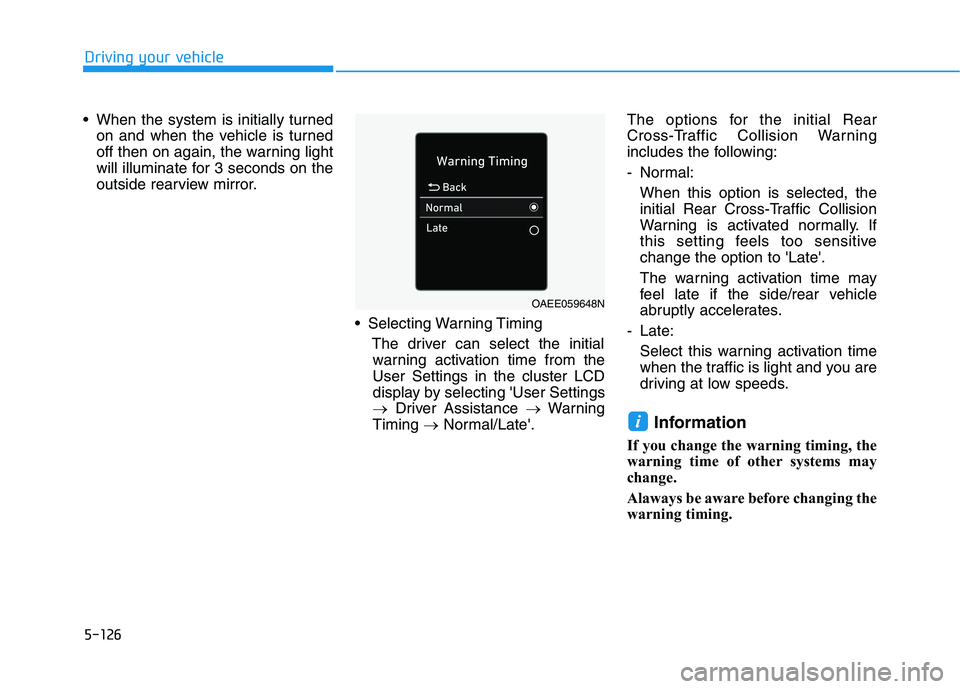
Selecting Warning Timing
The driver can select the initial
warning activation time from the
User Settings in the cluster LCD
display by selecting 'User Settings
→Driver Assistance →Warning
Timing →Normal/Late'.The options for the initial Rear
Cross-Traffic Collision Warning
includes the following:
- Normal:
When this option is selected, the
initial Rear Cross-Traffic Collision
Warning is activated normally. If
this setting feels too sensitive
change the option to 'Late'.
The warning activation time may
feel late if the side/rear vehicle
abruptly accelerates.
- Late:
Select this warning activation time
when the traffic is light and you are
driving at low speeds.
Information
If you change the warning timing, the
warning time of other systems may
change.
Alaways be aware before changing the
warning timing.
i
OAEE059648N
Page 363 of 561
5-127
Driving your vehicle
5
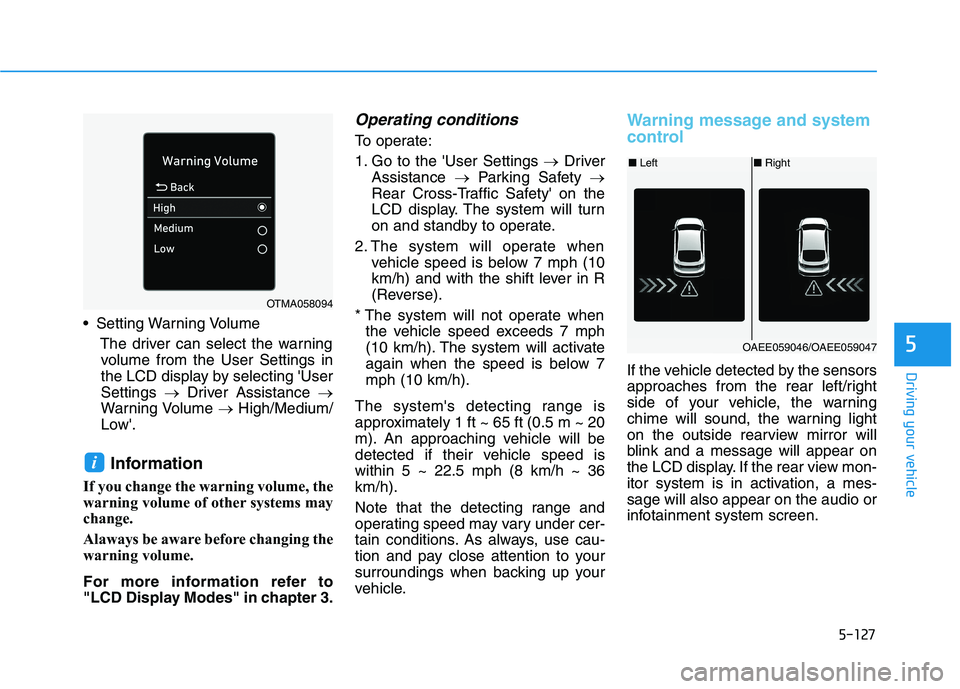
Setting Warning Volume
The driver can select the warning
volume from the User Settings in
the LCD display by selecting 'User
Settings →Driver Assistance →
Warning Volume →High/Medium/
Low'.
Information
If you change the warning volume, the
warning volume of other systems may
change.
Alaways be aware before changing the
warning volume.
For more information refer to
"LCD Display Modes" in chapter 3.
Operating conditions
To operate:
1. Go to the 'User Settings →Driver
Assistance →Parking Safety →
Rear Cross-Traffic Safety' on the
LCD display. The system will turn
on and standby to operate.
2. The system will operate when
vehicle speed is below 7 mph (10
km/h) and with the shift lever in R
(Reverse).
* The system will not operate when
the vehicle speed exceeds 7 mph
(10 km/h). The system will activate
again when the speed is below 7
mph (10 km/h).
The system's detecting range is
approximately 1 ft ~ 65 ft (0.5 m ~ 20
m). An approaching vehicle will be
detected if their vehicle speed is
within 5 ~ 22.5 mph (8 km/h ~ 36
km/h).
Note that the detecting range and
operating speed may vary under cer-
tain conditions. As always, use cau-
tion and pay close attention to your
surroundings when backing up your
vehicle.
Warning message and system
control
If the vehicle detected by the sensors
approaches from the rear left/right
side of your vehicle, the warning
chime will sound, the warning light
on the outside rearview mirror will
blink and a message will appear on
the LCD display. If the rear view mon-
itor system is in activation, a mes-
sage will also appear on the audio or
infotainment system screen.
i
OTMA058094
■Left■Right
OAEE059046/OAEE059047
Page 364 of 561
5-128
Driving your vehicle
The warning will stop when:
- The detected vehicle moves out of
the sensing area or
- When the vehicle is right behind
your vehicle or
- When the vehicle is not approach-
ing your vehicle or
- When the other vehicle slows
down.
- The vehicle's approaching speed is
decreased.(Continued)
The warning of Rear Cross-
Traffic Collision Warning sys-
tem may not sound while
other system's warning
sounds.
When the operating condition
of Rear Cross-Traffic Collision
Warning system is satisfied
the warning will occur when a
vehicle approaches the
side/rear of your stopped (0
km/h vehicle speed) vehicle.
The system's warning may
not operate properly if the
left/right of your vehicle's rear
bumper is blocked by a vehi-
cle or obstacle.
Always pay attention to road
and traffic conditions while
driving, whether or not the
warning light on the outside
rearview mirror illuminates or
there is a warning alarm.
Playing the vehicle audio sys-
tem at high volume may pre-
vent occupants from hearing
the system's warning sounds.
(Continued)
CAUTION
If any other warning sound
such as seat belt warning
chime is already generated,
Rear Cross-Traffic Collision
Warning system warning may
not sound.
Drive safely even though the
vehicle is equipped with a
Rear Cross-Traffic Collision
Warning system. Do not sole-
ly rely on the system but
check your surrounding when
backing the vehicle up.
The driver is responsible for
accurate brake control.
(Continued)
WARNING
Page 372 of 561
5-136
Driving your vehicle
Information
The ESC system (if equipped) must be
turned OFF before rocking the vehi-
cle.
If you are still stuck after rocking
the vehicle a few times, have the
vehicle pulled out by a tow vehicle
to avoid vehicle overheating, pos-
sible damage to the reduction
gear and tire damage. See
"Towing" in chapter 6.
Smooth Cornering
Avoid braking or gear changing in
corners, especially when roads are
wet. Ideally, corners should always
be taken under gentle acceleration.
Driving at Night
Night driving presents more hazards
than driving in the daylight. Here are
some important tips to remember:
Slow down and keep more dis-
tance between you and other vehi-
cles, as it may be more difficult to
see at night, especially in areas
where there may not be any street
lights.
Adjust your mirrors to reduce the
glare from other driver's head-
lamps.
Keep your headlamps clean and
properly aimed. Dirty or improperly
aimed headlamps will make it
much more difficult to see at night.
Avoid staring directly at the head-
lamps of oncoming vehicles. You
could be temporarily blinded, and it
will take several seconds for your
eyes to readjust to the darkness.
Driving in the Rain
Rain and wet roads can make driving
dangerous. Here are a few things to
consider when driving in the rain or
on slick pavement:
Slow down and allow extra follow-
ing distance. A heavy rainfall
makes it harder to see and increas-
es the distance needed to stop
your vehicle.
Turn OFF your Cruise Control. (if
equipped)
Replace your windshield wiper
blades when they show signs of
streaking or missing areas on the
windshield.
Be sure your tires have enough
tread. If your tires do not have
enough tread, making a quick stop
on wet pavement can cause a skid
and possibly lead to an accident.
See "Tire Tread" in chapter 7.
Turn on your headlamps to make it
easier for others to see you.
Driving too fast through large pud-
dles can affect your brakes. If you
must go through puddles, try to
drive through them slowly.
NOTICE
i
Page 450 of 561
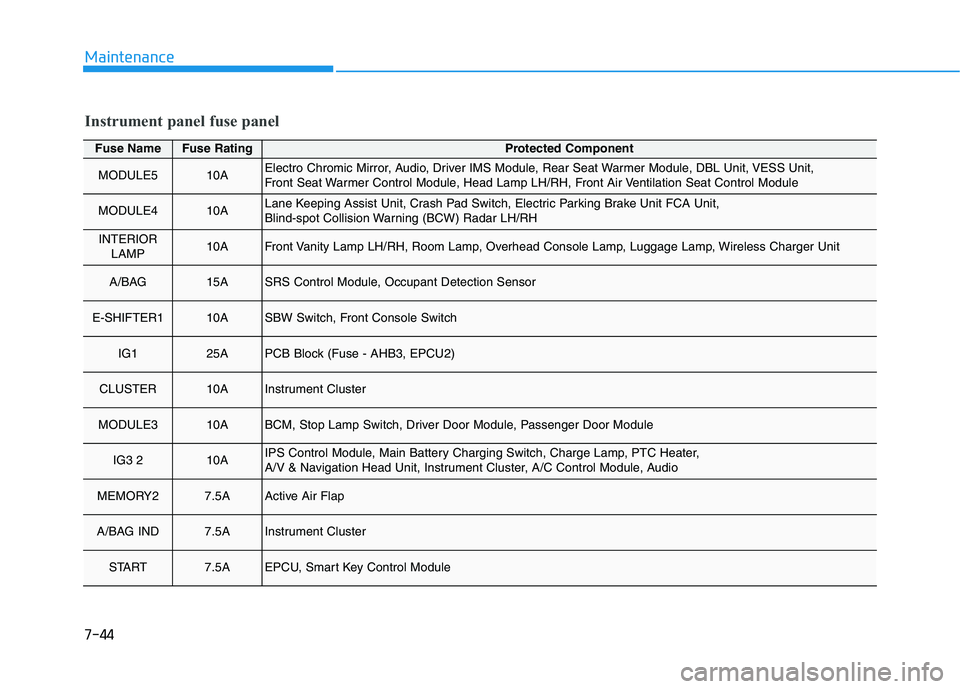
7-44
Maintenance
Fuse NameFuse RatingProtected Component
MODULE510AElectro Chromic Mirror, Audio, Driver IMS Module, Rear Seat Warmer Module, DBL Unit, VESS Unit,
Front Seat Warmer Control Module, Head Lamp LH/RH, Front Air Ventilation Seat Control Module
MODULE410ALane Keeping Assist Unit, Crash Pad Switch, Electric Parking Brake Unit FCA Unit,
Blind-spot Collision Warning (BCW) Radar LH/RH
INTERIOR
LAMP10AFront Vanity Lamp LH/RH, Room Lamp, Overhead Console Lamp, Luggage Lamp, Wireless Charger Unit
A/BAG 15ASRS Control Module, Occupant Detection Sensor
E-SHIFTER110ASBW Switch, Front Console Switch
IG125APCB Block (Fuse - AHB3, EPCU2)
CLUSTER10AInstrument Cluster
MODULE310ABCM, Stop Lamp Switch, Driver Door Module, Passenger Door Module
IG3 210AIPS Control Module, Main Battery Charging Switch, Charge Lamp, PTC Heater,
A/V & Navigation Head Unit, Instrument Cluster, A/C Control Module, Audio
MEMORY27.5AActive Air Flap
A/BAG IND7.5AInstrument Cluster
START7.5AEPCU, Smart Key Control Module
Instrument panel fuse panel
Page 451 of 561
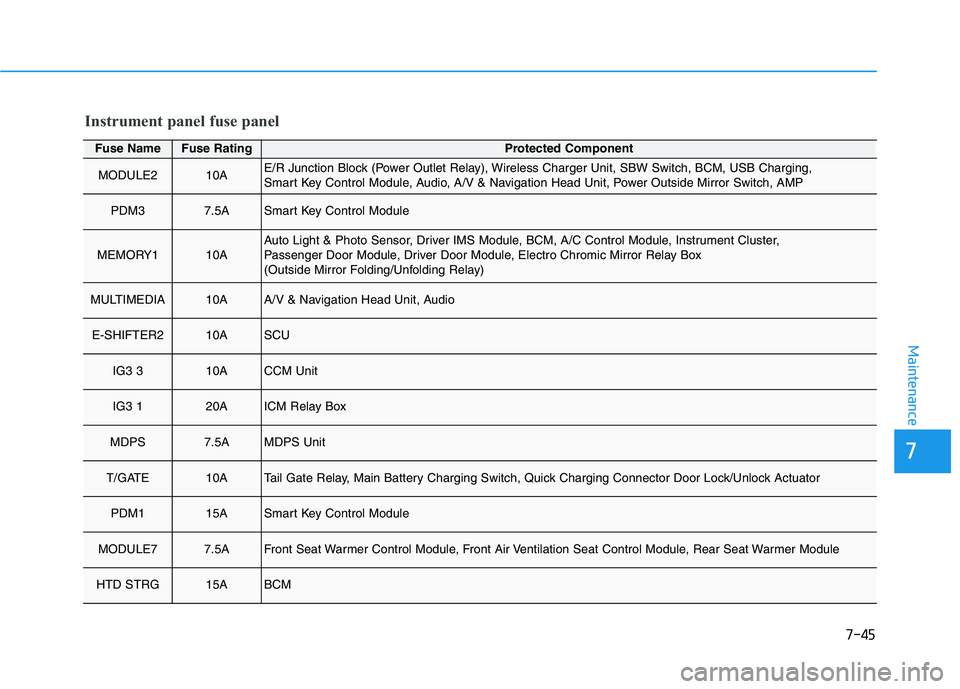
7-45
7
Maintenance
Fuse NameFuse RatingProtected Component
MODULE210AE/R Junction Block (Power Outlet Relay), Wireless Charger Unit, SBW Switch, BCM, USB Charging,
Smart Key Control Module, Audio, A/V & Navigation Head Unit, Power Outside Mirror Switch, AMP
PDM37.5ASmart Key Control Module
MEMORY110AAuto Light & Photo Sensor, Driver IMS Module, BCM, A/C Control Module, Instrument Cluster,
Passenger Door Module, Driver Door Module, Electro Chromic Mirror Relay Box
(Outside Mirror Folding/Unfolding Relay)
MULTIMEDIA10AA/V & Navigation Head Unit, Audio
E-SHIFTER210ASCU
IG3 310ACCM Unit
IG3 120AICM Relay Box
MDPS7.5AMDPS Unit
T/GATE10ATail Gate Relay, Main Battery Charging Switch, Quick Charging Connector Door Lock/Unlock Actuator
PDM115ASmart Key Control Module
MODULE77.5AFront Seat Warmer Control Module, Front Air Ventilation Seat Control Module, Rear Seat Warmer Module
HTD STRG15ABCM
Instrument panel fuse panel
Page 453 of 561
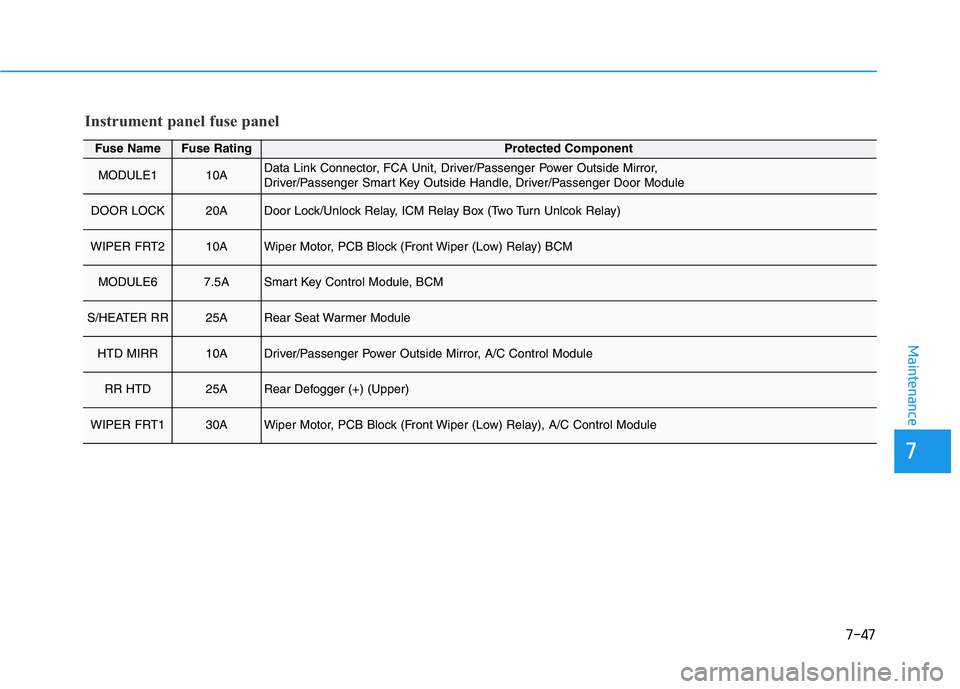
7-47
7
Maintenance
Fuse NameFuse RatingProtected Component
MODULE110AData Link Connector, FCA Unit, Driver/Passenger Power Outside Mirror,
Driver/Passenger Smart Key Outside Handle, Driver/Passenger Door Module
DOOR LOCK20ADoor Lock/Unlock Relay, ICM Relay Box (Two Turn Unlcok Relay)
WIPER FRT210AWiper Motor, PCB Block (Front Wiper (Low) Relay) BCM
MODULE67.5ASmart Key Control Module, BCM
S/HEATER RR25ARear Seat Warmer Module
HTD MIRR10ADriver/Passenger Power Outside Mirror, A/C Control Module
RR HTD25ARear Defogger (+) (Upper)
WIPER FRT130AWiper Motor, PCB Block (Front Wiper (Low) Relay), A/C Control Module
Instrument panel fuse panel
Page 468 of 561
7-62
Maintenance
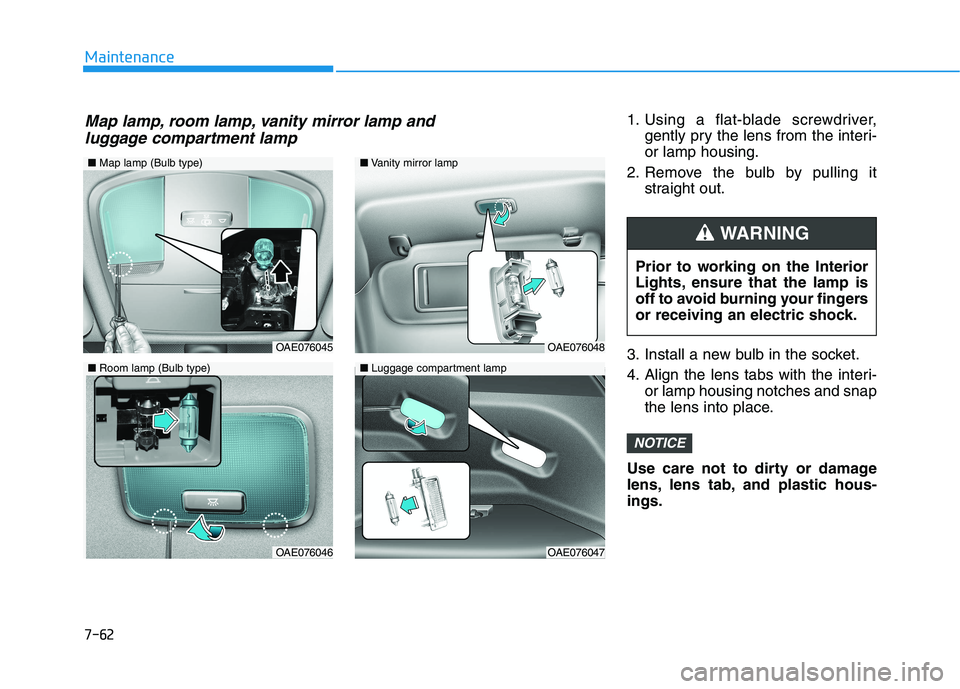
1. Using a flat-blade screwdriver,
gently pry the lens from the interi-
or lamp housing.
2. Remove the bulb by pulling it
straight out.
3. Install a new bulb in the socket.
4. Align the lens tabs with the interi-
or lamp housing notches and snap
the lens into place.
Use care not to dirty or damage
lens, lens tab, and plastic hous-
ings.
NOTICE
Prior to working on the Interior
Lights, ensure that the lamp is
off to avoid burning your fingers
or receiving an electric shock.
WARNING
■Map lamp (Bulb type)
OAE076045
OAE076046
■Vanity mirror lamp
■Luggage compartment lamp
OAE076048
OAE076047
■Room lamp (Bulb type)
Map lamp, room lamp, vanity mirror lamp and
luggage compartment lamp
Page 481 of 561
8-3
88
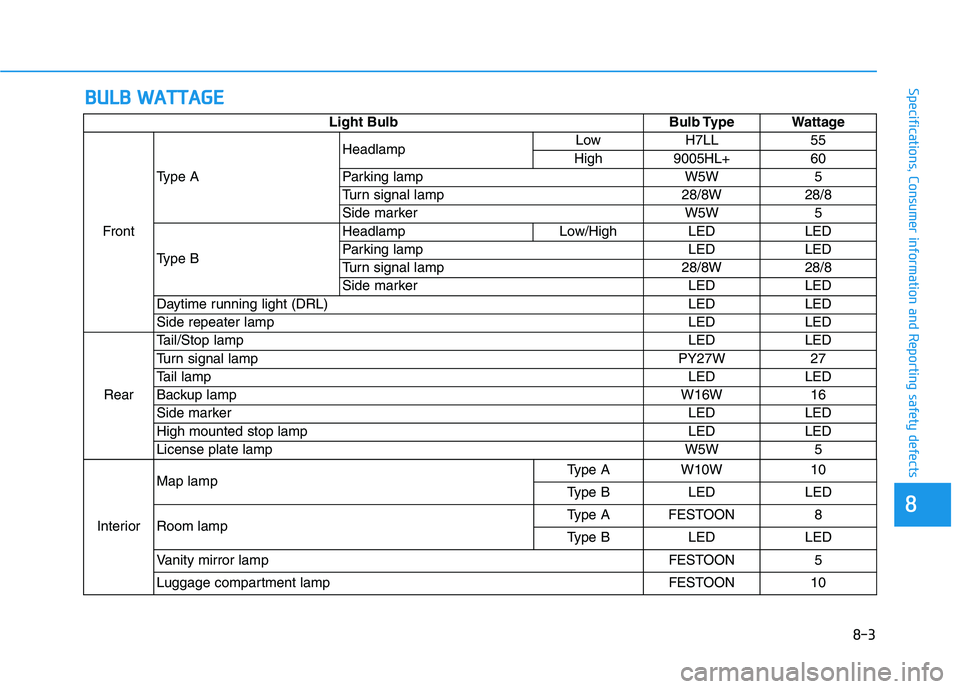
Specifications, Consumer information and Reporting safety defectsB BU
UL
LB
B
W
WA
AT
TT
TA
AG
GE
E
Light Bulb Bulb Type Wattage
FrontType AHeadlampLow H7LL 55
High 9005HL+ 60
Parking lamp W5W 5
Turn signal lamp 28/8W 28/8
Side marker W5W 5
Type BHeadlamp Low/High LED LED
Parking lamp LED LED
Turn signal lamp 28/8W 28/8
Side marker LED LED
Daytime running light (DRL) LED LED
Side repeater lamp LED LED
RearTail/Stop lampLED LED
Turn signal lamp PY27W 27
Tail lampLED LED
Backup lampW16W 16
Side markerLED LED
High mounted stop lamp LED LED
License plate lamp W5W 5
InteriorMap lampType A W10W 10
Type B LED LED
Room lampType A FESTOON 8
Type B LED LED
Vanity mirror lamp FESTOON 5
Luggage compartment lamp FESTOON 10
Page 558 of 561
I-5
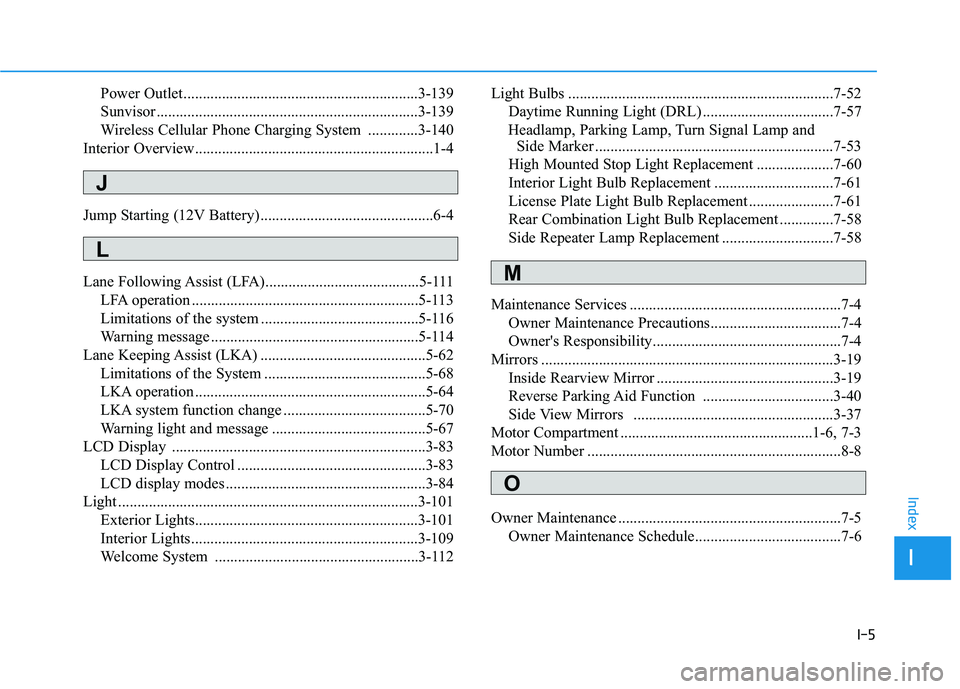
Power Outlet.............................................................3-139
Sunvisor ....................................................................3-139
Wireless Cellular Phone Charging System .............3-140
Interior Overview..............................................................1-4
Jump Starting (12V Battery) .............................................6-4
Lane Following Assist (LFA)........................................5-111
LFA operation ...........................................................5-113
Limitations of the system .........................................5-116
Warning message ......................................................5-114
Lane Keeping Assist (LKA) ...........................................5-62
Limitations of the System ..........................................5-68
LKA operation ............................................................5-64
LKA system function change .....................................5-70
Warning light and message ........................................5-67
LCD Display ..................................................................3-83
LCD Display Control .................................................3-83
LCD display modes ....................................................3-84
Light ..............................................................................3-101
Exterior Lights..........................................................3-101
Interior Lights...........................................................3-109
Welcome System .....................................................3-112Light Bulbs .....................................................................7-52
Daytime Running Light (DRL) ..................................7-57
Headlamp, Parking Lamp, Turn Signal Lamp and
Side Marker ..............................................................7-53
High Mounted Stop Light Replacement ....................7-60
Interior Light Bulb Replacement ...............................7-61
License Plate Light Bulb Replacement ......................7-61
Rear Combination Light Bulb Replacement ..............7-58
Side Repeater Lamp Replacement .............................7-58
Maintenance Services .......................................................7-4
Owner Maintenance Precautions..................................7-4
Owner's Responsibility.................................................7-4
Mirrors ............................................................................3-19
Inside Rearview Mirror ..............................................3-19
Reverse Parking Aid Function ..................................3-40
Side View Mirrors ....................................................3-37
Motor Compartment ..................................................1-6, 7-3
Motor Number ..................................................................8-8
Owner Maintenance ..........................................................7-5
Owner Maintenance Schedule......................................7-6
I
Index
J
L
M
O