charging HYUNDAI IONIQ 2020 Manual PDF
[x] Cancel search | Manufacturer: HYUNDAI, Model Year: 2020, Model line: IONIQ, Model: HYUNDAI IONIQ 2020Pages: 561, PDF Size: 24.5 MB
Page 531 of 561
H43
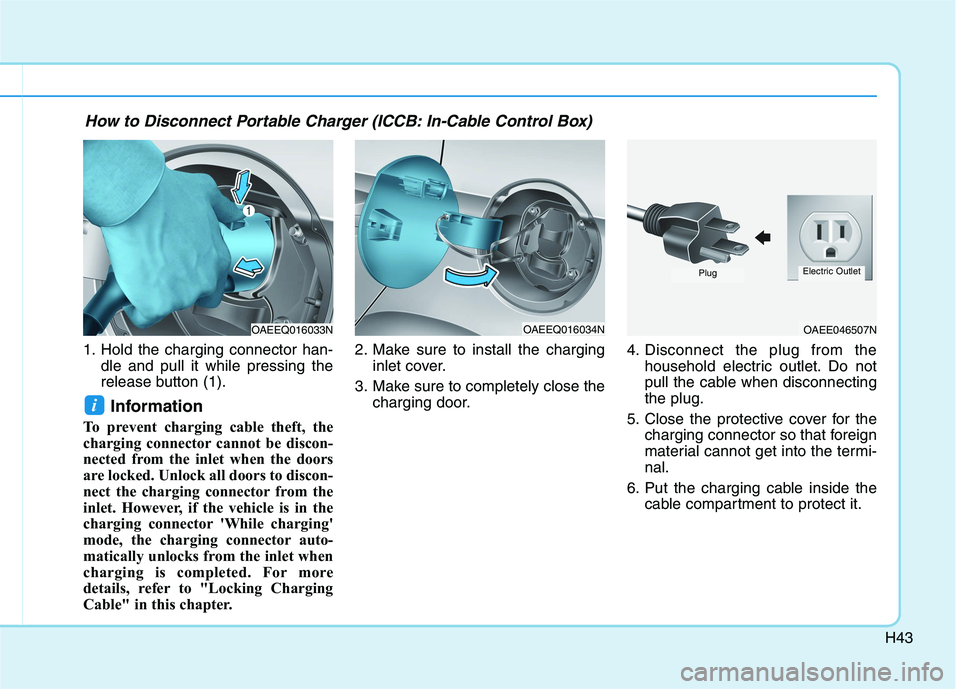
1. Hold the charging connector han-
dle and pull it while pressing the
release button (1).
Information
To prevent charging cable theft, the
charging connector cannot be discon-
nected from the inlet when the doors
are locked. Unlock all doors to discon-
nect the charging connector from the
inlet. However, if the vehicle is in the
charging connector 'While charging'
mode, the charging connector auto-
matically unlocks from the inlet when
charging is completed. For more
details, refer to "Locking Charging
Cable" in this chapter.2. Make sure to install the charging
inlet cover.
3. Make sure to completely close the
charging door.4. Disconnect the plug from the
household electric outlet. Do not
pull the cable when disconnecting
the plug.
5. Close the protective cover for the
charging connector so that foreign
material cannot get into the termi-
nal.
6. Put the charging cable inside the
cable compartment to protect it.
i
OAEEQ016033NOAEEQ016034NOAEE046507N
PlugElectric Outlet
How to Disconnect Portable Charger (ICCB: In-Cable Control Box)
Page 532 of 561
H44
C CH
HA
AR
RG
GI
IN
NG
G
E
EL
LE
EC
CT
TR
RI
IC
C
V
VE
EH
HI
IC
CL
LE
E
(
(T
TR
RI
IC
CK
KL
LE
E
C
CH
HA
AR
RG
GE
E)
)
(
(C
CO
ON
NT
T.
.)
)
Unlock Charging Connector in
Emergency
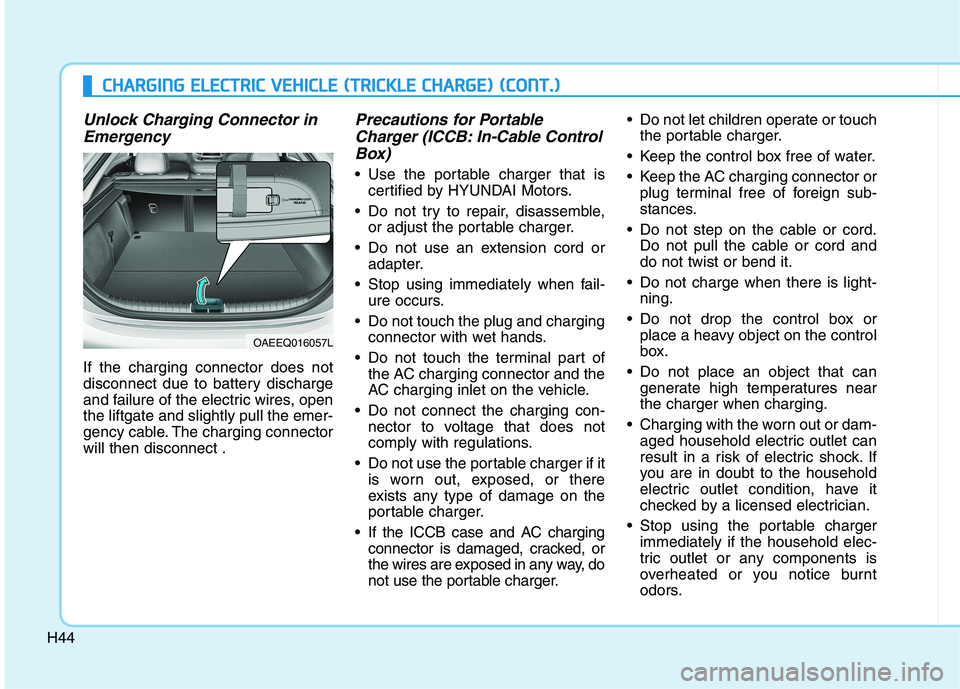
If the charging connector does not
disconnect due to battery discharge
and failure of the electric wires, open
the liftgate and slightly pull the emer-
gency cable. The charging connector
will then disconnect .
Precautions for Portable
Charger (ICCB: In-Cable Control
Box)
Use the portable charger that is
certified by HYUNDAI Motors.
Do not try to repair, disassemble,
or adjust the portable charger.
Do not use an extension cord or
adapter.
Stop using immediately when fail-
ure occurs.
Do not touch the plug and charging
connector with wet hands.
Do not touch the terminal part of
the AC charging connector and the
AC charging inlet on the vehicle.
Do not connect the charging con-
nector to voltage that does not
comply with regulations.
Do not use the portable charger if it
is worn out, exposed, or there
exists any type of damage on the
portable charger.
If the ICCB case and AC charging
connector is damaged, cracked, or
the wires are exposed in any way, do
not use the portable charger. Do not let children operate or touch
the portable charger.
Keep the control box free of water.
Keep the AC charging connector or
plug terminal free of foreign sub-
stances.
Do not step on the cable or cord.
Do not pull the cable or cord and
do not twist or bend it.
Do not charge when there is light-
ning.
Do not drop the control box or
place a heavy object on the control
box.
Do not place an object that can
generate high temperatures near
the charger when charging.
Charging with the worn out or dam-
aged household electric outlet can
result in a risk of electric shock. If
you are in doubt to the household
electric outlet condition, have it
checked by a licensed electrician.
Stop using the portable charger
immediately if the household elec-
tric outlet or any components is
overheated or you notice burnt
odors.
OAEEQ016057L
Page 533 of 561
H45
EV Charging Troubleshooting - Steps to Consider
If the vehicle fails to charge after being plugged in to a charging station or if plugged in when using the portable charger,
check the following:
1. Verify the charge mode is set to immediate. (i.e. confirm that scheduled charging is turned OFF)
2. Check the operation status of the charging station or the portable charger.
3. Check to see if there are any warning messages in the LCD cluster. Refer to "LCD Display Messages" in this sec-
tion.
4. If there is an error message on the charging station display screen, there may be a problem with the charging sta-
tion. Try to charge the vehicle with a different charging station.
5. If the vehicle fails to charge with different charging station equipment, there may be a problem with the vehicle.
Contact an authorized HYUNDAI dealer for inspection.
Page 534 of 561
H46
How to Start the Vehicle
1. Holding the smart key, sit in the
driver's seat.
2. Fasten the seat belt before start-
ing the vehicle.
3. Make sure to engage the parking
brake.
4. Turn OFF all electrical devices.
5. Make sure to depress and hold
the brake pedal.
6. While depressing the brake
pedal, shift to P (Park).
7. Depress and hold the brake while
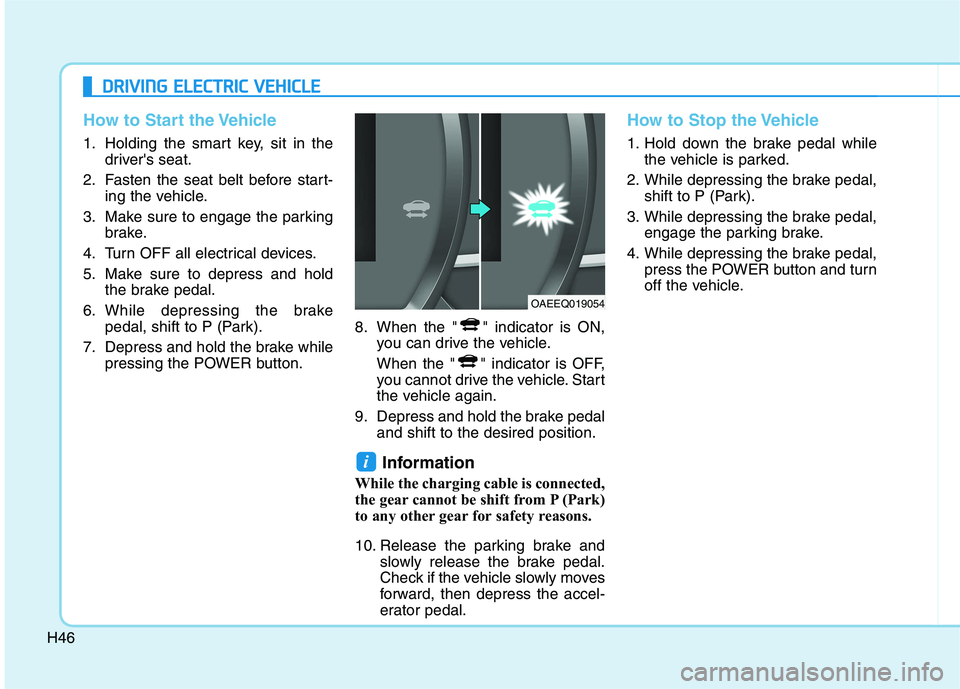
pressing the POWER button.8. When the " " indicator is ON,
you can drive the vehicle.
When the " " indicator is OFF,
you cannot drive the vehicle. Start
the vehicle again.
9. Depress and hold the brake pedal
and shift to the desired position.
Information
While the charging cable is connected,
the gear cannot be shift from P (Park)
to any other gear for safety reasons.
10. Release the parking brake and
slowly release the brake pedal.
Check if the vehicle slowly moves
forward, then depress the accel-
erator pedal.
How to Stop the Vehicle
1. Hold down the brake pedal while
the vehicle is parked.
2. While depressing the brake pedal,
shift to P (Park).
3. While depressing the brake pedal,
engage the parking brake.
4. While depressing the brake pedal,
press the POWER button and turn
off the vehicle.
i
D DR
RI
IV
VI
IN
NG
G
E
EL
LE
EC
CT
TR
RI
IC
C
V
VE
EH
HI
IC
CL
LE
E
OAEEQ019054
Page 537 of 561
H49
Tips for Improving Distance to
Empty
If you operate the air conditioner
/heater too much, the driving battery
uses too much electricity. This may
reduce the distance to empty.
Therefore, it is recommended that
you set the cabin temperature to
73°F (23°C) AUTO. This setting that
has been certified by various
assessment tests to maintain opti-
mal energy consumption rates while
keeping the temperature fresh.
Turn OFF the heater and air condi-
tioner if you do not need them.
Depress and hold the accelerator
pedal to maintain speed and drive
economically.
Gradually depress and release the
accelerator pedal when accelerat-
ing or decelerating.
Always maintain specified tire
pressures.
Do not use unnecessary electrical
components while driving.
Do not load unnecessary items in
the vehicle.
Do not mount parts that may
increase air resistance.
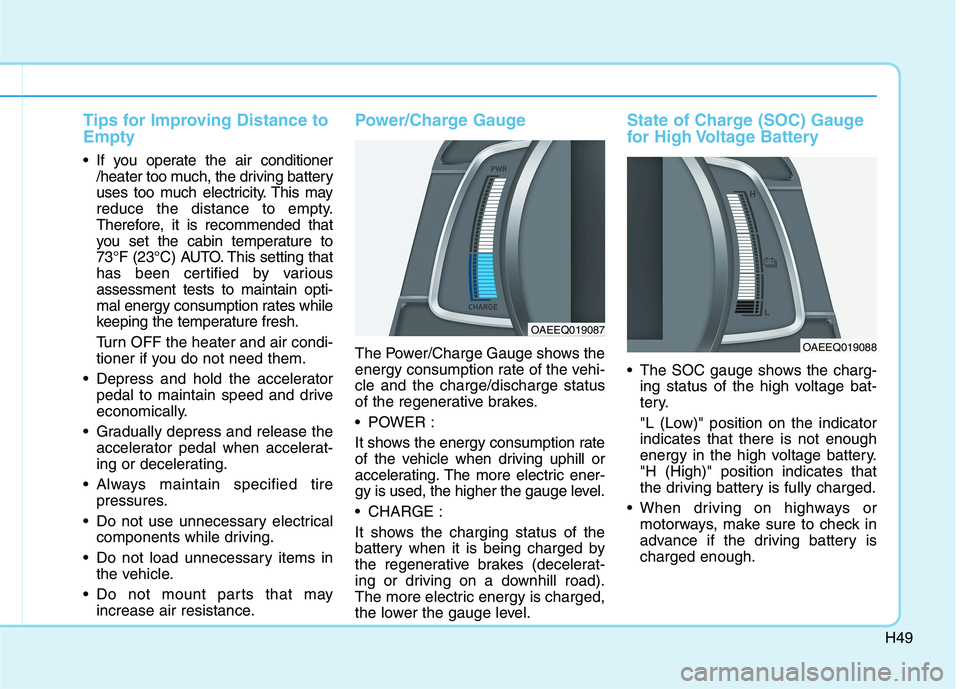
Power/Charge Gauge
The Power/Charge Gauge shows the
energy consumption rate of the vehi-
cle and the charge/discharge status
of the regenerative brakes.
POWER :
It shows the energy consumption rate
of the vehicle when driving uphill or
accelerating. The more electric ener-
gy is used, the higher the gauge level.
CHARGE :
It shows the charging status of the
battery when it is being charged by
the regenerative brakes (decelerat-
ing or driving on a downhill road).
The more electric energy is charged,
the lower the gauge level.
State of Charge (SOC) Gauge
for High Voltage Battery
The SOC gauge shows the charg-
ing status of the high voltage bat-
tery.
"L (Low)" position on the indicator
indicates that there is not enough
energy in the high voltage battery.
"H (High)" position indicates that
the driving battery is fully charged.
When driving on highways or
motorways, make sure to check in
advance if the driving battery is
charged enough.
OAEEQ019087
OAEEQ019088
Page 538 of 561
H50
D DR
RI
IV
VI
IN
NG
G
E
EL
LE
EC
CT
TR
RI
IC
C
V
VE
EH
HI
IC
CL
LE
E
(
(C
CO
ON
NT
T.
.)
)
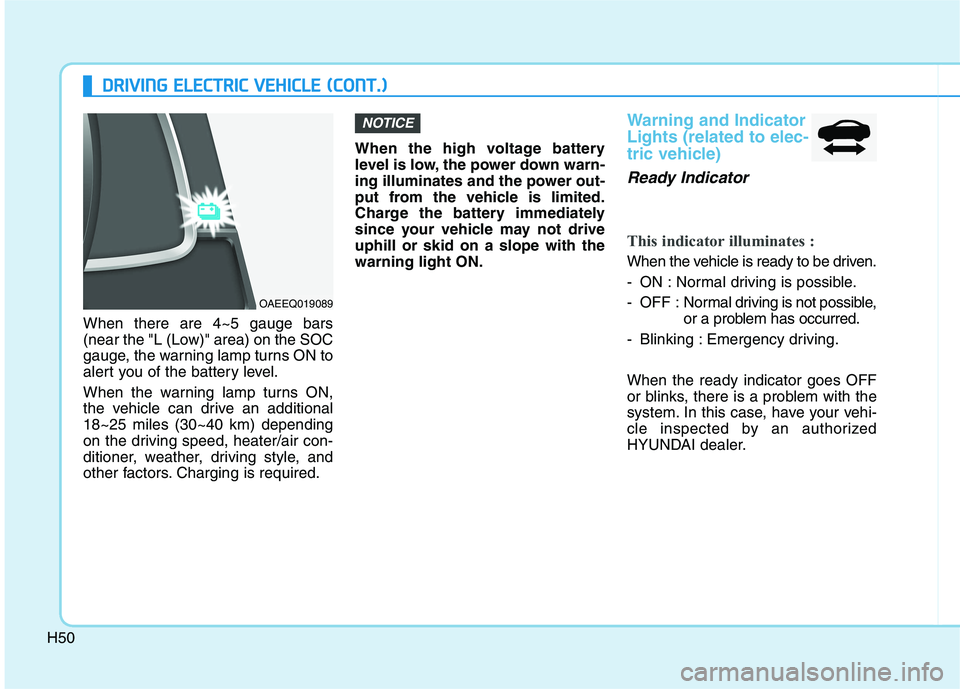
When there are 4~5 gauge bars
(near the "L (Low)" area) on the SOC
gauge, the warning lamp turns ON to
alert you of the battery level.
When the warning lamp turns ON,
the vehicle can drive an additional
18~25 miles (30~40 km) depending
on the driving speed, heater/air con-
ditioner, weather, driving style, and
other factors. Charging is required.When the high voltage battery
level is low, the power down warn-
ing illuminates and the power out-
put from the vehicle is limited.
Charge the battery immediately
since your vehicle may not drive
uphill or skid on a slope with the
warning light ON.
Warning and Indicator
Lights (related to elec-
tric vehicle)
Ready Indicator
This indicator illuminates :
When the vehicle is ready to be driven.
- ON : Normal driving is possible.
- OFF : Normal driving is not possible,
or a problem has occurred.
- Blinking : Emergency driving.
When the ready indicator goes OFF
or blinks, there is a problem with the
system. In this case, have your vehi-
cle inspected by an authorized
HYUNDAI dealer.
NOTICE
OAEEQ019089
Page 540 of 561
![HYUNDAI IONIQ 2020 Manual PDF H52
D DR
RI
IV
VI
IN
NG
G
E
EL
LE
EC
CT
TR
RI
IC
C
V
VE
EH
HI
IC
CL
LE
E
(
(C
CO
ON
NT
T.
.)
)
Charging Indicator Light
This warning light illuminates :
[Red] When charging the high volt-
age b](/img/35/58884/w960_58884-539.png "HYUNDAI IONIQ 2020 Manual PDF H52
D DR
RI
IV
VI
IN
NG
G
E
EL
LE
EC
CT
TR
RI
IC
C
V
VE
EH
HI
IC
CL
LE
E
(
(C
CO
ON
NT
T.
.)
)
Charging Indicator Light
This warning light illuminates :
[Red] When charging the high volt-
age b")
H52
D DR
RI
IV
VI
IN
NG
G
E
EL
LE
EC
CT
TR
RI
IC
C
V
VE
EH
HI
IC
CL
LE
E
(
(C
CO
ON
NT
T.
.)
)
Charging Indicator Light
This warning light illuminates :
[Red] When charging the high volt-
age battery.
High Voltage Battery
Level Warning Light
This warning light illuminates :
When the high voltage battery level
low.
When the warning light turns ON,
charge the battery immediately.
Regenerative Brake
Warning Light
This warning light illuminates :
When the regenerative brake does
not operate and the brake does not
perform well. This causes the Brake
Warning light (red) and Regenerative
Brake Warning Light (yellow) to illu-
minate simultaneously.
In this case, drive safely and have
your vehicle inspected by an author-
ized HYUNDAI dealer.
The operation of the brake pedal may
be more difficult than normal and the
braking distance can increase.
LCD Display Messages
Shift to P to charge
This message is displayed if you
connect the charging cable without
the gear in the P (Park) position.
Shift to P (Park) before connecting
the charging cable.
(yellow)
OAEPHQ049833L
Page 541 of 561
H53
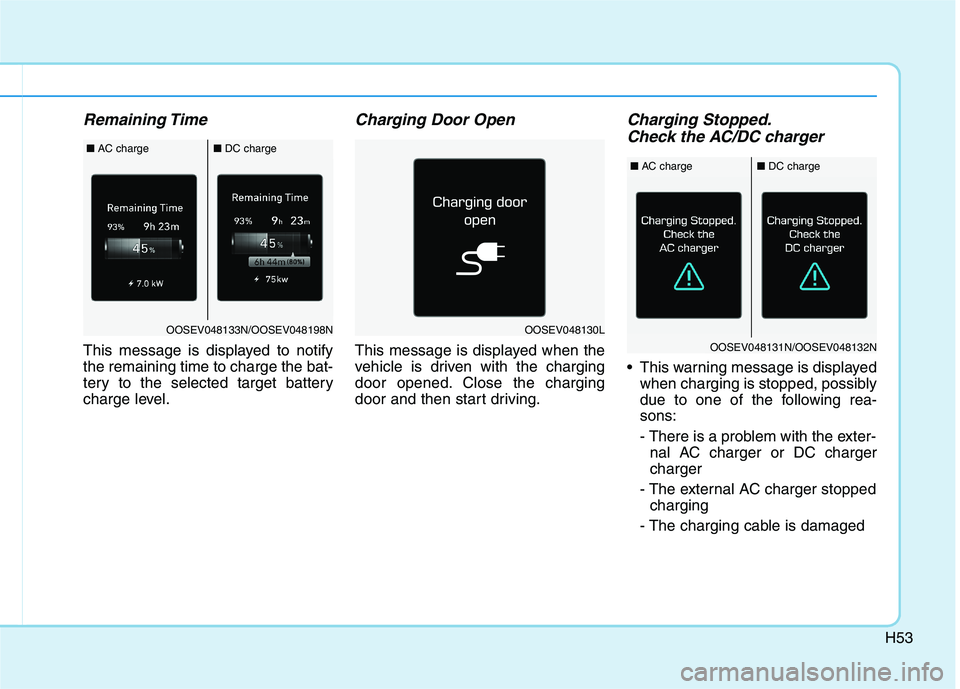
Remaining Time
This message is displayed to notify
the remaining time to charge the bat-
tery to the selected target battery
charge level.
Charging Door Open
This message is displayed when the
vehicle is driven with the charging
door opened. Close the charging
door and then start driving.
Charging Stopped.
Check the AC/DC charger
This warning message is displayed
when charging is stopped, possibly
due to one of the following rea-
sons:
- There is a problem with the exter-
nal AC charger or DC charger
charger
- The external AC charger stopped
charging
- The charging cable is damaged
OOSEV048130LOOSEV048133N/OOSEV048198N
■AC charge■DC charge
OOSEV048131N/OOSEV048132N
■AC charge■DC charge
Page 542 of 561
H54
D DR
RI
IV
VI
IN
NG
G
E
EL
LE
EC
CT
TR
RI
IC
C
V
VE
EH
HI
IC
CL
LE
E
(
(C
CO
ON
NT
T.
.)
)
If this warning message appears,
check if there is a problem with the
charging cable or connector, or if
there is an error message on the
charging station display screen.
If the same problem occurs when
charging the vehicle with a normally
operating AC charger or genuine
HYUNDAI portable charger, have
your vehicle inspected by an author-
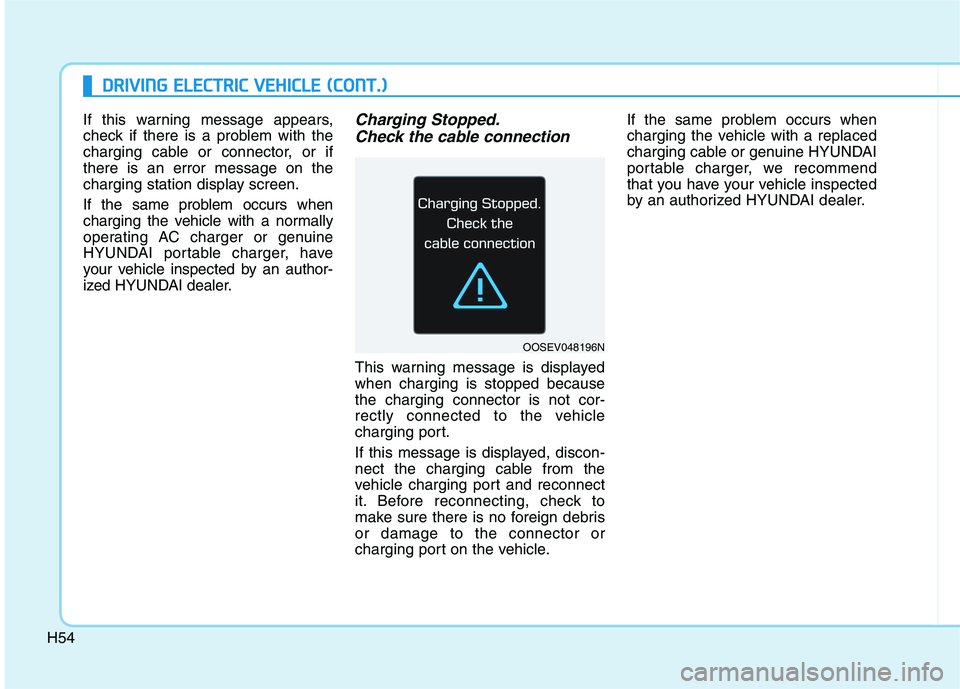
ized HYUNDAI dealer.Charging Stopped.
Check the cable connection
This warning message is displayed
when charging is stopped because
the charging connector is not cor-
rectly connected to the vehicle
charging port.
If this message is displayed, discon-
nect the charging cable from the
vehicle charging port and reconnect
it. Before reconnecting, check to
make sure there is no foreign debris
or damage to the connector or
charging port on the vehicle.If the same problem occurs when
charging the vehicle with a replaced
charging cable or genuine HYUNDAI
portable charger, we recommend
that you have your vehicle inspected
by an authorized HYUNDAI dealer.
OOSEV048196N
Page 544 of 561
![HYUNDAI IONIQ 2020 Manual PDF H56
Low outside temperature may
limit power output. Charge EV
battery/Low EV battery tempera-
ture. Power limited
[A] : Displays when turning off vehicle.
[B] : Displays when turning on vehicle.
Both](/img/35/58884/w960_58884-543.png "HYUNDAI IONIQ 2020 Manual PDF H56
Low outside temperature may
limit power output. Charge EV
battery/Low EV battery tempera-
ture. Power limited
[A] : Displays when turning off vehicle.
[B] : Displays when turning on vehicle.
Both")
H56
Low outside temperature may
limit power output. Charge EV
battery/Low EV battery tempera-
ture. Power limited
[A] : Displays when turning off vehicle.
[B] : Displays when turning on vehicle.
Both warning messages are dis-
played to protect electric vehicle sys-
tem when the outside ambient tem-
perature is low. If the high voltage
battery charging level is low and
parked outside in low temperature for
a long time, vehicle power could be
limited.
Charging the battery before driving
helps increase power.If this warning message is still dis-
played even after the ambient tem-
perature has increased, have the
vehicle inspected by an author-
ized HYUNDAI dealer.
Battery Overheated!
Stop safety
This warning message is displayed
to protect battery and electric vehicle
system when the high voltage bat-
tery temperature is too high.
Turn off the POWER button and stop
the vehicle so that the battery tem-
perature decreases.
NOTICE
D DR
RI
IV
VI
IN
NG
G
E
EL
LE
EC
CT
TR
RI
IC
C
V
VE
EH
HI
IC
CL
LE
E
(
(C
CO
ON
NT
T.
.)
)
OOSEV048199N/OOSEV048126N
OOSEV048213L