Sound HYUNDAI IONIQ 5 2023 User Guide
[x] Cancel search | Manufacturer: HYUNDAI, Model Year: 2023, Model line: IONIQ 5, Model: HYUNDAI IONIQ 5 2023Pages: 680, PDF Size: 48.22 MB
Page 186 of 680
Instrument Cluster
4-28
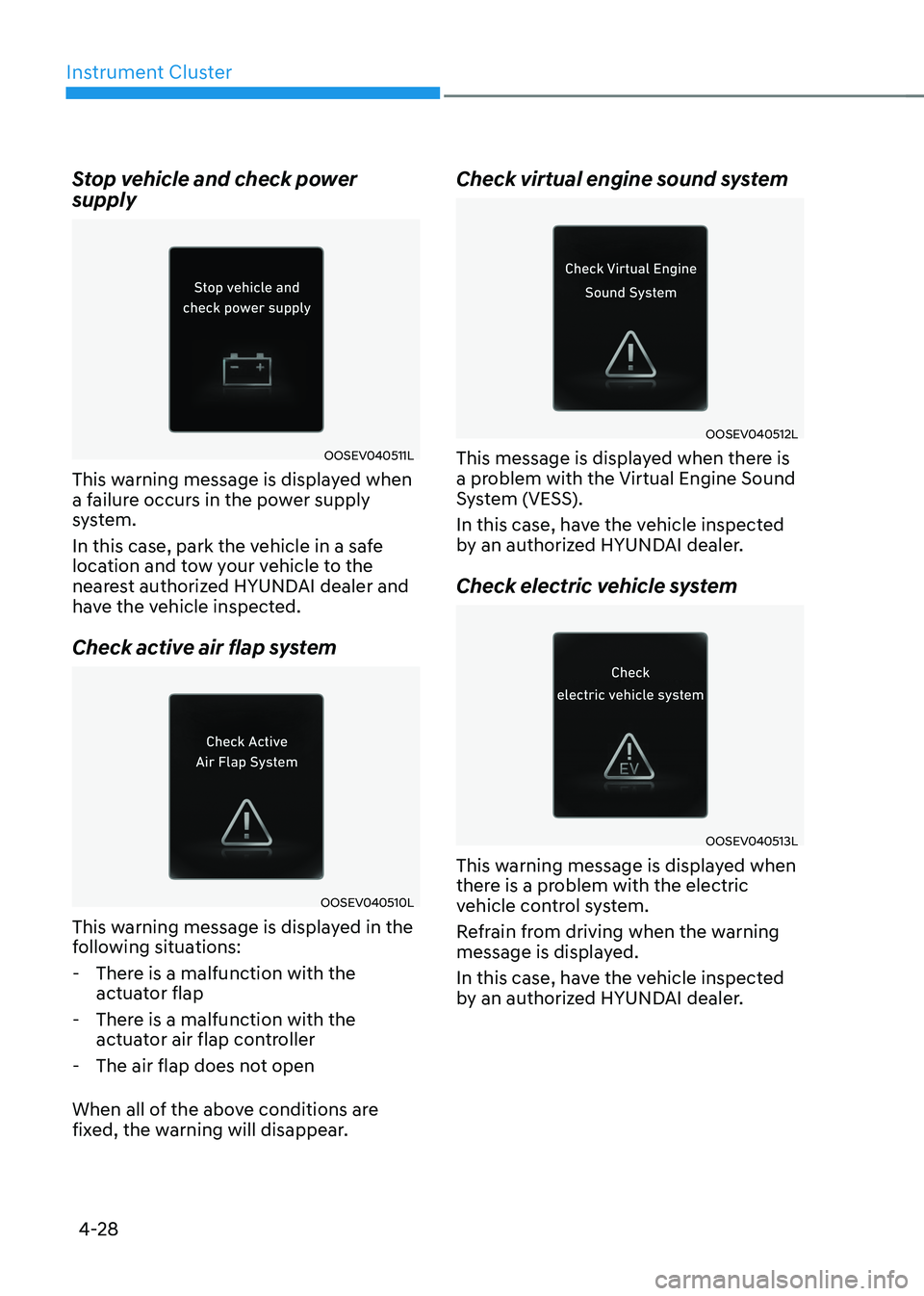
Stop vehicle and check power supply
OOSEV040511L
This warning message is displayed when
a failure occurs in the power supply
system.
In this case, park the vehicle in a safe
location and tow your vehicle to the
nearest authorized HYUNDAI dealer and
have the vehicle inspected.
Check active air flap system
OOSEV040510L
This warning message is displayed in the
following situations:
- There is a malfunction with the actuator flap
- There is a malfunction with the actuator air flap controller
- The air flap does not open
When all of the above conditions are
fixed, the warning will disappear. Check virtual engine sound system
OOSEV040512L
This message is displayed when there is
a problem with the Virtual Engine Sound
System (VESS).
In this case, have the vehicle inspected
by an authorized HYUNDAI dealer.
Check electric vehicle system
OOSEV040513L
This warning message is displayed when
there is a problem with the electric
vehicle control system.
Refrain from driving when the warning
message is displayed.
In this case, have the vehicle inspected
by an authorized HYUNDAI dealer.
Page 199 of 680
05
5 -7
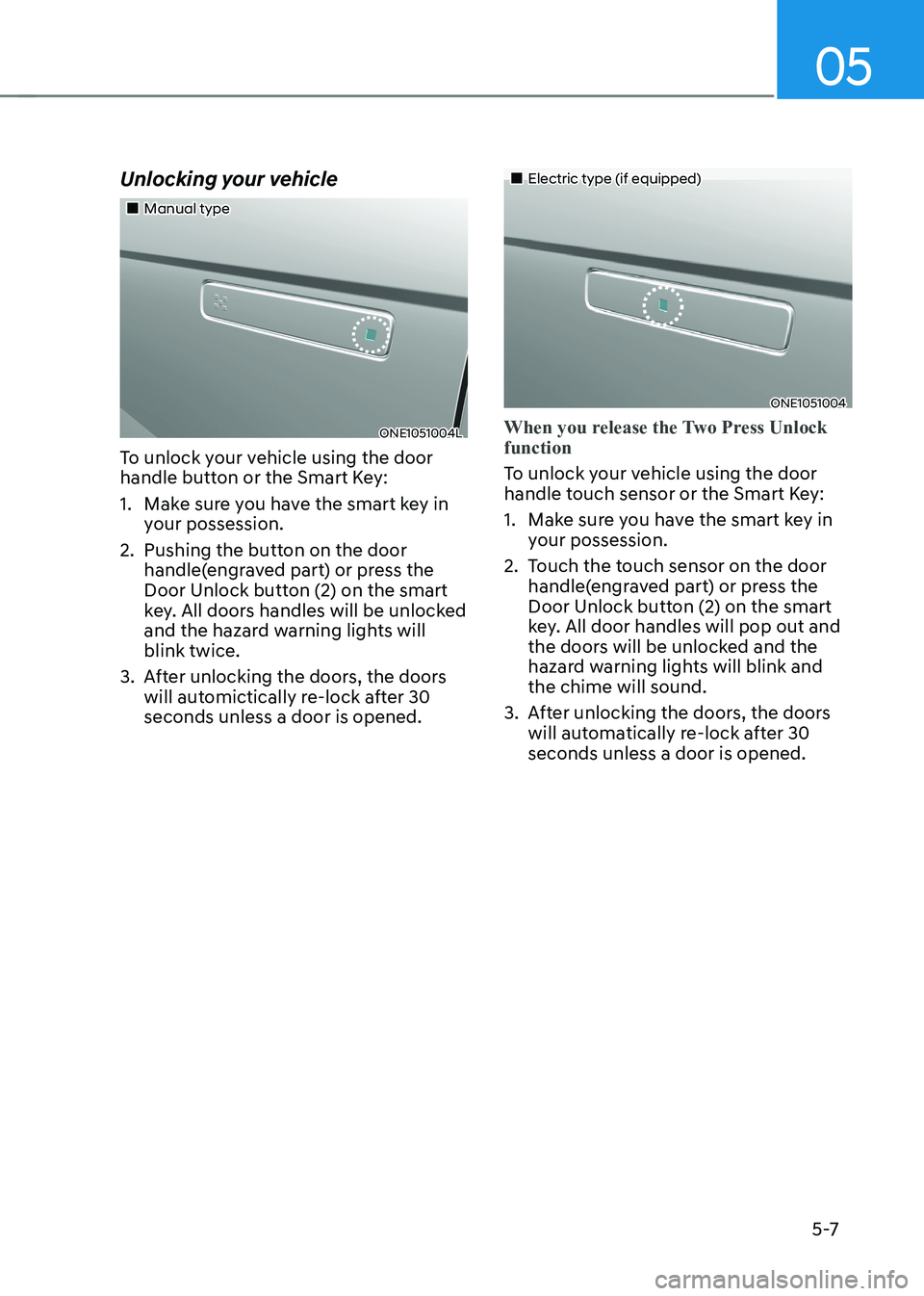
Unlocking your vehicle
„„Manual type
ONE1051004L
To unlock your vehicle using the door
handle button or the Smart Key:
1. Make sure you have the smart key in your possession.
2. Pushing the button on the door handle(engraved part) or press the
Door Unlock button (2) on the smart
key. All doors handles will be unlocked
and the hazard warning lights will blink twice.
3. After unlocking the doors, the doors will automictically re-lock after 30 seconds unless a door is opened.
„„Electric type (if equipped)
ONE1051004
When you release the Two Press Unlock function
To unlock your vehicle using the door
handle touch sensor or the Smart Key:
1. Make sure you have the smart key in your possession.
2. Touch the touch sensor on the door handle(engraved part) or press the
Door Unlock button (2) on the smart
key. All door handles will pop out and
the doors will be unlocked and the
hazard warning lights will blink and the chime will sound.
3. After unlocking the doors, the doors will automatically re-lock after 30 seconds unless a door is opened.
Page 200 of 680
Convenience Features
5-8
When you set the Two Press Unlock function
1. Make sure you have the smart key in your possession.
2. Touch the touch sensor on the door handle(engraved part) or press the
Door Unlock button (2) on the smart
key. The driver’s door handle will
pop out and the driver’s door will be
unlocked.
3. Touch the touch sensor on the door handle(engraved part) or press the
Door Unlock button (2) on the smart
key within 4 seconds again. All door
handles will pop out and the doors will
be unlocked and the hazard warning
lights will blink twice and the chime will sound.
4. After unlocking the doors, the doors
will automatically re-lock after 30 seconds unless a door is opened. Two Press Unlock Feature
The priority for unlocking the driver door
only, or unlocking all the doors with
one press may be adjusted in the User
Settings menu in the LCD cluster display.
The Two Press Unlock feature, when
enabled, will require the user to press
the door unlock button once for driver
door only and twice for unlocking all the
doors.
Select or Deselect the Two Press Unlock
Feature in the User Settings menu in the
LCD cluster display. The option can be
found under the following menu:
USER SETTINGS → DOOR →TWO PRESS
UNLOCK
The Two Press Unlock Feature can also
be enabled or disabled by pressing
the door lock and unlock buttons
simultaneously on the Key FOB:
Press and hold both the DOOR LOCK
button and the DOOR UNLOCK button
simultaneously until the hazard warning
lights blink.
This will enable or disable the Two Press
Unlock feature. Repeat this procedure to enable/disable the mode again.
Page 203 of 680
05
5-11
Remotely moving vehicle forward or
backward (if equipped)
With the smart key, the driver can move
the vehicle forward or backward using
the Forward or Backward button (6, 7) on
the smart key.
For more details, refer to “Remote
Smart Parking Assist (RSPA)” section in
chapter 7.
Start-up
You can start the vehicle without
inserting the key.
For more details, refer to the “Start/
Stop Button” section in chapter 6.
Information
If the smart key is not moved for some
time, the detection function for smart key operation will pause. Lift the smart key to activate the detection again.
NOTICE
To prevent damaging the smart key: • Keep the smart key in a cool,
dry place to avoid damage or
malfunction. Exposure to moisture
or high temperature may cause
the internal circuit of the smart key
to malfunction which may not be
covered under warranty.
• Avoid dropping or throwing the
smart key.
• Protect the smart key from extreme
temperatures. Mechanical key
If the Smart Key does not operate
normally, you can lock or unlock the
driver’s door by using the mechanical
key.
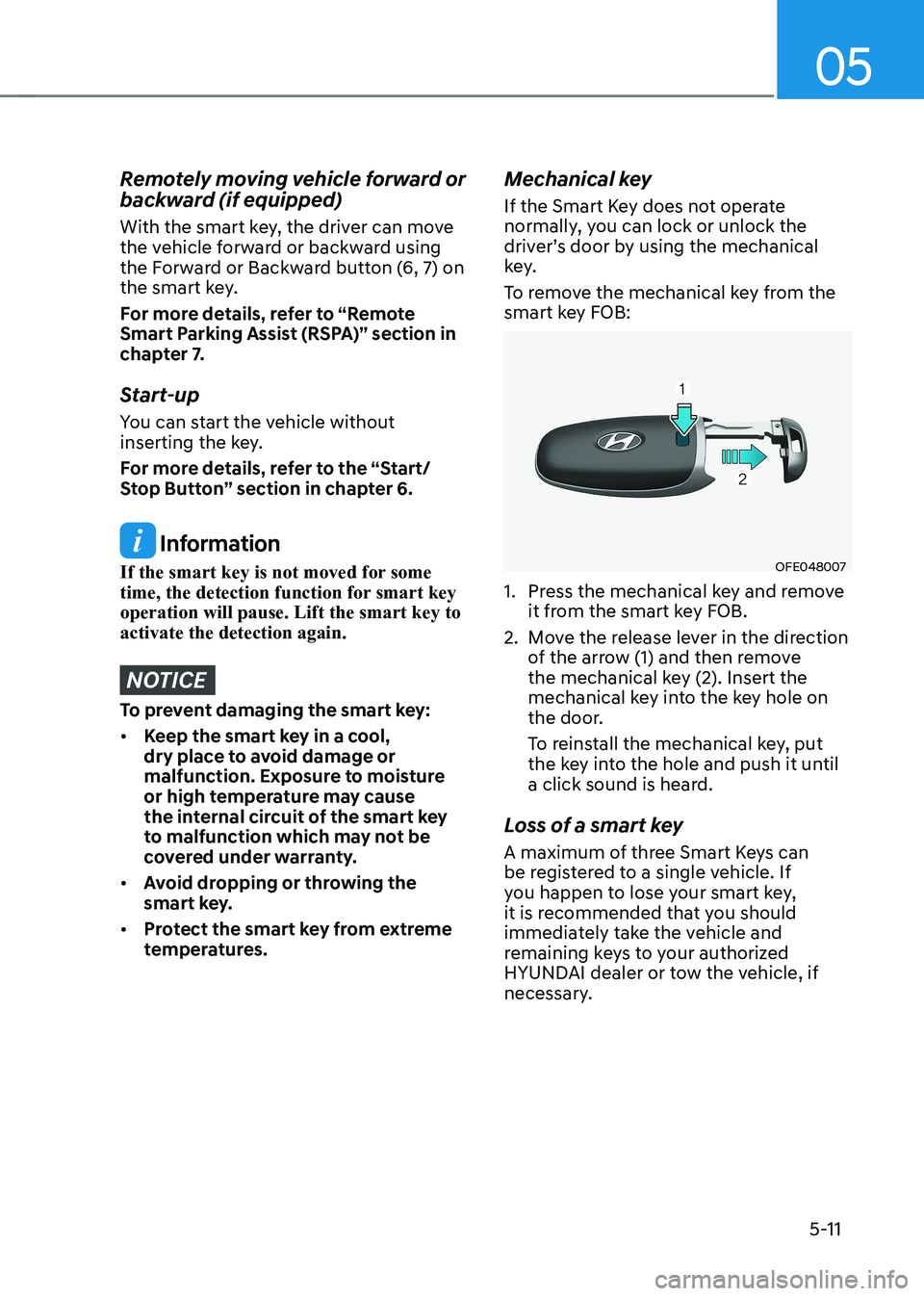
To remove the mechanical key from the
smart key FOB:
OFE048007
1. Press the mechanical key and remove it from the smart key FOB.
2. Move the release lever in the direction of the arrow (1) and then remove
the mechanical key (2). Insert the
mechanical key into the key hole on
the door.
To reinstall the mechanical key, put
the key into the hole and push it until
a click sound is heard.
Loss of a smart key
A maximum of three Smart Keys can
be registered to a single vehicle. If
you happen to lose your smart key,
it is recommended that you should
immediately take the vehicle and
remaining keys to your authorized
HYUNDAI dealer or tow the vehicle, if
necessary.
Page 212 of 680
Convenience Features
5-20
Remote Control with Digital Key
To use the remote control function with
your android smartphone, Bluetooth
must be turned on.
Remote Control Connection with Digital
Key
1. Open Hyundai digital key application on the smartphone. Select the
vehicle to activate the remote control
function as a main vehicle.
2. Approach with the activated smartphone app to your vehicle
and you can check whether the
connection is available. If it enables
your smartphone to connect, connect
with your vehicle by pressing the
connect button. The remote control
function is activated after completing
the process.
Remote Control Operation with Digital
Key
You can execute the remote control
operation including door lock/unlock,
panic on/off, remote start / remote
stop and trunk opening. The icon for
each function will be highlighted and
alarm/vibration also provided when the
operation is performed.
Note that you cannot lock your vehicle
using the Hyundai digital key app if any
of the following occurs: • The Engine Start/Stop button is in
ACC or ON position.
• Any doors are open.
When the smartphone and the vehicle
are connected by the Bluetooth function
but the remote control command
cannot be received over 5 minutes, the
remote control connection is cancelled
automatically. CAUTION
• If metallic window tint was applied
to your vehicle, it may cause
bad Bluetooth connection or
performance degradation of the
digital key.
• If multiple users operate the remote
control function simultaneously, the
connection between the digital key
and the vehicle might result in failed
commands. Please connect and
operate the remote control function
only the necessary user.
• When using the remote control
operation, the driver (the remote
control user) should leave the vehicle
after confirming the door lock (the
chime sounds once and the hazard
warning lights blink).
• The remote functions of the Digital
Key app enables the vehicle to be
controlled from a set distance. If
the digital key or the vehicle goes
beyond the operable distance, the
remote control function might be
disconnected or cancelled.
• If the digital key (smartphone) is
connected with the vehicle for the
remote control, the driver with the
key goes far away from the vehicle,
the function might not work.
• If the remote control operation
is executed where the mobile
connection is weak, Bluetooth
connection is poor due to several
Bluetooth devices or there is an
object such as metal or concrete, it
might be delayed or the operable
distance might decrease. You should
not cover the smartphone with your
hand or place other devices which
can cause frequency interference. It
may result in poor performance.
• If the remote control function is not
available, please use NFC function to
lock or unlock the doors.
Page 213 of 680
05
5-21
Remote Start with Digital Key •
When the shift button of your vehicle
is in P (Park) and all of the doors
including trunk and hood is locked
and the vehicle is off, press the Door
Lock button in the Hyundai Digital
Key app then press the Remote Start
button within 4 seconds.
You can confirm the engine is on if the
hazard warning lights blinks two times and the chime sounds.
• If you want to turn off the engine,
press Remote Engine Stop. Air
Conditioner / Heating system
maintains the same status as when
you last used the vehicle.
• Unless you put the registered digital
key(smartphone) on the interior
authentication pad (wireless charger)
when the remote start function is on,
the engine will turn off.
• If you do not get on the vehicle within
10 minutes after the engine turns on,
the vehicle will turn off.
For more information, refer to the Engine
Start/Stop button in chapter 6.
Vehicle information Display
The digital key application displays
the vehicle information such as
driving or door conditions through the
communication with the vehicle. • How to check : Select the vehicle
what you want to check and touch
the vehicle image, then vehicle
information display page will be
shown.
• Contents : accumulated odometer,
latest fuel economy, driving range,
fuel remaining, tire pressure, doors
lock/unlock status and last data
updated time.
à Displayed vehicle date could be
differed from the current vehicle condition.
à For more information, please refer to
the ‘Tutorial’ on your Digital key app.
Smartphone change/App deletion
If you change your smartphone or delete
the Hyundai Digital Key App, please refer
to the following to set up your Digital
Key:
Smartphone Change/ Reset
If you change or reset the smartphone,
the registered digital key in your previous
smartphone may not be used. Please
refer to following procedure to use the
digital key.
1. Install the digital key application and
log in.
2. If you are the owner, retry the Digital key save process.
3. If you are the sharer, need to re-share the key from owner.
App delete & reinstall/ Delete App data
You can re-download the digital key
from server in these cases as follow
procedure.
1. Reinstall the application and log in.
2. Input the PIN number for user verification.
3. If PIN is correct, digital key data will be re-downloaded to your
smartphone and you can use it
without any further registration or sharing.
Smartphone operability with Digital Key
The digital key application may not
be available to old type smartphones.
Please check the available smartphone
models with your dealer. NFC antenna position on the smartphone can be
confirmed on each smartphone’s manual
or contact to customer service center of
the smartphone manufacture.
Page 218 of 680
Convenience Features
5-26
Inoperable condition
If you do not contact the digital key (card
key) to the center of the door handle
authentication pad accurately., it may
not work. In addition, if you overlap and
use the key with NFC-enabled cards such
as transportation card or credit card, it
does not work.
Note that if you try to lock your vehicle
with digital key (card key) in following
cases, the doors will not be locked and
chime will sound for 3 seconds. •
The Smart Key is in the vehicle.
• The Engine Start/Stop button is in
ACC or ON position.
• Any of the doors, hood and trunk are open
If the digital key (card key) does not
work, please detach the key around
4 inches (0.1 m) from the handle
authentication pad and retry to contact.
The card key may be damaged by the
impact. It would not work properly if
the key is damaged. You should buy a
new card and register again. Long-time
exposure to high temperature may cause
the card key to malfunction. Please be
careful not to expose the key to direct
sunlight or high temperature.
After unlock the door or start up the
vehicle with digital key, even though
the driver tries to lock the doors by the
central door lock switch, the door lock
will be once locked and immediately
released at the moment of door closed.
Start-up with Card key
After placing your registered card key
onto the interior authentication pad
(wireless charger), step on the brake and
press the Engine Start/Stop button.
WARNING
• If you do not place the digital key
(card key) onto the center of the
interior authentication pad (wireless
charger) exactly, the card key may
not be recognized. If the engine is
not turned on, adjust and place the
key again.
• If you overlap and use the key
with NFC-enabled cards such as
transportation card or credit card,
the card key may not be recognized.
• If the digital key (card key) does not
work, please detach the key around
4 inches (0.1 m) from the handle
authentication pad and retry to
contact.
• The card key may be damaged due to
impact. It would not work properly if
the key is damaged. You should buy a
new card and register again.
For more information, refer to the
Engine Start/Stop button in chapter 6.
Page 221 of 680
05
5-29
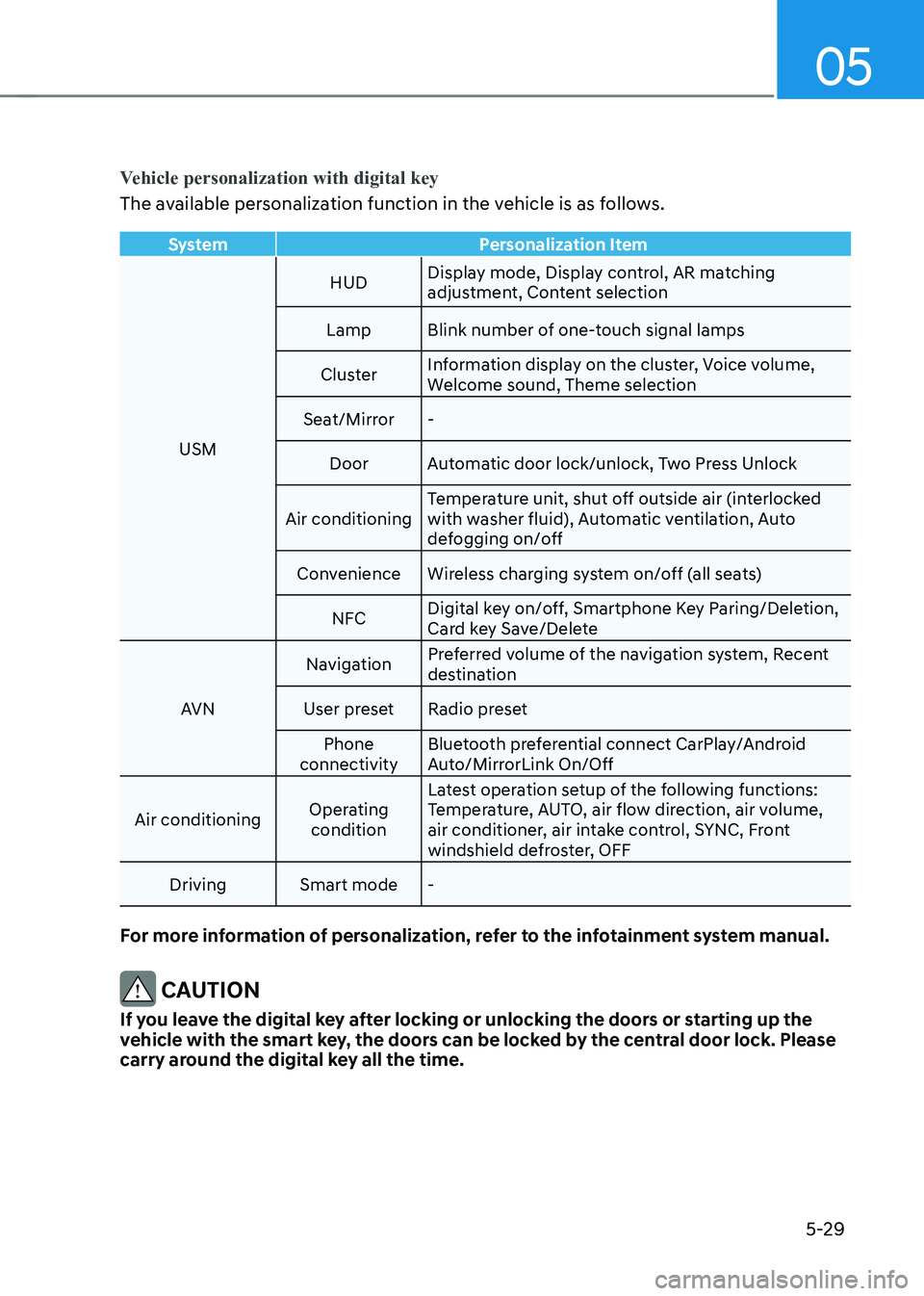
Vehicle personalization with digital key
The available personalization function in the vehicle is as follows.
SystemPersonalization Item
USMHUD
Display mode, Display control, AR matching
adjustment, Content selection
Lamp Blink number of one-touch signal lamps
Cluster Information display on the cluster, Voice volume,
Welcome sound, Theme selection
Seat/Mirror -
Door Automatic door lock/unlock, Two Press Unlock
Air conditioning Temperature unit, shut off outside air (interlocked
with washer fluid), Automatic ventilation, Auto
defogging on/off
Convenience Wireless charging system on/off (all seats)
NFC Digital key on/off, Smartphone Key Paring/Deletion,
Card key Save/Delete
AVN Navigation
Preferred volume of the navigation system, Recent
destination
User preset Radio preset Phone
connectivity Bluetooth preferential connect CarPlay/Android
Auto/MirrorLink On/Off
Air conditioning Operating
condition Latest operation setup of the following functions:
Temperature, AUTO, air flow direction, air volume,
air conditioner, air intake control, SYNC, Front
windshield defroster, OFF
Driving Smart mode -
For more information of personalization, refer to the infotainment system manual.
CAUTION
If you leave the digital key after locking or unlocking the doors or starting up the
vehicle with the smart key, the doors can be locked by the central door lock. Please
carry around the digital key all the time.
Page 222 of 680
Convenience Features
5-30
Door locKs
Operating Door Unlocks from
Outside the Vehicle (Manual
type)
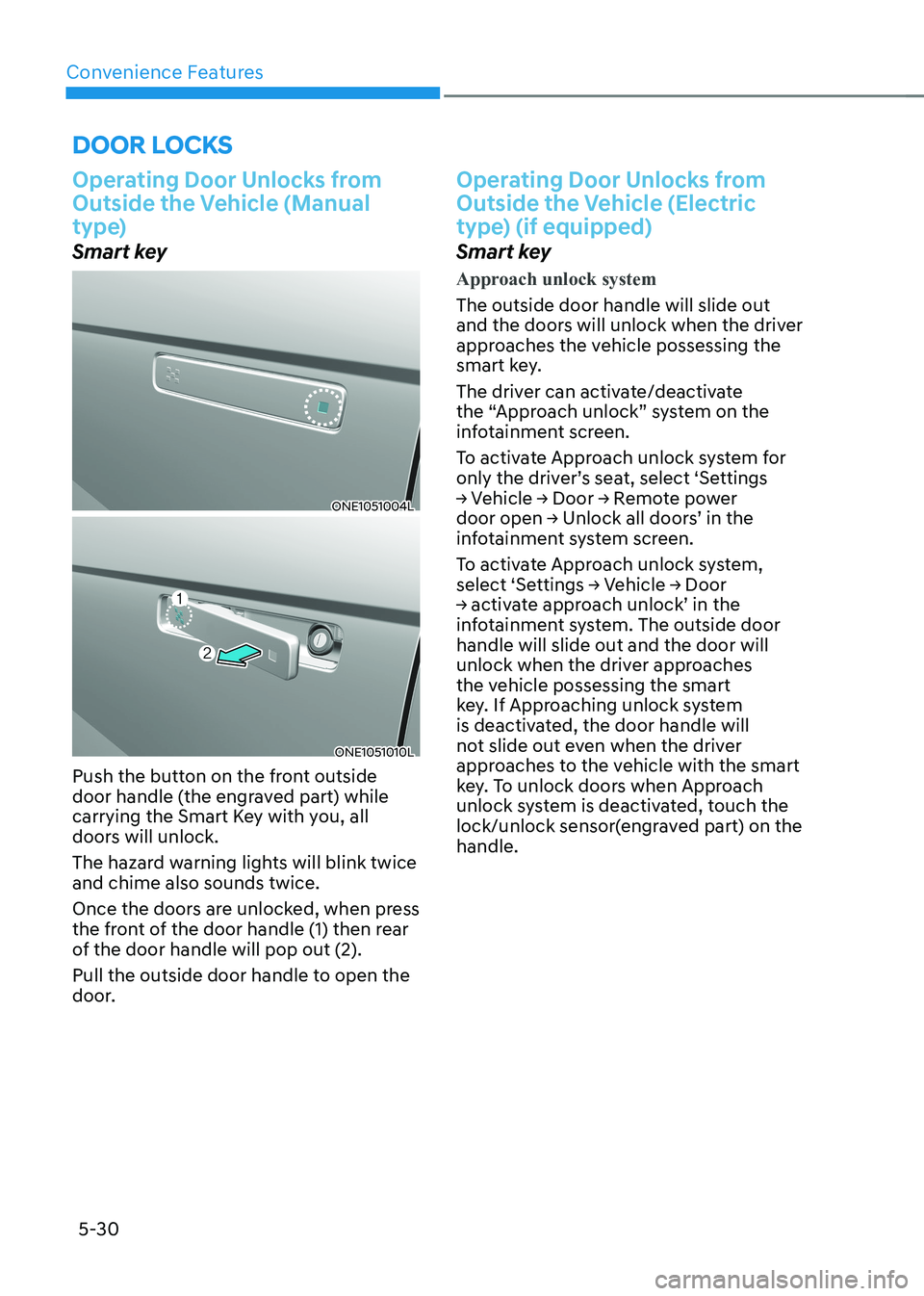
Smart key
ONE1051004L
ONE1051010L
Push the button on the front outside
door handle (the engraved part) while
carrying the Smart Key with you, all
doors will unlock.
The hazard warning lights will blink twice and chime also sounds twice.
Once the doors are unlocked, when press
the front of the door handle (1) then rear
of the door handle will pop out (2).
Pull the outside door handle to open the
door.
Operating Door Unlocks from
Outside the Vehicle (Electric
type) (if equipped)
Smart key
Approach unlock system
The outside door handle will slide out
and the doors will unlock when the driver
approaches the vehicle possessing the
smart key.
The driver can activate/deactivate
the “Approach unlock” system on the
infotainment screen.
To activate Approach unlock system for
only the driver’s seat, select ‘Settings
→ Vehicle → Door → Remote power
door open → Unlock all doors’ in the
infotainment system screen.
To activate Approach unlock system,
select ‘Settings → Vehicle → Door
→ activate approach unlock’ in the
infotainment system. The outside door handle will slide out and the door will
unlock when the driver approaches
the vehicle possessing the smart
key. If Approaching unlock system
is deactivated, the door handle will
not slide out even when the driver
approaches to the vehicle with the smart
key. To unlock doors when Approach
unlock system is deactivated, touch the
lock/unlock sensor(engraved part) on the handle.
Page 223 of 680
05
5-31
ONE1051276
ONE1051010
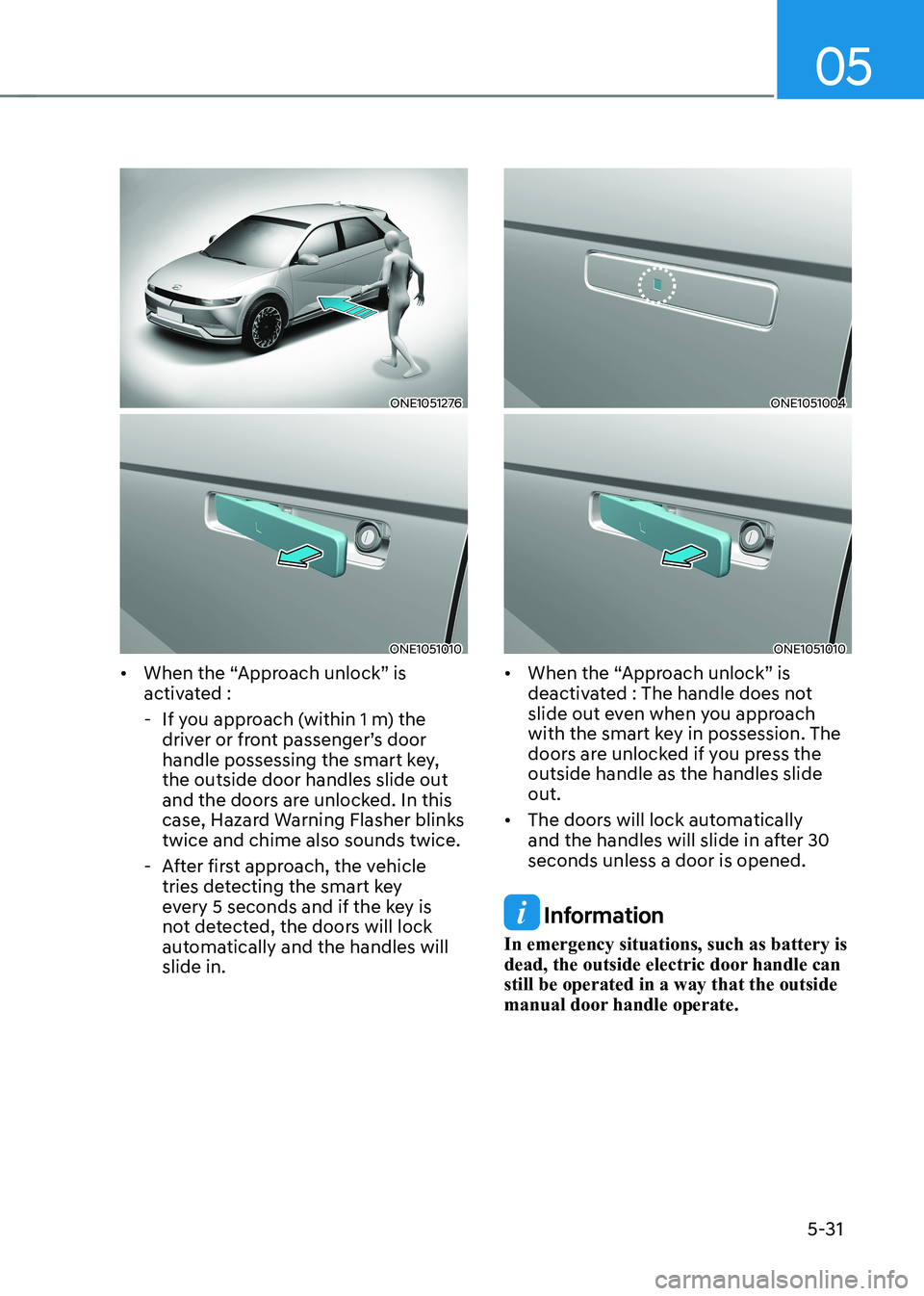
• When the “Approach unlock” is
activated :
- If you approach (within 1 m) the driver or front passenger’s door
handle possessing the smart key, the outside door handles slide out
and the doors are unlocked. In this
case, Hazard Warning Flasher blinks twice and chime also sounds twice.
- After first approach, the vehicle tries detecting the smart key
every 5 seconds and if the key is
not detected, the doors will lock
automatically and the handles will slide in.
ONE1051004
ONE1051010
• When the “Approach unlock” is
deactivated : The handle does not
slide out even when you approach
with the smart key in possession. The
doors are unlocked if you press the outside handle as the handles slide out.
• The doors will lock automatically
and the handles will slide in after 30 seconds unless a door is opened.
Information
In emergency situations, such as battery is
dead, the outside electric door handle can still be operated in a way that the outside
manual door handle operate.